Overwhelmed - Macrium Reflect


Windows provides three different versions of the boot manager:
- Windows Boot Manager for disk or removable USB devices​
- DVD boot manager for physical DVD's​
- WDS boot manager for network boot (PXE)​

Booting off a physical DVD requires a different type of boot code than booting off a disk device. CD's & DVD's are written in the specialized ISO 9660 ("El Torito") volume format.

When you convert an ISO image to a bootable USB drive, the process copies the boot file from the ADK's source folders, or \Windows\Boot\EFI and EFI_EX.

The SVN number that's used to prevent Secure Boot from using an outdated boot file is provided as a separate version number for the Windows Boot Manager, DVD boot, and WDS network boot. The Windows Boot Manager SVN is up to 9.0, and both the DVD boot and WDS network boot are 3.0 (meaning it hasn't changed in a long time).
 

My Computer My Computer

At a glance

Windows 7
OS
Windows 7
I can still mount MR images. Macrium Reflect 8.1.8631 (paid-lifetime)


@kelper

I leave mine OFF, all the time...

View attachment 168984

TL;DR:
Completely removing Macrium (I use Revo Uninstaller Pro to truly nuke all leftover crap from programs - never deleting anything in red as I previously learned that doing so can cause Win 11 problems
Installing the recommended V8.0.xxxx version (with internet off to ensure I could uncheck Macrium's auto-update/check settings) and then running a fresh backup worked!
NOTE: the registration key I had when purchasing back in 2022 did NOT work, pressing the 'GET CODE' button emailed me a 'new key', which was a LOT shorter than the one received when originally purchasing the license? Unsure as to why, but it let me complete the installation?

DETAILED VERSION:
I had the same issue pop-up today (like you I paid for a lifetime license for the 'personal home use only' version, which has worked reliably with whatever the latest updated v8.1.xxxx version as recently as 2 days ago July-02-2026.
I made some changes (mostly cleaning up junk programs I don't need anymore) and it was time for a new image.
Macrium kept throwing 'serious errors' that on actually caused an entire system crash and reboot!
Upon logging back into Win 11 I went to eventviewer to see what was going on, to be presented by a bunch of errors related to existing backups, but more strangely, images that I had deleted.
It also had errors related to my Proton Drive AND Google Drive cloud backup operations, again something I have had running without issue for a LONG time.
Then Macrium guard errors plus errors referencing an older version of Macrium (v8.0.xxx) that clearly had been updated to V8.1.xxxx probably last year.
I had turned off automatic updates last year or perhaps before, after reading about people having issues with their version being reverted to a 30-day trial - whatever happened today had nothing to do with some update to Macrium.

Here's my core isolation settings, again unchanged since at least mid-2025 after I had issues with the 'Firmware Protection' and 'Local Security Authority Protection's settings in the Win 11 'Core Isolation' settings area - I recall that this was related to a new game I had installed 'Arc Raiders' (from memory) that I found through searches on their official site/forums needed to be off due to the 'anti-cheat' components of the game. The 'Vulnerable Drivers' toggle is on and remains on, and has not caused issues with any games/their 'anti-cheat' components.
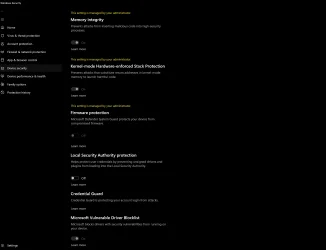
1783207151798.webp

Blocked unauthorised process (C:\WINDOWS\Explorer.EXE) accessing file (\Device\HarddiskVolume9\

Blocked unauthorised process (C:\Users\xxxx\AppData\Local\Programs\Proton\Drive\ProtonDrive.exe) accessing file (\Device\HarddiskVolume9\8. Macrium Reflect Image\

Blocked unauthorised process (C:\Program Files\Google\Drive File Stream\126.0.5.0\GoogleDriveFS.exe) accessing file (\Device\HarddiskVolume6\1. Macrium Reflect Image Backups\

I have no idea what happened today, like I said, I had been using the V8.1.xxx final version for at least a year - a Win 11 25H2 thing perhaps?
But Macrium once again works, although I do miss the dark UI option that is not available in V8.0.xxxx

Hope this helps anyone else in the same boat as me to actually get to use the program they paid for - I messaged Macrium (in the section they provide when uninstalling the V8.1.xxx version as feedback for why I was uninstalling, suggesting that regardless of whether or not this was caused by Win 11 25H2 (my version is as up to date as it can be, even with the 'Xbox Mode' working - Version 25H2 (OS Build 26200.8737), that they still had a responsibility to honor paying customers who are more than happy with the older version and have no need for their new subscription based model. I will update this post if I get a response from Macrium!

 

My Computer My Computer

At a glance

Win 11 23H2 EnterpriseRyzen 9800X3DG.Skill Trident Z RGB 6200MT CL30MSI RTX 5090 Suprim SoC
OS
Win 11 23H2 Enterprise
Computer type
PC/Desktop
Manufacturer/Model
Self-Built
CPU
Ryzen 9800X3D
Motherboard
MSI MAG X870 Tomahawk WiFi
Memory
G.Skill Trident Z RGB 6200MT CL30
Graphics Card(s)
MSI RTX 5090 Suprim SoC
Sound Card
Sound Blaster G8
Monitor(s) Displays
LG C2 42 Main Desktop, 3x Gigabyte FI32Q in a triple array for gaming simulations
Screen Resolution
3840x2160, 2560x1440 (3)
Hard Drives
WD SN850X 2TB M.2 NVME (OS Drive), WD SN850X 2TB M.2 NVME, 2x Crucial 2TB SSD, Crucial 1TB SSD, Seagate Barracuda 2TB HDD
PSU
NZXT C1200 Gold ATX 3.1-Fully Modular/Low-Noise-1200 Watts-12V-2x6 Connector-Zero Fan Mode-100% Japanese Capacitors
Case
NZXT H7
Cooling
EK AIO Elite 360mm Elite
Keyboard
Razer Huntsman V3 Pro
Mouse
Logitech G502X
Internet Speed
1GB
Browser
Edge Chromium
Antivirus
Windows Defender
But it still does not.

Last WU updated SVN to 9 and I recreated the macrium PE thinking it would pickup the change.

It would not boot as there was a SVN mismatch so got a secure boot violation error.
I created a WinPE image with Macrium and it was on Windows 10, as far as I can tell it does have 2023 CA. The Macrium site states you have to use WinPE 11 (freshly downloaded also) which is what I did.

I revoked the old CA in a VM and it does boot on secure boot.

I welcome a better way of validating the CA though, it would be nice if a tool was made for it.

Another problem seems to be is if you use something like Rufus to put it on a USB stick, Rufus redoes the EFI by itself, so there is an additional failure point created. This 2023 situation has made me uncomfortable using Rufus now, given the changes it makes.

The VM test was on the raw ISO.
 

My Computer My Computer

At a glance

Windows 1013700k32 Gig 3200CL12Nvidia 4800 Super RTX
OS
Windows 10
Computer type
PC/Desktop
CPU
13700k
Motherboard
Asrock Steel Legend D4 Z690
Memory
32 Gig 3200CL12
Graphics Card(s)
Nvidia 4800 Super RTX
Sound Card
Creative AE9
Monitor(s) Displays
LG 27GL850
Screen Resolution
2560x1440
Hard Drives
970 EVO 1TB
SN850X 2TB
DC P4600 2TB
860 EVO 1TB
3 x 3TB WD Red
2 x 4TB WD Red
PSU
Antec HCG 750 Gold
Case
Fractal Define R4
Cooling
Noctua NH-D15S
Internet Speed
1000/1000
Browser
Firefox
Antivirus
Windows Defender

My Computer My Computer

At a glance

Windows 7
OS
Windows 7
Well this PC hasnt revoked 2011, can you make it report the version rather than just say if it can boot?

Ahh actually, if I understand right, it is reporting, but showing it is actually the 2011 cert, this suggests Macriums documentation which claims making a Win11 PE uses 2023 is wrong and I bodged the VM test.

We really shouldnt be relying on powershell scripts for this stuff.
Code:
Macrium v8.1.8853
-----------------
    WinPE Boot File [Production PCA 2011] is ALLOWED.

Bootable Media
--------------

USB Drive L: "EASY2BOOT"
    Boot File [Production PCA 2011] is ALLOWED.

I used that other script from the Macrium forum and now the L: reports 2023, not sure why its reporting a 2nd CA, the one thats not marked as bootable is still 2011.


Code:
Macrium v8.1.8853
-----------------
    WinPE Boot File [Production PCA 2011] is ALLOWED.

Bootable Media
--------------

USB Drive L: "EASY2BOOT"
    Windows Boot Manager [Windows UEFI CA 2023] is ALLOWED.
 
Last edited:

My Computer My Computer

At a glance

Windows 1013700k32 Gig 3200CL12Nvidia 4800 Super RTX
OS
Windows 10
Computer type
PC/Desktop
CPU
13700k
Motherboard
Asrock Steel Legend D4 Z690
Memory
32 Gig 3200CL12
Graphics Card(s)
Nvidia 4800 Super RTX
Sound Card
Creative AE9
Monitor(s) Displays
LG 27GL850
Screen Resolution
2560x1440
Hard Drives
970 EVO 1TB
SN850X 2TB
DC P4600 2TB
860 EVO 1TB
3 x 3TB WD Red
2 x 4TB WD Red
PSU
Antec HCG 750 Gold
Case
Fractal Define R4
Cooling
Noctua NH-D15S
Internet Speed
1000/1000
Browser
Firefox
Antivirus
Windows Defender
You need to use the -Verbose option on the script's command line, which will report details on the boot file's cert, file version and SVN number. This will explain why this boot file is not allowed any more.

Many users agree that Macrium is lagging in making these changes more automatic so it's a hands free process. Until then you have the choice to either find out the USB drive isn't bootable by testing it, or running a script from Windows.
 

My Computer My Computer

At a glance

Windows 7
OS
Windows 7
Back
Top Bottom