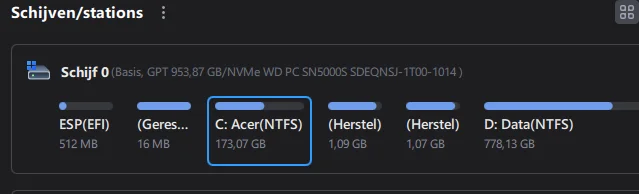
partitions before and after an upgrade


Brownyboy70

Well-known member
Member
VIP
Local time
11:56 PM
Posts
35
OS
Windows 11 Home 25H2- 07-09-‎2026 26220 9472
This afternoon I hav upgradede my W11 Home to W11 pro,ev'ry thing was going smootly, but before there were 5 partitons and after there were 6 partitins, I have now 2 recovery partitons so I dont know wich one to keep and wich one to delete. I hope to get some suggestion.

Greetz Brownyboy
1792779704679.webp
 

My Computer My Computer

At a glance

Windows 11 Home 25H2- 07-09-‎2026 26220 947213th Gen Intel(R) Core(TM) i7-13620H (2.40 GHz)16 gigIntel(R) Iris(R) Xe Graphics, NVIDIA Geforce ...
OS
Windows 11 Home 25H2- 07-09-‎2026 26220 9472
Computer type
Laptop
Manufacturer/Model
Acer/Aspire 17
CPU
13th Gen Intel(R) Core(TM) i7-13620H (2.40 GHz)
Motherboard
64-bits besturingssysteem, x64-processor
Memory
16 gig
Graphics Card(s)
Intel(R) Iris(R) Xe Graphics, NVIDIA Geforce MX450
Sound Card
Realtek (R) Audio
Monitor(s) Displays
17.3
Screen Resolution
1920*1080
Hard Drives
Micron_2210_MTFDHBA1T0QFD (SSD) 953,86GB C = 247 D = 705
Mouse
m220 logitech
Internet Speed
1000 Mbps
Browser
Edge chromium
Antivirus
Windows Defender, Malwarebytes
I have now 2 recovery partitons so I dont know wich one to keep


Ok, do this...

1. Open a command prompt as Administrator
2. Type: reagentc /disable
3. Open your partition software. The partition that is now... empty, is the one you need to keep.
4. Delete the other partition, and add that unallocated space to C: or D: whichever is adjacent.
5. Then in a command prompt as Administrator, type: reagentc /enable ...this will fill the partition that was empty.


I did this 2-3 weeks ago. I used Minitool Partition Wizard (free).


NOTE: You have to close and reopen the partition software to SEE the changes.
 
Last edited:

My Computers My Computers

  • At a glance

    Win 11 Home 26H2 26300.9711AMD Ryzen 7 3700XG.Skill (F4-3200C14D-16GTZKW)EVGA RTX 2070 (08G-P4-2171-KR)
    OS
    Win 11 Home 26H2 26300.9711
    Computer type
    PC/Desktop
    Manufacturer/Model
    Built by Ghot® [May 2020]
    CPU
    AMD Ryzen 7 3700X
    Motherboard
    Asus Pro WS X570-ACE (BIOS 5302)
    Memory
    G.Skill (F4-3200C14D-16GTZKW)
    Graphics Card(s)
    EVGA RTX 2070 (08G-P4-2171-KR)
    Sound Card
    Realtek ALC1220P / ALC S1220A
    Monitor(s) Displays
    Dell U3011 30"
    Screen Resolution
    2560 x 1600
    Hard Drives
    2x Samsung 860 EVO 500GB,
    WD 4TB Black FZBX - SATA III,
    WD 8TB Black FZBX - SATA III,
    DRW-24B1ST CD/DVD Burner
    PSU
    PC Power & Cooling 750W Quad EPS12V
    Case
    Cooler Master ATCS 840 Tower
    Cooling
    CM Hyper 212 EVO (push/pull)
    Keyboard
    Ducky DK9008 Shine II Blue LED
    Mouse
    Logitech Optical M-100
    Internet Speed
    300/300
    Browser
    Firefox (latest)
    Antivirus
    Bitdefender Total Security
    Other Info
    Speakers: Klipsch Pro Media 2.1
  • At a glance

    Windows XP Pro 32bit w/SP3AMD Athlon 64 X2 5000+ (OC'd @ 3.2Ghz)TWIN2X2048-6400C4DHX (2 x 1GB, DDR2 800)EVGA 256-P2-N758-TR GeForce 8600GT SSC
    Operating System
    Windows XP Pro 32bit w/SP3
    Computer type
    PC/Desktop
    Manufacturer/Model
    Built by Ghot® (not in use)
    CPU
    AMD Athlon 64 X2 5000+ (OC'd @ 3.2Ghz)
    Motherboard
    ASUS M2N32-SLI Deluxe Wireless Edition
    Memory
    TWIN2X2048-6400C4DHX (2 x 1GB, DDR2 800)
    Graphics card(s)
    EVGA 256-P2-N758-TR GeForce 8600GT SSC
    Sound Card
    Onboard
    Monitor(s) Displays
    ViewSonic G90FB Black 19" Professional (CRT)
    Screen Resolution
    up to 2048 x 1536
    Hard Drives
    WD 36GB 10,000rpm Raptor SATA
    Seagate 80GB 7200rpm SATA
    Lite-On LTR-52246S CD/RW
    Lite-On LH-18A1P CD/DVD Burner
    PSU
    PC Power & Cooling Silencer 750 Quad EPS12V
    Case
    Generic Beige case, 80mm fans
    Cooling
    ZALMAN 9500A 92mm CPU Cooler
    Keyboard
    Logitech Classic Keybooard 200
    Mouse
    Logitech Optical M-BT96a
    Internet Speed
    300/300
    Browser
    Firefox 3.x ??
    Antivirus
    Symantec (Norton)
    Other Info
    Still assembled, still runs. Haven't turned it on for 15 years?
I would not expect a new Recovery partition to be created as a result of doing that.

However, as you say you see 2 (I can't tell from your non-English screenshot), there are a couple of ways to find out which one is the older/not in use.

1. The 'cheat' method.
Use Minitool Partition Wizard to explore the partitions.
(Rt click the partition, click Explore) :
1.webp


You can compare the dates for the two partitions. The older will be the one you don't need.

2. Admin command prompt:
1.webp

2.webp
 

My Computer My Computer

At a glance

Windows 11 Proi7-8650U16GBIntel UHD 620
OS
Windows 11 Pro
Computer type
Laptop
Manufacturer/Model
Lenovo t480s
CPU
i7-8650U
Memory
16GB
Graphics Card(s)
Intel UHD 620
Screen Resolution
1920x1080
Hard Drives
C SN810 SDCPNRY-512G-1006
Browser
Edge, Firefox
Antivirus
Defender
The extra recovery partition can be confirmed /deleted and the C: partition expanded using diskpart commands.


Please run > post a share link


My Computer My Computer

At a glance

Windows 10Intel(R) Core(TM) i7-4800MQ CPU @ 2.70GHz16 GB Total: Manufacturer : Samsung MemoryTyp...NVIDIA Quadro K3100M; Intel(R) HD Graphics 4600
OS
Windows 10
Computer type
Laptop
Manufacturer/Model
HP
CPU
Intel(R) Core(TM) i7-4800MQ CPU @ 2.70GHz
Motherboard
Product : 190A Version : KBC Version 94.56
Memory
16 GB Total: Manufacturer : Samsung MemoryType : DDR3 FormFactor : SODIMM Capacity : 8GB Speed : 1600
Graphics Card(s)
NVIDIA Quadro K3100M; Intel(R) HD Graphics 4600
Sound Card
IDT High Definition Audio CODEC; PNP Device ID HDAUDIO\FUNC_01&VEN_111D&DEV_76E0
Hard Drives
Model Hitachi HTS727575A9E364
Antivirus
Microsoft Defender
Other Info
Mobile Workstation
I would not expect a new Recovery partition to be created as a result of doing that.

I didn't either, but it worked like a charm. ^^
Keep in mind, that the WinRE files are still there, even with the Recovery partition disabled.

So when you do reagentc /enable it re-creates the Recovery partition in the only place it can... the partition you "didn't" delete.


I know, I know... it goes against everything we've learned in the past.
But it works !!


From Google AI...

    • If you run reagentc /disable, the active 'real' recovery partition will become completely empty, allowing you to clearly distinguish it from leftover or duplicate partitions.
    • Remember to run reagentc /enable afterward to turn the Windows Recovery Environment back on


Here's where the magic first happened...


Hermoine blank.webp
 
Last edited:

My Computers My Computers

  • At a glance

    Win 11 Home 26H2 26300.9711AMD Ryzen 7 3700XG.Skill (F4-3200C14D-16GTZKW)EVGA RTX 2070 (08G-P4-2171-KR)
    OS
    Win 11 Home 26H2 26300.9711
    Computer type
    PC/Desktop
    Manufacturer/Model
    Built by Ghot® [May 2020]
    CPU
    AMD Ryzen 7 3700X
    Motherboard
    Asus Pro WS X570-ACE (BIOS 5302)
    Memory
    G.Skill (F4-3200C14D-16GTZKW)
    Graphics Card(s)
    EVGA RTX 2070 (08G-P4-2171-KR)
    Sound Card
    Realtek ALC1220P / ALC S1220A
    Monitor(s) Displays
    Dell U3011 30"
    Screen Resolution
    2560 x 1600
    Hard Drives
    2x Samsung 860 EVO 500GB,
    WD 4TB Black FZBX - SATA III,
    WD 8TB Black FZBX - SATA III,
    DRW-24B1ST CD/DVD Burner
    PSU
    PC Power & Cooling 750W Quad EPS12V
    Case
    Cooler Master ATCS 840 Tower
    Cooling
    CM Hyper 212 EVO (push/pull)
    Keyboard
    Ducky DK9008 Shine II Blue LED
    Mouse
    Logitech Optical M-100
    Internet Speed
    300/300
    Browser
    Firefox (latest)
    Antivirus
    Bitdefender Total Security
    Other Info
    Speakers: Klipsch Pro Media 2.1
  • At a glance

    Windows XP Pro 32bit w/SP3AMD Athlon 64 X2 5000+ (OC'd @ 3.2Ghz)TWIN2X2048-6400C4DHX (2 x 1GB, DDR2 800)EVGA 256-P2-N758-TR GeForce 8600GT SSC
    Operating System
    Windows XP Pro 32bit w/SP3
    Computer type
    PC/Desktop
    Manufacturer/Model
    Built by Ghot® (not in use)
    CPU
    AMD Athlon 64 X2 5000+ (OC'd @ 3.2Ghz)
    Motherboard
    ASUS M2N32-SLI Deluxe Wireless Edition
    Memory
    TWIN2X2048-6400C4DHX (2 x 1GB, DDR2 800)
    Graphics card(s)
    EVGA 256-P2-N758-TR GeForce 8600GT SSC
    Sound Card
    Onboard
    Monitor(s) Displays
    ViewSonic G90FB Black 19" Professional (CRT)
    Screen Resolution
    up to 2048 x 1536
    Hard Drives
    WD 36GB 10,000rpm Raptor SATA
    Seagate 80GB 7200rpm SATA
    Lite-On LTR-52246S CD/RW
    Lite-On LH-18A1P CD/DVD Burner
    PSU
    PC Power & Cooling Silencer 750 Quad EPS12V
    Case
    Generic Beige case, 80mm fans
    Cooling
    ZALMAN 9500A 92mm CPU Cooler
    Keyboard
    Logitech Classic Keybooard 200
    Mouse
    Logitech Optical M-BT96a
    Internet Speed
    300/300
    Browser
    Firefox 3.x ??
    Antivirus
    Symantec (Norton)
    Other Info
    Still assembled, still runs. Haven't turned it on for 15 years?
Ok, do this...

1. Open a command prompt as Administrator
2. Type: reagentc /disable
3. Open your partition software. The partition that is now... empty, is the one you need to keep.
4. Delete the other partition, and add that unallocated space to C: or D: whichever is adjacent.
5. Then in a command prompt as Administrator, type: reagentc /enable ...this will fill the partition that was empty.


I did this 2-3 weeks ago. I used Minitool Partition Wizard (free).


NOTE: You have to close and reopen the partition software to SEE the changes.
I have done the above but I think its not going the right way, not its says the partiton is not assigned (niet toegewezen)
1792785405070.webp
 

My Computer My Computer

At a glance

Windows 11 Home 25H2- 07-09-‎2026 26220 947213th Gen Intel(R) Core(TM) i7-13620H (2.40 GHz)16 gigIntel(R) Iris(R) Xe Graphics, NVIDIA Geforce ...
OS
Windows 11 Home 25H2- 07-09-‎2026 26220 9472
Computer type
Laptop
Manufacturer/Model
Acer/Aspire 17
CPU
13th Gen Intel(R) Core(TM) i7-13620H (2.40 GHz)
Motherboard
64-bits besturingssysteem, x64-processor
Memory
16 gig
Graphics Card(s)
Intel(R) Iris(R) Xe Graphics, NVIDIA Geforce MX450
Sound Card
Realtek (R) Audio
Monitor(s) Displays
17.3
Screen Resolution
1920*1080
Hard Drives
Micron_2210_MTFDHBA1T0QFD (SSD) 953,86GB C = 247 D = 705
Mouse
m220 logitech
Internet Speed
1000 Mbps
Browser
Edge chromium
Antivirus
Windows Defender, Malwarebytes
I have done the above but I think its not going the right way


Once you delete the false partition, add the unallocated space or either C: or D:
You may have to reboot.
THEN, do the reagentc /enable
 

My Computers My Computers

  • At a glance

    Win 11 Home 26H2 26300.9711AMD Ryzen 7 3700XG.Skill (F4-3200C14D-16GTZKW)EVGA RTX 2070 (08G-P4-2171-KR)
    OS
    Win 11 Home 26H2 26300.9711
    Computer type
    PC/Desktop
    Manufacturer/Model
    Built by Ghot® [May 2020]
    CPU
    AMD Ryzen 7 3700X
    Motherboard
    Asus Pro WS X570-ACE (BIOS 5302)
    Memory
    G.Skill (F4-3200C14D-16GTZKW)
    Graphics Card(s)
    EVGA RTX 2070 (08G-P4-2171-KR)
    Sound Card
    Realtek ALC1220P / ALC S1220A
    Monitor(s) Displays
    Dell U3011 30"
    Screen Resolution
    2560 x 1600
    Hard Drives
    2x Samsung 860 EVO 500GB,
    WD 4TB Black FZBX - SATA III,
    WD 8TB Black FZBX - SATA III,
    DRW-24B1ST CD/DVD Burner
    PSU
    PC Power & Cooling 750W Quad EPS12V
    Case
    Cooler Master ATCS 840 Tower
    Cooling
    CM Hyper 212 EVO (push/pull)
    Keyboard
    Ducky DK9008 Shine II Blue LED
    Mouse
    Logitech Optical M-100
    Internet Speed
    300/300
    Browser
    Firefox (latest)
    Antivirus
    Bitdefender Total Security
    Other Info
    Speakers: Klipsch Pro Media 2.1
  • At a glance

    Windows XP Pro 32bit w/SP3AMD Athlon 64 X2 5000+ (OC'd @ 3.2Ghz)TWIN2X2048-6400C4DHX (2 x 1GB, DDR2 800)EVGA 256-P2-N758-TR GeForce 8600GT SSC
    Operating System
    Windows XP Pro 32bit w/SP3
    Computer type
    PC/Desktop
    Manufacturer/Model
    Built by Ghot® (not in use)
    CPU
    AMD Athlon 64 X2 5000+ (OC'd @ 3.2Ghz)
    Motherboard
    ASUS M2N32-SLI Deluxe Wireless Edition
    Memory
    TWIN2X2048-6400C4DHX (2 x 1GB, DDR2 800)
    Graphics card(s)
    EVGA 256-P2-N758-TR GeForce 8600GT SSC
    Sound Card
    Onboard
    Monitor(s) Displays
    ViewSonic G90FB Black 19" Professional (CRT)
    Screen Resolution
    up to 2048 x 1536
    Hard Drives
    WD 36GB 10,000rpm Raptor SATA
    Seagate 80GB 7200rpm SATA
    Lite-On LTR-52246S CD/RW
    Lite-On LH-18A1P CD/DVD Burner
    PSU
    PC Power & Cooling Silencer 750 Quad EPS12V
    Case
    Generic Beige case, 80mm fans
    Cooling
    ZALMAN 9500A 92mm CPU Cooler
    Keyboard
    Logitech Classic Keybooard 200
    Mouse
    Logitech Optical M-BT96a
    Internet Speed
    300/300
    Browser
    Firefox 3.x ??
    Antivirus
    Symantec (Norton)
    Other Info
    Still assembled, still runs. Haven't turned it on for 15 years?
A normal upgrade from Windows 11 Home to Windows 11 Pro should not create an additional recovery partition. Changing editions typically involves enabling additional Windows features through a Pro product key. It doesn't require repartitioning the drive.

I have done the above but I think its not going the right way, not its says the partiton is not assigned (niet toegewezen)

For now, don't make any further changes to the partitions.

Run the following command as an administrator:

reagentc /info

If WinRE is disabled, run:

reagentc /disable
reagentc /enable
reagentc /info

Post the complete output, including any error messages.

We need to establish two things:
1. Whether WinRE is successfully enabled.
2. Whether Windows is using the remaining 1.07 GB recovery partition.
 

My Computers My Computers

  • At a glance

    Windows 11 ProAMD Ryzen 9 9950X3DKingston FURY Beast 64GB (2x32GB) DDR5 6000MT/sASUS TUF Gaming Radeon RX 9070 OC Edition 16G...
    OS
    Windows 11 Pro
    Computer type
    PC/Desktop
    CPU
    AMD Ryzen 9 9950X3D
    Motherboard
    ASRock B650E Taichi Lite
    Memory
    Kingston FURY Beast 64GB (2x32GB) DDR5 6000MT/s
    Graphics Card(s)
    ASUS TUF Gaming Radeon RX 9070 OC Edition 16GB GDDR6
    Hard Drives
    Solidigm P44 Pro 2TB M.2 NVMe SSD
  • At a glance

    Windows 11 HomeIntel Core Ultra 9 275HX64GB (2x 32GB) DDR5-6400NVIDIA GeForce RTX 5080 16GB GDDR7 Laptop GPU
    Operating System
    Windows 11 Home
    Computer type
    Laptop
    Manufacturer/Model
    Lenovo Legion Pro 7i Gen 10 16"
    CPU
    Intel Core Ultra 9 275HX
    Memory
    64GB (2x 32GB) DDR5-6400
    Graphics card(s)
    NVIDIA GeForce RTX 5080 16GB GDDR7 Laptop GPU
    Hard Drives
    2x 1TB M.2 NVMe SSD (SK Hynix)

Latest Support Threads

Back
Top Bottom