pausing updates for a week.


Maranna

Well-known member
Member
VIP
Local time
6:48 PM
Posts
305
OS
Windows 11 pro
I am wondering what percentage of computer users have paused their update especially in view of the last fiasco.
I don't know if it is a wise practice.
 

My Computers My Computers

  • At a glance

    Windows 11 proIntel Core i9- 12900K Alder Lake 3.2 GHz LGA1700G-Skill Ripjaws S5 32GBNVIDIA GEForce GTX1616 Super dual fan
    OS
    Windows 11 pro
    Computer type
    PC/Desktop
    Manufacturer/Model
    ASUS built by Micro center
    CPU
    Intel Core i9- 12900K Alder Lake 3.2 GHz LGA1700
    Motherboard
    Asus prime Z790-v WI FI Intel LGA1700 ATX
    Memory
    G-Skill Ripjaws S5 32GB
    Graphics Card(s)
    NVIDIA GEForce GTX1616 Super dual fan
    Hard Drives
    Samsung 500GB 860 EVO
    PSU
    Thermalake 500 Watt
    Case
    V 100ATX
    Antivirus
    Defender primary with MBAM free secondary
  • At a glance

    Windows 11 Pro 21H2 22000.438
    Operating System
    Windows 11 Pro 21H2 22000.438
    Computer type
    PC/Desktop
    Manufacturer/Model
    ASUS board built
    Motherboard
    Asus Tuf Z390 - Tuf Plus Gaming WI = FI
I never considered to pause updates.
 

My Computers My Computers

  • At a glance

    Windows 11 ProIntel Core i9-14900HX32 GBIntel UHD Graphics, NVIDIA RTX 4070 Laptop
    OS
    Windows 11 Pro
    Computer type
    Laptop
    Manufacturer/Model
    Lenovo Legion 7i 16IRX9
    CPU
    Intel Core i9-14900HX
    Motherboard
    LENOVO LNVNB161216 Chipset HM 770
    Memory
    32 GB
    Graphics Card(s)
    Intel UHD Graphics, NVIDIA RTX 4070 Laptop
    Sound Card
    Realtek in-built
    Screen Resolution
    3200x2000 200% Scale
    Hard Drives
    C: HDD 1 TB SAMSUNG MZVL21T0HCLR-00BL2
    D: HDD 1 TB CRUCIAL CT1000P3PSSD8
    Antivirus
    BitDefender Free
  • At a glance

    Windows 11 ProI7 10750H32 GBIntel UHD - NVIDIA 1650 Ti Max-Q
    Operating System
    Windows 11 Pro
    Computer type
    Laptop
    Manufacturer/Model
    Lenovo ThinkPad X1 3Gen Extreme
    CPU
    I7 10750H
    Motherboard
    Intel MW-490
    Memory
    32 GB
    Graphics card(s)
    Intel UHD - NVIDIA 1650 Ti Max-Q
    Sound Card
    Realtek in-built
    Screen Resolution
    3840x2160 225% Scale
    Hard Drives
    C: WDC PC SN730 SDBQNTY-1T00-1001 (1 TB)
    D: KINGSTON SNV2S2000G (2 TB)
    Antivirus
    BitDefender
And if so, for what purpose ?
 

My Computers My Computers

  • At a glance

    Windows 11 2xH2 (latest update ... forever anal)Intel i5-124008GBNVIDIA GeForce GT730
    OS
    Windows 11 2xH2 (latest update ... forever anal)
    Computer type
    PC/Desktop
    Manufacturer/Model
    HP Slim S01
    CPU
    Intel i5-12400
    Memory
    8GB
    Graphics Card(s)
    NVIDIA GeForce GT730
    Sound Card
    OOBE
    Monitor(s) Displays
    Acer 32"
    Screen Resolution
    1920x1080
    Hard Drives
    512GB KIOXIA NVMe
    1TB SATA SSD
    PSU
    OOBE
    Case
    OOBE
    Cooling
    OOBE
    Keyboard
    BT
    Mouse
    BT
    Browser
    Brave FFox Chrome Opera
    Antivirus
    KIS
  • At a glance

    Windows 11 Pro 2xH2 (latest update ... 4ever ...i7-1165G7 @ 2.80GHzIntel Iris Xe Graphics
    Operating System
    Windows 11 Pro 2xH2 (latest update ... 4ever anal)
    Computer type
    Laptop
    Manufacturer/Model
    HP Pavillion 15
    CPU
    i7-1165G7 @ 2.80GHz
    Graphics card(s)
    Intel Iris Xe Graphics
    Hard Drives
    Samsung NVMe 512GB
    + numerous/multiple SSD Type C USB enclosures
    Internet Speed
    NBN FTTN 50
    Browser
    Brave
    Antivirus
    KIS
I am wondering what percentage of computer users have paused their update especially in view of the last fiasco.
I don't know if it is a wise practice.
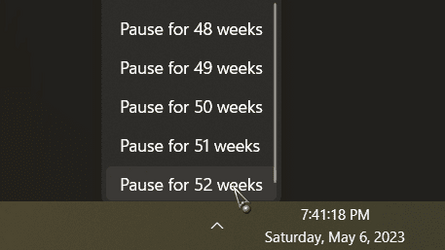
I've paused them for a week or two when the fiasco's get frustrating, but, then I get bored really fast! :p

Security updates will still come through.

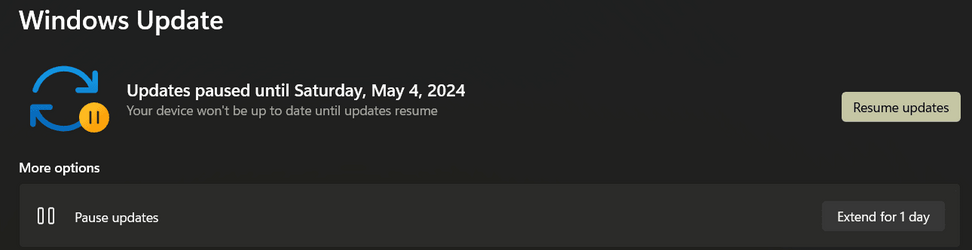
Heck, you can pause em for a year if you feel like it!
Just gotta Resume em if the need arises.

000507.png

000508.png
 

My Computers My Computers

  • At a glance

    Windows 11 Pro
    OS
    Windows 11 Pro
    Computer type
    PC/Desktop
    Manufacturer/Model
    ASUS ROG Strix
  • At a glance

    Windows 11 Pro
    Operating System
    Windows 11 Pro
    Computer type
    Laptop
    Manufacturer/Model
    ASUS VivoBook
  • ASUS VivoBook 'Lite' ~ Windows 11 Home
I use the advanced option to pause for 35 days and then watch and see how a CU plays out. If, after a week or so and things are OK, I will unpause and allow WU to do its thing.
 

My Computer My Computer

At a glance

W11 Home v. 25H2 bld. 26200.6899Intel i7 12700, @ 2.1-4.9 ghz, 12 core16GB, DDR4, 3200 mhzIntel UHD Graphics 770
OS
W11 Home v. 25H2 bld. 26200.6899
Computer type
PC/Desktop
Manufacturer/Model
HP ENVY/TE01-3254
CPU
Intel i7 12700, @ 2.1-4.9 ghz, 12 core
Motherboard
The Mother Of All Boards
Memory
16GB, DDR4, 3200 mhz
Graphics Card(s)
Intel UHD Graphics 770
Sound Card
internal, 5.1 Surround Sound
Monitor(s) Displays
AOC 22", mdl: 2269W
Screen Resolution
1280x1080
Hard Drives
1 internal- 1 TB SSD, 1 internal-1 TB SATA HDD, 1 USB external- 256GB SATA HDD, 2 USB external- 1 TB SATA HDD
PSU
310 watts
Case
HP ENVY
Cooling
Air, three internal fans
Keyboard
HP wireless
Mouse
HP wireless
Internet Speed
200+ Mb/sec Local Cable Gateway, Netgear R6400 bridged router, PC ethernet connection to Modem/Route
Browser
FireFox v.143.0, Chrome v.140.0.7339.128
Antivirus
Norton360 w/LifeLock
Other Info
4 USB 2.0 Type A Ports, 2 USB 3.0 Type A Ports, 2 USB 3.1 Type A Ports, 1 USB 3.0 Type C Port, 2 M.2 Slots
Macrium Reflect v.8.0.7279
I agree with post 5, just a fewer number of weeks. This way if there is a bad update, I have time while it's being patched but still have critical coverage.
 

My Computers My Computers

  • At a glance

    Windows 11 proIntel Core i9- 12900K Alder Lake 3.2 GHz LGA1700G-Skill Ripjaws S5 32GBNVIDIA GEForce GTX1616 Super dual fan
    OS
    Windows 11 pro
    Computer type
    PC/Desktop
    Manufacturer/Model
    ASUS built by Micro center
    CPU
    Intel Core i9- 12900K Alder Lake 3.2 GHz LGA1700
    Motherboard
    Asus prime Z790-v WI FI Intel LGA1700 ATX
    Memory
    G-Skill Ripjaws S5 32GB
    Graphics Card(s)
    NVIDIA GEForce GTX1616 Super dual fan
    Hard Drives
    Samsung 500GB 860 EVO
    PSU
    Thermalake 500 Watt
    Case
    V 100ATX
    Antivirus
    Defender primary with MBAM free secondary
  • At a glance

    Windows 11 Pro 21H2 22000.438
    Operating System
    Windows 11 Pro 21H2 22000.438
    Computer type
    PC/Desktop
    Manufacturer/Model
    ASUS board built
    Motherboard
    Asus Tuf Z390 - Tuf Plus Gaming WI = FI
No, I've never delayed one. Most screwy updates affect some machines and not others, I meet them head on and go ahead and apply them on update Tuesday. If one goes haywire , I work it out. If all goes well, I don't have to worry about it any more. I mark my calendar for the Monday before update Tuesday and make myself a backup. Patch Tuesday time for me is noon so while I'm drinking my coffee that morning I disable AV to make for a smoother experience. Later in the day, if that month's update hasn't automatically applied, I do it myself.
I never apply cumulative previews. only the release updates.
 

My Computers My Computers

  • At a glance

    Windows 11 Pro 25H2 26200.8655i9-10900 10 core 20 threads32 gbnone-Intel UHD Graphics 630
    OS
    Windows 11 Pro 25H2 26200.8655
    Computer type
    PC/Desktop
    Manufacturer/Model
    Dell Optiplex 7080
    CPU
    i9-10900 10 core 20 threads
    Motherboard
    DELL 0J37VM
    Memory
    32 gb
    Graphics Card(s)
    none-Intel UHD Graphics 630
    Sound Card
    Integrated Realtek
    Monitor(s) Displays
    Benq 27
    Screen Resolution
    2560x1440
    Hard Drives
    2x1tb Solidigm m.2 nvme /External drives 512gb Samsung m.2 sata+2tb Kingston m2.nvme
    PSU
    500w
    Case
    MT
    Cooling
    Dell Premium
    Keyboard
    Logitech wired
    Mouse
    Logitech wireless
    Internet Speed
    so slow I'm too embarrassed to tell
    Browser
    #1 Edge #2 Firefox
    Antivirus
    Defender+MWB Premium
  • At a glance

    Windows 11 Pro 24H2 26200.8457AMD Ryzen 7 6800U32 gbintegrated
    Operating System
    Windows 11 Pro 24H2 26200.8457
    Computer type
    PC/Desktop
    Manufacturer/Model
    Beelink Mini PC SER5
    CPU
    AMD Ryzen 7 6800U
    Memory
    32 gb
    Graphics card(s)
    integrated
    Sound Card
    integrated
    Monitor(s) Displays
    Benq 27
    Screen Resolution
    2560x1440
    Hard Drives
    1TB Crucial nvme
    Keyboard
    Logitech wired
    Mouse
    Logitech wireless
    Internet Speed
    still too embarrassed to tell
    Browser
    Firefox
    Antivirus
    Defender
    Other Info
    System 3 is non compliant Dell 9020 i7-4770/24gb ram Win11 PRO 26200.8457
Using a program like Macrium or Acronis saves the day for me. If there is a miscue I just recover to a date the pc worked welI - think.
Still I like to avoid trouble and use my time constructively. (y)
 

My Computers My Computers

  • At a glance

    Windows 11 proIntel Core i9- 12900K Alder Lake 3.2 GHz LGA1700G-Skill Ripjaws S5 32GBNVIDIA GEForce GTX1616 Super dual fan
    OS
    Windows 11 pro
    Computer type
    PC/Desktop
    Manufacturer/Model
    ASUS built by Micro center
    CPU
    Intel Core i9- 12900K Alder Lake 3.2 GHz LGA1700
    Motherboard
    Asus prime Z790-v WI FI Intel LGA1700 ATX
    Memory
    G-Skill Ripjaws S5 32GB
    Graphics Card(s)
    NVIDIA GEForce GTX1616 Super dual fan
    Hard Drives
    Samsung 500GB 860 EVO
    PSU
    Thermalake 500 Watt
    Case
    V 100ATX
    Antivirus
    Defender primary with MBAM free secondary
  • At a glance

    Windows 11 Pro 21H2 22000.438
    Operating System
    Windows 11 Pro 21H2 22000.438
    Computer type
    PC/Desktop
    Manufacturer/Model
    ASUS board built
    Motherboard
    Asus Tuf Z390 - Tuf Plus Gaming WI = FI
Back
Top Bottom