Solved PC crashes


GrandpaSquatch

Member
Member
Local time
12:11 PM
Posts
7
OS
windows 11
After a year with no problems now when I play a game mostly Tarkov I can get one or two raids in before screens go black and monitors go in sleep mode and the PC acks like its restarting but with nothing on the screens. I never get Blue screens, I notice I have to reinstall my GPU drivers, cause after I try and get into my GPU controller and it wants me to update it and wont let me into the program. I even try and download the update like it asks me to and all it does is install and go back to the same message to update and install drivers. When I do install the drivers after using DDU in bios, I double check the to see if I'm up to date with drivers and I am after I reinstall drivers.

after a week I started getting free programs like HWMonitor, OCCT, and some others to run some test and monitor what was happening. stress tested CPU passed, stress tested GPU passed, Stressed tested Memory passed. no crashes and or problems. in event viewer I get lots of DCOM 10010 errors (red) did everything they say to get rid of that and it keeps happening and learned they cause no real harm normally. I also get a .Netframe error but not very often, I did get a Kernnel-power error and I did what the website said and I don't get that one much anymore. Thinking it was a power issue I replaced the PSU, same problem still exist. Thinking it was a GPU cause of the drivers always getting corrupt after each crash, I ended up replacing it, that didn't fix the problem, same issues. I ran multiple windows tools trying to fix it and still same problem. I reinstalled windows 11 hoping that would fix the issue and that didn't fix it. I can't keep replacing hard wear. I am trying hard to not take this in cause its my first custom build and I would love to figure this out but now I need some help. Very new to troubleshooting so any help would be great. Or if anyone knows a trusted diagnostic program that works, would be appreciated.

Thank you in advance.
Steve.
windows 11 (build 26200.8655)
 
Windows Build/Version
windows 11 (build 26200.8655)

My Computer

System One

  • OS
    windows 11
    Computer type
    PC/Desktop
    Manufacturer/Model
    Custom
    CPU
    Ryzen 7 9800x3D 8-core 4700mhz
    Motherboard
    gigabyte X870E Aorus Master
    Memory
    64 GB Gskill 6000
    Graphics Card(s)
    AMD Radeon RX 9070 XT
    Sound Card
    Not sure
    Monitor(s) Displays
    1. 40 inch LG Ultragear+ 2. Dell 28 inch (AW2720HF)
    Screen Resolution
    1. 3440x1440 (recommended) 2. 1920 x1080 (recommended)
    Hard Drives
    SSD 8TB BW
    PSU
    Corsair HX1200i
    Case
    generic fish tank style.
    Cooling
    Corsair ICUE Link Titan 360 RX lcd lIQUID pcu cOOLER 360MM
    Keyboard
    Corsair
    Mouse
    swift point z2
    Internet Speed
    Elon Musk star link
    Browser
    N/A
    Antivirus
    Windows Defense
Hello @GrandpaSquatch and welcome to ElevenForum.

First off, here's ten points, just for filling out your computer specs. :-)


1. Check the Tarkov Forums to start with. Others may be having the same issues.
2. Black screens are usually caused by RAM not seated properly, or temperature issues.

It would help to know the maximum GPU temps you see before the black screen.
And re-seating the RAM is easy enough to do.


Here's some other things (unrelated to your problem), that you may find useful...


My Computers

System One System Two

  • OS
    Win 11 Home ♦♦♦26200.8655 ♦♦♦♦♦♦♦25H2
    Computer type
    PC/Desktop
    Manufacturer/Model
    Built by Ghot® [May 2020]
    CPU
    AMD Ryzen 7 3700X
    Motherboard
    Asus Pro WS X570-ACE (BIOS 5302)
    Memory
    G.Skill (F4-3200C14D-16GTZKW)
    Graphics Card(s)
    EVGA RTX 2070 (08G-P4-2171-KR)
    Sound Card
    Realtek ALC1220P / ALC S1220A
    Monitor(s) Displays
    Dell U3011 30"
    Screen Resolution
    2560 x 1600
    Hard Drives
    2x Samsung 860 EVO 500GB,
    WD 4TB Black FZBX - SATA III,
    WD 8TB Black FZBX - SATA III,
    DRW-24B1ST CD/DVD Burner
    PSU
    PC Power & Cooling 750W Quad EPS12V
    Case
    Cooler Master ATCS 840 Tower
    Cooling
    CM Hyper 212 EVO (push/pull)
    Keyboard
    Ducky DK9008 Shine II Blue LED
    Mouse
    Logitech Optical M-100
    Internet Speed
    300/300
    Browser
    Firefox (latest)
    Antivirus
    Bitdefender Total Security
    Other Info
    Speakers: Klipsch Pro Media 2.1
  • Operating System
    Windows XP Pro 32bit w/SP3
    Computer type
    PC/Desktop
    Manufacturer/Model
    Built by Ghot® (not in use)
    CPU
    AMD Athlon 64 X2 5000+ (OC'd @ 3.2Ghz)
    Motherboard
    ASUS M2N32-SLI Deluxe Wireless Edition
    Memory
    TWIN2X2048-6400C4DHX (2 x 1GB, DDR2 800)
    Graphics card(s)
    EVGA 256-P2-N758-TR GeForce 8600GT SSC
    Sound Card
    Onboard
    Monitor(s) Displays
    ViewSonic G90FB Black 19" Professional (CRT)
    Screen Resolution
    up to 2048 x 1536
    Hard Drives
    WD 36GB 10,000rpm Raptor SATA
    Seagate 80GB 7200rpm SATA
    Lite-On LTR-52246S CD/RW
    Lite-On LH-18A1P CD/DVD Burner
    PSU
    PC Power & Cooling Silencer 750 Quad EPS12V
    Case
    Generic Beige case, 80mm fans
    Cooling
    ZALMAN 9500A 92mm CPU Cooler
    Keyboard
    Logitech Classic Keybooard 200
    Mouse
    Logitech Optical M-BT96a
    Internet Speed
    300/300
    Browser
    Firefox 3.x ??
    Antivirus
    Symantec (Norton)
    Other Info
    Still assembled, still runs. Haven't turned it on for 15 years?
Ghot, Thank you for the information, I apologize for not mentioning that. I tried to get all the details in on first post. lol. I did take the RAM out and put them back into place to reseat them. I even tried to reseat the RAM into in the #1 and #3 ports and the PC didn't even try and start. So I put them back into the other ports. I only saw temp once while I was monitoring the PC while I was playing a game while using OCCT and when it froze the temps were in the upper 55-59c range. for the GPU,CPU and Memory but that was the only time I got lucky to have that program running when it crashed. I will try and look into the forums for Tarkov today, I didn't even think about that, thank you. I will try and get new RAM and see if that fixes my problems as well.

It's crashed with a couple games but mainly Tarkov, I did run Civ 6 for 2 hours straight and had my GPU running at 100% with no crashes, Tarkov doesn't even get my GPU up to 100% so that confused me greatly. If you need my specs I'll share them if that would be helpful.

I did run stress test with my GPU,CPU, Memory and all came back with no issues but heck I am new to this so there maybe something I'm missing with the test.

Thanks again for your information.
Steve.
 

My Computer

System One

  • OS
    windows 11
    Computer type
    PC/Desktop
    Manufacturer/Model
    Custom
    CPU
    Ryzen 7 9800x3D 8-core 4700mhz
    Motherboard
    gigabyte X870E Aorus Master
    Memory
    64 GB Gskill 6000
    Graphics Card(s)
    AMD Radeon RX 9070 XT
    Sound Card
    Not sure
    Monitor(s) Displays
    1. 40 inch LG Ultragear+ 2. Dell 28 inch (AW2720HF)
    Screen Resolution
    1. 3440x1440 (recommended) 2. 1920 x1080 (recommended)
    Hard Drives
    SSD 8TB BW
    PSU
    Corsair HX1200i
    Case
    generic fish tank style.
    Cooling
    Corsair ICUE Link Titan 360 RX lcd lIQUID pcu cOOLER 360MM
    Keyboard
    Corsair
    Mouse
    swift point z2
    Internet Speed
    Elon Musk star link
    Browser
    N/A
    Antivirus
    Windows Defense
Hi @GrandpaSquatch ,

The best way to handle this is to open a new thread after doing what listed below so that @zbook can analyze the data you provide.


My Computers

System One System Two

  • OS
    All Branches but Release
    Computer type
    Laptop
    Manufacturer/Model
    Acer Nitro ANV15-51
    CPU
    AMD Ryzen 7 7735HS 3200-4500 Mhz 8 cores x 2
    Motherboard
    Sportage_RBH
    Memory
    32 GB DDR5
    Graphics Card(s)
    Radeon Graphic / NVIDIA GeForce RTX 4060 8 GB GDDR6
    Sound Card
    AMD/Realtek(R) Audio
    Monitor(s) Displays
    Integrated Monitor (15.3"vis)
    Screen Resolution
    FHD 1920X1080 16:9 144Hz
    Hard Drives
    KINGSTON OM8SEP4512Q-AA 1TB
    Western Digital 256GB
    PSU
    19V DC 6.32 A 120 W
    Cooling
    Dual Fans
    Mouse
    MS Bluetooth
    Internet Speed
    Fiber 1GB Cox -us & 1GB Orange-fr
    Browser
    Edge Canary- Firefox Nightly-Chrome Dev-Chrome Dev
    Antivirus
    Windows Defender
  • Operating System
    Windows 11 Beta
    Computer type
    Laptop
    Manufacturer/Model
    Asus X751BP
    CPU
    AMD A9-9420
    Memory
    8 GB of DDR4
    Graphics card(s)
    AMD Radeon R5
    Screen Resolution
    1600x900
    Hard Drives
    Seagate 1 TB
It's probably just a driver issue. Revert back to the previous GPU driver using DDU software and skip the current version if that is giving you a problem. I had the same issue recently with my ASUS RX 9070 XT GPU driver.
 

My Computers

System One System Two

  • OS
    Windows 11 Pro
    Computer type
    PC/Desktop
    CPU
    AMD Ryzen 7 9800X3D
    Motherboard
    MSI PRO B850-P Wifi
    Memory
    32GB DDR5 CL30 Kingston Fury
    Graphics Card(s)
    ASUS Prime Radeon RX 9060 XT OC Edition 16GB
    Monitor(s) Displays
    LG Ultrawide 34" + LG 27" 1080p
    Screen Resolution
    3440x1440
    Hard Drives
    Main Boot Drive : 512GB Adata XPG RGB Gen3x4 NVMe M.2 SSD
    PSU
    EVGA 750 Watts 80+ Gold
    Case
    Deepcool Genome II
    Cooling
    Thermalright Burst Assassin 120
    Internet Speed
    1Gbps
    Browser
    Chrome
    Antivirus
    "Moderna"
  • Operating System
    Windows 11 Pro
    Computer type
    PC/Desktop
    CPU
    i7-4790K
    Motherboard
    ASRock Xtreme6 Z97
    Memory
    16GB Corsair Vengeance Pro
    Graphics card(s)
    MSI R9 290
    Monitor(s) Displays
    LG Ultrawide 34"
    Screen Resolution
    3440x1440
    Hard Drives
    500GB Adata SSD (OS Only)
    PSU
    Thermaltake 475 Watts 80 Bronze
    Case
    Thermaltake Commander I Snow Edition
    Cooling
    Deep Cool Archer Air Cooler
    Keyboard
    Armageddon MKA-5R RGB-Hornet
    Mouse
    Logitech G402
    Internet Speed
    1Gbps
    Browser
    Chrome
    Antivirus
    Moderna :)
@OAT I will do that today, for sure.

Thank you.
Steve.
 

My Computer

System One

  • OS
    windows 11
    Computer type
    PC/Desktop
    Manufacturer/Model
    Custom
    CPU
    Ryzen 7 9800x3D 8-core 4700mhz
    Motherboard
    gigabyte X870E Aorus Master
    Memory
    64 GB Gskill 6000
    Graphics Card(s)
    AMD Radeon RX 9070 XT
    Sound Card
    Not sure
    Monitor(s) Displays
    1. 40 inch LG Ultragear+ 2. Dell 28 inch (AW2720HF)
    Screen Resolution
    1. 3440x1440 (recommended) 2. 1920 x1080 (recommended)
    Hard Drives
    SSD 8TB BW
    PSU
    Corsair HX1200i
    Case
    generic fish tank style.
    Cooling
    Corsair ICUE Link Titan 360 RX lcd lIQUID pcu cOOLER 360MM
    Keyboard
    Corsair
    Mouse
    swift point z2
    Internet Speed
    Elon Musk star link
    Browser
    N/A
    Antivirus
    Windows Defense
  • Like
Reactions: OAT
@badrobot I didn't know that was an option, again sorry new to the whole troubleshooting thing. I don't know how to go back to a specific version for GPU threw DDU but I'll figure that out.

Thank you.
Steve.
 

My Computer

System One

  • OS
    windows 11
    Computer type
    PC/Desktop
    Manufacturer/Model
    Custom
    CPU
    Ryzen 7 9800x3D 8-core 4700mhz
    Motherboard
    gigabyte X870E Aorus Master
    Memory
    64 GB Gskill 6000
    Graphics Card(s)
    AMD Radeon RX 9070 XT
    Sound Card
    Not sure
    Monitor(s) Displays
    1. 40 inch LG Ultragear+ 2. Dell 28 inch (AW2720HF)
    Screen Resolution
    1. 3440x1440 (recommended) 2. 1920 x1080 (recommended)
    Hard Drives
    SSD 8TB BW
    PSU
    Corsair HX1200i
    Case
    generic fish tank style.
    Cooling
    Corsair ICUE Link Titan 360 RX lcd lIQUID pcu cOOLER 360MM
    Keyboard
    Corsair
    Mouse
    swift point z2
    Internet Speed
    Elon Musk star link
    Browser
    N/A
    Antivirus
    Windows Defense
@badrobot I didn't know that was an option, again sorry new to the whole troubleshooting thing. I don't know how to go back to a specific version for GPU threw DDU but I'll figure that out.

Thank you.
Steve.
It happens to some people. Happened to me not long ago. Before you dig too deep, try to go back to the previous version of the driver (download it from AMD site). As for DDU, it's free and very easy. There's a lot of straightforward tutorial on Youtube. If that solves your problem, then just stay with it until the next driver release.
 

My Computers

System One System Two

  • OS
    Windows 11 Pro
    Computer type
    PC/Desktop
    CPU
    AMD Ryzen 7 9800X3D
    Motherboard
    MSI PRO B850-P Wifi
    Memory
    32GB DDR5 CL30 Kingston Fury
    Graphics Card(s)
    ASUS Prime Radeon RX 9060 XT OC Edition 16GB
    Monitor(s) Displays
    LG Ultrawide 34" + LG 27" 1080p
    Screen Resolution
    3440x1440
    Hard Drives
    Main Boot Drive : 512GB Adata XPG RGB Gen3x4 NVMe M.2 SSD
    PSU
    EVGA 750 Watts 80+ Gold
    Case
    Deepcool Genome II
    Cooling
    Thermalright Burst Assassin 120
    Internet Speed
    1Gbps
    Browser
    Chrome
    Antivirus
    "Moderna"
  • Operating System
    Windows 11 Pro
    Computer type
    PC/Desktop
    CPU
    i7-4790K
    Motherboard
    ASRock Xtreme6 Z97
    Memory
    16GB Corsair Vengeance Pro
    Graphics card(s)
    MSI R9 290
    Monitor(s) Displays
    LG Ultrawide 34"
    Screen Resolution
    3440x1440
    Hard Drives
    500GB Adata SSD (OS Only)
    PSU
    Thermaltake 475 Watts 80 Bronze
    Case
    Thermaltake Commander I Snow Edition
    Cooling
    Deep Cool Archer Air Cooler
    Keyboard
    Armageddon MKA-5R RGB-Hornet
    Mouse
    Logitech G402
    Internet Speed
    1Gbps
    Browser
    Chrome
    Antivirus
    Moderna :)
@badrobot I didn't know that was an option, again sorry new to the whole troubleshooting thing. I don't know how to go back to a specific version for GPU threw DDU but I'll figure that out.

Thank you.
Steve.
btw, which driver version do you have? Adrenalin 26.6.1?
 

My Computers

System One System Two

  • OS
    Windows 11 Pro
    Computer type
    PC/Desktop
    CPU
    AMD Ryzen 7 9800X3D
    Motherboard
    MSI PRO B850-P Wifi
    Memory
    32GB DDR5 CL30 Kingston Fury
    Graphics Card(s)
    ASUS Prime Radeon RX 9060 XT OC Edition 16GB
    Monitor(s) Displays
    LG Ultrawide 34" + LG 27" 1080p
    Screen Resolution
    3440x1440
    Hard Drives
    Main Boot Drive : 512GB Adata XPG RGB Gen3x4 NVMe M.2 SSD
    PSU
    EVGA 750 Watts 80+ Gold
    Case
    Deepcool Genome II
    Cooling
    Thermalright Burst Assassin 120
    Internet Speed
    1Gbps
    Browser
    Chrome
    Antivirus
    "Moderna"
  • Operating System
    Windows 11 Pro
    Computer type
    PC/Desktop
    CPU
    i7-4790K
    Motherboard
    ASRock Xtreme6 Z97
    Memory
    16GB Corsair Vengeance Pro
    Graphics card(s)
    MSI R9 290
    Monitor(s) Displays
    LG Ultrawide 34"
    Screen Resolution
    3440x1440
    Hard Drives
    500GB Adata SSD (OS Only)
    PSU
    Thermaltake 475 Watts 80 Bronze
    Case
    Thermaltake Commander I Snow Edition
    Cooling
    Deep Cool Archer Air Cooler
    Keyboard
    Armageddon MKA-5R RGB-Hornet
    Mouse
    Logitech G402
    Internet Speed
    1Gbps
    Browser
    Chrome
    Antivirus
    Moderna :)
@GrandpaSquatch


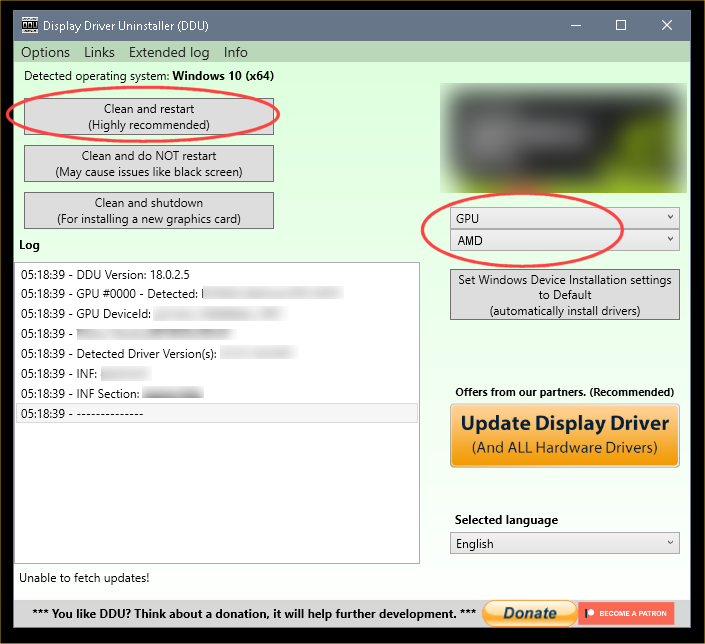
 DDU Instructions - AMD


1. First, do Option #2, step #3 and onward, here...
2. This will block MS from including drivers in Windows Updates.
3. They'll still be listed in the Optional Updates, if you ever need them.


1. Get this program, here: Display Driver Uninstaller (DDU) | Wagnardsoft ...get the latest version, and save it to your desktop.
2. Get your vid card driver here, use the Manual Search: http://support.amd.com/en-us/download ...save this to your desktop.
Unhook the internet completely.
3. Reboot into Safe Mode and run DDU (Display Driver Uninstaller) choose the "Highly Recommend Option", and just do what it tells you.
4. After it's done, reboot to normal mode, then just double click the AMD driver to install. If it want's to reboot, let it.
Rehook the internet.

ZeG5oTO.png
 

My Computers

System One System Two

  • OS
    Win 11 Home ♦♦♦26200.8655 ♦♦♦♦♦♦♦25H2
    Computer type
    PC/Desktop
    Manufacturer/Model
    Built by Ghot® [May 2020]
    CPU
    AMD Ryzen 7 3700X
    Motherboard
    Asus Pro WS X570-ACE (BIOS 5302)
    Memory
    G.Skill (F4-3200C14D-16GTZKW)
    Graphics Card(s)
    EVGA RTX 2070 (08G-P4-2171-KR)
    Sound Card
    Realtek ALC1220P / ALC S1220A
    Monitor(s) Displays
    Dell U3011 30"
    Screen Resolution
    2560 x 1600
    Hard Drives
    2x Samsung 860 EVO 500GB,
    WD 4TB Black FZBX - SATA III,
    WD 8TB Black FZBX - SATA III,
    DRW-24B1ST CD/DVD Burner
    PSU
    PC Power & Cooling 750W Quad EPS12V
    Case
    Cooler Master ATCS 840 Tower
    Cooling
    CM Hyper 212 EVO (push/pull)
    Keyboard
    Ducky DK9008 Shine II Blue LED
    Mouse
    Logitech Optical M-100
    Internet Speed
    300/300
    Browser
    Firefox (latest)
    Antivirus
    Bitdefender Total Security
    Other Info
    Speakers: Klipsch Pro Media 2.1
  • Operating System
    Windows XP Pro 32bit w/SP3
    Computer type
    PC/Desktop
    Manufacturer/Model
    Built by Ghot® (not in use)
    CPU
    AMD Athlon 64 X2 5000+ (OC'd @ 3.2Ghz)
    Motherboard
    ASUS M2N32-SLI Deluxe Wireless Edition
    Memory
    TWIN2X2048-6400C4DHX (2 x 1GB, DDR2 800)
    Graphics card(s)
    EVGA 256-P2-N758-TR GeForce 8600GT SSC
    Sound Card
    Onboard
    Monitor(s) Displays
    ViewSonic G90FB Black 19" Professional (CRT)
    Screen Resolution
    up to 2048 x 1536
    Hard Drives
    WD 36GB 10,000rpm Raptor SATA
    Seagate 80GB 7200rpm SATA
    Lite-On LTR-52246S CD/RW
    Lite-On LH-18A1P CD/DVD Burner
    PSU
    PC Power & Cooling Silencer 750 Quad EPS12V
    Case
    Generic Beige case, 80mm fans
    Cooling
    ZALMAN 9500A 92mm CPU Cooler
    Keyboard
    Logitech Classic Keybooard 200
    Mouse
    Logitech Optical M-BT96a
    Internet Speed
    300/300
    Browser
    Firefox 3.x ??
    Antivirus
    Symantec (Norton)
    Other Info
    Still assembled, still runs. Haven't turned it on for 15 years?
@badrobot Yes sir, I had the 26.6.1 installed. I will try and Go back to the 26.3.1 like you said to try earlier in the thread. Or try a earlier one.

Thank you.
 

My Computer

System One

  • OS
    windows 11
    Computer type
    PC/Desktop
    Manufacturer/Model
    Custom
    CPU
    Ryzen 7 9800x3D 8-core 4700mhz
    Motherboard
    gigabyte X870E Aorus Master
    Memory
    64 GB Gskill 6000
    Graphics Card(s)
    AMD Radeon RX 9070 XT
    Sound Card
    Not sure
    Monitor(s) Displays
    1. 40 inch LG Ultragear+ 2. Dell 28 inch (AW2720HF)
    Screen Resolution
    1. 3440x1440 (recommended) 2. 1920 x1080 (recommended)
    Hard Drives
    SSD 8TB BW
    PSU
    Corsair HX1200i
    Case
    generic fish tank style.
    Cooling
    Corsair ICUE Link Titan 360 RX lcd lIQUID pcu cOOLER 360MM
    Keyboard
    Corsair
    Mouse
    swift point z2
    Internet Speed
    Elon Musk star link
    Browser
    N/A
    Antivirus
    Windows Defense
@Ghot, thank you good sir, I will try a fresh reinstall with that today.

Thank you.
 

My Computer

System One

  • OS
    windows 11
    Computer type
    PC/Desktop
    Manufacturer/Model
    Custom
    CPU
    Ryzen 7 9800x3D 8-core 4700mhz
    Motherboard
    gigabyte X870E Aorus Master
    Memory
    64 GB Gskill 6000
    Graphics Card(s)
    AMD Radeon RX 9070 XT
    Sound Card
    Not sure
    Monitor(s) Displays
    1. 40 inch LG Ultragear+ 2. Dell 28 inch (AW2720HF)
    Screen Resolution
    1. 3440x1440 (recommended) 2. 1920 x1080 (recommended)
    Hard Drives
    SSD 8TB BW
    PSU
    Corsair HX1200i
    Case
    generic fish tank style.
    Cooling
    Corsair ICUE Link Titan 360 RX lcd lIQUID pcu cOOLER 360MM
    Keyboard
    Corsair
    Mouse
    swift point z2
    Internet Speed
    Elon Musk star link
    Browser
    N/A
    Antivirus
    Windows Defense
@badrobot Yes sir, I had the 26.6.1 installed. I will try and Go back to the 26.3.1 like you said to try earlier in the thread. Or try a earlier one.

Thank you.
I installed the 26.6.1 when I posted my question. But I made sure to create a restore point before installation in case I encountered the same problem.
Playing BO6, so far I did not run into any problem.
 

My Computers

System One System Two

  • OS
    Windows 11 Pro
    Computer type
    PC/Desktop
    CPU
    AMD Ryzen 7 9800X3D
    Motherboard
    MSI PRO B850-P Wifi
    Memory
    32GB DDR5 CL30 Kingston Fury
    Graphics Card(s)
    ASUS Prime Radeon RX 9060 XT OC Edition 16GB
    Monitor(s) Displays
    LG Ultrawide 34" + LG 27" 1080p
    Screen Resolution
    3440x1440
    Hard Drives
    Main Boot Drive : 512GB Adata XPG RGB Gen3x4 NVMe M.2 SSD
    PSU
    EVGA 750 Watts 80+ Gold
    Case
    Deepcool Genome II
    Cooling
    Thermalright Burst Assassin 120
    Internet Speed
    1Gbps
    Browser
    Chrome
    Antivirus
    "Moderna"
  • Operating System
    Windows 11 Pro
    Computer type
    PC/Desktop
    CPU
    i7-4790K
    Motherboard
    ASRock Xtreme6 Z97
    Memory
    16GB Corsair Vengeance Pro
    Graphics card(s)
    MSI R9 290
    Monitor(s) Displays
    LG Ultrawide 34"
    Screen Resolution
    3440x1440
    Hard Drives
    500GB Adata SSD (OS Only)
    PSU
    Thermaltake 475 Watts 80 Bronze
    Case
    Thermaltake Commander I Snow Edition
    Cooling
    Deep Cool Archer Air Cooler
    Keyboard
    Armageddon MKA-5R RGB-Hornet
    Mouse
    Logitech G402
    Internet Speed
    1Gbps
    Browser
    Chrome
    Antivirus
    Moderna :)
@badrobot Yes sir, I had the 26.6.1 installed. I will try and Go back to the 26.3.1 like you said to try earlier in the thread. Or try a earlier one.

Thank you.
Just go back to the immediate previous version. No need to go far back.
 

My Computers

System One System Two

  • OS
    Windows 11 Pro
    Computer type
    PC/Desktop
    CPU
    AMD Ryzen 7 9800X3D
    Motherboard
    MSI PRO B850-P Wifi
    Memory
    32GB DDR5 CL30 Kingston Fury
    Graphics Card(s)
    ASUS Prime Radeon RX 9060 XT OC Edition 16GB
    Monitor(s) Displays
    LG Ultrawide 34" + LG 27" 1080p
    Screen Resolution
    3440x1440
    Hard Drives
    Main Boot Drive : 512GB Adata XPG RGB Gen3x4 NVMe M.2 SSD
    PSU
    EVGA 750 Watts 80+ Gold
    Case
    Deepcool Genome II
    Cooling
    Thermalright Burst Assassin 120
    Internet Speed
    1Gbps
    Browser
    Chrome
    Antivirus
    "Moderna"
  • Operating System
    Windows 11 Pro
    Computer type
    PC/Desktop
    CPU
    i7-4790K
    Motherboard
    ASRock Xtreme6 Z97
    Memory
    16GB Corsair Vengeance Pro
    Graphics card(s)
    MSI R9 290
    Monitor(s) Displays
    LG Ultrawide 34"
    Screen Resolution
    3440x1440
    Hard Drives
    500GB Adata SSD (OS Only)
    PSU
    Thermaltake 475 Watts 80 Bronze
    Case
    Thermaltake Commander I Snow Edition
    Cooling
    Deep Cool Archer Air Cooler
    Keyboard
    Armageddon MKA-5R RGB-Hornet
    Mouse
    Logitech G402
    Internet Speed
    1Gbps
    Browser
    Chrome
    Antivirus
    Moderna :)
Since going back to a older version of my graphics card drivers my PC has ran great with no crashes. I
Just want to give a big thank you to @badrobot, @Ghot and @OAT for the information and help you each gave me.

THANK YOU AGAIN!!!
 

My Computer

System One

  • OS
    windows 11
    Computer type
    PC/Desktop
    Manufacturer/Model
    Custom
    CPU
    Ryzen 7 9800x3D 8-core 4700mhz
    Motherboard
    gigabyte X870E Aorus Master
    Memory
    64 GB Gskill 6000
    Graphics Card(s)
    AMD Radeon RX 9070 XT
    Sound Card
    Not sure
    Monitor(s) Displays
    1. 40 inch LG Ultragear+ 2. Dell 28 inch (AW2720HF)
    Screen Resolution
    1. 3440x1440 (recommended) 2. 1920 x1080 (recommended)
    Hard Drives
    SSD 8TB BW
    PSU
    Corsair HX1200i
    Case
    generic fish tank style.
    Cooling
    Corsair ICUE Link Titan 360 RX lcd lIQUID pcu cOOLER 360MM
    Keyboard
    Corsair
    Mouse
    swift point z2
    Internet Speed
    Elon Musk star link
    Browser
    N/A
    Antivirus
    Windows Defense
Thanks for letting us know the results. :-)
 

My Computers

System One System Two

  • OS
    Win 11 Home ♦♦♦26200.8655 ♦♦♦♦♦♦♦25H2
    Computer type
    PC/Desktop
    Manufacturer/Model
    Built by Ghot® [May 2020]
    CPU
    AMD Ryzen 7 3700X
    Motherboard
    Asus Pro WS X570-ACE (BIOS 5302)
    Memory
    G.Skill (F4-3200C14D-16GTZKW)
    Graphics Card(s)
    EVGA RTX 2070 (08G-P4-2171-KR)
    Sound Card
    Realtek ALC1220P / ALC S1220A
    Monitor(s) Displays
    Dell U3011 30"
    Screen Resolution
    2560 x 1600
    Hard Drives
    2x Samsung 860 EVO 500GB,
    WD 4TB Black FZBX - SATA III,
    WD 8TB Black FZBX - SATA III,
    DRW-24B1ST CD/DVD Burner
    PSU
    PC Power & Cooling 750W Quad EPS12V
    Case
    Cooler Master ATCS 840 Tower
    Cooling
    CM Hyper 212 EVO (push/pull)
    Keyboard
    Ducky DK9008 Shine II Blue LED
    Mouse
    Logitech Optical M-100
    Internet Speed
    300/300
    Browser
    Firefox (latest)
    Antivirus
    Bitdefender Total Security
    Other Info
    Speakers: Klipsch Pro Media 2.1
  • Operating System
    Windows XP Pro 32bit w/SP3
    Computer type
    PC/Desktop
    Manufacturer/Model
    Built by Ghot® (not in use)
    CPU
    AMD Athlon 64 X2 5000+ (OC'd @ 3.2Ghz)
    Motherboard
    ASUS M2N32-SLI Deluxe Wireless Edition
    Memory
    TWIN2X2048-6400C4DHX (2 x 1GB, DDR2 800)
    Graphics card(s)
    EVGA 256-P2-N758-TR GeForce 8600GT SSC
    Sound Card
    Onboard
    Monitor(s) Displays
    ViewSonic G90FB Black 19" Professional (CRT)
    Screen Resolution
    up to 2048 x 1536
    Hard Drives
    WD 36GB 10,000rpm Raptor SATA
    Seagate 80GB 7200rpm SATA
    Lite-On LTR-52246S CD/RW
    Lite-On LH-18A1P CD/DVD Burner
    PSU
    PC Power & Cooling Silencer 750 Quad EPS12V
    Case
    Generic Beige case, 80mm fans
    Cooling
    ZALMAN 9500A 92mm CPU Cooler
    Keyboard
    Logitech Classic Keybooard 200
    Mouse
    Logitech Optical M-BT96a
    Internet Speed
    300/300
    Browser
    Firefox 3.x ??
    Antivirus
    Symantec (Norton)
    Other Info
    Still assembled, still runs. Haven't turned it on for 15 years?
Back
Top Bottom