Pixelated text in Windows 11 22H2


The_Jackal

Member
Local time
9:48 PM
Posts
3
OS
Windows 11 Pro 22H2 build 22621.819
Hi guys, I need help here.

I have 2 monitors (S2721DGF and S2716DG) and I having trouble with text. In monitor S2721DGF everything looks fine but in S2716DG text look pixelated as if the monitor had not been set to the original resolution. I'm using Windows 11 22H2 build 22621.819. This same monitor setup looks normal in Ubuntu 22.10.

This I'm already tried:
1-fresh install windows 11 with lastest nVidia drivers
2-change cables (teste other 2 DP cables and 2 HDMI cables)
3-clear type tuning
4-change port in graphics card
5-checked resolution and scale (both are QHD and setted to 100% scale)

Maybe is a problem with monitor hardware? I'm attached 2 photos to show this diference. In screenshot it cannot be noticed, so I take a photo.

Thanks for any help.
 
Windows Build/Version
Windows 11 22H2 build 22621.819

Attachments

  • S2716DG_1.jpg
    S2716DG_1.jpg
    541.4 KB · Views: 7
  • S2721DGF_1.jpg
    S2721DGF_1.jpg
    625.1 KB · Views: 7

My Computer My Computer

At a glance

Windows 11 Pro 22H2 build 22621.819Intel i7 10700k4 x 8GB DDR4 3200mhz G.SkillEVGA RTX 3080 FTW3
OS
Windows 11 Pro 22H2 build 22621.819
Computer type
PC/Desktop
CPU
Intel i7 10700k
Motherboard
Gigabyte Z490 Aorus Elite
Memory
4 x 8GB DDR4 3200mhz G.Skill
Graphics Card(s)
EVGA RTX 3080 FTW3
Sound Card
Integrated Realtek
Monitor(s) Displays
S2721GDF / S2716DG
Screen Resolution
2560x1440
Hard Drives
1x SSD XPG Gammix 1TB
1xHD Seagate 1TB
1xHD Western Digital 1TB
PSU
Corsair RM1000-x
Cooling
Corsair H110i
Keyboard
IKBC F108
Mouse
Logitech G703 Wireless

welcome to the forum. the specs and several reviews indicate that the DGF is a better monitor.
 

My Computers My Computers

  • At a glance

    Windows 11 Pro10th Gen Intel(R) Core(TM) i7-10700, 2.90GHz32GB, 2x16GB, DDR4, 2933MhzNVIDIA(R) GeForce(R) RTX 2060 SUPER(TM) 8GB G...
    OS
    Windows 11 Pro
    Computer type
    PC/Desktop
    Manufacturer/Model
    Dell 8940 XPS
    CPU
    10th Gen Intel(R) Core(TM) i7-10700, 2.90GHz
    Motherboard
    Dell 0KV3RP (U3E1)
    Memory
    32GB, 2x16GB, DDR4, 2933Mhz
    Graphics Card(s)
    NVIDIA(R) GeForce(R) RTX 2060 SUPER(TM) 8GB GDDR6
    Sound Card
    Onboard, Realtek Codec, NVIDIA Hi Def Audio, Intel Display Audio
    Monitor(s) Displays
    Dell UltraSharp U3415W
    Screen Resolution
    3440x1440
    Hard Drives
    2TB M.2 PCIe NVMe SSD; 2TB Samsung SSD 860 EVO; 2TB Samsung SSD 860 EVO 2
    PSU
    500 W Dell
    Case
    Night Sky Bezel Chassis
    Cooling
    Dell
    Keyboard
    Logi Wireless
    Mouse
    Logi Wireless
    Internet Speed
    111 Mbps Download, 132 Mbps Upload
    Browser
    Edge, Chrome
    Antivirus
    Windows Defender, MalwareBytes
  • At a glance

    Windows 11 ProIntel 13900K Core I9 24 Core LGA 170032GB (2x16) Kingston Fury Beast 6000MHZ DDR5nVidia 4090 Founders Edition
    Operating System
    Windows 11 Pro
    Computer type
    PC/Desktop
    Manufacturer/Model
    Falcon Northwest Talon
    CPU
    Intel 13900K Core I9 24 Core LGA 1700
    Motherboard
    Asus ROG Z970 Maximus Hero
    Memory
    32GB (2x16) Kingston Fury Beast 6000MHZ DDR5
    Graphics card(s)
    nVidia 4090 Founders Edition
    Sound Card
    Motherboard
    Monitor(s) Displays
    Alienware 34” Curved OLED
    Screen Resolution
    4K
    Hard Drives
    SSD M.2 Kingston Renegade Fury 4 TB x 2; Western Digital Red Pro 8 TB SATA III
    PSU
    1000W ECGA Platinum Modular ATX
    Case
    Falcon NW Custom
    Cooling
    AIO Falcon NW 280mm Liquid Cooler
    Keyboard
    Logitech Pro Gamer
    Mouse
    Logitech G502
    Internet Speed
    111 Mbps Download, 132 Mbps Upload
    Browser
    Edge, Chrome
    Antivirus
    Windows Defender, MalwareBytes
    Other Info
    Noise Blocker Fans
Good to have you on the forum. See this post to see if anything there helps you. Also, it appears you are running in light mode. See if the text is pixelated in dark mode.
 

My Computers My Computers

  • At a glance

    Windows 11 Pro 25H2 26200.8655i9-10900 10 core 20 threads32 gbnone-Intel UHD Graphics 630
    OS
    Windows 11 Pro 25H2 26200.8655
    Computer type
    PC/Desktop
    Manufacturer/Model
    Dell Optiplex 7080
    CPU
    i9-10900 10 core 20 threads
    Motherboard
    DELL 0J37VM
    Memory
    32 gb
    Graphics Card(s)
    none-Intel UHD Graphics 630
    Sound Card
    Integrated Realtek
    Monitor(s) Displays
    Benq 27
    Screen Resolution
    2560x1440
    Hard Drives
    2x1tb Solidigm m.2 nvme /External drives 512gb Samsung m.2 sata+2tb Kingston m2.nvme
    PSU
    500w
    Case
    MT
    Cooling
    Dell Premium
    Keyboard
    Logitech wired
    Mouse
    Logitech wireless
    Internet Speed
    so slow I'm too embarrassed to tell
    Browser
    #1 Edge #2 Firefox
    Antivirus
    Defender+MWB Premium
  • At a glance

    Windows 11 Pro 24H2 26200.8457AMD Ryzen 7 6800U32 gbintegrated
    Operating System
    Windows 11 Pro 24H2 26200.8457
    Computer type
    PC/Desktop
    Manufacturer/Model
    Beelink Mini PC SER5
    CPU
    AMD Ryzen 7 6800U
    Memory
    32 gb
    Graphics card(s)
    integrated
    Sound Card
    integrated
    Monitor(s) Displays
    Benq 27
    Screen Resolution
    2560x1440
    Hard Drives
    1TB Crucial nvme
    Keyboard
    Logitech wired
    Mouse
    Logitech wireless
    Internet Speed
    still too embarrassed to tell
    Browser
    Firefox
    Antivirus
    Defender
    Other Info
    System 3 is non compliant Dell 9020 i7-4770/24gb ram Win11 PRO 26200.8457
welcome to the forum. the specs and several reviews indicate that the DGF is a better monitor.
No doubt about that, but its strange 'cause it have a high native resolution (2560x1440), this should not happen. Everything else looks sharp except texts.
Good to have you on the forum. See this post to see if anything there helps you. Also, it appears you are running in light mode. See if the text is pixelated in dark mode.
Thanks, I`ll check this thread.

To add some details, looks that happen with small fonts, when I increase zoom on browser its look better.
 

My Computer My Computer

At a glance

Windows 11 Pro 22H2 build 22621.819Intel i7 10700k4 x 8GB DDR4 3200mhz G.SkillEVGA RTX 3080 FTW3
OS
Windows 11 Pro 22H2 build 22621.819
Computer type
PC/Desktop
CPU
Intel i7 10700k
Motherboard
Gigabyte Z490 Aorus Elite
Memory
4 x 8GB DDR4 3200mhz G.Skill
Graphics Card(s)
EVGA RTX 3080 FTW3
Sound Card
Integrated Realtek
Monitor(s) Displays
S2721GDF / S2716DG
Screen Resolution
2560x1440
Hard Drives
1x SSD XPG Gammix 1TB
1xHD Seagate 1TB
1xHD Western Digital 1TB
PSU
Corsair RM1000-x
Cooling
Corsair H110i
Keyboard
IKBC F108
Mouse
Logitech G703 Wireless

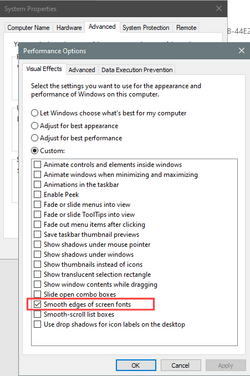
I have a DELL U3011. Other people were complaining about how the text in my screenshots was pixelated.
I couldn't "see" the problem on mine and I can't "see" the problem on yours. But have you tried this?

Image1.png
 

My Computers My Computers

  • At a glance

    Win 11 Home ♦♦♦26200.8655 ♦♦♦♦♦♦♦25H2AMD Ryzen 7 3700XG.Skill (F4-3200C14D-16GTZKW)EVGA RTX 2070 (08G-P4-2171-KR)
    OS
    Win 11 Home ♦♦♦26200.8655 ♦♦♦♦♦♦♦25H2
    Computer type
    PC/Desktop
    Manufacturer/Model
    Built by Ghot® [May 2020]
    CPU
    AMD Ryzen 7 3700X
    Motherboard
    Asus Pro WS X570-ACE (BIOS 5302)
    Memory
    G.Skill (F4-3200C14D-16GTZKW)
    Graphics Card(s)
    EVGA RTX 2070 (08G-P4-2171-KR)
    Sound Card
    Realtek ALC1220P / ALC S1220A
    Monitor(s) Displays
    Dell U3011 30"
    Screen Resolution
    2560 x 1600
    Hard Drives
    2x Samsung 860 EVO 500GB,
    WD 4TB Black FZBX - SATA III,
    WD 8TB Black FZBX - SATA III,
    DRW-24B1ST CD/DVD Burner
    PSU
    PC Power & Cooling 750W Quad EPS12V
    Case
    Cooler Master ATCS 840 Tower
    Cooling
    CM Hyper 212 EVO (push/pull)
    Keyboard
    Ducky DK9008 Shine II Blue LED
    Mouse
    Logitech Optical M-100
    Internet Speed
    300/300
    Browser
    Firefox (latest)
    Antivirus
    Bitdefender Total Security
    Other Info
    Speakers: Klipsch Pro Media 2.1
  • At a glance

    Windows XP Pro 32bit w/SP3AMD Athlon 64 X2 5000+ (OC'd @ 3.2Ghz)TWIN2X2048-6400C4DHX (2 x 1GB, DDR2 800)EVGA 256-P2-N758-TR GeForce 8600GT SSC
    Operating System
    Windows XP Pro 32bit w/SP3
    Computer type
    PC/Desktop
    Manufacturer/Model
    Built by Ghot® (not in use)
    CPU
    AMD Athlon 64 X2 5000+ (OC'd @ 3.2Ghz)
    Motherboard
    ASUS M2N32-SLI Deluxe Wireless Edition
    Memory
    TWIN2X2048-6400C4DHX (2 x 1GB, DDR2 800)
    Graphics card(s)
    EVGA 256-P2-N758-TR GeForce 8600GT SSC
    Sound Card
    Onboard
    Monitor(s) Displays
    ViewSonic G90FB Black 19" Professional (CRT)
    Screen Resolution
    up to 2048 x 1536
    Hard Drives
    WD 36GB 10,000rpm Raptor SATA
    Seagate 80GB 7200rpm SATA
    Lite-On LTR-52246S CD/RW
    Lite-On LH-18A1P CD/DVD Burner
    PSU
    PC Power & Cooling Silencer 750 Quad EPS12V
    Case
    Generic Beige case, 80mm fans
    Cooling
    ZALMAN 9500A 92mm CPU Cooler
    Keyboard
    Logitech Classic Keybooard 200
    Mouse
    Logitech Optical M-BT96a
    Internet Speed
    300/300
    Browser
    Firefox 3.x ??
    Antivirus
    Symantec (Norton)
    Other Info
    Still assembled, still runs. Haven't turned it on for 15 years?
I have a DELL U3011. Other people were complaining about how the text in my screenshots was pixelated.
I couldn't "see" the problem on mine and I can't "see" the problem on yours. But have you tried this?

View attachment 46132
I checked this and it already checked, thanks!

I'm thinking it's a hardware problem unfortunately
 

My Computer My Computer

At a glance

Windows 11 Pro 22H2 build 22621.819Intel i7 10700k4 x 8GB DDR4 3200mhz G.SkillEVGA RTX 3080 FTW3
OS
Windows 11 Pro 22H2 build 22621.819
Computer type
PC/Desktop
CPU
Intel i7 10700k
Motherboard
Gigabyte Z490 Aorus Elite
Memory
4 x 8GB DDR4 3200mhz G.Skill
Graphics Card(s)
EVGA RTX 3080 FTW3
Sound Card
Integrated Realtek
Monitor(s) Displays
S2721GDF / S2716DG
Screen Resolution
2560x1440
Hard Drives
1x SSD XPG Gammix 1TB
1xHD Seagate 1TB
1xHD Western Digital 1TB
PSU
Corsair RM1000-x
Cooling
Corsair H110i
Keyboard
IKBC F108
Mouse
Logitech G703 Wireless
Just a thought. Do you have monitor software installed for either of the monitors? Maybe there is some sort of conflict with settings there that affects what you see.
 

My Computers My Computers

  • At a glance

    Windows 11 Pro 25H2 26200.8655i9-10900 10 core 20 threads32 gbnone-Intel UHD Graphics 630
    OS
    Windows 11 Pro 25H2 26200.8655
    Computer type
    PC/Desktop
    Manufacturer/Model
    Dell Optiplex 7080
    CPU
    i9-10900 10 core 20 threads
    Motherboard
    DELL 0J37VM
    Memory
    32 gb
    Graphics Card(s)
    none-Intel UHD Graphics 630
    Sound Card
    Integrated Realtek
    Monitor(s) Displays
    Benq 27
    Screen Resolution
    2560x1440
    Hard Drives
    2x1tb Solidigm m.2 nvme /External drives 512gb Samsung m.2 sata+2tb Kingston m2.nvme
    PSU
    500w
    Case
    MT
    Cooling
    Dell Premium
    Keyboard
    Logitech wired
    Mouse
    Logitech wireless
    Internet Speed
    so slow I'm too embarrassed to tell
    Browser
    #1 Edge #2 Firefox
    Antivirus
    Defender+MWB Premium
  • At a glance

    Windows 11 Pro 24H2 26200.8457AMD Ryzen 7 6800U32 gbintegrated
    Operating System
    Windows 11 Pro 24H2 26200.8457
    Computer type
    PC/Desktop
    Manufacturer/Model
    Beelink Mini PC SER5
    CPU
    AMD Ryzen 7 6800U
    Memory
    32 gb
    Graphics card(s)
    integrated
    Sound Card
    integrated
    Monitor(s) Displays
    Benq 27
    Screen Resolution
    2560x1440
    Hard Drives
    1TB Crucial nvme
    Keyboard
    Logitech wired
    Mouse
    Logitech wireless
    Internet Speed
    still too embarrassed to tell
    Browser
    Firefox
    Antivirus
    Defender
    Other Info
    System 3 is non compliant Dell 9020 i7-4770/24gb ram Win11 PRO 26200.8457
Try adjusting the response time in the Display Menu in the OSD - on my lg monitor text appears much better when this is set to low - it looks like your screenshot when set to high. Doesn't affect anything else as far as I can tell. Might be worth playing with the ULMB setting as well if not greyed out.
 

Attachments

  • response time.jpg
    response time.jpg
    60.5 KB · Views: 6

My Computer My Computer

At a glance

windows11i5 2520m6gb
OS
windows11
Computer type
Laptop
Manufacturer/Model
Lenovo x220
CPU
i5 2520m
Motherboard
lenovo
Memory
6gb
Sound Card
echo indigo DJx
Screen Resolution
1366 x 768
Hard Drives
250 gb Samsung SSD
Browser
edge
Antivirus
defender
I had possibly a similar effect with my Dell 24" All-In-One but have managed to overcome it enough to get used to and live with it. I think it is something to do with Windows fonts and the monitor. With text being OK running Ubuntu using the same computer and monitor suggests it could be a combination of the two.

I found the system fonts looked much better in dark mode. Switching to that was a bit difficult for me to get used to but that's OK now. Setting up ClearType and adjusting preferences to 'best appearance' helped too.

I also switched all system fonts from using Sergoe UI to one called MS Reference Sans Serif' and raised the point number to 10. Microsoft updates might sometimes reset this but 'Advanced System Font Size Changer' (by WinTools) stores the user preference and can change it back to that in a click. It's about 17$ for a three year licence after a month's free trial.

The text in some forums still looks a little strange. Almost as if there is a white surround to black pixels. Noticeable when black text sits on a mid-grey or blue background. Increasing the zoom using CTRL+Mousewheel gets around that. I don't know if this is all relevant to your own problem but it seems it could be similar.
 

My Computer My Computer

At a glance

Windows11 Home12th Gen Intel i7-1.70 GHz16.0 GBIntel UHD Graphics - Nvidia GeForce MX450
OS
Windows11 Home
Computer type
PC/Desktop
Manufacturer/Model
HP QHD AiO
CPU
12th Gen Intel i7-1.70 GHz
Motherboard
89E9 0100
Memory
16.0 GB
Graphics Card(s)
Intel UHD Graphics - Nvidia GeForce MX450
Sound Card
Realtek Audio
Monitor(s) Displays
HP 27" QHD
Screen Resolution
2560 x 1440
Hard Drives
1TB SSD (OS and programs) - 1TB HDD (Storage)
Browser
Edge
Hello! First set the native resolution (maximum supported) and the desired scaling at the affected monitor. Then search for Cleartype settings and run the wizard to fine tune text appearance on the monitor. You must move the wizard window on the desired monitor before proceeding. After finishing you will see a great difference in text quality. I would also make sure my graphics drivers are updated before running the Cleartype settings wizard.
 

My Computers My Computers

  • At a glance

    Windows 11 Pro 23H2 (5699), 25H2 (8655)Mobile DualCore Intel Core 2 Duo T7250, 2000 MHz4GBMobile Intel(R) GMA 4500M (Mobile 4 series)
    OS
    Windows 11 Pro 23H2 (5699), 25H2 (8655)
    Computer type
    Laptop
    Manufacturer/Model
    Acer Extensa 5630EZ
    CPU
    Mobile DualCore Intel Core 2 Duo T7250, 2000 MHz
    Motherboard
    Acer Extensa 5630
    Memory
    4GB
    Graphics Card(s)
    Mobile Intel(R) GMA 4500M (Mobile 4 series)
    Sound Card
    Realtek ALC268 @ Intel 82801IB ICH9 - High Definition Audio Controller
    Monitor(s) Displays
    1
    Screen Resolution
    1280x800
    Hard Drives
    Samsung SSD 850 EVO 250GB SATA Device (250 GB, SATA-III)
    Internet Speed
    VDSL 50 Mbps
    Browser
    MICROSOFT EDGE
    Antivirus
    WINDOWS DEFENDER
    Other Info
    Legacy MBR installation, no TPM, no Secure Boot, no WDDM 2.0 graphics drivers, no SSE4.2, cannot get more unsupported ;) This is only my test laptop. I had installed Windows 11 here before upgrading my main PC. For my main PC I use everyday see my 2nd system specs.
  • At a glance

    Windows 11 Pro v25H2 (build 26200.8655)Intel Core-i7 3770 3.40GHz s1155 (3rd generat...2x Kingston Hyper-X Blu 8GB DDR3-1600GIGABYTE GeForce RTX 3050 WINDFORCE OC V2 6GB...
    Operating System
    Windows 11 Pro v25H2 (build 26200.8655)
    Computer type
    PC/Desktop
    Manufacturer/Model
    Custom-built PC
    CPU
    Intel Core-i7 3770 3.40GHz s1155 (3rd generation)
    Motherboard
    Asus P8H61 s1155 ATX
    Memory
    2x Kingston Hyper-X Blu 8GB DDR3-1600
    Graphics card(s)
    GIGABYTE GeForce RTX 3050 WINDFORCE OC V2 6GB (GV-N3050WF2OCV2-6GD)
    Sound Card
    Realtek HD audio (ALC887)
    Monitor(s) Displays
    Sony Bravia KDL-19L4000 19" LCD TV via VGA
    Screen Resolution
    1440x900 32-bit 60Hz
    Hard Drives
    WD Blue SA510 2.5 1000GB SSD as system disk, Western Digital Caviar Purple 4TB SATA III (WD40PURZ) as second
    PSU
    Thermaltake Litepower RGB 550W Full Wired
    Case
    SUPERCASE MIDI-TOWER
    Cooling
    Deepcool Gamma Archer CPU cooler, 1x 8cm fan at the back
    Keyboard
    Mitsumi 101-key PS/2
    Mouse
    Sunnyline OptiEye PS/2
    Internet Speed
    100Mbps
    Browser
    Microsoft Edge, Mozilla Firefox
    Antivirus
    Microsoft Windows Defender
    Other Info
    Legacy BIOS (MBR) installation, no TPM, no Secure Boot, WDDM 3.0 graphics drivers, WEI score 7.4
Back
Top Bottom