Solved pop ups


Please Mark this thread as Solved
on the right hand side around the same height as the thread title, should be a big button that says mark as solved
I am so glad you got it sorted. Please Mark as solved to avoid future comments. Thank You
 

My Computer

System One

  • OS
    Windows 11 Pro Insider 64 bit 25H2 26200.5742
    Computer type
    PC/Desktop
    Manufacturer/Model
    Gigabyte Z390 UD
    CPU
    Intel Core i7 9700K 3.60
    Motherboard
    Gigabyte Z390 UD
    Memory
    16 GB
    Graphics Card(s)
    nVidia GEForce RTX 2060 Super
    Sound Card
    onboard
    Monitor(s) Displays
    Two 27" Dell 4K monitors
    Screen Resolution
    3840 x 2160
    Hard Drives
    M.2 NVME SSD, 500 GB; Two 2TB Mechanical HDD's
    PSU
    850w PSU
    Case
    Cyberpower PC
    Cooling
    Water cooled
    Keyboard
    Backlit Cyberpower gaming keyboard
    Mouse
    Backlit Cyberpower gaming mouse
    Internet Speed
    1 GB mbps
    Browser
    Brave
    Antivirus
    Windows Security
Spoke too soon, its back, several times today its popped up.
 

My Computer

System One

  • OS
    Windows 11 pro
    Computer type
    Laptop
    Manufacturer/Model
    HP Zbook
    CPU
    Intel(R) Core(TM) i7-8850H CPU @ 2.60GHz 2.59 GHz
    Motherboard
    HP 842D
    Memory
    32GB
    Graphics Card(s)
    Nvidia Quadro P3200
    Hard Drives
    Samsung 980 1TB M.2
    Toshiba KXG50ZNV512G M.2
    Crucial P5 Plus 2TB M.2
    Mouse
    MX Master 3
    Internet Speed
    500MBPS
    Browser
    Chrome, Edge
    Antivirus
    Windows defender
Microsoft will not allow you to remove Windows Update. You need a third party debloat tool to do it.
 

My Computers

System One System Two

  • OS
    Windows 11 Education For 25H2
    Computer type
    Laptop
    Manufacturer/Model
    HP ZBook G2
    CPU
    Intel® Core i7 5500u
    Motherboard
    HP
    Memory
    8 GB
    Graphics Card(s)
    Intel HD Family Graphics 5500 AMD Firepro 4150M
    Sound Card
    Realtek High Audio
    Hard Drives
    1 TB SSD
    Mouse
    HP USB Mouse
    Antivirus
    Windows Defender
  • Operating System
    Windows 11 Pro For Workstations 25H2
    Computer type
    Laptop
    Manufacturer/Model
    HP Zbook G4
    CPU
    Xeon 1535m v6
    Motherboard
    HP
    Memory
    32 GB
    Graphics card(s)
    AMD Quadro Pro 4100
    Sound Card
    Bang and Olufson Audio
    Hard Drives
    1TB SSD
    Mouse
    HP USB Mouse
    Antivirus
    Windows Defender
Microsoft updates? can you explain
 

My Computer

System One

  • OS
    Windows 11 pro
    Computer type
    Laptop
    Manufacturer/Model
    HP Zbook
    CPU
    Intel(R) Core(TM) i7-8850H CPU @ 2.60GHz 2.59 GHz
    Motherboard
    HP 842D
    Memory
    32GB
    Graphics Card(s)
    Nvidia Quadro P3200
    Hard Drives
    Samsung 980 1TB M.2
    Toshiba KXG50ZNV512G M.2
    Crucial P5 Plus 2TB M.2
    Mouse
    MX Master 3
    Internet Speed
    500MBPS
    Browser
    Chrome, Edge
    Antivirus
    Windows defender
I have downloaded Revo uninstaller ran it it dind't find anythig from Teamviewer or QTupdater, done the registry find it found both i deleted both but as soon as i restart the pc both reappear.
 

My Computer

System One

  • OS
    Windows 11 pro
    Computer type
    Laptop
    Manufacturer/Model
    HP Zbook
    CPU
    Intel(R) Core(TM) i7-8850H CPU @ 2.60GHz 2.59 GHz
    Motherboard
    HP 842D
    Memory
    32GB
    Graphics Card(s)
    Nvidia Quadro P3200
    Hard Drives
    Samsung 980 1TB M.2
    Toshiba KXG50ZNV512G M.2
    Crucial P5 Plus 2TB M.2
    Mouse
    MX Master 3
    Internet Speed
    500MBPS
    Browser
    Chrome, Edge
    Antivirus
    Windows defender
please check task scheduler
windows tools > task scheduler

when this window opens
on the left menu check for
QTupdater and TeamViewer

disable then delete any entries that you find

#####
then check task manager
window tools > task manager
on the left is > startup
again check for QTupdater and TeamViewer

right click and disable any startup items.

#####
then restart your system and check to see if it appears again

note.
if it appears again it would look like you have some kind of download software
that is re-installing this software.
if that is the case i would suggest and complete wipe and reinstall of the system.

best of luck Steve ..
 

My Computers

System One System Two

  • OS
    Debian 13 KDE .. Windows 11 Home
    Computer type
    PC/Desktop
    Manufacturer/Model
    HP 24" AiO
    CPU
    Ryzen 7 5825u
    Motherboard
    HP
    Memory
    64GB DDR4 3200
    Graphics Card(s)
    Ryzen 7 5825u
    Sound Card
    RealTek
    Monitor(s) Displays
    24" HP AiO
    Screen Resolution
    1920 x 1080 @60 Hz
    Hard Drives
    1TB WD Blue SN580 M2 SSD Partitioned.
    2x 1TB USB HDD External Backup/Storage.
    PSU
    90W external power brick
    Case
    24" All in One
    Cooling
    Default Air Cooling
    Keyboard
    HP WiFi UK extended
    Mouse
    HP WiFi 3 Button
    Internet Speed
    1GB full fibre
    Browser
    Edge & Firefox
    Antivirus
    AVG Internet Security/Windows Defender
    Other Info
    Mainly Open Source Software
  • Operating System
    Ubuntu 22.04.5 LTS
    Computer type
    Laptop
    Manufacturer/Model
    Dell 13" Latitude 2017
    CPU
    i5 7200u
    Motherboard
    Dell
    Memory
    16GB DDR4
    Graphics card(s)
    Intel
    Sound Card
    Intel
    Monitor(s) Displays
    13" Dell Laptop
    Hard Drives
    250GB Crucial 2.5" SSD
    Mouse
    Generic WiFi 3 button
    Internet Speed
    WiFi only
    Browser
    Firefox
    Antivirus
    ClamAV TK
    Other Info
    Mainly Open Source Software
I'm probably not qualigfied to help but I do know that TeamViewer can be on your computer without a full installation using the
QuickSupport module (a small, single-use .exe file that runs without installing)
Also, where did you get that Windows PC manager? It does not come with Windows 11 but is an add on so maybe it came with that? When this pop-up is there, launch task manager and see if it will give you a clue and you can kill the pop-up from there as well. You can look at the Properties of the task and see the path . . . (?)
 

My Computers

System One System Two

  • OS
    Windows 11 (up to date)
    Computer type
    PC/Desktop
    Manufacturer/Model
    Custom
    CPU
    Intel i5 12400
    Motherboard
    Gigabyte Z690 UA
    Memory
    Corsair Vengeance LPX 16GB
    Graphics Card(s)
    On Board the Z690
    Sound Card
    On Board
    Monitor(s) Displays
    43" Samsung tu7000
    Screen Resolution
    2560 x 1440
    Hard Drives
    SAMSUNG SSD 1TB NVMe M.2
    PSU
    Thermaltake smart 500w 80+
    Case
    LIAN LANCOOL_205M
    Cooling
    Bunch of fans . . . :o) (lights dont work)
    Keyboard
    Unicomp: Ultra Classic White Buckling Spring USB
    Mouse
    M510
    Internet Speed
    50mbps on Ethernet
    Browser
    Fire Fox
    Antivirus
    Windows
    Other Info
    Love this computer but I still prefer Win-7 like I love my old Lazy Boy Recliner . . . it just feels better.
  • Operating System
    WIN-7-64BIT and Win-11 pro for testing on unsupported hardware
    Computer type
    PC/Desktop
    Manufacturer/Model
    Home built
    CPU
    i5-3570K CPU @ 3.40GHz, 3801 Mhz, 4 Core(s), 4 Logical Processor(s)
    Motherboard
    GA-Z77-HD3
    Memory
    16 GB - Crucial Ballistick 4GB PC3-14900 DDR3-1333 MHz
    Graphics card(s)
    NVIDIA GeForce GTX 1050
    Sound Card
    On Board
    Monitor(s) Displays
    ASUS VP278
    Screen Resolution
    1920 x 1080
    Hard Drives
    4 - internal Samsung 2.5" SSD, 1 WD HDD 7200 and some external drives
    PSU
    EVGA 550w
    Case
    Old Gygabyte Tower
    Cooling
    Yes
    Keyboard
    Unicomp - UNIOP4A USB (like the old IBM Model H that I started with)
    Mouse
    M510
    Internet Speed
    50mbps
    Browser
    Firefox
    Antivirus
    Windows
    Other Info
    The only thing it lack is USB-3.2 on the front face but it has 3.0 on the back
I'm probably not qualigfied to help but I do know that TeamViewer can be on your computer without a full installation using the
QuickSupport module (a small, single-use .exe file that runs without installing)
Also, where did you get that Windows PC manager? It does not come with Windows 11 but is an add on so maybe it came with that? When this pop-up is there, launch task manager and see if it will give you a clue and you can kill the pop-up from there as well. You can look at the Properties of the task and see the path . . . (?)
PC Manager is available in the Microsoft Store. It's interesting that the original source of PC Manager is a Chinese division of Microsoft.
 

My Computers

System One System Two

  • OS
    Windows 11 Pro
    Computer type
    Laptop
    Manufacturer/Model
    Dell XPS 16 DA16260
    CPU
    Intel Series 3 Core Ultra X9 388H
    Memory
    64GB LPDDR5x 9600 MT/s
    Graphics Card(s)
    Intel Arc graphics B390 Panther Lake
    Monitor(s) Displays
    16" 3.2K Tandem OLED Infinity Edge
    Screen Resolution
    3200 x 2000 16:10 236 PPI
    Hard Drives
    1 Terabyte M.2 PCIe NVMe SSD
    Case
    Black Anodized Aluminum
    Cooling
    Vapor Chamber Cooling
    Mouse
    None
    Internet Speed
    942 Mbps Netgear Mesh + 2 Satellites
    Browser
    Microsoft Edge (Chromium)
    Antivirus
    Windows Security (Defender)
    Other Info
    NPU delivering 67 TOPS
    Microsoft 365 subscription
    Microsoft Office 365
    Microsoft OneDrive 1TB Cloud
    Microsoft Visual Studio
    Microsoft Visual Studio Code
    Microsoft Sysinternals Suite
    Microsoft BitLocker
    Microsoft Copilot
    Dell Support Assist
    Dell Command | Update
    Macrium Reflect X subscription
    1Password Password Manager
    Amazon Kindle for PC
    Lightroom/Photoshop subscription
    Interactive Brokers Trader Workstation
  • Operating System
    Windows 11 Pro
    Computer type
    Laptop
    Manufacturer/Model
    Microsoft Surface Laptop 7
    CPU
    Snapdragon® X Elite (12 Core) with Hexagon NPU delivering 45 TOPS
    Memory
    32GB LPDDR5x 8448 MT/s
    Graphics card(s)
    Integrated Adreno GPU
    Sound Card
    Omnisonic speakers with Dolby Atmos spatial sound
    Monitor(s) Displays
    13.8″ PixelSense Flow touchscreen 120 Hz 600 NIT
    Screen Resolution
    2304 × 1536 (201 PPI), 3:2 aspect ratio
    Hard Drives
    1 TB PCIe NVMe Gen 4 SSD
    Case
    Black Anodized Aluminum
    Cooling
    Vapor Chamber Cooling
    Mouse
    None
    Internet Speed
    942 Mbps Netgear Mesh + 2 Satellites
    Browser
    Microsoft Edge (Chromium)
    Antivirus
    Windows Security (Defender)
    Other Info
    Microsoft 365 subscription (Office)
    Microsoft Office 365
    Microsoft OneDrive 1TB Cloud
    Microsoft Visual Studio 2026
    Microsoft Visual Studio Code
    Interactive Brokers Trader Workstation
    Lightroom/Photoshop subscription
    1Password Password Manager
    Microsoft Sysinternals
    Amazon Kindle for PC
    Microsoft BitLocker
    Microsoft Copilot
please check task scheduler
windows tools > task scheduler

when this window opens
on the left menu check for
QTupdater and TeamViewer

disable then delete any entries that you find

#####
then check task manager
window tools > task manager
on the left is > startup
again check for QTupdater and TeamViewer

right click and disable any startup items.

#####
then restart your system and check to see if it appears again

note.
if it appears again it would look like you have some kind of download software
that is re-installing this software.
if that is the case i would suggest and complete wipe and reinstall of the system.

best of luck Steve ..
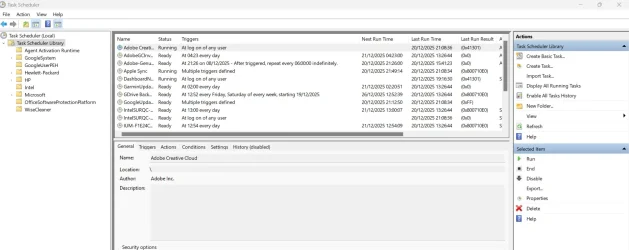
Am I in the correct place?

Screenshot 2025-12-20 211342.webp
 

My Computer

System One

  • OS
    Windows 11 pro
    Computer type
    Laptop
    Manufacturer/Model
    HP Zbook
    CPU
    Intel(R) Core(TM) i7-8850H CPU @ 2.60GHz 2.59 GHz
    Motherboard
    HP 842D
    Memory
    32GB
    Graphics Card(s)
    Nvidia Quadro P3200
    Hard Drives
    Samsung 980 1TB M.2
    Toshiba KXG50ZNV512G M.2
    Crucial P5 Plus 2TB M.2
    Mouse
    MX Master 3
    Internet Speed
    500MBPS
    Browser
    Chrome, Edge
    Antivirus
    Windows defender
You are in the right place. Put your pointer on the tool bar directly on the line separating
Name and Status. When it turns into a double sided arrow, drag it to the right to view the names completely.

Scroll down and look for TeamViewer. choose Disable or Delete to remove it. If not there then this is not a task that runs with Windows.

Follow the instructions in Post #28 and remove all registry entries for TeamViewer.
 

My Computer

System One

  • OS
    Windows 11 Pro Insider 64 bit 25H2 26200.5742
    Computer type
    PC/Desktop
    Manufacturer/Model
    Gigabyte Z390 UD
    CPU
    Intel Core i7 9700K 3.60
    Motherboard
    Gigabyte Z390 UD
    Memory
    16 GB
    Graphics Card(s)
    nVidia GEForce RTX 2060 Super
    Sound Card
    onboard
    Monitor(s) Displays
    Two 27" Dell 4K monitors
    Screen Resolution
    3840 x 2160
    Hard Drives
    M.2 NVME SSD, 500 GB; Two 2TB Mechanical HDD's
    PSU
    850w PSU
    Case
    Cyberpower PC
    Cooling
    Water cooled
    Keyboard
    Backlit Cyberpower gaming keyboard
    Mouse
    Backlit Cyberpower gaming mouse
    Internet Speed
    1 GB mbps
    Browser
    Brave
    Antivirus
    Windows Security
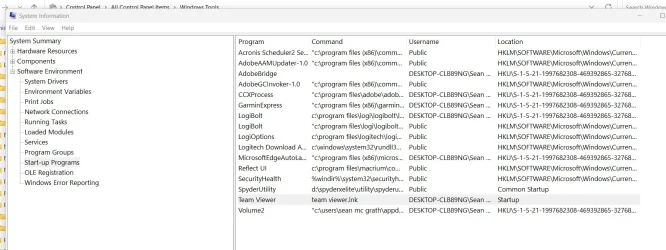
Nothing found in there but i found Teamviewer inside system information, start up? how do i uninstall this or disable it?
Screenshot 2025-12-20 222000.webp
 

My Computer

System One

  • OS
    Windows 11 pro
    Computer type
    Laptop
    Manufacturer/Model
    HP Zbook
    CPU
    Intel(R) Core(TM) i7-8850H CPU @ 2.60GHz 2.59 GHz
    Motherboard
    HP 842D
    Memory
    32GB
    Graphics Card(s)
    Nvidia Quadro P3200
    Hard Drives
    Samsung 980 1TB M.2
    Toshiba KXG50ZNV512G M.2
    Crucial P5 Plus 2TB M.2
    Mouse
    MX Master 3
    Internet Speed
    500MBPS
    Browser
    Chrome, Edge
    Antivirus
    Windows defender
Nothing found in there but i found Teamviewer inside system information, start up? how do i uninstall this or disable it?
View attachment 157554
please see my post #46 and task manager
window tools > task manager

on the left of the task manager window is a menu list and you want startup
TeamViewer and/or QTupdater can be disabled there.

also it maybe an idea to open Windows services
windows tools > services

and check there for TeamViewer and/or QTupdater
you can open any service by right clicking that service entry then on that right click menu click 'properties'
then stop any related service and then set that service to disabled by the drop down menu.

best of luck Steve ..
 

My Computers

System One System Two

  • OS
    Debian 13 KDE .. Windows 11 Home
    Computer type
    PC/Desktop
    Manufacturer/Model
    HP 24" AiO
    CPU
    Ryzen 7 5825u
    Motherboard
    HP
    Memory
    64GB DDR4 3200
    Graphics Card(s)
    Ryzen 7 5825u
    Sound Card
    RealTek
    Monitor(s) Displays
    24" HP AiO
    Screen Resolution
    1920 x 1080 @60 Hz
    Hard Drives
    1TB WD Blue SN580 M2 SSD Partitioned.
    2x 1TB USB HDD External Backup/Storage.
    PSU
    90W external power brick
    Case
    24" All in One
    Cooling
    Default Air Cooling
    Keyboard
    HP WiFi UK extended
    Mouse
    HP WiFi 3 Button
    Internet Speed
    1GB full fibre
    Browser
    Edge & Firefox
    Antivirus
    AVG Internet Security/Windows Defender
    Other Info
    Mainly Open Source Software
  • Operating System
    Ubuntu 22.04.5 LTS
    Computer type
    Laptop
    Manufacturer/Model
    Dell 13" Latitude 2017
    CPU
    i5 7200u
    Motherboard
    Dell
    Memory
    16GB DDR4
    Graphics card(s)
    Intel
    Sound Card
    Intel
    Monitor(s) Displays
    13" Dell Laptop
    Hard Drives
    250GB Crucial 2.5" SSD
    Mouse
    Generic WiFi 3 button
    Internet Speed
    WiFi only
    Browser
    Firefox
    Antivirus
    ClamAV TK
    Other Info
    Mainly Open Source Software
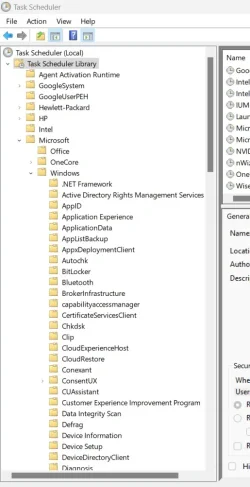
Am i in the correct place inside task manager? Nothing found in Windows services.
Screenshot 2025-12-20 232420.webp
 

My Computer

System One

  • OS
    Windows 11 pro
    Computer type
    Laptop
    Manufacturer/Model
    HP Zbook
    CPU
    Intel(R) Core(TM) i7-8850H CPU @ 2.60GHz 2.59 GHz
    Motherboard
    HP 842D
    Memory
    32GB
    Graphics Card(s)
    Nvidia Quadro P3200
    Hard Drives
    Samsung 980 1TB M.2
    Toshiba KXG50ZNV512G M.2
    Crucial P5 Plus 2TB M.2
    Mouse
    MX Master 3
    Internet Speed
    500MBPS
    Browser
    Chrome, Edge
    Antivirus
    Windows defender
@Bikeit
yes that is the right place now just go through each item on that menu and check for TeamViewer and/or QTupdate.

after checking Windows scheduler then check Windows task manager for any startup entries.

best of luck Steve ..
 

My Computers

System One System Two

  • OS
    Debian 13 KDE .. Windows 11 Home
    Computer type
    PC/Desktop
    Manufacturer/Model
    HP 24" AiO
    CPU
    Ryzen 7 5825u
    Motherboard
    HP
    Memory
    64GB DDR4 3200
    Graphics Card(s)
    Ryzen 7 5825u
    Sound Card
    RealTek
    Monitor(s) Displays
    24" HP AiO
    Screen Resolution
    1920 x 1080 @60 Hz
    Hard Drives
    1TB WD Blue SN580 M2 SSD Partitioned.
    2x 1TB USB HDD External Backup/Storage.
    PSU
    90W external power brick
    Case
    24" All in One
    Cooling
    Default Air Cooling
    Keyboard
    HP WiFi UK extended
    Mouse
    HP WiFi 3 Button
    Internet Speed
    1GB full fibre
    Browser
    Edge & Firefox
    Antivirus
    AVG Internet Security/Windows Defender
    Other Info
    Mainly Open Source Software
  • Operating System
    Ubuntu 22.04.5 LTS
    Computer type
    Laptop
    Manufacturer/Model
    Dell 13" Latitude 2017
    CPU
    i5 7200u
    Motherboard
    Dell
    Memory
    16GB DDR4
    Graphics card(s)
    Intel
    Sound Card
    Intel
    Monitor(s) Displays
    13" Dell Laptop
    Hard Drives
    250GB Crucial 2.5" SSD
    Mouse
    Generic WiFi 3 button
    Internet Speed
    WiFi only
    Browser
    Firefox
    Antivirus
    ClamAV TK
    Other Info
    Mainly Open Source Software
No entry of Teamviewer or QTupdate inside task scheduler nor inside task manager plus all entries of both have been removed from System information start up programs, i have rebooted the PC a few times and so far no pop ups, im hoping it stays like this, again thanks to all who have offered help and guidance.
 

My Computer

System One

  • OS
    Windows 11 pro
    Computer type
    Laptop
    Manufacturer/Model
    HP Zbook
    CPU
    Intel(R) Core(TM) i7-8850H CPU @ 2.60GHz 2.59 GHz
    Motherboard
    HP 842D
    Memory
    32GB
    Graphics Card(s)
    Nvidia Quadro P3200
    Hard Drives
    Samsung 980 1TB M.2
    Toshiba KXG50ZNV512G M.2
    Crucial P5 Plus 2TB M.2
    Mouse
    MX Master 3
    Internet Speed
    500MBPS
    Browser
    Chrome, Edge
    Antivirus
    Windows defender

Latest Support Threads

Back
Top Bottom