Power surge on the USB port


What steps should I take for a potential driver issue? I tried installing the lan drivers from my motherboard website and it seems to attempt but fails to install
 

My Computer My Computer

At a glance

Windows 11 Pro x64 25H2i9 14900kG.SKILL Ripjaws S5 Series DDR5 64gb 6400MT/sNVIDIA Geforce RTX 5070 Ti OC 16gb
OS
Windows 11 Pro x64 25H2
Computer type
PC/Desktop
CPU
i9 14900k
Motherboard
MSI Z790 Gaming Plus WiFi-AMZ Gaming Motherboard
Memory
G.SKILL Ripjaws S5 Series DDR5 64gb 6400MT/s
Graphics Card(s)
NVIDIA Geforce RTX 5070 Ti OC 16gb
Sound Card
HyperX Cloud 3 Wireless Headset , Astro A50 Gen 5 Wireless Gaming Headset
Monitor(s) Displays
Acer Prediator x34 X5 QD-OLED Ultrawide 240hz, Portable Monitor 1920x1080p 60hz
Screen Resolution
3440x1440p , 1920x1080p
Hard Drives
Crucial P3 Plus 500gb NVMe M.2
WD Black SN750 NVMe SSD 1TB
WD Black SN7100 NVMe SSD 2TB
Crucial MX500 1TB
PSU
Corsair RMx Series RM1000x ATX 3.1 PCIe 5.1
Case
MSI MAG PANO 100L PZ
Cooling
ID-COOLING FX360 Pro Liquid CPU Cooler
Keyboard
CORSAIR - K70 PRO TKL RGB Hall Effect Gaming Keyboard
Mouse
Glorious Model O 2 Pro Wireless Gaming Mouse
Internet Speed
https://www.speedtest.net/result/19091168380.png
Browser
Firefox
Antivirus
Windows Security
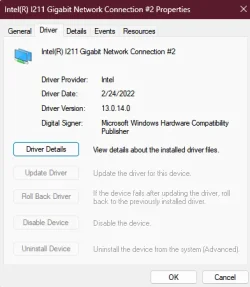
Let's start by looking at Device Manager to see what driver you are using now.
I used to use the driver provided by ASUS on my own motherboard, however, I have had more consistency using the Intel driver. (See attached screen shot).
Another method that I have used successfully (since the late 1990's) is to remove the network adapter in Windows Device Manager, re-scan for new hardware and then allow Windows to select the driver.

Hope this helps.Device Manager.webp
 

My Computer My Computer

At a glance

Windows 11 Pro 26200.9278Ryzen 5 5600G24GB
OS
Windows 11 Pro 26200.9278
Computer type
PC/Desktop
Manufacturer/Model
Home Built
CPU
Ryzen 5 5600G
Motherboard
ASUS X470 Prime Pro
Memory
24GB
Monitor(s) Displays
Alienware 2518HF
Screen Resolution
1920 x 1080
Hard Drives
Boot: NVME WDC WDS500G; ASUS M.2 Riser card with 3 additional NVME drives
Various Internal SDD (Samsung and WDC) and HDD drives mostly Western Digital
PSU
Seasonic Focus Gold 650W
Case
Corsair 200R
Cooling
Noctua PWM fans x 3
Keyboard
Corsair K60 SE Pro
Mouse
Corsair Dark Core RGB Pro SE
Internet Speed
500/500
Browser
MS Edge
Antivirus
Malwarebytes Premium
I'm getting somewhere here. i just performed the "Network reset" option where it removes all the drivers and reboots in 5 minutes. I let it do it's thing and my ethernet is now working. now we gotta tackle the USBs not being picked up on windows. haven't had the surge error but all my stuff has power but not being detected by windows?
 

My Computer My Computer

At a glance

Windows 11 Pro x64 25H2i9 14900kG.SKILL Ripjaws S5 Series DDR5 64gb 6400MT/sNVIDIA Geforce RTX 5070 Ti OC 16gb
OS
Windows 11 Pro x64 25H2
Computer type
PC/Desktop
CPU
i9 14900k
Motherboard
MSI Z790 Gaming Plus WiFi-AMZ Gaming Motherboard
Memory
G.SKILL Ripjaws S5 Series DDR5 64gb 6400MT/s
Graphics Card(s)
NVIDIA Geforce RTX 5070 Ti OC 16gb
Sound Card
HyperX Cloud 3 Wireless Headset , Astro A50 Gen 5 Wireless Gaming Headset
Monitor(s) Displays
Acer Prediator x34 X5 QD-OLED Ultrawide 240hz, Portable Monitor 1920x1080p 60hz
Screen Resolution
3440x1440p , 1920x1080p
Hard Drives
Crucial P3 Plus 500gb NVMe M.2
WD Black SN750 NVMe SSD 1TB
WD Black SN7100 NVMe SSD 2TB
Crucial MX500 1TB
PSU
Corsair RMx Series RM1000x ATX 3.1 PCIe 5.1
Case
MSI MAG PANO 100L PZ
Cooling
ID-COOLING FX360 Pro Liquid CPU Cooler
Keyboard
CORSAIR - K70 PRO TKL RGB Hall Effect Gaming Keyboard
Mouse
Glorious Model O 2 Pro Wireless Gaming Mouse
Internet Speed
https://www.speedtest.net/result/19091168380.png
Browser
Firefox
Antivirus
Windows Security
Again, working from my own Asus motherboard experience, my USB ports work best when using the drivers provided by Asus originally with the board. Start with the original native version and then incrementally update as needed.
BTW, be sure you backup your drivers and image your system as you progress.
 

My Computer My Computer

At a glance

Windows 11 Pro 26200.9278Ryzen 5 5600G24GB
OS
Windows 11 Pro 26200.9278
Computer type
PC/Desktop
Manufacturer/Model
Home Built
CPU
Ryzen 5 5600G
Motherboard
ASUS X470 Prime Pro
Memory
24GB
Monitor(s) Displays
Alienware 2518HF
Screen Resolution
1920 x 1080
Hard Drives
Boot: NVME WDC WDS500G; ASUS M.2 Riser card with 3 additional NVME drives
Various Internal SDD (Samsung and WDC) and HDD drives mostly Western Digital
PSU
Seasonic Focus Gold 650W
Case
Corsair 200R
Cooling
Noctua PWM fans x 3
Keyboard
Corsair K60 SE Pro
Mouse
Corsair Dark Core RGB Pro SE
Internet Speed
500/500
Browser
MS Edge
Antivirus
Malwarebytes Premium
using the drivers provided by Asus originally with the board. Start with the original native version and then incrementally update as needed.
I tried this. it removed all USB drivers and also while doing so it disabled my ethernet ( weird.. don't know how that is related. ) but i rebooted the PC after all that and my ethernet came back but nothing else. keyboard and mouse work like before and power to devices but still not detected by windows?
 

My Computer My Computer

At a glance

Windows 11 Pro x64 25H2i9 14900kG.SKILL Ripjaws S5 Series DDR5 64gb 6400MT/sNVIDIA Geforce RTX 5070 Ti OC 16gb
OS
Windows 11 Pro x64 25H2
Computer type
PC/Desktop
CPU
i9 14900k
Motherboard
MSI Z790 Gaming Plus WiFi-AMZ Gaming Motherboard
Memory
G.SKILL Ripjaws S5 Series DDR5 64gb 6400MT/s
Graphics Card(s)
NVIDIA Geforce RTX 5070 Ti OC 16gb
Sound Card
HyperX Cloud 3 Wireless Headset , Astro A50 Gen 5 Wireless Gaming Headset
Monitor(s) Displays
Acer Prediator x34 X5 QD-OLED Ultrawide 240hz, Portable Monitor 1920x1080p 60hz
Screen Resolution
3440x1440p , 1920x1080p
Hard Drives
Crucial P3 Plus 500gb NVMe M.2
WD Black SN750 NVMe SSD 1TB
WD Black SN7100 NVMe SSD 2TB
Crucial MX500 1TB
PSU
Corsair RMx Series RM1000x ATX 3.1 PCIe 5.1
Case
MSI MAG PANO 100L PZ
Cooling
ID-COOLING FX360 Pro Liquid CPU Cooler
Keyboard
CORSAIR - K70 PRO TKL RGB Hall Effect Gaming Keyboard
Mouse
Glorious Model O 2 Pro Wireless Gaming Mouse
Internet Speed
https://www.speedtest.net/result/19091168380.png
Browser
Firefox
Antivirus
Windows Security

Latest Support Threads

Back
Top Bottom