Solved Printer problems


The printers wifi interface is disabled!
 

My Computer My Computer

At a glance

win 11Ryzen 5600G32 GB DDR4on board
OS
win 11
Computer type
PC/Desktop
Manufacturer/Model
Home build
CPU
Ryzen 5600G
Motherboard
B450 Tomahawk Max
Memory
32 GB DDR4
Graphics Card(s)
on board
Monitor(s) Displays
LG 27MR400
Screen Resolution
1280 x 1024
Hard Drives
SSD
Internet Speed
3MB/s
Browser
Opera
Antivirus
Windows
If it's still not working power off the printer and router. Power the router back on and wait until you can access the internet with your laptop before powering the printer back on.. Let us know if you can print. I will hang out here for awhile...
 

My Computer My Computer

At a glance

Windows 11 & Zorin ProIntel® Core™ Ultra 9 Processor 275HX 2.7 GHz32 gbNVIDIA® GeForce RTX™ 5060 Laptop GPU
OS
Windows 11 & Zorin Pro
Computer type
Laptop
Manufacturer/Model
Asus Rog Strix G16
CPU
Intel® Core™ Ultra 9 Processor 275HX 2.7 GHz
Motherboard
AsusteK Computer
Memory
32 gb
Graphics Card(s)
NVIDIA® GeForce RTX™ 5060 Laptop GPU
Sound Card
Realtek High Definition Audio
Monitor(s) Displays
Laptop 16 inch
Screen Resolution
2560 X 1600
Hard Drives
Boot: Samsung 9100 NVME 2 TB Microsoft Storage Controller: Standard NVM Express Driver: Microsoft 6/21/2006. No SATA/AHCI on my motherboard or in bios
Mouse
Pad
Browser
Google Chrome
Antivirus
Microsoft
Other Info
Printer: HP Color LaserJet MFP M477dw
No test page.
 

My Computer My Computer

At a glance

win 11Ryzen 5600G32 GB DDR4on board
OS
win 11
Computer type
PC/Desktop
Manufacturer/Model
Home build
CPU
Ryzen 5600G
Motherboard
B450 Tomahawk Max
Memory
32 GB DDR4
Graphics Card(s)
on board
Monitor(s) Displays
LG 27MR400
Screen Resolution
1280 x 1024
Hard Drives
SSD
Internet Speed
3MB/s
Browser
Opera
Antivirus
Windows
Does your printer automatically print a test page when it's powered on? Mine does not....
 

My Computer My Computer

At a glance

Windows 11 & Zorin ProIntel® Core™ Ultra 9 Processor 275HX 2.7 GHz32 gbNVIDIA® GeForce RTX™ 5060 Laptop GPU
OS
Windows 11 & Zorin Pro
Computer type
Laptop
Manufacturer/Model
Asus Rog Strix G16
CPU
Intel® Core™ Ultra 9 Processor 275HX 2.7 GHz
Motherboard
AsusteK Computer
Memory
32 gb
Graphics Card(s)
NVIDIA® GeForce RTX™ 5060 Laptop GPU
Sound Card
Realtek High Definition Audio
Monitor(s) Displays
Laptop 16 inch
Screen Resolution
2560 X 1600
Hard Drives
Boot: Samsung 9100 NVME 2 TB Microsoft Storage Controller: Standard NVM Express Driver: Microsoft 6/21/2006. No SATA/AHCI on my motherboard or in bios
Mouse
Pad
Browser
Google Chrome
Antivirus
Microsoft
Other Info
Printer: HP Color LaserJet MFP M477dw
No, it does not.
 

My Computer My Computer

At a glance

win 11Ryzen 5600G32 GB DDR4on board
OS
win 11
Computer type
PC/Desktop
Manufacturer/Model
Home build
CPU
Ryzen 5600G
Motherboard
B450 Tomahawk Max
Memory
32 GB DDR4
Graphics Card(s)
on board
Monitor(s) Displays
LG 27MR400
Screen Resolution
1280 x 1024
Hard Drives
SSD
Internet Speed
3MB/s
Browser
Opera
Antivirus
Windows
What IP address is shown in the printer front panel configuration menu? Make sure you look in the Wired Network section.

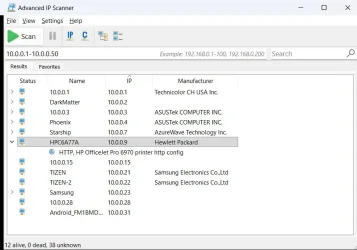
If the printer is connected to the router with Ethernet and it is turned on then you see it if you run Advanced IP Scanner. For example, I can see my HP printer with it.

2026-06-13 20_46_35-Advanced IP Scanner.webp
 

My Computers My Computers

  • At a glance

    Windows 11 Pro 25H2 (26200.6901)AMD Ryzen 7 6800H with Radeon 680M GPU (486MB...Crucial DDR5-4800 (2400MHz) 32GB (2 x 16GB)NVIDIA RTX 3060 Laptop (6GB RAM)
    OS
    Windows 11 Pro 25H2 (26200.6901)
    Computer type
    Laptop
    Manufacturer/Model
    ASUS TUF Gaming A15 (2022)
    CPU
    AMD Ryzen 7 6800H with Radeon 680M GPU (486MB RAM)
    Memory
    Crucial DDR5-4800 (2400MHz) 32GB (2 x 16GB)
    Graphics Card(s)
    NVIDIA RTX 3060 Laptop (6GB RAM)
    Sound Card
    n/a
    Monitor(s) Displays
    15.6-inch
    Screen Resolution
    1920x1080 300Hz
    Hard Drives
    2 x Samsung 990 Evo Plus (2TB M.2 NVME SSD)
    PSU
    n/a
    Mouse
    Wireless Mouse M510
    Internet Speed
    2100Mbps/300Mbps
    Browser
    Firefox
    Antivirus
    Malwarebytes
  • At a glance

    Windows 11 Pro 25H2 (26200.8246)AMD Ryzen 7 5700X3DG.SKILL Flare X 32GB (2x16GB) DDR4ASUS ROG-STRIX-RTX3060TI-08G-V2-GAMING (RTX 3...
    Operating System
    Windows 11 Pro 25H2 (26200.8246)
    Computer type
    PC/Desktop
    Manufacturer/Model
    Custom build
    CPU
    AMD Ryzen 7 5700X3D
    Motherboard
    ASUS ROG Strix B550-F Gaming WiFi II
    Memory
    G.SKILL Flare X 32GB (2x16GB) DDR4
    Graphics card(s)
    ASUS ROG-STRIX-RTX3060TI-08G-V2-GAMING (RTX 3060-Ti, 8GB RAM)
    Monitor(s) Displays
    Samsung G50D IPS 27"
    Screen Resolution
    1440p/180Hz
    Hard Drives
    SAMSUNG 990 EVO Plus (2TB] M.2 NVME SSD
    SAMSUNG 990 EVO Plus (4TB) M.2 NVME SSD
    PSU
    Corsair RM750x (750 watts)
    Case
    Cooler Master MasterCase 5
    Cooling
    Scythe Mugen 6
    Keyboard
    Logitech K520 (MK540 keyboard/mouse combo)
    Mouse
    Logitech M310 (MK540 keyboard/mouse combo)
    Internet Speed
    2100 Mbps down / 300 Mbps up
    Browser
    Firefox, Edge, Chrome
    Antivirus
    Malwarebytes (Premium)
    Other Info
    ASUS Blu-ray Burner BW-16D1HT (SATA) || Western Digital Easystore 20TB USB 3.0 external hard drive used with Acronis True Image 2025 backup software || HP OfficeJet Pro 6975 Printer/Scanner
You can have both wired Ethernet and wireless Wi-Fi access on a modern printer (works for me).
For this model printer, you cannot have the printer connected both by ethernet and wifi to the router. That is issue the OP has yet to confirm he has resolved.
It is not that you cannot print to the same printer using Wifi or ethernet. As long as the printer is connected correctly to the router, your devices can use either Wifi or ethernet, depending upon how they access the router.
 

My Computer My Computer

At a glance

Windows 11 25H2Broadwell-e 6850K 4.5ghz @1.36v32GB Corsair LPM 3600 C16EVGA RTX 3080Ti FTW
OS
Windows 11 25H2
Computer type
PC/Desktop
Manufacturer/Model
EVGA home brew
CPU
Broadwell-e 6850K 4.5ghz @1.36v
Motherboard
EVGA X99 FTW K
Memory
32GB Corsair LPM 3600 C16
Graphics Card(s)
EVGA RTX 3080Ti FTW
Sound Card
Asus Centurion true 7.1 headset. (5 speakers in each earpeice)
Monitor(s) Displays
LG C4 55"
Screen Resolution
4K 144hz
Hard Drives
Various models of SSDs ~10TB No HDDs installed.
PSU
be quiet! BN516 Straight Power 12-1000w 80 Plus Platinum
Case
Corsair 780T modified to dual 200mm intake fans
Cooling
Corsair H110i
Keyboard
Corsair K95 Platinum
Mouse
Corsair M65 RGB Elite
Internet Speed
50Mbs
MisterEd: the front panel shows only Zeros
 

My Computer My Computer

At a glance

win 11Ryzen 5600G32 GB DDR4on board
OS
win 11
Computer type
PC/Desktop
Manufacturer/Model
Home build
CPU
Ryzen 5600G
Motherboard
B450 Tomahawk Max
Memory
32 GB DDR4
Graphics Card(s)
on board
Monitor(s) Displays
LG 27MR400
Screen Resolution
1280 x 1024
Hard Drives
SSD
Internet Speed
3MB/s
Browser
Opera
Antivirus
Windows
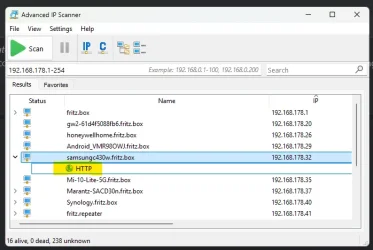
Looking at your Advanced Ipscanner pic, there will be a drop down box (BRW.... 192.168.1.14), this should take you to the printers internal settings page?

Mine is below, if I double left click HTTP entry hi-lighted in yellow (below the Samsung c430w) it takes me straight to the printers internal home page (note:- some may require a password!)

ipscan.webp
 

My Computer My Computer

At a glance

Windows 11 Pro 25H2Intel Alder lake i7 12700K32 Gb Corsair Vengeance LPX DDR4 3200 XMP2EVGA 3070ti FTW3 Ultra Gaming & Intel Arc
OS
Windows 11 Pro 25H2
Computer type
PC/Desktop
Manufacturer/Model
My Self
CPU
Intel Alder lake i7 12700K
Motherboard
Asus z690 Gaming WiFi D4, Bios Ver 4505
Memory
32 Gb Corsair Vengeance LPX DDR4 3200 XMP2
Graphics Card(s)
EVGA 3070ti FTW3 Ultra Gaming & Intel Arc
Sound Card
Via Display port
Monitor(s) Displays
Dell AW2723DF
Screen Resolution
2560 x 1440 @ 280Hz G-Sync mode
Hard Drives
WD Black SN850 1Tb NVME (Boot Drive)
WD BLACK SN850X + Heatsink 1Tb NVME
Samsung 870 Qvo 1Tb SSD,
Pioneer DVD-RW DVR-219L
WD Black SN850x NVME 2Tb x3
PSU
Corsair RM850
Case
Phanteks Enthoo Pro M Tempered Glass
Cooling
Be Quiet Shadow Rock 3
Keyboard
Logitech G Pro
Mouse
Logitech G903, Lightspeed + Powerplay Mat
Internet Speed
900Mb/900Mb Fritz!Box 7590ax v2
Browser
Firefox
Antivirus
MS Defender
Other Info
Logitech C930e webcam
Synology DS218 play 2 x 4Tb Synology HAT3300-4T
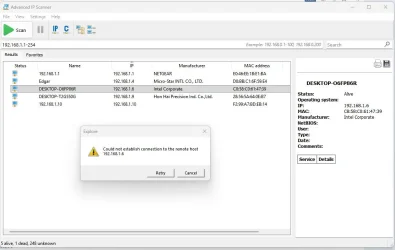
Double-clicking on any of the entries produces this message:
No printer shown
 

Attachments

  • prproperties1.webp
    prproperties1.webp
    41 KB · Views: 1

My Computer My Computer

At a glance

win 11Ryzen 5600G32 GB DDR4on board
OS
win 11
Computer type
PC/Desktop
Manufacturer/Model
Home build
CPU
Ryzen 5600G
Motherboard
B450 Tomahawk Max
Memory
32 GB DDR4
Graphics Card(s)
on board
Monitor(s) Displays
LG 27MR400
Screen Resolution
1280 x 1024
Hard Drives
SSD
Internet Speed
3MB/s
Browser
Opera
Antivirus
Windows
that is because there is no tree under it ( > to the left of the name). on your printer
The printers wifi interface is disabled!
so as of right now, it is only connected via ethernet. go into the network settings on your printer, ipv4, and set it to a static ip address (just use anything that is not listed on the advanced scanner results, such as .40 for example (you can ping it first to see if it gets a reply, if you want). once set to .40, reboot the printer. in windows,

win+r and run
Code:
shell:::{26EE0668-A00A-44D7-9371-BEB064C98683}\0\::{A8A91A66-3A7D-4424-8D24-04E180695C7A}

right click your printer > remove device

"Add a printer" button at top

click "The printer that i want isn't listed" link at bottom

"Add a printer using an IP address or hostname" > next

input .40 ip address > next

when it adds the printer and finishes, back in the window you opened earlier, Right click the printer now > Printer properties > Ports (tab) > Ensure the port selected is that IP address.
If it isnt or is WSD, Add port > set that IP and just name it that IP > Apply that port to the printer.
 

My Computer My Computer

At a glance

Windows 11 Pro
OS
Windows 11 Pro
I tried to ping several different IP addresses to find out one that pings but all timed out.
So I went into the printer setup and entered an IP address (192.168.1.7) but that didn't ping either.
The IP scanner did not see it.
 

My Computer My Computer

At a glance

win 11Ryzen 5600G32 GB DDR4on board
OS
win 11
Computer type
PC/Desktop
Manufacturer/Model
Home build
CPU
Ryzen 5600G
Motherboard
B450 Tomahawk Max
Memory
32 GB DDR4
Graphics Card(s)
on board
Monitor(s) Displays
LG 27MR400
Screen Resolution
1280 x 1024
Hard Drives
SSD
Internet Speed
3MB/s
Browser
Opera
Antivirus
Windows
Try this: Power cycle the router. Wait a few minutes for it to reboot. Then restart Windows.

What you want to do is clear any cached routing information in the network. By rebooting both the router and your Windows, everything gets reset. There are ways to clear this way without rebooting, but rebooting is the easiest way to explain it.
 

My Computer My Computer

At a glance

Windows 7
OS
Windows 7
I tried to ping several different IP addresses to find out one that pings but all timed out.
So I went into the printer setup and entered an IP address (192.168.1.7) but that didn't ping either.
The IP scanner did not see it.
You shouldn't be setting the IP address in the printer setup. When you connect the printer with an Ethernet cable to the router, the router should automatically assign an IP address.

For example, I have 3 desktop computers connected by Ethernet to the router. When they were first connected the router assigned them an IP address. The only way to change these IP addresses was to go into the router configuration and manually change them.

Once the printer is connected to the router you need to run the setup on each computer.

The Quick Setup Guide for your printer shows two ways to set up your printer
  • Configuration using the CD-ROM (Windows)
  • Configuration without using the CD-ROM (Windows)
The 2nd option says to download the driver and software package from the support site:

DCP-L2540DW - Downloads
 
Last edited:

My Computers My Computers

  • At a glance

    Windows 11 Pro 25H2 (26200.6901)AMD Ryzen 7 6800H with Radeon 680M GPU (486MB...Crucial DDR5-4800 (2400MHz) 32GB (2 x 16GB)NVIDIA RTX 3060 Laptop (6GB RAM)
    OS
    Windows 11 Pro 25H2 (26200.6901)
    Computer type
    Laptop
    Manufacturer/Model
    ASUS TUF Gaming A15 (2022)
    CPU
    AMD Ryzen 7 6800H with Radeon 680M GPU (486MB RAM)
    Memory
    Crucial DDR5-4800 (2400MHz) 32GB (2 x 16GB)
    Graphics Card(s)
    NVIDIA RTX 3060 Laptop (6GB RAM)
    Sound Card
    n/a
    Monitor(s) Displays
    15.6-inch
    Screen Resolution
    1920x1080 300Hz
    Hard Drives
    2 x Samsung 990 Evo Plus (2TB M.2 NVME SSD)
    PSU
    n/a
    Mouse
    Wireless Mouse M510
    Internet Speed
    2100Mbps/300Mbps
    Browser
    Firefox
    Antivirus
    Malwarebytes
  • At a glance

    Windows 11 Pro 25H2 (26200.8246)AMD Ryzen 7 5700X3DG.SKILL Flare X 32GB (2x16GB) DDR4ASUS ROG-STRIX-RTX3060TI-08G-V2-GAMING (RTX 3...
    Operating System
    Windows 11 Pro 25H2 (26200.8246)
    Computer type
    PC/Desktop
    Manufacturer/Model
    Custom build
    CPU
    AMD Ryzen 7 5700X3D
    Motherboard
    ASUS ROG Strix B550-F Gaming WiFi II
    Memory
    G.SKILL Flare X 32GB (2x16GB) DDR4
    Graphics card(s)
    ASUS ROG-STRIX-RTX3060TI-08G-V2-GAMING (RTX 3060-Ti, 8GB RAM)
    Monitor(s) Displays
    Samsung G50D IPS 27"
    Screen Resolution
    1440p/180Hz
    Hard Drives
    SAMSUNG 990 EVO Plus (2TB] M.2 NVME SSD
    SAMSUNG 990 EVO Plus (4TB) M.2 NVME SSD
    PSU
    Corsair RM750x (750 watts)
    Case
    Cooler Master MasterCase 5
    Cooling
    Scythe Mugen 6
    Keyboard
    Logitech K520 (MK540 keyboard/mouse combo)
    Mouse
    Logitech M310 (MK540 keyboard/mouse combo)
    Internet Speed
    2100 Mbps down / 300 Mbps up
    Browser
    Firefox, Edge, Chrome
    Antivirus
    Malwarebytes (Premium)
    Other Info
    ASUS Blu-ray Burner BW-16D1HT (SATA) || Western Digital Easystore 20TB USB 3.0 external hard drive used with Acronis True Image 2025 backup software || HP OfficeJet Pro 6975 Printer/Scanner
OK, power-cycled the router, started win.
The router set-up does NOT show the printer, the IP scanner does not show either!
 

My Computer My Computer

At a glance

win 11Ryzen 5600G32 GB DDR4on board
OS
win 11
Computer type
PC/Desktop
Manufacturer/Model
Home build
CPU
Ryzen 5600G
Motherboard
B450 Tomahawk Max
Memory
32 GB DDR4
Graphics Card(s)
on board
Monitor(s) Displays
LG 27MR400
Screen Resolution
1280 x 1024
Hard Drives
SSD
Internet Speed
3MB/s
Browser
Opera
Antivirus
Windows
MisterEd: the front panel shows only Zeros
I just did a Google search for "DCP-L2540DW wired network setup". Here is a summary of the result:
Note at the bottom of the result is a link to a YouTube video. Hope this helps.

To set up your Brother DCP-L2540DW on a wired network, disable its Wi-Fi, connect an Ethernet cable from the printer to your router, and run the Brother software on your computer to detect and install the printer.

Here are the step-by-step instructions:

Step 1: Enable Wired Network (and disable Wi-Fi)

Since the printer cannot use both wired and wireless connections simultaneously, ensure Wi-Fi is turned off and Wired LAN is enabled.
  1. Press the Menu button on the printer's control panel.
  2. Press the ▲ or ▼ arrow keys to select Network and press OK.
  3. Select Wired LAN (or WLAN) and press OK.
  4. Select Wired Enable and set it to On. If prompted to turn WLAN (Wireless) off, confirm it.
Step 2: Connect the Hardware
  1. Plug one end of a standard Ethernet cable into the LAN port on the back of your printer.
  2. Plug the other end into an available LAN port (Ethernet port) on your home router.
Step 3: Install Software on Your Computer
  1. Navigate to the official Brother Setup Page.
  2. Download and run the Full Driver & Software Package.
  3. When the connection type prompt appears, select Wired Network Connection (Ethernet).
  4. The installer will search your network for the printer. Select it from the list and complete the on-screen instructions.
For a visual overview of how the wired network installation works:

Wired Network Install DCPL2550DW - Windows

 

My Computers My Computers

  • At a glance

    Windows 11 Pro 25H2 (26200.6901)AMD Ryzen 7 6800H with Radeon 680M GPU (486MB...Crucial DDR5-4800 (2400MHz) 32GB (2 x 16GB)NVIDIA RTX 3060 Laptop (6GB RAM)
    OS
    Windows 11 Pro 25H2 (26200.6901)
    Computer type
    Laptop
    Manufacturer/Model
    ASUS TUF Gaming A15 (2022)
    CPU
    AMD Ryzen 7 6800H with Radeon 680M GPU (486MB RAM)
    Memory
    Crucial DDR5-4800 (2400MHz) 32GB (2 x 16GB)
    Graphics Card(s)
    NVIDIA RTX 3060 Laptop (6GB RAM)
    Sound Card
    n/a
    Monitor(s) Displays
    15.6-inch
    Screen Resolution
    1920x1080 300Hz
    Hard Drives
    2 x Samsung 990 Evo Plus (2TB M.2 NVME SSD)
    PSU
    n/a
    Mouse
    Wireless Mouse M510
    Internet Speed
    2100Mbps/300Mbps
    Browser
    Firefox
    Antivirus
    Malwarebytes
  • At a glance

    Windows 11 Pro 25H2 (26200.8246)AMD Ryzen 7 5700X3DG.SKILL Flare X 32GB (2x16GB) DDR4ASUS ROG-STRIX-RTX3060TI-08G-V2-GAMING (RTX 3...
    Operating System
    Windows 11 Pro 25H2 (26200.8246)
    Computer type
    PC/Desktop
    Manufacturer/Model
    Custom build
    CPU
    AMD Ryzen 7 5700X3D
    Motherboard
    ASUS ROG Strix B550-F Gaming WiFi II
    Memory
    G.SKILL Flare X 32GB (2x16GB) DDR4
    Graphics card(s)
    ASUS ROG-STRIX-RTX3060TI-08G-V2-GAMING (RTX 3060-Ti, 8GB RAM)
    Monitor(s) Displays
    Samsung G50D IPS 27"
    Screen Resolution
    1440p/180Hz
    Hard Drives
    SAMSUNG 990 EVO Plus (2TB] M.2 NVME SSD
    SAMSUNG 990 EVO Plus (4TB) M.2 NVME SSD
    PSU
    Corsair RM750x (750 watts)
    Case
    Cooler Master MasterCase 5
    Cooling
    Scythe Mugen 6
    Keyboard
    Logitech K520 (MK540 keyboard/mouse combo)
    Mouse
    Logitech M310 (MK540 keyboard/mouse combo)
    Internet Speed
    2100 Mbps down / 300 Mbps up
    Browser
    Firefox, Edge, Chrome
    Antivirus
    Malwarebytes (Premium)
    Other Info
    ASUS Blu-ray Burner BW-16D1HT (SATA) || Western Digital Easystore 20TB USB 3.0 external hard drive used with Acronis True Image 2025 backup software || HP OfficeJet Pro 6975 Printer/Scanner
OK, power-cycled the router, started win.
The router set-up does NOT show the printer, the IP scanner does not show either!
Did you run the IP scanner tool? You want to know how everything (including the printer) is currently numbered.
 

My Computer My Computer

At a glance

Windows 7
OS
Windows 7
It appears that the printer has finally given up the ghost. Dead as a door nail. Pulled the plug and replaced it a couple of times, no sign of life! Rest in peace!
 

My Computer My Computer

At a glance

win 11Ryzen 5600G32 GB DDR4on board
OS
win 11
Computer type
PC/Desktop
Manufacturer/Model
Home build
CPU
Ryzen 5600G
Motherboard
B450 Tomahawk Max
Memory
32 GB DDR4
Graphics Card(s)
on board
Monitor(s) Displays
LG 27MR400
Screen Resolution
1280 x 1024
Hard Drives
SSD
Internet Speed
3MB/s
Browser
Opera
Antivirus
Windows
It appears that the printer has finally given up the ghost. Dead as a door nail. Pulled the plug and replaced it a couple of times, no sign of life! Rest in peace!
Sorry to hear about that. All is not lost. Whatever printer it is will need to be setup. Just read the user manual and download the setup software. There might even be a YouTube video to guide you.
 

My Computers My Computers

  • At a glance

    Windows 11 Pro 25H2 (26200.6901)AMD Ryzen 7 6800H with Radeon 680M GPU (486MB...Crucial DDR5-4800 (2400MHz) 32GB (2 x 16GB)NVIDIA RTX 3060 Laptop (6GB RAM)
    OS
    Windows 11 Pro 25H2 (26200.6901)
    Computer type
    Laptop
    Manufacturer/Model
    ASUS TUF Gaming A15 (2022)
    CPU
    AMD Ryzen 7 6800H with Radeon 680M GPU (486MB RAM)
    Memory
    Crucial DDR5-4800 (2400MHz) 32GB (2 x 16GB)
    Graphics Card(s)
    NVIDIA RTX 3060 Laptop (6GB RAM)
    Sound Card
    n/a
    Monitor(s) Displays
    15.6-inch
    Screen Resolution
    1920x1080 300Hz
    Hard Drives
    2 x Samsung 990 Evo Plus (2TB M.2 NVME SSD)
    PSU
    n/a
    Mouse
    Wireless Mouse M510
    Internet Speed
    2100Mbps/300Mbps
    Browser
    Firefox
    Antivirus
    Malwarebytes
  • At a glance

    Windows 11 Pro 25H2 (26200.8246)AMD Ryzen 7 5700X3DG.SKILL Flare X 32GB (2x16GB) DDR4ASUS ROG-STRIX-RTX3060TI-08G-V2-GAMING (RTX 3...
    Operating System
    Windows 11 Pro 25H2 (26200.8246)
    Computer type
    PC/Desktop
    Manufacturer/Model
    Custom build
    CPU
    AMD Ryzen 7 5700X3D
    Motherboard
    ASUS ROG Strix B550-F Gaming WiFi II
    Memory
    G.SKILL Flare X 32GB (2x16GB) DDR4
    Graphics card(s)
    ASUS ROG-STRIX-RTX3060TI-08G-V2-GAMING (RTX 3060-Ti, 8GB RAM)
    Monitor(s) Displays
    Samsung G50D IPS 27"
    Screen Resolution
    1440p/180Hz
    Hard Drives
    SAMSUNG 990 EVO Plus (2TB] M.2 NVME SSD
    SAMSUNG 990 EVO Plus (4TB) M.2 NVME SSD
    PSU
    Corsair RM750x (750 watts)
    Case
    Cooler Master MasterCase 5
    Cooling
    Scythe Mugen 6
    Keyboard
    Logitech K520 (MK540 keyboard/mouse combo)
    Mouse
    Logitech M310 (MK540 keyboard/mouse combo)
    Internet Speed
    2100 Mbps down / 300 Mbps up
    Browser
    Firefox, Edge, Chrome
    Antivirus
    Malwarebytes (Premium)
    Other Info
    ASUS Blu-ray Burner BW-16D1HT (SATA) || Western Digital Easystore 20TB USB 3.0 external hard drive used with Acronis True Image 2025 backup software || HP OfficeJet Pro 6975 Printer/Scanner
OK, just need to buy a new printer, any suggestions re Brother laser?
 

My Computer My Computer

At a glance

win 11Ryzen 5600G32 GB DDR4on board
OS
win 11
Computer type
PC/Desktop
Manufacturer/Model
Home build
CPU
Ryzen 5600G
Motherboard
B450 Tomahawk Max
Memory
32 GB DDR4
Graphics Card(s)
on board
Monitor(s) Displays
LG 27MR400
Screen Resolution
1280 x 1024
Hard Drives
SSD
Internet Speed
3MB/s
Browser
Opera
Antivirus
Windows
Back
Top Bottom