program runs in Windows 10 but not Windows 11


@IanMosley
@garlin
The plot thickens.
Okay I installed all the VC++ packages as suggested.
No success after a reboot.
Then I looked on my Win 10 PC to see what VC++ it has.
Seems to have several more than the Win 11.
Can I assume that a higher version number mean a lower version one is not needed. eg V12.xxx means no need for V11.xxx?
Excuse the ignorance.

I hope OAT will come back and tell me how his system differs from mine as he seems to have it running.
 

My Computer My Computer

At a glance

Windows 11 Proi7-1370064GB DDR4RTX4600
OS
Windows 11 Pro
Computer type
PC/Desktop
Manufacturer/Model
Gigabyte MOBO
CPU
i7-13700
Motherboard
Z790
Memory
64GB DDR4
Graphics Card(s)
RTX4600
Hard Drives
NVMe 2TB/SSD 2TB/HDD 4TB/HDD 8TB
PSU
BeQuiet 750w
Case
Fractal Define 7 Quiet
Internet Speed
300Mbps FTTH
Antivirus
Windows Defender
Visual C++ 2012 Runtime is no longer supported.
Supported is not the same thing as available for install. Apps are often written to require some outdated run-time because they're legacy code, and MS will continue offering them for download to appease developers. Unless you've tested a specific app, it's not wise to make a blanket statement that the latest VC++ will always work. Some apps depend on weird legacy quirks.
 

My Computer My Computer

At a glance

Windows 7
OS
Windows 7
  • Like
Reactions: OAT
I hope OAT will come back and tell me how his system differs from mine as he seems to have it running.
I do not see any of these having any impact at all on your installation.
But this is what I have:
Screenshot 2023-12-08 220845.png
 

My Computers My Computers

  • At a glance

    All Branches but ReleaseAMD Ryzen 7 7735HS 3200-4500 Mhz 8 cores x 232 GB DDR5Radeon Graphic / NVIDIA GeForce RTX 4060 8 GB...
    OS
    All Branches but Release
    Computer type
    Laptop
    Manufacturer/Model
    Acer Nitro ANV15-51
    CPU
    AMD Ryzen 7 7735HS 3200-4500 Mhz 8 cores x 2
    Motherboard
    Sportage_RBH
    Memory
    32 GB DDR5
    Graphics Card(s)
    Radeon Graphic / NVIDIA GeForce RTX 4060 8 GB GDDR6
    Sound Card
    AMD/Realtek(R) Audio
    Monitor(s) Displays
    Integrated Monitor (15.3"vis)
    Screen Resolution
    FHD 1920X1080 16:9 144Hz
    Hard Drives
    KINGSTON OM8SEP4512Q-AA 1TB
    Western Digital 256GB
    PSU
    19V DC 6.32 A 120 W
    Cooling
    Dual Fans
    Mouse
    MS Bluetooth
    Internet Speed
    Fiber 1GB Cox -us & 1GB Orange-fr
    Browser
    Edge Canary- Firefox Nightly-Chrome Dev-Chrome Dev
    Antivirus
    Windows Defender
  • At a glance

    Windows 11 BetaAMD A9-94208 GB of DDR4AMD Radeon R5
    Operating System
    Windows 11 Beta
    Computer type
    Laptop
    Manufacturer/Model
    Asus X751BP
    CPU
    AMD A9-9420
    Memory
    8 GB of DDR4
    Graphics card(s)
    AMD Radeon R5
    Screen Resolution
    1600x900
    Hard Drives
    Seagate 1 TB
Just got on this and will relate that doing an install on Tuesday show failure so on a hunch I ran SFC /SCANNOW as Adminisrator and it found trouble in some files, it fixed them and the install worked.
 

My Computers My Computers

  • At a glance

    Win11 Pro RTM Version 24H2 Build 26100.4202Intel Core i5 11th Gen. 2.40GHz12GB
    OS
    Win11 Pro RTM Version 24H2 Build 26100.4202
    Computer type
    Laptop
    Manufacturer/Model
    Dell Vostro 3400
    CPU
    Intel Core i5 11th Gen. 2.40GHz
    Memory
    12GB
    Hard Drives
    256GB SSD NVMe M.2
  • At a glance

    Win11 Pro RTM Version 24H2 Build 26100.4202Intel Core i5 10th Gen. 2.90GHz16GBOnboard, no VGA, using a DisplayPort-to-VGA a...
    Operating System
    Win11 Pro RTM Version 24H2 Build 26100.4202
    Computer type
    PC/Desktop
    Manufacturer/Model
    Dell Vostro 5890
    CPU
    Intel Core i5 10th Gen. 2.90GHz
    Memory
    16GB
    Graphics card(s)
    Onboard, no VGA, using a DisplayPort-to-VGA adapter
    Monitor(s) Displays
    24" Dell
    Hard Drives
    512GB SSD NVMe, 4TB Seagate HDD
    Browser
    Firefox, Edge
    Antivirus
    Windows Defender/Microsoft Security
@Berton
I ran an sfc /scannow and unfortunately it found nothing.
 

My Computer My Computer

At a glance

Windows 11 Proi7-1370064GB DDR4RTX4600
OS
Windows 11 Pro
Computer type
PC/Desktop
Manufacturer/Model
Gigabyte MOBO
CPU
i7-13700
Motherboard
Z790
Memory
64GB DDR4
Graphics Card(s)
RTX4600
Hard Drives
NVMe 2TB/SSD 2TB/HDD 4TB/HDD 8TB
PSU
BeQuiet 750w
Case
Fractal Define 7 Quiet
Internet Speed
300Mbps FTTH
Antivirus
Windows Defender

My Computers My Computers

  • At a glance

    Win11 Pro RTM Version 24H2 Build 26100.4202Intel Core i5 11th Gen. 2.40GHz12GB
    OS
    Win11 Pro RTM Version 24H2 Build 26100.4202
    Computer type
    Laptop
    Manufacturer/Model
    Dell Vostro 3400
    CPU
    Intel Core i5 11th Gen. 2.40GHz
    Memory
    12GB
    Hard Drives
    256GB SSD NVMe M.2
  • At a glance

    Win11 Pro RTM Version 24H2 Build 26100.4202Intel Core i5 10th Gen. 2.90GHz16GBOnboard, no VGA, using a DisplayPort-to-VGA a...
    Operating System
    Win11 Pro RTM Version 24H2 Build 26100.4202
    Computer type
    PC/Desktop
    Manufacturer/Model
    Dell Vostro 5890
    CPU
    Intel Core i5 10th Gen. 2.90GHz
    Memory
    16GB
    Graphics card(s)
    Onboard, no VGA, using a DisplayPort-to-VGA adapter
    Monitor(s) Displays
    24" Dell
    Hard Drives
    512GB SSD NVMe, 4TB Seagate HDD
    Browser
    Firefox, Edge
    Antivirus
    Windows Defender/Microsoft Security
@OAT,
Thanks for that but it seems very different from both my Win 10 pc where it works and my Win11 pc where it doesn't.
I believe you use Defender so please could you just say what settings you are using and if TPM and Secure Boot.

@all
Also can someone please educate me re what I wrote above on versions of VC++ ie Can I assume that a higher version number mean a lower version one is not needed. eg V12.xxx means no need for V11.xxx?

Thanks
 

My Computer My Computer

At a glance

Windows 11 Proi7-1370064GB DDR4RTX4600
OS
Windows 11 Pro
Computer type
PC/Desktop
Manufacturer/Model
Gigabyte MOBO
CPU
i7-13700
Motherboard
Z790
Memory
64GB DDR4
Graphics Card(s)
RTX4600
Hard Drives
NVMe 2TB/SSD 2TB/HDD 4TB/HDD 8TB
PSU
BeQuiet 750w
Case
Fractal Define 7 Quiet
Internet Speed
300Mbps FTTH
Antivirus
Windows Defender
@OAT,
Thanks for that but it seems very different from both my Win 10 pc where it works and my Win11 pc where it doesn't.
I believe you use Defender so please could you just say what settings you are using and if TPM and Secure Boot.

@all
Also can someone please educate me re what I wrote above on versions of VC++ ie Can I assume that a higher version number mean a lower version one is not needed. eg V12.xxx means no need for V11.xxx?

Thanks
Like with other support programs like .NET Framework some install of programs look for specific version and will install as needed. There's no guarantee that version 10 will run what version 7 does, etc., it's up the the programs that need it to call for it. Or in other words support programs are not always backwards compatible.
 

My Computers My Computers

  • At a glance

    Win11 Pro RTM Version 24H2 Build 26100.4202Intel Core i5 11th Gen. 2.40GHz12GB
    OS
    Win11 Pro RTM Version 24H2 Build 26100.4202
    Computer type
    Laptop
    Manufacturer/Model
    Dell Vostro 3400
    CPU
    Intel Core i5 11th Gen. 2.40GHz
    Memory
    12GB
    Hard Drives
    256GB SSD NVMe M.2
  • At a glance

    Win11 Pro RTM Version 24H2 Build 26100.4202Intel Core i5 10th Gen. 2.90GHz16GBOnboard, no VGA, using a DisplayPort-to-VGA a...
    Operating System
    Win11 Pro RTM Version 24H2 Build 26100.4202
    Computer type
    PC/Desktop
    Manufacturer/Model
    Dell Vostro 5890
    CPU
    Intel Core i5 10th Gen. 2.90GHz
    Memory
    16GB
    Graphics card(s)
    Onboard, no VGA, using a DisplayPort-to-VGA adapter
    Monitor(s) Displays
    24" Dell
    Hard Drives
    512GB SSD NVMe, 4TB Seagate HDD
    Browser
    Firefox, Edge
    Antivirus
    Windows Defender/Microsoft Security
There are several generations of VC++ runtimes, grouped by original year of release. On paper, the newest VC++ (2015-2022) should be able to handle any apps written for older versions. For the most part, that's true for average programs.

Unfortunately there are some quirky apps, which don't work without a specific version. Older Windows games are notorious for that.

The typical guidance is if an app specifies to use an older VC++ of a given year (ie. 2012), you provide it simply to prevent possible compatibility problems. Just one less thing to worry about. You don't need to collect the entire set of older VC++ versions, but some users like to do this for convenience so they don't need to keep checking if they're missing one of them.
 

My Computer My Computer

At a glance

Windows 7
OS
Windows 7
@garlin
@Berton
Thanks for both your inputs. One less thing that I am unclear about.
 

My Computer My Computer

At a glance

Windows 11 Proi7-1370064GB DDR4RTX4600
OS
Windows 11 Pro
Computer type
PC/Desktop
Manufacturer/Model
Gigabyte MOBO
CPU
i7-13700
Motherboard
Z790
Memory
64GB DDR4
Graphics Card(s)
RTX4600
Hard Drives
NVMe 2TB/SSD 2TB/HDD 4TB/HDD 8TB
PSU
BeQuiet 750w
Case
Fractal Define 7 Quiet
Internet Speed
300Mbps FTTH
Antivirus
Windows Defender
:thumbsup:
 

My Computers My Computers

  • At a glance

    Win11 Pro RTM Version 24H2 Build 26100.4202Intel Core i5 11th Gen. 2.40GHz12GB
    OS
    Win11 Pro RTM Version 24H2 Build 26100.4202
    Computer type
    Laptop
    Manufacturer/Model
    Dell Vostro 3400
    CPU
    Intel Core i5 11th Gen. 2.40GHz
    Memory
    12GB
    Hard Drives
    256GB SSD NVMe M.2
  • At a glance

    Win11 Pro RTM Version 24H2 Build 26100.4202Intel Core i5 10th Gen. 2.90GHz16GBOnboard, no VGA, using a DisplayPort-to-VGA a...
    Operating System
    Win11 Pro RTM Version 24H2 Build 26100.4202
    Computer type
    PC/Desktop
    Manufacturer/Model
    Dell Vostro 5890
    CPU
    Intel Core i5 10th Gen. 2.90GHz
    Memory
    16GB
    Graphics card(s)
    Onboard, no VGA, using a DisplayPort-to-VGA adapter
    Monitor(s) Displays
    24" Dell
    Hard Drives
    512GB SSD NVMe, 4TB Seagate HDD
    Browser
    Firefox, Edge
    Antivirus
    Windows Defender/Microsoft Security
@OAT,
could you just say what settings you are using and if TPM and Secure Boot.
Default settings for Defender, & yes to both, but it is irrelevant.

Have you tried to uninstall the program, restart windows and reinstall the program, not selecting any of the cloud options?
Do you get an error at all when clicking the .exe or shortcut?
Have you tried logging in to your system as a different user or admin and run the .msi?
Please post screenshots of file/shortcut properties.
Good luck & good night.
Thx
 

My Computers My Computers

  • At a glance

    All Branches but ReleaseAMD Ryzen 7 7735HS 3200-4500 Mhz 8 cores x 232 GB DDR5Radeon Graphic / NVIDIA GeForce RTX 4060 8 GB...
    OS
    All Branches but Release
    Computer type
    Laptop
    Manufacturer/Model
    Acer Nitro ANV15-51
    CPU
    AMD Ryzen 7 7735HS 3200-4500 Mhz 8 cores x 2
    Motherboard
    Sportage_RBH
    Memory
    32 GB DDR5
    Graphics Card(s)
    Radeon Graphic / NVIDIA GeForce RTX 4060 8 GB GDDR6
    Sound Card
    AMD/Realtek(R) Audio
    Monitor(s) Displays
    Integrated Monitor (15.3"vis)
    Screen Resolution
    FHD 1920X1080 16:9 144Hz
    Hard Drives
    KINGSTON OM8SEP4512Q-AA 1TB
    Western Digital 256GB
    PSU
    19V DC 6.32 A 120 W
    Cooling
    Dual Fans
    Mouse
    MS Bluetooth
    Internet Speed
    Fiber 1GB Cox -us & 1GB Orange-fr
    Browser
    Edge Canary- Firefox Nightly-Chrome Dev-Chrome Dev
    Antivirus
    Windows Defender
  • At a glance

    Windows 11 BetaAMD A9-94208 GB of DDR4AMD Radeon R5
    Operating System
    Windows 11 Beta
    Computer type
    Laptop
    Manufacturer/Model
    Asus X751BP
    CPU
    AMD A9-9420
    Memory
    8 GB of DDR4
    Graphics card(s)
    AMD Radeon R5
    Screen Resolution
    1600x900
    Hard Drives
    Seagate 1 TB
OAT

Thanks for getting back.
Yes I have uninstalled the app many times, by using Revo Uninstaller to clean up the mess left, then searching using regedit to delete any SplashID remnants left. Then rebooted and reinstalled. Still not working.

Yes I get an error whenever I click on the desktop icon, as I mentioned initially. In Event Viewer under Windows Logs>Applications i get an error saying "faulting module...ntdll.dll" relating to the splashID exe file.
See attached

I have run sfc /scannow and also DISM and no errors found but still whenever I click on the icon to run it it gives me this ntdll.dll error message.

So just now, as per your suggestion, I made a user account and ….it worked. No event viewer error and it runs the program.

I am unsure what you need to see of file/shortcut properties but attached are the details and security tabs (line blanked out is my MS account and email details) when right clicking on the desktop icon.

Thanks for all your help.
 

Attachments

  • event log.jpg
    event log.jpg
    45.3 KB · Views: 1
  • details tab.jpg
    details tab.jpg
    23.7 KB · Views: 1
  • security tab.jpg
    security tab.jpg
    31.9 KB · Views: 1

My Computer My Computer

At a glance

Windows 11 Proi7-1370064GB DDR4RTX4600
OS
Windows 11 Pro
Computer type
PC/Desktop
Manufacturer/Model
Gigabyte MOBO
CPU
i7-13700
Motherboard
Z790
Memory
64GB DDR4
Graphics Card(s)
RTX4600
Hard Drives
NVMe 2TB/SSD 2TB/HDD 4TB/HDD 8TB
PSU
BeQuiet 750w
Case
Fractal Define 7 Quiet
Internet Speed
300Mbps FTTH
Antivirus
Windows Defender
So just now, as per your suggestion, I made a user account and ….it worked. No event viewer error and it runs the program.
If permissions are the same for the faulting user and the new user you created, it seems to mean a user hive corruption.
The content of HKEY_CURRENT_USER (Ntuser.dat, Ntuser.dat.log) is compromised. I do not thing that the SAM hive was affected.
The sole solution is to continue using the new user credentials, and delete your problematic user profile.
Of course, once deleted, the same user name can be created anew if you wish to do so.
 

My Computers My Computers

  • At a glance

    All Branches but ReleaseAMD Ryzen 7 7735HS 3200-4500 Mhz 8 cores x 232 GB DDR5Radeon Graphic / NVIDIA GeForce RTX 4060 8 GB...
    OS
    All Branches but Release
    Computer type
    Laptop
    Manufacturer/Model
    Acer Nitro ANV15-51
    CPU
    AMD Ryzen 7 7735HS 3200-4500 Mhz 8 cores x 2
    Motherboard
    Sportage_RBH
    Memory
    32 GB DDR5
    Graphics Card(s)
    Radeon Graphic / NVIDIA GeForce RTX 4060 8 GB GDDR6
    Sound Card
    AMD/Realtek(R) Audio
    Monitor(s) Displays
    Integrated Monitor (15.3"vis)
    Screen Resolution
    FHD 1920X1080 16:9 144Hz
    Hard Drives
    KINGSTON OM8SEP4512Q-AA 1TB
    Western Digital 256GB
    PSU
    19V DC 6.32 A 120 W
    Cooling
    Dual Fans
    Mouse
    MS Bluetooth
    Internet Speed
    Fiber 1GB Cox -us & 1GB Orange-fr
    Browser
    Edge Canary- Firefox Nightly-Chrome Dev-Chrome Dev
    Antivirus
    Windows Defender
  • At a glance

    Windows 11 BetaAMD A9-94208 GB of DDR4AMD Radeon R5
    Operating System
    Windows 11 Beta
    Computer type
    Laptop
    Manufacturer/Model
    Asus X751BP
    CPU
    AMD A9-9420
    Memory
    8 GB of DDR4
    Graphics card(s)
    AMD Radeon R5
    Screen Resolution
    1600x900
    Hard Drives
    Seagate 1 TB
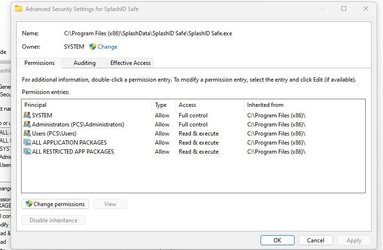
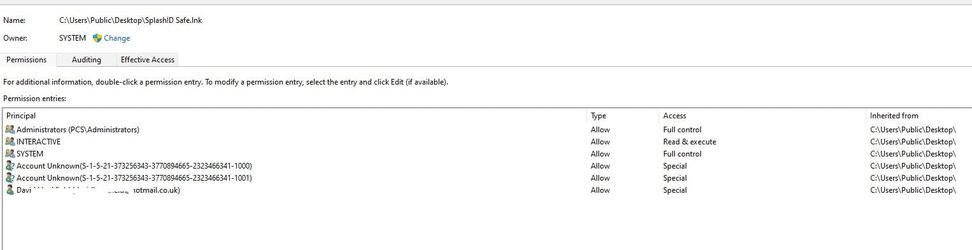
Hi OAT,

Gosh don’t you sleep much. :oops:

I just checked once more the permissions for the admin account (in which the app fails to load) and the new user account (called test) where it does work.

The permissions are the same in both accounts when I look at c:\prog files32\splashID….

They are also the same in either account when I look at the desktop icons.

There are some differences in the Security>Advanced tab between the exe file and the desktop icon, which I guess may be to be expected, but not sure.

Please see attached (my admin/MS account with my email showing has been hidden)

Hope this makes sense.

I am just hoping that these can be changed so it will work as the thought of having to go through resetting and re-installing all my setups over the last few weeks isn’t the Christmas present I was hoping for

Dave
 

Attachments

  • security_admin account-exe file permisions.jpg
    security_admin account-exe file permisions.jpg
    44.8 KB · Views: 1
  • security_admin account _splash desktop icon.jpg
    security_admin account _splash desktop icon.jpg
    36.9 KB · Views: 1

My Computer My Computer

At a glance

Windows 11 Proi7-1370064GB DDR4RTX4600
OS
Windows 11 Pro
Computer type
PC/Desktop
Manufacturer/Model
Gigabyte MOBO
CPU
i7-13700
Motherboard
Z790
Memory
64GB DDR4
Graphics Card(s)
RTX4600
Hard Drives
NVMe 2TB/SSD 2TB/HDD 4TB/HDD 8TB
PSU
BeQuiet 750w
Case
Fractal Define 7 Quiet
Internet Speed
300Mbps FTTH
Antivirus
Windows Defender
We can rule out a permission issue as you would get an actual warning for those.
You would also get a permission related event in the log.
There is no magic wand in this case I'm afraid.
Do you have a restore point?

Wise Registry cleaner (free) has an option to defrag the registry, that does not mean repairing it.
I have low confidence it would work but it still is worth a shot.
 

My Computers My Computers

  • At a glance

    All Branches but ReleaseAMD Ryzen 7 7735HS 3200-4500 Mhz 8 cores x 232 GB DDR5Radeon Graphic / NVIDIA GeForce RTX 4060 8 GB...
    OS
    All Branches but Release
    Computer type
    Laptop
    Manufacturer/Model
    Acer Nitro ANV15-51
    CPU
    AMD Ryzen 7 7735HS 3200-4500 Mhz 8 cores x 2
    Motherboard
    Sportage_RBH
    Memory
    32 GB DDR5
    Graphics Card(s)
    Radeon Graphic / NVIDIA GeForce RTX 4060 8 GB GDDR6
    Sound Card
    AMD/Realtek(R) Audio
    Monitor(s) Displays
    Integrated Monitor (15.3"vis)
    Screen Resolution
    FHD 1920X1080 16:9 144Hz
    Hard Drives
    KINGSTON OM8SEP4512Q-AA 1TB
    Western Digital 256GB
    PSU
    19V DC 6.32 A 120 W
    Cooling
    Dual Fans
    Mouse
    MS Bluetooth
    Internet Speed
    Fiber 1GB Cox -us & 1GB Orange-fr
    Browser
    Edge Canary- Firefox Nightly-Chrome Dev-Chrome Dev
    Antivirus
    Windows Defender
  • At a glance

    Windows 11 BetaAMD A9-94208 GB of DDR4AMD Radeon R5
    Operating System
    Windows 11 Beta
    Computer type
    Laptop
    Manufacturer/Model
    Asus X751BP
    CPU
    AMD A9-9420
    Memory
    8 GB of DDR4
    Graphics card(s)
    AMD Radeon R5
    Screen Resolution
    1600x900
    Hard Drives
    Seagate 1 TB
Okay well it looks like the best is to do a reinstall. Who knows what else might be corrupt. I have a clone from a week ago but I guess it's not a good idea to use that as that also might be corrupt.
Making a new admin account, deleting the corrupt one, will still leave me with a load of setups to do.
or are you pretty sure the corruption is within the admin account?
Thanks as ever.
 

My Computer My Computer

At a glance

Windows 11 Proi7-1370064GB DDR4RTX4600
OS
Windows 11 Pro
Computer type
PC/Desktop
Manufacturer/Model
Gigabyte MOBO
CPU
i7-13700
Motherboard
Z790
Memory
64GB DDR4
Graphics Card(s)
RTX4600
Hard Drives
NVMe 2TB/SSD 2TB/HDD 4TB/HDD 8TB
PSU
BeQuiet 750w
Case
Fractal Define 7 Quiet
Internet Speed
300Mbps FTTH
Antivirus
Windows Defender
Okay well it looks like the best is to do a reinstall. Who knows what else might be corrupt. I have a clone from a week ago but I guess it's not a good idea to use that as that also might be corrupt.
Making a new admin account, deleting the corrupt one, will still leave me with a load of setups to do.
or are you pretty sure the corruption is within the admin account?
Thanks as ever.
Not the Administrators group account, the user account you are getting the failure with.
Please refresh this page as I have added a last ditch effort in the previous post.
 

My Computers My Computers

  • At a glance

    All Branches but ReleaseAMD Ryzen 7 7735HS 3200-4500 Mhz 8 cores x 232 GB DDR5Radeon Graphic / NVIDIA GeForce RTX 4060 8 GB...
    OS
    All Branches but Release
    Computer type
    Laptop
    Manufacturer/Model
    Acer Nitro ANV15-51
    CPU
    AMD Ryzen 7 7735HS 3200-4500 Mhz 8 cores x 2
    Motherboard
    Sportage_RBH
    Memory
    32 GB DDR5
    Graphics Card(s)
    Radeon Graphic / NVIDIA GeForce RTX 4060 8 GB GDDR6
    Sound Card
    AMD/Realtek(R) Audio
    Monitor(s) Displays
    Integrated Monitor (15.3"vis)
    Screen Resolution
    FHD 1920X1080 16:9 144Hz
    Hard Drives
    KINGSTON OM8SEP4512Q-AA 1TB
    Western Digital 256GB
    PSU
    19V DC 6.32 A 120 W
    Cooling
    Dual Fans
    Mouse
    MS Bluetooth
    Internet Speed
    Fiber 1GB Cox -us & 1GB Orange-fr
    Browser
    Edge Canary- Firefox Nightly-Chrome Dev-Chrome Dev
    Antivirus
    Windows Defender
  • At a glance

    Windows 11 BetaAMD A9-94208 GB of DDR4AMD Radeon R5
    Operating System
    Windows 11 Beta
    Computer type
    Laptop
    Manufacturer/Model
    Asus X751BP
    CPU
    AMD A9-9420
    Memory
    8 GB of DDR4
    Graphics card(s)
    AMD Radeon R5
    Screen Resolution
    1600x900
    Hard Drives
    Seagate 1 TB
Now I am confused. I only have my main account (with admin privileges) linked to a MS account. and the new user account for testing today.
 

My Computer My Computer

At a glance

Windows 11 Proi7-1370064GB DDR4RTX4600
OS
Windows 11 Pro
Computer type
PC/Desktop
Manufacturer/Model
Gigabyte MOBO
CPU
i7-13700
Motherboard
Z790
Memory
64GB DDR4
Graphics Card(s)
RTX4600
Hard Drives
NVMe 2TB/SSD 2TB/HDD 4TB/HDD 8TB
PSU
BeQuiet 750w
Case
Fractal Define 7 Quiet
Internet Speed
300Mbps FTTH
Antivirus
Windows Defender
Now I am confused. I only have my main account (with admin privileges) linked to a MS account. and the new user account for testing today.
It's OK, I got too specific. Being an Admin, you belong to the Administrators group.
Only the user giving you problems needs to go, whether or not you want to keep on using the temp user is up to you.
Please take your time re-installing and only delete the problem profile when you are sure you are done.
 

My Computers My Computers

  • At a glance

    All Branches but ReleaseAMD Ryzen 7 7735HS 3200-4500 Mhz 8 cores x 232 GB DDR5Radeon Graphic / NVIDIA GeForce RTX 4060 8 GB...
    OS
    All Branches but Release
    Computer type
    Laptop
    Manufacturer/Model
    Acer Nitro ANV15-51
    CPU
    AMD Ryzen 7 7735HS 3200-4500 Mhz 8 cores x 2
    Motherboard
    Sportage_RBH
    Memory
    32 GB DDR5
    Graphics Card(s)
    Radeon Graphic / NVIDIA GeForce RTX 4060 8 GB GDDR6
    Sound Card
    AMD/Realtek(R) Audio
    Monitor(s) Displays
    Integrated Monitor (15.3"vis)
    Screen Resolution
    FHD 1920X1080 16:9 144Hz
    Hard Drives
    KINGSTON OM8SEP4512Q-AA 1TB
    Western Digital 256GB
    PSU
    19V DC 6.32 A 120 W
    Cooling
    Dual Fans
    Mouse
    MS Bluetooth
    Internet Speed
    Fiber 1GB Cox -us & 1GB Orange-fr
    Browser
    Edge Canary- Firefox Nightly-Chrome Dev-Chrome Dev
    Antivirus
    Windows Defender
  • At a glance

    Windows 11 BetaAMD A9-94208 GB of DDR4AMD Radeon R5
    Operating System
    Windows 11 Beta
    Computer type
    Laptop
    Manufacturer/Model
    Asus X751BP
    CPU
    AMD A9-9420
    Memory
    8 GB of DDR4
    Graphics card(s)
    AMD Radeon R5
    Screen Resolution
    1600x900
    Hard Drives
    Seagate 1 TB
Back
Top Bottom