Radically different volume settings needed for laptop speakers and USB headset


elevadu

Active member
Local time
6:12 PM
Posts
45
OS
Windows 11 Pro
I can't tell where the problem is; Windows? Drivers? Settings? The headset? I've dug around and not found a good solution.

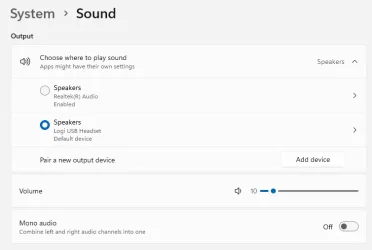
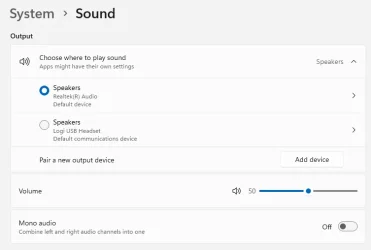
Example: I normally have laptop speakers set at volume 50 (of 100 based on Windows 11's default soundbar), but when I plug in my USB headset, I have to turn output down to 10. Then when I unplug the headset, I have to turn volume back up to 50. It's very frustrating, and led to some annoyances with others and some hurt eardrums and yelps for myself.

What's the best way to troubleshoot this? I've clicked around in settings but whatever I'm doing is not fixing it.

Note: The headset is (I think) this:
Logitech - H390 Wired USB-A On-Ear Stereo Headphones with Noise Canceling Microphone - Black
 
Windows Build/Version
Windows 11 Pro 24H2

My Computer

System One

  • OS
    Windows 11 Pro
    Computer type
    PC/Desktop
    Manufacturer/Model
    Dell Latitude
OK I think Windows Settings are supposed to remember the volumes for each output, but... it seems to not do that, or at least consistently, or maybe something I'm doing is futzing with it inadvertantly.

1760295803470.webp

1760295842442.webp

I'll have to pay better attention to it to see how it actually works exactly.
 

My Computer

System One

  • OS
    Windows 11 Pro
    Computer type
    PC/Desktop
    Manufacturer/Model
    Dell Latitude
My best sound card is in my W10 computer. It's a SoundBlaster Audigy FX v2 (I have desktops). This computer/OS/sound card/whatever remembers the sound level for speakers and headphones, both analog (TRS plug), that are slightly different, 60 vs 40 or so (as the speakers have a volume knob, I leave it in an adequate level but I haven't bothered/considered to do both levels equal, the speakers are fine but they don't have the quality of the sound card and I have tried to adjust an "optimal" signal level, the fact that "it" remembers the headphones level is very useful). The computer I'm using now is a W7 with decent onboard sound. It uses only one level for speakers or headphones (analog again), I use to have it at 66 which is a fine level for both. I have now connected the headphones, lowered the level to 55, played some music in case it matters (it doesn't seem so), detached them and the volume was at 55, not 66. The situation in my other W7 computer is similar although I have a peculiar setup there for the obsolescence of the sound card. I have a W11 miniPC whose sound I use very little, it has good quality but lower volume which I have at 100. I also use analog speakers/headphones in it.

My conclusion would be that it depends on the sound solution, unless someone with more experience tells otherwise (I don't discard there's a OS dependence, but I believe the basics of Windows sound is the same since Vista).

As you are using a USB headset, I did this search in Google


IA: USB headsets work by transmitting digital audio signals directly to a device via a USB port, bypassing the need for the device's internal sound card [italic from the IA, bold from me]. They use a built-in digital-to-analog converter (DAC) to convert the digital data into an analog signal for the headphones, and an analog-to-digital converter (ADC) to convert the microphone's audio into a digital signal to be sent to the device.

So you have two sound cards, one embedded in the headset, and I suspect that the headset volume isn't just right. Does it have a volume control in the device or in some software panel?

(I think this response lacks something I don't have, but I hope it helps).
 

My Computer

System One

  • OS
    Windows 11
    Manufacturer/Model
    MeLE Quieter 2Q (fanless miniPC)
    CPU
    Celeron J4125 (10th gen)
    Memory
    8GB DDR4
    Monitor(s) Displays
    Samsung SyncMaster T260
    Screen Resolution
    1920x1200
    Hard Drives
    256GB eMMC (Windows)
    2TB USB3 HDD Toshiba (Data)
This is what I do:

NOTE: This applies only to AMPLIFIED speakers where the speakers have their own volume control independent of the Windows volume control.

Adjust the volume on the speakers themselves so that they closely match the apparent volume of the headphones.

As an example, in your case, the volume of the speakers is much lower than that of the headphones because you need to turn up the volume on Windows to compensate. So, don't change the volume on the speakers using Windows volume control, crank up the volume control on the physical speaker's amp until the volume at level 10 matches more closely what you experience from the headphones.
 

My Computers

System One System Two

  • OS
    Win11 Pro 25H2 (RTM+)
    Computer type
    PC/Desktop
    Manufacturer/Model
    Acemagic
    CPU
    Intel i7-14650HX
    Memory
    32 GB
    Graphics Card(s)
    No GPU - Built-in Intel Graphics
    Sound Card
    Integrated
    Monitor(s) Displays
    Varies as machine will often be moved to locations with different monitors
    Screen Resolution
    Varies
    Hard Drives
    1 x 1TB Gen 4 NVMe SSD
    PSU
    120W Power Brick
    Keyboard
    Corsair K70 Max RGB Magnetic Keyboard
    Mouse
    Logitech MX Master 3
    Internet Speed
    1Gb Up / 1 Gb Down
    Browser
    Edge
    Antivirus
    Windows Defender
  • Operating System
    Win11 Pro 25H2 (RTM+)
    Computer type
    Laptop
    Manufacturer/Model
    Lenovo ThinkBook 13x Gen 2
    CPU
    Intel i7-1255U
    Memory
    16 GB
    Graphics card(s)
    Intel Iris Xe Graphics
    Sound Card
    Realtek® ALC3306-CG codec
    Monitor(s) Displays
    13.3-inch IPS Display
    Screen Resolution
    WQXGA (2560 x 1600)
    Hard Drives
    2 TB 4 x 4 NVMe SSD
    PSU
    USB-C / Thunderbolt 4 Power / Charging
    Keyboard
    Backlit, spill resistant keyboard
    Mouse
    Buttonless Glass Precision Touchpad
    Internet Speed
    1Gb Up / 1Gb Down
    Browser
    Edge
    Antivirus
    Windows Defender
    Other Info
    WiFi 6e / Bluetooth 5.1 / Facial Recognition / Fingerprint Sensor / ToF (Time of Flight) Human Presence Sensor
Adjust the volume on the speakers themselves so that they closely match the apparent volume of the headphones.
I set the laptop speaker volume to be good so we can hear it while near the desk. Much louder is too loud, much less is too quiet.

I do the same thing with the headphones, but for my ears to be comfortably hearable and not too loud.

I thought that's what everyone already does with audio (make it comfortably hearable), and I've been doing that for over a decade.

So, what you're suggesting is either not usable or you're not understanding the problem.

There's no separate speaker from the laptop that I can adjust, it's built into the laptop and adjustable through Windows. I never mentioned it was a separate speaker. I think you're not understanding the problem because you're describing a setup I don't have.
 

My Computer

System One

  • OS
    Windows 11 Pro
    Computer type
    PC/Desktop
    Manufacturer/Model
    Dell Latitude
Is the headset new? Have you used it in other computers? Can you do it carefully? I think a confortable sound level of 10 is suspicious. The headset could be defective or badly designed. My sound solutions would all be barely audible at 10. I believe my ears are normal. This means a 40-50 dB difference for the speakers (that I like quiet if at all) and likely 80-90 dB for the headphones (which I use louder). Are you meaning say 80 dB with the volume at 10???

Something isn't right there. A digital signal (have you tried changing its format if possible, like sampling frequency and/or number of bits?) like the USB one simply cannot be a lot louder or quieter, it's impossible: most sounds will already be using the full digital range and it's up to a DAC (simplifying) to convert it in a headphones level, a home level, a music bar level, a concert level or a sonar level (*). What if they don't, what if they use half the range instead? The sound would be 6 dB quieter, 54 dB instead of 60 dB for example. And if they half the range 4 times (1/16th of the range) it would be 36 dB instead of 60. The same the other way round: if a digital dignal "usually" uses 1/16th of the range normally but in your case it's using the full range for a particular reason, instead of 60 dB you'd have 84 dB, that doesn't sound as your problem (EDIT PS: half the signal level is 4 times lower power level and the same up, the differences among 36, 60 and 84 dB are noticeable enough to cause a problem, but I cannot conceive that the signal level is regulated digitally; to say one of the problems, each time you halve the range you lose a bit and 6 dB of SNR, and leaving that apart the DAC is optimized for full range signals, it works a lot better so, SNR apart).

So there's a problem with the headphones. The communication through USB is digital, if it were analog one could theoretically believe that the laptop is applying excessive signal level, maybe draining the battery too fast (if you set the headset at a reasonable distance as if it'd be speakers), but in digital it's plain impossible. The headset is defective or badly designed.

------------------------------------------------

(*) I once heared a sonar (Idk nautic slang, maybe it's other type of thing) can reach 190 dB and hurt whales. Well, w/o denying the whales problem, 190 dB is 10 megawatts per square meter, maybe the energy of a bomb??? That would hurt every living thing, but if 190 dB is a typical bomb level, don't believe that an atomic bomb would be like 190 millions or trillions of dB, it would be like 250 dB, that's 1,000,000 times higher. Each 10 dB more are a zero added. 0 dB means 1 picowatt per square meter, that's considered the limit to perceive a sound. 120 dB adds the necessary 12 zeroes for 1 W per square meter (this is already hurting for the ears specially if during prolonged intervals, but not way for the things or living beings in the sense of staying alive), 190 dB has 7 zeroes more, so 10 MW/m2. Idk if this hypothetical sound can actually be produced artificially or naturally. At 100% speaker efficiency it would require 10 MW = 10,000 1000W PSUs to produce it at 10 cm (4 inches), and speakers efficiency is very far from 100% afaik.
 
Last edited:

My Computer

System One

  • OS
    Windows 11
    Manufacturer/Model
    MeLE Quieter 2Q (fanless miniPC)
    CPU
    Celeron J4125 (10th gen)
    Memory
    8GB DDR4
    Monitor(s) Displays
    Samsung SyncMaster T260
    Screen Resolution
    1920x1200
    Hard Drives
    256GB eMMC (Windows)
    2TB USB3 HDD Toshiba (Data)
If 50% volume is fine for your laptop speakers, then just to make sure your headset also stay consistent with this, put the volume for your headset to 50% in Windows settings also and then turn down the volume on the headset itself to balance out the difference. I assume that the headset inline volume knob is NOT digital in nature (adjusts Windows volume when turning). If this is the case, there is not much else you can do but to adjust the volume down in Windows or using the know on headset to your current 10% and live with it.

Laptop speakers are tiny and weak. You usually have to crank up the volume quite high for them to be even audible.
 

My Computers

System One System Two

  • OS
    Win 11 Pro 25H2 26200.8457 / Linux Mint 22.3
    Computer type
    Laptop
    Manufacturer/Model
    Lenovo A485
    CPU
    Ryzen 7 2700U Pro
    Motherboard
    Lenovo (WiFi/BT module upgraded to Intel Wireless-AC-9260)
    Memory
    32GB
    Graphics Card(s)
    iGPU Vega 10
    Sound Card
    Realtek
    Monitor(s) Displays
    14" FHD (built-in) + 14" Lenovo Thinkvision M14t (touch+pen) + 32" Asus PB328
    Screen Resolution
    FHD + FHD + 1440p
    Hard Drives
    Intel 660p m.2 nVME PCIe3.0 x2 512GB
    PSU
    125W(Dock)/65W(Travel Adapter)
    Keyboard
    Thinkpad / Logitech MX Keys
    Mouse
    Logitech MX Master 2S
    Internet Speed
    1/1Gbit
    Browser
    Firefox
    Antivirus
    Windows Defender
    Other Info
    SecureBoot: Enabled
    TPM2.0: Enabled
    AMD-V: Enabled
  • Operating System
    Win 11 Pro 25H2 26200.8521(RP)
    Computer type
    PC/Desktop
    Manufacturer/Model
    Custom
    CPU
    i7-7700k @4.8GHz
    Motherboard
    Asus PRIME Z270-A
    Memory
    32GB 2x16GB 2133MHz CL15
    Graphics card(s)
    EVGA GTX1080Ti FTW 11GB
    Sound Card
    Integrated
    Monitor(s) Displays
    32" 10-bit Asus PB328Q
    Screen Resolution
    WQHD 2560x1440
    Hard Drives
    512GB ADATA SX8000NP NVMe PCIe Gen 3 x4
    PSU
    850W
    Case
    Fractal Design Define 7
    Cooling
    Noctua NH-D15 chromax.black
    Keyboard
    Logitech MX Keys
    Mouse
    Logitech MX Master 2S
    Internet Speed
    1/1Gbit
    Browser
    Firefox
    Antivirus
    Windows Defender
    Other Info
    AC WiFi Card
Back
Top Bottom