Random Crashes to a Black Screen. No Errors.


ZeroC00l

Member
Member
Local time
12:50 AM
Posts
27
OS
Windows 11
I'm a little stumped on this one and I'm not even sure its a Windows issue, but for a couple months now when I run some software my screen will go black and the sound will stop randomly. There's no way out of this black screen, there's no errors given, no BSOD, no warning, no feed back that pressing keys is doing anything, and it happens with multiple programs. Because of how random it is I can't even recreate it.

A couple months ago it was happening in just one game I play where at least once a session my screen would go black and then a second or two later the sound of the game would stop. And it was only that game until this past weekend where it happened again playing a different game, and happened yet again with a 3rd game today. It doesn't happen with any non-game software. I've tried unplugging the monitor and plugging it back in to no luck. The only way out of this is to completely reboot my computer. I've also thought it might have to do with video drivers, but its happened across multiple driver versions.
 
Windows Build/Version
24H2

My Computer

System One

  • OS
    Windows 11
    Computer type
    PC/Desktop
    Manufacturer/Model
    Custom Built
    CPU
    AMD Ryzen 9 3900X
    Motherboard
    Asus ROG Strix X570-E Gaming
    Memory
    64GB
    Graphics Card(s)
    Asus TUF Gaming OC RTX 3080 10GB
    Monitor(s) Displays
    LG 27" Ultragear
    Screen Resolution
    2560x1440
    PSU
    EVGA SuperNOVA750 G3
    Case
    Fractal Design Define 7
    Cooling
    Fractal Design Celsius+ S24 AIO

@ZeroC00l


Whenever I get a black screen, the first thing I check is the RAM.
I remove the RAM, use an artists brush to dust out the RAM slot and then reseat the RAM.

I don't know if that will solve your problem, but it has for me, a number of times.

Also, here's ten points for filling out your computer specs. :-)
 

My Computers

System One System Two

  • OS
    Win 11 Home ♦♦♦26200.8655 ♦♦♦♦♦♦♦25H2
    Computer type
    PC/Desktop
    Manufacturer/Model
    Built by Ghot® [May 2020]
    CPU
    AMD Ryzen 7 3700X
    Motherboard
    Asus Pro WS X570-ACE (BIOS 5302)
    Memory
    G.Skill (F4-3200C14D-16GTZKW)
    Graphics Card(s)
    EVGA RTX 2070 (08G-P4-2171-KR)
    Sound Card
    Realtek ALC1220P / ALC S1220A
    Monitor(s) Displays
    Dell U3011 30"
    Screen Resolution
    2560 x 1600
    Hard Drives
    2x Samsung 860 EVO 500GB,
    WD 4TB Black FZBX - SATA III,
    WD 8TB Black FZBX - SATA III,
    DRW-24B1ST CD/DVD Burner
    PSU
    PC Power & Cooling 750W Quad EPS12V
    Case
    Cooler Master ATCS 840 Tower
    Cooling
    CM Hyper 212 EVO (push/pull)
    Keyboard
    Ducky DK9008 Shine II Blue LED
    Mouse
    Logitech Optical M-100
    Internet Speed
    300/300
    Browser
    Firefox (latest)
    Antivirus
    Bitdefender Total Security
    Other Info
    Speakers: Klipsch Pro Media 2.1
  • Operating System
    Windows XP Pro 32bit w/SP3
    Computer type
    PC/Desktop
    Manufacturer/Model
    Built by Ghot® (not in use)
    CPU
    AMD Athlon 64 X2 5000+ (OC'd @ 3.2Ghz)
    Motherboard
    ASUS M2N32-SLI Deluxe Wireless Edition
    Memory
    TWIN2X2048-6400C4DHX (2 x 1GB, DDR2 800)
    Graphics card(s)
    EVGA 256-P2-N758-TR GeForce 8600GT SSC
    Sound Card
    Onboard
    Monitor(s) Displays
    ViewSonic G90FB Black 19" Professional (CRT)
    Screen Resolution
    up to 2048 x 1536
    Hard Drives
    WD 36GB 10,000rpm Raptor SATA
    Seagate 80GB 7200rpm SATA
    Lite-On LTR-52246S CD/RW
    Lite-On LH-18A1P CD/DVD Burner
    PSU
    PC Power & Cooling Silencer 750 Quad EPS12V
    Case
    Generic Beige case, 80mm fans
    Cooling
    ZALMAN 9500A 92mm CPU Cooler
    Keyboard
    Logitech Classic Keybooard 200
    Mouse
    Logitech Optical M-BT96a
    Internet Speed
    300/300
    Browser
    Firefox 3.x ??
    Antivirus
    Symantec (Norton)
    Other Info
    Still assembled, still runs. Haven't turned it on for 15 years?
@ZeroC00l


Whenever I get a black screen, the first thing I check is the RAM.
I remove the RAM, use an artists brush to dust out the RAM slot and then reseat the RAM.

I don't know if that will solve your problem, but it has for me, a number of times.

Also, here's ten points for filling out your computer specs. :-)
I will give the RAM cleaning a try and see what happens. Like I said it seems random and I can't recreate it so it might be a day or two before it happens again (if the ram cleaning doesnt work). I guess in this case no news would be good news.
 

My Computer

System One

  • OS
    Windows 11
    Computer type
    PC/Desktop
    Manufacturer/Model
    Custom Built
    CPU
    AMD Ryzen 9 3900X
    Motherboard
    Asus ROG Strix X570-E Gaming
    Memory
    64GB
    Graphics Card(s)
    Asus TUF Gaming OC RTX 3080 10GB
    Monitor(s) Displays
    LG 27" Ultragear
    Screen Resolution
    2560x1440
    PSU
    EVGA SuperNOVA750 G3
    Case
    Fractal Design Define 7
    Cooling
    Fractal Design Celsius+ S24 AIO
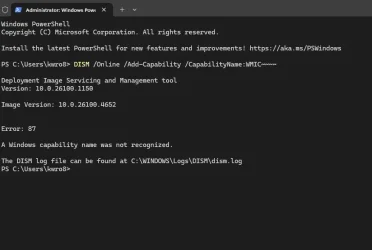
1) Please run the V2 log collector > post a share link


2) Add WMIC:


3) Run Tuneup plus > post a share link


Batch files for use in BSOD debugging - Windows 10 Help Forums

Batch files for use in BSOD debugging - Windows 10 Help Forums


4) Open event viewer > system and application > post share links


5) Create a new restore point:

Create System Restore Point in Windows 10


My Computer

System One

  • OS
    Windows 10
    Computer type
    Laptop
    Manufacturer/Model
    HP
    CPU
    Intel(R) Core(TM) i7-4800MQ CPU @ 2.70GHz
    Motherboard
    Product : 190A Version : KBC Version 94.56
    Memory
    16 GB Total: Manufacturer : Samsung MemoryType : DDR3 FormFactor : SODIMM Capacity : 8GB Speed : 1600
    Graphics Card(s)
    NVIDIA Quadro K3100M; Intel(R) HD Graphics 4600
    Sound Card
    IDT High Definition Audio CODEC; PNP Device ID HDAUDIO\FUNC_01&VEN_111D&DEV_76E0
    Hard Drives
    Model Hitachi HTS727575A9E364
    Antivirus
    Microsoft Defender
    Other Info
    Mobile Workstation
@ZeroC00l


Whenever I get a black screen, the first thing I check is the RAM.
I remove the RAM, use an artists brush to dust out the RAM slot and then reseat the RAM.

I don't know if that will solve your problem, but it has for me, a number of times.

Also, here's ten points for filling out your computer specs. :-)
Went to play a game and test things out. Black screen crash twice. After the second crash I reseated the RAM, 2 more black screens and after the last one while the computer was booting it POST but the screen stayed black. Had to force another reboot to get it to work again.

Tried Memtest64 and would quickly get a "Memory Locking failed (might be reserved by other apps/kernals)" even though nothing else was running and it gave the same error no matter the test memory allocation. Errors at Max, 32GB and 16GB.

I was also going to run a Memtest86, but will wait to see what these other logs and tests show.
1) Please run the V2 log collector > post a share link
I started this process. BSOD zip is too big to attach.

1) BSOD .zip

2) trying to install the WMIC gave an error, but I think I might already have it set up so I skipped ahead.
TerminalError.webp

3) Tuneup log attached to post

4) Share links to the Application and System logs.

Application Log link

System Log link

5) System restore point has been created.
 

Attachments

My Computer

System One

  • OS
    Windows 11
    Computer type
    PC/Desktop
    Manufacturer/Model
    Custom Built
    CPU
    AMD Ryzen 9 3900X
    Motherboard
    Asus ROG Strix X570-E Gaming
    Memory
    64GB
    Graphics Card(s)
    Asus TUF Gaming OC RTX 3080 10GB
    Monitor(s) Displays
    LG 27" Ultragear
    Screen Resolution
    2560x1440
    PSU
    EVGA SuperNOVA750 G3
    Case
    Fractal Design Define 7
    Cooling
    Fractal Design Celsius+ S24 AIO

Windows had predicted that the RAM would fail and blocked the use of many areas.


1) Run Memtest86+ for 8 or more passes > take pictures > post images or share links

Memtest86+ | The Open-Source Memory Testing Tool

Just 1 error is a test fail and testing can be aborted.

The more the passes the better the testing conditions.

It sometimes takes passes into the 20's to detect malfunctioning RAM.

The RAM can be tested all at one time or one at a time in the same DIMM.

Memtest86+ | The Open-Source Memory Testing Tool

MemTest86+ - Test RAM


One of the drives reported a bad block.


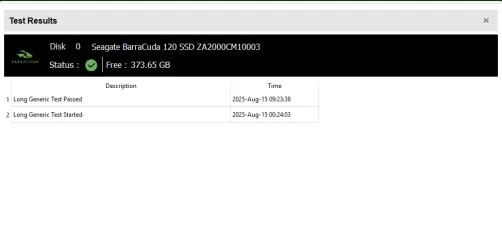
2) Run Sea Tools Long generic test (all drives) > post images or share links


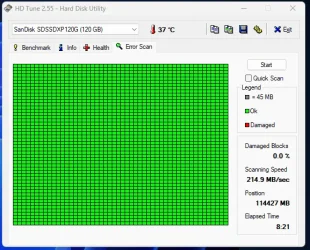
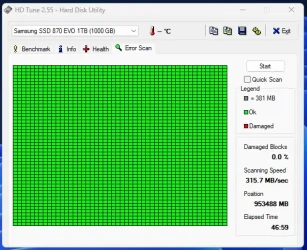
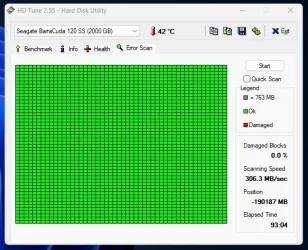
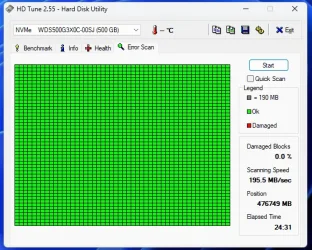
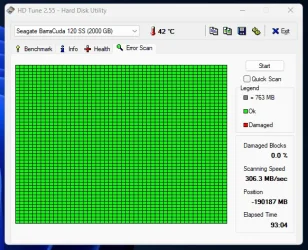
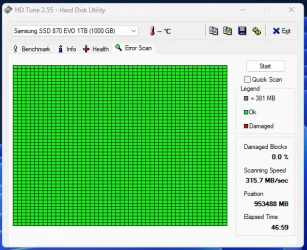
3) Run HD Tune (all drives) (old version) > post images or share links


a) Health

b) Full error scan


4) Open administrative command prompt and copy and paste:

chkdsk /b /v

Run these chkdsk switches on all drives using the syntax: chkdsk /b /v C: or chkdsk /b /v D: or chkdsk /b /v E: etc.

Make sure that the windows drive runs overnight while sleeping.

C:\WINDOWS\system32>chkdsk /b /v
The type of the file system is NTFS.
Cannot lock current drive.
Chkdsk cannot run because the volume is in use by another
process. Would you like to schedule this volume to be
checked the next time the system restarts? (Y/N)

Type: Y

Reboot as needed.


5) After completing all chkdsk /b /v run:

https://www.tenforums.com/attachmen...-files-use-bsod-debugging-chkdskfromevent.bat

Batch files for use in BSOD debugging - Windows 10 Help Forums

Batch files for use in BSOD debugging - Windows 10 Help Forums


Make sure that this runs only after the prior three steps for each drive.


6) Run HD Sentinel (all drives) > post images or share links (do not run until posting results for each steps 5, 6, 7 and 8)

Hard Disk Sentinel - HDD health and temperature monitoring
a) Overview
b) Temperature
c) SMART


Please make sure that all of the above steps are performed in sequence


7)These steps / tests can be performed overnight while sleeping:
a) Memtest86+
b) Sea Tools Long generic test
c) HD Tune Full error scan
d) Chkdsk /b /v


Code:
Event[6765]
  Log Name: System
  Source: disk
  Date: 2025-08-12T22:32:24.5560000Z
  Event ID: 7
  Task: None
  Level: Error
  Opcode: N/A
  Keyword: Classic,
  User: N/A
  User Name: N/A
  Computer: DESKTOP-TGMNO60
  Description:
The device, \Device\Harddisk5\DR8, has a bad block.


Code:
Event[6766]
  Log Name: System
  Source: disk
  Date: 2025-08-12T22:32:24.5560000Z
  Event ID: 51
  Task: None
  Level: Warning
  Opcode: N/A
  Keyword: Classic,
  User: N/A
  User Name: N/A
  Computer: DESKTOP-TGMNO60
  Description:
An error was detected on device \Device\Harddisk5\DR8 during a paging operation.


Code:
RAM Defects
-----------
identifier              {badmemory}
badmemorylist           0x15d7e2
0x15d7e5
0x1650ef
0x1bfb38
0x1bfb39
0x1bfb3b
0x1bfb3c
0x1bfb3d
0x1bfb3f
0x2eb4f3
0x33c790
0x33c793
0x33c797
0x7db4b0
0x7db4b1
0x7db4b2
0x7db4b3
0x7db4b4
0x7db4b5
0x7db4b6
0x7db4b7
 
Last edited:

My Computer

System One

  • OS
    Windows 10
    Computer type
    Laptop
    Manufacturer/Model
    HP
    CPU
    Intel(R) Core(TM) i7-4800MQ CPU @ 2.70GHz
    Motherboard
    Product : 190A Version : KBC Version 94.56
    Memory
    16 GB Total: Manufacturer : Samsung MemoryType : DDR3 FormFactor : SODIMM Capacity : 8GB Speed : 1600
    Graphics Card(s)
    NVIDIA Quadro K3100M; Intel(R) HD Graphics 4600
    Sound Card
    IDT High Definition Audio CODEC; PNP Device ID HDAUDIO\FUNC_01&VEN_111D&DEV_76E0
    Hard Drives
    Model Hitachi HTS727575A9E364
    Antivirus
    Microsoft Defender
    Other Info
    Mobile Workstation
In Windows 11 you can also test your RAM
  • On your keyboard, select the Windows logo key + R to open the Run application function. Enter mdsched to open the Windows Memory Diagnostic app.
 

My Computer

System One

  • OS
    Windows 11 Pro Insider 64 bit 25H2 26200.5742
    Computer type
    PC/Desktop
    Manufacturer/Model
    Gigabyte Z390 UD
    CPU
    Intel Core i7 9700K 3.60
    Motherboard
    Gigabyte Z390 UD
    Memory
    16 GB
    Graphics Card(s)
    nVidia GEForce RTX 2060 Super
    Sound Card
    onboard
    Monitor(s) Displays
    Two 27" Dell 4K monitors
    Screen Resolution
    3840 x 2160
    Hard Drives
    M.2 NVME SSD, 500 GB; Two 2TB Mechanical HDD's
    PSU
    850w PSU
    Case
    Cyberpower PC
    Cooling
    Water cooled
    Keyboard
    Backlit Cyberpower gaming keyboard
    Mouse
    Backlit Cyberpower gaming mouse
    Internet Speed
    1 GB mbps
    Browser
    Brave
    Antivirus
    Windows Security
1) Run Memtest86+ for 8 or more passes > take pictures > post images or share links

Memtest86+ | The Open-Source Memory Testing Tool

Just 1 error is a test fail and testing can be aborted.

The more the passes the better the testing conditions.

It sometimes takes passes into the 20's to detect malfunctioning RAM.

The RAM can be tested all at one time or one at a time in the same DIMM.

Memtest86+ | The Open-Source Memory Testing Tool

MemTest86+ - Test RAM
I've ran Memtest over night twice but it never makes past 3 passes before I need to use the computer again. I'm also not seeing where the log files are being kept for the test. But the 6 total passes (two sets of 3 passes) ive ran have passed so far. I can run it again if necessary.

Here are the other test results of what i've done so far. Because of how long some of them take I havent been able to run all tests but will try the Chkdsk later today.
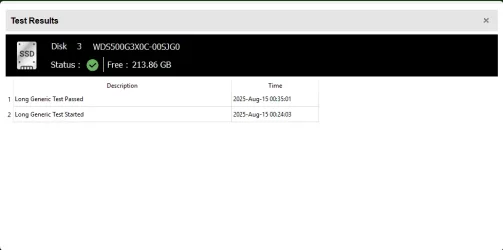
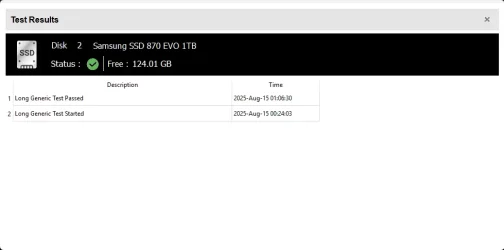
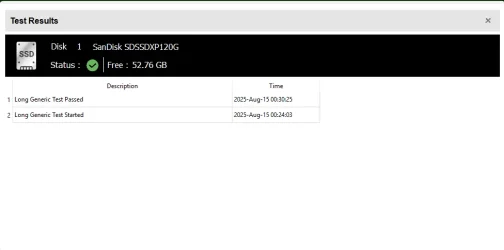
2) Run Sea Tools Long generic test (all drives) > post images or share links
Did long generic test for all:
HDTest4.webpHDTest3.webpHDTest2.webpHDTest1.webp
3) Run HD Tune (all drives) (old version) > post images or share links
SanDisk_SD SSDXP_120GB_Error Scan.webp
SanDisk Health.txt file.

Samsung_SSD 870 EVO_1TB_ErrorScan.webp
Samsung SSD Health.txt File.


Seagate BarraCuda_120_SS_Error Scan.webp
Seagate BarraCuda_Health.txt file.


NVMe_WD_S500GB_Error Scan.webp

HD Tune shows no info for the health tab. I think I read something that it doesnt support NVMe drives?


I will update this past after the chkdsk, but mainly wanted to see about the lack of log files for the memtest.
 

Attachments

  • Seagate BarraCuda_120_SS_Error Scan.webp
    Seagate BarraCuda_120_SS_Error Scan.webp
    43.6 KB · Views: 0
  • Samsung_SSD 870 EVO_1TB_ErrorScan.webp
    Samsung_SSD 870 EVO_1TB_ErrorScan.webp
    37 KB · Views: 0

My Computer

System One

  • OS
    Windows 11
    Computer type
    PC/Desktop
    Manufacturer/Model
    Custom Built
    CPU
    AMD Ryzen 9 3900X
    Motherboard
    Asus ROG Strix X570-E Gaming
    Memory
    64GB
    Graphics Card(s)
    Asus TUF Gaming OC RTX 3080 10GB
    Monitor(s) Displays
    LG 27" Ultragear
    Screen Resolution
    2560x1440
    PSU
    EVGA SuperNOVA750 G3
    Case
    Fractal Design Define 7
    Cooling
    Fractal Design Celsius+ S24 AIO
Looks like the Drives and the RAM are heathy. It must be something else
 

My Computer

System One

  • OS
    Windows 11 Pro Insider 64 bit 25H2 26200.5742
    Computer type
    PC/Desktop
    Manufacturer/Model
    Gigabyte Z390 UD
    CPU
    Intel Core i7 9700K 3.60
    Motherboard
    Gigabyte Z390 UD
    Memory
    16 GB
    Graphics Card(s)
    nVidia GEForce RTX 2060 Super
    Sound Card
    onboard
    Monitor(s) Displays
    Two 27" Dell 4K monitors
    Screen Resolution
    3840 x 2160
    Hard Drives
    M.2 NVME SSD, 500 GB; Two 2TB Mechanical HDD's
    PSU
    850w PSU
    Case
    Cyberpower PC
    Cooling
    Water cooled
    Keyboard
    Backlit Cyberpower gaming keyboard
    Mouse
    Backlit Cyberpower gaming mouse
    Internet Speed
    1 GB mbps
    Browser
    Brave
    Antivirus
    Windows Security
It could be dust or something else bridging contacts on a motherboard component, such as dust between capacitor leads. (underside on a capacitor)
(Looks for a dust bunny that's big enough to go from one lead to the other lead of a capacitor) (capacitors that are of the normal barrel-type, not SMD. Polymer caps on ATX motherboards, usually are the barrel shape with two leads on the bottom, just like caps before the polymer era)

I was getting random freezes back in very-late-2012, IIRC, on my Asus P5QL Pro and found a dust bunny bridging capacitor legs. A Linux distro would randomly freeze and I also at other times after rebooting, got bogus errors. Then I found the culprit. It coincidentally happened after I upgraded the CPU. Somehow, a dust bunny got right down where it shouldn't ever be! IIRC, I used some form of a brush to get it out of there!
 

My Computers

System One System Two

  • OS
    Windows 11 Pro x64 24H2
    Computer type
    PC/Desktop
    CPU
    Ryzen 9 5900X
    Motherboard
    ASRock B550 PG Velocita (UEFI-BIOS 3.90)
    Memory
    64 GB G.Skill RipJaws V F4-3200C16D-64GVK
    Graphics Card(s)
    ASRock Steel Legend Arc B580 12 GB
    Monitor(s) Displays
    Alienware AW3423DWF OLED ultrawide
    Hard Drives
    Samsung 990 Pro 1 TB NVMe SSD
    PSU
    eVGA Supernova 750 G3
    Case
    Corsair 275R
    Internet Speed
    VTel FTTH 1 Gb down and 1 Gb up
  • Operating System
    Windows 11 Home x64 25H2
    Computer type
    PC/Desktop
    CPU
    Ryzen 7 5800X3D
    Motherboard
    Asus ROG Strix B550-F Gaming (UEFI-BIOS version 3636)
    Memory
    32 GB (2x16 GB G.Skill TridentZ Neo)
    Graphics card(s)
    Sapphire Nitro+ Radeon RX 6750 XT
    Hard Drives
    Samsung 970 Pro 512 GB NVMe SSD
    PSU
    Corsair RM850x
    Case
    Fractal Focus G
1) The computer has four RAM modules (16 GB each).

Please remove two RAM modules.

Leave the other two RAM modules undisturbed (do not reseat).


2) Run Tuneup plus > post a share link.


3) After posting a tuneup plus share link open administrative command prompt and copy and paste:

bcdedit /deletevalue {badmemory} badmemorylist

Post results.


4) Rerun Tuneup plus > post a share link.


5) Use the computer with only two RAM modules (32 GB) for one week
(Plan to use the other two RAM modules the following week unless there is an access problem)


6) For any new BSOD please post a new V2 share link into the newest post


Code:
Location     : DIMM_A1
BankLabel    : BANK 0
Manufacturer : G Skill Intl
MemoryType   : DDR4
FormFactor   : DIMM
Capacity     : 16GB
Speed        : 2133
Serial       : 00000000
PartNumber   : F4-2400C15-16GVR
ECC          : False
TypeDetail   : {Synchronous, Unbuffered (Unregistered)}

Location     : DIMM_A2
BankLabel    : BANK 1
Manufacturer : G Skill Intl
MemoryType   : DDR4
FormFactor   : DIMM
Capacity     : 16GB
Speed        : 2133
Serial       : 00000000
PartNumber   : F4-2400C15-16GVR
ECC          : False
TypeDetail   : {Synchronous, Unbuffered (Unregistered)}

Location     : DIMM_B1
BankLabel    : BANK 2
Manufacturer : G Skill Intl
MemoryType   : DDR4
FormFactor   : DIMM
Capacity     : 16GB
Speed        : 2133
Serial       : 00000000
PartNumber   : F4-2400C15-16GVR
ECC          : False
TypeDetail   : {Synchronous, Unbuffered (Unregistered)}

Location     : DIMM_B2
BankLabel    : BANK 3
Manufacturer : G Skill Intl
MemoryType   : DDR4
FormFactor   : DIMM
Capacity     : 16GB
Speed        : 2133
Serial       : 00000000
PartNumber   : F4-2400C15-16GVR
ECC          : False
TypeDetail   : {Synchronous, Unbuffered (Unregistered)}
 

My Computer

System One

  • OS
    Windows 10
    Computer type
    Laptop
    Manufacturer/Model
    HP
    CPU
    Intel(R) Core(TM) i7-4800MQ CPU @ 2.70GHz
    Motherboard
    Product : 190A Version : KBC Version 94.56
    Memory
    16 GB Total: Manufacturer : Samsung MemoryType : DDR3 FormFactor : SODIMM Capacity : 8GB Speed : 1600
    Graphics Card(s)
    NVIDIA Quadro K3100M; Intel(R) HD Graphics 4600
    Sound Card
    IDT High Definition Audio CODEC; PNP Device ID HDAUDIO\FUNC_01&VEN_111D&DEV_76E0
    Hard Drives
    Model Hitachi HTS727575A9E364
    Antivirus
    Microsoft Defender
    Other Info
    Mobile Workstation
5) After completing all chkdsk /b /v run:
I've completed the chkdsk. txt file attached. That should be the last of the steps for now until you give the go ahead to run the Hard Disk Sentinel

It could be dust or something else bridging contacts on a motherboard component, such as dust between capacitor leads. (underside on a capacitor)
(Looks for a dust bunny that's big enough to go from one lead to the other lead of a capacitor) (capacitors that are of the normal barrel-type, not SMD. Polymer caps on ATX motherboards, usually are the barrel shape with two leads on the bottom, just like caps before the polymer era)
Its possible. I have a cat that loves to shed especially right now in the summer. But my case also has dust screen built in that stop the big chunks and when I opened it up to reseat the RAM it didn't look abnormally dusty. I'll go back through it and try and be more thorough.

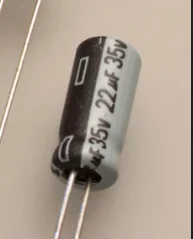
By capacitor you're talking about these things?
capacitor.webp


I can re-seat the RAM again along with the video card. The processor has an AIO over it, so i'd be really amazed if a significant amount of dust got under there.
 

Attachments

My Computer

System One

  • OS
    Windows 11
    Computer type
    PC/Desktop
    Manufacturer/Model
    Custom Built
    CPU
    AMD Ryzen 9 3900X
    Motherboard
    Asus ROG Strix X570-E Gaming
    Memory
    64GB
    Graphics Card(s)
    Asus TUF Gaming OC RTX 3080 10GB
    Monitor(s) Displays
    LG 27" Ultragear
    Screen Resolution
    2560x1440
    PSU
    EVGA SuperNOVA750 G3
    Case
    Fractal Design Define 7
    Cooling
    Fractal Design Celsius+ S24 AIO
By capacitor you're talking about these things?
View attachment 142604
Yes, where you can see anything crossing between the leads! Just like in that picture.

Also crashes during operation like that, would normally be the video card GPU core boost, if overclocking the GPU core. It means you need to back off on GPU core OC. Same with CPU, if using PBO, but using PBO on Ryzen, isn't as easy as OC'ing GPU.

For GPU, OTOH, an unstable OC does not cause POST failure. As with the usual GPU OC'ing, it's done by software. It usually would crash under a 3D-demanding task, such as a black screen crash when running GTA V, for example. It usually wouldn't crash at the desktop. So, if OC'ing GPU core with Afterburner, you should be able to easily tone it down.

This rarely happens because of RAM, except in a rare circumstance that the RAM "disappears" from the system while in operation. To check for this, be on the lookout for an LED indicating DRAM, and failure to POST on power cycle. Had that happen once on my Asus ROG Strix B550-F Gaming.

Known symptoms of RAM slot(s) needing to be cleaned or RAM needing to be reseated, that are far more common:

1: Random and frequent "PAGE_FAULT_IN_NONPAGED_AREA" BSOD or "BAD_POOL_HEADER" BSOD.
2: Windows Update fails with "PAGE_FAULT_IN_NONPAGED_AREA" BSOD and causes Windows Update to attempt a rollback on reboot.
3: "BAD_POOL_HEADER" or "PAGE_FAULT_IN_NONPAGED_AREA" BSOD when running the Windows installer.
--------------------------------------------------------------------------------------------------------------------------

It's also possible to get "MEMORY_MANAGEMENT" BSOD due to RAM instability.
 
Last edited:

My Computers

System One System Two

  • OS
    Windows 11 Pro x64 24H2
    Computer type
    PC/Desktop
    CPU
    Ryzen 9 5900X
    Motherboard
    ASRock B550 PG Velocita (UEFI-BIOS 3.90)
    Memory
    64 GB G.Skill RipJaws V F4-3200C16D-64GVK
    Graphics Card(s)
    ASRock Steel Legend Arc B580 12 GB
    Monitor(s) Displays
    Alienware AW3423DWF OLED ultrawide
    Hard Drives
    Samsung 990 Pro 1 TB NVMe SSD
    PSU
    eVGA Supernova 750 G3
    Case
    Corsair 275R
    Internet Speed
    VTel FTTH 1 Gb down and 1 Gb up
  • Operating System
    Windows 11 Home x64 25H2
    Computer type
    PC/Desktop
    CPU
    Ryzen 7 5800X3D
    Motherboard
    Asus ROG Strix B550-F Gaming (UEFI-BIOS version 3636)
    Memory
    32 GB (2x16 GB G.Skill TridentZ Neo)
    Graphics card(s)
    Sapphire Nitro+ Radeon RX 6750 XT
    Hard Drives
    Samsung 970 Pro 512 GB NVMe SSD
    PSU
    Corsair RM850x
    Case
    Fractal Focus G
All chkdsk were good.
(only cleaning)
 

My Computer

System One

  • OS
    Windows 10
    Computer type
    Laptop
    Manufacturer/Model
    HP
    CPU
    Intel(R) Core(TM) i7-4800MQ CPU @ 2.70GHz
    Motherboard
    Product : 190A Version : KBC Version 94.56
    Memory
    16 GB Total: Manufacturer : Samsung MemoryType : DDR3 FormFactor : SODIMM Capacity : 8GB Speed : 1600
    Graphics Card(s)
    NVIDIA Quadro K3100M; Intel(R) HD Graphics 4600
    Sound Card
    IDT High Definition Audio CODEC; PNP Device ID HDAUDIO\FUNC_01&VEN_111D&DEV_76E0
    Hard Drives
    Model Hitachi HTS727575A9E364
    Antivirus
    Microsoft Defender
    Other Info
    Mobile Workstation
2) Run Tuneup plus > post a share link.
Here's a link to the Tuneup.log file (ran it after removing two of the sticks.)

Also crashes during operation like that, would normally be the video card GPU core boost, if overclocking the GPU core. It means you need to back off on GPU core OC. Same with CPU, if using PBO, but using PBO on Ryzen, isn't as easy as OC'ing GPU.
I dont have anything overclocked. It should all be running at default.
Known symptoms of RAM slot(s) needing to be cleaned or RAM needing to be reseated, that are far more common:

1: Random and frequent "PAGE_FAULT_IN_NONPAGED_AREA" BSOD or "BAD_POOL_HEADER" BSOD.
2: Windows Update fails with "PAGE_FAULT_IN_NONPAGED_AREA" BSOD and causes Windows Update to attempt a rollback on reboot.
3: "BAD_POOL_HEADER" or "PAGE_FAULT_IN_NONPAGED_AREA" BSOD when running the Windows installer.
The problem with these crashes is that there are no errors, no BSOD. The screen just goes black and after the reboot it acts normal. No suggestion of safe mode, no errors, no nothing. Its like the computer gets narcolepsy.
 

My Computer

System One

  • OS
    Windows 11
    Computer type
    PC/Desktop
    Manufacturer/Model
    Custom Built
    CPU
    AMD Ryzen 9 3900X
    Motherboard
    Asus ROG Strix X570-E Gaming
    Memory
    64GB
    Graphics Card(s)
    Asus TUF Gaming OC RTX 3080 10GB
    Monitor(s) Displays
    LG 27" Ultragear
    Screen Resolution
    2560x1440
    PSU
    EVGA SuperNOVA750 G3
    Case
    Fractal Design Define 7
    Cooling
    Fractal Design Celsius+ S24 AIO
I dont have anything overclocked. It should all be running at default.
No suggestion of safe mode, no errors, no nothing. Its like the computer gets narcolepsy.
This reminds me of the bug I saw in 11 before, where at low loads, especially when running Edge. (and thus I suspect Chromium)
Also this can happen if you change the refresh rate. (what appears to be a bug in 11)
With this bug, however, there's a major difference:

It crashes with a blank/gray screen and the monitor backlight is still lit. The monitor still thinks there's a signal.

This bug would be if there aren't suspected RAM problems, where everything else comes up clean, but crashes like that when switching a tab in Edge, or when changing the refresh rate.
 

My Computers

System One System Two

  • OS
    Windows 11 Pro x64 24H2
    Computer type
    PC/Desktop
    CPU
    Ryzen 9 5900X
    Motherboard
    ASRock B550 PG Velocita (UEFI-BIOS 3.90)
    Memory
    64 GB G.Skill RipJaws V F4-3200C16D-64GVK
    Graphics Card(s)
    ASRock Steel Legend Arc B580 12 GB
    Monitor(s) Displays
    Alienware AW3423DWF OLED ultrawide
    Hard Drives
    Samsung 990 Pro 1 TB NVMe SSD
    PSU
    eVGA Supernova 750 G3
    Case
    Corsair 275R
    Internet Speed
    VTel FTTH 1 Gb down and 1 Gb up
  • Operating System
    Windows 11 Home x64 25H2
    Computer type
    PC/Desktop
    CPU
    Ryzen 7 5800X3D
    Motherboard
    Asus ROG Strix B550-F Gaming (UEFI-BIOS version 3636)
    Memory
    32 GB (2x16 GB G.Skill TridentZ Neo)
    Graphics card(s)
    Sapphire Nitro+ Radeon RX 6750 XT
    Hard Drives
    Samsung 970 Pro 512 GB NVMe SSD
    PSU
    Corsair RM850x
    Case
    Fractal Focus G
It crashes with a blank/gray screen and the monitor backlight is still lit. The monitor still thinks there's a signal.
Shortly after the screen goes black the monitor briefly shows me a message that says "No signal. Entering the power saving mode shortly". Its a message built into the monitor, not from Windows or any software i was running. And its a different messagethan if I were to unplug the DisplayPort cable, then it says a different but simple "No signal" message.

I also don't use any Chromium based browsers. I use Firefox, but do have a g-sync monitor so its constantly changing the refresh rate to match the games fps.
 

My Computer

System One

  • OS
    Windows 11
    Computer type
    PC/Desktop
    Manufacturer/Model
    Custom Built
    CPU
    AMD Ryzen 9 3900X
    Motherboard
    Asus ROG Strix X570-E Gaming
    Memory
    64GB
    Graphics Card(s)
    Asus TUF Gaming OC RTX 3080 10GB
    Monitor(s) Displays
    LG 27" Ultragear
    Screen Resolution
    2560x1440
    PSU
    EVGA SuperNOVA750 G3
    Case
    Fractal Design Define 7
    Cooling
    Fractal Design Celsius+ S24 AIO
Shortly after the screen goes black the monitor briefly shows me a message that says "No signal. Entering the power saving mode shortly". Its a message built into the monitor, not from Windows or any software i was running. And its a different messagethan if I were to unplug the DisplayPort cable, then it says a different but simple "No signal" message.

I also don't use any Chromium based browsers. I use Firefox, but do have a g-sync monitor so its constantly changing the refresh rate to match the games fps.
The bug I was talking about is where you don't get the no-signal message from the monitor, but Windows does not respond to anything. With the mentioned bug, the monitor don't go to standby. With that bug, the monitor's backlights are still lit.

If the monitor has the dreaded no-signal message and goes to standby, then it's a usual hardware-related crash.
 

My Computers

System One System Two

  • OS
    Windows 11 Pro x64 24H2
    Computer type
    PC/Desktop
    CPU
    Ryzen 9 5900X
    Motherboard
    ASRock B550 PG Velocita (UEFI-BIOS 3.90)
    Memory
    64 GB G.Skill RipJaws V F4-3200C16D-64GVK
    Graphics Card(s)
    ASRock Steel Legend Arc B580 12 GB
    Monitor(s) Displays
    Alienware AW3423DWF OLED ultrawide
    Hard Drives
    Samsung 990 Pro 1 TB NVMe SSD
    PSU
    eVGA Supernova 750 G3
    Case
    Corsair 275R
    Internet Speed
    VTel FTTH 1 Gb down and 1 Gb up
  • Operating System
    Windows 11 Home x64 25H2
    Computer type
    PC/Desktop
    CPU
    Ryzen 7 5800X3D
    Motherboard
    Asus ROG Strix B550-F Gaming (UEFI-BIOS version 3636)
    Memory
    32 GB (2x16 GB G.Skill TridentZ Neo)
    Graphics card(s)
    Sapphire Nitro+ Radeon RX 6750 XT
    Hard Drives
    Samsung 970 Pro 512 GB NVMe SSD
    PSU
    Corsair RM850x
    Case
    Fractal Focus G
Can you use the Motherboard internal graphics connection to test?

I had an EVGA card that would black screen due to a corrupt card bios, but internal graphics ran fine....

Just a thought :unsure:
 

My Computer

System One

  • OS
    Windows 11 Pro 25H2
    Computer type
    PC/Desktop
    Manufacturer/Model
    My Self
    CPU
    Intel Alder lake i7 12700K
    Motherboard
    Asus z690 Gaming WiFi D4, Bios Ver 4505
    Memory
    32 Gb Corsair Vengeance LPX DDR4 3200 XMP2
    Graphics Card(s)
    EVGA 3070ti FTW3 Ultra Gaming & Intel Arc
    Sound Card
    Via Display port
    Monitor(s) Displays
    Dell AW2723DF
    Screen Resolution
    2560 x 1440 @ 280Hz G-Sync mode
    Hard Drives
    WD Black SN850 1Tb NVME (Boot Drive)
    WD BLACK SN850X + Heatsink 1Tb NVME
    Samsung 870 Qvo 1Tb SSD,
    Pioneer DVD-RW DVR-219L
    WD Black SN850x NVME 2Tb x3
    PSU
    Corsair RM850
    Case
    Phanteks Enthoo Pro M Tempered Glass
    Cooling
    Be Quiet Shadow Rock 3
    Keyboard
    Logitech G Pro
    Mouse
    Logitech G903, Lightspeed + Powerplay Mat
    Internet Speed
    900Mb/900Mb Fritz!Box 7590ax v2
    Browser
    Firefox
    Antivirus
    MS Defender
    Other Info
    Logitech C930e webcam
    Synology DS218 play 2 x 4Tb Synology HAT3300-4T
One trick that's helped me in the past with screen problems: Use a smartphone to remotely view and control your PC's screen while the computer is running. (For example, you can connect to your PC with VNC.)

Then in your case, the next time the screen goes blank, you can still operate your PC remotely with your smartphone. If everything is still working properly, it starts to look like a bad video card is the problem.
 

My Computer

System One

  • OS
    Windows 11
    Computer type
    PC/Desktop
    Manufacturer/Model
    Custom
    CPU
    Ryzen 9 7900X
    Motherboard
    ASUS ROG STRIX B-650 E-F
    Memory
    64 GB
    Graphics Card(s)
    Nvidia GeForce GTX 1650
    Hard Drives
    C: SSD, 500 GB
    D: HDD, 1 TB
    J: HDD, 1 TB
    Antivirus
    Norton

Latest Support Threads

Back
Top Bottom