Remove hidden Admin account, help


DBBG

New member
Local time
6:51 PM
Posts
7
OS
Window 11
Hello,
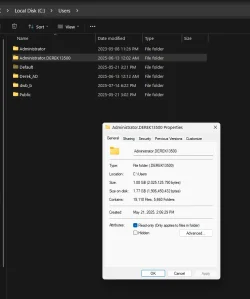
I'm trying clean up some files and clutter on my machine and I've been having some difficulty trying to figure out how to remove an admin account that I'm not sure I need anymore. The account is AdminDerek13500.
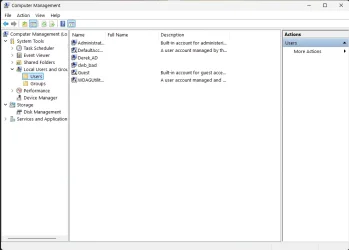
I don't see it any but the c/users folders, it is not listed in any of the account tools for removal.
I'm using the dwb account for daily activities and usually stay out of the built in Admin account and have another account I added as a back up if i were to get locked out, DerekAD.

What is the right way to go about removing the adminderek13500 account?
Admin005.webpadmin001.webpAdmin002.webpAdmin003.webpAdmin004.webp
 

My Computer My Computer

At a glance

Window 11I5 1350032 G ddr4
OS
Window 11
Computer type
PC/Desktop
Manufacturer/Model
MSI
CPU
I5 13500
Motherboard
MSI B760 Tomahawk
Memory
32 G ddr4
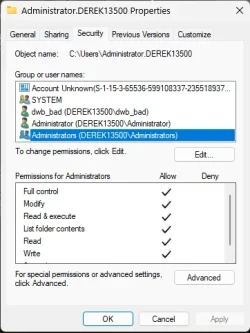
in Microsoft's infinite wisdom and because of the lack of communication in house, there are things with Administrator and Administrators, yes two separate accounts.
 

My Computer My Computer

At a glance

Win117800X3D32gb G.Skill4070 Ti Super
OS
Win11
Computer type
PC/Desktop
Manufacturer/Model
Mine 1.5
CPU
7800X3D
Motherboard
ASUS B650 Tuf with wifi.
Memory
32gb G.Skill
Graphics Card(s)
4070 Ti Super
Monitor(s) Displays
1x Nixeus NX_EDG27, 2x Dell S2440L (16:9)
Screen Resolution
1440p
Hard Drives
C:\NVME (500GB), D:\Seagate (2TB), E:\ & F:\ SSD 990EVO (1TB)
PSU
Corsair HX1000i
Case
Phanteks Enthoo Primo w/10 140mm SP Fans
Cooling
Artic TF2 420
Keyboard
Corsair 1000
Mouse
Steel Series Prime Wireless
Internet Speed
20 MB/s
Browser
Firefox 64
Antivirus
not telling!
Other Info
https://i.imgur.com/aoz3vWY.jpg?2
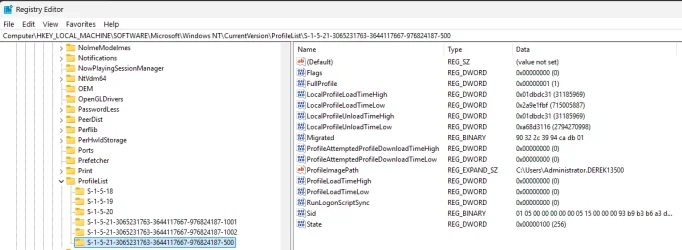
User profiles are in registry HKEY_LOCAL_MACHINE\SOFTWARE\Microsoft\Windows NT\CurrentVersion\ProfileList.
Each user profile has a subkey here identified by a long alphanumeric string called a Security Identifier (SID). Inside each SID subkey, the ProfileImagePath value points to the location of the user's profile folder on the hard drive.
You have to open each subkey to find the account name associated with key.

Always backup your registry before making changes.
 

My Computers My Computers

  • At a glance

    Windows 11 Pro 25H2 26200.8875i9-10900 10 core 20 threads32 gbnone-Intel UHD Graphics 630
    OS
    Windows 11 Pro 25H2 26200.8875
    Computer type
    PC/Desktop
    Manufacturer/Model
    Dell Optiplex 7080
    CPU
    i9-10900 10 core 20 threads
    Motherboard
    DELL 0J37VM
    Memory
    32 gb
    Graphics Card(s)
    none-Intel UHD Graphics 630
    Sound Card
    Integrated Realtek
    Monitor(s) Displays
    Benq 27
    Screen Resolution
    2560x1440
    Hard Drives
    2x1tb Solidigm m.2 nvme /External drives 512gb Samsung m.2 sata+2tb Kingston m2.nvme
    PSU
    500w
    Case
    MT
    Cooling
    Dell Premium
    Keyboard
    Logitech wired
    Mouse
    Logitech wireless
    Internet Speed
    so slow I'm too embarrassed to tell
    Browser
    #1 Edge #2 Firefox
    Antivirus
    Defender+MWB Premium
  • At a glance

    Windows 11 Pro 24H2 26200.8875AMD Ryzen 7 6800U32 gbintegrated
    Operating System
    Windows 11 Pro 24H2 26200.8875
    Computer type
    PC/Desktop
    Manufacturer/Model
    Beelink Mini PC SER5
    CPU
    AMD Ryzen 7 6800U
    Memory
    32 gb
    Graphics card(s)
    integrated
    Sound Card
    integrated
    Monitor(s) Displays
    Benq 27
    Screen Resolution
    2560x1440
    Hard Drives
    1TB Crucial nvme
    Keyboard
    Logitech wired
    Mouse
    Logitech wireless
    Internet Speed
    still too embarrassed to tell
    Browser
    Firefox
    Antivirus
    Defender
    Other Info
    System 3 is non compliant Dell 9020 i7-4770/24gb ram Win11 PRO 26200.8875
@DTG1


I gave you ten points for filling out your computer specs. :-)
 

My Computers My Computers

  • At a glance

    Win 11 Home ♦♦♦26200.8875 ♦♦♦♦♦♦♦25H2AMD Ryzen 7 3700XG.Skill (F4-3200C14D-16GTZKW)EVGA RTX 2070 (08G-P4-2171-KR)
    OS
    Win 11 Home ♦♦♦26200.8875 ♦♦♦♦♦♦♦25H2
    Computer type
    PC/Desktop
    Manufacturer/Model
    Built by Ghot® [May 2020]
    CPU
    AMD Ryzen 7 3700X
    Motherboard
    Asus Pro WS X570-ACE (BIOS 5302)
    Memory
    G.Skill (F4-3200C14D-16GTZKW)
    Graphics Card(s)
    EVGA RTX 2070 (08G-P4-2171-KR)
    Sound Card
    Realtek ALC1220P / ALC S1220A
    Monitor(s) Displays
    Dell U3011 30"
    Screen Resolution
    2560 x 1600
    Hard Drives
    2x Samsung 860 EVO 500GB,
    WD 4TB Black FZBX - SATA III,
    WD 8TB Black FZBX - SATA III,
    DRW-24B1ST CD/DVD Burner
    PSU
    PC Power & Cooling 750W Quad EPS12V
    Case
    Cooler Master ATCS 840 Tower
    Cooling
    CM Hyper 212 EVO (push/pull)
    Keyboard
    Ducky DK9008 Shine II Blue LED
    Mouse
    Logitech Optical M-100
    Internet Speed
    300/300
    Browser
    Firefox (latest)
    Antivirus
    Bitdefender Total Security
    Other Info
    Speakers: Klipsch Pro Media 2.1
  • At a glance

    Windows XP Pro 32bit w/SP3AMD Athlon 64 X2 5000+ (OC'd @ 3.2Ghz)TWIN2X2048-6400C4DHX (2 x 1GB, DDR2 800)EVGA 256-P2-N758-TR GeForce 8600GT SSC
    Operating System
    Windows XP Pro 32bit w/SP3
    Computer type
    PC/Desktop
    Manufacturer/Model
    Built by Ghot® (not in use)
    CPU
    AMD Athlon 64 X2 5000+ (OC'd @ 3.2Ghz)
    Motherboard
    ASUS M2N32-SLI Deluxe Wireless Edition
    Memory
    TWIN2X2048-6400C4DHX (2 x 1GB, DDR2 800)
    Graphics card(s)
    EVGA 256-P2-N758-TR GeForce 8600GT SSC
    Sound Card
    Onboard
    Monitor(s) Displays
    ViewSonic G90FB Black 19" Professional (CRT)
    Screen Resolution
    up to 2048 x 1536
    Hard Drives
    WD 36GB 10,000rpm Raptor SATA
    Seagate 80GB 7200rpm SATA
    Lite-On LTR-52246S CD/RW
    Lite-On LH-18A1P CD/DVD Burner
    PSU
    PC Power & Cooling Silencer 750 Quad EPS12V
    Case
    Generic Beige case, 80mm fans
    Cooling
    ZALMAN 9500A 92mm CPU Cooler
    Keyboard
    Logitech Classic Keybooard 200
    Mouse
    Logitech Optical M-BT96a
    Internet Speed
    300/300
    Browser
    Firefox 3.x ??
    Antivirus
    Symantec (Norton)
    Other Info
    Still assembled, still runs. Haven't turned it on for 15 years?
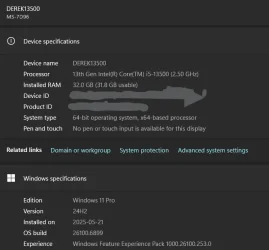
Your computer name is derek13500
There is no sign of any user account called adminderek13500
The foldername Administrator.adminderek13500 is very strange.
- Have you possibly tried to rename the normally hidden & disabled Built-in Admin [the one with the username Administrator]?
- Or have you possibly experienced user profile corruption in the past?
Otherwise it looks like you used to have a user account called Administrator.adminderek13500 that no longer exists.

And don't be misled, there is no account called Administrators. That is the name of the group to which all your Admin accounts belong.

I suggest you just have a nose around the folder C:\Users\Administrator.adminderek13500 so that you can copy off any files of interest.
While you're in there, see if any files ring a bell. That folder exists for a reason & that user account Administrator.adminderek13500 existed for a reason.
Then you'll know you are ready to delete it but there's no hurry if you are unsure about how that folder came to exist.


Denis
 

My Computer My Computer

At a glance

Windows 11 Home x64 Version 25H2 Build 26200....
OS
Windows 11 Home x64 Version 25H2 Build 26200.8037
Your computer name is derek13500
There is no sign of any user account called adminderek13500
The foldername Administrator.adminderek13500 is very strange.
- Have you possibly tried to rename the normally hidden & disabled Built-in Admin [the one with the username Administrator]?
- Or have you possibly experienced user profile corruption in the past?
Otherwise it looks like you used to have a user account called Administrator.adminderek13500 that no longer exists.

And don't be misled, there is no account called Administrators. That is the name of the group to which all your Admin accounts belong.

I suggest you just have a nose around the folder C:\Users\Administrator.adminderek13500 so that you can copy off any files of interest.
While you're in there, see if any files ring a bell. That folder exists for a reason & that user account Administrator.adminderek13500 existed for a reason.
Then you'll know you are ready to delete it but there's no hurry if you are unsure about how that folder came to exist.


Denis
@denis, It's pretty mystifying and I don't want to delete anything that shouldn't be. There is very little information stored in the profile that I can access, mostly music production vst presets and Onedrive files leftover after switching off OneDrive and the last time I accessed it was 2023, I think. All of the files are also backed up to other accounts and drives. I'm not in a huge rush to get rid of the account but I wanted to slim down the c drive before jumping to the 25h2 update. I'm just stumped as to why it doesn't show up in the control panel or settings.
Can it be deleted as a folder or is there a more involved process? I do have revo uninstaller available.
Thanks for the advice. I'm going to do some more research before deleting to get a better understanding of how my machine operates. I'm not super fluent with windows but I can make sense of things with the right tutorial or guidelines but some of this stuff is way above my level of understanding for what i use this machine for.
 

My Computer My Computer

At a glance

Window 11I5 1350032 G ddr4
OS
Window 11
Computer type
PC/Desktop
Manufacturer/Model
MSI
CPU
I5 13500
Motherboard
MSI B760 Tomahawk
Memory
32 G ddr4
Thanks to all who replied. I'll eventually figure this out.
 

My Computer My Computer

At a glance

Window 11I5 1350032 G ddr4
OS
Window 11
Computer type
PC/Desktop
Manufacturer/Model
MSI
CPU
I5 13500
Motherboard
MSI B760 Tomahawk
Memory
32 G ddr4
User profiles are in registry HKEY_LOCAL_MACHINE\SOFTWARE\Microsoft\Windows NT\CurrentVersion\ProfileList.
Each user profile has a subkey here identified by a long alphanumeric string called a Security Identifier (SID). Inside each SID subkey, the ProfileImagePath value points to the location of the user's profile folder on the hard drive.
You have to open each subkey to find the account name associated with key.

Always backup your registry before making changes.
Thanks for that, the profile does reside in the registry along with the other user profiles as well several others, which I assume are related to hidden admin account, (The built in admin account, not the one I'm looking for)
 

Attachments

  • Admin006.webp
    Admin006.webp
    74.7 KB · Views: 1

My Computer My Computer

At a glance

Window 11I5 1350032 G ddr4
OS
Window 11
Computer type
PC/Desktop
Manufacturer/Model
MSI
CPU
I5 13500
Motherboard
MSI B760 Tomahawk
Memory
32 G ddr4
Export that entire profile registry key, then delete the profile. If there are any issues your can import it back in.
 

My Computers My Computers

  • At a glance

    Windows 11 Pro 25H2 26200.8875i9-10900 10 core 20 threads32 gbnone-Intel UHD Graphics 630
    OS
    Windows 11 Pro 25H2 26200.8875
    Computer type
    PC/Desktop
    Manufacturer/Model
    Dell Optiplex 7080
    CPU
    i9-10900 10 core 20 threads
    Motherboard
    DELL 0J37VM
    Memory
    32 gb
    Graphics Card(s)
    none-Intel UHD Graphics 630
    Sound Card
    Integrated Realtek
    Monitor(s) Displays
    Benq 27
    Screen Resolution
    2560x1440
    Hard Drives
    2x1tb Solidigm m.2 nvme /External drives 512gb Samsung m.2 sata+2tb Kingston m2.nvme
    PSU
    500w
    Case
    MT
    Cooling
    Dell Premium
    Keyboard
    Logitech wired
    Mouse
    Logitech wireless
    Internet Speed
    so slow I'm too embarrassed to tell
    Browser
    #1 Edge #2 Firefox
    Antivirus
    Defender+MWB Premium
  • At a glance

    Windows 11 Pro 24H2 26200.8875AMD Ryzen 7 6800U32 gbintegrated
    Operating System
    Windows 11 Pro 24H2 26200.8875
    Computer type
    PC/Desktop
    Manufacturer/Model
    Beelink Mini PC SER5
    CPU
    AMD Ryzen 7 6800U
    Memory
    32 gb
    Graphics card(s)
    integrated
    Sound Card
    integrated
    Monitor(s) Displays
    Benq 27
    Screen Resolution
    2560x1440
    Hard Drives
    1TB Crucial nvme
    Keyboard
    Logitech wired
    Mouse
    Logitech wireless
    Internet Speed
    still too embarrassed to tell
    Browser
    Firefox
    Antivirus
    Defender
    Other Info
    System 3 is non compliant Dell 9020 i7-4770/24gb ram Win11 PRO 26200.8875
Search or Press the Windows key +R and type
sysdm.cpl and press enter. Advanced tab
Under User Profiles click the Settings button.
If that user is there select it and and press the Delete button.
 

My Computer My Computer

At a glance

Windows 11 Pro Insider 64 bit 25H2 26200.5742Intel Core i7 9700K 3.6016 GBnVidia GEForce RTX 2060 Super
OS
Windows 11 Pro Insider 64 bit 25H2 26200.5742
Computer type
PC/Desktop
Manufacturer/Model
Gigabyte Z390 UD
CPU
Intel Core i7 9700K 3.60
Motherboard
Gigabyte Z390 UD
Memory
16 GB
Graphics Card(s)
nVidia GEForce RTX 2060 Super
Sound Card
onboard
Monitor(s) Displays
Two 27" Dell 4K monitors
Screen Resolution
3840 x 2160
Hard Drives
M.2 NVME SSD, 500 GB; Two 2TB Mechanical HDD's
PSU
850w PSU
Case
Cyberpower PC
Cooling
Water cooled
Keyboard
Backlit Cyberpower gaming keyboard
Mouse
Backlit Cyberpower gaming mouse
Internet Speed
1 GB mbps
Browser
Brave
Antivirus
Windows Security
On my computers, the SID number ending in 500 is the profile for the Built-in Admn account.


Denis
 

My Computer My Computer

At a glance

Windows 11 Home x64 Version 25H2 Build 26200....
OS
Windows 11 Home x64 Version 25H2 Build 26200.8037
Your computer name is derek13500
There is no sign of any user account called adminderek13500
If you have a broken user profile (that doesn't allow logons), Windows will sometimes create a temp user profile as [Username].[Hostname] so you can try recovering your old profile. That's probably what happened to the built-in Administrator.

I've never seen it myself, but have read people mentioning it online.
 

My Computer My Computer

At a glance

Windows 7
OS
Windows 7
I've ... read people mentioning it online
Interesting.
So there was not [as I had wondered about] a failed attempt to rename the Built-in Admin, just an incident in which it failed to logon successfully.

the profile does reside in the registry
Have you ever had a failure to log in to the Built-in Admin?
Have you ever tried to do anything unusual with that account such as, but I'm only speculating:
- linking it to an MSAccount - an attempt which it is supposed to reject?
- renaming it?
- applying a password to it?

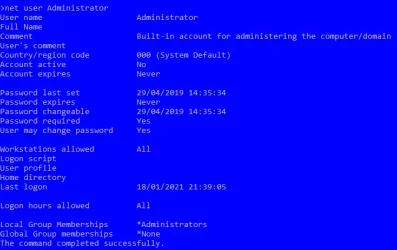
Is there anything unusual in its properties - look in the response to the cmd
net user Administrator
Here are the properties of mine as an example. Its Full name field is empty, as it should be.
net user Administrator.webp


Denis
 
Last edited:

My Computer My Computer

At a glance

Windows 11 Home x64 Version 25H2 Build 26200....
OS
Windows 11 Home x64 Version 25H2 Build 26200.8037
Windows will sometimes create a temp user profile as [Username].[Hostname] so you can try recovering your old profile
Yep, it will append the name of the domain. If you’re not joined to AD, the computer itself is the domain of which the user is a member. If the problem happens more than once, it starts appending numbers.

Edit: I pulled these profile paths from our inventory. This person likes to do a lot of "tweaking" on devices under their control. Names changed to mask the guilty.

View attachment 149811
 
Last edited:

My Computer My Computer

At a glance

Windows 11 Enterprise 25H2 [rev. 8893]
OS
Windows 11 Enterprise 25H2 [rev. 8893]
There's another case of Administrator.[ComputerName] at


Denis
 

My Computer My Computer

At a glance

Windows 11 Home x64 Version 25H2 Build 26200....
OS
Windows 11 Home x64 Version 25H2 Build 26200.8037
Interesting.
So there was not [as I had wondered about] a failed attempt to rename the Built-in Admin, just an incident in which it failed to logon successfully.


Have you ever had a failure to log in to the Built-in Admin?
Have you ever tried to do anything unusual with that account such as, but I'm only speculating:
- linking it to an MSAccount - an attempt which it is supposed to reject?
- renaming it?
- applying a password to it?

Is there anything unusual in its properties - look in the response to the cmd
net user Administrator
Here are the properties of mine as an example. Its Full name field is empty, as it should be.
View attachment 149800


Denis
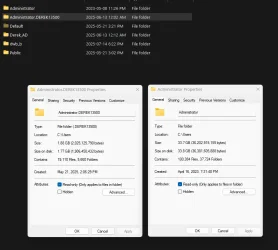
Mine looks similar but the account is active. Still looking in to this. I'm assuming The AdminDerek13500 is the built in account and there is a second I may have activated. The built in account is practically empty but the Administrator account has 35 gb of files sitting in it. I haven't quite had the time to fully research this yet but looking at some leads now.
 

My Computer My Computer

At a glance

Window 11I5 1350032 G ddr4
OS
Window 11
Computer type
PC/Desktop
Manufacturer/Model
MSI
CPU
I5 13500
Motherboard
MSI B760 Tomahawk
Memory
32 G ddr4
If your user profile is gone, its not really gone, its a bak. file in the registry.

Look in the Profile List Folder. Examine every entry carefully and delete the one that doesn't have a bak. extension

Rename user profile with a bak. by removing the extension.

Change the D32 ProfileImagePath VALUE data from 1 to 0. Now change STATE from 1 to 0.

Save the changes and reboot your PC. When you reach the login screen, you should be able to login to your user profile.
 
Last edited:

My Computers My Computers

  • At a glance

    Windows 11 Education For 25H2Intel® Core i7 5500u8 GBIntel HD Family Graphics 5500 AMD Firepro 4150M
    OS
    Windows 11 Education For 25H2
    Computer type
    Laptop
    Manufacturer/Model
    HP ZBook G2
    CPU
    Intel® Core i7 5500u
    Motherboard
    HP
    Memory
    8 GB
    Graphics Card(s)
    Intel HD Family Graphics 5500 AMD Firepro 4150M
    Sound Card
    Realtek High Audio
    Hard Drives
    1 TB SSD
    Mouse
    HP USB Mouse
    Antivirus
    Windows Defender
  • At a glance

    Windows 11 Pro For Workstations 25H2Xeon 1535m v632 GBAMD Quadro Pro 4100
    Operating System
    Windows 11 Pro For Workstations 25H2
    Computer type
    Laptop
    Manufacturer/Model
    HP Zbook G4
    CPU
    Xeon 1535m v6
    Motherboard
    HP
    Memory
    32 GB
    Graphics card(s)
    AMD Quadro Pro 4100
    Sound Card
    Bang and Olufson Audio
    Hard Drives
    1TB SSD
    Mouse
    HP USB Mouse
    Antivirus
    Windows Defender
I'm assuming The AdminDerek13500 is the built in account
Administrator.AdminDerek13500 is not an account. It's a profile created by an account fault - possibly either at a failed login or during a crash whilst logged in to Administrator.

I'm puzzled. I'm convinced I have seen you post the results of the
Net user
command which lists all accounts but I cannot see it now. Perhaps it was just my imagination.
Do post the results of this command to inform replies and ensure misleading suggestions are not made.

I know you've posted the results of Net user Administrator but I thought that the overall Net user results had already been shown.
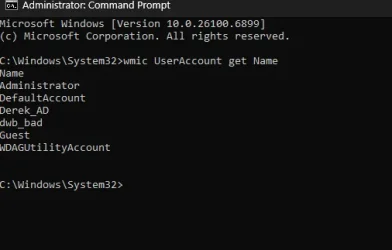
OK, I've got it now. Your original screenshots told us what net user would tell us.


All the best,
Denis
 

My Computer My Computer

At a glance

Windows 11 Home x64 Version 25H2 Build 26200....
OS
Windows 11 Home x64 Version 25H2 Build 26200.8037
Interesting.
So there was not [as I had wondered about] a failed attempt to rename the Built-in Admin, just an incident in which it failed to logon successfully.


Have you ever had a failure to log in to the Built-in Admin?
Have you ever tried to do anything unusual with that account such as, but I'm only speculating:
- linking it to an MSAccount - an attempt which it is supposed to reject?
- renaming it?
- applying a password to it?

Is there anything unusual in its properties - look in the response to the cmd
net user Administrator
Here are the properties of mine as an example. Its Full name field is empty, as it should be.
View attachment 149800


Denis
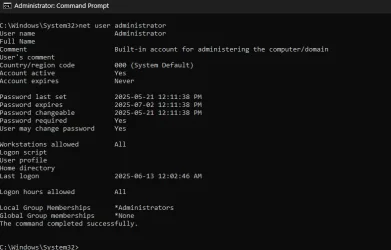
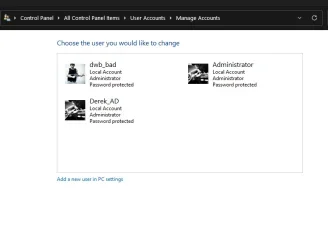
Here's the admin cmd and user list, plus properties of the accounts in question. The AdminDerek13500 is listed in the registry as xxxx 500, which is the code for the MS admin account. So now It's the Administrator account that doesn't appear, as far as I can tell. Could it be leftover from windows 10, before updating to 11? I had my antivirus institute a password change on 2 accounts, one of them was either one of the Admin accounts but i'm not sure which one was done, Admin or adminDerek 13500

Apologies for dragging this out, it seems the more I dig the into this the stranger it gets.

Admin010.webp


Admin007.webpAdmin008.webp
 

My Computer My Computer

At a glance

Window 11I5 1350032 G ddr4
OS
Window 11
Computer type
PC/Desktop
Manufacturer/Model
MSI
CPU
I5 13500
Motherboard
MSI B760 Tomahawk
Memory
32 G ddr4
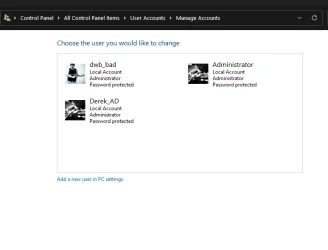
So now It's the Administrator account that doesn't appear
Yes it does.
1761212473048.webp


You cannot mix up accounts with profiles.
Those folders are associated with accounts but they are folders belonging to profiles; they are not accounts.
Your three accounts are shown in the diagram above.

Could it be leftover from windows 10
There's no telling when an incident happened that caused the Administrator.AdminDerek13500 profile [& folder] to appear.

I had my antivirus institute a password change on 2 accounts, one of them was either one of the Admin accounts but i'm not sure which one was done, Admin
You tried to change the password of the Built-in Admin, the account with the username Administrator?
Or are you referring to Derek_AD, dwb-bad?
I have not heard of using an anti-malware utility to change account passwords.

Your Built-in Admin, the account with the username Administrator, is normally disabled. You have enabled yours.
Does it have a password?
I suggest you find out and then disable it again.


All the best,
Denis
 

My Computer My Computer

At a glance

Windows 11 Home x64 Version 25H2 Build 26200....
OS
Windows 11 Home x64 Version 25H2 Build 26200.8037
Back
Top Bottom