RESTORATION


My monitor is 1440x900 so it makes little sense to run the 4K test. I did and minimum frame rate was 25fps, much playable if it was a real game. Also I can at last do 3840x2160 @ 60fps at my LG smart TV. My GTX 1050 Ti needed a 2m or shorter HDMI cable for 4K meaning I had to put the PC next to the TV. Anything longer and would drop to 1080p. Now I did it with a 3m cable and didn't complain. I set scaling to the GPU (default is the display) and even old 320x240 videos look good filling the 50" TV screen. 720x576 videos look perfect, almost like HD.
For the most part 4K for gaming is over rated. Some hard core gamers say that 2K is ideal. I'm not a hard core gamer so I wouldn't know. I do know however that for a man my age and my limited eye sight I really don't much care for how 4K makes everything on my monitor so tiny. Yes, I could down scale but then what is the point in having 4K if you have to hobble it? The sad part of it is that I actually own a nice 32" 2K monitor but it's too big to fit inside my set up so I use it to watch videos in my bed room. The 4K monitor sits in my computer shelf just fine. Great resolution but everything is just sooo tiny!

My girls run 1050's on first gen Bloomfields without any bottle necking issues. Neither one has asked me for a better GFX card. They game a lot. When I suggest giving them an upgrade the looks on their faces says it all. HANDS OFF! Whenever they need me to service anything I have to promise them that I won't change anything. No CPU upgrade, no swapping out graphics cards, no upgrading the motherboard. Yes, they're smart enough to know what these things are. No worries, one is going to university soon and leaving her desktop behind in storage. I don't have her permission to touch it. lol She already told me "No surprises". Meanwhile, in my bed room, I'm running a Dell Studio XPS 9001. It has an i7 960 chip in it and it runs that 2K monitor like a boss.

And to think I found it in a recycling bin. All it needed was a new GFX card.

A LEGEND
 

My Computer

System One

  • OS
    WIN 11, WIN 10, WIN 8.1, WIN 7 U, WIN 7 PRO, WIN 7 HOME (32 Bit), LINUX MINT
    Computer type
    PC/Desktop
    Manufacturer/Model
    DIY, ASUS, and DELL
    CPU
    Intel i7 6900K and i9-7960X / AMD 3800X (8 core)
    Motherboard
    ASUS X99E-WS USB 3.1 and ASUS X299 SAGE
    Memory
    128 GB CORSAIR DOMINATOR PLATINUM (B DIE)
    Graphics Card(s)
    NVIDIA 1070 and RTX 3070
    Sound Card
    Crystal Sound (onboard)
    Monitor(s) Displays
    single Samsung 30" 4K and 8" aux monitor
    Screen Resolution
    4K and something equally attrocious. I'll be working on this.
    Hard Drives
    A, B, C, D, E, F, G, H, I, J, K, L, M, N, O, P, Q, R, S, T, U, V, W

    Ports X, Y, and Z are reserved for USB access and removable drives.

    Drive types consist of the following: Various mechanical hard drives bearing the brand names, Seagate, Toshiba, and Western Digital. Various NVMe drives bearing the brand names Kingston, Intel, Silicon Power, Crucial, Western Digital, and Team Group. Various SATA SSDs bearing various different brand names.

    RAID arrays included:

    LSI RAID 10 (WD Velociraptors) 1115.72 GB
    LSI RAID 10 (WD SSDS) 463.80 GB

    INTEL RAID 0 (KINGSTON HYPER X) System 447.14 GB
    INTEL RAID 1 TOSHIBA ENTERPRIZE class Data 2794.52 GB
    INTEL RAID 1 SEAGATE HYBRID 931.51 GB
    PSU
    SEVERAL. I prefer my Corsair Platinum HX1000i but I also like EVGA power supplies
    Case
    ThermalTake Level 10 GT (among others)
    Cooling
    Noctua is my favorite and I use it in my main. I also own various other coolers.
    Keyboard
    all kinds.
    Mouse
    all kinds
    Internet Speed
    360 mbps - 1 gbps (depending)
    Browser
    FIREFOX
    Antivirus
    KASPERSKY (no apologies)
    Other Info
    Gave Dell touch screen with Windows 11 to daughter and got me an OTVOC. Being a PC builder I own many desktop PCs as well. I am a father of five providing PCs, laptops, and tablets for all my family, most of which I have modified, rebuilt, or simply built from scratch. I do not own a cell phone, never have, never will.
I think when there is super fast action on screen you won't notice the difference between 1080p and 2K or 4K. Only on static images. So I see no point gaming or watching action movies beyond 1080p. Besides our first games were at 256x192 (80's home computers) or 320x200 (PC) resolution with 16 or 256 colors. Anything higher is fantastic. Even 640x480 is super for me. I still play some of these old games in emulators this time with better AdLib or SoundBlaster sound than the dreadful PC beeper.
 

My Computers

System One System Two

  • OS
    Windows 11 Pro 23H2 (5699), 25H2 (8457)
    Computer type
    Laptop
    Manufacturer/Model
    Acer Extensa 5630EZ
    CPU
    Mobile DualCore Intel Core 2 Duo T7250, 2000 MHz
    Motherboard
    Acer Extensa 5630
    Memory
    4GB
    Graphics Card(s)
    Mobile Intel(R) GMA 4500M (Mobile 4 series)
    Sound Card
    Realtek ALC268 @ Intel 82801IB ICH9 - High Definition Audio Controller
    Monitor(s) Displays
    1
    Screen Resolution
    1280x800
    Hard Drives
    Samsung SSD 850 EVO 250GB SATA Device (250 GB, SATA-III)
    Internet Speed
    VDSL 50 Mbps
    Browser
    MICROSOFT EDGE
    Antivirus
    WINDOWS DEFENDER
    Other Info
    Legacy MBR installation, no TPM, no Secure Boot, no WDDM 2.0 graphics drivers, no SSE4.2, cannot get more unsupported ;) This is only my test laptop. I had installed Windows 11 here before upgrading my main PC. For my main PC I use everyday see my 2nd system specs.
  • Operating System
    Windows 11 Pro v25H2 (build 26200.8457)
    Computer type
    PC/Desktop
    Manufacturer/Model
    Custom-built PC
    CPU
    Intel Core-i7 3770 3.40GHz s1155 (3rd generation)
    Motherboard
    Asus P8H61 s1155 ATX
    Memory
    2x Kingston Hyper-X Blu 8GB DDR3-1600
    Graphics card(s)
    GIGABYTE GeForce RTX 3050 WINDFORCE OC V2 6GB (GV-N3050WF2OCV2-6GD)
    Sound Card
    Realtek HD audio (ALC887)
    Monitor(s) Displays
    Sony Bravia KDL-19L4000 19" LCD TV via VGA
    Screen Resolution
    1440x900 32-bit 60Hz
    Hard Drives
    WD Blue SA510 2.5 1000GB SSD as system disk, Western Digital Caviar Purple 4TB SATA III (WD40PURZ) as second
    PSU
    Thermaltake Litepower RGB 550W Full Wired
    Case
    SUPERCASE MIDI-TOWER
    Cooling
    Deepcool Gamma Archer CPU cooler, 1x 8cm fan at the back
    Keyboard
    Mitsumi 101-key PS/2
    Mouse
    Sunnyline OptiEye PS/2
    Internet Speed
    100Mbps
    Browser
    Microsoft Edge, Mozilla Firefox
    Antivirus
    Microsoft Windows Defender
    Other Info
    Legacy BIOS (MBR) installation, no TPM, no Secure Boot, WDDM 3.0 graphics drivers, WEI score 7.4
OLED monitors. However, most of them are glossy, not matte.
 
Last edited:

My Computer

System One

  • OS
    Microsoft Windows 11 Home
    Computer type
    PC/Desktop
    Manufacturer/Model
    MSI MS-7D98
    CPU
    Intel Core i5-13490F
    Motherboard
    MSI B760 GAMING PLUS WIFI
    Memory
    2 x 16 Patriot Memory (PDP Systems) PSD516G560081 6400MT (32-37-37-74); 1.35V)
    Graphics Card(s)
    GIGABYTE GeForce RTX 4070 WINDFORCE OC 12G (GV-N4070WF3OC-12GD)
    Sound Card
    Bluetooth Аудио
    Monitor(s) Displays
    INNOCN 15K1F
    Screen Resolution
    1920 x 1080
    Hard Drives
    WD_BLACK SN770 250GB
    KINGSTON SNV2S1000G (ELFK0S.6)
    PSU
    Thermaltake Toughpower GF3 1000W
    Case
    CG560 - DeepCool
    Cooling
    ID-COOLING SE-224-XTS / 2 x 140Mm Fan - rear and top; 3 x 120Mm - front
    Keyboard
    Corsair K70 RGB TKL
    Mouse
    Corsair KATAR PRO XT
    Internet Speed
    100 Mbps
    Browser
    Firefox
    Antivirus
    Microsoft Defender Antivirus
    Other Info
    https://www.userbenchmark.com/UserRun/66553205
For my work station I don't need anything so fancy for graphics. My 1070 will suffice.

IMG_1426.webp

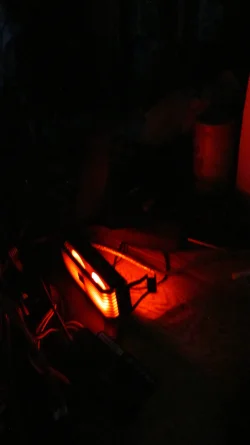
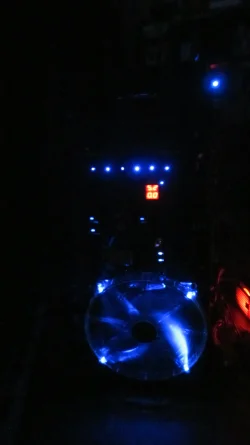
I'm actually quite pleased with this photo as normally I can't get that 'tail light at night down a highway' effect on camera but I caught it here. This is what it actually looks like in real time. I modified the handle with some high volt automotive LEDs. The streaks are static due to the refraction in the handle. There is no movement here. The mod fits the Level 10 GT theme rather nicely, I think. Discrete. Not loud and flashy.

Anyway, this is my idea of RGB. You can see the red, you can see the green, you should have no problem seeing my favorite color. I like lights that mean something. Even if it is a pilot light or dummy light at least it serves a function. Like the lights on my system board. They serve a function. Or the lights on my HBA cards. They let me know when something is running right or wrong.

IMG_1424.webp
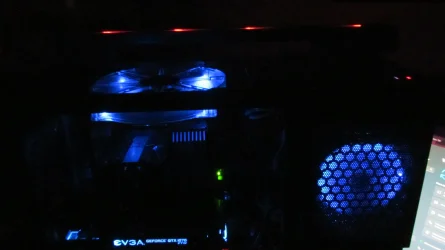
RGB all the way, baybee! I can even turn off the big blue fans when I want to and I often do. No need to waste power in the day time. Admittedly this unit is only half built at this point but as far as the CPU is concerned it's all systems go. I may not even bother to overclock it this time but it ran @ 4.1 GHz for the longest while with its 128 GB of memory and over 30 drives.

IMG_1427.webp

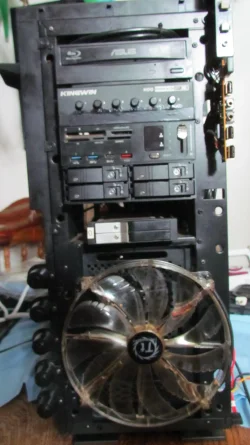
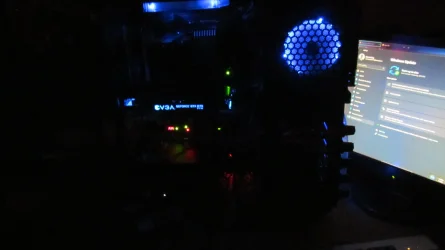
You can't see much of the front of this unit in the dark but this is what faces me when my PC is back where it belongs. When I plug into a USB on the front I get a green light. Yaaay! RGB. That butt oglee red on the right is my RAM fan that I was experimenting with. I'm getting some ideas and there's a chance I'll be modding it rather than risking Corsair's crapware on my PC.

Camping with the girls yesterday was a blast. Alas, we didn't catch any fish. The river was too high and flooding out. We still had fun.
 

My Computer

System One

  • OS
    WIN 11, WIN 10, WIN 8.1, WIN 7 U, WIN 7 PRO, WIN 7 HOME (32 Bit), LINUX MINT
    Computer type
    PC/Desktop
    Manufacturer/Model
    DIY, ASUS, and DELL
    CPU
    Intel i7 6900K and i9-7960X / AMD 3800X (8 core)
    Motherboard
    ASUS X99E-WS USB 3.1 and ASUS X299 SAGE
    Memory
    128 GB CORSAIR DOMINATOR PLATINUM (B DIE)
    Graphics Card(s)
    NVIDIA 1070 and RTX 3070
    Sound Card
    Crystal Sound (onboard)
    Monitor(s) Displays
    single Samsung 30" 4K and 8" aux monitor
    Screen Resolution
    4K and something equally attrocious. I'll be working on this.
    Hard Drives
    A, B, C, D, E, F, G, H, I, J, K, L, M, N, O, P, Q, R, S, T, U, V, W

    Ports X, Y, and Z are reserved for USB access and removable drives.

    Drive types consist of the following: Various mechanical hard drives bearing the brand names, Seagate, Toshiba, and Western Digital. Various NVMe drives bearing the brand names Kingston, Intel, Silicon Power, Crucial, Western Digital, and Team Group. Various SATA SSDs bearing various different brand names.

    RAID arrays included:

    LSI RAID 10 (WD Velociraptors) 1115.72 GB
    LSI RAID 10 (WD SSDS) 463.80 GB

    INTEL RAID 0 (KINGSTON HYPER X) System 447.14 GB
    INTEL RAID 1 TOSHIBA ENTERPRIZE class Data 2794.52 GB
    INTEL RAID 1 SEAGATE HYBRID 931.51 GB
    PSU
    SEVERAL. I prefer my Corsair Platinum HX1000i but I also like EVGA power supplies
    Case
    ThermalTake Level 10 GT (among others)
    Cooling
    Noctua is my favorite and I use it in my main. I also own various other coolers.
    Keyboard
    all kinds.
    Mouse
    all kinds
    Internet Speed
    360 mbps - 1 gbps (depending)
    Browser
    FIREFOX
    Antivirus
    KASPERSKY (no apologies)
    Other Info
    Gave Dell touch screen with Windows 11 to daughter and got me an OTVOC. Being a PC builder I own many desktop PCs as well. I am a father of five providing PCs, laptops, and tablets for all my family, most of which I have modified, rebuilt, or simply built from scratch. I do not own a cell phone, never have, never will.
Hadermeister. You know, I'm thinking that I might have owned that G19 keyboard too, come to think of it. Keys were too soft but it was pretty. Please show me a picture of that Steel Series keyboard you're using so I have some idea of what to look at when this one finally dies.
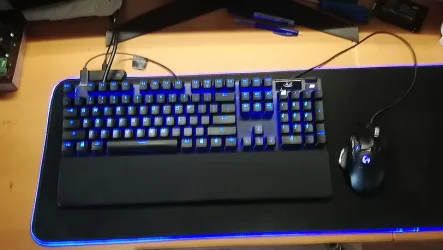
This is a picture of my Steelseries APEX 7 keyboard. My demands where simple; It has a display, It has a rotatable multifunction knob, it has a USB connection for my mouse, it has rock-solid switches, must have good and clear RGB led underneath every button, and a good palmrest. This keyboard fitted those demands. Strangely enough they have never heard of an hub-function because the connection to the PC is a thick cable that splits in the end in 2 USB connectors. One for the keyboard and one for the mouse. An other issue I found was it's power. Since it does not have a powersupply, they draw all the power from the USB port. After a while I noticed some strange behavior; the keyboard kept on resetting itself. I knew that it was a power thing. I bought on Amazon a USB-C 3.2 hub that attaches itself on the side of the table and did had a separate 5V connection to power the USB directly. The problem never occurred again. I went online and was curious if other people had the same problems. Some did. Connected their (rubbish) tech support and asked them if they knew this issue; their reply was strange and odd. No the problem was not know and I must not connect this keyboard to any Hub.... They clearly are not aware that if you buy an motherboard with USB ports at the back they also use an internal Hub on the motherboard! So that reply was BS. I my case; every USB port on the backside is used. When I connected this keyboard to my PC also some other device had that resetting problem also. A sign that the complete power consumption with this keyboard added to it was to much for my motherboard. I thought my USB port was defective. As I though all problems (that USB port was OK) went away as soon as I used the sperate USB table hub. That Hub is a good one, 4 additional ports, potential for a powersupply connected to it to power the Hub separately (an extra 5V powersupply not included, so I bought a cheap on on Amazon also) The hub is attached to the side of the table. No Hubs roaming on my table. (Amazon.nl) Not a plastic Hub; all metal.

This problem did not have with my old G19 keyboard. It had already a separate powersupply because of the small LCD attached in it. It showed me the CPU and RAM usage by default. That function i am missing on this keyboard. What I did found out; The black and white OLED screen is programable. I upload a small animated GIF onto the display. If this is possible, it is also possible to display the CPU and RAM usage as well. But allas. They are not ready or seen that potential. The software is capable of much other stuff I don't use. (modern youth stuff; gaming, music etc.) It does has 5 config settings which can be addressed by a shortcut. I could program the keyboard in such a way that during a game certain keys lite in one color and all the rest in a dimmer color. I think it is also possible when I start a game it detects that and switches automatically over to a certain config. The rotatable knob on the lefttop is default connected to the volume. So I can adjust the volume with ease. On other keyboard you have to press a certain key and two other keys to get the volume up or down. The switches that you talked about are tactile ones. (brown) The pressure on that keys are just right. They make some clicking sound. I was worried about that. It must not be loud. But they are not. The layout off the keyboard is just old school. No shift keys are not shorter because the had to cramp one special key between them. It has also 6 programmable keys (My old G19 had 12) It is capable to store long shortcuts under them of record / play a macro. They are sitting on that Insert-Page down island. Too bad that they used big fat letters on them; M1-M6. The real function is also there in small print. I whished it was the other way arround. I am pleased with this affordable keyboard. There is an other one that has more options; APEX 9 but at that price range? Nope. The palmrest. it's heavy an made from aluminum with a soft skin on top of it that is easy to clean. No plastic palmrest anymore. (The G19 had one, mechanically attached) I's magnetic and attaches is automatically to the right spot onto the keyboard. So there is now way the keyboard (it's frame is also made from aluminum) is wondering arround on my XXL mousemat. :D I am also pleased with the new Creative 2.1 soundbar and my terrific Be Quite PC case. A dream for every homebuilder. :geek:They nailed it with listen to them. An L-shape table? I also have one. (Office table from IKEA) My old PC is sitting next to me in the short end of the L.
 

Attachments

  • ATK 7.webp
    ATK 7.webp
    113.2 KB · Views: 4
  • keyboard.webp
    keyboard.webp
    45.6 KB · Views: 3
  • realdesktop.webp
    realdesktop.webp
    94.9 KB · Views: 3
Last edited:

My Computer

System One

  • OS
    Win 11 Pro "25H2" Build 26200.8524, Zorin OS Pro
    Computer type
    PC/Desktop
    Manufacturer/Model
    Self built
    CPU
    Intel® Core™ i7-12700KF 12th Gen.
    Motherboard
    ASUS Prime Z690-A, BIOS v4505
    Memory
    32GB DDR5 5600-36 Vengeance
    Graphics Card(s)
    PCIe4.0 Asus NVIDIA RTX3060Ti
    Sound Card
    Onboard; Realtek
    Monitor(s) Displays
    34" LG 34UC79G-B Curved 21:9 144Hz
    Screen Resolution
    2560x1080 (No HDR)
    Hard Drives
    250Gb Samsung 870PRO NVMe (Win 11 Pro)
    1Tb Samsung 980PRO NVMe
    1Tb Samsung 970EVO NVMe
    2Tb Samsung 990PRO NVMe with heatsink.
    4Tb WDC WD40EZRZ Blue SATA (Int.)
    4Tb WDC WD40EZRZ Blue SATA (Int.)
    3Tb WDC WD30EFRZ Red SATA (Int.)
    256Gb Samsung 840PRO SSD (RHEL 9,5)
    256Gb Samsung 850PRO SSD (Zorin OS Pro 18)
    PSU
    Coolermaster 850W V2 Gold with internal 12cm exaust fan
    Case
    Be-Quiet Pure Base 600.
    Cooling
    3x Be-Quiet! 12/14cm "Silent Wings 4" casefans, 1x Arctic Freezer i35 CPU towerblock with fan.
    Keyboard
    Steelseries APEX 7 keyboard.
    Mouse
    Logitech G-502 Hero
    Internet Speed
    1Gb
    Browser
    Brave
    Antivirus
    F-Secure
    Other Info
    No Noise system.
    256Gb Kingston Travler USB 3.0 drive.
    64Gb Sandisk USB 3.2 drive. (Ventoy)
    8Gb Philips USB 3.0 drive. (Win. Inst.)
    8Gb Philips USB 3.0 drive. (Rescue disk)
    2Tb WD USB 3.0 Passport drive.
    USB Ext. 500Gb WD SATA drive.
    External USB 3.0 C.A. CD/DVD* burner.
This is a picture of my Steelseries APEX 7 keyboard. . .
Hadermeister, my friend. You arrrre AMAZING!!! I think you may have just shown me the keyboard of my dreams. Whenever this board gives me the slightest signs of dying on me I'll be heading on over to Amazon for an APEX 7. I Have just the smallest concern about having enough room on my desk for the palm rest but other than that the keyboard looks to be ideal for my purposes.

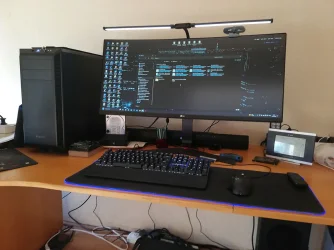
Clearly we share similar tastes. The additional small monitor on the right? I have one too. The Logitech cam on top of the main? I have one too. The mouse and keyboard pad with just the right amount of subtle blue trim, I confess, I gave it to my wife because she likes owls and it had these owls printed on it. (She made it turn pink.) Ha! You even have a toaster on the left just like me. (Makes me think you may be right handed.) The only real difference in layout is where I normally keep my PC and that is because it is so huge I have to keep it on the opposite end of the "L" behind me or it will hang over the edge of the desk!

I have a hub on my desk too. It won't roam because it is permanently secured. It's solid metal and each port has a teeny tiny blue LED that lights up when the switch is toggled and yes, it is a powered hub and it has served me well for years. In my opinion too much stuff is made of plastic these days. Even my KVM and POE Ethernet switch have metal enclosures. Here is where we likely differ: I don't use WiFi and I refuse to have it in my house. This choice resulted in this old man getting some exercise wiring up the house with Ethernet cable. No worries. I pulled more miles of wire in my day than I can count.

Anyway, I gave Corsair the benefit of the doubt and switched off the sensor access in the WinInfo app to no avail. Then I uninstalled the app and still nothing. I can get it to show blue but I can't stop the flashing. So the controller simply has to go. More wasted money compliments of Corsair. The lousy thing never worked properly from day one because the software was atrocious. But have no fear, my friend. I still have options. I ordered one of these from Amazon.


The only issue I may have with it is perhaps I'll need to re-select the color each time I boot. Anything to stop that confounded flashing! In the meantime I'm thinking about playing with the pin outs. Perhaps I can get the color I want simply by eliminating the right pin. I'm thinking this should not be too hard to test. Because who knows how long it will take to get this silly device I ordered from China! One thing is certain: I will never buy a fan controller from Corsair again. Today's Corsair isn't the Corsair of old. That name has been sold too many times to people who just want to profit off of misery.

If all else fails I can always donate the RAM fans to the X299 project. The fans will run without the LEDs connected. The Dominator RAM is well heat-sinked. I just like to spoil the old girl. Perhaps this time I won't bother to overclock the memory. Trust me when I say once the whole thing is put together it feels like an ice chest inside. I will be putting up more pictures to show why this is the case. (No pun intended.)
IMG_1428.webp
Such ugliness should be illegal!
 

My Computer

System One

  • OS
    WIN 11, WIN 10, WIN 8.1, WIN 7 U, WIN 7 PRO, WIN 7 HOME (32 Bit), LINUX MINT
    Computer type
    PC/Desktop
    Manufacturer/Model
    DIY, ASUS, and DELL
    CPU
    Intel i7 6900K and i9-7960X / AMD 3800X (8 core)
    Motherboard
    ASUS X99E-WS USB 3.1 and ASUS X299 SAGE
    Memory
    128 GB CORSAIR DOMINATOR PLATINUM (B DIE)
    Graphics Card(s)
    NVIDIA 1070 and RTX 3070
    Sound Card
    Crystal Sound (onboard)
    Monitor(s) Displays
    single Samsung 30" 4K and 8" aux monitor
    Screen Resolution
    4K and something equally attrocious. I'll be working on this.
    Hard Drives
    A, B, C, D, E, F, G, H, I, J, K, L, M, N, O, P, Q, R, S, T, U, V, W

    Ports X, Y, and Z are reserved for USB access and removable drives.

    Drive types consist of the following: Various mechanical hard drives bearing the brand names, Seagate, Toshiba, and Western Digital. Various NVMe drives bearing the brand names Kingston, Intel, Silicon Power, Crucial, Western Digital, and Team Group. Various SATA SSDs bearing various different brand names.

    RAID arrays included:

    LSI RAID 10 (WD Velociraptors) 1115.72 GB
    LSI RAID 10 (WD SSDS) 463.80 GB

    INTEL RAID 0 (KINGSTON HYPER X) System 447.14 GB
    INTEL RAID 1 TOSHIBA ENTERPRIZE class Data 2794.52 GB
    INTEL RAID 1 SEAGATE HYBRID 931.51 GB
    PSU
    SEVERAL. I prefer my Corsair Platinum HX1000i but I also like EVGA power supplies
    Case
    ThermalTake Level 10 GT (among others)
    Cooling
    Noctua is my favorite and I use it in my main. I also own various other coolers.
    Keyboard
    all kinds.
    Mouse
    all kinds
    Internet Speed
    360 mbps - 1 gbps (depending)
    Browser
    FIREFOX
    Antivirus
    KASPERSKY (no apologies)
    Other Info
    Gave Dell touch screen with Windows 11 to daughter and got me an OTVOC. Being a PC builder I own many desktop PCs as well. I am a father of five providing PCs, laptops, and tablets for all my family, most of which I have modified, rebuilt, or simply built from scratch. I do not own a cell phone, never have, never will.
@ Sannerman:

Yes I agree. We have similar tastes it seems. It was a tough deal to search (the number you can find is endless from simple to complex) for a keyboard that was to my liking. I ran through every keyboard manufacturer I could find. I had certain things in my mind what to watch for. The keyboard is the most interface between a human and it's PC. We interact with it. It must be sturdy and do the thing that I want. Any normal option is welcome to make life easier. Don't go for all the fancy unneeded stuff. I began with my sturdy Commodore VIC 20 and later the 64. Then came IBM with their XT along. I waited and bought my first AT from a Asian origin. A Clone. Disks were ludicrous small 20Mb at that time but every piece of software was also tiny. I knew every component on there (I was interested in that world and ended up to be an technician who could repair this stuff on a component basis. I even like to program the CPU and the surrounding stuff on a assembler basis; machine talk. To manipulate so it could do thing it should not do normally. Had a great good time with this. (That virus came with the VIC 20 and the 64 to be honest. An early adapter.) Later it became (I was in the service industry now) Perl. A programming language that was suited for Windows, Linux etc. A universal language. And still up this day I keep track onto the new possibility's of now. Yes i also must admit; I am an old guy also but I am no fool. I notice the in-depth fault that Windows are making. I have more than 50 years of knowledge behind me. I know how stuff must run and maintenance. Internaly I have a 1Gb network with 2 sturdy Netgear switches that never fail even after 20 years, CAT 6 cable everywhere. I just don't like WiFi connection. It is easy and simple but the speeds. Ha.... I have a good fiberglass connection and dito 1Gb abbo. I can slurp may Gb within a few minutes. No Wifi for mee. Speed! That's what I want! The only thing that is connected to my modems WiFi is my cellphone. It is that or to pay heavy for your data bundle going though a cell tower all arround us. So alle massages and updates go through my modem which is already free of charge because I already paid for the 1Gb connection. I saw the battles in the past DSL, ADSL, cable speeds where getting higher. Until the killer came along. Fiber. Installed by a provider for free. Now the sky is the limit. Now a 1Gb connection. In the future? It's getting better. 4Gb is arround the corner. Is is for every body? No! Browsing, playing games online? Total overkill. But I am a heavy user who download a few TB each moth to check thing out. Also games (illegal) to see it first. When it's worth it? I buy it. My PC is a fast one now and it needs maintenance that other people lacking. If keep my current Win11 24H2 up to date and clean it on a monthly basis. I have many answers about the problems that some people encounters. It is sometime a simple basis of knowing what is turning underneath the Windows hood and then show where to look for. I have given tips to people those later said. if I just kew this sooner. Yes I am a digger also. From my profession I always am searching for the root cause. I give that advice in the simplest form I can think of and they ondertand that simple pointers. They are getting smarter also. None is born Dumb. We have have a brain. Al it lacks is pointing to the right direction. So i am gladly sharing my knowledge to everybody who is in trouble or asking me. I have a deep understanding of litterly everything. Even non PC related.

So I have a lot off knowledge. Real good ones! Give me a problem and I will point you to the right direction. Not solving it. I am not there. But a good advice is always welcome. You can solve it yourself using the directions. I just have some deeper knowledge on electronics and software. But I still not god.... So I also make mistakes by reading and interpertate it wrong. My 2Gb Samsung drive died once. Blame the motherboard for it. Send it back RMA. They received that and found the many springs (those damn sensitive springs) underneath my 12th gen Intel CPU were damaged. Did not understand the damage until I looked back in the past; I had trouble with the plastic cover who protected those spring when I bought it. I tried to install it the wrong way. That is one mistake I never make again! I will make a picture of any plastic cap in the future. My fault. So I paid 60 Euros to replace it at. They tested it again and no faults where noticed. So my expensive 2Gb NVMe went to heaven suddenly. No worry's there I can RMA it also with it's 5 years warranty. But where to register the RMA? No clue. They hide their site. All the they know are complete stuff. PC's, TV's etc. No components wanted..... Damn Samsung and their claim of 5 year warranty. I bought it on Amazon and now they are directing me to the manufacturer.... In the mean time I bought a faster and newer 2Gb Samsung NVMe device.

I do have some old school 4TB drive in my system. The blue kind from WD. (speed is not that important. If I want speed I use my 4 NVMe's those give me speed. Those drives are there for backup purposes.... Stores software and can be used to installed it again....) My case prevent them from vibrating (don't that normally not also) They are hanging in detachable bays with a rubber dampener between the HD and the housing. That's what I love about the Be Quite design cases. It started just as a noiseless fan company from Germany. They now expended their range to all kind of cases. They are also a new company and not American. It seems that Sweden and Germany fills a gap that the Americans and Asians not see; Quality and ease. Had many cases of corsair, Aearo, Zalm, Coolermaster. None beats the Be Quite case today now; plenty of room to getting the videocard out how long they can be. Have a 3,5 cm space behind the motherboard to divert all kind of cables. Have 3 drive bays. No need for them? You can leave them outside permanent. A few SDD bay behind the motherboard area. In all I made use of them all. 98% of my cables went onto the backside. Looking at the top? No cable to be seen what has a great influence inside the case for is air flow. The system is cool and makes no noise. That's all what I wanted. My RTX may rev up but it soon going to quite also. Enough airflow inthe case. That's important for a no noise system. I don't use any fan controls what so ever. Unneeded. All my fans and connectors has a smart wires attached to them. They rev up when needed. PWM connectors. Every motherboard has them now. They control the revs of the fans connected to them. If it isn't enough to your liking? Software that came with your motherboard shows a graph which you can adjust. So no need for any from of fan controles. That technology belongs to the past when motherboard could not control them. Now they can!!!

Leds on all kind of stuff; Fans, Watercoolers, memory... Hahaha. It's only intended for the fan boys with their open cases to impress others. I am an old guy; that rubbish don't impress me. Specs do! The fasted please with out any rubbish like lights on it please.... And now I have a very fast system which can start within some 17 seconds. RAM, CPU and NVMe's are one of the fastest you can buy. Not all of them are top predators. I have a budget to keep in mind. But still fast enough. Money is a concept you have to deal with it. What can I buy within this range? I had an old i7 system with 32Gb RAM and a GTX 1080Ti. Now? I was confronted that my old fast GTX1080Ti was outdated. Bought a new RTX 3060Ti. Despite all the reviews about it; (ended up with blue screens, the reviews did not.....) It needed a real PICI Gen 5 slot. Overhaul was needed for the next 5-10 years. A new 12th Gen i7, fast DDR 5 and a new motherboard. That fitted the bill. The new PCI 5 slot did it's job. Later on I discovered it was just an old PCI 4 slot with some alterations added to it. Manufactures also lies. in order to promote their "new" stuff...Strange to find this out with modern software....) So be aware of claims. I don't trust anyone anymore with their claims. Looking a many reviews that sometime punch a whole in it. Others I don't trust them; getting paid by the manufacturer to give a splendid review about it. I have seen them. I stay away from those "reviews". Yes you have to use your brain and wits to choose your devices. An easy task? No!! You have to know your stuff! When I meat rubbish (that really never occurs, I can sift to the specs like no one) I send it back..... Others may have a hard time with this because they don't posse the knowledge i do have. And that is rare today. I can talk and explain but nobody understand it. So I adjust myself to it. Just in Jip en Janneke language. A famous Dutch writer invented that story. It took off.... (look that reference up; it will explain everything where I am talking about. And it is true. Explaining it in simple terms works. No need to get technical. The basics is enough to understand.
So i am old. Have a lot experience with IT. Know what devices are to my likening. We share also some commen intrest. What more do you want? It's a privilege to meet a like minded individual like me who knows his stuff. We can shake our hand on that!! No often I came across people who are so open like me and have the same intrest. And share their thoughts!!! (y) I am long of stuff sometimes. Forgive me. I need to tell the details also behind every opinion. So you understand how my mind is working and how it make a solid decision based on pure technical details. I love your switch to love my choise of keyboard. But wait a moment. Sleep over it for several night. Contemplate the pro an cons. The investment is 160 euros. That is al lot for just a keyboard. You must have good reasons for buying one! Budget. The Apex 9 cost some100 euros more. That it's worth it for me. That's me. Look at your own demands you give to a keyboard! Maybe differ from me? So buy an other keyboard that meets your demands and budget! My demands where high. Other people can be bothered with it. Keys and some superb lightning effects is enough for me. I? Have some other demands. One thing I recommend are the reviews. They are independent and give you an overall sense of good or bad. I review them every time I buy something expensive. It is a sensible thing to do. I never bought a product of this manufacturer before so I don't know their track record also how bad or good they are. So in mine my language; I ga niet over een nacht over ijs.... A good advice. Just try yourself to get an opinion first. We are not lemmings.... 😜😜
 

My Computer

System One

  • OS
    Win 11 Pro "25H2" Build 26200.8524, Zorin OS Pro
    Computer type
    PC/Desktop
    Manufacturer/Model
    Self built
    CPU
    Intel® Core™ i7-12700KF 12th Gen.
    Motherboard
    ASUS Prime Z690-A, BIOS v4505
    Memory
    32GB DDR5 5600-36 Vengeance
    Graphics Card(s)
    PCIe4.0 Asus NVIDIA RTX3060Ti
    Sound Card
    Onboard; Realtek
    Monitor(s) Displays
    34" LG 34UC79G-B Curved 21:9 144Hz
    Screen Resolution
    2560x1080 (No HDR)
    Hard Drives
    250Gb Samsung 870PRO NVMe (Win 11 Pro)
    1Tb Samsung 980PRO NVMe
    1Tb Samsung 970EVO NVMe
    2Tb Samsung 990PRO NVMe with heatsink.
    4Tb WDC WD40EZRZ Blue SATA (Int.)
    4Tb WDC WD40EZRZ Blue SATA (Int.)
    3Tb WDC WD30EFRZ Red SATA (Int.)
    256Gb Samsung 840PRO SSD (RHEL 9,5)
    256Gb Samsung 850PRO SSD (Zorin OS Pro 18)
    PSU
    Coolermaster 850W V2 Gold with internal 12cm exaust fan
    Case
    Be-Quiet Pure Base 600.
    Cooling
    3x Be-Quiet! 12/14cm "Silent Wings 4" casefans, 1x Arctic Freezer i35 CPU towerblock with fan.
    Keyboard
    Steelseries APEX 7 keyboard.
    Mouse
    Logitech G-502 Hero
    Internet Speed
    1Gb
    Browser
    Brave
    Antivirus
    F-Secure
    Other Info
    No Noise system.
    256Gb Kingston Travler USB 3.0 drive.
    64Gb Sandisk USB 3.2 drive. (Ventoy)
    8Gb Philips USB 3.0 drive. (Win. Inst.)
    8Gb Philips USB 3.0 drive. (Rescue disk)
    2Tb WD USB 3.0 Passport drive.
    USB Ext. 500Gb WD SATA drive.
    External USB 3.0 C.A. CD/DVD* burner.
Regarding RMA, there is no need to return to Amazon or other seller. You can return directly to the manufacturer.
 

My Computers

System One System Two

  • OS
    Windows 11 Pro 23H2 (5699), 25H2 (8457)
    Computer type
    Laptop
    Manufacturer/Model
    Acer Extensa 5630EZ
    CPU
    Mobile DualCore Intel Core 2 Duo T7250, 2000 MHz
    Motherboard
    Acer Extensa 5630
    Memory
    4GB
    Graphics Card(s)
    Mobile Intel(R) GMA 4500M (Mobile 4 series)
    Sound Card
    Realtek ALC268 @ Intel 82801IB ICH9 - High Definition Audio Controller
    Monitor(s) Displays
    1
    Screen Resolution
    1280x800
    Hard Drives
    Samsung SSD 850 EVO 250GB SATA Device (250 GB, SATA-III)
    Internet Speed
    VDSL 50 Mbps
    Browser
    MICROSOFT EDGE
    Antivirus
    WINDOWS DEFENDER
    Other Info
    Legacy MBR installation, no TPM, no Secure Boot, no WDDM 2.0 graphics drivers, no SSE4.2, cannot get more unsupported ;) This is only my test laptop. I had installed Windows 11 here before upgrading my main PC. For my main PC I use everyday see my 2nd system specs.
  • Operating System
    Windows 11 Pro v25H2 (build 26200.8457)
    Computer type
    PC/Desktop
    Manufacturer/Model
    Custom-built PC
    CPU
    Intel Core-i7 3770 3.40GHz s1155 (3rd generation)
    Motherboard
    Asus P8H61 s1155 ATX
    Memory
    2x Kingston Hyper-X Blu 8GB DDR3-1600
    Graphics card(s)
    GIGABYTE GeForce RTX 3050 WINDFORCE OC V2 6GB (GV-N3050WF2OCV2-6GD)
    Sound Card
    Realtek HD audio (ALC887)
    Monitor(s) Displays
    Sony Bravia KDL-19L4000 19" LCD TV via VGA
    Screen Resolution
    1440x900 32-bit 60Hz
    Hard Drives
    WD Blue SA510 2.5 1000GB SSD as system disk, Western Digital Caviar Purple 4TB SATA III (WD40PURZ) as second
    PSU
    Thermaltake Litepower RGB 550W Full Wired
    Case
    SUPERCASE MIDI-TOWER
    Cooling
    Deepcool Gamma Archer CPU cooler, 1x 8cm fan at the back
    Keyboard
    Mitsumi 101-key PS/2
    Mouse
    Sunnyline OptiEye PS/2
    Internet Speed
    100Mbps
    Browser
    Microsoft Edge, Mozilla Firefox
    Antivirus
    Microsoft Windows Defender
    Other Info
    Legacy BIOS (MBR) installation, no TPM, no Secure Boot, WDDM 3.0 graphics drivers, WEI score 7.4
Hadermeister

I call you this because it is clear that you are a master. I also started out with a Commodore 64 — PLUGH! — but I switched over to ye olde Radio Shack Tandy and got addicted to JEOPARDY (the game). My son played the stock market game. Needless to say he's considerably wealthier than I am in real life now. Me, I'm just living like a priest in poverty on a poor man's pittance. Not unlike yourself I can write and write and write — or should I say, "type"? No worries. I have lived a full life. Like you, I have much to type about.

I live right next to the Canadian northern wilderness alongside the Alaskan Highway (which I also worked on when I was a younger man). Ironically, there was a time where internet speed in my little town was faster than most people could get in the city. This was due to the Alberta oil industry. I did electrical work 'out in the patch' as they like to call it. This is where I learned the importance of double grounding and explosion proof enclosures. Sadly, I'm a bit of a Johnny-come-lately in the world of computing. My son actually got me into it so I have him to blame.

Last year my D-Link switch box died. At first I thought it was simply the adapter but nope, it kept on cutting out. It was dated though. I bought it back in 2002, full metal jacket, a whole 100 Mbps. Now I'm doing 1 Gbps over half a dozen switches. lol We do have fiber in town now so If I wanted fiber to my door I could get it BUT... I have a pretty sweet deal going with my ISP. They don't ask questions and I keep paying my bill. I hardly know what I would do with 10 Gbps anyway and it is still a bit pricey but we can get it in a little town with a 2K population stuck out in the middle of what would pass for the wilderness. Ain't technology awesome?

I apologize for lumping you in with the WiFi crowd. Amazing. I should haven known that you run on a closed circuit. As they say in the movies, "This is the way." I don't criticize those who want to convert their PCs into two-way radios but for me, this is NOT the way. People who plug into a closed circuit will always leave a foot print. Hackers love WiFi because foot prints fade fast in the ether. That is about the best way I can put it in layman's terms, keeping it short and sweet.


Mein Vater kam aus Deutschland, aber ich wurde in Kanada geboren. I hope I said that right. Ich sprechen bischen Deutsch. I knew from your first post that you were European. Passionate! Awake! Expressive. I think some of my father's European preferences were passed down to me and they just come to me naturally. My PC serves my networking needs. Others might think it over the top but I know my needs and with 4 females in the house who are all active users those hard drives can add up. No regrets. It's really quite simple: My system is complex. Plus one must always leave a little room for artistic expression and you are so right when you say it's about DESIGN.

Now about this little NVMe issue. Years ago I purchased a Samsung 860 EVO and my BIOS refused to see it. I contacted Samsung and they helped me with my RMA. My advice is simply go to the manufacturer. You may not get a cash refund but you could at least get a replacement. Perhaps the policy is a little different where you live but I suspect Samsung will help you out with a reincarnation.

Funny. I run RAID 10 on 4 nice little WD Blue SSDs and it has never given me a problem. That configuration is for a specific storage purpose. All 4 drives sit tight and squat on top of my blue ray drive. No screws, no bay, they just slide in beside each other nice and tight. I built the array to be temporary but it worked so well I just left it. If it ain't broke don't fix it, right?

On my X299 build I de-shrouded my RX360 and put a thinner fan on it. This gave me one extra PCIe lane. The thing was a beast, hogging three lanes when two should have been enough. But that is an entirely different project. I usually have two or three on the go. I'm trying to avoid rescuing old PCs and giving them away because I already have a dozen in the house (not including laptops and tablets etc.) The neighborhood kids call me the "computer guy". I'm getting young people off their tablets and phones and back on PCs. Alas, my retirement doesn't pay me enough to keep doing this and my basement is turning into a computer shop.

So yes, we are old but we have so much to offer! It is likewise an honor to bump into another like-minded old timer and sail that ship of friends across the pond to exchange thoughts and ideas. Hey, that's what the internet is for! Back when I was a youngster we had Ham radio. I used to love shooting those skip waves across the ionosphere. Today we have the internet. So far this old keyboard is hanging in there. Perhaps it will last until I can get all my girls into college? We shall soon see. Time flies. It keeps on slipping into the future and becoming part of the past. At least I will know what to look for when I need a new keyboard.

I'm also acquainted with Be Quiet components and they are good. They're not cheap in Canada but they are quality components at least for now. Things change. Anyway, I'm back to assembly. NO, not that kind of assembly! I mean re-assembling my PC after cleaning everything. Always a pleasure to chat and share ideas.
 

My Computer

System One

  • OS
    WIN 11, WIN 10, WIN 8.1, WIN 7 U, WIN 7 PRO, WIN 7 HOME (32 Bit), LINUX MINT
    Computer type
    PC/Desktop
    Manufacturer/Model
    DIY, ASUS, and DELL
    CPU
    Intel i7 6900K and i9-7960X / AMD 3800X (8 core)
    Motherboard
    ASUS X99E-WS USB 3.1 and ASUS X299 SAGE
    Memory
    128 GB CORSAIR DOMINATOR PLATINUM (B DIE)
    Graphics Card(s)
    NVIDIA 1070 and RTX 3070
    Sound Card
    Crystal Sound (onboard)
    Monitor(s) Displays
    single Samsung 30" 4K and 8" aux monitor
    Screen Resolution
    4K and something equally attrocious. I'll be working on this.
    Hard Drives
    A, B, C, D, E, F, G, H, I, J, K, L, M, N, O, P, Q, R, S, T, U, V, W

    Ports X, Y, and Z are reserved for USB access and removable drives.

    Drive types consist of the following: Various mechanical hard drives bearing the brand names, Seagate, Toshiba, and Western Digital. Various NVMe drives bearing the brand names Kingston, Intel, Silicon Power, Crucial, Western Digital, and Team Group. Various SATA SSDs bearing various different brand names.

    RAID arrays included:

    LSI RAID 10 (WD Velociraptors) 1115.72 GB
    LSI RAID 10 (WD SSDS) 463.80 GB

    INTEL RAID 0 (KINGSTON HYPER X) System 447.14 GB
    INTEL RAID 1 TOSHIBA ENTERPRIZE class Data 2794.52 GB
    INTEL RAID 1 SEAGATE HYBRID 931.51 GB
    PSU
    SEVERAL. I prefer my Corsair Platinum HX1000i but I also like EVGA power supplies
    Case
    ThermalTake Level 10 GT (among others)
    Cooling
    Noctua is my favorite and I use it in my main. I also own various other coolers.
    Keyboard
    all kinds.
    Mouse
    all kinds
    Internet Speed
    360 mbps - 1 gbps (depending)
    Browser
    FIREFOX
    Antivirus
    KASPERSKY (no apologies)
    Other Info
    Gave Dell touch screen with Windows 11 to daughter and got me an OTVOC. Being a PC builder I own many desktop PCs as well. I am a father of five providing PCs, laptops, and tablets for all my family, most of which I have modified, rebuilt, or simply built from scratch. I do not own a cell phone, never have, never will.

My Computer

System One

  • OS
    WIN 11, WIN 10, WIN 8.1, WIN 7 U, WIN 7 PRO, WIN 7 HOME (32 Bit), LINUX MINT
    Computer type
    PC/Desktop
    Manufacturer/Model
    DIY, ASUS, and DELL
    CPU
    Intel i7 6900K and i9-7960X / AMD 3800X (8 core)
    Motherboard
    ASUS X99E-WS USB 3.1 and ASUS X299 SAGE
    Memory
    128 GB CORSAIR DOMINATOR PLATINUM (B DIE)
    Graphics Card(s)
    NVIDIA 1070 and RTX 3070
    Sound Card
    Crystal Sound (onboard)
    Monitor(s) Displays
    single Samsung 30" 4K and 8" aux monitor
    Screen Resolution
    4K and something equally attrocious. I'll be working on this.
    Hard Drives
    A, B, C, D, E, F, G, H, I, J, K, L, M, N, O, P, Q, R, S, T, U, V, W

    Ports X, Y, and Z are reserved for USB access and removable drives.

    Drive types consist of the following: Various mechanical hard drives bearing the brand names, Seagate, Toshiba, and Western Digital. Various NVMe drives bearing the brand names Kingston, Intel, Silicon Power, Crucial, Western Digital, and Team Group. Various SATA SSDs bearing various different brand names.

    RAID arrays included:

    LSI RAID 10 (WD Velociraptors) 1115.72 GB
    LSI RAID 10 (WD SSDS) 463.80 GB

    INTEL RAID 0 (KINGSTON HYPER X) System 447.14 GB
    INTEL RAID 1 TOSHIBA ENTERPRIZE class Data 2794.52 GB
    INTEL RAID 1 SEAGATE HYBRID 931.51 GB
    PSU
    SEVERAL. I prefer my Corsair Platinum HX1000i but I also like EVGA power supplies
    Case
    ThermalTake Level 10 GT (among others)
    Cooling
    Noctua is my favorite and I use it in my main. I also own various other coolers.
    Keyboard
    all kinds.
    Mouse
    all kinds
    Internet Speed
    360 mbps - 1 gbps (depending)
    Browser
    FIREFOX
    Antivirus
    KASPERSKY (no apologies)
    Other Info
    Gave Dell touch screen with Windows 11 to daughter and got me an OTVOC. Being a PC builder I own many desktop PCs as well. I am a father of five providing PCs, laptops, and tablets for all my family, most of which I have modified, rebuilt, or simply built from scratch. I do not own a cell phone, never have, never will.
Regardless of what others may say about WD-40 I have found it to be an excellent solvent. It can even remove indelible ink from walls in many cases. Yes, it can leave behind an oily film but this can be removed with simple soap and water or a good rinse of isopropyl (which cannot remove indelible ink) so the stuff still has its uses and I agree with Spapakons on this matter also. I just wish it wouldn't stink so much. lol Here's my proof about WD-40:

IMG_1433.webp
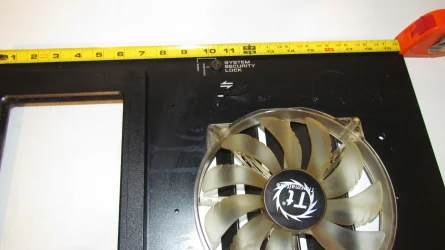
I apologize for the blurred effect but you get the general idea. All the discoloration has been removed from this fan except for at the center of the hub. Fortunately this will all be covered by the grill in the front bezel but the really stubborn stuff for the most part is gone. Fans this size are not cheap so they are worth cleaning. All of this fits under a front bezel so it won't even be noticed. Even so, it will be clean and sanitary after one more isopropyl wiping.

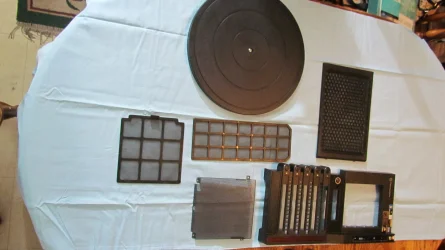
IMG_1432.webpThe pieces are laid out for easy access and the turntable awaits the beast. The filters are clean but slightly stained. No worries this will not be noticeable either once they are installed. After this will be the side panel with the little window. Coming soon!
 

My Computer

System One

  • OS
    WIN 11, WIN 10, WIN 8.1, WIN 7 U, WIN 7 PRO, WIN 7 HOME (32 Bit), LINUX MINT
    Computer type
    PC/Desktop
    Manufacturer/Model
    DIY, ASUS, and DELL
    CPU
    Intel i7 6900K and i9-7960X / AMD 3800X (8 core)
    Motherboard
    ASUS X99E-WS USB 3.1 and ASUS X299 SAGE
    Memory
    128 GB CORSAIR DOMINATOR PLATINUM (B DIE)
    Graphics Card(s)
    NVIDIA 1070 and RTX 3070
    Sound Card
    Crystal Sound (onboard)
    Monitor(s) Displays
    single Samsung 30" 4K and 8" aux monitor
    Screen Resolution
    4K and something equally attrocious. I'll be working on this.
    Hard Drives
    A, B, C, D, E, F, G, H, I, J, K, L, M, N, O, P, Q, R, S, T, U, V, W

    Ports X, Y, and Z are reserved for USB access and removable drives.

    Drive types consist of the following: Various mechanical hard drives bearing the brand names, Seagate, Toshiba, and Western Digital. Various NVMe drives bearing the brand names Kingston, Intel, Silicon Power, Crucial, Western Digital, and Team Group. Various SATA SSDs bearing various different brand names.

    RAID arrays included:

    LSI RAID 10 (WD Velociraptors) 1115.72 GB
    LSI RAID 10 (WD SSDS) 463.80 GB

    INTEL RAID 0 (KINGSTON HYPER X) System 447.14 GB
    INTEL RAID 1 TOSHIBA ENTERPRIZE class Data 2794.52 GB
    INTEL RAID 1 SEAGATE HYBRID 931.51 GB
    PSU
    SEVERAL. I prefer my Corsair Platinum HX1000i but I also like EVGA power supplies
    Case
    ThermalTake Level 10 GT (among others)
    Cooling
    Noctua is my favorite and I use it in my main. I also own various other coolers.
    Keyboard
    all kinds.
    Mouse
    all kinds
    Internet Speed
    360 mbps - 1 gbps (depending)
    Browser
    FIREFOX
    Antivirus
    KASPERSKY (no apologies)
    Other Info
    Gave Dell touch screen with Windows 11 to daughter and got me an OTVOC. Being a PC builder I own many desktop PCs as well. I am a father of five providing PCs, laptops, and tablets for all my family, most of which I have modified, rebuilt, or simply built from scratch. I do not own a cell phone, never have, never will.
The front bezel and the filters and grills are installed now. As promised here are some shots of the front side panel.

IMG_1435.webp
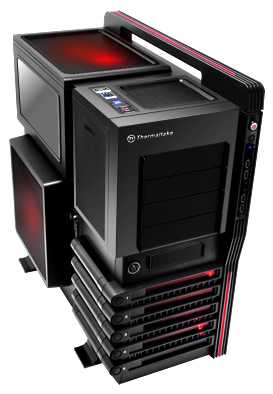
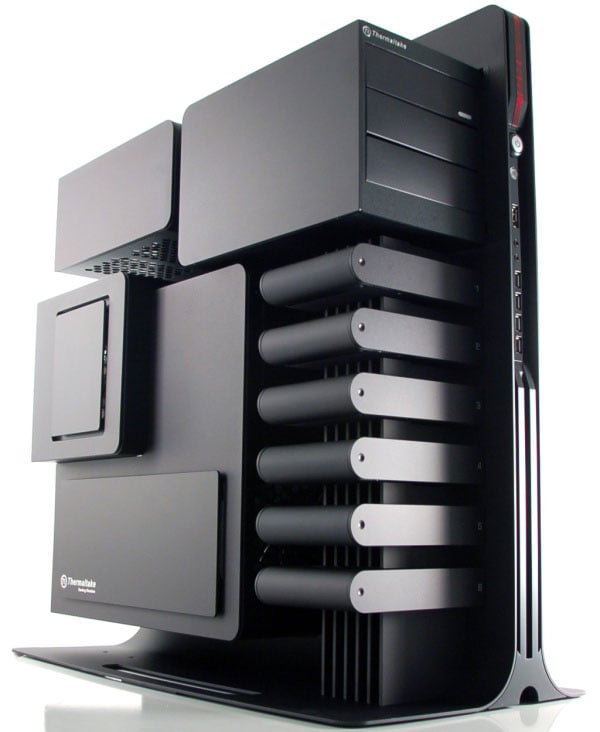
As I mentioned earlier, this is no small computer case. In fact, with the handle I believe it's just a wee bit taller than the Cooler Master ATCS 840 I described some place on this thread>> ASUS X299 SAGE But I digress. Regular soap and water took care of most of the dust and discoloration. Once it completely dries I'll go over it with some isopropyl. I'm debating leaving the box shroud off as it will allow me to read the Q code logger without ever having to open the door. Yes, Virginia there actually is a practical reason for having a transparent side panel. Alas! My little window at the top of this panel doesn't afford me the proper angle to view my Q code logger.


IMG_1434.webp

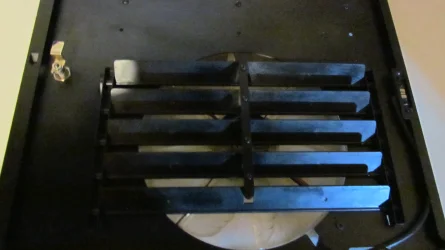
It just happens that when the louvers are directed in the "up" position I can read right through the fan and clearly read my logger. Just a fluke but a handy one. Plus I want the louvers in the "up" position as this blows a huge volume of external air over top the HBA cards and my NVMe where it continues to vent out through the top exhaust fan. With 3 X 200mm fans on this unit it isn't hard to understand why it stays as cool as a cucumber.

right through the fan blades.webpAnd here is why I keep the box shroud off. No problem at all reading this. The picture was taken through the moving blades and through the louvers. The drawback could be that I build up dust twice as fast? :::shrugs::: Cant' win 'em all.

The Hadermeister is right: It's about DESIGN.
 

My Computer

System One

  • OS
    WIN 11, WIN 10, WIN 8.1, WIN 7 U, WIN 7 PRO, WIN 7 HOME (32 Bit), LINUX MINT
    Computer type
    PC/Desktop
    Manufacturer/Model
    DIY, ASUS, and DELL
    CPU
    Intel i7 6900K and i9-7960X / AMD 3800X (8 core)
    Motherboard
    ASUS X99E-WS USB 3.1 and ASUS X299 SAGE
    Memory
    128 GB CORSAIR DOMINATOR PLATINUM (B DIE)
    Graphics Card(s)
    NVIDIA 1070 and RTX 3070
    Sound Card
    Crystal Sound (onboard)
    Monitor(s) Displays
    single Samsung 30" 4K and 8" aux monitor
    Screen Resolution
    4K and something equally attrocious. I'll be working on this.
    Hard Drives
    A, B, C, D, E, F, G, H, I, J, K, L, M, N, O, P, Q, R, S, T, U, V, W

    Ports X, Y, and Z are reserved for USB access and removable drives.

    Drive types consist of the following: Various mechanical hard drives bearing the brand names, Seagate, Toshiba, and Western Digital. Various NVMe drives bearing the brand names Kingston, Intel, Silicon Power, Crucial, Western Digital, and Team Group. Various SATA SSDs bearing various different brand names.

    RAID arrays included:

    LSI RAID 10 (WD Velociraptors) 1115.72 GB
    LSI RAID 10 (WD SSDS) 463.80 GB

    INTEL RAID 0 (KINGSTON HYPER X) System 447.14 GB
    INTEL RAID 1 TOSHIBA ENTERPRIZE class Data 2794.52 GB
    INTEL RAID 1 SEAGATE HYBRID 931.51 GB
    PSU
    SEVERAL. I prefer my Corsair Platinum HX1000i but I also like EVGA power supplies
    Case
    ThermalTake Level 10 GT (among others)
    Cooling
    Noctua is my favorite and I use it in my main. I also own various other coolers.
    Keyboard
    all kinds.
    Mouse
    all kinds
    Internet Speed
    360 mbps - 1 gbps (depending)
    Browser
    FIREFOX
    Antivirus
    KASPERSKY (no apologies)
    Other Info
    Gave Dell touch screen with Windows 11 to daughter and got me an OTVOC. Being a PC builder I own many desktop PCs as well. I am a father of five providing PCs, laptops, and tablets for all my family, most of which I have modified, rebuilt, or simply built from scratch. I do not own a cell phone, never have, never will.
Last edited:

My Computer

System One

  • OS
    WIN 11, WIN 10, WIN 8.1, WIN 7 U, WIN 7 PRO, WIN 7 HOME (32 Bit), LINUX MINT
    Computer type
    PC/Desktop
    Manufacturer/Model
    DIY, ASUS, and DELL
    CPU
    Intel i7 6900K and i9-7960X / AMD 3800X (8 core)
    Motherboard
    ASUS X99E-WS USB 3.1 and ASUS X299 SAGE
    Memory
    128 GB CORSAIR DOMINATOR PLATINUM (B DIE)
    Graphics Card(s)
    NVIDIA 1070 and RTX 3070
    Sound Card
    Crystal Sound (onboard)
    Monitor(s) Displays
    single Samsung 30" 4K and 8" aux monitor
    Screen Resolution
    4K and something equally attrocious. I'll be working on this.
    Hard Drives
    A, B, C, D, E, F, G, H, I, J, K, L, M, N, O, P, Q, R, S, T, U, V, W

    Ports X, Y, and Z are reserved for USB access and removable drives.

    Drive types consist of the following: Various mechanical hard drives bearing the brand names, Seagate, Toshiba, and Western Digital. Various NVMe drives bearing the brand names Kingston, Intel, Silicon Power, Crucial, Western Digital, and Team Group. Various SATA SSDs bearing various different brand names.

    RAID arrays included:

    LSI RAID 10 (WD Velociraptors) 1115.72 GB
    LSI RAID 10 (WD SSDS) 463.80 GB

    INTEL RAID 0 (KINGSTON HYPER X) System 447.14 GB
    INTEL RAID 1 TOSHIBA ENTERPRIZE class Data 2794.52 GB
    INTEL RAID 1 SEAGATE HYBRID 931.51 GB
    PSU
    SEVERAL. I prefer my Corsair Platinum HX1000i but I also like EVGA power supplies
    Case
    ThermalTake Level 10 GT (among others)
    Cooling
    Noctua is my favorite and I use it in my main. I also own various other coolers.
    Keyboard
    all kinds.
    Mouse
    all kinds
    Internet Speed
    360 mbps - 1 gbps (depending)
    Browser
    FIREFOX
    Antivirus
    KASPERSKY (no apologies)
    Other Info
    Gave Dell touch screen with Windows 11 to daughter and got me an OTVOC. Being a PC builder I own many desktop PCs as well. I am a father of five providing PCs, laptops, and tablets for all my family, most of which I have modified, rebuilt, or simply built from scratch. I do not own a cell phone, never have, never will.
@Scannerman
It was nice to read of your story and background. Yes we are old folk and share some common experiences. Who should have thought that? Of German descent no less. Living in Canada near Alaska. Up north so to speak. Enough wilderness there. I live in the Netherlands (The low country) in the pittoresk town of Delft (779 years old) famous and well know for it's Delfts blue porcelain back in the VOC days. A tradition that still exits until today. Of course I can read and talk German as well. (but not as good as English) It's our biggest neighbor. Your German sentence was (y) No grammatical faults there. 😆 I even worked for 11 years for a German company; Siemens at their IT department in the Netherlands. I still must think about difference of management style. The Dutch are more direct and relaxed. Rank does not matter. We can talk to anybody from the director downwards and speak our minds. There was aways a certain appreciation for doing so. The Germans were at first more formal and strict. We were not impressed of the people above us. They started also to appreciate that what we saw at the lower levels and ideas how to improve; it's all to the benefit of the company. The French on the other hands; If you were not French yourself? Go away. They expected from us if they say "Jump" we would say "How high"... 😆 When our department went from Siemens to ATOS; one thing I was sad about; we have lost one big huge client. All they wanted where the contracts and not the people. ATOS did not like that contract so they had to go.... Looking back only a few of the former Siemens employees are still working at ATOS. The rest take other jobs in all kind of company's everywhere. In 2023 they have made a big loss and the French government preventing them from falling over. I as a person are not surprised. If this is your way of doing business you will pay in the end.

I've looked at your case. What a strange case it is. It's an old one seen it's layout and what it can house. On thing stands out; It's huge. It can house so many fans that it could take off. 😆 One nice feature though; the removable drive bays. It it's also large enough to fit long cards without any problems. The design is awkward. Those BMW Autoworks must had a good night spending a night before in a bar because the design is not like their cars. And it's price $700? No one would spend that much on a case. Fortunately they dropped it to $260. Which is still a lot. But if the design is to your liking? Why not?

Well if I look at cases in the present day; No more room for an Blu-ray player in the front. That went out off the window. Now all fronts has some kind of mesh in the front and behind it 3 fans. (with lights) Some other has temperate glass at the front and/or at the side. So the focus is more on looking at the insides with all kind of stuff lighting up; motherboard, fans, RAM, Graphic card etc. A complete lightshow that I can do without. I never look at it inside; I know what in there. I just have one goal; good cable management, a good airflow inside so the temps are low, and absolutely no noise. All my fans are PWM controlled by the motherboard. If the motherboard thinks it must ramp the speed of the fans a bit; it does so automatically. No need for any fan controllers. That functionality has been taken over by the motherboard itself. The need for HDD and SSD's has gone completely. I have 4 NVMe's residing om my motherboard (An ASUS Prime Z690A) in the range of 1x500Gb, 2x 1TB and 1x 2TB. I only use 2 internal 4TB HDD's for storage. Stuff is getting to large too place it on a DVD or Blu-ray. (How do you store a 140Gb game on those?) I have also a bunch of HDD's drives in the TB range that can placed in and external USB 3.0 drive bay. Also a bunch of external USB drives. If there is a need to do things with an ISO; I mount it on my system or if it is a Windows/Linux OS; place it onto a USB stick(s). Furthermore I have 2 NAS devices of one of them is dedicated for movies. I have and old DUNE media player who contacts that NAS in order to play movies on my 4K 55"screen with a movie theater 7.1 soundssystem behind it. So yes; i have a bunch of stuff beside my 2nd old system.
 

My Computer

System One

  • OS
    Win 11 Pro "25H2" Build 26200.8524, Zorin OS Pro
    Computer type
    PC/Desktop
    Manufacturer/Model
    Self built
    CPU
    Intel® Core™ i7-12700KF 12th Gen.
    Motherboard
    ASUS Prime Z690-A, BIOS v4505
    Memory
    32GB DDR5 5600-36 Vengeance
    Graphics Card(s)
    PCIe4.0 Asus NVIDIA RTX3060Ti
    Sound Card
    Onboard; Realtek
    Monitor(s) Displays
    34" LG 34UC79G-B Curved 21:9 144Hz
    Screen Resolution
    2560x1080 (No HDR)
    Hard Drives
    250Gb Samsung 870PRO NVMe (Win 11 Pro)
    1Tb Samsung 980PRO NVMe
    1Tb Samsung 970EVO NVMe
    2Tb Samsung 990PRO NVMe with heatsink.
    4Tb WDC WD40EZRZ Blue SATA (Int.)
    4Tb WDC WD40EZRZ Blue SATA (Int.)
    3Tb WDC WD30EFRZ Red SATA (Int.)
    256Gb Samsung 840PRO SSD (RHEL 9,5)
    256Gb Samsung 850PRO SSD (Zorin OS Pro 18)
    PSU
    Coolermaster 850W V2 Gold with internal 12cm exaust fan
    Case
    Be-Quiet Pure Base 600.
    Cooling
    3x Be-Quiet! 12/14cm "Silent Wings 4" casefans, 1x Arctic Freezer i35 CPU towerblock with fan.
    Keyboard
    Steelseries APEX 7 keyboard.
    Mouse
    Logitech G-502 Hero
    Internet Speed
    1Gb
    Browser
    Brave
    Antivirus
    F-Secure
    Other Info
    No Noise system.
    256Gb Kingston Travler USB 3.0 drive.
    64Gb Sandisk USB 3.2 drive. (Ventoy)
    8Gb Philips USB 3.0 drive. (Win. Inst.)
    8Gb Philips USB 3.0 drive. (Rescue disk)
    2Tb WD USB 3.0 Passport drive.
    USB Ext. 500Gb WD SATA drive.
    External USB 3.0 C.A. CD/DVD* burner.
I suggested WD-40 to remove dried dust from the fan, not to lubricate it. Of course if it is noisy just replace it. Not worth your effort trying to make it quiet just to last a few months more.
Yup. I have a 5 pack of Thermalright 120 mm fans as standby at the enormous cost of 25 bucks Canadian (or 5 bucks American :p). It's almost not worth the trouble of cleaning the darned things at that price.
 

My Computers

System One System Two

  • OS
    Win 11 Pro
    Computer type
    PC/Desktop
    Manufacturer/Model
    ABS (Newegg)
    CPU
    Intel(R) Core(TM) i5-10400F CPU @ 2.90GHz
    Motherboard
    ASUSTeK COMPUTER INC. PRIME B560M-A AC Rev 1.xx
    Memory
    Corsair VENGEANCE® LPX 32GB (2 x 16GB) DDR4 DRAM 3600MHz
    Graphics Card(s)
    MSI NVIDIA GeForce RTX 3060 Ti
    Sound Card
    Realtek Digital Output (Realtek(R) Audio)
    Monitor(s) Displays
    Viewsonic VS 2725 -2k 27"
    Screen Resolution
    2560x1440 100hz
    Hard Drives
    T-FORCE TM8FP800 1TB + a couple SATA SSDs
    PSU
    Gigabyte P650E
    Case
    DeepCool Matrexx 50 mid-tower
    Cooling
    Assassin X 120 Refined SE and 5 Thermalright TL-C12C case fans
    Keyboard
    Redragon K655 or K720
    Mouse
    CoolerMaster MM711 or Redragon M612
    Internet Speed
    Starlink: speed varies
    Browser
    Brave (default), Chrome (for ATG), Edge (for ATMS)
    Antivirus
    Windows Defender
    Other Info
    An assortment of "land fill, obsolete" computers all running Linux Mint 22 (at the moment).
  • Operating System
    Linux Mint 22.2 Cinnamon
    Computer type
    PC/Desktop
    Manufacturer/Model
    Hewlett-Packard HP ProDesk 600 G1 SFF
    CPU
    i5 4590
    Motherboard
    HP
    Memory
    16 GB
    Graphics card(s)
    Intel(R) HD Graphics 4600
    Sound Card
    Realtek High Definition Audio
    Monitor(s) Displays
    Generic 24"
    Hard Drives
    Samsung SSD 860 EVO 500GB
    Hitachi HUA722010CLA330
    WDC WD40EZAZ-19SF3B0
    PSU
    Factory 240 watt
    Case
    Low Profile Desktop
    Cooling
    Factory cooling
    Keyboard
    HP
    Mouse
    HP
    Internet Speed
    Starlink
    Browser
    Brave
    Antivirus
    ?
    Other Info
    This is my media server
Hadermeister

I love the wilderness. Sadly, I'm too old to enjoy it as much as I did when I was a younger man. I'm not as close to Alaska as you may think. The Canadian North is huge. I did work on the Alaska Highway and I live in what we call the Northern Gateway. I believe I've seen the sort of porcelain you mentioned and it is beautiful. If I were a wealthier man I would buy some for the missus to keep in her China cabinet.

My father was a strict man but he softened in old age. It has been my experience that German fathers are typically this way. Perhaps war made them like this. I have no idea. My father had horrific war stories as he was a little boy growing up in the war. I haven't spoken German much since his passing but he was a good father, relatively speaking. Siemens is huge but not a big as IBM. Sadly, it is much the same way with the French in Canada. If you don't speak French you're pretty much treated as a second class citizen. This a big problem in my country. But enough of politics. The whole world is a big mess.

I think the precursor to the GT might have involved a little French engineering because if you really want to see an odd looking case check out this link:


The only thing more insane about that case apart from the design is the price.

The Level 10 GT has much better air flow and is considerably more practical than the prototype. Maybe not so artsy-fartsy, but it fits the purpose. I have no idea why BMW decided to design a computer case. I nearly bought an ASUS Prime. Those are nice looking boards. However I have a weakness for lots of PCIe lanes and E-ATX can deliver. I have the complete Matrix collection on Blue Ray so every now and then I make use of my DVD player. Good Sci-Fi is so hard to find these days. We need more scientists like Heinlein and Asimov writing stories.

Remember the old saying, "Don't put all your eggs in one basket"? That is how I feel about drives. I like combinations because I like options. My mains use SSDS, NVMe, and spinners. I feel the same way about RAID. This build will have its original arrays running again when I'm done: Two RAID 1 arrays, one RAID 0, and two RAID tens. I definitely like my options. Too old and set in my ways to change, but it pays to be flexible.

I like lights when they actually represent something. I like them even more when they're tiny. The glaring, blaring, flashing, strobing stuff I can do without. Quiet is good but a little fan noise doesn't bother me much. When a PC starts to sound like a Lear jet preparing for take off something's wrong. I really am considering putting those Corsair RAM fans in the ATC case instead. The Micron RAM in that case doesn't have heats sinks nearly as substantial as my Dominator RAM and it runs at a higher frequency hence it is likely to run hotter. I tested the RAM without the coolers already and the temps are okay. So perhaps the Level 10 might have a little less lighting.

I had to leave off the building project for a short time due to my 14 year old's birthday. She had other plans for me. Yup, this old man did not stop being a Dad just because he was getting old. Anyway, that's a whole new story all on it's own.

Happy Friday! 😎
 

My Computer

System One

  • OS
    WIN 11, WIN 10, WIN 8.1, WIN 7 U, WIN 7 PRO, WIN 7 HOME (32 Bit), LINUX MINT
    Computer type
    PC/Desktop
    Manufacturer/Model
    DIY, ASUS, and DELL
    CPU
    Intel i7 6900K and i9-7960X / AMD 3800X (8 core)
    Motherboard
    ASUS X99E-WS USB 3.1 and ASUS X299 SAGE
    Memory
    128 GB CORSAIR DOMINATOR PLATINUM (B DIE)
    Graphics Card(s)
    NVIDIA 1070 and RTX 3070
    Sound Card
    Crystal Sound (onboard)
    Monitor(s) Displays
    single Samsung 30" 4K and 8" aux monitor
    Screen Resolution
    4K and something equally attrocious. I'll be working on this.
    Hard Drives
    A, B, C, D, E, F, G, H, I, J, K, L, M, N, O, P, Q, R, S, T, U, V, W

    Ports X, Y, and Z are reserved for USB access and removable drives.

    Drive types consist of the following: Various mechanical hard drives bearing the brand names, Seagate, Toshiba, and Western Digital. Various NVMe drives bearing the brand names Kingston, Intel, Silicon Power, Crucial, Western Digital, and Team Group. Various SATA SSDs bearing various different brand names.

    RAID arrays included:

    LSI RAID 10 (WD Velociraptors) 1115.72 GB
    LSI RAID 10 (WD SSDS) 463.80 GB

    INTEL RAID 0 (KINGSTON HYPER X) System 447.14 GB
    INTEL RAID 1 TOSHIBA ENTERPRIZE class Data 2794.52 GB
    INTEL RAID 1 SEAGATE HYBRID 931.51 GB
    PSU
    SEVERAL. I prefer my Corsair Platinum HX1000i but I also like EVGA power supplies
    Case
    ThermalTake Level 10 GT (among others)
    Cooling
    Noctua is my favorite and I use it in my main. I also own various other coolers.
    Keyboard
    all kinds.
    Mouse
    all kinds
    Internet Speed
    360 mbps - 1 gbps (depending)
    Browser
    FIREFOX
    Antivirus
    KASPERSKY (no apologies)
    Other Info
    Gave Dell touch screen with Windows 11 to daughter and got me an OTVOC. Being a PC builder I own many desktop PCs as well. I am a father of five providing PCs, laptops, and tablets for all my family, most of which I have modified, rebuilt, or simply built from scratch. I do not own a cell phone, never have, never will.
Yup. I have a 5 pack of Thermalright 120 mm fans as standby at the enormous cost of 25 bucks Canadian (or 5 bucks American :p). It's almost not worth the trouble of cleaning the darned things at that price.
I have a 5 pack of Termalright fans sitting on my shelf that has sat there for years. I'm thinking one day I might actually use them. 😄
 

My Computer

System One

  • OS
    WIN 11, WIN 10, WIN 8.1, WIN 7 U, WIN 7 PRO, WIN 7 HOME (32 Bit), LINUX MINT
    Computer type
    PC/Desktop
    Manufacturer/Model
    DIY, ASUS, and DELL
    CPU
    Intel i7 6900K and i9-7960X / AMD 3800X (8 core)
    Motherboard
    ASUS X99E-WS USB 3.1 and ASUS X299 SAGE
    Memory
    128 GB CORSAIR DOMINATOR PLATINUM (B DIE)
    Graphics Card(s)
    NVIDIA 1070 and RTX 3070
    Sound Card
    Crystal Sound (onboard)
    Monitor(s) Displays
    single Samsung 30" 4K and 8" aux monitor
    Screen Resolution
    4K and something equally attrocious. I'll be working on this.
    Hard Drives
    A, B, C, D, E, F, G, H, I, J, K, L, M, N, O, P, Q, R, S, T, U, V, W

    Ports X, Y, and Z are reserved for USB access and removable drives.

    Drive types consist of the following: Various mechanical hard drives bearing the brand names, Seagate, Toshiba, and Western Digital. Various NVMe drives bearing the brand names Kingston, Intel, Silicon Power, Crucial, Western Digital, and Team Group. Various SATA SSDs bearing various different brand names.

    RAID arrays included:

    LSI RAID 10 (WD Velociraptors) 1115.72 GB
    LSI RAID 10 (WD SSDS) 463.80 GB

    INTEL RAID 0 (KINGSTON HYPER X) System 447.14 GB
    INTEL RAID 1 TOSHIBA ENTERPRIZE class Data 2794.52 GB
    INTEL RAID 1 SEAGATE HYBRID 931.51 GB
    PSU
    SEVERAL. I prefer my Corsair Platinum HX1000i but I also like EVGA power supplies
    Case
    ThermalTake Level 10 GT (among others)
    Cooling
    Noctua is my favorite and I use it in my main. I also own various other coolers.
    Keyboard
    all kinds.
    Mouse
    all kinds
    Internet Speed
    360 mbps - 1 gbps (depending)
    Browser
    FIREFOX
    Antivirus
    KASPERSKY (no apologies)
    Other Info
    Gave Dell touch screen with Windows 11 to daughter and got me an OTVOC. Being a PC builder I own many desktop PCs as well. I am a father of five providing PCs, laptops, and tablets for all my family, most of which I have modified, rebuilt, or simply built from scratch. I do not own a cell phone, never have, never will.
For the most part 4K for gaming is over rated. Some hard core gamers say that 2K is ideal. I'm not a hard core gamer so I wouldn't know. I do know however that for a man my age and my limited eye sight I really don't much care for how 4K makes everything on my monitor so tiny. Yes, I could down scale but then what is the point in having 4K if you have to hobble it? The sad part of it is that I actually own a nice 32" 2K monitor but it's too big to fit inside my set up so I use it to watch videos in my bed room. The 4K monitor sits in my computer shelf just fine. Great resolution but everything is just sooo tiny!

My girls run 1050's on first gen Bloomfields without any bottle necking issues. Neither one has asked me for a better GFX card. They game a lot. When I suggest giving them an upgrade the looks on their faces says it all. HANDS OFF! Whenever they need me to service anything I have to promise them that I won't change anything. No CPU upgrade, no swapping out graphics cards, no upgrading the motherboard. Yes, they're smart enough to know what these things are. No worries, one is going to university soon and leaving her desktop behind in storage. I don't have her permission to touch it. lol She already told me "No surprises". Meanwhile, in my bed room, I'm running a Dell Studio XPS 9001. It has an i7 960 chip in it and it runs that 2K monitor like a boss.

And to think I found it in a recycling bin. All it needed was a new GFX card.

A LEGEND
That (i7 920) is a Legend. I had one but it now runs my brothers' computer which he uses to burn CDs and a little Internet. Underused. : ( I should give him an "upgrade."
 

My Computers

System One System Two

  • OS
    Windows 11 Pro 25H2
    Computer type
    PC/Desktop
    Manufacturer/Model
    Wordsworth 10000
    CPU
    Core i7 10700K 3.8 GHz
    Motherboard
    Asus ROG Strix Z590-A Gaming Wifi
    Memory
    Corsair Vengeance LPX DDR4 128 GB 3000MHz
    Graphics Card(s)
    Asus ProArt GeForce RTX 4070 Ti Super 16 GB
    Sound Card
    Asus Xonar DSX
    Monitor(s) Displays
    HP 2709m
    Screen Resolution
    1920x1080
    Hard Drives
    Samsung 990 Pro M.2 SSD 2 TB; Samsung 990 Pro M.2 SSD 4 TB
    PSU
    Thermaltake Toughpower GF3 1350W
    Case
    Fractal Design Meshify 2
    Cooling
    CPU-Noctua NH D15 Chromax, GPU-Stock, Case-Noctua Chromax 3x140
    Keyboard
    Microsoft Natural Ergo 4000
    Mouse
    HP X500
    Internet Speed
    Cable
    Browser
    Vivaldi, MS Edge
    Antivirus
    Malwarebytes 5.2.4, Windows Defender
    Other Info
    Klipsch Promedia 5.1 THX
    Asus External Blu-Ray 16D1X-USB 3.0
  • Operating System
    Windows 11 Pro 25H2
    Computer type
    PC/Desktop
    Manufacturer/Model
    Wordsworth 6000
    CPU
    Core i7 6700K 4.0 GHz
    Motherboard
    Asus Z170 Pro
    Memory
    Corsair Vengeance LPX DDR4 32 GB 3000MHz
    Graphics card(s)
    Asus GeForce GTX 1050 Ti
    Sound Card
    Asus Xonar SE
    Monitor(s) Displays
    HP X24ih
    Screen Resolution
    1920x1080
    Hard Drives
    Intel 760p M.2 SSD 500 GB; Intel 540 SSD 480 GB; Intel 335 SSD 240 GB
    PSU
    Thermaltake Toughpower GF1 750W
    Case
    Lian Li PC-B70
    Cooling
    CPU- Noctua NH-D15; GPU-Stock; Case-Noctua Chromax 2x140, 2x120
    Keyboard
    Microsoft Wireless Comfort 5050
    Mouse
    Microsoft Wireless Comfort 5050
    Internet Speed
    Cable
    Browser
    Vivaldi, MS Edge
    Antivirus
    Malwarebytes 4.4.3, Windows Defender
    Other Info
    HP bd 340
    HP bd 240
    Denon DRA-800H
    Klipsch RP-600M
    Klipsch R-100SW (2)

    System 3 Specs
    Windows 11 Pro 25H2
    Core i7 10700K 3.8 GHz
    Asus ROG Strix Z590-A Gaming Wifi
    Corsair Vengeance LPX DDR4 32 GB 3200MHz
    Asus Radeon RX560 Dual 4 GB
    Xonar SE
    Samsung 980 Pro M.2 SSD 1 TB (2)
    Thermaltake Toughpower GF3 850W
    Fractal Design Meshify 2
    CPU-Noctua NH D15 Chromax, GPU-Stock, Case-Noctua Chromax 2x140,1x120
That (i7 920) is a Legend. I had one but it now runs my brothers' computer which he uses to burn CDs and a little Internet. Underused. : ( I should give him an "upgrade."
I would give him my ild Pentium 4 system for burning CDs and internet. I can think of better use for an i7 920.
 

My Computers

System One System Two

  • OS
    Windows 11 Pro 23H2 (5699), 25H2 (8457)
    Computer type
    Laptop
    Manufacturer/Model
    Acer Extensa 5630EZ
    CPU
    Mobile DualCore Intel Core 2 Duo T7250, 2000 MHz
    Motherboard
    Acer Extensa 5630
    Memory
    4GB
    Graphics Card(s)
    Mobile Intel(R) GMA 4500M (Mobile 4 series)
    Sound Card
    Realtek ALC268 @ Intel 82801IB ICH9 - High Definition Audio Controller
    Monitor(s) Displays
    1
    Screen Resolution
    1280x800
    Hard Drives
    Samsung SSD 850 EVO 250GB SATA Device (250 GB, SATA-III)
    Internet Speed
    VDSL 50 Mbps
    Browser
    MICROSOFT EDGE
    Antivirus
    WINDOWS DEFENDER
    Other Info
    Legacy MBR installation, no TPM, no Secure Boot, no WDDM 2.0 graphics drivers, no SSE4.2, cannot get more unsupported ;) This is only my test laptop. I had installed Windows 11 here before upgrading my main PC. For my main PC I use everyday see my 2nd system specs.
  • Operating System
    Windows 11 Pro v25H2 (build 26200.8457)
    Computer type
    PC/Desktop
    Manufacturer/Model
    Custom-built PC
    CPU
    Intel Core-i7 3770 3.40GHz s1155 (3rd generation)
    Motherboard
    Asus P8H61 s1155 ATX
    Memory
    2x Kingston Hyper-X Blu 8GB DDR3-1600
    Graphics card(s)
    GIGABYTE GeForce RTX 3050 WINDFORCE OC V2 6GB (GV-N3050WF2OCV2-6GD)
    Sound Card
    Realtek HD audio (ALC887)
    Monitor(s) Displays
    Sony Bravia KDL-19L4000 19" LCD TV via VGA
    Screen Resolution
    1440x900 32-bit 60Hz
    Hard Drives
    WD Blue SA510 2.5 1000GB SSD as system disk, Western Digital Caviar Purple 4TB SATA III (WD40PURZ) as second
    PSU
    Thermaltake Litepower RGB 550W Full Wired
    Case
    SUPERCASE MIDI-TOWER
    Cooling
    Deepcool Gamma Archer CPU cooler, 1x 8cm fan at the back
    Keyboard
    Mitsumi 101-key PS/2
    Mouse
    Sunnyline OptiEye PS/2
    Internet Speed
    100Mbps
    Browser
    Microsoft Edge, Mozilla Firefox
    Antivirus
    Microsoft Windows Defender
    Other Info
    Legacy BIOS (MBR) installation, no TPM, no Secure Boot, WDDM 3.0 graphics drivers, WEI score 7.4
I would give him my ild Pentium 4 system for burning CDs and internet. I can think of better use for an i7 920.
As can I, those uses I put it to in days of old.
 

My Computers

System One System Two

  • OS
    Windows 11 Pro 25H2
    Computer type
    PC/Desktop
    Manufacturer/Model
    Wordsworth 10000
    CPU
    Core i7 10700K 3.8 GHz
    Motherboard
    Asus ROG Strix Z590-A Gaming Wifi
    Memory
    Corsair Vengeance LPX DDR4 128 GB 3000MHz
    Graphics Card(s)
    Asus ProArt GeForce RTX 4070 Ti Super 16 GB
    Sound Card
    Asus Xonar DSX
    Monitor(s) Displays
    HP 2709m
    Screen Resolution
    1920x1080
    Hard Drives
    Samsung 990 Pro M.2 SSD 2 TB; Samsung 990 Pro M.2 SSD 4 TB
    PSU
    Thermaltake Toughpower GF3 1350W
    Case
    Fractal Design Meshify 2
    Cooling
    CPU-Noctua NH D15 Chromax, GPU-Stock, Case-Noctua Chromax 3x140
    Keyboard
    Microsoft Natural Ergo 4000
    Mouse
    HP X500
    Internet Speed
    Cable
    Browser
    Vivaldi, MS Edge
    Antivirus
    Malwarebytes 5.2.4, Windows Defender
    Other Info
    Klipsch Promedia 5.1 THX
    Asus External Blu-Ray 16D1X-USB 3.0
  • Operating System
    Windows 11 Pro 25H2
    Computer type
    PC/Desktop
    Manufacturer/Model
    Wordsworth 6000
    CPU
    Core i7 6700K 4.0 GHz
    Motherboard
    Asus Z170 Pro
    Memory
    Corsair Vengeance LPX DDR4 32 GB 3000MHz
    Graphics card(s)
    Asus GeForce GTX 1050 Ti
    Sound Card
    Asus Xonar SE
    Monitor(s) Displays
    HP X24ih
    Screen Resolution
    1920x1080
    Hard Drives
    Intel 760p M.2 SSD 500 GB; Intel 540 SSD 480 GB; Intel 335 SSD 240 GB
    PSU
    Thermaltake Toughpower GF1 750W
    Case
    Lian Li PC-B70
    Cooling
    CPU- Noctua NH-D15; GPU-Stock; Case-Noctua Chromax 2x140, 2x120
    Keyboard
    Microsoft Wireless Comfort 5050
    Mouse
    Microsoft Wireless Comfort 5050
    Internet Speed
    Cable
    Browser
    Vivaldi, MS Edge
    Antivirus
    Malwarebytes 4.4.3, Windows Defender
    Other Info
    HP bd 340
    HP bd 240
    Denon DRA-800H
    Klipsch RP-600M
    Klipsch R-100SW (2)

    System 3 Specs
    Windows 11 Pro 25H2
    Core i7 10700K 3.8 GHz
    Asus ROG Strix Z590-A Gaming Wifi
    Corsair Vengeance LPX DDR4 32 GB 3200MHz
    Asus Radeon RX560 Dual 4 GB
    Xonar SE
    Samsung 980 Pro M.2 SSD 1 TB (2)
    Thermaltake Toughpower GF3 850W
    Fractal Design Meshify 2
    CPU-Noctua NH D15 Chromax, GPU-Stock, Case-Noctua Chromax 2x140,1x120

Latest Support Threads

Back
Top Bottom