Safe Mode CMD c: "Access is denied"


courseiam

New member
Local time
4:07 AM
Posts
6
OS
Windows 11
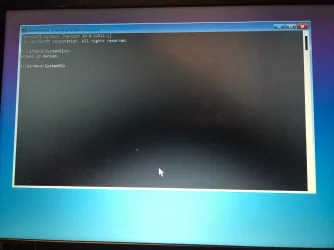
I'm trying to reset a laptop via safe mode, but I get "There was a problem while resetting your PC". If I then try to use Command Prompt under advance options I can't then access c drive. I get the following message. "Access is denied". Any ideas?
 

Attachments

  • 20250128_193926.webp
    20250128_193926.webp
    867 KB · Views: 3

My Computer My Computer

At a glance

Windows 11
OS
Windows 11
The last 3 Notebooks I've set up with Win11 Home Version 24H2 automatically had Bitlocker encryption of the drive but did not ask for an access key nor provide one. That can limit access to the drive.
 

My Computers My Computers

  • At a glance

    Win11 Pro RTM Version 24H2 Build 26100.4202Intel Core i5 11th Gen. 2.40GHz12GB
    OS
    Win11 Pro RTM Version 24H2 Build 26100.4202
    Computer type
    Laptop
    Manufacturer/Model
    Dell Vostro 3400
    CPU
    Intel Core i5 11th Gen. 2.40GHz
    Memory
    12GB
    Hard Drives
    256GB SSD NVMe M.2
  • At a glance

    Win11 Pro RTM Version 24H2 Build 26100.4202Intel Core i5 10th Gen. 2.90GHz16GBOnboard, no VGA, using a DisplayPort-to-VGA a...
    Operating System
    Win11 Pro RTM Version 24H2 Build 26100.4202
    Computer type
    PC/Desktop
    Manufacturer/Model
    Dell Vostro 5890
    CPU
    Intel Core i5 10th Gen. 2.90GHz
    Memory
    16GB
    Graphics card(s)
    Onboard, no VGA, using a DisplayPort-to-VGA adapter
    Monitor(s) Displays
    24" Dell
    Hard Drives
    512GB SSD NVMe, 4TB Seagate HDD
    Browser
    Firefox, Edge
    Antivirus
    Windows Defender/Microsoft Security
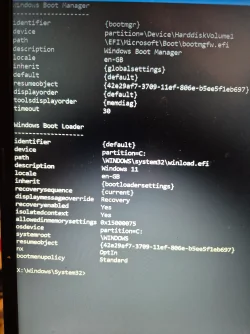
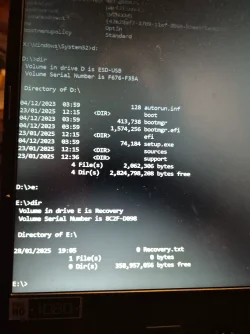
Please post the results for these:

a) Type:
bcdedit
d:
dir
e:
dir


b) startup repair


c) system restore: (start with the oldest)


My Computer My Computer

At a glance

Windows 10Intel(R) Core(TM) i7-4800MQ CPU @ 2.70GHz16 GB Total: Manufacturer : Samsung MemoryTyp...NVIDIA Quadro K3100M; Intel(R) HD Graphics 4600
OS
Windows 10
Computer type
Laptop
Manufacturer/Model
HP
CPU
Intel(R) Core(TM) i7-4800MQ CPU @ 2.70GHz
Motherboard
Product : 190A Version : KBC Version 94.56
Memory
16 GB Total: Manufacturer : Samsung MemoryType : DDR3 FormFactor : SODIMM Capacity : 8GB Speed : 1600
Graphics Card(s)
NVIDIA Quadro K3100M; Intel(R) HD Graphics 4600
Sound Card
IDT High Definition Audio CODEC; PNP Device ID HDAUDIO\FUNC_01&VEN_111D&DEV_76E0
Hard Drives
Model Hitachi HTS727575A9E364
Antivirus
Microsoft Defender
Other Info
Mobile Workstation
I'm trying to reset a laptop via safe mode, but I get "There was a problem while resetting your PC". If I then try to use Command Prompt under advance options I can't then access c drive. I get the following message. "Access is denied". Any ideas?
Welcome to ElevenForum!

Try other drive letters. When booted to the recovery environment drive letters can be different than how Windows would order them. For example, try D: and then issue a "dir" to see if the Windows folder is present. If that does not work, try E:, etc.
 

My Computers My Computers

  • At a glance

    Win11 Pro 25H2 (RTM+)Intel i7-14650HX32 GBNo GPU - Built-in Intel Graphics
    OS
    Win11 Pro 25H2 (RTM+)
    Computer type
    PC/Desktop
    Manufacturer/Model
    Acemagic
    CPU
    Intel i7-14650HX
    Memory
    32 GB
    Graphics Card(s)
    No GPU - Built-in Intel Graphics
    Sound Card
    Integrated
    Monitor(s) Displays
    Varies as machine will often be moved to locations with different monitors
    Screen Resolution
    Varies
    Hard Drives
    1 x 1TB Gen 4 NVMe SSD
    PSU
    120W Power Brick
    Keyboard
    Corsair K70 Max RGB Magnetic Keyboard
    Mouse
    Logitech MX Master 3
    Internet Speed
    1Gb Up / 1 Gb Down
    Browser
    Edge
    Antivirus
    Windows Defender
  • At a glance

    Win11 Pro 25H2 (RTM+)Intel i7-1255U16 GBIntel Iris Xe Graphics
    Operating System
    Win11 Pro 25H2 (RTM+)
    Computer type
    Laptop
    Manufacturer/Model
    Lenovo ThinkBook 13x Gen 2
    CPU
    Intel i7-1255U
    Memory
    16 GB
    Graphics card(s)
    Intel Iris Xe Graphics
    Sound Card
    Realtek® ALC3306-CG codec
    Monitor(s) Displays
    13.3-inch IPS Display
    Screen Resolution
    WQXGA (2560 x 1600)
    Hard Drives
    2 TB 4 x 4 NVMe SSD
    PSU
    USB-C / Thunderbolt 4 Power / Charging
    Keyboard
    Backlit, spill resistant keyboard
    Mouse
    Buttonless Glass Precision Touchpad
    Internet Speed
    1Gb Up / 1Gb Down
    Browser
    Edge
    Antivirus
    Windows Defender
    Other Info
    WiFi 6e / Bluetooth 5.1 / Facial Recognition / Fingerprint Sensor / ToF (Time of Flight) Human Presence Sensor
@zbook, I guess we must have posted about the same time.

Great minds think alike - and so do we :-)
 

My Computers My Computers

  • At a glance

    Win11 Pro 25H2 (RTM+)Intel i7-14650HX32 GBNo GPU - Built-in Intel Graphics
    OS
    Win11 Pro 25H2 (RTM+)
    Computer type
    PC/Desktop
    Manufacturer/Model
    Acemagic
    CPU
    Intel i7-14650HX
    Memory
    32 GB
    Graphics Card(s)
    No GPU - Built-in Intel Graphics
    Sound Card
    Integrated
    Monitor(s) Displays
    Varies as machine will often be moved to locations with different monitors
    Screen Resolution
    Varies
    Hard Drives
    1 x 1TB Gen 4 NVMe SSD
    PSU
    120W Power Brick
    Keyboard
    Corsair K70 Max RGB Magnetic Keyboard
    Mouse
    Logitech MX Master 3
    Internet Speed
    1Gb Up / 1 Gb Down
    Browser
    Edge
    Antivirus
    Windows Defender
  • At a glance

    Win11 Pro 25H2 (RTM+)Intel i7-1255U16 GBIntel Iris Xe Graphics
    Operating System
    Win11 Pro 25H2 (RTM+)
    Computer type
    Laptop
    Manufacturer/Model
    Lenovo ThinkBook 13x Gen 2
    CPU
    Intel i7-1255U
    Memory
    16 GB
    Graphics card(s)
    Intel Iris Xe Graphics
    Sound Card
    Realtek® ALC3306-CG codec
    Monitor(s) Displays
    13.3-inch IPS Display
    Screen Resolution
    WQXGA (2560 x 1600)
    Hard Drives
    2 TB 4 x 4 NVMe SSD
    PSU
    USB-C / Thunderbolt 4 Power / Charging
    Keyboard
    Backlit, spill resistant keyboard
    Mouse
    Buttonless Glass Precision Touchpad
    Internet Speed
    1Gb Up / 1Gb Down
    Browser
    Edge
    Antivirus
    Windows Defender
    Other Info
    WiFi 6e / Bluetooth 5.1 / Facial Recognition / Fingerprint Sensor / ToF (Time of Flight) Human Presence Sensor

Attachments

  • 20250128_205018.webp
    20250128_205018.webp
    999.9 KB · Views: 2
  • 20250128_211544.webp
    20250128_211544.webp
    892 KB · Views: 2

My Computer My Computer

At a glance

Windows 11
OS
Windows 11
Please indicate whether drive encryption is or is not in use and whether this is a local account or Microsoft account.

Did startup repair create a srttrail.txt?

What happened with system restore?


Post commands with results:
reg query HKLM\System\CurrentControlSet\Control /v PEFirmwareType
reg query HKEY_LOCAL_MACHINE\System\CurrentControlSet\Control\SystemInformation\ /v SystemProductName
reg query HKEY_LOCAL_MACHINE\HARDWARE\DESCRIPTION\System\BIOS
 

My Computer My Computer

At a glance

Windows 10Intel(R) Core(TM) i7-4800MQ CPU @ 2.70GHz16 GB Total: Manufacturer : Samsung MemoryTyp...NVIDIA Quadro K3100M; Intel(R) HD Graphics 4600
OS
Windows 10
Computer type
Laptop
Manufacturer/Model
HP
CPU
Intel(R) Core(TM) i7-4800MQ CPU @ 2.70GHz
Motherboard
Product : 190A Version : KBC Version 94.56
Memory
16 GB Total: Manufacturer : Samsung MemoryType : DDR3 FormFactor : SODIMM Capacity : 8GB Speed : 1600
Graphics Card(s)
NVIDIA Quadro K3100M; Intel(R) HD Graphics 4600
Sound Card
IDT High Definition Audio CODEC; PNP Device ID HDAUDIO\FUNC_01&VEN_111D&DEV_76E0
Hard Drives
Model Hitachi HTS727575A9E364
Antivirus
Microsoft Defender
Other Info
Mobile Workstation
@zbook I don't know if encryption is in use. It's a friend's and he has no idea

Where will I find srttrail.txt?

There are no system restore points.

reg query HKLM\System\CurrentControlSet\Control /v PEFirmwareType: ERROR: The system was unable to find the specified registry key or value.

reg query HKEY_LOCAL_MACHINE\System\CurrentControlSet\Control\SystemInformation\ /v SystemProductName: Error: Invalid syntax. Strange as it works on my other devices.

reg query HKEY_LOCAL_MACHINE\HARDWARE\DESCRIPTION\System\BIOS: See attached.
 

Attachments

  • 20250128_215938.webp
    20250128_215938.webp
    1.3 MB · Views: 2

My Computer My Computer

At a glance

Windows 11
OS
Windows 11
What were / are the computer problems that you were attempting a reset?

Can the computer boot to the desktop?

Can the computer boot to Windows RE without the flash drive?


Was a startup repair performed?

Was there an error message or code?
 

My Computer My Computer

At a glance

Windows 10Intel(R) Core(TM) i7-4800MQ CPU @ 2.70GHz16 GB Total: Manufacturer : Samsung MemoryTyp...NVIDIA Quadro K3100M; Intel(R) HD Graphics 4600
OS
Windows 10
Computer type
Laptop
Manufacturer/Model
HP
CPU
Intel(R) Core(TM) i7-4800MQ CPU @ 2.70GHz
Motherboard
Product : 190A Version : KBC Version 94.56
Memory
16 GB Total: Manufacturer : Samsung MemoryType : DDR3 FormFactor : SODIMM Capacity : 8GB Speed : 1600
Graphics Card(s)
NVIDIA Quadro K3100M; Intel(R) HD Graphics 4600
Sound Card
IDT High Definition Audio CODEC; PNP Device ID HDAUDIO\FUNC_01&VEN_111D&DEV_76E0
Hard Drives
Model Hitachi HTS727575A9E364
Antivirus
Microsoft Defender
Other Info
Mobile Workstation
@zbook my friend hasn't used it in a while and cant remember his password or pin. He just wanted it factory reset as I think he's giving it to some

Yes it can boot to Windows RE without. I was just going to reinstall windows then thought I'd ask here first. as I was curious

Yes a start up repair was preformed and it did a check disk scan.
 

My Computer My Computer

At a glance

Windows 11
OS
Windows 11


If there are important files then consider a custom install:


If there are no important files then consider a clean install:


A custom install may require a password whereas no password is required for a clean install.
 

My Computer My Computer

At a glance

Windows 10Intel(R) Core(TM) i7-4800MQ CPU @ 2.70GHz16 GB Total: Manufacturer : Samsung MemoryTyp...NVIDIA Quadro K3100M; Intel(R) HD Graphics 4600
OS
Windows 10
Computer type
Laptop
Manufacturer/Model
HP
CPU
Intel(R) Core(TM) i7-4800MQ CPU @ 2.70GHz
Motherboard
Product : 190A Version : KBC Version 94.56
Memory
16 GB Total: Manufacturer : Samsung MemoryType : DDR3 FormFactor : SODIMM Capacity : 8GB Speed : 1600
Graphics Card(s)
NVIDIA Quadro K3100M; Intel(R) HD Graphics 4600
Sound Card
IDT High Definition Audio CODEC; PNP Device ID HDAUDIO\FUNC_01&VEN_111D&DEV_76E0
Hard Drives
Model Hitachi HTS727575A9E364
Antivirus
Microsoft Defender
Other Info
Mobile Workstation
Thanks, I'll give that a try and get back to you
 

My Computer My Computer

At a glance

Windows 11
OS
Windows 11
@zbook All done. I did a clean install, no issues. Still curious why c was access denied... oh well. Thanks for your help!
 

My Computer My Computer

At a glance

Windows 11
OS
Windows 11
Nice.


This was seen on Google AI for access denied Windows RE:


Code:
"Access Denied" on Windows means you don't have the necessary permissions to access a specific file, folder, or system function, 

often appearing when trying to modify, delete, or open a protected item; to fix this, you usually need to right-click the item, go to 

"Properties," then the "Security" tab, and adjust user permissions to grant yourself the required access level.

Key points about "Access Denied" on Windows:

Permission issue:

The primary reason for this error is that your user account doesn't have the appropriate permissions to perform the action on the selected 

file or folder.

How to troubleshoot:

Check ownership: Right-click the item, go to "Properties," then "Security" tab, and check if you are the owner of the file/folder.

Modify permissions: If you're not the owner, you can try to take ownership or edit permissions to grant yourself access.

Administrator privileges: Sometimes, you might need to run the application or action with administrator privileges to overcome access 

restrictions.

What to do when you see "Access Denied":

Right-click and access properties: Right-click the file or folder you want to access, then select "Properties".

Go to the "Security" tab: In the properties window, navigate to the "Security" tab.

Check user permissions: Under "Group or user names," check if your user account is listed and has the necessary permissions 

(like "Read," "Write," "Modify").

Edit permissions: If needed, click "Edit" to change the permissions for your user account.

Take ownership: If you are not the owner of the file or folder, you might need to take ownership first before changing permissions.

 

My Computer My Computer

At a glance

Windows 10Intel(R) Core(TM) i7-4800MQ CPU @ 2.70GHz16 GB Total: Manufacturer : Samsung MemoryTyp...NVIDIA Quadro K3100M; Intel(R) HD Graphics 4600
OS
Windows 10
Computer type
Laptop
Manufacturer/Model
HP
CPU
Intel(R) Core(TM) i7-4800MQ CPU @ 2.70GHz
Motherboard
Product : 190A Version : KBC Version 94.56
Memory
16 GB Total: Manufacturer : Samsung MemoryType : DDR3 FormFactor : SODIMM Capacity : 8GB Speed : 1600
Graphics Card(s)
NVIDIA Quadro K3100M; Intel(R) HD Graphics 4600
Sound Card
IDT High Definition Audio CODEC; PNP Device ID HDAUDIO\FUNC_01&VEN_111D&DEV_76E0
Hard Drives
Model Hitachi HTS727575A9E364
Antivirus
Microsoft Defender
Other Info
Mobile Workstation
Back
Top Bottom