
Safely Remove Hardware and Eject Media issue


letstrythis1

Member
Local time
7:41 AM
Posts
3
OS
Windows 11
Evening all,

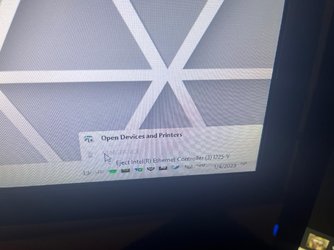
I am using Windows 11, I just ordered a new PC (Corsair Vengeance). I was tinkering around with my USB flash drive and was using the safely remove hardware and eject media. I noticed this in the options, Im assuming its for my internet but why would I want to eject this? Sort of worried I will click it by accident!

Not sure why this would even appear here, I'm assuming its probably not something you would be ejecting on any frequent basis
hit9ys0684aa1.jpg
 
Windows Build/Version
Windows 11

My Computer My Computer

At a glance

Windows 1113900k64 GB 5600 DDR5MSI 4090 GTX
OS
Windows 11
Computer type
PC/Desktop
Manufacturer/Model
Corsair Vengenace
CPU
13900k
Motherboard
MSI Pro z690
Memory
64 GB 5600 DDR5
Graphics Card(s)
MSI 4090 GTX
Sound Card
Realtek
Hard Drives
2TB SSD
PSU
Corsair 1000W
Could that be a USB to RJ45/Ethernet adapter?

This is mine with HDDs:

1672893410646.png
 

My Computers My Computers

  • At a glance

    Win11 Pro RTM Version 24H2 Build 26100.4202Intel Core i5 11th Gen. 2.40GHz12GB
    OS
    Win11 Pro RTM Version 24H2 Build 26100.4202
    Computer type
    Laptop
    Manufacturer/Model
    Dell Vostro 3400
    CPU
    Intel Core i5 11th Gen. 2.40GHz
    Memory
    12GB
    Hard Drives
    256GB SSD NVMe M.2
  • At a glance

    Win11 Pro RTM Version 24H2 Build 26100.4202Intel Core i5 10th Gen. 2.90GHz16GBOnboard, no VGA, using a DisplayPort-to-VGA a...
    Operating System
    Win11 Pro RTM Version 24H2 Build 26100.4202
    Computer type
    PC/Desktop
    Manufacturer/Model
    Dell Vostro 5890
    CPU
    Intel Core i5 10th Gen. 2.90GHz
    Memory
    16GB
    Graphics card(s)
    Onboard, no VGA, using a DisplayPort-to-VGA adapter
    Monitor(s) Displays
    24" Dell
    Hard Drives
    512GB SSD NVMe, 4TB Seagate HDD
    Browser
    Firefox, Edge
    Antivirus
    Windows Defender/Microsoft Security
I think its the Ethernet on my motherboard just alittle confused why it would be in the menu, and hopefully I dont fat finger it and accidentally uninstall it
 

My Computer My Computer

At a glance

Windows 1113900k64 GB 5600 DDR5MSI 4090 GTX
OS
Windows 11
Computer type
PC/Desktop
Manufacturer/Model
Corsair Vengenace
CPU
13900k
Motherboard
MSI Pro z690
Memory
64 GB 5600 DDR5
Graphics Card(s)
MSI 4090 GTX
Sound Card
Realtek
Hard Drives
2TB SSD
PSU
Corsair 1000W
So i ran windows update and install the updates and rebooted. Seems like its disappeared now so maybe it was an issue with earlier builds of Windows 11? Weird.
 

My Computer My Computer

At a glance

Windows 1113900k64 GB 5600 DDR5MSI 4090 GTX
OS
Windows 11
Computer type
PC/Desktop
Manufacturer/Model
Corsair Vengenace
CPU
13900k
Motherboard
MSI Pro z690
Memory
64 GB 5600 DDR5
Graphics Card(s)
MSI 4090 GTX
Sound Card
Realtek
Hard Drives
2TB SSD
PSU
Corsair 1000W
That's why a number of folks recommend doing the updates, frequently fix things.
 

My Computers My Computers

  • At a glance

    Win11 Pro RTM Version 24H2 Build 26100.4202Intel Core i5 11th Gen. 2.40GHz12GB
    OS
    Win11 Pro RTM Version 24H2 Build 26100.4202
    Computer type
    Laptop
    Manufacturer/Model
    Dell Vostro 3400
    CPU
    Intel Core i5 11th Gen. 2.40GHz
    Memory
    12GB
    Hard Drives
    256GB SSD NVMe M.2
  • At a glance

    Win11 Pro RTM Version 24H2 Build 26100.4202Intel Core i5 10th Gen. 2.90GHz16GBOnboard, no VGA, using a DisplayPort-to-VGA a...
    Operating System
    Win11 Pro RTM Version 24H2 Build 26100.4202
    Computer type
    PC/Desktop
    Manufacturer/Model
    Dell Vostro 5890
    CPU
    Intel Core i5 10th Gen. 2.90GHz
    Memory
    16GB
    Graphics card(s)
    Onboard, no VGA, using a DisplayPort-to-VGA adapter
    Monitor(s) Displays
    24" Dell
    Hard Drives
    512GB SSD NVMe, 4TB Seagate HDD
    Browser
    Firefox, Edge
    Antivirus
    Windows Defender/Microsoft Security
Back
Top Bottom




