
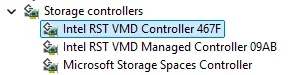
I upgraded my HP All In One desktop to a Samsung 990 Pro NVME. A firmware updat was released and according to Samsung I cannot install it due to the Intel VMD controller srivers insstalled. There is no way in the bios to disable them. The NVME drive is using the MS driver in the attachment.
Samsung also has their own driver as well. Can I delete both Intel VMD's in the pic, use the Samsung driver and also do the firmware ? This is the only drive so deleteing them wont affect any other drives.
My other option is to use the Samsung ISO and Rufus and do the firmware update then switch drivers. Or am I making a mountain out of molehill for liitle or no gain.
Samsung also has their own driver as well. Can I delete both Intel VMD's in the pic, use the Samsung driver and also do the firmware ? This is the only drive so deleteing them wont affect any other drives.
My other option is to use the Samsung ISO and Rufus and do the firmware update then switch drivers. Or am I making a mountain out of molehill for liitle or no gain.
Attachments
My Computer
At a glance
windows 11 64i7-12700T32 GBNvidia GeForce 1650 / Intel 770
- OS
- windows 11 64
- Computer type
- PC/Desktop
- Manufacturer/Model
- HP
- CPU
- i7-12700T
- Memory
- 32 GB
- Graphics Card(s)
- Nvidia GeForce 1650 / Intel 770
- Screen Resolution
- 1920 / 1080
- Hard Drives
- Samsung 990 Pro 1TB
- Case
- All in One
- Keyboard
- USB
- Mouse
- USB
- Internet Speed
- 600 MBS
- Browser
- Chrome
- Antivirus
- MS









