Samsung SSD 990 Pro 2TB won't update Firmware in Samsung Magician software


You need to update via usb don't it this way, then enable vmd again once updated

As noted above, the USB option does not see any of the drives.
 

My Computer

System One

  • OS
    Windows 11 Pro 25H2 (26200.8457)
    Computer type
    PC/Desktop
    Manufacturer/Model
    CLX Intel Battlebox Ultimate (RA)
    CPU
    Intel® Core™ i9-13900KS 3.20GHz
    Motherboard
    ASUS ROG Maximus Z790 Hero WIFI - ATX
    Memory
    128GB DDR5-5200 Kingston Fury Beast RGB
    Graphics Card(s)
    Zotac Trinity NVIDIA® GeForce® RTX 4090 24GB GDDR6X
    Sound Card
    Realtek USB Audio
    Monitor(s) Displays
    Dell G3223Q 32" 4K Ultra HD
    Screen Resolution
    3840x2160 @144hz
    Hard Drives
    2TB x 2 Samsung 990 Pro 2280 NVMe M.2 SSD's
    2TB x 1 Samsung 980 Pro 2280 NVMe M.2 SSD
    4 TB x 1 My Passport Ultra External USB
    PSU
    1200W Corsair HX Ser HX1200 80+ Platinum
    Case
    Lian Li / Der Bauer 011DXL ROG
    Cooling
    Phanteks Glacier One 360 RGB AIO LC
    Keyboard
    Logitech K330 Wireless
    Mouse
    Logitech M310 Wireless
    Internet Speed
    1GB Fiber : 945/57
    Browser
    Firefox - Brave
    Antivirus
    Bitdefender Premium Personal
    Other Info
    Macrium Reflect X
Have you created a bootable usb with the image?

This worked for me me when I turned off secure boot and turned off VMD
 

My Computer

System One

  • OS
    Windows 11
    Computer type
    Laptop
    Manufacturer/Model
    Asus ProArt Studiobook 16 OLED (H7604JI)
    CPU
    Intel i9 13980HX
    Motherboard
    Unknown
    Memory
    32GB
    Graphics Card(s)
    NVidia Geforce 4070
    Monitor(s) Displays
    16" Oled
    Hard Drives
    1TB
Have you created a bootable usb with the image?

This worked for me me when I turned off secure boot and turned off VMD
Yes. But it always says there are no drives are detected.
 

My Computer

System One

  • OS
    Windows 11 Pro 25H2 (26200.8457)
    Computer type
    PC/Desktop
    Manufacturer/Model
    CLX Intel Battlebox Ultimate (RA)
    CPU
    Intel® Core™ i9-13900KS 3.20GHz
    Motherboard
    ASUS ROG Maximus Z790 Hero WIFI - ATX
    Memory
    128GB DDR5-5200 Kingston Fury Beast RGB
    Graphics Card(s)
    Zotac Trinity NVIDIA® GeForce® RTX 4090 24GB GDDR6X
    Sound Card
    Realtek USB Audio
    Monitor(s) Displays
    Dell G3223Q 32" 4K Ultra HD
    Screen Resolution
    3840x2160 @144hz
    Hard Drives
    2TB x 2 Samsung 990 Pro 2280 NVMe M.2 SSD's
    2TB x 1 Samsung 980 Pro 2280 NVMe M.2 SSD
    4 TB x 1 My Passport Ultra External USB
    PSU
    1200W Corsair HX Ser HX1200 80+ Platinum
    Case
    Lian Li / Der Bauer 011DXL ROG
    Cooling
    Phanteks Glacier One 360 RGB AIO LC
    Keyboard
    Logitech K330 Wireless
    Mouse
    Logitech M310 Wireless
    Internet Speed
    1GB Fiber : 945/57
    Browser
    Firefox - Brave
    Antivirus
    Bitdefender Premium Personal
    Other Info
    Macrium Reflect X
Yes. But it always says there are no drives are after
Yes. But it always says there are no drives are detected.
After you disable them options are you going to the boot settings and setting it to boot from usb?
Is it the image saying no drive detected or your computer?
 

My Computer

System One

  • OS
    Windows 11
    Computer type
    Laptop
    Manufacturer/Model
    Asus ProArt Studiobook 16 OLED (H7604JI)
    CPU
    Intel i9 13980HX
    Motherboard
    Unknown
    Memory
    32GB
    Graphics Card(s)
    NVidia Geforce 4070
    Monitor(s) Displays
    16" Oled
    Hard Drives
    1TB
Is it the image saying no drive detected or your computer?
Yes, the bootable USB I made from the image. I boot from it, it says no drives detected.
 

My Computer

System One

  • OS
    Windows 11 Pro 25H2 (26200.8457)
    Computer type
    PC/Desktop
    Manufacturer/Model
    CLX Intel Battlebox Ultimate (RA)
    CPU
    Intel® Core™ i9-13900KS 3.20GHz
    Motherboard
    ASUS ROG Maximus Z790 Hero WIFI - ATX
    Memory
    128GB DDR5-5200 Kingston Fury Beast RGB
    Graphics Card(s)
    Zotac Trinity NVIDIA® GeForce® RTX 4090 24GB GDDR6X
    Sound Card
    Realtek USB Audio
    Monitor(s) Displays
    Dell G3223Q 32" 4K Ultra HD
    Screen Resolution
    3840x2160 @144hz
    Hard Drives
    2TB x 2 Samsung 990 Pro 2280 NVMe M.2 SSD's
    2TB x 1 Samsung 980 Pro 2280 NVMe M.2 SSD
    4 TB x 1 My Passport Ultra External USB
    PSU
    1200W Corsair HX Ser HX1200 80+ Platinum
    Case
    Lian Li / Der Bauer 011DXL ROG
    Cooling
    Phanteks Glacier One 360 RGB AIO LC
    Keyboard
    Logitech K330 Wireless
    Mouse
    Logitech M310 Wireless
    Internet Speed
    1GB Fiber : 945/57
    Browser
    Firefox - Brave
    Antivirus
    Bitdefender Premium Personal
    Other Info
    Macrium Reflect X
Yes, the bootable USB I made from the image. I boot from it, it says no drives detected.
Disable VMD. If you cannot, then the only way to upgrade is use another computer or an M.2 to USB adapter.
 

My Computers

System One System Two

  • OS
    Windows 11 Pro 23H2 (5699), 25H2 (8457)
    Computer type
    Laptop
    Manufacturer/Model
    Acer Extensa 5630EZ
    CPU
    Mobile DualCore Intel Core 2 Duo T7250, 2000 MHz
    Motherboard
    Acer Extensa 5630
    Memory
    4GB
    Graphics Card(s)
    Mobile Intel(R) GMA 4500M (Mobile 4 series)
    Sound Card
    Realtek ALC268 @ Intel 82801IB ICH9 - High Definition Audio Controller
    Monitor(s) Displays
    1
    Screen Resolution
    1280x800
    Hard Drives
    Samsung SSD 850 EVO 250GB SATA Device (250 GB, SATA-III)
    Internet Speed
    VDSL 50 Mbps
    Browser
    MICROSOFT EDGE
    Antivirus
    WINDOWS DEFENDER
    Other Info
    Legacy MBR installation, no TPM, no Secure Boot, no WDDM 2.0 graphics drivers, no SSE4.2, cannot get more unsupported ;) This is only my test laptop. I had installed Windows 11 here before upgrading my main PC. For my main PC I use everyday see my 2nd system specs.
  • Operating System
    Windows 11 Pro v25H2 (build 26200.8457)
    Computer type
    PC/Desktop
    Manufacturer/Model
    Custom-built PC
    CPU
    Intel Core-i7 3770 3.40GHz s1155 (3rd generation)
    Motherboard
    Asus P8H61 s1155 ATX
    Memory
    2x Kingston Hyper-X Blu 8GB DDR3-1600
    Graphics card(s)
    GIGABYTE GeForce RTX 3050 WINDFORCE OC V2 6GB (GV-N3050WF2OCV2-6GD)
    Sound Card
    Realtek HD audio (ALC887)
    Monitor(s) Displays
    Sony Bravia KDL-19L4000 19" LCD TV via VGA
    Screen Resolution
    1440x900 32-bit 60Hz
    Hard Drives
    WD Blue SA510 2.5 1000GB SSD as system disk, Western Digital Caviar Purple 4TB SATA III (WD40PURZ) as second
    PSU
    Thermaltake Litepower RGB 550W Full Wired
    Case
    SUPERCASE MIDI-TOWER
    Cooling
    Deepcool Gamma Archer CPU cooler, 1x 8cm fan at the back
    Keyboard
    Mitsumi 101-key PS/2
    Mouse
    Sunnyline OptiEye PS/2
    Internet Speed
    100Mbps
    Browser
    Microsoft Edge, Mozilla Firefox
    Antivirus
    Microsoft Windows Defender
    Other Info
    Legacy BIOS (MBR) installation, no TPM, no Secure Boot, WDDM 3.0 graphics drivers, WEI score 7.4
After i found out about vmd and secure boot needing to be disabled i followed what was on the instructions on the samsung website under other upgrade methods on this page.


I also used the software they list to create the boot image
 

My Computer

System One

  • OS
    Windows 11
    Computer type
    Laptop
    Manufacturer/Model
    Asus ProArt Studiobook 16 OLED (H7604JI)
    CPU
    Intel i9 13980HX
    Motherboard
    Unknown
    Memory
    32GB
    Graphics Card(s)
    NVidia Geforce 4070
    Monitor(s) Displays
    16" Oled
    Hard Drives
    1TB
Still didn't work? Nevermind, probably your SSD works fine with current firmware. Upgrading won't give you any measurable performance improvement. It's mostly psychological that you "improved" the drive, aka placebo.
 

My Computers

System One System Two

  • OS
    Windows 11 Pro 23H2 (5699), 25H2 (8457)
    Computer type
    Laptop
    Manufacturer/Model
    Acer Extensa 5630EZ
    CPU
    Mobile DualCore Intel Core 2 Duo T7250, 2000 MHz
    Motherboard
    Acer Extensa 5630
    Memory
    4GB
    Graphics Card(s)
    Mobile Intel(R) GMA 4500M (Mobile 4 series)
    Sound Card
    Realtek ALC268 @ Intel 82801IB ICH9 - High Definition Audio Controller
    Monitor(s) Displays
    1
    Screen Resolution
    1280x800
    Hard Drives
    Samsung SSD 850 EVO 250GB SATA Device (250 GB, SATA-III)
    Internet Speed
    VDSL 50 Mbps
    Browser
    MICROSOFT EDGE
    Antivirus
    WINDOWS DEFENDER
    Other Info
    Legacy MBR installation, no TPM, no Secure Boot, no WDDM 2.0 graphics drivers, no SSE4.2, cannot get more unsupported ;) This is only my test laptop. I had installed Windows 11 here before upgrading my main PC. For my main PC I use everyday see my 2nd system specs.
  • Operating System
    Windows 11 Pro v25H2 (build 26200.8457)
    Computer type
    PC/Desktop
    Manufacturer/Model
    Custom-built PC
    CPU
    Intel Core-i7 3770 3.40GHz s1155 (3rd generation)
    Motherboard
    Asus P8H61 s1155 ATX
    Memory
    2x Kingston Hyper-X Blu 8GB DDR3-1600
    Graphics card(s)
    GIGABYTE GeForce RTX 3050 WINDFORCE OC V2 6GB (GV-N3050WF2OCV2-6GD)
    Sound Card
    Realtek HD audio (ALC887)
    Monitor(s) Displays
    Sony Bravia KDL-19L4000 19" LCD TV via VGA
    Screen Resolution
    1440x900 32-bit 60Hz
    Hard Drives
    WD Blue SA510 2.5 1000GB SSD as system disk, Western Digital Caviar Purple 4TB SATA III (WD40PURZ) as second
    PSU
    Thermaltake Litepower RGB 550W Full Wired
    Case
    SUPERCASE MIDI-TOWER
    Cooling
    Deepcool Gamma Archer CPU cooler, 1x 8cm fan at the back
    Keyboard
    Mitsumi 101-key PS/2
    Mouse
    Sunnyline OptiEye PS/2
    Internet Speed
    100Mbps
    Browser
    Microsoft Edge, Mozilla Firefox
    Antivirus
    Microsoft Windows Defender
    Other Info
    Legacy BIOS (MBR) installation, no TPM, no Secure Boot, WDDM 3.0 graphics drivers, WEI score 7.4
The Intel RST controller has a problem with Samsung Magician firmware updates for the Samsung SSD 990 Pro and Linux kernels. I removed the RST controller in bios by disabling the VMD controller and perfoming a clean install on my new laptop. I think a repair install would do the same thing. This forces Microsoft to replace the controller driver with one of it's own. It's old and slower but Linux and Samsung Magician work perfectly. This is the new contoller that I want:
A new native NVMe driver (nvmedisk.sys) offering up to 80% higher IOPS was introduced in Windows Server 2025 and is present, though disabled, in Windows 11 25H2, as noted in reports from Neowin and TechPowerUp. While enthusiasts previously used registry tweaks to activate it early, Microsoft is now restricting access to this feature in newer Insider builds, as indicated in articles by Tom's Hardware and Windows
 

My Computer

System One

  • OS
    Windows 11 & Zorin Pro
    Computer type
    Laptop
    Manufacturer/Model
    Asus Rog Strix G16
    CPU
    Intel® Core™ Ultra 9 Processor 275HX 2.7 GHz
    Motherboard
    AsusteK Computer
    Memory
    32 gb
    Graphics Card(s)
    NVIDIA® GeForce RTX™ 5060 Laptop GPU
    Sound Card
    Realtek High Definition Audio
    Monitor(s) Displays
    Laptop 16 inch
    Screen Resolution
    2560 X 1600
    Hard Drives
    Boot: Samsung 9100 NVME 2 TB Microsoft Storage Controller: Standard NVM Express Driver: Microsoft 6/21/2006. No SATA/AHCI on my motherboard or in bios
    Mouse
    Pad
    Browser
    Google Chrome
    Antivirus
    Microsoft
    Other Info
    Printer: HP Color LaserJet MFP M477dw
Note: If you have a newer laptop like my 2025 Asus Rog Strix it does not have Sata/AHCI in it's bios because it doesn't use that technology . It has NVME SSD's. NVMe (Non-Volatile Memory Express) drives are ultra-fast SSDs that connect directly to a computer's motherboard via the PCIe bus, offering significantly higher speeds and lower latency than SATA SSDs. Ideal for gaming, workstations, and OS drives.
 

My Computer

System One

  • OS
    Windows 11 & Zorin Pro
    Computer type
    Laptop
    Manufacturer/Model
    Asus Rog Strix G16
    CPU
    Intel® Core™ Ultra 9 Processor 275HX 2.7 GHz
    Motherboard
    AsusteK Computer
    Memory
    32 gb
    Graphics Card(s)
    NVIDIA® GeForce RTX™ 5060 Laptop GPU
    Sound Card
    Realtek High Definition Audio
    Monitor(s) Displays
    Laptop 16 inch
    Screen Resolution
    2560 X 1600
    Hard Drives
    Boot: Samsung 9100 NVME 2 TB Microsoft Storage Controller: Standard NVM Express Driver: Microsoft 6/21/2006. No SATA/AHCI on my motherboard or in bios
    Mouse
    Pad
    Browser
    Google Chrome
    Antivirus
    Microsoft
    Other Info
    Printer: HP Color LaserJet MFP M477dw
I'm planning on getting rid of this drive. I called Western Digital and their firmware updates is only handled though their interface and they do not offer ISO files. They were aware of this Samsung issue and they advised they dont have this problem. Is anyone aware of any other comparable drives that can accept firmware updates easily ?
 

My Computer

System One

  • OS
    windows 11 64
    Computer type
    PC/Desktop
    Manufacturer/Model
    HP
    CPU
    i7-12700T
    Memory
    32 GB
    Graphics Card(s)
    Nvidia GeForce 1650 / Intel 770
    Screen Resolution
    1920 / 1080
    Hard Drives
    Samsubg 990 Pro 1TB
    Case
    All in One
    Keyboard
    USB
    Mouse
    USB
    Internet Speed
    600 MBS
    Browser
    Chrome
    Antivirus
    MS
The Intel RST controller has a problem with Samsung Magician firmware updates for the Samsung SSD 990 Pro and Linux kernels. I removed the RST controller in bios by disabling the VMD controller and perfoming a clean install on my new laptop. I think a repair install would do the same thing. This forces Microsoft to replace the controller driver with one of it's own. It's old and slower but Linux and Samsung Magician work perfectly. This is the new contoller that I want:
A new native NVMe driver (nvmedisk.sys) offering up to 80% higher IOPS was introduced in Windows Server 2025 and is present, though disabled, in Windows 11 25H2, as noted in reports from Neowin and TechPowerUp. While enthusiasts previously used registry tweaks to activate it early, Microsoft is now restricting access to this feature in newer Insider builds, as indicated in articles by Tom's Hardware and Windows
I wanted to verify this way works, but it requires a new install. Turn off the VMD in bios and Windows will use it's drivers which allow updating the firmware.
 

My Computer

System One

  • OS
    Windows 11 Pro 25H2 (26200.8457)
    Computer type
    PC/Desktop
    Manufacturer/Model
    CLX Intel Battlebox Ultimate (RA)
    CPU
    Intel® Core™ i9-13900KS 3.20GHz
    Motherboard
    ASUS ROG Maximus Z790 Hero WIFI - ATX
    Memory
    128GB DDR5-5200 Kingston Fury Beast RGB
    Graphics Card(s)
    Zotac Trinity NVIDIA® GeForce® RTX 4090 24GB GDDR6X
    Sound Card
    Realtek USB Audio
    Monitor(s) Displays
    Dell G3223Q 32" 4K Ultra HD
    Screen Resolution
    3840x2160 @144hz
    Hard Drives
    2TB x 2 Samsung 990 Pro 2280 NVMe M.2 SSD's
    2TB x 1 Samsung 980 Pro 2280 NVMe M.2 SSD
    4 TB x 1 My Passport Ultra External USB
    PSU
    1200W Corsair HX Ser HX1200 80+ Platinum
    Case
    Lian Li / Der Bauer 011DXL ROG
    Cooling
    Phanteks Glacier One 360 RGB AIO LC
    Keyboard
    Logitech K330 Wireless
    Mouse
    Logitech M310 Wireless
    Internet Speed
    1GB Fiber : 945/57
    Browser
    Firefox - Brave
    Antivirus
    Bitdefender Premium Personal
    Other Info
    Macrium Reflect X
Yes it worked but it was a new laptop with nothing on it but the OS, Once you remove the RST Controller you won't be able to boot, You need to create a bootable ISO with Media Creation tools before doing anything. I checked your setup are any of your 4 drives in Raid mode? Are you having a problem upgrading your Samsung drives firmware?
 

My Computer

System One

  • OS
    Windows 11 & Zorin Pro
    Computer type
    Laptop
    Manufacturer/Model
    Asus Rog Strix G16
    CPU
    Intel® Core™ Ultra 9 Processor 275HX 2.7 GHz
    Motherboard
    AsusteK Computer
    Memory
    32 gb
    Graphics Card(s)
    NVIDIA® GeForce RTX™ 5060 Laptop GPU
    Sound Card
    Realtek High Definition Audio
    Monitor(s) Displays
    Laptop 16 inch
    Screen Resolution
    2560 X 1600
    Hard Drives
    Boot: Samsung 9100 NVME 2 TB Microsoft Storage Controller: Standard NVM Express Driver: Microsoft 6/21/2006. No SATA/AHCI on my motherboard or in bios
    Mouse
    Pad
    Browser
    Google Chrome
    Antivirus
    Microsoft
    Other Info
    Printer: HP Color LaserJet MFP M477dw
Yes it worked but it was a new laptop with nothing on it but the OS, Once you remove the RST Controller you won't be able to boot, You need to create a bootable ISO with Media Creation tools before doing anything. I checked your setup are any of your 4 drives in Raid mode? Are you having a problem upgrading your Samsung drives firmware?
No, I'm not having any problems now. I already had a Windows 11 Pro boot USB, so I turned off VMD in bios and reinstalled Windows then Magician and it updated the firmware fine. I was just testing it. Then I restored the image I had just made and back to normal.

What are you talking about an RST Controller?
 

My Computer

System One

  • OS
    Windows 11 Pro 25H2 (26200.8457)
    Computer type
    PC/Desktop
    Manufacturer/Model
    CLX Intel Battlebox Ultimate (RA)
    CPU
    Intel® Core™ i9-13900KS 3.20GHz
    Motherboard
    ASUS ROG Maximus Z790 Hero WIFI - ATX
    Memory
    128GB DDR5-5200 Kingston Fury Beast RGB
    Graphics Card(s)
    Zotac Trinity NVIDIA® GeForce® RTX 4090 24GB GDDR6X
    Sound Card
    Realtek USB Audio
    Monitor(s) Displays
    Dell G3223Q 32" 4K Ultra HD
    Screen Resolution
    3840x2160 @144hz
    Hard Drives
    2TB x 2 Samsung 990 Pro 2280 NVMe M.2 SSD's
    2TB x 1 Samsung 980 Pro 2280 NVMe M.2 SSD
    4 TB x 1 My Passport Ultra External USB
    PSU
    1200W Corsair HX Ser HX1200 80+ Platinum
    Case
    Lian Li / Der Bauer 011DXL ROG
    Cooling
    Phanteks Glacier One 360 RGB AIO LC
    Keyboard
    Logitech K330 Wireless
    Mouse
    Logitech M310 Wireless
    Internet Speed
    1GB Fiber : 945/57
    Browser
    Firefox - Brave
    Antivirus
    Bitdefender Premium Personal
    Other Info
    Macrium Reflect X
What are you talking about an RST Controller?

Intel® Rapid Storage Technology (RST).

You don't need it since you disabled VMD.
 

My Computers

System One System Two

  • OS
    Win 11 Pro 25H2 26200.8524
    Computer type
    PC/Desktop
    Manufacturer/Model
    Self Built
    CPU
    Intel® Core™ i7-14700K
    Motherboard
    ASUS TUF Z690-PLUS WIFI BIOS 4505 11/29/25
    Memory
    G.SKILL Ripjaws S5 Series 64GB (2 x 32GB) DDR5
    Graphics Card(s)
    ASUS GeForce RTX 4070 Super 12GB
    Sound Card
    Sound Blaster AE-5 Plus
    Monitor(s) Displays
    ASUS TUF Gaming 27" 2K HDR Gaming
    Screen Resolution
    2560 x 1440
    Hard Drives
    Samsung 990 Pro 1TB NVMe (Win 11 25H2)
    SK hynix P41 500GB NVMe 25H2 DEV/Games
    SK hynix P41 2TB NVMe (x3)
    Crucial P3 Plus 4TB
    PSU
    Corsair RM850x Shift
    Case
    Antec Dark Phantom DP502 FLUX
    Cooling
    Corsair Nautilus 360 RS AIO
    Keyboard
    Logitech MK 320
    Mouse
    Razer Basilisk V3
    Internet Speed
    350Mbs
    Browser
    Firefox
    Antivirus
    Winows Security
    Other Info
    MR 8.1 Home

    System 3 Specs
    Win 11 Pro 25H2 26200.8524
    ASUS PRIME Z370-P II BIOS 3004 7/12/21
    Intel Core i7-8700 CPU @ 3.20GHz
    32GB DDR4 RAM (4x8)
    iGPU Intel UHD Graphics 630
  • Operating System
    Win 11 Pro 25H2 26200.8524
    Computer type
    PC/Desktop
    Manufacturer/Model
    Self Built
    CPU
    Intel Core i7-11700F
    Motherboard
    Asus TUF Gaming Z590 Plus WiFi (BIOS 2803)
    Memory
    64 GB DDR4
    Graphics card(s)
    MSI GeForce RTX 3060 Ventus 2X 12GB
    Sound Card
    SoundBlaster Audigy Fx V2
    Monitor(s) Displays
    Samsung F27T350
    Screen Resolution
    1920x1080
    Hard Drives
    Samsung 980 Pro 1TB
    Samsung 970 EVO Plus 2TB
    Samsung 870 EVO 500GB SSD
    PSU
    Corsair HX750
    Case
    Cougar MX330-G Window
    Cooling
    Thermalright Frozen Edge 240 Black AIO
    Internet Speed
    350Mbps
    Browser
    Firefox
    Antivirus
    Windows Security
Intel® Rapid Storage Technology (RST).

You don't need it since you disabled VMD.
Oh, ya. I didn't install any of my myriad drivers, I was just testing it.
 

My Computer

System One

  • OS
    Windows 11 Pro 25H2 (26200.8457)
    Computer type
    PC/Desktop
    Manufacturer/Model
    CLX Intel Battlebox Ultimate (RA)
    CPU
    Intel® Core™ i9-13900KS 3.20GHz
    Motherboard
    ASUS ROG Maximus Z790 Hero WIFI - ATX
    Memory
    128GB DDR5-5200 Kingston Fury Beast RGB
    Graphics Card(s)
    Zotac Trinity NVIDIA® GeForce® RTX 4090 24GB GDDR6X
    Sound Card
    Realtek USB Audio
    Monitor(s) Displays
    Dell G3223Q 32" 4K Ultra HD
    Screen Resolution
    3840x2160 @144hz
    Hard Drives
    2TB x 2 Samsung 990 Pro 2280 NVMe M.2 SSD's
    2TB x 1 Samsung 980 Pro 2280 NVMe M.2 SSD
    4 TB x 1 My Passport Ultra External USB
    PSU
    1200W Corsair HX Ser HX1200 80+ Platinum
    Case
    Lian Li / Der Bauer 011DXL ROG
    Cooling
    Phanteks Glacier One 360 RGB AIO LC
    Keyboard
    Logitech K330 Wireless
    Mouse
    Logitech M310 Wireless
    Internet Speed
    1GB Fiber : 945/57
    Browser
    Firefox - Brave
    Antivirus
    Bitdefender Premium Personal
    Other Info
    Macrium Reflect X
Hi, I have a Asus ProArt StudioBook 16 laptop.
I swapped the SSD myself to a Samsung 990 Pro and the Magician software for it is telling me there is a firmware update.
When I try to update it I get a message that says failed to update fw on selected drive.

Does anyone know how I can fix this?

Thanks
James
When I update the Samsung firmware I've found that it will not do it if you run Samung Magician from your regular User account by selecting Run as Administrator from the Right click menu. I must first sign in to my actual Administrator account then run Samsung Magician to update the firmware.
 

My Computers

System One System Two

  • OS
    Windows 11 Pro 25H2
    Computer type
    PC/Desktop
    Manufacturer/Model
    Wordsworth 10000
    CPU
    Core i7 10700K 3.8 GHz
    Motherboard
    Asus ROG Strix Z590-A Gaming Wifi
    Memory
    Corsair Vengeance LPX DDR4 128 GB 3000MHz
    Graphics Card(s)
    Asus ProArt GeForce RTX 4070 Ti Super 16 GB
    Sound Card
    Asus Xonar DSX
    Monitor(s) Displays
    HP 2709m
    Screen Resolution
    1920x1080
    Hard Drives
    Samsung 990 Pro M.2 SSD 2 TB; Samsung 990 Pro M.2 SSD 4 TB
    PSU
    Thermaltake Toughpower GF3 1350W
    Case
    Fractal Design Meshify 2
    Cooling
    CPU-Noctua NH D15 Chromax, GPU-Stock, Case-Noctua Chromax 3x140
    Keyboard
    Microsoft Natural Ergo 4000
    Mouse
    HP X500
    Internet Speed
    Cable
    Browser
    Vivaldi, MS Edge
    Antivirus
    Malwarebytes 5.2.4, Windows Defender
    Other Info
    Klipsch Promedia 5.1 THX
    Asus External Blu-Ray 16D1X-USB 3.0
  • Operating System
    Windows 11 Pro 25H2
    Computer type
    PC/Desktop
    Manufacturer/Model
    Wordsworth 6000
    CPU
    Core i7 6700K 4.0 GHz
    Motherboard
    Asus Z170 Pro
    Memory
    Corsair Vengeance LPX DDR4 32 GB 3000MHz
    Graphics card(s)
    Asus GeForce GTX 1050 Ti
    Sound Card
    Asus Xonar SE
    Monitor(s) Displays
    HP X24ih
    Screen Resolution
    1920x1080
    Hard Drives
    Intel 760p M.2 SSD 500 GB; Intel 540 SSD 480 GB; Intel 335 SSD 240 GB
    PSU
    Thermaltake Toughpower GF1 750W
    Case
    Lian Li PC-B70
    Cooling
    CPU- Noctua NH-D15; GPU-Stock; Case-Noctua Chromax 2x140, 2x120
    Keyboard
    Microsoft Wireless Comfort 5050
    Mouse
    Microsoft Wireless Comfort 5050
    Internet Speed
    Cable
    Browser
    Vivaldi, MS Edge
    Antivirus
    Malwarebytes 4.4.3, Windows Defender
    Other Info
    HP bd 340
    HP bd 240
    Denon DRA-800H
    Klipsch RP-600M
    Klipsch R-100SW (2)

    System 3 Specs
    Windows 11 Pro 25H2
    Core i7 10700K 3.8 GHz
    Asus ROG Strix Z590-A Gaming Wifi
    Corsair Vengeance LPX DDR4 32 GB 3200MHz
    Asus Radeon RX560 Dual 4 GB
    Xonar SE
    Samsung 980 Pro M.2 SSD 1 TB (2)
    Thermaltake Toughpower GF3 850W
    Fractal Design Meshify 2
    CPU-Noctua NH D15 Chromax, GPU-Stock, Case-Noctua Chromax 2x140,1x120
Rufus will not work to install the Samsung 990 Pro firmware. It builds its bootable ISO from your system including the ( Intel RST Driver / VMD ) you need to avoid. I found the Samsung Firmware Manual that explains how to do this it includes directions to build a bootable Linux ISO. This will work because it will use the Linux kernel drivers to boot avoiding the Intel RST driver. https://download.semiconductor.sams...manual/Firmware_Update_Utility_UserManual.pdf

New SSD Firmware: Tool & Software Download | Samsung Semiconductor Global
 
Last edited:

My Computer

System One

  • OS
    Windows 11 & Zorin Pro
    Computer type
    Laptop
    Manufacturer/Model
    Asus Rog Strix G16
    CPU
    Intel® Core™ Ultra 9 Processor 275HX 2.7 GHz
    Motherboard
    AsusteK Computer
    Memory
    32 gb
    Graphics Card(s)
    NVIDIA® GeForce RTX™ 5060 Laptop GPU
    Sound Card
    Realtek High Definition Audio
    Monitor(s) Displays
    Laptop 16 inch
    Screen Resolution
    2560 X 1600
    Hard Drives
    Boot: Samsung 9100 NVME 2 TB Microsoft Storage Controller: Standard NVM Express Driver: Microsoft 6/21/2006. No SATA/AHCI on my motherboard or in bios
    Mouse
    Pad
    Browser
    Google Chrome
    Antivirus
    Microsoft
    Other Info
    Printer: HP Color LaserJet MFP M477dw
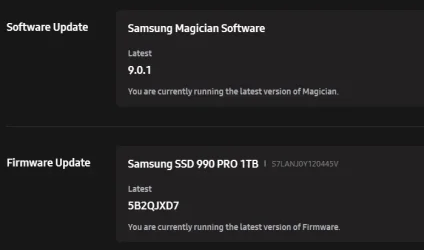
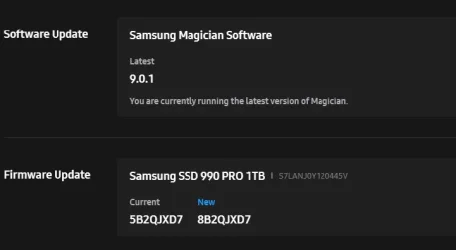
Overnight Samsung has altered the response you get in Magician when you clock the update button. Instead of reporting that there is a firmware update it now reports that you have the latest. I guess so you dont call their tech support and complain.

They are very well aware of the issue and their hands are tied and they can get a little testy abou it. I filed a BBB conplaint about how they handled this and that rep is caught up in her underwear thinking this is a washing machine and a local repair guy can handle it.
 

Attachments

  • Screenshot 2026-04-10 105608.webp
    Screenshot 2026-04-10 105608.webp
    11.8 KB · Views: 2
  • Screenshot 2026-04-10 105652.webp
    Screenshot 2026-04-10 105652.webp
    12.3 KB · Views: 2

My Computer

System One

  • OS
    windows 11 64
    Computer type
    PC/Desktop
    Manufacturer/Model
    HP
    CPU
    i7-12700T
    Memory
    32 GB
    Graphics Card(s)
    Nvidia GeForce 1650 / Intel 770
    Screen Resolution
    1920 / 1080
    Hard Drives
    Samsubg 990 Pro 1TB
    Case
    All in One
    Keyboard
    USB
    Mouse
    USB
    Internet Speed
    600 MBS
    Browser
    Chrome
    Antivirus
    MS
My comments posted to the Samsung site -

I installed this is an Intel i7 generation 12 system. Intel enjoys about 65% of the US PC market and the overwhelming majority of this market share uses the Intel RST VMD Controller 467F. I bought it for its speed and 5 year warranty and for what I thought was to be excellent support.

It came with firmware # 5B2QJXD7 and for a while Magician offered me firmware #8B2QJXD7 until last week. It does not allow me to update the firmware. Its very common in NVME PC’s to not be able to change bios settings to AHCI. According to Samsung Support in order for me to get the latest firmware installed on this drive I’d have to remove it from the All-in-One PC I have, create a USB with the new firmware on it and go to another PC and flash the firmware. Or, remove the drive, wipe the data and send it off to Samsung to flash the drive for probably two weeks and then reinstall it and then install a new system image.

Having to dissemble an all-in-one PC, wipe the drive, pack it up, ship it, wait two weeks then reassemble and put a new system image on is not what I call support. Losing the use of a PC is unacceptable and so is suggesting a customer run around and “borrow” another PC just to flash firmware.

While this drive is very fast it has very limited value if you can’t update the firmware.

By contrast, the competition manages to update the firmware entirely within the confines of the manufacturer’s software. It’s deceptive of Samsung to not make the purchaser aware of this limitation in advance as well as their support system being so limited.

Having to expend this much time and effort to update the firmware is evidence of poor support.
 

My Computer

System One

  • OS
    windows 11 64
    Computer type
    PC/Desktop
    Manufacturer/Model
    HP
    CPU
    i7-12700T
    Memory
    32 GB
    Graphics Card(s)
    Nvidia GeForce 1650 / Intel 770
    Screen Resolution
    1920 / 1080
    Hard Drives
    Samsubg 990 Pro 1TB
    Case
    All in One
    Keyboard
    USB
    Mouse
    USB
    Internet Speed
    600 MBS
    Browser
    Chrome
    Antivirus
    MS

Latest Support Threads

Back
Top Bottom