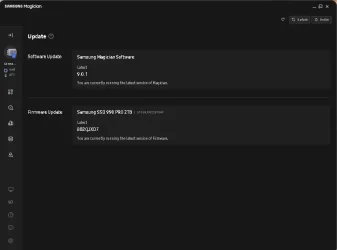
Samsung SSD 990 Pro 2TB won't update Firmware in Samsung Magician software


1776291521943.webp
 

My Computer

System One

  • OS
    Windows 11 & Zorin Pro
    Computer type
    Laptop
    Manufacturer/Model
    Asus Rog Strix G16
    CPU
    Intel® Core™ Ultra 9 Processor 275HX 2.7 GHz
    Motherboard
    AsusteK Computer
    Memory
    32 gb
    Graphics Card(s)
    NVIDIA® GeForce RTX™ 5060 Laptop GPU
    Sound Card
    Realtek High Definition Audio
    Monitor(s) Displays
    Laptop 16 inch
    Screen Resolution
    2560 X 1600
    Hard Drives
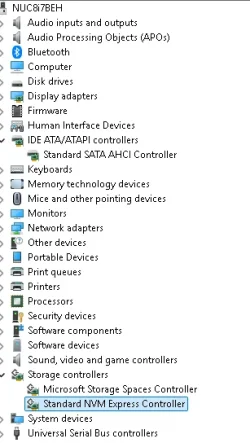
    Boot: Samsung 9100 NVME 2 TB Microsoft Storage Controller: Standard NVM Express Driver: Microsoft 6/21/2006. No SATA/AHCI on my motherboard or in bios
    Mouse
    Pad
    Browser
    Google Chrome
    Antivirus
    Microsoft
    Other Info
    Printer: HP Color LaserJet MFP M477dw
1776291620979.webp
 

My Computer

System One

  • OS
    Windows 11 & Zorin Pro
    Computer type
    Laptop
    Manufacturer/Model
    Asus Rog Strix G16
    CPU
    Intel® Core™ Ultra 9 Processor 275HX 2.7 GHz
    Motherboard
    AsusteK Computer
    Memory
    32 gb
    Graphics Card(s)
    NVIDIA® GeForce RTX™ 5060 Laptop GPU
    Sound Card
    Realtek High Definition Audio
    Monitor(s) Displays
    Laptop 16 inch
    Screen Resolution
    2560 X 1600
    Hard Drives
    Boot: Samsung 9100 NVME 2 TB Microsoft Storage Controller: Standard NVM Express Driver: Microsoft 6/21/2006. No SATA/AHCI on my motherboard or in bios
    Mouse
    Pad
    Browser
    Google Chrome
    Antivirus
    Microsoft
    Other Info
    Printer: HP Color LaserJet MFP M477dw
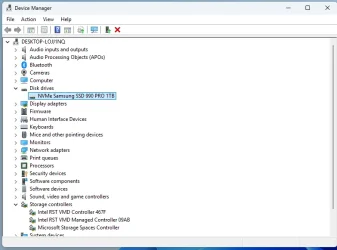
This can be done but not with the storage controller and disk driver you are using. If you aren't using it in Raid mode you don't need it.

This is a Nuc8i7 2014 model... I have no problems with Samsung Magician monitoring or installing new drivers.

Just in case your interested the Microsoft Controller and Device Driver are Linux Mint and Zorin compatible. The Intel RST controller and driver are not compatible. That was my reason for removing Intel RST originally...
 
Last edited:

My Computer

System One

  • OS
    Windows 11 & Zorin Pro
    Computer type
    Laptop
    Manufacturer/Model
    Asus Rog Strix G16
    CPU
    Intel® Core™ Ultra 9 Processor 275HX 2.7 GHz
    Motherboard
    AsusteK Computer
    Memory
    32 gb
    Graphics Card(s)
    NVIDIA® GeForce RTX™ 5060 Laptop GPU
    Sound Card
    Realtek High Definition Audio
    Monitor(s) Displays
    Laptop 16 inch
    Screen Resolution
    2560 X 1600
    Hard Drives
    Boot: Samsung 9100 NVME 2 TB Microsoft Storage Controller: Standard NVM Express Driver: Microsoft 6/21/2006. No SATA/AHCI on my motherboard or in bios
    Mouse
    Pad
    Browser
    Google Chrome
    Antivirus
    Microsoft
    Other Info
    Printer: HP Color LaserJet MFP M477dw
I started using and building computers in 1988 and until I retired I depended on them for CAD work. I bought this high end (3 years ago) HP AIO and am satisfied but I do have to insist on being able to update firmware on a premium ($320 USD on Amazon) drive. No IDE etc. All I have is a ZIF port and a place to mount a small SSD / HDD drive.
 

Attachments

  • Screenshot 2026-04-15 125849.webp
    Screenshot 2026-04-15 125849.webp
    34 KB · Views: 1

My Computer

System One

  • OS
    windows 11 64
    Computer type
    PC/Desktop
    Manufacturer/Model
    HP
    CPU
    i7-12700T
    Memory
    32 GB
    Graphics Card(s)
    Nvidia GeForce 1650 / Intel 770
    Screen Resolution
    1920 / 1080
    Hard Drives
    Samsubg 990 Pro 1TB
    Case
    All in One
    Keyboard
    USB
    Mouse
    USB
    Internet Speed
    600 MBS
    Browser
    Chrome
    Antivirus
    MS

Latest Support Threads

Back
Top Bottom