
Screen Displays Lock Screen instead of Turning-off


GaryE

Member
Local time
5:07 PM
Posts
2
OS
Windows 11 Pro
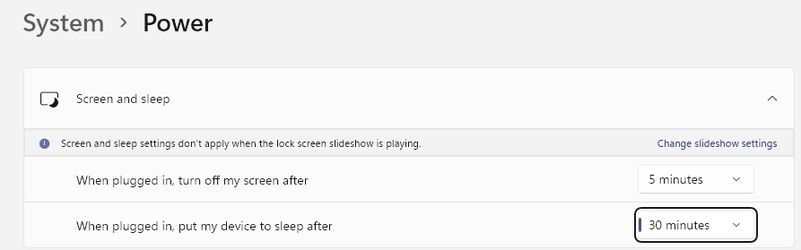
Running Windows 11 21H2 on my desktop PC: I have the screen set to turn-off in 5 minutes. Instead of turning-off the screen, Windows displays the lock screen. Appreciate any ideas. Thanks!
Sleep Settings.png
Power Options.png
 

My Computer My Computer

At a glance

Windows 11 ProIntel i5-12600K32GB Kingston DDR4 2666MhzOnboard
OS
Windows 11 Pro
Computer type
PC/Desktop
Manufacturer/Model
SilentPC
CPU
Intel i5-12600K
Motherboard
Asus PRIME Z690M-PLUS
Memory
32GB Kingston DDR4 2666Mhz
Graphics Card(s)
Onboard
Sound Card
Onboard
Monitor(s) Displays
HP Z30i
Screen Resolution
2560 x 1600
Hard Drives
Samsung 870 EVO SSD
PSU
Corsair RM650x
Case
Fractal Design Mini C Silent
Cooling
Noctua NH-D15S Premium Silent CPU Cooler
Keyboard
Microsoft Sidewinder
Mouse
Microsoft Ergonomic
I think the key to your problem is written right there on the screen "screen and sleep settings don't apply when the lockscreen slideshow is playing". Turn off the lockscreen slideshow.
 

My Computers My Computers

  • At a glance

    Windows 11 Pro 25H2 26200.9168i9-10900 10 core 20 threads32 gbnone-Intel UHD Graphics 630
    OS
    Windows 11 Pro 25H2 26200.9168
    Computer type
    PC/Desktop
    Manufacturer/Model
    Dell Optiplex 7080
    CPU
    i9-10900 10 core 20 threads
    Motherboard
    DELL 0J37VM
    Memory
    32 gb
    Graphics Card(s)
    none-Intel UHD Graphics 630
    Sound Card
    Integrated Realtek
    Monitor(s) Displays
    Benq 27
    Screen Resolution
    2560x1440
    Hard Drives
    2x1tb Solidigm m.2 nvme /External drives 512gb Samsung m.2 sata+2tb Kingston m2.nvme
    PSU
    500w
    Case
    MT
    Cooling
    Dell Premium
    Keyboard
    Logitech wired
    Mouse
    Logitech wireless
    Internet Speed
    so slow I'm too embarrassed to tell
    Browser
    #1 Edge #2 Firefox
    Antivirus
    Defender+MWB Premium
  • At a glance

    Windows 11 Pro 24H2 26200.9168AMD Ryzen 7 6800U32 gbintegrated
    Operating System
    Windows 11 Pro 24H2 26200.9168
    Computer type
    PC/Desktop
    Manufacturer/Model
    Beelink Mini PC SER5
    CPU
    AMD Ryzen 7 6800U
    Memory
    32 gb
    Graphics card(s)
    integrated
    Sound Card
    integrated
    Monitor(s) Displays
    Benq 27
    Screen Resolution
    2560x1440
    Hard Drives
    1TB Crucial nvme
    Keyboard
    Logitech wired
    Mouse
    Logitech wireless
    Internet Speed
    still too embarrassed to tell
    Browser
    Firefox
    Antivirus
    Defender
  • System 3 is non compliant Dell 9020 i7-4770/24gb ram Win11 PRO 26200.9168
I think the key to your problem is written right there on the screen "screen and sleep settings don't apply when the lockscreen slideshow is playing". Turn off the lockscreen slideshow.
I'm a dummy. I missed that. Thank you very much.
 

My Computer My Computer

At a glance

Windows 11 ProIntel i5-12600K32GB Kingston DDR4 2666MhzOnboard
OS
Windows 11 Pro
Computer type
PC/Desktop
Manufacturer/Model
SilentPC
CPU
Intel i5-12600K
Motherboard
Asus PRIME Z690M-PLUS
Memory
32GB Kingston DDR4 2666Mhz
Graphics Card(s)
Onboard
Sound Card
Onboard
Monitor(s) Displays
HP Z30i
Screen Resolution
2560 x 1600
Hard Drives
Samsung 870 EVO SSD
PSU
Corsair RM650x
Case
Fractal Design Mini C Silent
Cooling
Noctua NH-D15S Premium Silent CPU Cooler
Keyboard
Microsoft Sidewinder
Mouse
Microsoft Ergonomic

Latest Support Threads

Back
Top Bottom




