Screen glitching (going black) after Windows 11 update


Click on the start icon and type System Information. Open the app.

View attachment 90757

View attachment 90758

Thanks. It just says 86C9... does that sound about right?

Did you update your BIOS & Intel Video to the latest official versions for your HP?

I believe the HP app I downloaded said the were up to date, but I will check again.

The model HP 15-dy1xxx is incomplete… what is xxx?

My apologies. Do you know which one?

View attachment 90750


If you use the HP link I gave above, when you enter your serial number, it give drivers specific to your machine. https://support.hp.com/us-en/drivers/laptops

I found an old email with the email from ebay where I bought it from. It says hp 15-dy100. The auto-selector on the HP website says hp dy-1000 series. I guess that's the same?

Right now I'm using HP detect which version and will let the program do it's thing.

However as I'm writing this it identified my laptop and then sent me to an error page like before.

As usual, problems with hp bs.

Now I just tried to see what I get on the hp 15-dy1000 page here:


And it only lets me select Windows 10 as my operating system, not Windows 11.

Argghhhh hp!
 

My Computer My Computer

At a glance

Windows 11 HomeIntel i7-1065G716 GBIntel Iris Plus Graphics
OS
Windows 11 Home
Computer type
Laptop
Manufacturer/Model
HP 15-dy1xxx
CPU
Intel i7-1065G7
Motherboard
Not sure...
Memory
16 GB
Graphics Card(s)
Intel Iris Plus Graphics
Sound Card
Realtek Audio I think?
Monitor(s) Displays
Not sure... whatever came with the laptop
Screen Resolution
1920x1080
Hard Drives
Samsung 970 EVO PLUS NVMe M.2 PCI-Ex4 SSD, 2TB
PSU
Whatever came with laptop
Case
None
Cooling
No idea
Keyboard
Came with laptop
Mouse
Microsoft bluetooth mouse
Browser
Chrome
Antivirus
Windows defender
And it only lets me select Windows 10 as my operating system, not Windows 11.

So I updated to Windows 11 a while back.
So it was originally built & shipped with Windows 10 then very likely you wont find Windows 11 drivers for it at HP.
Have you looked in optional updates?


My Computers My Computers

  • At a glance

    Windows 11 Pro 25H2 Build 26200.8894Intel(R) Core(TM) i7-4770K CPU @ 3.50GHz32.0 GB of I forget and the box is in storage.Gigabyte nVidia GeForce GTX 1660 Super OC 6GB
    OS
    Windows 11 Pro 25H2 Build 26200.8894
    Computer type
    PC/Desktop
    Manufacturer/Model
    Sin-built 2013
    CPU
    Intel(R) Core(TM) i7-4770K CPU @ 3.50GHz
    Motherboard
    ASUS ROG Maximus VI Formula
    Memory
    32.0 GB of I forget and the box is in storage.
    Graphics Card(s)
    Gigabyte nVidia GeForce GTX 1660 Super OC 6GB
    Sound Card
    ROG SupremeFX Formula 8-Channel High Definition Audio
    Monitor(s) Displays
    5 x LG 25MS500-B - 1 x 24MK430H-B - 1 x Wacom Pro 22" Touch Screen Tablet
    Screen Resolution
    All over the place
    Hard Drives
    Too many to list. OS on Samsung 1TB 870 QVO SATA
    PSU
    Silverstone 1500
    Case
    NZXT Phantom 820 Full-Tower Case
    Cooling
    Noctua NH-D15 Elite Class Dual Tower CPU Cooler / 6 x EziDIY 120mm / 2 x Corsair 140mm somethings / 1 x 140mm Thermaltake something / 2 x 200mm Corsair.
    Keyboard
    Corsair K95 / Logitech diNovo Edge Wireless
    Mouse
    Logitech: G402 / G502 / Mx Masters / Mx Air Cordless
    Internet Speed
    2000/500Mbps
    Browser
    All sorts
    Antivirus
    Kaspersky Premium
    Other Info
    ㅤㅤㅤㅤㅤㅤㅤㅤㅤㅤㅤㅤㅤㅤㅤㅤㅤㅤㅤㅤㅤㅤㅤㅤㅤㅤㅤㅤㅤㅤㅤㅤㅤㅤㅤㅤㅤㅤㅤㅤ⠀⠀⠀⠀⠀⠀⠀⠀⠀⠀
    TP-Link BE9300 WiFi 7 Bluetooth 5.4 (Archer TBE550E)
    TP-Link TX201 V1 2.5GB Lan

    Grandstream HT812 - VoIP
    ASUS DSL-AX82U - Mesh
    ASUS RT-AC68U - Mesh
    ASUS RT-BE88U Router

    Brother MFC-L2880DW Printer

    I’m on a horse.
  • At a glance

    Windows 11 Pro 25H2 Build 26200.8894 (Wifes)13th Generation Intel® Core™ i5-1340P Process...16GB LPDDR5-52001x Intel® Iris® Xe Graphics
    Operating System
    Windows 11 Pro 25H2 Build 26200.8894 (Wifes)
    Computer type
    Laptop
    Manufacturer/Model
    LENOVO Yoga 7 14IRL8 - Type 82YL
    CPU
    13th Generation Intel® Core™ i5-1340P Processor(Core™ i5-1340P)
    Memory
    16GB LPDDR5-5200
    Graphics card(s)
    1x Intel® Iris® Xe Graphics
    Sound Card
    Optimized with Dolby Atmos®
    Screen Resolution
    QHD 2880 x 1800 OLED
    Hard Drives
    M.2 512 GB SSD PCIe
    Mouse
    Logiteck MX Master 3S
    Internet Speed
    2000/500
    Antivirus
    Defender / Malwarebytes
    Other Info
    …still on a horse.


    Wireless Network: Wi-Fi 6E 2x2 AX; Bluetooth® 5.1 or above
    Ports: 1x 1 Novo button; 2 in 1 Audio Combo jack; Micro SD Card Reader; HDMI 1.4b; 2 x USB Type-C (TBT4)
    USB 3.2 Gen 2 DP 1.4a
    PD 3.0); 1 x USB 3.2 Gen1 Type A
    Camera
    1x 1080P FHD IR/RGB Hybrid with Privacy Shutter and Dual Array Microphone
    Graphics
    1x Intel® Iris® Xe Graphics
    Monitor
    14" WUXGA
    Form Factor
    Convertible Notebook
  • Windows 11 Pro 25H2 Build 26200.8894 (Wifes)

    Yoga 7 2-in-1 14IML9 - Type 83DJ

    Processor: Intel® Core™ Ultra 7 155H Processor(Core™ Ultra 7 155H)

    Memory: 32GB LPD5X-7467

    Hard Drive: 1 TB SSD PCIe

    Wireless Network: 1x Wi-Fi 6E 2x2 AX; Bluetooth® 5.1 or above

    Ports: 1 x HDMI 2.1 TMDS; 1 x Novo Button; 1 x Combo Audio Jack
    2 x USB-C (USB 4.0)
    1 x USB-A 3.2 Gen 1

    Camera: 1080P FHD IR Hybrid with Dual Microphone

    Graphics: Intel® Arc™ Graphics

    Monitor: 14" 2.8K

    ...Where's my horse?
  • Like
Reactions: mkm
So it was originally built & shipped with Windows 10 then very likely you wont find Windows 11 drivers for it at HP.
Have you looked in optional updates?


Thanks!

I tried it... there were 4 drivers available to install in the optional updates section. I'll install them and restart and put it to sleep over night and see how it is tomorrow.

I'm a bit confused. I installed my own ssd in the laptop when I got it. It also had Windows 10. So any hard drive that initially had Windows 10 could have these problems when upgrading to 11?
 

My Computer My Computer

At a glance

Windows 11 HomeIntel i7-1065G716 GBIntel Iris Plus Graphics
OS
Windows 11 Home
Computer type
Laptop
Manufacturer/Model
HP 15-dy1xxx
CPU
Intel i7-1065G7
Motherboard
Not sure...
Memory
16 GB
Graphics Card(s)
Intel Iris Plus Graphics
Sound Card
Realtek Audio I think?
Monitor(s) Displays
Not sure... whatever came with the laptop
Screen Resolution
1920x1080
Hard Drives
Samsung 970 EVO PLUS NVMe M.2 PCI-Ex4 SSD, 2TB
PSU
Whatever came with laptop
Case
None
Cooling
No idea
Keyboard
Came with laptop
Mouse
Microsoft bluetooth mouse
Browser
Chrome
Antivirus
Windows defender
Thanks!

I tried it... there were 4 drivers available to install in the optional updates section. I'll install them and restart and put it to sleep over night and see how it is tomorrow.

I'm a bit confused. I installed my own ssd in the laptop when I got it. It also had Windows 10. So any hard drive that initially had Windows 10 could have these problems when upgrading to 11?
No, the problems could stem from anywhere, we don’t know yet?

The fact the laptop was shipped with Windows 10, Windows 10 will be hardcoded in the Bios/Firmware. There is a work around to upgrade doing a clean install which will result in Windows 11. If the work around is not used you would most likely only be given the option via the install media to choose Windows 10 on a clean install.

But you should not have any issues if you’re only doing a repair/in-place upgrade


My Computers My Computers

  • At a glance

    Windows 11 Pro 25H2 Build 26200.8894Intel(R) Core(TM) i7-4770K CPU @ 3.50GHz32.0 GB of I forget and the box is in storage.Gigabyte nVidia GeForce GTX 1660 Super OC 6GB
    OS
    Windows 11 Pro 25H2 Build 26200.8894
    Computer type
    PC/Desktop
    Manufacturer/Model
    Sin-built 2013
    CPU
    Intel(R) Core(TM) i7-4770K CPU @ 3.50GHz
    Motherboard
    ASUS ROG Maximus VI Formula
    Memory
    32.0 GB of I forget and the box is in storage.
    Graphics Card(s)
    Gigabyte nVidia GeForce GTX 1660 Super OC 6GB
    Sound Card
    ROG SupremeFX Formula 8-Channel High Definition Audio
    Monitor(s) Displays
    5 x LG 25MS500-B - 1 x 24MK430H-B - 1 x Wacom Pro 22" Touch Screen Tablet
    Screen Resolution
    All over the place
    Hard Drives
    Too many to list. OS on Samsung 1TB 870 QVO SATA
    PSU
    Silverstone 1500
    Case
    NZXT Phantom 820 Full-Tower Case
    Cooling
    Noctua NH-D15 Elite Class Dual Tower CPU Cooler / 6 x EziDIY 120mm / 2 x Corsair 140mm somethings / 1 x 140mm Thermaltake something / 2 x 200mm Corsair.
    Keyboard
    Corsair K95 / Logitech diNovo Edge Wireless
    Mouse
    Logitech: G402 / G502 / Mx Masters / Mx Air Cordless
    Internet Speed
    2000/500Mbps
    Browser
    All sorts
    Antivirus
    Kaspersky Premium
    Other Info
    ㅤㅤㅤㅤㅤㅤㅤㅤㅤㅤㅤㅤㅤㅤㅤㅤㅤㅤㅤㅤㅤㅤㅤㅤㅤㅤㅤㅤㅤㅤㅤㅤㅤㅤㅤㅤㅤㅤㅤㅤ⠀⠀⠀⠀⠀⠀⠀⠀⠀⠀
    TP-Link BE9300 WiFi 7 Bluetooth 5.4 (Archer TBE550E)
    TP-Link TX201 V1 2.5GB Lan

    Grandstream HT812 - VoIP
    ASUS DSL-AX82U - Mesh
    ASUS RT-AC68U - Mesh
    ASUS RT-BE88U Router

    Brother MFC-L2880DW Printer

    I’m on a horse.
  • At a glance

    Windows 11 Pro 25H2 Build 26200.8894 (Wifes)13th Generation Intel® Core™ i5-1340P Process...16GB LPDDR5-52001x Intel® Iris® Xe Graphics
    Operating System
    Windows 11 Pro 25H2 Build 26200.8894 (Wifes)
    Computer type
    Laptop
    Manufacturer/Model
    LENOVO Yoga 7 14IRL8 - Type 82YL
    CPU
    13th Generation Intel® Core™ i5-1340P Processor(Core™ i5-1340P)
    Memory
    16GB LPDDR5-5200
    Graphics card(s)
    1x Intel® Iris® Xe Graphics
    Sound Card
    Optimized with Dolby Atmos®
    Screen Resolution
    QHD 2880 x 1800 OLED
    Hard Drives
    M.2 512 GB SSD PCIe
    Mouse
    Logiteck MX Master 3S
    Internet Speed
    2000/500
    Antivirus
    Defender / Malwarebytes
    Other Info
    …still on a horse.


    Wireless Network: Wi-Fi 6E 2x2 AX; Bluetooth® 5.1 or above
    Ports: 1x 1 Novo button; 2 in 1 Audio Combo jack; Micro SD Card Reader; HDMI 1.4b; 2 x USB Type-C (TBT4)
    USB 3.2 Gen 2 DP 1.4a
    PD 3.0); 1 x USB 3.2 Gen1 Type A
    Camera
    1x 1080P FHD IR/RGB Hybrid with Privacy Shutter and Dual Array Microphone
    Graphics
    1x Intel® Iris® Xe Graphics
    Monitor
    14" WUXGA
    Form Factor
    Convertible Notebook
  • Windows 11 Pro 25H2 Build 26200.8894 (Wifes)

    Yoga 7 2-in-1 14IML9 - Type 83DJ

    Processor: Intel® Core™ Ultra 7 155H Processor(Core™ Ultra 7 155H)

    Memory: 32GB LPD5X-7467

    Hard Drive: 1 TB SSD PCIe

    Wireless Network: 1x Wi-Fi 6E 2x2 AX; Bluetooth® 5.1 or above

    Ports: 1 x HDMI 2.1 TMDS; 1 x Novo Button; 1 x Combo Audio Jack
    2 x USB-C (USB 4.0)
    1 x USB-A 3.2 Gen 1

    Camera: 1080P FHD IR Hybrid with Dual Microphone

    Graphics: Intel® Arc™ Graphics

    Monitor: 14" 2.8K

    ...Where's my horse?
  • Like
Reactions: mkm
No, the problems could stem from anywhere, we don’t know yet?

The fact the laptop was shipped with Windows 10, Windows 10 will be hardcoded in the Bios/Firmware. There is a work around to upgrade doing a clean install which will result in Windows 11. If the work around is not used you would most likely only be given the option via the install media to choose Windows 10 on a clean install.

But you should not have any issues if you’re only doing a repair/in-place upgrade


Ok I think I will have to try this, because doing the Windows 11 secret hidden drivers updates didn't work :(.

I will try this one and report back, thanks!
 

My Computer My Computer

At a glance

Windows 11 HomeIntel i7-1065G716 GBIntel Iris Plus Graphics
OS
Windows 11 Home
Computer type
Laptop
Manufacturer/Model
HP 15-dy1xxx
CPU
Intel i7-1065G7
Motherboard
Not sure...
Memory
16 GB
Graphics Card(s)
Intel Iris Plus Graphics
Sound Card
Realtek Audio I think?
Monitor(s) Displays
Not sure... whatever came with the laptop
Screen Resolution
1920x1080
Hard Drives
Samsung 970 EVO PLUS NVMe M.2 PCI-Ex4 SSD, 2TB
PSU
Whatever came with laptop
Case
None
Cooling
No idea
Keyboard
Came with laptop
Mouse
Microsoft bluetooth mouse
Browser
Chrome
Antivirus
Windows defender
But you should not have any issues if you’re only doing a repair/in-place upgrade

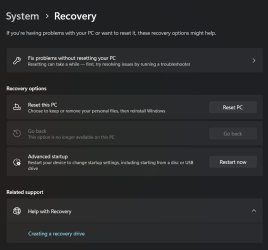
Ok so before I do anything stupid, I don't have the option to "Fix problems using Windows Update" in Recovery Settings.

I have "Reset this PC", which I'm assuming is the same thing? I've attached a screenshot. After choosing that option there is an option to keep my files, but not my apps.

Seems like this is the way to go? I don't wanna reset it if I'm missing some other option somewhere.

"Fix problems without resetting your PC" doesn't give any useful options.
 

Attachments

  • 1.jpg
    1.jpg
    52.6 KB · Views: 1

My Computer My Computer

At a glance

Windows 11 HomeIntel i7-1065G716 GBIntel Iris Plus Graphics
OS
Windows 11 Home
Computer type
Laptop
Manufacturer/Model
HP 15-dy1xxx
CPU
Intel i7-1065G7
Motherboard
Not sure...
Memory
16 GB
Graphics Card(s)
Intel Iris Plus Graphics
Sound Card
Realtek Audio I think?
Monitor(s) Displays
Not sure... whatever came with the laptop
Screen Resolution
1920x1080
Hard Drives
Samsung 970 EVO PLUS NVMe M.2 PCI-Ex4 SSD, 2TB
PSU
Whatever came with laptop
Case
None
Cooling
No idea
Keyboard
Came with laptop
Mouse
Microsoft bluetooth mouse
Browser
Chrome
Antivirus
Windows defender
Ok so before I do anything stupid, I don't have the option to "Fix problems using Windows Update" in Recovery Settings.

I have "Reset this PC", which I'm assuming is the same thing? I've attached a screenshot. After choosing that option there is an option to keep my files, but not my apps.

Seems like this is the way to go? I don't wanna reset it if I'm missing some other option somewhere.

"Fix problems without resetting your PC" doesn't give any useful options.
I have never reset. But if windows says it will keep files, I’d suggest that’s what it will do.
I strongly advise you to make a backup and make an image of your current system. At the very least, backup your personal files.
I don’t understand why windows is giving you trouble with and In-Place Upgrade. And you followed the Tutorial, did you try Option One & Two?
You did download the latest ISO yes?

I can’t say for sure, because I am not as up to date as some of the smarter members here. But perhaps you’re having trouble because Windows 10 is set in hardcoded your BIOS/Firmware?.


My Computers My Computers

  • At a glance

    Windows 11 Pro 25H2 Build 26200.8894Intel(R) Core(TM) i7-4770K CPU @ 3.50GHz32.0 GB of I forget and the box is in storage.Gigabyte nVidia GeForce GTX 1660 Super OC 6GB
    OS
    Windows 11 Pro 25H2 Build 26200.8894
    Computer type
    PC/Desktop
    Manufacturer/Model
    Sin-built 2013
    CPU
    Intel(R) Core(TM) i7-4770K CPU @ 3.50GHz
    Motherboard
    ASUS ROG Maximus VI Formula
    Memory
    32.0 GB of I forget and the box is in storage.
    Graphics Card(s)
    Gigabyte nVidia GeForce GTX 1660 Super OC 6GB
    Sound Card
    ROG SupremeFX Formula 8-Channel High Definition Audio
    Monitor(s) Displays
    5 x LG 25MS500-B - 1 x 24MK430H-B - 1 x Wacom Pro 22" Touch Screen Tablet
    Screen Resolution
    All over the place
    Hard Drives
    Too many to list. OS on Samsung 1TB 870 QVO SATA
    PSU
    Silverstone 1500
    Case
    NZXT Phantom 820 Full-Tower Case
    Cooling
    Noctua NH-D15 Elite Class Dual Tower CPU Cooler / 6 x EziDIY 120mm / 2 x Corsair 140mm somethings / 1 x 140mm Thermaltake something / 2 x 200mm Corsair.
    Keyboard
    Corsair K95 / Logitech diNovo Edge Wireless
    Mouse
    Logitech: G402 / G502 / Mx Masters / Mx Air Cordless
    Internet Speed
    2000/500Mbps
    Browser
    All sorts
    Antivirus
    Kaspersky Premium
    Other Info
    ㅤㅤㅤㅤㅤㅤㅤㅤㅤㅤㅤㅤㅤㅤㅤㅤㅤㅤㅤㅤㅤㅤㅤㅤㅤㅤㅤㅤㅤㅤㅤㅤㅤㅤㅤㅤㅤㅤㅤㅤ⠀⠀⠀⠀⠀⠀⠀⠀⠀⠀
    TP-Link BE9300 WiFi 7 Bluetooth 5.4 (Archer TBE550E)
    TP-Link TX201 V1 2.5GB Lan

    Grandstream HT812 - VoIP
    ASUS DSL-AX82U - Mesh
    ASUS RT-AC68U - Mesh
    ASUS RT-BE88U Router

    Brother MFC-L2880DW Printer

    I’m on a horse.
  • At a glance

    Windows 11 Pro 25H2 Build 26200.8894 (Wifes)13th Generation Intel® Core™ i5-1340P Process...16GB LPDDR5-52001x Intel® Iris® Xe Graphics
    Operating System
    Windows 11 Pro 25H2 Build 26200.8894 (Wifes)
    Computer type
    Laptop
    Manufacturer/Model
    LENOVO Yoga 7 14IRL8 - Type 82YL
    CPU
    13th Generation Intel® Core™ i5-1340P Processor(Core™ i5-1340P)
    Memory
    16GB LPDDR5-5200
    Graphics card(s)
    1x Intel® Iris® Xe Graphics
    Sound Card
    Optimized with Dolby Atmos®
    Screen Resolution
    QHD 2880 x 1800 OLED
    Hard Drives
    M.2 512 GB SSD PCIe
    Mouse
    Logiteck MX Master 3S
    Internet Speed
    2000/500
    Antivirus
    Defender / Malwarebytes
    Other Info
    …still on a horse.


    Wireless Network: Wi-Fi 6E 2x2 AX; Bluetooth® 5.1 or above
    Ports: 1x 1 Novo button; 2 in 1 Audio Combo jack; Micro SD Card Reader; HDMI 1.4b; 2 x USB Type-C (TBT4)
    USB 3.2 Gen 2 DP 1.4a
    PD 3.0); 1 x USB 3.2 Gen1 Type A
    Camera
    1x 1080P FHD IR/RGB Hybrid with Privacy Shutter and Dual Array Microphone
    Graphics
    1x Intel® Iris® Xe Graphics
    Monitor
    14" WUXGA
    Form Factor
    Convertible Notebook
  • Windows 11 Pro 25H2 Build 26200.8894 (Wifes)

    Yoga 7 2-in-1 14IML9 - Type 83DJ

    Processor: Intel® Core™ Ultra 7 155H Processor(Core™ Ultra 7 155H)

    Memory: 32GB LPD5X-7467

    Hard Drive: 1 TB SSD PCIe

    Wireless Network: 1x Wi-Fi 6E 2x2 AX; Bluetooth® 5.1 or above

    Ports: 1 x HDMI 2.1 TMDS; 1 x Novo Button; 1 x Combo Audio Jack
    2 x USB-C (USB 4.0)
    1 x USB-A 3.2 Gen 1

    Camera: 1080P FHD IR Hybrid with Dual Microphone

    Graphics: Intel® Arc™ Graphics

    Monitor: 14" 2.8K

    ...Where's my horse?
Ok so before I do anything stupid, I don't have the option to "Fix problems using Windows Update" in Recovery Settings.
Recovery settings? So you didn’t actually do the In-Place Upgrade?


My Computers My Computers

  • At a glance

    Windows 11 Pro 25H2 Build 26200.8894Intel(R) Core(TM) i7-4770K CPU @ 3.50GHz32.0 GB of I forget and the box is in storage.Gigabyte nVidia GeForce GTX 1660 Super OC 6GB
    OS
    Windows 11 Pro 25H2 Build 26200.8894
    Computer type
    PC/Desktop
    Manufacturer/Model
    Sin-built 2013
    CPU
    Intel(R) Core(TM) i7-4770K CPU @ 3.50GHz
    Motherboard
    ASUS ROG Maximus VI Formula
    Memory
    32.0 GB of I forget and the box is in storage.
    Graphics Card(s)
    Gigabyte nVidia GeForce GTX 1660 Super OC 6GB
    Sound Card
    ROG SupremeFX Formula 8-Channel High Definition Audio
    Monitor(s) Displays
    5 x LG 25MS500-B - 1 x 24MK430H-B - 1 x Wacom Pro 22" Touch Screen Tablet
    Screen Resolution
    All over the place
    Hard Drives
    Too many to list. OS on Samsung 1TB 870 QVO SATA
    PSU
    Silverstone 1500
    Case
    NZXT Phantom 820 Full-Tower Case
    Cooling
    Noctua NH-D15 Elite Class Dual Tower CPU Cooler / 6 x EziDIY 120mm / 2 x Corsair 140mm somethings / 1 x 140mm Thermaltake something / 2 x 200mm Corsair.
    Keyboard
    Corsair K95 / Logitech diNovo Edge Wireless
    Mouse
    Logitech: G402 / G502 / Mx Masters / Mx Air Cordless
    Internet Speed
    2000/500Mbps
    Browser
    All sorts
    Antivirus
    Kaspersky Premium
    Other Info
    ㅤㅤㅤㅤㅤㅤㅤㅤㅤㅤㅤㅤㅤㅤㅤㅤㅤㅤㅤㅤㅤㅤㅤㅤㅤㅤㅤㅤㅤㅤㅤㅤㅤㅤㅤㅤㅤㅤㅤㅤ⠀⠀⠀⠀⠀⠀⠀⠀⠀⠀
    TP-Link BE9300 WiFi 7 Bluetooth 5.4 (Archer TBE550E)
    TP-Link TX201 V1 2.5GB Lan

    Grandstream HT812 - VoIP
    ASUS DSL-AX82U - Mesh
    ASUS RT-AC68U - Mesh
    ASUS RT-BE88U Router

    Brother MFC-L2880DW Printer

    I’m on a horse.
  • At a glance

    Windows 11 Pro 25H2 Build 26200.8894 (Wifes)13th Generation Intel® Core™ i5-1340P Process...16GB LPDDR5-52001x Intel® Iris® Xe Graphics
    Operating System
    Windows 11 Pro 25H2 Build 26200.8894 (Wifes)
    Computer type
    Laptop
    Manufacturer/Model
    LENOVO Yoga 7 14IRL8 - Type 82YL
    CPU
    13th Generation Intel® Core™ i5-1340P Processor(Core™ i5-1340P)
    Memory
    16GB LPDDR5-5200
    Graphics card(s)
    1x Intel® Iris® Xe Graphics
    Sound Card
    Optimized with Dolby Atmos®
    Screen Resolution
    QHD 2880 x 1800 OLED
    Hard Drives
    M.2 512 GB SSD PCIe
    Mouse
    Logiteck MX Master 3S
    Internet Speed
    2000/500
    Antivirus
    Defender / Malwarebytes
    Other Info
    …still on a horse.


    Wireless Network: Wi-Fi 6E 2x2 AX; Bluetooth® 5.1 or above
    Ports: 1x 1 Novo button; 2 in 1 Audio Combo jack; Micro SD Card Reader; HDMI 1.4b; 2 x USB Type-C (TBT4)
    USB 3.2 Gen 2 DP 1.4a
    PD 3.0); 1 x USB 3.2 Gen1 Type A
    Camera
    1x 1080P FHD IR/RGB Hybrid with Privacy Shutter and Dual Array Microphone
    Graphics
    1x Intel® Iris® Xe Graphics
    Monitor
    14" WUXGA
    Form Factor
    Convertible Notebook
  • Windows 11 Pro 25H2 Build 26200.8894 (Wifes)

    Yoga 7 2-in-1 14IML9 - Type 83DJ

    Processor: Intel® Core™ Ultra 7 155H Processor(Core™ Ultra 7 155H)

    Memory: 32GB LPD5X-7467

    Hard Drive: 1 TB SSD PCIe

    Wireless Network: 1x Wi-Fi 6E 2x2 AX; Bluetooth® 5.1 or above

    Ports: 1 x HDMI 2.1 TMDS; 1 x Novo Button; 1 x Combo Audio Jack
    2 x USB-C (USB 4.0)
    1 x USB-A 3.2 Gen 1

    Camera: 1080P FHD IR Hybrid with Dual Microphone

    Graphics: Intel® Arc™ Graphics

    Monitor: 14" 2.8K

    ...Where's my horse?
And you followed the Tutorial, did you try Option One & Two?
You did download the latest ISO yes?


I did not actually try option 2 yet because it seemed way more complicated. But I suppose I will have to do that now as option 1 isn't working.

Recovery settings? So you didn’t actually do the In-Place Upgrade?


Yes in options one is says to go to Settings > System > Recovery > Fix problems using Windows Update

But when I do this, under Recovery I don't have the option to "Fix problems using Windows Update". Only to reset the PC.

It seems from this thread that a reinstall is the better option vs resetting:


Edit: and yes I did clone my hard drive last night so I've just made a new backup
 

My Computer My Computer

At a glance

Windows 11 HomeIntel i7-1065G716 GBIntel Iris Plus Graphics
OS
Windows 11 Home
Computer type
Laptop
Manufacturer/Model
HP 15-dy1xxx
CPU
Intel i7-1065G7
Motherboard
Not sure...
Memory
16 GB
Graphics Card(s)
Intel Iris Plus Graphics
Sound Card
Realtek Audio I think?
Monitor(s) Displays
Not sure... whatever came with the laptop
Screen Resolution
1920x1080
Hard Drives
Samsung 970 EVO PLUS NVMe M.2 PCI-Ex4 SSD, 2TB
PSU
Whatever came with laptop
Case
None
Cooling
No idea
Keyboard
Came with laptop
Mouse
Microsoft bluetooth mouse
Browser
Chrome
Antivirus
Windows defender
I have "Reset this PC", which I'm assuming is the same thing
No, a reset and a repair install are not the same. A reset is closer to a clean install. A reset is performed through RECOVERY. It retains your personal files, reinstalls windows, but deletes all 3rd party apps and user settings.

A repair install is done from within WINDOWS. Per the tutorial you were given, you download the Windows iso. From within Windows, you mount the iso, open it, and click on the setup.exe file inside.
Windows is overwritten and all your files, apps, and settings are kept intact.

This is the best article I've found comparing the differences between clean install, reset, and a repair install (also called in-place upgrade even though you may be overwriting your current version with the exact same version) Reset vs Clean install vs In-place Upgrade in Windows 11/10
 

My Computers My Computers

  • At a glance

    Windows 11 Pro 25H2 26200.8875i9-10900 10 core 20 threads32 gbnone-Intel UHD Graphics 630
    OS
    Windows 11 Pro 25H2 26200.8875
    Computer type
    PC/Desktop
    Manufacturer/Model
    Dell Optiplex 7080
    CPU
    i9-10900 10 core 20 threads
    Motherboard
    DELL 0J37VM
    Memory
    32 gb
    Graphics Card(s)
    none-Intel UHD Graphics 630
    Sound Card
    Integrated Realtek
    Monitor(s) Displays
    Benq 27
    Screen Resolution
    2560x1440
    Hard Drives
    2x1tb Solidigm m.2 nvme /External drives 512gb Samsung m.2 sata+2tb Kingston m2.nvme
    PSU
    500w
    Case
    MT
    Cooling
    Dell Premium
    Keyboard
    Logitech wired
    Mouse
    Logitech wireless
    Internet Speed
    so slow I'm too embarrassed to tell
    Browser
    #1 Edge #2 Firefox
    Antivirus
    Defender+MWB Premium
  • At a glance

    Windows 11 Pro 24H2 26200.8875AMD Ryzen 7 6800U32 gbintegrated
    Operating System
    Windows 11 Pro 24H2 26200.8875
    Computer type
    PC/Desktop
    Manufacturer/Model
    Beelink Mini PC SER5
    CPU
    AMD Ryzen 7 6800U
    Memory
    32 gb
    Graphics card(s)
    integrated
    Sound Card
    integrated
    Monitor(s) Displays
    Benq 27
    Screen Resolution
    2560x1440
    Hard Drives
    1TB Crucial nvme
    Keyboard
    Logitech wired
    Mouse
    Logitech wireless
    Internet Speed
    still too embarrassed to tell
    Browser
    Firefox
    Antivirus
    Defender
    Other Info
    System 3 is non compliant Dell 9020 i7-4770/24gb ram Win11 PRO 26200.8875
But when I do this, under Recovery I don't have the option to "Fix problems using Windows Update". Only to reset the PC.

That is odd. @Brink do you know if this is common?
 

My Computers My Computers

  • At a glance

    Windows 11 Pro 25H2 Build 26200.8894Intel(R) Core(TM) i7-4770K CPU @ 3.50GHz32.0 GB of I forget and the box is in storage.Gigabyte nVidia GeForce GTX 1660 Super OC 6GB
    OS
    Windows 11 Pro 25H2 Build 26200.8894
    Computer type
    PC/Desktop
    Manufacturer/Model
    Sin-built 2013
    CPU
    Intel(R) Core(TM) i7-4770K CPU @ 3.50GHz
    Motherboard
    ASUS ROG Maximus VI Formula
    Memory
    32.0 GB of I forget and the box is in storage.
    Graphics Card(s)
    Gigabyte nVidia GeForce GTX 1660 Super OC 6GB
    Sound Card
    ROG SupremeFX Formula 8-Channel High Definition Audio
    Monitor(s) Displays
    5 x LG 25MS500-B - 1 x 24MK430H-B - 1 x Wacom Pro 22" Touch Screen Tablet
    Screen Resolution
    All over the place
    Hard Drives
    Too many to list. OS on Samsung 1TB 870 QVO SATA
    PSU
    Silverstone 1500
    Case
    NZXT Phantom 820 Full-Tower Case
    Cooling
    Noctua NH-D15 Elite Class Dual Tower CPU Cooler / 6 x EziDIY 120mm / 2 x Corsair 140mm somethings / 1 x 140mm Thermaltake something / 2 x 200mm Corsair.
    Keyboard
    Corsair K95 / Logitech diNovo Edge Wireless
    Mouse
    Logitech: G402 / G502 / Mx Masters / Mx Air Cordless
    Internet Speed
    2000/500Mbps
    Browser
    All sorts
    Antivirus
    Kaspersky Premium
    Other Info
    ㅤㅤㅤㅤㅤㅤㅤㅤㅤㅤㅤㅤㅤㅤㅤㅤㅤㅤㅤㅤㅤㅤㅤㅤㅤㅤㅤㅤㅤㅤㅤㅤㅤㅤㅤㅤㅤㅤㅤㅤ⠀⠀⠀⠀⠀⠀⠀⠀⠀⠀
    TP-Link BE9300 WiFi 7 Bluetooth 5.4 (Archer TBE550E)
    TP-Link TX201 V1 2.5GB Lan

    Grandstream HT812 - VoIP
    ASUS DSL-AX82U - Mesh
    ASUS RT-AC68U - Mesh
    ASUS RT-BE88U Router

    Brother MFC-L2880DW Printer

    I’m on a horse.
  • At a glance

    Windows 11 Pro 25H2 Build 26200.8894 (Wifes)13th Generation Intel® Core™ i5-1340P Process...16GB LPDDR5-52001x Intel® Iris® Xe Graphics
    Operating System
    Windows 11 Pro 25H2 Build 26200.8894 (Wifes)
    Computer type
    Laptop
    Manufacturer/Model
    LENOVO Yoga 7 14IRL8 - Type 82YL
    CPU
    13th Generation Intel® Core™ i5-1340P Processor(Core™ i5-1340P)
    Memory
    16GB LPDDR5-5200
    Graphics card(s)
    1x Intel® Iris® Xe Graphics
    Sound Card
    Optimized with Dolby Atmos®
    Screen Resolution
    QHD 2880 x 1800 OLED
    Hard Drives
    M.2 512 GB SSD PCIe
    Mouse
    Logiteck MX Master 3S
    Internet Speed
    2000/500
    Antivirus
    Defender / Malwarebytes
    Other Info
    …still on a horse.


    Wireless Network: Wi-Fi 6E 2x2 AX; Bluetooth® 5.1 or above
    Ports: 1x 1 Novo button; 2 in 1 Audio Combo jack; Micro SD Card Reader; HDMI 1.4b; 2 x USB Type-C (TBT4)
    USB 3.2 Gen 2 DP 1.4a
    PD 3.0); 1 x USB 3.2 Gen1 Type A
    Camera
    1x 1080P FHD IR/RGB Hybrid with Privacy Shutter and Dual Array Microphone
    Graphics
    1x Intel® Iris® Xe Graphics
    Monitor
    14" WUXGA
    Form Factor
    Convertible Notebook
  • Windows 11 Pro 25H2 Build 26200.8894 (Wifes)

    Yoga 7 2-in-1 14IML9 - Type 83DJ

    Processor: Intel® Core™ Ultra 7 155H Processor(Core™ Ultra 7 155H)

    Memory: 32GB LPD5X-7467

    Hard Drive: 1 TB SSD PCIe

    Wireless Network: 1x Wi-Fi 6E 2x2 AX; Bluetooth® 5.1 or above

    Ports: 1 x HDMI 2.1 TMDS; 1 x Novo Button; 1 x Combo Audio Jack
    2 x USB-C (USB 4.0)
    1 x USB-A 3.2 Gen 1

    Camera: 1080P FHD IR Hybrid with Dual Microphone

    Graphics: Intel® Arc™ Graphics

    Monitor: 14" 2.8K

    ...Where's my horse?
That is odd. @Brink do you know if this is common?

Currently option one below is only available starting with Windows 11 build 25905 (Canary), build 23601 (Dev), and build 22635.2915 (Beta).


My Computers My Computers

  • At a glance

    Windows 11 Pro for WorkstationsIntel i7-8700K 5 GHz64 GB (4x16GB) G.SKILL TridentZ RGB DDR4 3600...ASUS ROG-STRIX-GTX1080TI-O11G-GAMING (11GB GD...
    OS
    Windows 11 Pro for Workstations
    Computer type
    PC/Desktop
    Manufacturer/Model
    Custom self build
    CPU
    Intel i7-8700K 5 GHz
    Motherboard
    ASUS ROG Maximus XI Formula Z390
    Memory
    64 GB (4x16GB) G.SKILL TridentZ RGB DDR4 3600 MHz (F4-3600C18D-32GTZR)
    Graphics Card(s)
    ASUS ROG-STRIX-GTX1080TI-O11G-GAMING (11GB GDDR5X)
    Sound Card
    Integrated Digital Audio (S/PDIF)
    Monitor(s) Displays
    2 x Samsung Odyssey G75 27"
    Screen Resolution
    2560x1440
    Hard Drives
    1TB Samsung 990 PRO M.2,
    4TB Samsung 990 PRO M.2,
    TerraMaster F8 SSD Plus NAS
    PSU
    Seasonic Prime Titanium 850W
    Case
    Thermaltake Core P3 wall mounted
    Cooling
    Corsair Hydro H115i
    Keyboard
    Amazon Basics Wired Full Keyboard MD005
    Mouse
    Logitech MX Master 4
    Internet Speed
    2 Gbps Download and 100 Mbps Upload
    Browser
    Chrome and Edge
    Antivirus
    Microsoft Defender
    Other Info
    Logitech Z625 speaker system,
    Logitech BRIO 4K Pro webcam,
    HP Color LaserJet Pro MFP M477fdn,
    CyberPower CP1500PFCLCD
    Galaxy S23 Plus phone
  • At a glance

    Windows 11 ProSnapdragon X Elite (12 core) 3.42 GHz16 GB LPDDR5x-7467 MHz
    Operating System
    Windows 11 Pro
    Computer type
    Laptop
    Manufacturer/Model
    Surface Laptop 7 Copilot+ PC
    CPU
    Snapdragon X Elite (12 core) 3.42 GHz
    Memory
    16 GB LPDDR5x-7467 MHz
    Monitor(s) Displays
    15" HDR
    Screen Resolution
    2496 x 1664
    Hard Drives
    1 TB SSD
    Internet Speed
    Wi-Fi 7 and Bluetooth 5.4
    Browser
    Chrome and Edge
    Antivirus
    Microsoft Defender
Ahh, the plot thickens. We have not been told this is an insider build.
 

My Computers My Computers

  • At a glance

    Windows 11 Pro 25H2 26200.8875i9-10900 10 core 20 threads32 gbnone-Intel UHD Graphics 630
    OS
    Windows 11 Pro 25H2 26200.8875
    Computer type
    PC/Desktop
    Manufacturer/Model
    Dell Optiplex 7080
    CPU
    i9-10900 10 core 20 threads
    Motherboard
    DELL 0J37VM
    Memory
    32 gb
    Graphics Card(s)
    none-Intel UHD Graphics 630
    Sound Card
    Integrated Realtek
    Monitor(s) Displays
    Benq 27
    Screen Resolution
    2560x1440
    Hard Drives
    2x1tb Solidigm m.2 nvme /External drives 512gb Samsung m.2 sata+2tb Kingston m2.nvme
    PSU
    500w
    Case
    MT
    Cooling
    Dell Premium
    Keyboard
    Logitech wired
    Mouse
    Logitech wireless
    Internet Speed
    so slow I'm too embarrassed to tell
    Browser
    #1 Edge #2 Firefox
    Antivirus
    Defender+MWB Premium
  • At a glance

    Windows 11 Pro 24H2 26200.8875AMD Ryzen 7 6800U32 gbintegrated
    Operating System
    Windows 11 Pro 24H2 26200.8875
    Computer type
    PC/Desktop
    Manufacturer/Model
    Beelink Mini PC SER5
    CPU
    AMD Ryzen 7 6800U
    Memory
    32 gb
    Graphics card(s)
    integrated
    Sound Card
    integrated
    Monitor(s) Displays
    Benq 27
    Screen Resolution
    2560x1440
    Hard Drives
    1TB Crucial nvme
    Keyboard
    Logitech wired
    Mouse
    Logitech wireless
    Internet Speed
    still too embarrassed to tell
    Browser
    Firefox
    Antivirus
    Defender
    Other Info
    System 3 is non compliant Dell 9020 i7-4770/24gb ram Win11 PRO 26200.8875
I have an HP 14 and had similar issues when going from Windows 10 to 11 initially, and actually thought the screen had failed. I did do a clean install and also needed to use the Intel Graphics driver. But you could try the latest HP driver first. It didn't like a clean install of Windows 11 (repeat of screen issues) so I did a clean install of Windows 10 until fully updated, then installed Windows 11 via the Installation Assistant, then updated the graphics driver. If you update the graphics driver in Windows 10, it gets removed again when you upgrade to Windows 11 so leave it till last.

When choosing on the HP site, it won't list drivers for Windows 11 (mine doesn't) so you just select Windows 10 and then in the box next to that with a drop down box, select the latest version of Windows 10.

Before that, you could run sfc/scannow. Type cmd in the search box - click to run as administrator and type sfc/scannow - wait till it's finished and see what it says.

But you might not need to do a clean install. A reset was mentioned above as an option.
 
Last edited:

My Computers My Computers

  • At a glance

    Windows 11 Home 25H2Core i5-1035G132gb
    OS
    Windows 11 Home 25H2
    Computer type
    Laptop
    Manufacturer/Model
    HP Pavilion 14-ce3606sa
    CPU
    Core i5-1035G1
    Memory
    32gb
    Hard Drives
    Samsung 870 evo sata ssd
    Cooling
    Could be better
    Internet Speed
    50 mbps Starlink
    Browser
    Firefox
    Other Info
    Originally came installed with a 500gb H10 Optane ssd
  • At a glance

    Windows 11 HomeIntel Core i5-1035G116gb
    Operating System
    Windows 11 Home
    Computer type
    Laptop
    Manufacturer/Model
    HP Pavilion ce3606sa
    CPU
    Intel Core i5-1035G1
    Memory
    16gb
    Hard Drives
    Hynix Gold P31 2TB
    Internet Speed
    200mbps Starlink
    Browser
    Firefox
    Antivirus
    Defender
No, a reset and a repair install are not the same. A reset is closer to a clean install. A reset is performed through RECOVERY. It retains your personal files, reinstalls windows, but deletes all 3rd party apps and user settings.

A repair install is done from within WINDOWS. Per the tutorial you were given, you download the Windows iso. From within Windows, you mount the iso, open it, and click on the setup.exe file inside.
Windows is overwritten and all your files, apps, and settings are kept intact.

This is the best article I've found comparing the differences between clean install, reset, and a repair install (also called in-place upgrade even though you may be overwriting your current version with the exact same version) Reset vs Clean install vs In-place Upgrade in Windows 11/10

Right thank you. And for my issue you would lean towards a repair install correct?

Currently option one below is only available starting with Windows 11 build 25905 (Canary), build 23601 (Dev), and build 22635.2915 (Beta).


I did notice it said I need this build, but wasn't totally sure what it meant or how to get it.

I have an HP 14 and had similar issues when going from Windows 10 to 11 initially, and actually thought the screen had failed. I did do a clean install and also needed to use the Intel Graphics driver. But you could try the latest HP driver first. It didn't like a clean install of Windows 11 (repeat of screen issues) so I did a clean install of Windows 10 until fully updated, then installed Windows 11 via the Installation Assistant, then updated the graphics driver. If you update the graphics driver in Windows 10, it gets removed again when you upgrade to Windows 11 so leave it till last.

When choosing on the HP site, it won't list drivers for Windows 11 (mine doesn't) so you just select Windows 10 and then in the box next to that with a drop down box, select the latest version of Windows 10.

Before that, you could run sfc/scannow. Type cmd in the search box - click to run as administrator and type sfc/scannow - wait till it's finished and see what it says.

But you might not need to do a clean install. A reset was mentioned above as an option.

Hey there thank you :).

Ok so I ran sfc/scannow and got the message:

"Windows Resource Protection found corrupt files and successfully repaired them.
For online repairs, details are included in the CBS log file located at
windir\Logs\CBS\CBS.log. For example C:\Windows\Logs\CBS\CBS.log. For offline
repairs, details are included in the log file provided by the /OFFLOGFILE flag."

I have no idea what this means or if it'll fix anything?

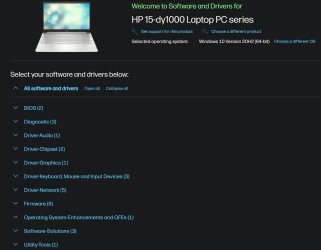
I also went to the HP drivers site and selected the latest version of Windows 10 like you said and got a list of drivers (screenshot attached).

Should I install all of these drivers? Or perhaps just BIOS and graphics?

Thanks!
 

Attachments

  • 11.jpg
    11.jpg
    63.8 KB · Views: 1

My Computer My Computer

At a glance

Windows 11 HomeIntel i7-1065G716 GBIntel Iris Plus Graphics
OS
Windows 11 Home
Computer type
Laptop
Manufacturer/Model
HP 15-dy1xxx
CPU
Intel i7-1065G7
Motherboard
Not sure...
Memory
16 GB
Graphics Card(s)
Intel Iris Plus Graphics
Sound Card
Realtek Audio I think?
Monitor(s) Displays
Not sure... whatever came with the laptop
Screen Resolution
1920x1080
Hard Drives
Samsung 970 EVO PLUS NVMe M.2 PCI-Ex4 SSD, 2TB
PSU
Whatever came with laptop
Case
None
Cooling
No idea
Keyboard
Came with laptop
Mouse
Microsoft bluetooth mouse
Browser
Chrome
Antivirus
Windows defender
If sfc/scannow found things that needed repairing that might have helped.

Maybe try the latest graphics driver before thinking about doing a repair install or reset.

I would just do the graphics driver for now and choose the latest one from the list. When you go to download it from the HP site it offers to use their assistant to download it or opt to say something like "no thanks I'll just download". Opt for that and the file will go to your downloads folder. Double click on it and follow the install procedure. It's the same procedure for the bios.

I found that was more stable but there was still the odd issue when playing some videos so I ended up having to use the latest Intel version. But it's best to try the manufacturer version first.

Have you checked what the current bios version you have is?
 

My Computers My Computers

  • At a glance

    Windows 11 Home 25H2Core i5-1035G132gb
    OS
    Windows 11 Home 25H2
    Computer type
    Laptop
    Manufacturer/Model
    HP Pavilion 14-ce3606sa
    CPU
    Core i5-1035G1
    Memory
    32gb
    Hard Drives
    Samsung 870 evo sata ssd
    Cooling
    Could be better
    Internet Speed
    50 mbps Starlink
    Browser
    Firefox
    Other Info
    Originally came installed with a 500gb H10 Optane ssd
  • At a glance

    Windows 11 HomeIntel Core i5-1035G116gb
    Operating System
    Windows 11 Home
    Computer type
    Laptop
    Manufacturer/Model
    HP Pavilion ce3606sa
    CPU
    Intel Core i5-1035G1
    Memory
    16gb
    Hard Drives
    Hynix Gold P31 2TB
    Internet Speed
    200mbps Starlink
    Browser
    Firefox
    Antivirus
    Defender
If sfc/scannow found things that needed repairing that might have helped.

Maybe try the latest graphics driver before thinking about doing a repair install or reset.

I would just do the graphics driver for now and choose the latest one from the list. When you go to download it from the HP site it offers to use their assistant to download it or opt to say something like "no thanks I'll just download". Opt for that and the file will go to your downloads folder. Double click on it and follow the install procedure. It's the same procedure for the bios.

I found that was more stable but there was still the odd issue when playing some videos so I ended up having to use the latest Intel version. But it's best to try the manufacturer version first.

Have you checked what the current bios version you have is?

Thank you... I will try installing the latest graphics driver tonight.

In System Information it says BIOS Version/Date: AMI F.30, 2023-07-04

Which seems not to be the latest version based on the HP site, which gives version F.32 Rev.A on Dec. 4, 2023.

If installing the graphics driver doesn't do it, I suppose I should try updating the BIOS? If that doesn't work then do the Windows reinstall.
 

My Computer My Computer

At a glance

Windows 11 HomeIntel i7-1065G716 GBIntel Iris Plus Graphics
OS
Windows 11 Home
Computer type
Laptop
Manufacturer/Model
HP 15-dy1xxx
CPU
Intel i7-1065G7
Motherboard
Not sure...
Memory
16 GB
Graphics Card(s)
Intel Iris Plus Graphics
Sound Card
Realtek Audio I think?
Monitor(s) Displays
Not sure... whatever came with the laptop
Screen Resolution
1920x1080
Hard Drives
Samsung 970 EVO PLUS NVMe M.2 PCI-Ex4 SSD, 2TB
PSU
Whatever came with laptop
Case
None
Cooling
No idea
Keyboard
Came with laptop
Mouse
Microsoft bluetooth mouse
Browser
Chrome
Antivirus
Windows defender
Thank you... I will try installing the latest graphics driver tonight.

In System Information it says BIOS Version/Date: AMI F.30, 2023-07-04

Which seems not to be the latest version based on the HP site, which gives version F.32 Rev.A on Dec. 4, 2023.

If installing the graphics driver doesn't do it, I suppose I should try updating the BIOS? If that doesn't work then do the Windows reinstall.
Good plan (y)
 

My Computers My Computers

  • At a glance

    Windows 11 Pro 25H2 Build 26200.8894Intel(R) Core(TM) i7-4770K CPU @ 3.50GHz32.0 GB of I forget and the box is in storage.Gigabyte nVidia GeForce GTX 1660 Super OC 6GB
    OS
    Windows 11 Pro 25H2 Build 26200.8894
    Computer type
    PC/Desktop
    Manufacturer/Model
    Sin-built 2013
    CPU
    Intel(R) Core(TM) i7-4770K CPU @ 3.50GHz
    Motherboard
    ASUS ROG Maximus VI Formula
    Memory
    32.0 GB of I forget and the box is in storage.
    Graphics Card(s)
    Gigabyte nVidia GeForce GTX 1660 Super OC 6GB
    Sound Card
    ROG SupremeFX Formula 8-Channel High Definition Audio
    Monitor(s) Displays
    5 x LG 25MS500-B - 1 x 24MK430H-B - 1 x Wacom Pro 22" Touch Screen Tablet
    Screen Resolution
    All over the place
    Hard Drives
    Too many to list. OS on Samsung 1TB 870 QVO SATA
    PSU
    Silverstone 1500
    Case
    NZXT Phantom 820 Full-Tower Case
    Cooling
    Noctua NH-D15 Elite Class Dual Tower CPU Cooler / 6 x EziDIY 120mm / 2 x Corsair 140mm somethings / 1 x 140mm Thermaltake something / 2 x 200mm Corsair.
    Keyboard
    Corsair K95 / Logitech diNovo Edge Wireless
    Mouse
    Logitech: G402 / G502 / Mx Masters / Mx Air Cordless
    Internet Speed
    2000/500Mbps
    Browser
    All sorts
    Antivirus
    Kaspersky Premium
    Other Info
    ㅤㅤㅤㅤㅤㅤㅤㅤㅤㅤㅤㅤㅤㅤㅤㅤㅤㅤㅤㅤㅤㅤㅤㅤㅤㅤㅤㅤㅤㅤㅤㅤㅤㅤㅤㅤㅤㅤㅤㅤ⠀⠀⠀⠀⠀⠀⠀⠀⠀⠀
    TP-Link BE9300 WiFi 7 Bluetooth 5.4 (Archer TBE550E)
    TP-Link TX201 V1 2.5GB Lan

    Grandstream HT812 - VoIP
    ASUS DSL-AX82U - Mesh
    ASUS RT-AC68U - Mesh
    ASUS RT-BE88U Router

    Brother MFC-L2880DW Printer

    I’m on a horse.
  • At a glance

    Windows 11 Pro 25H2 Build 26200.8894 (Wifes)13th Generation Intel® Core™ i5-1340P Process...16GB LPDDR5-52001x Intel® Iris® Xe Graphics
    Operating System
    Windows 11 Pro 25H2 Build 26200.8894 (Wifes)
    Computer type
    Laptop
    Manufacturer/Model
    LENOVO Yoga 7 14IRL8 - Type 82YL
    CPU
    13th Generation Intel® Core™ i5-1340P Processor(Core™ i5-1340P)
    Memory
    16GB LPDDR5-5200
    Graphics card(s)
    1x Intel® Iris® Xe Graphics
    Sound Card
    Optimized with Dolby Atmos®
    Screen Resolution
    QHD 2880 x 1800 OLED
    Hard Drives
    M.2 512 GB SSD PCIe
    Mouse
    Logiteck MX Master 3S
    Internet Speed
    2000/500
    Antivirus
    Defender / Malwarebytes
    Other Info
    …still on a horse.


    Wireless Network: Wi-Fi 6E 2x2 AX; Bluetooth® 5.1 or above
    Ports: 1x 1 Novo button; 2 in 1 Audio Combo jack; Micro SD Card Reader; HDMI 1.4b; 2 x USB Type-C (TBT4)
    USB 3.2 Gen 2 DP 1.4a
    PD 3.0); 1 x USB 3.2 Gen1 Type A
    Camera
    1x 1080P FHD IR/RGB Hybrid with Privacy Shutter and Dual Array Microphone
    Graphics
    1x Intel® Iris® Xe Graphics
    Monitor
    14" WUXGA
    Form Factor
    Convertible Notebook
  • Windows 11 Pro 25H2 Build 26200.8894 (Wifes)

    Yoga 7 2-in-1 14IML9 - Type 83DJ

    Processor: Intel® Core™ Ultra 7 155H Processor(Core™ Ultra 7 155H)

    Memory: 32GB LPD5X-7467

    Hard Drive: 1 TB SSD PCIe

    Wireless Network: 1x Wi-Fi 6E 2x2 AX; Bluetooth® 5.1 or above

    Ports: 1 x HDMI 2.1 TMDS; 1 x Novo Button; 1 x Combo Audio Jack
    2 x USB-C (USB 4.0)
    1 x USB-A 3.2 Gen 1

    Camera: 1080P FHD IR Hybrid with Dual Microphone

    Graphics: Intel® Arc™ Graphics

    Monitor: 14" 2.8K

    ...Where's my horse?
Thank you... I will try installing the latest graphics driver tonight.

In System Information it says BIOS Version/Date: AMI F.30, 2023-07-04

Which seems not to be the latest version based on the HP site, which gives version F.32 Rev.A on Dec. 4, 2023.

If installing the graphics driver doesn't do it, I suppose I should try updating the BIOS? If that doesn't work then do the Windows reinstall.
If the HP graphics driver doesn't solve the issue, I'd try the newer Intel one before reinstalling :-) And update the bios as well.
 

My Computers My Computers

  • At a glance

    Windows 11 Home 25H2Core i5-1035G132gb
    OS
    Windows 11 Home 25H2
    Computer type
    Laptop
    Manufacturer/Model
    HP Pavilion 14-ce3606sa
    CPU
    Core i5-1035G1
    Memory
    32gb
    Hard Drives
    Samsung 870 evo sata ssd
    Cooling
    Could be better
    Internet Speed
    50 mbps Starlink
    Browser
    Firefox
    Other Info
    Originally came installed with a 500gb H10 Optane ssd
  • At a glance

    Windows 11 HomeIntel Core i5-1035G116gb
    Operating System
    Windows 11 Home
    Computer type
    Laptop
    Manufacturer/Model
    HP Pavilion ce3606sa
    CPU
    Intel Core i5-1035G1
    Memory
    16gb
    Hard Drives
    Hynix Gold P31 2TB
    Internet Speed
    200mbps Starlink
    Browser
    Firefox
    Antivirus
    Defender
Good plan (y)

Well the graphics driver seems to have partially worked. Frequent blacking out was happening, but less crazy than before.

I'll try the BIOS next and see what that does.
 

My Computer My Computer

At a glance

Windows 11 HomeIntel i7-1065G716 GBIntel Iris Plus Graphics
OS
Windows 11 Home
Computer type
Laptop
Manufacturer/Model
HP 15-dy1xxx
CPU
Intel i7-1065G7
Motherboard
Not sure...
Memory
16 GB
Graphics Card(s)
Intel Iris Plus Graphics
Sound Card
Realtek Audio I think?
Monitor(s) Displays
Not sure... whatever came with the laptop
Screen Resolution
1920x1080
Hard Drives
Samsung 970 EVO PLUS NVMe M.2 PCI-Ex4 SSD, 2TB
PSU
Whatever came with laptop
Case
None
Cooling
No idea
Keyboard
Came with laptop
Mouse
Microsoft bluetooth mouse
Browser
Chrome
Antivirus
Windows defender

Latest Support Threads

Back
Top Bottom