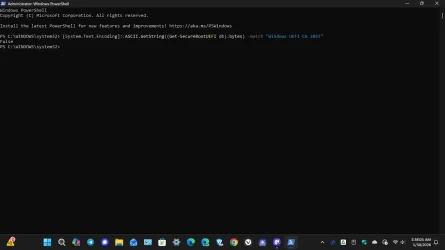
As far as the instruction's are concerned, I have a question about this one:i have put this together as i had problems updating 2 desktops and 3 laptops.
which have now all had their Secure Boot Certs updated to the new 2023 secure boot cert
also the other post about this were getting very long and confusing.
this is in two parts. part A and part B.
edit by me. please note, your system must be online for part A to update
Part A.
open a PowerShell as Admin
then copy and paste these two commands in this order.
thanks to @Brink tutorial.
1.
then press enter
2.
press enter and now restart your computer TWICE
##### to check that the 2023 cert is now available #####
to check that the 2023 cert is available after the 2 restarts
open a PowerShell as Admin copy and paste this command
the result of the command should show as 'True'
and then open the Windows registry to this key
Computer\HKEY_LOCAL_MACHINE\SYSTEM\CurrentControlSet\Control\SecureBoot\Servicing
in the right window you will see ..
UEFICA2023Status which will show 'updating'
WindowsUEFICA2023Capable 0x00000001
close the registry and you can now begin part B.
######
Part B.
open a CMD Prompt as Admin
then copy and paste this command
thanks to @Scott
1. at the CMD Prompt as Admin
press enter and now close the CMD Prompt terminal
then open a PowerShell as Admin
2. within the PowerShell
As far as the
press enter and restart you computer.
Final Check once the system has restarted
open the registry and find this key (again)
Computer\HKEY_LOCAL_MACHINE\SYSTEM\CurrentControlSet\Control\SecureBoot\Servicing
in the right Window you will see ..
UEFICA2023Status which will now show 'Updated'
WindowsUEFICA2023Capable 0x00000002
your system is now updated to the new 2023 certs
if this post is in the wrong part of the Forum please move it to the correct one.
edit by me. missed this out .. your system needs to be online for the update to work
best of luck Steve ..
press enter and now restart your computer TWICE
##### to check that the 2023 cert is now available #####
to check that the 2023 cert is available after the 2 restarts
open a PowerShell as Admin copy and paste this command
the result of the command should show as 'True'
I didn't receive a 'true' instead I received a 'false', so I'll need to determine what to do about it. I'm one of those type of people that don't like to wait until the last minute to get something done that I feel is important.
My Computers
-
At a glance
Windows11Pro (x64)Intel(R) Core(TM) i5-3470 CPU @ 3.20GHz 3.20 GHz8.00 GB (7.88 GB usable)- OS
- Windows11Pro (x64)
- Computer type
- PC/Desktop
- Manufacturer/Model
- HP/HP8300EliteSFF
- CPU
- Intel(R) Core(TM) i5-3470 CPU @ 3.20GHz 3.20 GHz
- Memory
- 8.00 GB (7.88 GB usable)
-
At a glance
Windows11Pro(x64)Intel(R) Core(TM) i5-3320M CPU @ 2.60GHz 2.60...8.00 GB (7.82 GB usable)Intel (R) HD Graphics 4000- Operating System
- Windows11Pro(x64)
- Computer type
- Laptop
- Manufacturer/Model
- Lenovo/T430
- CPU
- Intel(R) Core(TM) i5-3320M CPU @ 2.60GHz 2.60 GHz
- Motherboard
- Lenovo 2349KB7
- Memory
- 8.00 GB (7.82 GB usable)
- Graphics card(s)
- Intel (R) HD Graphics 4000
- Sound Card
- Realtek High Definition Audio
- Hard Drives
- SSD 222.79 GB