Solved Secure boot update HowTo


i have put this together as i had problems updating 2 desktops and 3 laptops.
which have now all had their Secure Boot Certs updated to the new 2023 secure boot cert
also the other post about this were getting very long and confusing.
this is in two parts. part A and part B.
edit by me. please note, your system must be online for part A to update

Part A
.
open a PowerShell as Admin
then copy and paste these two commands in this order.
thanks to @Brink tutorial.

1.


then press enter

2.


press enter and now restart your computer TWICE

##### to check that the 2023 cert is now available #####
to check that the 2023 cert is available after the 2 restarts
open a PowerShell as Admin copy and paste this command

the result of the command should show as 'True'

and then open the Windows registry to this key
Computer\HKEY_LOCAL_MACHINE\SYSTEM\CurrentControlSet\Control\SecureBoot\Servicing

in the right window you will see ..
UEFICA2023Status which will show 'updating'
WindowsUEFICA2023Capable 0x00000001

close the registry and you can now begin part B.

######

Part B.
open a CMD Prompt as Admin
then copy and paste this command
thanks to @Scott

1. at the CMD Prompt as Admin


press enter and now close the CMD Prompt terminal

then open a PowerShell as Admin


2. within the PowerShell
As far as the

press enter and restart you computer.

Final Check once the system has restarted
open the registry and find this key (again)
Computer\HKEY_LOCAL_MACHINE\SYSTEM\CurrentControlSet\Control\SecureBoot\Servicing

in the right Window you will see ..
UEFICA2023Status which will now show 'Updated'
WindowsUEFICA2023Capable 0x00000002


your system is now updated to the new 2023 certs
if this post is in the wrong part of the Forum please move it to the correct one.

edit by me. missed this out .. your system needs to be online for the update to work
best of luck Steve ..
As far as the instruction's are concerned, I have a question about this one:
press enter and now restart your computer TWICE

##### to check that the 2023 cert is now available #####
to check that the 2023 cert is available after the 2 restarts
open a PowerShell as Admin copy and paste this command

the result of the command should show as 'True'
I didn't receive a 'true' instead I received a 'false', so I'll need to determine what to do about it. I'm one of those type of people that don't like to wait until the last minute to get something done that I feel is important.
 

My Computer

System One

  • OS
    Windows11Pro (x64)
    Computer type
    PC/Desktop
    Manufacturer/Model
    HP/HP8300EliteSFF
    CPU
    Intel(R) Core(TM) i5-3470 CPU @ 3.20GHz 3.20 GHz
    Memory
    8.00 GB (7.88 GB usable)
As far as the instruction's are concerned, I have a question about this one:
press enter and now restart your computer TWICE

##### to check that the 2023 cert is now available #####
to check that the 2023 cert is available after the 2 restarts
open a PowerShell as Admin copy and paste this command

the result of the command should show as 'True'
I didn't receive a 'true' instead I received a 'false', so I'll need to determine what to do about it. I'm one of those type of people that don't like to wait until the last minute to get something done that I feel is important.

you will need to do Part One again
when you get to the restarts leave about 5 to 15 mins between each one.

best of luck Steve ..
 

My Computers

System One System Two

  • OS
    Windows 11 Home
    Computer type
    PC/Desktop
    Manufacturer/Model
    HP 24" AiO
    CPU
    Ryzen 7 5825u
    Motherboard
    HP
    Memory
    64GB DDR4 3200
    Graphics Card(s)
    Ryzen 7 5825u
    Sound Card
    RealTek
    Monitor(s) Displays
    24" HP AiO
    Screen Resolution
    1920 x 1080 @60 Hz
    Hard Drives
    1TB WD Blue SN580 M2 SSD Partitioned.
    2x 1TB USB HDD External Backup/Storage.
    PSU
    90W external power brick
    Case
    24" All in One
    Cooling
    Default Air Cooling
    Keyboard
    HP WiFi UK extended
    Mouse
    HP WiFi 3 Button
    Internet Speed
    1GB full fibre
    Browser
    Edge & Firefox
    Antivirus
    AVG Internet Security/Windows Defender
    Other Info
    Mainly Open Source Software
  • Operating System
    Ubuntu 22.04.5 LTS
    Computer type
    Laptop
    Manufacturer/Model
    Dell 13" Latitude 2017
    CPU
    i5 7200u
    Motherboard
    Dell
    Memory
    16GB DDR4
    Graphics card(s)
    Intel
    Sound Card
    Intel
    Monitor(s) Displays
    13" Dell Laptop
    Hard Drives
    250GB Crucial 2.5" SSD
    Mouse
    Generic WiFi 3 button
    Internet Speed
    WiFi only
    Browser
    Firefox
    Antivirus
    ClamAV TK
    Other Info
    Mainly Open Source Software
you will need to do Part One again
when you get to the restarts leave about 5 to 15 mins between each one.

best of luck Steve ..
Steve,
Thanks so much for your timely response, I wish you the best that life has to offer.
 

My Computer

System One

  • OS
    Windows11Pro (x64)
    Computer type
    PC/Desktop
    Manufacturer/Model
    HP/HP8300EliteSFF
    CPU
    Intel(R) Core(TM) i5-3470 CPU @ 3.20GHz 3.20 GHz
    Memory
    8.00 GB (7.88 GB usable)
Steve,
Hopefully that's where I went wrong as far as restarting my computer twice, I didn't wait long enough between restarting.
 

My Computer

System One

  • OS
    Windows11Pro (x64)
    Computer type
    PC/Desktop
    Manufacturer/Model
    HP/HP8300EliteSFF
    CPU
    Intel(R) Core(TM) i5-3470 CPU @ 3.20GHz 3.20 GHz
    Memory
    8.00 GB (7.88 GB usable)
Steve,
Hopefully that's where I went wrong as far as restarting my computer twice, I didn't wait long enough between restarting.

it isnt your fault this came to light after several people had similar problems and that work around was found
sometimes it can take several attempts and several restarts for Part one of the update to work

i haven't put into the HowTo because
1. i dont wish to edit it continuously and make it more confusing.
2. for a vast majority it works first time but i dont normally get to hear about the success stories.

glad you got it sorted.
best of luck Steve ..
 

My Computers

System One System Two

  • OS
    Windows 11 Home
    Computer type
    PC/Desktop
    Manufacturer/Model
    HP 24" AiO
    CPU
    Ryzen 7 5825u
    Motherboard
    HP
    Memory
    64GB DDR4 3200
    Graphics Card(s)
    Ryzen 7 5825u
    Sound Card
    RealTek
    Monitor(s) Displays
    24" HP AiO
    Screen Resolution
    1920 x 1080 @60 Hz
    Hard Drives
    1TB WD Blue SN580 M2 SSD Partitioned.
    2x 1TB USB HDD External Backup/Storage.
    PSU
    90W external power brick
    Case
    24" All in One
    Cooling
    Default Air Cooling
    Keyboard
    HP WiFi UK extended
    Mouse
    HP WiFi 3 Button
    Internet Speed
    1GB full fibre
    Browser
    Edge & Firefox
    Antivirus
    AVG Internet Security/Windows Defender
    Other Info
    Mainly Open Source Software
  • Operating System
    Ubuntu 22.04.5 LTS
    Computer type
    Laptop
    Manufacturer/Model
    Dell 13" Latitude 2017
    CPU
    i5 7200u
    Motherboard
    Dell
    Memory
    16GB DDR4
    Graphics card(s)
    Intel
    Sound Card
    Intel
    Monitor(s) Displays
    13" Dell Laptop
    Hard Drives
    250GB Crucial 2.5" SSD
    Mouse
    Generic WiFi 3 button
    Internet Speed
    WiFi only
    Browser
    Firefox
    Antivirus
    ClamAV TK
    Other Info
    Mainly Open Source Software
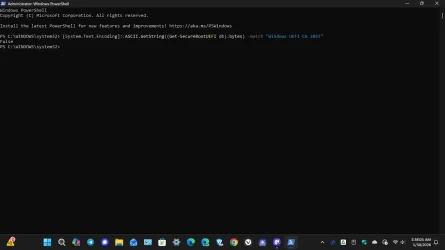
Unfortunately I'm still receiving a 'false' notification when I try to perform the secure boot update, I'm enclosing a screenshot to show you what I'm seeing.
 

Attachments

  • Screenshot (74).webp
    Screenshot (74).webp
    29.2 KB · Views: 3

My Computer

System One

  • OS
    Windows11Pro (x64)
    Computer type
    PC/Desktop
    Manufacturer/Model
    HP/HP8300EliteSFF
    CPU
    Intel(R) Core(TM) i5-3470 CPU @ 3.20GHz 3.20 GHz
    Memory
    8.00 GB (7.88 GB usable)
it isnt your fault this came to light after several people had similar problems and that work around was found
sometimes it can take several attempts and several restarts for Part one of the update to work

i haven't put into the HowTo because
1. i dont wish to edit it continuously and make it more confusing.
2. for a vast majority it works first time but i dont normally get to hear about the success stories.

glad you got it sorted.
best of luck Steve ..
Steve,
I appreciate your well wishes but at least so far I'm still receiving a 'false' notification and at least so far I really don't know why. I'm providing my system information for some additional information in the hope that I can eventually solve my issue.
Windows Edition: Windows 11 Pro
" Version: 26H1
" OS Build: 28020.1495
" Experience: Windows Feature Experience Pack 1000.26100.317.0
 

My Computer

System One

  • OS
    Windows11Pro (x64)
    Computer type
    PC/Desktop
    Manufacturer/Model
    HP/HP8300EliteSFF
    CPU
    Intel(R) Core(TM) i5-3470 CPU @ 3.20GHz 3.20 GHz
    Memory
    8.00 GB (7.88 GB usable)
Steve,
I appreciate your well wishes but at least so far I'm still receiving a 'false' notification and at least so far I really don't know why. I'm providing my system information for some additional information in the hope that I can eventually solve my issue.
Windows Edition: Windows 11 Pro
" Version: 26H1
" OS Build: 28020.1495
" Experience: Windows Feature Experience Pack 1000.26100.317.0

Have you double check that it is supported and turned on in the BIOS for your HP8300EliteSFF?
I scrolled back a couple of pages of the tread but did not see that. I had what seems like the exact same issue you are having till I realized it was not set up in my BIOS

Accessing Secure Boot Settings
  1. Enter BIOS: Restart the computer and immediately press the ESC key repeatedly until the Startup Menu appears.
  2. Open Setup: Press F10 to enter the HP Computer Setup Utility.
  3. Navigate to Security: Use the arrow keys to select the Security tab.
  4. Configure Secure Boot:
    • Select Secure Boot Configuration and press Enter.
    • To Enable: Set Legacy Support to Disabled and Secure Boot to Enabled.
    • To Disable: Set Secure Boot to Disabled and Legacy Support to Enabled (if needed for older OS/hardware).
  5. Save Changes: Press F10 to accept changes, then go to the File menu and select Save Changes and Exit.

Key Requirements & Troubleshooting

  • BIOS Version: If "Secure Boot Configuration" is missing, you may need to update to the latest HP BIOS firmware (e.g., v03.xx or higher).
  • Partition Style: For Secure Boot to function with a bootable drive, the drive must be using the GPT partition style rather than MBR.
  • TPM: This model typically includes TPM 1.2, which is compatible with UEFI but does not meet the TPM 2.0 requirement for official Windows 11
 

My Computers

System One System Two

  • OS
    Windows 11 (up to date)
    Computer type
    PC/Desktop
    Manufacturer/Model
    Custom
    CPU
    Intel i5 12400
    Motherboard
    Gigabyte Z690 UA
    Memory
    Corsair Vengeance LPX 16GB
    Graphics Card(s)
    On Board the Z690
    Sound Card
    On Board
    Monitor(s) Displays
    43" Samsung tu7000
    Screen Resolution
    2560 x 1440
    Hard Drives
    SAMSUNG SSD 1TB NVMe M.2
    PSU
    Thermaltake smart 500w 80+
    Case
    LIAN LANCOOL_205M
    Cooling
    Bunch of fans . . . :o) (lights dont work)
    Keyboard
    Unicomp: Ultra Classic White Buckling Spring USB
    Mouse
    M510
    Internet Speed
    50mbps on Ethernet
    Browser
    Fire Fox
    Antivirus
    Windows
    Other Info
    Love this computer but I still prefer Win-7 like I love my old Lazy Boy Recliner . . . it just feels better.
  • Operating System
    WIN-7-64BIT and Win-11 pro for testing on unsupported hardware
    Computer type
    PC/Desktop
    Manufacturer/Model
    Home built
    CPU
    i5-3570K CPU @ 3.40GHz, 3801 Mhz, 4 Core(s), 4 Logical Processor(s)
    Motherboard
    GA-Z77-HD3
    Memory
    16 GB - Crucial Ballistick 4GB PC3-14900 DDR3-1333 MHz
    Graphics card(s)
    NVIDIA GeForce GTX 1050
    Sound Card
    On Board
    Monitor(s) Displays
    ASUS VP278
    Screen Resolution
    1920 x 1080
    Hard Drives
    4 - internal Samsung 2.5" SSD, 1 WD HDD 7200 and some external drives
    PSU
    EVGA 550w
    Case
    Old Gygabyte Tower
    Cooling
    Yes
    Keyboard
    Unicomp - UNIOP4A USB (like the old IBM Model H that I started with)
    Mouse
    M510
    Internet Speed
    50mbps
    Browser
    Firefox
    Antivirus
    Windows
    Other Info
    The only thing it lack is USB-3.2 on the front face but it has 3.0 on the back
Earlier this morning I followed this same setup procedure on my lenovo T-430 laptop that's currently running the exact same version of windows 11 pro and I received the same results as I did on my desktop computer (False). So at least for now I'm going to wait awhile before I try anything else, I still appreciate all of the help that's been provided to me.
 

My Computer

System One

  • OS
    Windows11Pro (x64)
    Computer type
    PC/Desktop
    Manufacturer/Model
    HP/HP8300EliteSFF
    CPU
    Intel(R) Core(TM) i5-3470 CPU @ 3.20GHz 3.20 GHz
    Memory
    8.00 GB (7.88 GB usable)
Earlier this morning I followed this same setup procedure on my lenovo T-430 laptop that's currently running the exact same version of windows 11 pro and I received the same results as I did on my desktop computer (False). So at least for now I'm going to wait awhile before I try anything else, I still appreciate all of the help that's been provided to me.
Persevere, it does 'take' eventually. All my machines are updated now.
 

My Computers

System One System Two

  • OS
    Windows 11 Enterprise 25H2 26200 7462
    Computer type
    PC/Desktop
    Manufacturer/Model
    Custom Build
    CPU
    Intel XEON E5-2699 v3
    Motherboard
    ASUS X99-A
    Memory
    64GB Teamgroup UD4-3600
    Graphics Card(s)
    NVIDIA GeForce GTX 1080 Ti
    Sound Card
    Integrated
    Monitor(s) Displays
    ACER X34 Predator
    Screen Resolution
    3440 x 1440
    Hard Drives
    Crucial CT1000P 3P SSD8 1TB
    Crucial CT1000 BX500 SSD 1TB
    PSU
    GameMax Pro
    Case
    Fractal Design
    Cooling
    Corsair H110iGT + 6 140mm Fans
    Keyboard
    Corsair K4
    Mouse
    G-Skill G502
    Internet Speed
    300MBs
    Browser
    Chrome
    Antivirus
    OEM
    Other Info
    ASUS RT-AC87U Router
  • Operating System
    25H2 26200.5074
    Computer type
    Laptop
    Manufacturer/Model
    ASUS X555LA
    Memory
    8GB
    Browser
    Chrome
    Antivirus
    OEM
Earlier this morning I read (as I remember) was on this very site that microsoft will be offering the secure boot update to all eligible machines automatically via windows update.
 

My Computer

System One

  • OS
    Windows11Pro (x64)
    Computer type
    PC/Desktop
    Manufacturer/Model
    HP/HP8300EliteSFF
    CPU
    Intel(R) Core(TM) i5-3470 CPU @ 3.20GHz 3.20 GHz
    Memory
    8.00 GB (7.88 GB usable)
Earlier this morning I read (as I remember) was on this very site that microsoft will be offering the secure boot update to all eligible machines automatically via windows update.
Yes! And this is the best solution. Waiting for Microsoft to fix it via upcoming updates...elsewise what? Neither me nor the most of windows users have done anything about it. Either Bios or next updates must fix it. Or else, we will all just ditch our PCs/laptops. 😂
 

My Computer

System One

  • OS
    win 11 pro 25 h2
    Computer type
    PC/Desktop
Earlier this morning I read (as I remember) was on this very site that microsoft will be offering the secure boot update to all eligible machines automatically via windows update.
Yes! And this is the best solution. Waiting for Microsoft to fix it via upcoming updates...elsewise what? Neither me nor the most of windows users have done anything about it. Either Bios or next updates must fix it. Or else, we will all just ditch our PCs/laptops. 😂

The question is: which machines are eligible and which ones are not?
None of these changes were done automatically by Windows update on any of my machines.
They are all updated now and ready with CA 2023. 🤞🤷‍♂️

1769902801234.webp

1769902672403.webp
1769918221685.webp
 
Last edited:

My Computer

System One

  • OS
    Windows 11 Pro 25H2
    Computer type
    PC/Desktop
    Manufacturer/Model
    Dell XPS 8930
    CPU
    Intel I9-9900K
    Memory
    64GB
    Graphics Card(s)
    NVIDIA RTX 2060
    Sound Card
    NVIDIA High Definition Audio
    Monitor(s) Displays
    4k Samsung
    Screen Resolution
    3840 x 2160
    Hard Drives
    512GB NVMe, ADATA SU 800, 2TB HDD
One of the reasons I wrote my update script, is the Windows scheduled task is somewhat cantankerous. It deliberately moves slowly, sometimes deferring a future action until the next reboot. What you're doing is filling a reg key (AvailableUpdates) with a bitmask, and requesting a set of future actions.

Some of the boot manager file replacements appear to taking longer to fulfill. My script replicates all the same actions of the scheduled task, but does it immediately without delay. The results are the same without you waiting an unknown amount of time, to confirm if it was successful. It will work right away, or inform you there was an error.

MS could have written their task to do everything in one pass, but they did not. There is no immediate feedback from running the task, unless you want to browse the Windows event viewer (which IMO is a lame thing to ask users to do). I'm sure they have their reasons, but it's not like you can't replicate the task's work from reading the official Secure Boot docs.

If you would like to try the update script, download it from:
garlin's PowerShell scripts for updating Secure Boot CA 2023
 

My Computer

System One

  • OS
    Windows 7
Hello All,
First of all I'm not trying to cause any kind of strife between any of the user's within this great platform. I've always appreciated the assistance that's been provided to me when I needed it, and whenever possible I enjoy providing assistance to others.
 

My Computer

System One

  • OS
    Windows11Pro (x64)
    Computer type
    PC/Desktop
    Manufacturer/Model
    HP/HP8300EliteSFF
    CPU
    Intel(R) Core(TM) i5-3470 CPU @ 3.20GHz 3.20 GHz
    Memory
    8.00 GB (7.88 GB usable)
hello all, tried to update boot certs. but it fails, found out that secure boot was disabled in bios, enablede it and run the update again
but it still fails. my question is if secure boot is disabled, will my computer be able to boot after june??
 

My Computer

System One

  • OS
    Win11Pro
    Computer type
    Laptop
    Manufacturer/Model
    Vivobook ASUSLaptop K3605ZF
    CPU
    12th Gen Intel(R) Core(TM) i7-12700H
    Motherboard
    ASUSTeK COMPUTER INC.
    Memory
    40 GB
    Graphics Card(s)
    Nvidia Geforce RTX 2050
    Sound Card
    RealTek Audio
    Monitor(s) Displays
    16
    Hard Drives
    NvMe Samsung SSD 990 Pro 2TB
    Internet Speed
    700/650
    Browser
    Chrome
    Antivirus
    Defender
Im on a legacy-bios , so EUFI is not enabled , secure boot can only enabled in EUFI , so I dont have it enabled !
What will happen , when MS tries to update the boot certs.............??!
 

My Computer

System One

  • OS
    Windows11 Pro 25H2
    Computer type
    PC/Desktop
    Manufacturer/Model
    Asus
    CPU
    i7
    Motherboard
    z97k
    Memory
    32GB
    Graphics Card(s)
    nVidia
    Sound Card
    Realtek
    Hard Drives
    3
    Cooling
    air
    Browser
    Edge
    Antivirus
    ESET
Im on a legacy-bios , so EUFI is not enabled , secure boot can only enabled in EUFI , so I dont have it enabled !
What will happen , when MS tries to update the boot certs.............??!
You cannot update the new certificates if you are on a legacy bios. It has to boot in uefi.
 

My Computer

System One

  • OS
    Windows 10 and Windows 11
Steve,
I appreciate your well wishes but at least so far I'm still receiving a 'false' notification and at least so far I really don't know why. I'm providing my system information for some additional information in the hope that I can eventually solve my issue.
Windows Edition: Windows 11 Pro
" Version: 26H1
" OS Build: 28020.1495
" Experience: Windows Feature Experience Pack 1000.26100.317.0
I saw that your computer is a HP Elite 8300 SFF from 2012, latest rom firmware Apr 26, 2019. This older generation of UEFI firmware lacks the necessary mechanisms to correctly ingest and store the **Windows UEFI CA 2023** certificate into the firmware's internal db Secure Boot Signature Database) that modern BIOS versions support.
And HP does only support systems launched from 2017 on for the new Windows CA 2023 certificates.
Look here under "Affected platforms and minimum bios versions list" : https://support.hp.com/us-en/document/ish_13070353-13070429-16
This might be the reason your uefi does not accept the new CA 2023.
 

My Computer

System One

  • OS
    Windows 10 and Windows 11
Earlier this morning I followed this same setup procedure on my lenovo T-430 laptop that's currently running the exact same version of windows 11 pro and I received the same results as I did on my desktop computer (False). So at least for now I'm going to wait awhile before I try anything else, I still appreciate all of the help that's been provided to me.
Your T-430 is also not on Lenovo's list among the computers which get the new CA 2023 certificates :
https://support.lenovo.com/us/en/solutions/HT518129
 

My Computer

System One

  • OS
    Windows 10 and Windows 11

Latest Support Threads

Back
Top Bottom