Solved Secure boot update HowTo


If you look at my oem pk list and the other one from the other user with miminal list, 2-3 posts up, mine is a smaller oem pk

You can ingrnore my other issues as they was solved.
I've tried 2 bios chips both the same.
 

My Computer My Computer

At a glance

Windows 11 ProIntel i7 9700k OC 5.0ghz32gb Gskill 3200mhz OC 3600mhzNvidia RTX 4070 Super FE
OS
Windows 11 Pro
Computer type
PC/Desktop
Manufacturer/Model
Self built
CPU
Intel i7 9700k OC 5.0ghz
Motherboard
Gigabyte Z390 Master, Rev1.0, F13f GF
Memory
32gb Gskill 3200mhz OC 3600mhz
Graphics Card(s)
Nvidia RTX 4070 Super FE
Sound Card
Onboard ESS Saber
Monitor(s) Displays
QHD LG 27" 165hz, OC 180hz, Asus 27" 144hz
Screen Resolution
2k
Hard Drives
Nvme SSD Samsung 990 Pro 2TB, 970 echo plus 1tb + 970 echo 256gb.
PSU
EVGA SuperNova platinum 800w
Case
NZXT H500 sweat box, modified.
Cooling
NZXT Kraken x63.
Keyboard
Logitech G810
Mouse
Logitech G403
Internet Speed
1.1gb down 110mb up
I don't know if there is a dedicated thread from this, but I just found that Hasleo has a new 'free' version: Hasleo Suite 5.9.2.3 Updated here, seems OK. Not sure if they fixed the Banned issue when checking bootmedia. A quick check after instal still showed BANNED


Hasleo 5.9.2.3
--------------
WinPE Boot Manager [Windows UEFI CA 2023] is BANNED.
C:\Program Files\Hasleo\Hasleo Backup Suite\bin\WADK\Boot\EFI_EX\bootmgfw.efi
File Version: 26100.30227, SVN 7.0

Bootable Media
--------------

USB Drive G: "HASLEOBS"
Boot File [Windows UEFI CA 2023] is ALLOWED.
G:\EFI\Boot\bootx64.efi
File Version: 28000.367, SVN 11.0

boot.wim:1 (WinPE 26100.1)
Boot Manager [Windows UEFI CA 2023] is ALLOWED.
\Windows\Boot\EFI_EX\bootmgfw_EX.efi
File Version: 28000.367, SVN 11.0

\Windows\System32\winload.efi is ALLOWED.
File Version: 26100.1
 

My Computer My Computer

At a glance

Windows 11 Intel i5 10400 HD630 graphics chipi5-1040012 gbHD630 chipset
OS
Windows 11 Intel i5 10400 HD630 graphics chip
Computer type
PC/Desktop
Manufacturer/Model
HP
CPU
i5-10400
Memory
12 gb
Graphics Card(s)
HD630 chipset
Monitor(s) Displays
LG 24inch
Hard Drives
SSD, external usb drive 1tb for files/backups
Keyboard
wireless Logi
Mouse
ms 4000 wireless mouse
Internet Speed
10meg
Browser
Firefox
Antivirus
Defender
Other Info
Win11 Home 25h2 26200.9457 09/14/2026
Hasleo 5.9.2.3
--------------
WinPE Boot Manager [Windows UEFI CA 2023] is BANNED.
C:\Program Files\Hasleo\Hasleo Backup Suite\bin\WADK\Boot\EFI_EX\bootmgfw.efi
File Version: 26100.30227, SVN 7.0
This represents the staging folder, which has a SVN 7.0 version, instead of SVN 11.0 (Sept 2026). If you use the option to use the current WinRE, it will bypass any outdated files in the staging folder.
 

My Computer My Computer

At a glance

Windows 7
OS
Windows 7
This represents the staging folder, which has a SVN 7.0 version, instead of SVN 11.0 (Sept 2026). If you use the option to use the current WinRE, it will bypass any outdated files in the staging folder.
Is that for the 'emergency disk' where is says: download winPE components' ? Seems I've done that before and it messed up the one of the 3 that are allowed.
I don't see anything about using current winRE..
 

My Computer My Computer

At a glance

Windows 11 Intel i5 10400 HD630 graphics chipi5-1040012 gbHD630 chipset
OS
Windows 11 Intel i5 10400 HD630 graphics chip
Computer type
PC/Desktop
Manufacturer/Model
HP
CPU
i5-10400
Memory
12 gb
Graphics Card(s)
HD630 chipset
Monitor(s) Displays
LG 24inch
Hard Drives
SSD, external usb drive 1tb for files/backups
Keyboard
wireless Logi
Mouse
ms 4000 wireless mouse
Internet Speed
10meg
Browser
Firefox
Antivirus
Defender
Other Info
Win11 Home 25h2 26200.9457 09/14/2026
@garlin thanks, hopefully he will see this.
 

My Computer My Computer

At a glance

Windows 11 Intel i5 10400 HD630 graphics chipi5-1040012 gbHD630 chipset
OS
Windows 11 Intel i5 10400 HD630 graphics chip
Computer type
PC/Desktop
Manufacturer/Model
HP
CPU
i5-10400
Memory
12 gb
Graphics Card(s)
HD630 chipset
Monitor(s) Displays
LG 24inch
Hard Drives
SSD, external usb drive 1tb for files/backups
Keyboard
wireless Logi
Mouse
ms 4000 wireless mouse
Internet Speed
10meg
Browser
Firefox
Antivirus
Defender
Other Info
Win11 Home 25h2 26200.9457 09/14/2026
I don't see anything about using current winRE

Do not check the box for download PE and it will build RE using the files in the boot folder of windows.

Do not be worried about the files in Hasleo bin\WADK as they are no longer used if you check the box for 2023.


Or are you wanting to build a PE rescue disk?
 

My Computer My Computer

At a glance

Windows 11 Pro
OS
Windows 11 Pro
Do not check the box for download PE and it will build RE using the files in the boot folder of windows.

Do not be worried about the files in Hasleo bin\WADK as they are no longer used if you check the box for 2023.


Or are you wanting to build a PE rescue disk?
No, I was wondering how to 'fix' the WADK in, but if its no longer used I will forget about it. I have a rescue USB that boots, so I'm good. Thanks for the reply and info.
 

My Computer My Computer

At a glance

Windows 11 Intel i5 10400 HD630 graphics chipi5-1040012 gbHD630 chipset
OS
Windows 11 Intel i5 10400 HD630 graphics chip
Computer type
PC/Desktop
Manufacturer/Model
HP
CPU
i5-10400
Memory
12 gb
Graphics Card(s)
HD630 chipset
Monitor(s) Displays
LG 24inch
Hard Drives
SSD, external usb drive 1tb for files/backups
Keyboard
wireless Logi
Mouse
ms 4000 wireless mouse
Internet Speed
10meg
Browser
Firefox
Antivirus
Defender
Other Info
Win11 Home 25h2 26200.9457 09/14/2026
No, I was wondering how to 'fix' the WADK in, but if its no longer used I will forget about it.

If you just want it to match Windows then you could copy C:\Windows\Boot\EFI_EX\bootmgfw.efi then replace the file in Hasleo Backup Suite\bin\WADK\Boot\EFI_EX\bootmgfw.efi
 

My Computer My Computer

At a glance

Windows 11 Pro
OS
Windows 11 Pro
If you just want it to match Windows then you could copy C:\Windows\Boot\EFI_EX\bootmgfw.efi then replace the file in Hasleo Backup Suite\bin\WADK\Boot\EFI_EX\bootmgfw.efi
OK , thanks, I was thinking you would have to jump through hoops to copy the efi, thanks.. will give that a try.
 

My Computer My Computer

At a glance

Windows 11 Intel i5 10400 HD630 graphics chipi5-1040012 gbHD630 chipset
OS
Windows 11 Intel i5 10400 HD630 graphics chip
Computer type
PC/Desktop
Manufacturer/Model
HP
CPU
i5-10400
Memory
12 gb
Graphics Card(s)
HD630 chipset
Monitor(s) Displays
LG 24inch
Hard Drives
SSD, external usb drive 1tb for files/backups
Keyboard
wireless Logi
Mouse
ms 4000 wireless mouse
Internet Speed
10meg
Browser
Firefox
Antivirus
Defender
Other Info
Win11 Home 25h2 26200.9457 09/14/2026
@KevTech ok, copied the file over and now the WADK does not appear when I run the check_bootmedia script
Bootable Media
--------------

USB Drive G: "HASLEOBS"
Boot File [Windows UEFI CA 2023] is ALLOWED.
G:\EFI\Boot\bootx64.efi
File Version: 28000.367, SVN 11.0

boot.wim:1 (WinPE 26100.1)
Boot Manager [Windows UEFI CA 2023] is ALLOWED.
\Windows\Boot\EFI_EX\bootmgfw_EX.efi
File Version: 28000.367, SVN 11.0

\Windows\System32\winload.efi is ALLOWED.
File Version: 26100.1
 

My Computer My Computer

At a glance

Windows 11 Intel i5 10400 HD630 graphics chipi5-1040012 gbHD630 chipset
OS
Windows 11 Intel i5 10400 HD630 graphics chip
Computer type
PC/Desktop
Manufacturer/Model
HP
CPU
i5-10400
Memory
12 gb
Graphics Card(s)
HD630 chipset
Monitor(s) Displays
LG 24inch
Hard Drives
SSD, external usb drive 1tb for files/backups
Keyboard
wireless Logi
Mouse
ms 4000 wireless mouse
Internet Speed
10meg
Browser
Firefox
Antivirus
Defender
Other Info
Win11 Home 25h2 26200.9457 09/14/2026
@garlin if it was down to faulty bios or corruption, a rufus UEFI works just a USB via the media creation too dose notl, why I'm thinking its invalid due to OEM certs..

This issue occurs because recent Windows 11 Secure Boot updates (such as the 2023–2026 DBX/Root CA revocations) have updated the allowed signatures database, while your newly created Media Creation Tool USB is deploying a bootloader file (bootx64.efi) that your specific Gigabyte BIOS NVRAM keys do not recognize as fully valid, or the motherboard's factory keys are in a state of conflict
 

My Computer My Computer

At a glance

Windows 11 ProIntel i7 9700k OC 5.0ghz32gb Gskill 3200mhz OC 3600mhzNvidia RTX 4070 Super FE
OS
Windows 11 Pro
Computer type
PC/Desktop
Manufacturer/Model
Self built
CPU
Intel i7 9700k OC 5.0ghz
Motherboard
Gigabyte Z390 Master, Rev1.0, F13f GF
Memory
32gb Gskill 3200mhz OC 3600mhz
Graphics Card(s)
Nvidia RTX 4070 Super FE
Sound Card
Onboard ESS Saber
Monitor(s) Displays
QHD LG 27" 165hz, OC 180hz, Asus 27" 144hz
Screen Resolution
2k
Hard Drives
Nvme SSD Samsung 990 Pro 2TB, 970 echo plus 1tb + 970 echo 256gb.
PSU
EVGA SuperNova platinum 800w
Case
NZXT H500 sweat box, modified.
Cooling
NZXT Kraken x63.
Keyboard
Logitech G810
Mouse
Logitech G403
Internet Speed
1.1gb down 110mb up
@garlin if it was down to faulty bios or corruption, a rufus UEFI works just a USB via the media creation too dose notl, why I'm thinking its invalid due to OEM certs..

This issue occurs because recent Windows 11 Secure Boot updates (such as the 2023–2026 DBX/Root CA revocations) have updated the allowed signatures database, while your newly created Media Creation Tool USB is deploying a bootloader file (bootx64.efi) that your specific Gigabyte BIOS NVRAM keys do not recognize as fully valid, or the motherboard's factory keys are in a state of conflict
Rufus can use two different boot files.

1. By default, Rufus provides its own 3rd-party boot file which is signed by Microsoft UEFI CA 2011.
2. From the custom settings menu, you can choose the "CA 2023 boot files" option, which uses the Windows boot file signed by CA 2023.
3. Depending on how you use MCT (whether "use settings for this computer" is checked), it can pick either version of the boot file (CA 2011 or CA 2023).

The best way to determine which boot file is present, use my Check_BootMedia.ps1 script. Run the script with your USB drive plugged in.
 

My Computer My Computer

At a glance

Windows 7
OS
Windows 7
@garlin Thank you, for all your time and answers, you are a great help.

I also have read that I can enroll the USB bootx64.efi in to the certs.

Will Try the Check boot USB in the day.
 

My Computer My Computer

At a glance

Windows 11 ProIntel i7 9700k OC 5.0ghz32gb Gskill 3200mhz OC 3600mhzNvidia RTX 4070 Super FE
OS
Windows 11 Pro
Computer type
PC/Desktop
Manufacturer/Model
Self built
CPU
Intel i7 9700k OC 5.0ghz
Motherboard
Gigabyte Z390 Master, Rev1.0, F13f GF
Memory
32gb Gskill 3200mhz OC 3600mhz
Graphics Card(s)
Nvidia RTX 4070 Super FE
Sound Card
Onboard ESS Saber
Monitor(s) Displays
QHD LG 27" 165hz, OC 180hz, Asus 27" 144hz
Screen Resolution
2k
Hard Drives
Nvme SSD Samsung 990 Pro 2TB, 970 echo plus 1tb + 970 echo 256gb.
PSU
EVGA SuperNova platinum 800w
Case
NZXT H500 sweat box, modified.
Cooling
NZXT Kraken x63.
Keyboard
Logitech G810
Mouse
Logitech G403
Internet Speed
1.1gb down 110mb up
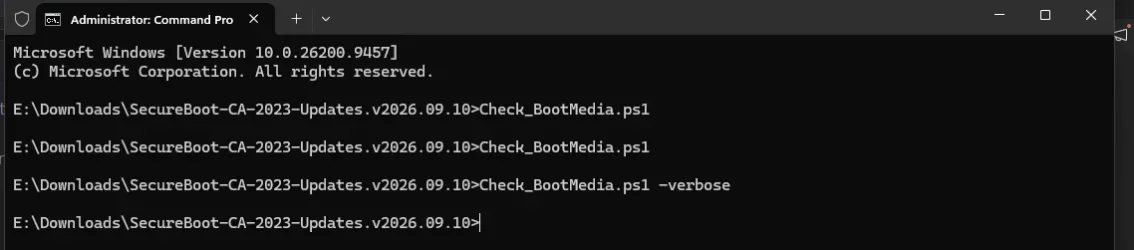
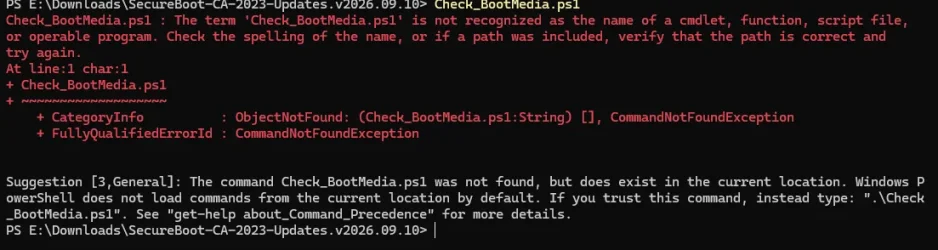
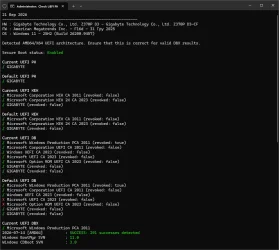
@garlin So I plugged my USB in and run the command and nothing happens

1789995717960.webp
think i need to run a command in powershell to allow scripts. yet cant find the command that i use to use.. where its a freash install.

Think its something like PowerShell.Exe -ExecutionPolicy Bypass

1789997502062.webp
 
Last edited:

My Computer My Computer

At a glance

Windows 11 ProIntel i7 9700k OC 5.0ghz32gb Gskill 3200mhz OC 3600mhzNvidia RTX 4070 Super FE
OS
Windows 11 Pro
Computer type
PC/Desktop
Manufacturer/Model
Self built
CPU
Intel i7 9700k OC 5.0ghz
Motherboard
Gigabyte Z390 Master, Rev1.0, F13f GF
Memory
32gb Gskill 3200mhz OC 3600mhz
Graphics Card(s)
Nvidia RTX 4070 Super FE
Sound Card
Onboard ESS Saber
Monitor(s) Displays
QHD LG 27" 165hz, OC 180hz, Asus 27" 144hz
Screen Resolution
2k
Hard Drives
Nvme SSD Samsung 990 Pro 2TB, 970 echo plus 1tb + 970 echo 256gb.
PSU
EVGA SuperNova platinum 800w
Case
NZXT H500 sweat box, modified.
Cooling
NZXT Kraken x63.
Keyboard
Logitech G810
Mouse
Logitech G403
Internet Speed
1.1gb down 110mb up
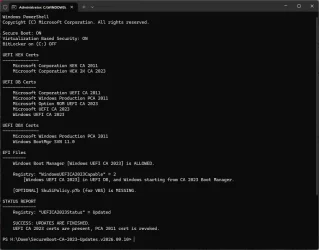
I can also now confirm, its not just my gigabyte board, someone else tried and got the same as me.

1790025806370.webp
1790025943222.webp
When they then tried a win boot usb they got the same, invalid signature

What i now need is someone with it working on gigabyte board to help. If anyone here can?
 

My Computer My Computer

At a glance

Windows 11 ProIntel i7 9700k OC 5.0ghz32gb Gskill 3200mhz OC 3600mhzNvidia RTX 4070 Super FE
OS
Windows 11 Pro
Computer type
PC/Desktop
Manufacturer/Model
Self built
CPU
Intel i7 9700k OC 5.0ghz
Motherboard
Gigabyte Z390 Master, Rev1.0, F13f GF
Memory
32gb Gskill 3200mhz OC 3600mhz
Graphics Card(s)
Nvidia RTX 4070 Super FE
Sound Card
Onboard ESS Saber
Monitor(s) Displays
QHD LG 27" 165hz, OC 180hz, Asus 27" 144hz
Screen Resolution
2k
Hard Drives
Nvme SSD Samsung 990 Pro 2TB, 970 echo plus 1tb + 970 echo 256gb.
PSU
EVGA SuperNova platinum 800w
Case
NZXT H500 sweat box, modified.
Cooling
NZXT Kraken x63.
Keyboard
Logitech G810
Mouse
Logitech G403
Internet Speed
1.1gb down 110mb up
I have GIGABYTE boards but none of them are UEFI. For higher end and newer boards I generally use ASUS. Apart from this I use DELL.

This thread has made for an interesting read however as it confirms many of my ideas about TPM and security. Thank you.
 

My Computer My Computer

At a glance

WIN 11, WIN 10, WIN 8.1, WIN 7 U, WIN 7 PRO, ...Intel i7 6900K and i9-7960X / AMD 3800X (8 core)128 GB CORSAIR DOMINATOR PLATINUM (B DIE)NVIDIA 1070 and RTX 3070
OS
WIN 11, WIN 10, WIN 8.1, WIN 7 U, WIN 7 PRO, WIN 7 HOME (32 Bit), LINUX MINT
Computer type
PC/Desktop
Manufacturer/Model
DIY, ASUS, and DELL
CPU
Intel i7 6900K and i9-7960X / AMD 3800X (8 core)
Motherboard
ASUS X99E-WS USB 3.1 and ASUS X299 SAGE
Memory
128 GB CORSAIR DOMINATOR PLATINUM (B DIE)
Graphics Card(s)
NVIDIA 1070 and RTX 3070
Sound Card
Crystal Sound (onboard)
Monitor(s) Displays
single Samsung 30" 4K and 8" aux monitor
Screen Resolution
4K and something equally attrocious. I'll be working on this.
Hard Drives
A, B, C, D, E, F, G, H, I, J, K, L, M, N, O, P, Q, R, S, T, U, V, W

Ports X, Y, and Z are reserved for USB access and removable drives.

Drive types consist of the following: Various mechanical hard drives bearing the brand names, Seagate, Toshiba, and Western Digital. Various NVMe drives bearing the brand names Kingston, Intel, Silicon Power, Crucial, Western Digital, and Team Group. Various SATA SSDs bearing various different brand names.

RAID arrays included:

LSI RAID 10 (WD Velociraptors) 1115.72 GB
LSI RAID 10 (WD SSDS) 463.80 GB

INTEL RAID 0 (KINGSTON HYPER X) System 447.14 GB
INTEL RAID 1 TOSHIBA ENTERPRIZE class Data 2794.52 GB
INTEL RAID 1 SEAGATE HYBRID 931.51 GB
PSU
SEVERAL. I prefer my Corsair Platinum HX1000i but I also like EVGA power supplies
Case
ThermalTake Level 10 GT (among others)
Cooling
Noctua is my favorite and I use it in my main. I also own various other coolers.
Keyboard
all kinds.
Mouse
all kinds
Internet Speed
360 mbps - 1 gbps (depending)
Browser
FIREFOX
Antivirus
KASPERSKY (no apologies)
Other Info
Gave Dell touch screen with Windows 11 to daughter and got me an OTVOC. Being a PC builder I own many desktop PCs as well. I am a father of five providing PCs, laptops, and tablets for all my family, most of which I have modified, rebuilt, or simply built from scratch. I do not own a cell phone, never have, never will.

Latest Support Threads

Back
Top Bottom