Security vulnerability BIOS updates for GIGABYTE server, workstation, and motherboard products


 GIGABYTE Support:

CVE-2025-33043, CVE-2025-2884, CVE-2025-3052

Jul 18, 2025

Giga Computing Technology Co., Ltd. acknowledges the security vulnerabilities affecting GIGABYTE’s server, workstation, and motherboard products. The affected platforms are listed below.

PlatformBIOS Release Schedule
CVE-2025-33043
AMD EPYC™ 9005 Series Processors [1]Released
AMD EPYC™ 9004 Series Processors [1]Released
AMD EPYC™ 8004 Series ProcessorsReleased
AMD EPYC™ 7003 Series ProcessorsReleased
AMD EPYC™ 7002 Series ProcessorsReleased
AMD Instinct™ MI300A APUReleased
AMD EPYC™ 4005/4004 & Ryzen™ 9000/7000 Series ProcessorsReleased
Intel® Xeon® 6 ProcessorsReleased
5th/4th Gen Intel® Xeon® Scalable Processors & Intel® Xeon® CPU Max SeriesReleased
3rd Gen Intel® Xeon® Scalable ProcessorsReleased
Intel® Xeon® E-2400 SeriesReleased
Intel® Xeon® E-2300 SeriesReleased
Intel® Xeon® W-3500/2500/3400/2400 ProcessorsReleased
14th/13th/12th Gen Intel® Core™ ProcessorsReleased
CVE-2025-2884
AMD EPYC™ 4005/4004 & Ryzen™ 9000/7000 Series ProcessorsReleased
[1] XV23-ZX0 does not follow the AMD EPYC 9005/9004 Series Processors BIOS release schedule, please contact our sales team for further information on the BIOS release plan.

The vulnerabilities are listed below. Updated BIOS versions to address the threats will be available on all affected product pages.

Common Vulnerabilities or Exposures (CVEID): CVE-2025-33043
Severity Rating: Medium
Description: APTIOV contains a vulnerability in BIOS where an attacker may cause an Improper Input Validation locally. Successful exploitation of this vulnerability can potentially impact of integrity.

Common Vulnerabilities or Exposures (CVEID): CVE-2025-2884
Severity Rating: Medium
Description: TCG TPM2.0 Reference implementation's CryptHmacSign helper function is vulnerable to Out-of-Bounds read due to the lack of validation the signature scheme with the signature key's algorithm. See Errata Revision 1.83 and advisory TCGVRT0009 for TCG standard TPM2.0


 Source:
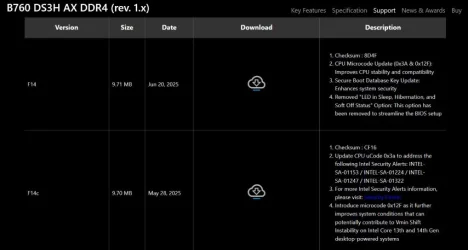
 
No new BIOS for me since May 28th.

Furthermore, I have been led to believe BIOS numbers with a letter after them (F14c in this case) are beta releases and I don't install beta BIOS's.

I'll wait for a non beta release. And I only have a 12th Generation CPU on this board.

AFAIK, that's not a beta release, it's major feature was a further upgrade for the CPU microcode for the Raptor Lake processors. Since I have a couple of those, I jumped on it.

I don't know what strange game Gigabyte seems to be playing here but I've just checked again and now there's an F14 BIOS available dated June 20th which wasn't there a couple of days ago.

So, they've gone from F14c to F14? And I think there was an F14a and F14b after the F13 release in March.
The way I look at it surely the new, latest BIOS should be F15?

I'll stay with F13 until they sort themselves out.
I also think they did this strange number/letter thing a couple of BIOS releases back as well.

biosupdate.webp
 

My Computer

System One

  • OS
    Windows 11 Professional 25H2
    Computer type
    PC/Desktop
    Manufacturer/Model
    Home Built
    CPU
    12th Gen Intel(R) Core(TM) i5-12400F 2.50 GHz
    Motherboard
    Gigabyte B760 DS3H AX DDR4
    Memory
    32GB (4x8GB) Kingston Fury RGB DDR4
    Graphics Card(s)
    NVIDIA GeForce GTX 1650
    Sound Card
    Onboard Sound
    Monitor(s) Displays
    BenQ GL2460 (24 inch - oldie but a goodie)
    Screen Resolution
    1920x1080
    Hard Drives
    Samsung SSD 870 EVO x 2 (250GB and 500GB) plus several external Samsung SSD's.
    PSU
    Corsair HX 750
    Case
    DeepCool
    Cooling
    Stock CPU cooler. 5 case fans (2 front, 2 top and 1 rear)
    Keyboard
    Logitech
    Mouse
    Logitech
    Internet Speed
    500/40 Fibre
    Browser
    Mozilla Firefox and Microsoft Edge
    Antivirus
    Windows Security
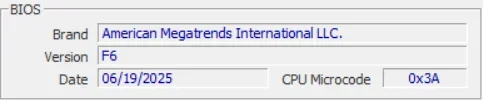
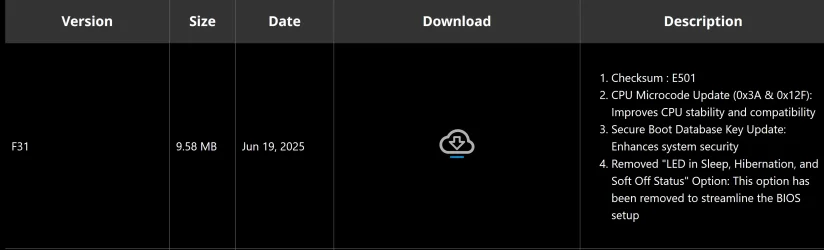
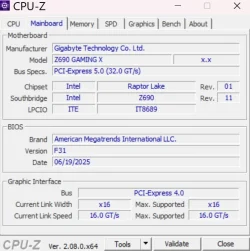
Yep, I wonder why there's two CPU microcode versions listed, what's that all about?
 

My Computers

System One System Two

  • OS
    Win 11 Pro 25H2, Build 26200.8524
    Computer type
    PC/Desktop
    Manufacturer/Model
    Home Brew
    CPU
    Intel Core i5 14500
    Motherboard
    Gigabyte B760M G P WIFI
    Memory
    64GB DDR4
    Graphics Card(s)
    GeForce RTX 4060
    Sound Card
    Chipset Realtek
    Monitor(s) Displays
    LG 45" Ultragear, Acer 24" 1080p
    Screen Resolution
    5120x1440, 1920x1080
    Hard Drives
    Crucial P310 2TB 2280 PCIe Gen4 3D NAND NVMe M.2 SSD (O/S)
    Silicon Power 2TB US75 NVMe PCIe Gen4 M.2 2280 SSD (backup)
    Crucial BX500 2TB 3D NAND (2nd backup)
    Seagate 4TB Ironwolf, rotating HDD archive files
    External off-line backup Drives: 2 NVMe 4TB drives in external enclosures
    PSU
    Thermaltake Toughpower GF3 750W
    Case
    LIAN LI LANCOOL 216 E-ATX PC Case
    Cooling
    Lots of fans!
    Keyboard
    Microsoft Comfort Curve 2000
    Mouse
    Logitech G305
    Internet Speed
    Verizon FiOS 1GB
    Browser
    Firefox
    Antivirus
    Malware Bytes & Windows Defender Security
  • Operating System
    Win 11 Pro 25H2, Build 26200.8524
    Computer type
    PC/Desktop
    Manufacturer/Model
    Home Brew
    CPU
    Intel Core i5 14400
    Motherboard
    Gigabyte B760M DS3H AX
    Memory
    32GB DDR5
    Graphics card(s)
    Intel 700 Embedded GPU
    Sound Card
    Realtek Embedded
    Monitor(s) Displays
    27" HP 1080p
    Screen Resolution
    1920x1080
    Hard Drives
    Crucial P310 2TB 2280 PCIe Gen4 eD NAND PCIe SSD
    Samsung EVO 990 2TB NVMe Gen4 SSD
    Samsung 2TB SATA SSD
    PSU
    Thermaltake Smart BM3 650W
    Case
    Okinos Micro ATX Case
    Cooling
    Fans
    Keyboard
    Microsoft Comfort Curve 2000
    Mouse
    Logitech G305
    Internet Speed
    Verizon FiOS 1GB
    Browser
    Firefox
    Antivirus
    Malware Bytes & Windows Defender Security
No updates since 21 May for my TUF GAMING Z790-PLUS WIFI board and no comments on the Asus forum for my board
 

My Computer

System One

  • OS
    Windows 11 Pro
    Computer type
    PC/Desktop
    Manufacturer/Model
    Self build
    CPU
    Core i7-13700K
    Motherboard
    Asus TUF Gaming Plus WiFi Z790
    Memory
    64 GB Kingston Fury Beast DDR5
    Graphics Card(s)
    Gigabyte GeForce RTX 2060 Super Gaming OC 8G
    Sound Card
    Realtek S1200A
    Monitor(s) Displays
    Viewsonic VP2770 & Dell (secondary)
    Screen Resolution
    2560 x 1440
    Hard Drives
    Kingston KC3000 2TB NVME SSD & SATA HDDs & SSD
    PSU
    EVGA SuperNova G2 850W
    Case
    Nanoxia Deep Silence 1
    Cooling
    Noctua NH-D14
    Keyboard
    Microsoft Digital Media Pro
    Mouse
    Logitech Wireless
    Internet Speed
    80 Mb / s
    Browser
    Chrome
    Antivirus
    Defender, Malwarebytes Free & AdwCleaner
No updates since 21 May for my TUF GAMING Z790-PLUS WIFI board and no comments on the Asus forum for my board
21 May 2025 is new.
 

My Computer

System One

  • OS
    26200.8037
    Computer type
    PC/Desktop
    CPU
    i5-11400F
    Motherboard
    Gigabyte
    Memory
    32GB
    Graphics Card(s)
    Geforce GT-1030
    Keyboard
    Logitech K400
    Mouse
    Logitech M720
    Internet Speed
    600 Mb
    Browser
    Edge

My Computer

System One

  • OS
    Windows 11 Pro
    Computer type
    PC/Desktop
    Manufacturer/Model
    Self build
    CPU
    Core i7-13700K
    Motherboard
    Asus TUF Gaming Plus WiFi Z790
    Memory
    64 GB Kingston Fury Beast DDR5
    Graphics Card(s)
    Gigabyte GeForce RTX 2060 Super Gaming OC 8G
    Sound Card
    Realtek S1200A
    Monitor(s) Displays
    Viewsonic VP2770 & Dell (secondary)
    Screen Resolution
    2560 x 1440
    Hard Drives
    Kingston KC3000 2TB NVME SSD & SATA HDDs & SSD
    PSU
    EVGA SuperNova G2 850W
    Case
    Nanoxia Deep Silence 1
    Cooling
    Noctua NH-D14
    Keyboard
    Microsoft Digital Media Pro
    Mouse
    Logitech Wireless
    Internet Speed
    80 Mb / s
    Browser
    Chrome
    Antivirus
    Defender, Malwarebytes Free & AdwCleaner
Question about this new vulnerability, I've not update my Bios since they released capsule bios, the last vulnerability, someone would need to be at the pc to have access, yet with the lastest, it can be run like a attachment in a email, is that right?

P.s gigabyte bios like say f14a or b are all like a beta bios and f14 with out a litter is like the final before f15a etc
 

My Computer

System One

  • OS
    Windows 11 Pro
    Computer type
    PC/Desktop
    Manufacturer/Model
    Self built
    CPU
    Intel i7 9700k OC 5.0ghz
    Motherboard
    Gigabyte Z390 Master, Rev1.0, F13c Custom Bios
    Memory
    32gb Gskill 3200mhz OC 3600mhz
    Graphics Card(s)
    Nvidia RTX 4070 Super FE
    Sound Card
    Onboard ESS Saber
    Monitor(s) Displays
    QHD LG 27" 165hz, OC 180hz, Asus 27" 144hz
    Screen Resolution
    2k
    Hard Drives
    Nvme SSD Samsung 990 Pro 2TB, 970 echo plus 1tb + 970 echo 256gb.
    PSU
    EVGA SuperNova platinum 800w
    Case
    NZXT H500 sweat box, modified.
    Cooling
    NZXT Kraken x63.
    Keyboard
    Logitech G810
    Mouse
    Logitech G403
    Internet Speed
    1.1gb down 110mb up
Well, I installed the latest Gigabyte BIOS for my two computers, and so far they didn't break anything. :LOL:

1753714891802.webp
 

My Computers

System One System Two

  • OS
    Win 11 Pro 25H2, Build 26200.8524
    Computer type
    PC/Desktop
    Manufacturer/Model
    Home Brew
    CPU
    Intel Core i5 14500
    Motherboard
    Gigabyte B760M G P WIFI
    Memory
    64GB DDR4
    Graphics Card(s)
    GeForce RTX 4060
    Sound Card
    Chipset Realtek
    Monitor(s) Displays
    LG 45" Ultragear, Acer 24" 1080p
    Screen Resolution
    5120x1440, 1920x1080
    Hard Drives
    Crucial P310 2TB 2280 PCIe Gen4 3D NAND NVMe M.2 SSD (O/S)
    Silicon Power 2TB US75 NVMe PCIe Gen4 M.2 2280 SSD (backup)
    Crucial BX500 2TB 3D NAND (2nd backup)
    Seagate 4TB Ironwolf, rotating HDD archive files
    External off-line backup Drives: 2 NVMe 4TB drives in external enclosures
    PSU
    Thermaltake Toughpower GF3 750W
    Case
    LIAN LI LANCOOL 216 E-ATX PC Case
    Cooling
    Lots of fans!
    Keyboard
    Microsoft Comfort Curve 2000
    Mouse
    Logitech G305
    Internet Speed
    Verizon FiOS 1GB
    Browser
    Firefox
    Antivirus
    Malware Bytes & Windows Defender Security
  • Operating System
    Win 11 Pro 25H2, Build 26200.8524
    Computer type
    PC/Desktop
    Manufacturer/Model
    Home Brew
    CPU
    Intel Core i5 14400
    Motherboard
    Gigabyte B760M DS3H AX
    Memory
    32GB DDR5
    Graphics card(s)
    Intel 700 Embedded GPU
    Sound Card
    Realtek Embedded
    Monitor(s) Displays
    27" HP 1080p
    Screen Resolution
    1920x1080
    Hard Drives
    Crucial P310 2TB 2280 PCIe Gen4 eD NAND PCIe SSD
    Samsung EVO 990 2TB NVMe Gen4 SSD
    Samsung 2TB SATA SSD
    PSU
    Thermaltake Smart BM3 650W
    Case
    Okinos Micro ATX Case
    Cooling
    Fans
    Keyboard
    Microsoft Comfort Curve 2000
    Mouse
    Logitech G305
    Internet Speed
    Verizon FiOS 1GB
    Browser
    Firefox
    Antivirus
    Malware Bytes & Windows Defender Security
It's not so much breaking anything, it's more how much slower it makes the pc. From newer micro codes that slow the cpu etc also overclocking settings can be harder to set
 

My Computer

System One

  • OS
    Windows 11 Pro
    Computer type
    PC/Desktop
    Manufacturer/Model
    Self built
    CPU
    Intel i7 9700k OC 5.0ghz
    Motherboard
    Gigabyte Z390 Master, Rev1.0, F13c Custom Bios
    Memory
    32gb Gskill 3200mhz OC 3600mhz
    Graphics Card(s)
    Nvidia RTX 4070 Super FE
    Sound Card
    Onboard ESS Saber
    Monitor(s) Displays
    QHD LG 27" 165hz, OC 180hz, Asus 27" 144hz
    Screen Resolution
    2k
    Hard Drives
    Nvme SSD Samsung 990 Pro 2TB, 970 echo plus 1tb + 970 echo 256gb.
    PSU
    EVGA SuperNova platinum 800w
    Case
    NZXT H500 sweat box, modified.
    Cooling
    NZXT Kraken x63.
    Keyboard
    Logitech G810
    Mouse
    Logitech G403
    Internet Speed
    1.1gb down 110mb up
Updated my old Z490 board and all is still working, no issues noted.
 

My Computers

System One System Two

  • OS
    Windows 11 25H2
    Computer type
    PC/Desktop
    Manufacturer/Model
    Custom Built
    CPU
    Intel i9 14900KF
    Motherboard
    ASUS Z790 ProArt Creator WiFi
    Memory
    64GB Corsair Vengeance RGB
    Graphics Card(s)
    MSI 4090 Suprim X
    Sound Card
    Onboard
    Monitor(s) Displays
    1 x Asus 24". 1 x Asus 32"
    Screen Resolution
    1920 x 1080 & 2560 x 1440
    Hard Drives
    Multiple
    PSU
    Corsair 1200HX
    Case
    Corsair 7000D RGB
    Cooling
    Corsair H150I Capellix XT
    Keyboard
    Corsair K70 RGB PRO
    Mouse
    Corsair M55 RGB Pro
    Internet Speed
    1000Mbps
    Browser
    Edge
    Antivirus
    Windows Default
  • Operating System
    Windows 11 25H2
    Computer type
    PC/Desktop
    Manufacturer/Model
    Custom Built
    CPU
    Intel i7 6800K
    Motherboard
    ASUS Z99 Deluxe
    Memory
    32GB DDR4 (Corsair)
    Graphics card(s)
    ASUS GTX 1080ti
    Sound Card
    Onboard
    Monitor(s) Displays
    1x Viewsonic 24" 1x LG 19"
    Screen Resolution
    1920 x 1080 & 1600 x 900
    Hard Drives
    3 x SATA SSD
    PSU
    650W Gigabyte Bronze
    Case
    Coolermaster HAF-X
    Cooling
    Noctua NH-15 Chroma black
    Keyboard
    Generic RGB
    Mouse
    Microsoft Basic
    Internet Speed
    1000Mbps
    Browser
    Edge
    Antivirus
    Windows Default
Thanks for the replys. I will then get on to gigabyte and see if they can do a custom bios for me, like before.
 

My Computer

System One

  • OS
    Windows 11 Pro
    Computer type
    PC/Desktop
    Manufacturer/Model
    Self built
    CPU
    Intel i7 9700k OC 5.0ghz
    Motherboard
    Gigabyte Z390 Master, Rev1.0, F13c Custom Bios
    Memory
    32gb Gskill 3200mhz OC 3600mhz
    Graphics Card(s)
    Nvidia RTX 4070 Super FE
    Sound Card
    Onboard ESS Saber
    Monitor(s) Displays
    QHD LG 27" 165hz, OC 180hz, Asus 27" 144hz
    Screen Resolution
    2k
    Hard Drives
    Nvme SSD Samsung 990 Pro 2TB, 970 echo plus 1tb + 970 echo 256gb.
    PSU
    EVGA SuperNova platinum 800w
    Case
    NZXT H500 sweat box, modified.
    Cooling
    NZXT Kraken x63.
    Keyboard
    Logitech G810
    Mouse
    Logitech G403
    Internet Speed
    1.1gb down 110mb up
Nothing as yet for my mobo!
 

My Computer

System One

  • OS
    Win 11 Pro Workstation 25H2 26200.8039
    Computer type
    PC/Desktop
    Manufacturer/Model
    Manmade
    CPU
    Xeon W7-3455
    Motherboard
    Gigabyte MW83-RP0
    Memory
    256Gb
    Graphics Card(s)
    RTX 4500 ADA
    Sound Card
    RealTek
    Monitor(s) Displays
    LG 32UN650P
    Screen Resolution
    3840x2160
    Hard Drives
    Boot: Transcend TS1MTE250H. Storage: Sabrent SB-RKT4P. Backup: Toshiba MG08ADA600E
    PSU
    Corsair 850W
    Case
    BeQuiet 802
    Cooling
    Noctua D9
    Internet Speed
    500Mb
    Browser
    Edge
    Antivirus
    Defender
    Other Info
    25H2 26200.8039

My Computer

System One

  • OS
    Windows 11 Pro 25H2 26200.7922
    Computer type
    PC/Desktop
    Manufacturer/Model
    Local shop built (KC Computers Ltd)
    CPU
    Intel Core i9 13900F
    Motherboard
    Gigabyte Z690 Gaming X (rev. 1.0/1.1) - (BIOS: F32 09 18 2025)
    Memory
    2 x Kingston Fury 32gb DDR5 5600 Beast
    Graphics Card(s)
    Gigabyte Eagle (Nvidia) RTX 3060
    Sound Card
    Chord Async USB 44.1kHz - 384kHz 2Qute DAC
    Monitor(s) Displays
    Gigabyte AORUS FO32U2 32” OLED Flat Gaming Monitor, 0.03ms, KVM, 250 cd/m2, FreeSync Premium Pro, HDR True Black 400
    Screen Resolution
    3840 x 2160 (UHD), 240Hz
    Hard Drives
    1 x KINGSTON NVMe M.2 SSDSKC3000D2048G 2TB
    1 x Samsung SSD 870 EVO 250GB
    2 x Crucial CT4000MX500SSD1 4TB
    2 x Crucial CT2000MX500SSD1 2TB
    1 x Crucial CT250MX500SSD1 250.0 GB
    PSU
    Gigabyte 750w
    Case
    Fractal Torrent
    Cooling
    Stock Intel CPU, 2 x Fractal 180mm PWM (front), 3 x Fractal 140mm PWM (bottom)
    Keyboard
    Logitech MX Mechanical Wireless Illuminated Performance Keyboard
    Mouse
    Logitech MX Master 3S Wireless Performance Mouse
    Internet Speed
    900 Mbps/900 Mbps Trooli FTTP
    Browser
    Firefox
    Antivirus
    Eset Nod32
Gigabyte B760 DS3H AX DDR4.

I've updated my BIOS to the F14 release dated June 20th (the one which oddly came after the earlier released 14a, b and c) and everything is working well so far.

As usual, the first thing that happens when you boot into Windows after a BIOS update is that annoying "Do you want to install the Gigabyte Control Center?" message pops out from the bottom right side of the screen because the update has turned it on again.

Went into the BIOS and disabled it once more. After I managed to find it... they don't make it easy to find, do they?
 

My Computer

System One

  • OS
    Windows 11 Professional 25H2
    Computer type
    PC/Desktop
    Manufacturer/Model
    Home Built
    CPU
    12th Gen Intel(R) Core(TM) i5-12400F 2.50 GHz
    Motherboard
    Gigabyte B760 DS3H AX DDR4
    Memory
    32GB (4x8GB) Kingston Fury RGB DDR4
    Graphics Card(s)
    NVIDIA GeForce GTX 1650
    Sound Card
    Onboard Sound
    Monitor(s) Displays
    BenQ GL2460 (24 inch - oldie but a goodie)
    Screen Resolution
    1920x1080
    Hard Drives
    Samsung SSD 870 EVO x 2 (250GB and 500GB) plus several external Samsung SSD's.
    PSU
    Corsair HX 750
    Case
    DeepCool
    Cooling
    Stock CPU cooler. 5 case fans (2 front, 2 top and 1 rear)
    Keyboard
    Logitech
    Mouse
    Logitech
    Internet Speed
    500/40 Fibre
    Browser
    Mozilla Firefox and Microsoft Edge
    Antivirus
    Windows Security
I don't know what strange game Gigabyte seems to be playing here but I've just checked again and now there's an F14 BIOS available dated June 20th which wasn't there a couple of days ago.

So, they've gone from F14c to F14? And I think there was an F14a and F14b after the F13 release in March.
The way I look at it surely the new, latest BIOS should be F15?

I'll stay with F13 until they sort themselves out.
I also think they did this strange number/letter thing a couple of BIOS releases back as well.

View attachment 140404
I believe the F14C is a beta and the F14 is a release.
 

My Computer

System One

  • OS
    Windows 11
    Computer type
    PC/Desktop
    Manufacturer/Model
    Generic
    CPU
    AMD Ryzen 8700G
    Motherboard
    Gigabyte B650 UD AC
    Memory
    64 GB
    Graphics Card(s)
    Onboard
    Sound Card
    Onboard
    Monitor(s) Displays
    Del U2723QE
    Screen Resolution
    3840 x 2160
    Hard Drives
    Corsiar MP600 1TB
    PSU
    Silverstone 750 GOLD
    Case
    Silverstone FARA 513
I updated my B650 UD AC to F35.
I could not get it to work directly booting from the USB Drive, QFLASH worked for me.
 

My Computer

System One

  • OS
    Windows 11
    Computer type
    PC/Desktop
    Manufacturer/Model
    Generic
    CPU
    AMD Ryzen 8700G
    Motherboard
    Gigabyte B650 UD AC
    Memory
    64 GB
    Graphics Card(s)
    Onboard
    Sound Card
    Onboard
    Monitor(s) Displays
    Del U2723QE
    Screen Resolution
    3840 x 2160
    Hard Drives
    Corsiar MP600 1TB
    PSU
    Silverstone 750 GOLD
    Case
    Silverstone FARA 513
I tend to use QFLASH when I do the BIOS updates, fewer middlemen involved in the process. I reason that the people that know most about updating the BIOS are the folks that are updating the BIOS.
 

My Computers

System One System Two

  • OS
    Win 11 Pro 25H2, Build 26200.8524
    Computer type
    PC/Desktop
    Manufacturer/Model
    Home Brew
    CPU
    Intel Core i5 14500
    Motherboard
    Gigabyte B760M G P WIFI
    Memory
    64GB DDR4
    Graphics Card(s)
    GeForce RTX 4060
    Sound Card
    Chipset Realtek
    Monitor(s) Displays
    LG 45" Ultragear, Acer 24" 1080p
    Screen Resolution
    5120x1440, 1920x1080
    Hard Drives
    Crucial P310 2TB 2280 PCIe Gen4 3D NAND NVMe M.2 SSD (O/S)
    Silicon Power 2TB US75 NVMe PCIe Gen4 M.2 2280 SSD (backup)
    Crucial BX500 2TB 3D NAND (2nd backup)
    Seagate 4TB Ironwolf, rotating HDD archive files
    External off-line backup Drives: 2 NVMe 4TB drives in external enclosures
    PSU
    Thermaltake Toughpower GF3 750W
    Case
    LIAN LI LANCOOL 216 E-ATX PC Case
    Cooling
    Lots of fans!
    Keyboard
    Microsoft Comfort Curve 2000
    Mouse
    Logitech G305
    Internet Speed
    Verizon FiOS 1GB
    Browser
    Firefox
    Antivirus
    Malware Bytes & Windows Defender Security
  • Operating System
    Win 11 Pro 25H2, Build 26200.8524
    Computer type
    PC/Desktop
    Manufacturer/Model
    Home Brew
    CPU
    Intel Core i5 14400
    Motherboard
    Gigabyte B760M DS3H AX
    Memory
    32GB DDR5
    Graphics card(s)
    Intel 700 Embedded GPU
    Sound Card
    Realtek Embedded
    Monitor(s) Displays
    27" HP 1080p
    Screen Resolution
    1920x1080
    Hard Drives
    Crucial P310 2TB 2280 PCIe Gen4 eD NAND PCIe SSD
    Samsung EVO 990 2TB NVMe Gen4 SSD
    Samsung 2TB SATA SSD
    PSU
    Thermaltake Smart BM3 650W
    Case
    Okinos Micro ATX Case
    Cooling
    Fans
    Keyboard
    Microsoft Comfort Curve 2000
    Mouse
    Logitech G305
    Internet Speed
    Verizon FiOS 1GB
    Browser
    Firefox
    Antivirus
    Malware Bytes & Windows Defender Security
Gigabyte B760 DS3H AX DDR4.

I've updated my BIOS to the F14 release dated June 20th (the one which oddly came after the earlier released 14a, b and c) and everything is working well so far.

As usual, the first thing that happens when you boot into Windows after a BIOS update is that annoying "Do you want to install the Gigabyte Control Center?" message pops out from the bottom right side of the screen because the update has turned it on again.

Went into the BIOS and disabled it once more. After I managed to find it... they don't make it easy to find, do they?
Whenever you update a BIOS it resets to base, which means any personalized BIOS settings are reset to their defaults, and why the GCC install was enabled. Nothing new here. And yes, if you don't want GCC to auto install, you should disable.
 

My Computers

System One System Two

  • OS
    Windows 11 Pro 24H2 (Build 26100.4770)
    Computer type
    PC/Desktop
    Manufacturer/Model
    Custom built
    CPU
    Intel Core 9 Ultra 285K
    Motherboard
    Gigabyte Aorus Z890 Xtreme AI Top
    Memory
    64G (4x16) DDR5 Corsair RGB Dominator Platinum (6400Mhz)
    Graphics Card(s)
    Radeon (XFX Mercury) RX 9070XT OC (with Magnetic Fans)
    Sound Card
    Onboard (DTS:X® Ultra Audio: ESS ES9280A DAC)
    Monitor(s) Displays
    27-inch Eizo Color Edge - CG2700X
    Screen Resolution
    3840 x 2160
    Hard Drives
    4 Samsung NVM 990 Pro drives: 1TB (OS), 2TB, 2 X 4TB.
    PSU
    Seasonic TX-1300 (1300 Watts)
    Case
    Cooler Master H500M
    Cooling
    Corsair Link Titan 280 RX RGB
    Keyboard
    Logitech Craft
    Mouse
    Logitech MX Master 3S
    Internet Speed
    1TB Download. 512mb Upload
    Browser
    Microsoft Edge Chromium
    Antivirus
    Windows Security
    Other Info
    System used for gaming, photography, music, school.
  • Operating System
    Windows 11 Pro 24H2 (Build 26100.4061)
    Computer type
    PC/Desktop
    Manufacturer/Model
    Custom built
    CPU
    Intel Core i9-9900K
    Motherboard
    Gigabyte Z390 Aorus Xtreme
    Memory
    32gig (4 x 8) Corsair Dominator Platinum DDR4 3600Mhz (B-Die)
    Graphics card(s)
    Radeon XFX Merc 7900XT (20gig)
    Sound Card
    Onboard
    Monitor(s) Displays
    24-Inch NEC PA242W
    Screen Resolution
    2880 x 1800
    Hard Drives
    2 X NVME, 1 X SATA SSD
    PSU
    EVGA Super Nova 1000 P2 (1000 Watt)
    Case
    Phantek Enthoo Luxe
    Cooling
    Corsair H115i Elite AIO Cooler
    Keyboard
    Logitech Keys
    Mouse
    Logitech MX Master 3
    Internet Speed
    1TB Download. 512mb Upload
    Browser
    Microsoft Edge Chromium
    Antivirus
    Windows Security
    Other Info
    Backup System
Whenever you update a BIOS it resets to base, which means any personalized BIOS settings are reset to their defaults, and why the GCC install was enabled. Nothing new here. And yes, if you don't want GCC to auto install, you should disable.
I run GCC all the time on my Win 11 Pro, starts up on Boot and several Bios Updates have not been displayed for my B650 UD AC.
I had to manually check for the latest update re the security issue.
 

My Computer

System One

  • OS
    Windows 11
    Computer type
    PC/Desktop
    Manufacturer/Model
    Generic
    CPU
    AMD Ryzen 8700G
    Motherboard
    Gigabyte B650 UD AC
    Memory
    64 GB
    Graphics Card(s)
    Onboard
    Sound Card
    Onboard
    Monitor(s) Displays
    Del U2723QE
    Screen Resolution
    3840 x 2160
    Hard Drives
    Corsiar MP600 1TB
    PSU
    Silverstone 750 GOLD
    Case
    Silverstone FARA 513
I run GCC all the time on my Win 11 Pro, starts up on Boot and several Bios Updates have not been displayed for my B650 UD AC.
I had to manually check for the latest update re the security issue.
I've not seen any BIOS updates in mine either, but I have seen several driver updates.
 

My Computers

System One System Two

  • OS
    Windows 11 Pro 24H2 (Build 26100.4770)
    Computer type
    PC/Desktop
    Manufacturer/Model
    Custom built
    CPU
    Intel Core 9 Ultra 285K
    Motherboard
    Gigabyte Aorus Z890 Xtreme AI Top
    Memory
    64G (4x16) DDR5 Corsair RGB Dominator Platinum (6400Mhz)
    Graphics Card(s)
    Radeon (XFX Mercury) RX 9070XT OC (with Magnetic Fans)
    Sound Card
    Onboard (DTS:X® Ultra Audio: ESS ES9280A DAC)
    Monitor(s) Displays
    27-inch Eizo Color Edge - CG2700X
    Screen Resolution
    3840 x 2160
    Hard Drives
    4 Samsung NVM 990 Pro drives: 1TB (OS), 2TB, 2 X 4TB.
    PSU
    Seasonic TX-1300 (1300 Watts)
    Case
    Cooler Master H500M
    Cooling
    Corsair Link Titan 280 RX RGB
    Keyboard
    Logitech Craft
    Mouse
    Logitech MX Master 3S
    Internet Speed
    1TB Download. 512mb Upload
    Browser
    Microsoft Edge Chromium
    Antivirus
    Windows Security
    Other Info
    System used for gaming, photography, music, school.
  • Operating System
    Windows 11 Pro 24H2 (Build 26100.4061)
    Computer type
    PC/Desktop
    Manufacturer/Model
    Custom built
    CPU
    Intel Core i9-9900K
    Motherboard
    Gigabyte Z390 Aorus Xtreme
    Memory
    32gig (4 x 8) Corsair Dominator Platinum DDR4 3600Mhz (B-Die)
    Graphics card(s)
    Radeon XFX Merc 7900XT (20gig)
    Sound Card
    Onboard
    Monitor(s) Displays
    24-Inch NEC PA242W
    Screen Resolution
    2880 x 1800
    Hard Drives
    2 X NVME, 1 X SATA SSD
    PSU
    EVGA Super Nova 1000 P2 (1000 Watt)
    Case
    Phantek Enthoo Luxe
    Cooling
    Corsair H115i Elite AIO Cooler
    Keyboard
    Logitech Keys
    Mouse
    Logitech MX Master 3
    Internet Speed
    1TB Download. 512mb Upload
    Browser
    Microsoft Edge Chromium
    Antivirus
    Windows Security
    Other Info
    Backup System
The latest BIOS updates for my two Gigabyte systems didn't show up in GCC. I have stopped it from running with Windows, I occasionally fire it up to see if there's anything new, but it appears to just be overhead for no reason.
 

My Computers

System One System Two

  • OS
    Win 11 Pro 25H2, Build 26200.8524
    Computer type
    PC/Desktop
    Manufacturer/Model
    Home Brew
    CPU
    Intel Core i5 14500
    Motherboard
    Gigabyte B760M G P WIFI
    Memory
    64GB DDR4
    Graphics Card(s)
    GeForce RTX 4060
    Sound Card
    Chipset Realtek
    Monitor(s) Displays
    LG 45" Ultragear, Acer 24" 1080p
    Screen Resolution
    5120x1440, 1920x1080
    Hard Drives
    Crucial P310 2TB 2280 PCIe Gen4 3D NAND NVMe M.2 SSD (O/S)
    Silicon Power 2TB US75 NVMe PCIe Gen4 M.2 2280 SSD (backup)
    Crucial BX500 2TB 3D NAND (2nd backup)
    Seagate 4TB Ironwolf, rotating HDD archive files
    External off-line backup Drives: 2 NVMe 4TB drives in external enclosures
    PSU
    Thermaltake Toughpower GF3 750W
    Case
    LIAN LI LANCOOL 216 E-ATX PC Case
    Cooling
    Lots of fans!
    Keyboard
    Microsoft Comfort Curve 2000
    Mouse
    Logitech G305
    Internet Speed
    Verizon FiOS 1GB
    Browser
    Firefox
    Antivirus
    Malware Bytes & Windows Defender Security
  • Operating System
    Win 11 Pro 25H2, Build 26200.8524
    Computer type
    PC/Desktop
    Manufacturer/Model
    Home Brew
    CPU
    Intel Core i5 14400
    Motherboard
    Gigabyte B760M DS3H AX
    Memory
    32GB DDR5
    Graphics card(s)
    Intel 700 Embedded GPU
    Sound Card
    Realtek Embedded
    Monitor(s) Displays
    27" HP 1080p
    Screen Resolution
    1920x1080
    Hard Drives
    Crucial P310 2TB 2280 PCIe Gen4 eD NAND PCIe SSD
    Samsung EVO 990 2TB NVMe Gen4 SSD
    Samsung 2TB SATA SSD
    PSU
    Thermaltake Smart BM3 650W
    Case
    Okinos Micro ATX Case
    Cooling
    Fans
    Keyboard
    Microsoft Comfort Curve 2000
    Mouse
    Logitech G305
    Internet Speed
    Verizon FiOS 1GB
    Browser
    Firefox
    Antivirus
    Malware Bytes & Windows Defender Security
Back
Top Bottom