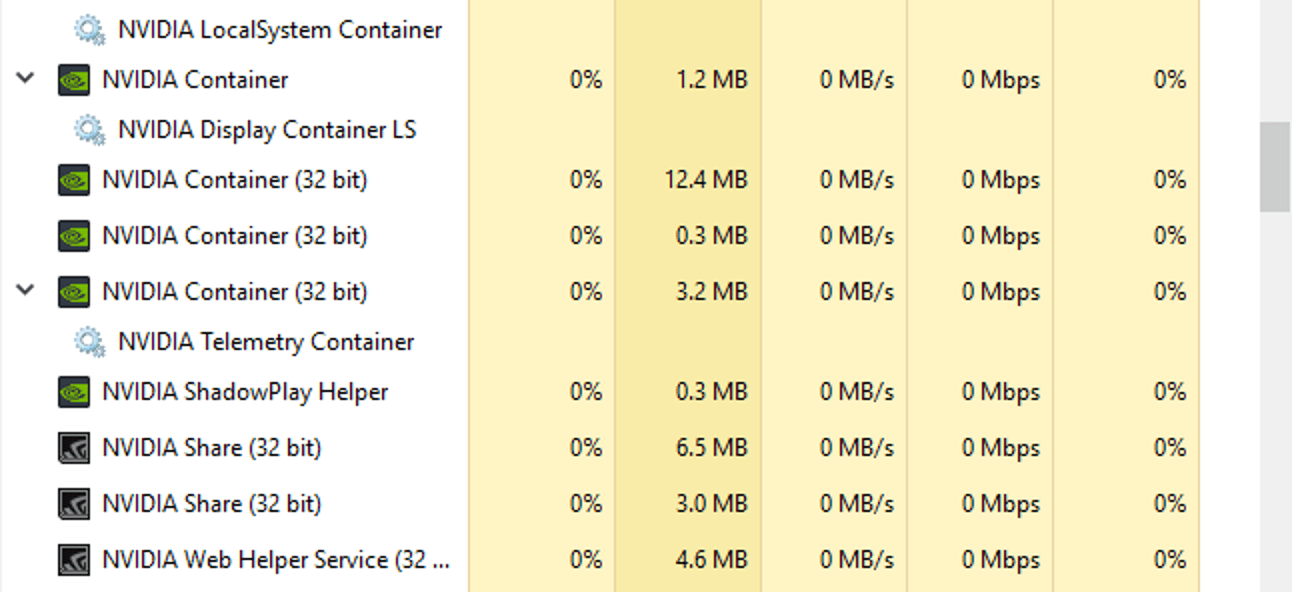
Solved Seems like too many Background Processes to me. Are there?


GARoss

Well-known member
Member
VIP
Local time
2:55 AM
Posts
137
Location
Florida, USA
OS
Windows 11 Pro Version 25H2 (OS Build 26200.7309)
Seems like too many Background Processes to me. Are there?
See attached. Nvidia has the most that look like duplicates, but there are others, too.

If so, how to weed them out?

Screenshot 2023-03-20 124105.jpg
 

My Computer My Computer

At a glance

Windows 11 Pro Version 25H2 (OS Build 26200.7...AMD Ryzen 9-3900X 12-Core 3.80Ghz16Gb Corsair DDR4 3466 MhzAsus DUAL-RTX2070-O8G-EVO-V2
OS
Windows 11 Pro Version 25H2 (OS Build 26200.7309)
Computer type
PC/Desktop
Manufacturer/Model
Custom built
CPU
AMD Ryzen 9-3900X 12-Core 3.80Ghz
Motherboard
Asus Prime X370-Pro
Memory
16Gb Corsair DDR4 3466 Mhz
Graphics Card(s)
Asus DUAL-RTX2070-O8G-EVO-V2
Sound Card
On Motherboard
Monitor(s) Displays
ASUS PA329C
Screen Resolution
3840x2160
Hard Drives
Samsung 980 SSD 1TB PCle 3.0x4, NVMe M.2 2280
Hitachi Deskstar 2Tb 7200 RPM 32MB Cache
Seagate Barracuda 500Gb 7200 RPM
PSU
Seasonic X750 Gold
Case
Antec C100
Cooling
CRYORIG H7 Tower Cooler
Keyboard
Macally USB
Mouse
Microsoft Basic Optical Mouse - USB
Internet Speed
350 Mbs
Browser
Firefox
Antivirus
PC Matic

My Computers My Computers

  • At a glance

    Windows 11 Pro 25H2 26200.8875i9-10900 10 core 20 threads32 gbnone-Intel UHD Graphics 630
    OS
    Windows 11 Pro 25H2 26200.8875
    Computer type
    PC/Desktop
    Manufacturer/Model
    Dell Optiplex 7080
    CPU
    i9-10900 10 core 20 threads
    Motherboard
    DELL 0J37VM
    Memory
    32 gb
    Graphics Card(s)
    none-Intel UHD Graphics 630
    Sound Card
    Integrated Realtek
    Monitor(s) Displays
    Benq 27
    Screen Resolution
    2560x1440
    Hard Drives
    2x1tb Solidigm m.2 nvme /External drives 512gb Samsung m.2 sata+2tb Kingston m2.nvme
    PSU
    500w
    Case
    MT
    Cooling
    Dell Premium
    Keyboard
    Logitech wired
    Mouse
    Logitech wireless
    Internet Speed
    so slow I'm too embarrassed to tell
    Browser
    #1 Edge #2 Firefox
    Antivirus
    Defender+MWB Premium
  • At a glance

    Windows 11 Pro 24H2 26200.8875AMD Ryzen 7 6800U32 gbintegrated
    Operating System
    Windows 11 Pro 24H2 26200.8875
    Computer type
    PC/Desktop
    Manufacturer/Model
    Beelink Mini PC SER5
    CPU
    AMD Ryzen 7 6800U
    Memory
    32 gb
    Graphics card(s)
    integrated
    Sound Card
    integrated
    Monitor(s) Displays
    Benq 27
    Screen Resolution
    2560x1440
    Hard Drives
    1TB Crucial nvme
    Keyboard
    Logitech wired
    Mouse
    Logitech wireless
    Internet Speed
    still too embarrassed to tell
    Browser
    Firefox
    Antivirus
    Defender
    Other Info
    System 3 is non compliant Dell 9020 i7-4770/24gb ram Win11 PRO 26200.8875
Okay, this is normal. Good to know! Thanks glasskuter.
 

My Computer My Computer

At a glance

Windows 11 Pro Version 25H2 (OS Build 26200.7...AMD Ryzen 9-3900X 12-Core 3.80Ghz16Gb Corsair DDR4 3466 MhzAsus DUAL-RTX2070-O8G-EVO-V2
OS
Windows 11 Pro Version 25H2 (OS Build 26200.7309)
Computer type
PC/Desktop
Manufacturer/Model
Custom built
CPU
AMD Ryzen 9-3900X 12-Core 3.80Ghz
Motherboard
Asus Prime X370-Pro
Memory
16Gb Corsair DDR4 3466 Mhz
Graphics Card(s)
Asus DUAL-RTX2070-O8G-EVO-V2
Sound Card
On Motherboard
Monitor(s) Displays
ASUS PA329C
Screen Resolution
3840x2160
Hard Drives
Samsung 980 SSD 1TB PCle 3.0x4, NVMe M.2 2280
Hitachi Deskstar 2Tb 7200 RPM 32MB Cache
Seagate Barracuda 500Gb 7200 RPM
PSU
Seasonic X750 Gold
Case
Antec C100
Cooling
CRYORIG H7 Tower Cooler
Keyboard
Macally USB
Mouse
Microsoft Basic Optical Mouse - USB
Internet Speed
350 Mbs
Browser
Firefox
Antivirus
PC Matic
Okay, this is normal. Good to know! Thanks glasskuter.
You can always install the drivers with nvcleaninstall if you don't need nvidia experience. I have it done this way and it looks like this.
 

Attachments

  • Zrzut ekranu 2023-03-20 190928.png
    Zrzut ekranu 2023-03-20 190928.png
    7.6 KB · Views: 2

My Computer My Computer

At a glance

Windows 11 Pro 22624.1465 insider betaRyzen 7 5800X3DG.SKILL 2x 16GB 3600Mhz CL16-19-19-19-39RTX3060TI MSI GAMING X TRIO
OS
Windows 11 Pro 22624.1465 insider beta
Computer type
PC/Desktop
CPU
Ryzen 7 5800X3D
Motherboard
MSI B450 GAMING PLUS MAX
Memory
G.SKILL 2x 16GB 3600Mhz CL16-19-19-19-39
Graphics Card(s)
RTX3060TI MSI GAMING X TRIO
Hard Drives
970 EVO Plus nvme 250GB - system
WD Blue 2TB HDD
2x MX500 1TB SSD
WD Blue SN570 nvme 1TB
PSU
Bequiet Pure Base 700W
Cooling
Bequiet dark rock pro 4
Browser
Microsoft Edge
Antivirus
Norton 360
You can always install the drivers with nvcleaninstall if you don't need nvidia experience. I have it done this way and it looks like this.
Thanks. I never game.

I installed Nvidia Experience so I can control my GPU fan speeds on/off. I noticed the GPU fans when set to AUTO never turned on even when rendering video. Controlling the fans cut temps by10c.
 

My Computer My Computer

At a glance

Windows 11 Pro Version 25H2 (OS Build 26200.7...AMD Ryzen 9-3900X 12-Core 3.80Ghz16Gb Corsair DDR4 3466 MhzAsus DUAL-RTX2070-O8G-EVO-V2
OS
Windows 11 Pro Version 25H2 (OS Build 26200.7309)
Computer type
PC/Desktop
Manufacturer/Model
Custom built
CPU
AMD Ryzen 9-3900X 12-Core 3.80Ghz
Motherboard
Asus Prime X370-Pro
Memory
16Gb Corsair DDR4 3466 Mhz
Graphics Card(s)
Asus DUAL-RTX2070-O8G-EVO-V2
Sound Card
On Motherboard
Monitor(s) Displays
ASUS PA329C
Screen Resolution
3840x2160
Hard Drives
Samsung 980 SSD 1TB PCle 3.0x4, NVMe M.2 2280
Hitachi Deskstar 2Tb 7200 RPM 32MB Cache
Seagate Barracuda 500Gb 7200 RPM
PSU
Seasonic X750 Gold
Case
Antec C100
Cooling
CRYORIG H7 Tower Cooler
Keyboard
Macally USB
Mouse
Microsoft Basic Optical Mouse - USB
Internet Speed
350 Mbs
Browser
Firefox
Antivirus
PC Matic
The original topic, "too many background processes" is something I attack with Gusto, on every Windows install, no matter the version.

I'm a very Basic user and windows is just loaded with Services that I'd never use or need in a hundred years, so why have them running?
So, using information that I acquired from the "Black Viper" website, I wrote a Batch File, to permanently disable a lot of the services that I'm sure I'd never want or need. Doing that can only Help to improve the overall performance of my PC.
All that information is out there, for those willing to look for it.

I also watch the "Task Manager" to make sure that nothing has slipped in there without my knowledge or permission.
 
The original topic, "too many background processes" is something I attack with Gusto, on every Windows install, no matter the version.

I'm a very Basic user and windows is just loaded with Services that I'd never use or need in a hundred years, so why have them running?
So, using information that I acquired from the "Black Viper" website, I wrote a Batch File, to permanently disable a lot of the services that I'm sure I'd never want or need. Doing that can only Help to improve the overall performance of my PC.
All that information is out there, for those willing to look for it.

I also watch the "Task Manager" to make sure that nothing has slipped in there without my knowledge or permission.

Well, there's also stripped down versions of Windows 11 (even step by step guides - on how to do that yourself - and keep only what you want/need). Microsoft is more prone to add "extra" features. As for an official Lite version - they released a bad joke like Windows S which is more like - "limiting" - than stripped down.
 

My Computer My Computer

At a glance

WinDOS 25H2Intel & AMDSO-DIMM SK Hynix 15.8 GB Dual-Channel DDR4-26...nVidia RTX 2060 6GB Mobile GPU (TU106M)
OS
WinDOS 25H2
Computer type
Laptop
CPU
Intel & AMD
Memory
SO-DIMM SK Hynix 15.8 GB Dual-Channel DDR4-2666 (2 x 8 GB) 1329MHz (19-19-19-43)
Graphics Card(s)
nVidia RTX 2060 6GB Mobile GPU (TU106M)
Sound Card
Onbord Realtek ALC1220
Screen Resolution
1920 x 1080
Hard Drives
1x Samsung PM981 NVMe PCIe M.2 512GB / 1x Seagate Expansion ST1000LM035 1TB
Thanks. I never game.

I installed Nvidia Experience so I can control my GPU fan speeds on/off. I noticed the GPU fans when set to AUTO never turned on even when rendering video. Controlling the fans cut temps by10c.

Here's how it looks with Nvcleanstall...

2023-03-20_215726.png

For fan control you could user MSi Afterburner - which doesn't need to run in background.
 

My Computer My Computer

At a glance

WinDOS 25H2Intel & AMDSO-DIMM SK Hynix 15.8 GB Dual-Channel DDR4-26...nVidia RTX 2060 6GB Mobile GPU (TU106M)
OS
WinDOS 25H2
Computer type
Laptop
CPU
Intel & AMD
Memory
SO-DIMM SK Hynix 15.8 GB Dual-Channel DDR4-2666 (2 x 8 GB) 1329MHz (19-19-19-43)
Graphics Card(s)
nVidia RTX 2060 6GB Mobile GPU (TU106M)
Sound Card
Onbord Realtek ALC1220
Screen Resolution
1920 x 1080
Hard Drives
1x Samsung PM981 NVMe PCIe M.2 512GB / 1x Seagate Expansion ST1000LM035 1TB
The original topic, "too many background processes" is something I attack with Gusto, on every Windows install, no matter the version.

I'm a very Basic user and windows is just loaded with Services that I'd never use or need in a hundred years, so why have them running?
So, using information that I acquired from the "Black Viper" website, I wrote a Batch File, to permanently disable a lot of the services that I'm sure I'd never want or need. Doing that can only Help to improve the overall performance of my PC.
All that information is out there, for those willing to look for it.

I also watch the "Task Manager" to make sure that nothing has slipped in there without my knowledge or permission.
So, your post brings up a question for me:

How much of a difference does this really make for you? I'm genuinely curious only because it's not something that I have ever bothered with. Even with all the processes running and my making absolutely zero effort to prune anything, my CPU utilization is typically only in the single digit percentages unless I'm doing something intensive like compressing video, etc.

So, I'm just curious. Have you noticed any real-world benefits?
 

My Computers My Computers

  • At a glance

    Win11 Pro 25H2 (RTM+)Intel i7-14650HX32 GBNo GPU - Built-in Intel Graphics
    OS
    Win11 Pro 25H2 (RTM+)
    Computer type
    PC/Desktop
    Manufacturer/Model
    Acemagic
    CPU
    Intel i7-14650HX
    Memory
    32 GB
    Graphics Card(s)
    No GPU - Built-in Intel Graphics
    Sound Card
    Integrated
    Monitor(s) Displays
    Varies as machine will often be moved to locations with different monitors
    Screen Resolution
    Varies
    Hard Drives
    1 x 1TB Gen 4 NVMe SSD
    PSU
    120W Power Brick
    Keyboard
    Corsair K70 Max RGB Magnetic Keyboard
    Mouse
    Logitech MX Master 3
    Internet Speed
    1Gb Up / 1 Gb Down
    Browser
    Edge
    Antivirus
    Windows Defender
  • At a glance

    Win11 Pro 25H2 (RTM+)Intel i7-1255U16 GBIntel Iris Xe Graphics
    Operating System
    Win11 Pro 25H2 (RTM+)
    Computer type
    Laptop
    Manufacturer/Model
    Lenovo ThinkBook 13x Gen 2
    CPU
    Intel i7-1255U
    Memory
    16 GB
    Graphics card(s)
    Intel Iris Xe Graphics
    Sound Card
    Realtek® ALC3306-CG codec
    Monitor(s) Displays
    13.3-inch IPS Display
    Screen Resolution
    WQXGA (2560 x 1600)
    Hard Drives
    2 TB 4 x 4 NVMe SSD
    PSU
    USB-C / Thunderbolt 4 Power / Charging
    Keyboard
    Backlit, spill resistant keyboard
    Mouse
    Buttonless Glass Precision Touchpad
    Internet Speed
    1Gb Up / 1Gb Down
    Browser
    Edge
    Antivirus
    Windows Defender
    Other Info
    WiFi 6e / Bluetooth 5.1 / Facial Recognition / Fingerprint Sensor / ToF (Time of Flight) Human Presence Sensor
my CPU utilization is typically only in the single digit percentages
I'm right there with you. Under everyday use (like right now) I have 83 processes running with 2% cpu, 20% memory, and 0% disk. Most of that memory use is from my browsers. I don't know what all that "stuff" is doing in the background and I don't care to know as long as my OS is running smoothly and my hardware not overloaded. Unless some app or process is causing me problems, I leave them alone.

We've been down this road before with discussions like this. I never have understood why folks get so concerned about processes when they're not having issues. I look at it this way. Hardware resources are meant to be used, not overused. The OS and the apps it's running are more sophisticated now so having more processes is to be expected. We don't know what dependencies one process or service has on another nor do we know what apps another user might use that depends on a certain process or service. IMO it would be irresponsible for me to arbitrarily advise someone to disable a bunch of "stuff" based on my own use.

Why people tinker with the "stuff" when it's a non-issue is beyond me.
 

My Computers My Computers

  • At a glance

    Windows 11 Pro 25H2 26200.8875i9-10900 10 core 20 threads32 gbnone-Intel UHD Graphics 630
    OS
    Windows 11 Pro 25H2 26200.8875
    Computer type
    PC/Desktop
    Manufacturer/Model
    Dell Optiplex 7080
    CPU
    i9-10900 10 core 20 threads
    Motherboard
    DELL 0J37VM
    Memory
    32 gb
    Graphics Card(s)
    none-Intel UHD Graphics 630
    Sound Card
    Integrated Realtek
    Monitor(s) Displays
    Benq 27
    Screen Resolution
    2560x1440
    Hard Drives
    2x1tb Solidigm m.2 nvme /External drives 512gb Samsung m.2 sata+2tb Kingston m2.nvme
    PSU
    500w
    Case
    MT
    Cooling
    Dell Premium
    Keyboard
    Logitech wired
    Mouse
    Logitech wireless
    Internet Speed
    so slow I'm too embarrassed to tell
    Browser
    #1 Edge #2 Firefox
    Antivirus
    Defender+MWB Premium
  • At a glance

    Windows 11 Pro 24H2 26200.8875AMD Ryzen 7 6800U32 gbintegrated
    Operating System
    Windows 11 Pro 24H2 26200.8875
    Computer type
    PC/Desktop
    Manufacturer/Model
    Beelink Mini PC SER5
    CPU
    AMD Ryzen 7 6800U
    Memory
    32 gb
    Graphics card(s)
    integrated
    Sound Card
    integrated
    Monitor(s) Displays
    Benq 27
    Screen Resolution
    2560x1440
    Hard Drives
    1TB Crucial nvme
    Keyboard
    Logitech wired
    Mouse
    Logitech wireless
    Internet Speed
    still too embarrassed to tell
    Browser
    Firefox
    Antivirus
    Defender
    Other Info
    System 3 is non compliant Dell 9020 i7-4770/24gb ram Win11 PRO 26200.8875
I have tons of 'toys' I like to use, Crystaldiskinfo, core temp, FXSound, SSD-LED, Sharex, Flow.Launcher to name a few and have 221 processes running on startup. Can't see what benefit you get by pruning the processes and if there is it would be tiny I would imagine.

XBVU4i9dnO.png
 

My Computers My Computers

  • At a glance

    Win 11 ProAMD Ryzen™ 7 7730U24GB Dual-Channel DDR4 @ 1596MHz (22-22-22-52)512MB ATI AMD Radeon Graphics (ASUStek Comput...
    OS
    Win 11 Pro
    Computer type
    Laptop
    Manufacturer/Model
    ASUS Vivobook
    CPU
    AMD Ryzen™ 7 7730U
    Motherboard
    M1605YA
    Memory
    24GB Dual-Channel DDR4 @ 1596MHz (22-22-22-52)
    Graphics Card(s)
    512MB ATI AMD Radeon Graphics (ASUStek Computer Inc)
    Monitor(s) Displays
    Generic PnP Monitor (1920x1200@60Hz) - P1 PLUS (1920x1080@59Hz)
    Screen Resolution
    1920 X 1200
    Hard Drives
    953GB Western Digital WD
    PSU
    45 Watts
    Mouse
    Lenovo Bluetooth.
    Internet Speed
    500 Mbps
    Browser
    Edge
    Antivirus
    Defender
  • At a glance

    Windows 11AMD Ryzen 7 5800H / 3.2 GHz32 GB DDR4 SDRAM 3200 MHzNVIDIA GeForce RTX 3060 6 GB GDDR6 SDRAM
    Operating System
    Windows 11
    Computer type
    Laptop
    Manufacturer/Model
    ACER NITRO
    CPU
    AMD Ryzen 7 5800H / 3.2 GHz
    Motherboard
    CZ Scala_CAS (FP6)
    Memory
    32 GB DDR4 SDRAM 3200 MHz
    Graphics card(s)
    NVIDIA GeForce RTX 3060 6 GB GDDR6 SDRAM
    Sound Card
    Realtek Audio. NVIDIA High Definition Audio
    Monitor(s) Displays
    15.6" LED backlight 1920 x 1080 (Full HD) 144 Hz
    Screen Resolution
    1920 x 1080 (Full HD)
    Hard Drives
    Samsung 970 Evo Plus 2TB NVMe M.2
    PSU
    180 Watt, 19.5 V
    Mouse
    Lenovo Bluetooth
    Internet Speed
    500 Mbps
    Browser
    Edge
    Antivirus
    Defender
Don't most processes take up system memory and the threads CPU cycles?

I've run NVCleanInstall before and I have noticed a difference in both.

There are probably some other ways to reduce system overhead (disabling unneeded startup programs and other minor system tweaks) if you are running into resource usage issues.
 

My Computer My Computer

At a glance

Windows 11 Pro 25H2 (26200.8894)AMD Ryzen 7 7800X3D32gb Team Group (T-Force) DDR5-6000Zotac nVidia GeForce RTX 4070 SUPER - 12gb
OS
Windows 11 Pro 25H2 (26200.8894)
Computer type
PC/Desktop
Manufacturer/Model
Pre-built
CPU
AMD Ryzen 7 7800X3D
Motherboard
MSI Pro B650-VC WiFi
Memory
32gb Team Group (T-Force) DDR5-6000
Graphics Card(s)
Zotac nVidia GeForce RTX 4070 SUPER - 12gb
Sound Card
Sound BlasterX G6
Monitor(s) Displays
Koorui G2421V and ViewSonic VX2453
Screen Resolution
P:2560x1440 S:1920x1080
Hard Drives
WD Blue SN5000 - 500gb NVME
WD Blue SN580 - 2TB NVME
Seagate 4TB HDD - ST4000VN008-2DR166
Keyboard
Mountain Everest
Mouse
Logitech G502 Hero
Internet Speed
T-Mobile Home Internet
Browser
Firefox
Other Info
QNAP TS-469 Pro NAS
TP-Link W7200 (2 unit mesh network)
Elgato Streamdeck
Don't most processes take up system memory and the threads CPU cycles?

I've run NVCleanInstall before and I have noticed a difference in both.

There are probably some other ways to reduce system overhead (disabling unneeded startup programs and other minor system tweaks) if you are running into resource usage issues.
Of course processes use some system resources but really how much and how much effect it has? I suppose you could run Windows without installing any software and that would keep Windows lean but that's not how anybody runs Windows. Anyway have a look at this video by Britec.

Britec09
 

My Computers My Computers

  • At a glance

    Win 11 ProAMD Ryzen™ 7 7730U24GB Dual-Channel DDR4 @ 1596MHz (22-22-22-52)512MB ATI AMD Radeon Graphics (ASUStek Comput...
    OS
    Win 11 Pro
    Computer type
    Laptop
    Manufacturer/Model
    ASUS Vivobook
    CPU
    AMD Ryzen™ 7 7730U
    Motherboard
    M1605YA
    Memory
    24GB Dual-Channel DDR4 @ 1596MHz (22-22-22-52)
    Graphics Card(s)
    512MB ATI AMD Radeon Graphics (ASUStek Computer Inc)
    Monitor(s) Displays
    Generic PnP Monitor (1920x1200@60Hz) - P1 PLUS (1920x1080@59Hz)
    Screen Resolution
    1920 X 1200
    Hard Drives
    953GB Western Digital WD
    PSU
    45 Watts
    Mouse
    Lenovo Bluetooth.
    Internet Speed
    500 Mbps
    Browser
    Edge
    Antivirus
    Defender
  • At a glance

    Windows 11AMD Ryzen 7 5800H / 3.2 GHz32 GB DDR4 SDRAM 3200 MHzNVIDIA GeForce RTX 3060 6 GB GDDR6 SDRAM
    Operating System
    Windows 11
    Computer type
    Laptop
    Manufacturer/Model
    ACER NITRO
    CPU
    AMD Ryzen 7 5800H / 3.2 GHz
    Motherboard
    CZ Scala_CAS (FP6)
    Memory
    32 GB DDR4 SDRAM 3200 MHz
    Graphics card(s)
    NVIDIA GeForce RTX 3060 6 GB GDDR6 SDRAM
    Sound Card
    Realtek Audio. NVIDIA High Definition Audio
    Monitor(s) Displays
    15.6" LED backlight 1920 x 1080 (Full HD) 144 Hz
    Screen Resolution
    1920 x 1080 (Full HD)
    Hard Drives
    Samsung 970 Evo Plus 2TB NVMe M.2
    PSU
    180 Watt, 19.5 V
    Mouse
    Lenovo Bluetooth
    Internet Speed
    500 Mbps
    Browser
    Edge
    Antivirus
    Defender
Of course processes use some system resources but really how much and how much effect it has? I suppose you could run Windows without installing any software and that would keep Windows lean but that's not how anybody runs Windows. Anyway have a look at this video by Britec.

Britec09
Depends from System to System (a vast ocean of old rigs, low end, mid range, high end and beyond) and User to User (how much stuff you have installed - particularly bloatware). For a messy user like Britec (tho, he's using a mid-high end rig by modern standards - so his rig can take it - yet a difference would be noticeable even for him - if that rig was properly optimized) - if using a low end system - the impact would be quite noticeable - especially if it's an old system (then the impact can be quite significant). On a mid range rig - still noticeable but easier to ignore for an average user. Maybe less relevant for a high end rig - but even then, for a trained eye - it's noticeable. While for someone with OCD tendencies (which is - quite the opposite from a messy user like Britec / noticeable even on the outside.... quite ironic that he's using RGB lights - which also increases visibility... of his dusty rig) - a video like above can be a real eyesore (triggering even). That being said - it also depends how much one can put up with (or not).
 

My Computer My Computer

At a glance

WinDOS 25H2Intel & AMDSO-DIMM SK Hynix 15.8 GB Dual-Channel DDR4-26...nVidia RTX 2060 6GB Mobile GPU (TU106M)
OS
WinDOS 25H2
Computer type
Laptop
CPU
Intel & AMD
Memory
SO-DIMM SK Hynix 15.8 GB Dual-Channel DDR4-2666 (2 x 8 GB) 1329MHz (19-19-19-43)
Graphics Card(s)
nVidia RTX 2060 6GB Mobile GPU (TU106M)
Sound Card
Onbord Realtek ALC1220
Screen Resolution
1920 x 1080
Hard Drives
1x Samsung PM981 NVMe PCIe M.2 512GB / 1x Seagate Expansion ST1000LM035 1TB
Why people tinker with the "stuff" when it's a non-issue is beyond me.
I have on app that sometimes will not open on first or second try. Never have found a solution other than... opening the Task Manager, finding the app in Background Processes then End Task. After that the app opens normally. So, while in Background Processes I noticed all these Nvidia processes open. Seemed unnecessary for so many so I made the post.

I can't speak for the other posts but for me it was just a surprise seeing so many Nvidia processes running & some looked like multiples of the same one. I could care less how many are running just wanted to know if that was "normal". Apparently, it is.

Good. I marked the post as solved but still getting suggestions. That's okay but the processes are there for a reason so I'm good with that. Back to work for me! (y)
 
Last edited:

My Computer My Computer

At a glance

Windows 11 Pro Version 25H2 (OS Build 26200.7...AMD Ryzen 9-3900X 12-Core 3.80Ghz16Gb Corsair DDR4 3466 MhzAsus DUAL-RTX2070-O8G-EVO-V2
OS
Windows 11 Pro Version 25H2 (OS Build 26200.7309)
Computer type
PC/Desktop
Manufacturer/Model
Custom built
CPU
AMD Ryzen 9-3900X 12-Core 3.80Ghz
Motherboard
Asus Prime X370-Pro
Memory
16Gb Corsair DDR4 3466 Mhz
Graphics Card(s)
Asus DUAL-RTX2070-O8G-EVO-V2
Sound Card
On Motherboard
Monitor(s) Displays
ASUS PA329C
Screen Resolution
3840x2160
Hard Drives
Samsung 980 SSD 1TB PCle 3.0x4, NVMe M.2 2280
Hitachi Deskstar 2Tb 7200 RPM 32MB Cache
Seagate Barracuda 500Gb 7200 RPM
PSU
Seasonic X750 Gold
Case
Antec C100
Cooling
CRYORIG H7 Tower Cooler
Keyboard
Macally USB
Mouse
Microsoft Basic Optical Mouse - USB
Internet Speed
350 Mbs
Browser
Firefox
Antivirus
PC Matic
Use Autoruns from Sysinternals, you can use it to disable all those Nvidia items from Scheduled Tasks (this is where most of the error reporting and telemetry tasks are) and disable any other items you don't need, like the Frame server SDK etc.
Disabling means you can just one click to re enable if needed rather than have to re install items, Autoruns is also useful for a lot of other service management and finding where things load from.
 

My Computer My Computer

At a glance

Windows 11 Pro 22H2, build: 22621.521Intel i7-12700K 3.6GHz Base (5.0GHz Turbo)64GB DDR 3600MhzAsus Tuff RTX 3080 10GB OC
OS
Windows 11 Pro 22H2, build: 22621.521
Computer type
PC/Desktop
Manufacturer/Model
Scan 3XS Custom 1700
CPU
Intel i7-12700K 3.6GHz Base (5.0GHz Turbo)
Motherboard
Asus ProArt Creator B660 D4
Memory
64GB DDR 3600Mhz
Graphics Card(s)
Asus Tuff RTX 3080 10GB OC
Sound Card
Onboard Realtek
Monitor(s) Displays
Gigabyte G32QC 32inch 16:9 curved @2560 x 1440p 165Hz Freesync Premium Pro/ Dell SE2422H 24inch 16:9 1920 x 1080p 75Hz Freesync
Screen Resolution
2560 x 1440p & 1920 x 1080p
Hard Drives
WD SN570 1TB NVME (Boot), Samsung 870QVO 1TB (SSD), SanDisk 3D Ultra 500Gb (SSD) x2, Seagate 3Tb Expansion Desk (Ext HDD), 2x Toshiba 1Tb P300 (Ext HDD)
PSU
Corsair RM1000X Modular
Case
Corsair 4000D Airflow Desktop
Cooling
Corsair Hydro H150i RGB Pro XT 360mm Liquid Cooler, 3 x 120mm fans, 1x Exhaust
Keyboard
Microsoft Ergonomic
Mouse
Logitech G402
Internet Speed
800Mbs
Browser
Edge Chromium
Antivirus
Defender, Malwarebytes
noticed all these Nvidia processes open. Seemed unnecessary for so many so I made the post.
Sorry, I did not mean to imply you, Sir. You just asked a question in case something was wrong. Had you not asked, you would not have known it was normal.
TM is a tool which meant to be a way users can monitor the performance of their system, stop a troublesome process or app, manage startup, or troubleshoot a problem...exactly as you are using it. For as long as I've used and researched computers, there have been people who 'tinkered' with disabling processes completely. Some are simply OCD about seeing all the processes running and think 'less is more'. Others tinker thinking they can get better performance out of their hardware by getting 'lean and mean'.
 

My Computers My Computers

  • At a glance

    Windows 11 Pro 25H2 26200.8875i9-10900 10 core 20 threads32 gbnone-Intel UHD Graphics 630
    OS
    Windows 11 Pro 25H2 26200.8875
    Computer type
    PC/Desktop
    Manufacturer/Model
    Dell Optiplex 7080
    CPU
    i9-10900 10 core 20 threads
    Motherboard
    DELL 0J37VM
    Memory
    32 gb
    Graphics Card(s)
    none-Intel UHD Graphics 630
    Sound Card
    Integrated Realtek
    Monitor(s) Displays
    Benq 27
    Screen Resolution
    2560x1440
    Hard Drives
    2x1tb Solidigm m.2 nvme /External drives 512gb Samsung m.2 sata+2tb Kingston m2.nvme
    PSU
    500w
    Case
    MT
    Cooling
    Dell Premium
    Keyboard
    Logitech wired
    Mouse
    Logitech wireless
    Internet Speed
    so slow I'm too embarrassed to tell
    Browser
    #1 Edge #2 Firefox
    Antivirus
    Defender+MWB Premium
  • At a glance

    Windows 11 Pro 24H2 26200.8875AMD Ryzen 7 6800U32 gbintegrated
    Operating System
    Windows 11 Pro 24H2 26200.8875
    Computer type
    PC/Desktop
    Manufacturer/Model
    Beelink Mini PC SER5
    CPU
    AMD Ryzen 7 6800U
    Memory
    32 gb
    Graphics card(s)
    integrated
    Sound Card
    integrated
    Monitor(s) Displays
    Benq 27
    Screen Resolution
    2560x1440
    Hard Drives
    1TB Crucial nvme
    Keyboard
    Logitech wired
    Mouse
    Logitech wireless
    Internet Speed
    still too embarrassed to tell
    Browser
    Firefox
    Antivirus
    Defender
    Other Info
    System 3 is non compliant Dell 9020 i7-4770/24gb ram Win11 PRO 26200.8875
Sorry, I did not mean to imply you, Sir. You just asked a question in case something was wrong. Had you not asked, you would not have known it was normal.
TM is a tool which meant to be a way users can monitor the performance of their system, stop a troublesome process or app, manage startup, or troubleshoot a problem...exactly as you are using it. For as long as I've used and researched computers, there have been people who 'tinkered' with disabling processes completely. Some are simply OCD about seeing all the processes running and think 'less is more'. Others tinker thinking they can get better performance out of their hardware by getting 'lean and mean'.
No apology necessary. I didn't take any offense.

Everyone in this forum have the best of intension when offering suggestions. I get into trouble when tinkering so I don't. That keeps me out of trouble. ;-)
 

My Computer My Computer

At a glance

Windows 11 Pro Version 25H2 (OS Build 26200.7...AMD Ryzen 9-3900X 12-Core 3.80Ghz16Gb Corsair DDR4 3466 MhzAsus DUAL-RTX2070-O8G-EVO-V2
OS
Windows 11 Pro Version 25H2 (OS Build 26200.7309)
Computer type
PC/Desktop
Manufacturer/Model
Custom built
CPU
AMD Ryzen 9-3900X 12-Core 3.80Ghz
Motherboard
Asus Prime X370-Pro
Memory
16Gb Corsair DDR4 3466 Mhz
Graphics Card(s)
Asus DUAL-RTX2070-O8G-EVO-V2
Sound Card
On Motherboard
Monitor(s) Displays
ASUS PA329C
Screen Resolution
3840x2160
Hard Drives
Samsung 980 SSD 1TB PCle 3.0x4, NVMe M.2 2280
Hitachi Deskstar 2Tb 7200 RPM 32MB Cache
Seagate Barracuda 500Gb 7200 RPM
PSU
Seasonic X750 Gold
Case
Antec C100
Cooling
CRYORIG H7 Tower Cooler
Keyboard
Macally USB
Mouse
Microsoft Basic Optical Mouse - USB
Internet Speed
350 Mbs
Browser
Firefox
Antivirus
PC Matic
It doesn't seem like we accomplish much in these little discussions, but I find them fun anyway.
Why? Well, because I was tweaking and tuning my computer long before there was such a thing as Windows.
It was almost a half century ago, when I got my first computer. It was a Commodore 64.
At that time I was working on BIG commercial computers, so I had an idea of just what made them GO.
On examining the Operating System (Kernel) of the C-64, I found that it was loaded with delays and redundancy.
(Much like the PC's of today) So I re-wrote the OS of the C-64 to make it load and run programs faster.

Today, I find Windows xx much like the little C-64, in that it's just loaded with needless code (services) and redundancy.

I never benchmark any of my PC's and never have. I just know the difference between a raw install and a well Tweaked OS.
The little Acer Slimline PC that I'm on right now, is old, slow and way below what most of you are used to.
But, I have it scooting right along, running Windows 11/Pro/64 like a champ.
I've disabled at least 25 Services, as I've done on all my Win-11 installs.
And performed a number of Registry Tweaks to improve performance.

I actually like Win-11 more than its predecessors, because it's so 'programmable'.

Keep up the good work, guys and dolls.

TM :cool:
 

My Computer My Computer

At a glance

Windows 11 Pro Version 25H2 (OS Build 26200.7...AMD Ryzen 9-3900X 12-Core 3.80Ghz16Gb Corsair DDR4 3466 MhzAsus DUAL-RTX2070-O8G-EVO-V2
OS
Windows 11 Pro Version 25H2 (OS Build 26200.7309)
Computer type
PC/Desktop
Manufacturer/Model
Custom built
CPU
AMD Ryzen 9-3900X 12-Core 3.80Ghz
Motherboard
Asus Prime X370-Pro
Memory
16Gb Corsair DDR4 3466 Mhz
Graphics Card(s)
Asus DUAL-RTX2070-O8G-EVO-V2
Sound Card
On Motherboard
Monitor(s) Displays
ASUS PA329C
Screen Resolution
3840x2160
Hard Drives
Samsung 980 SSD 1TB PCle 3.0x4, NVMe M.2 2280
Hitachi Deskstar 2Tb 7200 RPM 32MB Cache
Seagate Barracuda 500Gb 7200 RPM
PSU
Seasonic X750 Gold
Case
Antec C100
Cooling
CRYORIG H7 Tower Cooler
Keyboard
Macally USB
Mouse
Microsoft Basic Optical Mouse - USB
Internet Speed
350 Mbs
Browser
Firefox
Antivirus
PC Matic
Back
Top Bottom