
Shutdown problems


kamalaggi

Well-known member
Local time
11:53 PM
Posts
13
OS
Windows 11 23H2
Hi,

50% of the time my pc won't shutdown correctly. It tries to shutdown but just hangs on a blank screen with the fans still spinning and RGB lights still on. The other 50% of the time the pc shuts down normally. My PC temps are around 40 degrees idle and 70 degrees full load so no issues there.

I've even clean installed windows and problem is still there. I built this pc myself and maybe I've wired something incorrectly or there's a incompatible driver somewhere. Event viewer doesn't show anything

PC Specs are
Corsair 5000D Case
Corsair H1000i PSU
Asus Z690 TUF D4 WIFI Motherboard
Intel 12700k Processor
Corsair H150i Elite Liquid Cooler
Corsair Vengeance RGB 64GB DDR4 RAM (2x32GB)
Asus TUF 3070 Graphics Card
Samsung 980 Pro 1TB M.2
Samsung 970 Pro 512GB M.2
Seagate BarraCuda 8TB SATA
Western Digital 3TB SATA Drive.
Western Digital 2TB SATA Drive

Thanks for your help.
 
Windows Build/Version
Windows 11 Build 22621.1413

My Computer My Computer

At a glance

Windows 11 23H213700k128GB DDR4 3600Mhz (4x32GB)Asus Tuf 3070
OS
Windows 11 23H2
Computer type
PC/Desktop
CPU
13700k
Motherboard
Asus Z690 TUF D4 WIFI
Memory
128GB DDR4 3600Mhz (4x32GB)
Graphics Card(s)
Asus Tuf 3070
Hard Drives
2TB WD SN850x
4TB WD SN850x
4TB WD SN850x
PSU
Corsair HX1000
Case
Corsair 5000D Airflow
Cooling
Corsair iCUE H150i ELITE LCD 360mm AiO Liquid Cooler
do this first from cmd prompt chkdsk c: /f /r /x /b

then try either of these from cmd or win + r

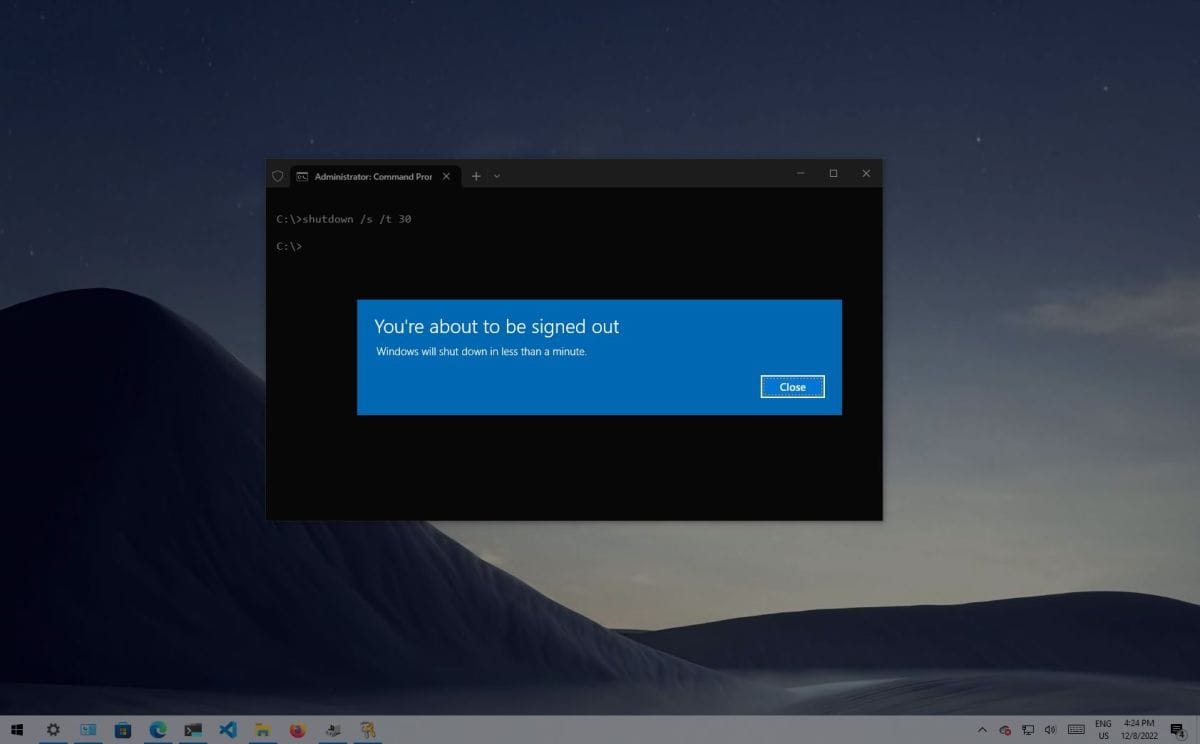
shutdown /s /f /t 0

shutdown /r /f /t 0
 

My Computer My Computer

At a glance

Windows 11 Pro 64-bitIntel Core i9-14900KF64 GB4083MB NVIDIA GeForce RTX 4090
OS
Windows 11 Pro 64-bit
Computer type
PC/Desktop
Manufacturer/Model
Alienware Aurora R16
CPU
Intel Core i9-14900KF
Motherboard
Alienware 0RF96M (U3E1)
Memory
64 GB
Graphics Card(s)
4083MB NVIDIA GeForce RTX 4090
Monitor(s) Displays
ROG XG43UQ 43 inch monitor
Screen Resolution
(3840x2160@120Hz)
Hard Drives
Samsung SSD 870 EVO 2TB
NVMe Samsung 2048GB
/t should be 1 not 0.

There are a number of things that can prevent the normal shutdown of Windows.
This goes back decades.
Hence I've only used a Quick Shutdown shortcut to Shutdown my own PC's for years.
The syntax has changed a little, like since Win-98 days, but the result is the same.
Today, with Windows 8 thru 11, the correct syntax for a Quick Shutdown shortcut is:
C:\Windows\System32\shutdown.exe /s /t 1
There is also, a registry tweak to assist Windows shutting down quickly.

Windows Registry Editor Version 5.00

; Shorten shutdown time. Time is in milliseconds.
[HKEY_LOCAL_MACHINE\SYSTEM\CurrentControlSet\Control]
"WaitToKillServiceTimeout"="1000"

That can be run as a registry script,or it can be done manually in "Regedit".
It cuts down the built in Shutdown time to a minimum of just ONE Second.

I use both of the above tricks on all my own PC's, and my typical shut down time is ~5 seconds.
And, for many years, I've shared both of the above tricks with my hundreds, of customers, and I've never had one person complain, "My PC won't shut down".
 
Last edited:
Open administrative command prompt and type or copy and paste:

powercfg -h off
shutdown -s

Power on the computer and shutdown as needed.

Report into this thread whether problems persist or whether turning off hibernation fixes the shutdown problem.
 

My Computer My Computer

At a glance

Windows 10Intel(R) Core(TM) i7-4800MQ CPU @ 2.70GHz16 GB Total: Manufacturer : Samsung MemoryTyp...NVIDIA Quadro K3100M; Intel(R) HD Graphics 4600
OS
Windows 10
Computer type
Laptop
Manufacturer/Model
HP
CPU
Intel(R) Core(TM) i7-4800MQ CPU @ 2.70GHz
Motherboard
Product : 190A Version : KBC Version 94.56
Memory
16 GB Total: Manufacturer : Samsung MemoryType : DDR3 FormFactor : SODIMM Capacity : 8GB Speed : 1600
Graphics Card(s)
NVIDIA Quadro K3100M; Intel(R) HD Graphics 4600
Sound Card
IDT High Definition Audio CODEC; PNP Device ID HDAUDIO\FUNC_01&VEN_111D&DEV_76E0
Hard Drives
Model Hitachi HTS727575A9E364
Antivirus
Microsoft Defender
Other Info
Mobile Workstation
/t should be 1 not 0.

for the /t switch, any number other than 0 automatically applies the /f switch, which force-stops any running apps without notice.
Perfectly fine to use /t 0 as it shuts down immediately.

1680247654045.png


My Computers My Computers

  • At a glance

    Win 11 Pro 25H2 26200.9168Intel® Core™ i7-14700KG.SKILL Ripjaws S5 Series 64GB (2 x 32GB) DDR5ASUS GeForce RTX 4070 Super 12GB
    OS
    Win 11 Pro 25H2 26200.9168
    Computer type
    PC/Desktop
    Manufacturer/Model
    Self Built
    CPU
    Intel® Core™ i7-14700K
    Motherboard
    ASUS TUF Z690-PLUS WIFI (BIOS 4505)
    Memory
    G.SKILL Ripjaws S5 Series 64GB (2 x 32GB) DDR5
    Graphics Card(s)
    ASUS GeForce RTX 4070 Super 12GB
    Sound Card
    Sound Blaster AE-5 Plus
    Monitor(s) Displays
    ASUS TUF Gaming 27" 2K HDR Gaming
    Screen Resolution
    2560 x 1440
    Hard Drives
    Samsung 990 Pro 1TB NVMe (Win 11 25H2)
    SK hynix P41 500GB NVMe
    SK hynix P41 2TB NVMe (x3)
    Crucial P3 Plus 4TB
    PSU
    Corsair RM850x Shift
    Case
    Antec Dark Phantom DP502 FLUX
    Cooling
    Corsair Nautilus 360 RS AIO
    Keyboard
    Logitech MK 320
    Mouse
    Razer Basilisk V3
    Internet Speed
    750Mbs
    Browser
    Firefox
    Antivirus
    Winows Security
    Other Info
    MR 8.1 Home
  • At a glance

    Win 11 Pro 25H2 26200.9168Intel Core i5-1140064 GB DDR4MSI GeForce RTX 3060 Ventus 2X 12GB
    Operating System
    Win 11 Pro 25H2 26200.9168
    Computer type
    PC/Desktop
    Manufacturer/Model
    Self Built
    CPU
    Intel Core i5-11400
    Motherboard
    Asus TUF Gaming Z590 Plus WiFi (BIOS 2803)
    Memory
    64 GB DDR4
    Graphics card(s)
    MSI GeForce RTX 3060 Ventus 2X 12GB
    Sound Card
    SoundBlaster Audigy Fx V2
    Monitor(s) Displays
    Samsung F27T350
    Screen Resolution
    1920x1080
    Hard Drives
    Samsung 980 Pro 1TB
    Samsung 970 EVO Plus 2TB
    Samsung 870 EVO 500GB SSD
    PSU
    Corsair HX750
    Case
    Cougar MX330-G Window
    Cooling
    Thermalright Frozen Edge 240 Black AIO
    Internet Speed
    350Mbps
    Browser
    Firefox
    Antivirus
    Windows Security
  • System Three
    Win 11 Pro 25H2 26200.9168
    ASUS PRIME Z370-P II BIOS 3004 7/12/21
    Intel Core i7-8700 CPU @ 3.20GHz
    32GB DDR4 RAM (4x8)
    iGPU Intel UHD Graphics 630
    Cooler Master Hyper 212
    Mid-Tower Desktop
Thank you Scott for clarifying t0 for me.
 

My Computer My Computer

At a glance

Windows 11 Pro 64-bitIntel Core i9-14900KF64 GB4083MB NVIDIA GeForce RTX 4090
OS
Windows 11 Pro 64-bit
Computer type
PC/Desktop
Manufacturer/Model
Alienware Aurora R16
CPU
Intel Core i9-14900KF
Motherboard
Alienware 0RF96M (U3E1)
Memory
64 GB
Graphics Card(s)
4083MB NVIDIA GeForce RTX 4090
Monitor(s) Displays
ROG XG43UQ 43 inch monitor
Screen Resolution
(3840x2160@120Hz)
Hard Drives
Samsung SSD 870 EVO 2TB
NVMe Samsung 2048GB
Samsung 980 Pro 1TB M.2
Samsung 970 Pro 512GB M.2
Seagate BarraCuda 8TB SATA
Western Digital 3TB SATA Drive.
Western Digital 2TB SATA Drive
Am I understand correctly that there are 5 hard drives in your machine? If so then which is the OS installed on?
Maybe the OS is trying to read/write to the others during shutdown and can't and that is stopping the shutdown? Just wondering.

Do you have a RAID setup?
 
Last edited:

My Computers My Computers

  • At a glance

    Windows 11 ProAMD Ryzen 9 8945HS32GB DDR5 SO-DIMMIntegrated AMD Radeon 780M (4.00 GHz)
    OS
    Windows 11 Pro
    Computer type
    PC/Desktop
    Manufacturer/Model
    GMKtec K11
    CPU
    AMD Ryzen 9 8945HS
    Memory
    32GB DDR5 SO-DIMM
    Graphics Card(s)
    Integrated AMD Radeon 780M (4.00 GHz)
    Monitor(s) Displays
    Benq 2250HM
    Screen Resolution
    1920 x 1080
    Hard Drives
    1 TB PCIe 4.0 NVMe M.2 SSD
  • At a glance

    Windows 11 HomeIntel® Core™ Ultra 7 - 255H processor16 GB LPDDR5 SDRAMIntel Arc 140T onboard graphics
    Operating System
    Windows 11 Home
    Computer type
    Laptop
    Manufacturer/Model
    ASUS Zenbook 14 OLED 14" Laptop - UX3405CA-QL192W
    CPU
    Intel® Core™ Ultra 7 - 255H processor
    Memory
    16 GB LPDDR5 SDRAM
    Graphics card(s)
    Intel Arc 140T onboard graphics
    Screen Resolution
    1920 x 1200 (16:10 WUXGA resolution) OLED Touchscreen
    Hard Drives
    1TB SSD
Am I understand correctly that there are 5 hard drives in your machine? If so then which is the OS installed on?
Maybe the OS is trying to read/write to the others during shutdown and can't and that is stopping the shutdown? Just wondering.
Thanks for your replies. Will try your suggestions tomorrow

Windows is installed to the 1tb 980 pro. The efi folder is also on this drive.
 

My Computer My Computer

At a glance

Windows 11 23H213700k128GB DDR4 3600Mhz (4x32GB)Asus Tuf 3070
OS
Windows 11 23H2
Computer type
PC/Desktop
CPU
13700k
Motherboard
Asus Z690 TUF D4 WIFI
Memory
128GB DDR4 3600Mhz (4x32GB)
Graphics Card(s)
Asus Tuf 3070
Hard Drives
2TB WD SN850x
4TB WD SN850x
4TB WD SN850x
PSU
Corsair HX1000
Case
Corsair 5000D Airflow
Cooling
Corsair iCUE H150i ELITE LCD 360mm AiO Liquid Cooler
I think problem is fixed now. Yesterday when i pressed shutdown I left it running and it eventually powered off after 20 minutes. Today it shutdown normally everytime.
 

My Computer My Computer

At a glance

Windows 11 23H213700k128GB DDR4 3600Mhz (4x32GB)Asus Tuf 3070
OS
Windows 11 23H2
Computer type
PC/Desktop
CPU
13700k
Motherboard
Asus Z690 TUF D4 WIFI
Memory
128GB DDR4 3600Mhz (4x32GB)
Graphics Card(s)
Asus Tuf 3070
Hard Drives
2TB WD SN850x
4TB WD SN850x
4TB WD SN850x
PSU
Corsair HX1000
Case
Corsair 5000D Airflow
Cooling
Corsair iCUE H150i ELITE LCD 360mm AiO Liquid Cooler
@kamalaggi - That's good but how did you fix it please? It might help other people if you say how you fixed it.
 

My Computers My Computers

  • At a glance

    Windows 11 ProAMD Ryzen 9 8945HS32GB DDR5 SO-DIMMIntegrated AMD Radeon 780M (4.00 GHz)
    OS
    Windows 11 Pro
    Computer type
    PC/Desktop
    Manufacturer/Model
    GMKtec K11
    CPU
    AMD Ryzen 9 8945HS
    Memory
    32GB DDR5 SO-DIMM
    Graphics Card(s)
    Integrated AMD Radeon 780M (4.00 GHz)
    Monitor(s) Displays
    Benq 2250HM
    Screen Resolution
    1920 x 1080
    Hard Drives
    1 TB PCIe 4.0 NVMe M.2 SSD
  • At a glance

    Windows 11 HomeIntel® Core™ Ultra 7 - 255H processor16 GB LPDDR5 SDRAMIntel Arc 140T onboard graphics
    Operating System
    Windows 11 Home
    Computer type
    Laptop
    Manufacturer/Model
    ASUS Zenbook 14 OLED 14" Laptop - UX3405CA-QL192W
    CPU
    Intel® Core™ Ultra 7 - 255H processor
    Memory
    16 GB LPDDR5 SDRAM
    Graphics card(s)
    Intel Arc 140T onboard graphics
    Screen Resolution
    1920 x 1200 (16:10 WUXGA resolution) OLED Touchscreen
    Hard Drives
    1TB SSD
@kamalaggi - That's good but how did you fix it please? It might help other people if you say how you fixed it.
I didn’t do anything. I just let it complete a shutdown which took initially 20 minutes.
 

My Computer My Computer

At a glance

Windows 11 23H213700k128GB DDR4 3600Mhz (4x32GB)Asus Tuf 3070
OS
Windows 11 23H2
Computer type
PC/Desktop
CPU
13700k
Motherboard
Asus Z690 TUF D4 WIFI
Memory
128GB DDR4 3600Mhz (4x32GB)
Graphics Card(s)
Asus Tuf 3070
Hard Drives
2TB WD SN850x
4TB WD SN850x
4TB WD SN850x
PSU
Corsair HX1000
Case
Corsair 5000D Airflow
Cooling
Corsair iCUE H150i ELITE LCD 360mm AiO Liquid Cooler

Latest Support Threads

Back
Top Bottom




