StartAllBack


StartAllBack: Windows 11 from better timeline​

Get the latest version here Download

Embrace, enhance, unsweep classic UI from under the rug​

Restore and improve taskbar​

  • Show labels on task icons
  • Adjust icon size and margins
  • Move taskbar to top, left or right edges
  • Drag and drop stuff onto taskbar
  • Center task icons but keep Start button on the left
  • Split into segments, use dynamic translucency
  • Separate corner icons with Windows 7/10 UI
  • Auto-hide when covered by maximized window

Restore and improve File Explorer and Control Panel​

  • Ribbon and Command Bar revamped with translucent effects
  • Details pane on bottom
  • Old search box (the one which works)
  • Dark mode support for more dialogs

Restore and improve context menus​

  • All new look with rounded acrylic menus
  • Fast and responsive taskbar menus
  • New fonts, better touch support

Restore and improve start menu​

  • Launch apps and go to system places in one click
  • Navigate dropdown menus like a boss
  • Enjoy fast and reliable search

Finally, lightweight styling and UI consistency​

  • Enjoy Windows 7, Windows 8 and third-party taskbar and start menu styles
  • Fix UI inconsistencies in Win32 apps
  • Don't be blue: recolor UI in all windows apps
  • Negative resource usage: fewer RAM used, fewer processes started, faster startup



StartAllBack For Windows 11 has been released.
It's an RC release. I haven't tested it yet as I have Start11 installed.

Edit: I have now tested it. It's working quite well.
Apart from a great start menu, you can also have the Enhanced Classic Taskbar back.
This means (for example) that you can have an uncombined and unlocked Taskbar.
You will now also be able to enhance the Taskbar clock using T-Clock Redux or similar.

T-Clock Redux Tray Clock_.png

You can also change Windows Explorer to Ribbon UI or Simple UI.

You can get it Download


01 - Welcome.png
02 - Start Menu.png
04 - Taskbar.png
05 - Explorer.png
06 - Advanced.png
Get
 

My Computers My Computers

  • At a glance

    Windows 11 Pro
    OS
    Windows 11 Pro
    Computer type
    PC/Desktop
    Manufacturer/Model
    ASUS ROG Strix
  • At a glance

    Windows 11 Pro
    Operating System
    Windows 11 Pro
    Computer type
    Laptop
    Manufacturer/Model
    ASUS VivoBook
  • ASUS VivoBook 'Lite' ~ Windows 11 Home
Ha!!! I didn't even know that key combo still existed! 🤷‍♂️
just trying all possible key combinations has me laughing at some that i've found. for instance: Win+Ctrl+C makes it grayscale.... no clue why but thought my monitors were having an issue for a very brief second 😂

oh.. and if its any use to you, Win+Ctrl+L activates live captions in windows for audio/video recording of your screen
 

My Computer My Computer

At a glance

Windows 11 Pro
OS
Windows 11 Pro

My Computers My Computers

  • At a glance

    Windows 11 Pro
    OS
    Windows 11 Pro
    Computer type
    PC/Desktop
    Manufacturer/Model
    ASUS ROG Strix
  • At a glance

    Windows 11 Pro
    Operating System
    Windows 11 Pro
    Computer type
    Laptop
    Manufacturer/Model
    ASUS VivoBook
  • ASUS VivoBook 'Lite' ~ Windows 11 Home
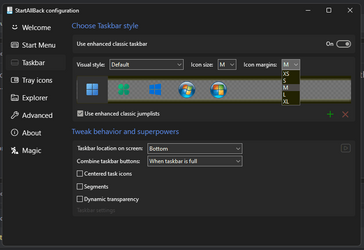
Went back to previous , could not change the distance between the left program-icons in taskbar , in 3.7.0 they went to the centre almost ..........
 

My Computers My Computers

  • At a glance

    Windows11 Pro 25H2i732GBnVidia
    OS
    Windows11 Pro 25H2
    Computer type
    PC/Desktop
    Manufacturer/Model
    Asus
    CPU
    i7
    Motherboard
    z97k
    Memory
    32GB
    Graphics Card(s)
    nVidia
    Sound Card
    Realtek
    Hard Drives
    3
    Cooling
    air
    Browser
    Edge
    Antivirus
    ESET
  • At a glance

    Windows11 ProIntel i516GBIntel
    Operating System
    Windows11 Pro
    Computer type
    PC/Desktop
    Manufacturer/Model
    ASUS
    CPU
    Intel i5
    Motherboard
    ASUS Basic
    Memory
    16GB
    Graphics card(s)
    Intel
    Sound Card
    Realtek
    Monitor(s) Displays
    Samsung
    Hard Drives
    one intern , 0ne extern, OS on SSD
    Cooling
    air
    Keyboard
    wireless Logitech
    Mouse
    wireless Logitech
    Internet Speed
    1GB
    Browser
    Edge
    Antivirus
    ESET
Went back to previous , could not change the distance between the left program-icons in taskbar , in 3.7.0 they went to the centre almost ..........
1701529555121.png
You mean...this ?
 

My Computer My Computer

At a glance

Windows 11
OS
Windows 11
In RC3 the CoPilot Symbol is working well, but in 3.7 stable with the new Symbol in Tasktray the CoPilot does not appear/work when clicking on it ;(
 

My Computers My Computers

  • At a glance

    Windows 11 (Dev Channel)i7-12700KF32 GB Corsair LPX DDR4-3600mhzGigabyte RTX3070 Gaming OC
    OS
    Windows 11 (Dev Channel)
    Computer type
    PC/Desktop
    Manufacturer/Model
    Sananda
    CPU
    i7-12700KF
    Motherboard
    MSI Pro Z690-A
    Memory
    32 GB Corsair LPX DDR4-3600mhz
    Graphics Card(s)
    Gigabyte RTX3070 Gaming OC
    Sound Card
    onboard
    Monitor(s) Displays
    Samsung UE49MU8000TXZG
    Screen Resolution
    3840*2160
    Hard Drives
    Samsung 970 Evo Plus 512GB
    WD Blue SN570 1TB
    PSU
    MSI MPG A750GF
    Case
    Fractal Design Define R5
    Cooling
    ARCTIC Liquid Freezer II 360 A-RGB
    Keyboard
    Logitech K520
    Mouse
    Logitech MX Anywhere 2
    Internet Speed
    80 MBit
    Browser
    Firefox 102.01
    Antivirus
    Windows Defender
  • At a glance

    Windows 11 (Dev Channel)i7-7700HQ16GB DDR4-2400mhzNvidia GTX 1070 8GB
    Operating System
    Windows 11 (Dev Channel)
    Computer type
    Laptop
    Manufacturer/Model
    GE72MVR 7RG Apache Pro
    CPU
    i7-7700HQ
    Motherboard
    MSI 607-179C1-01S
    Memory
    16GB DDR4-2400mhz
    Graphics card(s)
    Nvidia GTX 1070 8GB
    Sound Card
    onboard
    Monitor(s) Displays
    17.3" FHD (1920x1080), IPS-Level
    Screen Resolution
    1920x1080
    Hard Drives
    1x M.2 SSD Combo (NVMe PCIe Gen3 / SATA )
    1x 2.5" SATA HDD
    PSU
    6-Cell 51
    Case
    MSI
    Cooling
    Klim Typhoon
    Keyboard
    Backlight Keyboard mechanical
    Mouse
    MX Anywhere 2
    Internet Speed
    80Mbit
    Browser
    Firefox
    Antivirus
    Defender
In RC3 the CoPilot Symbol is working well, but in 3.7 stable with the new Symbol in Tasktray the CoPilot does not appear/work when clicking on it ;(
I guess you missed the part where it clearly said in the changelog about the Copilot being disabled by default....
 

My Computer My Computer

At a glance

Windows 11
OS
Windows 11
1701531137433.png
 

My Computer My Computer

At a glance

Windows 11, Pro for Workstations, 22631.2861 ...Amd Ryzen 5 5500 ("Zen 3") (3.6GHz,45-65W,L3:...DDR4 OLOy Owl Black, 8GB, 3200MHZ, (x2)Colorful GeForce GTX 1650 Super
OS
Windows 11, Pro for Workstations, 22631.2861 (23H2)
Computer type
PC/Desktop
Manufacturer/Model
Custom
CPU
Amd Ryzen 5 5500 ("Zen 3") (3.6GHz,45-65W,L3:16M,6/12)
Motherboard
Asus Prime B450M Gaming/BR Chipset B450 AMD AM4 mATX DDR4 - BIOS 4002
Memory
DDR4 OLOy Owl Black, 8GB, 3200MHZ, (x2)
Graphics Card(s)
Colorful GeForce GTX 1650 Super
Sound Card
-
Monitor(s) Displays
Philips TV 43PFG5102/78
Screen Resolution
1920x1080
Hard Drives
SSD: 120GB, Sata III, Leitura 560MBs e Gravação 540MBs
HD: Seagate Barracuda 1TB, Sata III, 7200RPM, 64MB
PSU
Corsair ATX CV550 550W, 80 Plus Bronze, PFC Ativo
Case
Wheel Jack, Mid Tower, Vidro Temperado, Black
Cooling
default
Keyboard
common
Mouse
commom
Internet Speed
600mb
Browser
Opera
Antivirus
Windows Defender

My Computers My Computers

  • At a glance

    Windows 11 (Dev Channel)i7-12700KF32 GB Corsair LPX DDR4-3600mhzGigabyte RTX3070 Gaming OC
    OS
    Windows 11 (Dev Channel)
    Computer type
    PC/Desktop
    Manufacturer/Model
    Sananda
    CPU
    i7-12700KF
    Motherboard
    MSI Pro Z690-A
    Memory
    32 GB Corsair LPX DDR4-3600mhz
    Graphics Card(s)
    Gigabyte RTX3070 Gaming OC
    Sound Card
    onboard
    Monitor(s) Displays
    Samsung UE49MU8000TXZG
    Screen Resolution
    3840*2160
    Hard Drives
    Samsung 970 Evo Plus 512GB
    WD Blue SN570 1TB
    PSU
    MSI MPG A750GF
    Case
    Fractal Design Define R5
    Cooling
    ARCTIC Liquid Freezer II 360 A-RGB
    Keyboard
    Logitech K520
    Mouse
    Logitech MX Anywhere 2
    Internet Speed
    80 MBit
    Browser
    Firefox 102.01
    Antivirus
    Windows Defender
  • At a glance

    Windows 11 (Dev Channel)i7-7700HQ16GB DDR4-2400mhzNvidia GTX 1070 8GB
    Operating System
    Windows 11 (Dev Channel)
    Computer type
    Laptop
    Manufacturer/Model
    GE72MVR 7RG Apache Pro
    CPU
    i7-7700HQ
    Motherboard
    MSI 607-179C1-01S
    Memory
    16GB DDR4-2400mhz
    Graphics card(s)
    Nvidia GTX 1070 8GB
    Sound Card
    onboard
    Monitor(s) Displays
    17.3" FHD (1920x1080), IPS-Level
    Screen Resolution
    1920x1080
    Hard Drives
    1x M.2 SSD Combo (NVMe PCIe Gen3 / SATA )
    1x 2.5" SATA HDD
    PSU
    6-Cell 51
    Case
    MSI
    Cooling
    Klim Typhoon
    Keyboard
    Backlight Keyboard mechanical
    Mouse
    MX Anywhere 2
    Internet Speed
    80Mbit
    Browser
    Firefox
    Antivirus
    Defender
Thought they meant the Icon is being disabled by default and not the copilot itself. Any Idea how to activate copilot after updating to 3.7? thank you :)
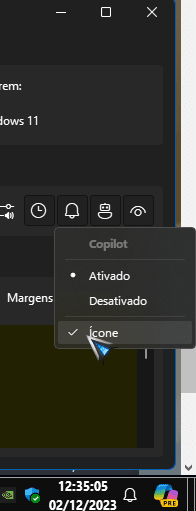
here it is working, the icon can be changed in startallback itself.
just moved to the clock side.
1701531315082.png
 

My Computer My Computer

At a glance

Windows 11, Pro for Workstations, 22631.2861 ...Amd Ryzen 5 5500 ("Zen 3") (3.6GHz,45-65W,L3:...DDR4 OLOy Owl Black, 8GB, 3200MHZ, (x2)Colorful GeForce GTX 1650 Super
OS
Windows 11, Pro for Workstations, 22631.2861 (23H2)
Computer type
PC/Desktop
Manufacturer/Model
Custom
CPU
Amd Ryzen 5 5500 ("Zen 3") (3.6GHz,45-65W,L3:16M,6/12)
Motherboard
Asus Prime B450M Gaming/BR Chipset B450 AMD AM4 mATX DDR4 - BIOS 4002
Memory
DDR4 OLOy Owl Black, 8GB, 3200MHZ, (x2)
Graphics Card(s)
Colorful GeForce GTX 1650 Super
Sound Card
-
Monitor(s) Displays
Philips TV 43PFG5102/78
Screen Resolution
1920x1080
Hard Drives
SSD: 120GB, Sata III, Leitura 560MBs e Gravação 540MBs
HD: Seagate Barracuda 1TB, Sata III, 7200RPM, 64MB
PSU
Corsair ATX CV550 550W, 80 Plus Bronze, PFC Ativo
Case
Wheel Jack, Mid Tower, Vidro Temperado, Black
Cooling
default
Keyboard
common
Mouse
commom
Internet Speed
600mb
Browser
Opera
Antivirus
Windows Defender
here it is working, the icon can be changed in startallback itself.
just moved to the clock side.
View attachment 79776
Strange... there must be something wrong with my windows settings. In RC3 With Icon next to the startbutton copilot is opening for me. In 3.7 with the new icon on the right side the icon is here but does not open the copilot. Maybe it is time for a fresh install for me. Thank you anyways :)
 

My Computers My Computers

  • At a glance

    Windows 11 (Dev Channel)i7-12700KF32 GB Corsair LPX DDR4-3600mhzGigabyte RTX3070 Gaming OC
    OS
    Windows 11 (Dev Channel)
    Computer type
    PC/Desktop
    Manufacturer/Model
    Sananda
    CPU
    i7-12700KF
    Motherboard
    MSI Pro Z690-A
    Memory
    32 GB Corsair LPX DDR4-3600mhz
    Graphics Card(s)
    Gigabyte RTX3070 Gaming OC
    Sound Card
    onboard
    Monitor(s) Displays
    Samsung UE49MU8000TXZG
    Screen Resolution
    3840*2160
    Hard Drives
    Samsung 970 Evo Plus 512GB
    WD Blue SN570 1TB
    PSU
    MSI MPG A750GF
    Case
    Fractal Design Define R5
    Cooling
    ARCTIC Liquid Freezer II 360 A-RGB
    Keyboard
    Logitech K520
    Mouse
    Logitech MX Anywhere 2
    Internet Speed
    80 MBit
    Browser
    Firefox 102.01
    Antivirus
    Windows Defender
  • At a glance

    Windows 11 (Dev Channel)i7-7700HQ16GB DDR4-2400mhzNvidia GTX 1070 8GB
    Operating System
    Windows 11 (Dev Channel)
    Computer type
    Laptop
    Manufacturer/Model
    GE72MVR 7RG Apache Pro
    CPU
    i7-7700HQ
    Motherboard
    MSI 607-179C1-01S
    Memory
    16GB DDR4-2400mhz
    Graphics card(s)
    Nvidia GTX 1070 8GB
    Sound Card
    onboard
    Monitor(s) Displays
    17.3" FHD (1920x1080), IPS-Level
    Screen Resolution
    1920x1080
    Hard Drives
    1x M.2 SSD Combo (NVMe PCIe Gen3 / SATA )
    1x 2.5" SATA HDD
    PSU
    6-Cell 51
    Case
    MSI
    Cooling
    Klim Typhoon
    Keyboard
    Backlight Keyboard mechanical
    Mouse
    MX Anywhere 2
    Internet Speed
    80Mbit
    Browser
    Firefox
    Antivirus
    Defender
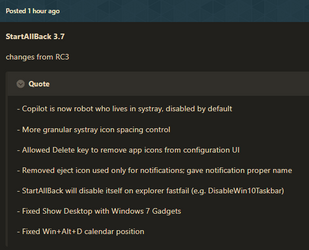
StartAllBack 3.7.0.4840
  • Copilot is now robot who lives in systray, disabled by default
  • More granular systray icon spacing control
  • Allowed Delete key to remove app icons from configuration UI
  • Removed eject icon used only for notifications; gave notification proper name
  • StartAllBack will disable itself on explorer fastfail (e.g. DisableWin10Taskbar)
  • Fixed Show Desktop with Windows 7 Gadgets
  • Fixed Win+Alt+D calendar position
 
Last edited:

My Computer My Computer

At a glance

Windows 11 ProIntel Core i9 12900KFCorsair 64GB DDR5 Vengeance C40 5200MhzASUS GeForce RTX 3090 ROG Strix OC 24GB
OS
Windows 11 Pro
Computer type
PC/Desktop
Manufacturer/Model
Custom Build
CPU
Intel Core i9 12900KF
Motherboard
ASUS ROG Maximus Z690 Hero
Memory
Corsair 64GB DDR5 Vengeance C40 5200Mhz
Graphics Card(s)
ASUS GeForce RTX 3090 ROG Strix OC 24GB
Sound Card
OnBoard
Monitor(s) Displays
Acer Predator XB323UGP 32" QHD G-SYNC-C 144Hz 1MS IPS LED
Screen Resolution
2560 x 1440
Hard Drives
1x Samsung 980 Pro Series Gen4 250GB M.2 NVMe
1x Samsung 980 Pro Series Gen4 500GB M.2 NVMe
2x Samsung 980 Pro Series Gen4 2TB M.2 NVMe
PSU
Corsair AX1200i 1200W 80PLUS Titanium Modular
Case
Corsair 4000D Black Case w/ Tempered Glass Side Panel
Cooling
Noctua NH-U12A Chromax Black CPU Cooler, 4x Noctua 120mm Fans
Keyboard
Logitech MK545
Mouse
Logitech MX Master 3
Internet Speed
Fixed Wireless 150mbps/75mbps
Browser
Firefox
Antivirus
Kaspersky
Other Info
Thrustmaster TS-PC RACER
Fanatec CSL Elite Pedals with the Load Cell Kit
Yamaha Amp with Bose Speakers
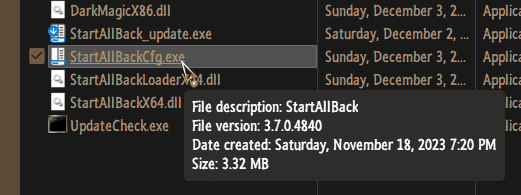
link? i have 3.7 but cant find 3.7.0.4840
 

My Computer My Computer

At a glance

Windows 11 Pro
OS
Windows 11 Pro
btw, the windows 11 calendar flyout keeps the notification box persistent starting with 22h2 due to the integration of the Do Not Disturb link in the top right corner of it. prior to 22h2, that feature was not there, so when you cleared all notifications or turned off notifications the flyout would only display the calendar. so if someone can figure out how to port the 21h2 flyout, we could essentially get it back. just food for thought
 

My Computer My Computer

At a glance

Windows 11 Pro
OS
Windows 11 Pro

My Computers My Computers

  • At a glance

    Windows 11 Pro
    OS
    Windows 11 Pro
    Computer type
    PC/Desktop
    Manufacturer/Model
    ASUS ROG Strix
  • At a glance

    Windows 11 Pro
    Operating System
    Windows 11 Pro
    Computer type
    Laptop
    Manufacturer/Model
    ASUS VivoBook
  • ASUS VivoBook 'Lite' ~ Windows 11 Home
The latest 3.7 is 4840
where do you see that version number? the properties of the exe? (if so, i already deleted that). nothing better than feeling dumb over simple stuff lol
 

My Computer My Computer

At a glance

Windows 11 Pro
OS
Windows 11 Pro
Tested , went back to 3.6.16.4729 , coz too much space between taskbar-icons in latest............... :wink:
 

My Computers My Computers

  • At a glance

    Windows11 Pro 25H2i732GBnVidia
    OS
    Windows11 Pro 25H2
    Computer type
    PC/Desktop
    Manufacturer/Model
    Asus
    CPU
    i7
    Motherboard
    z97k
    Memory
    32GB
    Graphics Card(s)
    nVidia
    Sound Card
    Realtek
    Hard Drives
    3
    Cooling
    air
    Browser
    Edge
    Antivirus
    ESET
  • At a glance

    Windows11 ProIntel i516GBIntel
    Operating System
    Windows11 Pro
    Computer type
    PC/Desktop
    Manufacturer/Model
    ASUS
    CPU
    Intel i5
    Motherboard
    ASUS Basic
    Memory
    16GB
    Graphics card(s)
    Intel
    Sound Card
    Realtek
    Monitor(s) Displays
    Samsung
    Hard Drives
    one intern , 0ne extern, OS on SSD
    Cooling
    air
    Keyboard
    wireless Logitech
    Mouse
    wireless Logitech
    Internet Speed
    1GB
    Browser
    Edge
    Antivirus
    ESET
where do you see that version number?
Yeah..., the downloaded executable doesn't show the Build number but, the installed exe does...

0005812.png
 

My Computers My Computers

  • At a glance

    Windows 11 Pro
    OS
    Windows 11 Pro
    Computer type
    PC/Desktop
    Manufacturer/Model
    ASUS ROG Strix
  • At a glance

    Windows 11 Pro
    Operating System
    Windows 11 Pro
    Computer type
    Laptop
    Manufacturer/Model
    ASUS VivoBook
  • ASUS VivoBook 'Lite' ~ Windows 11 Home

Latest Support Threads

Back
Top Bottom