StartAllBack


StartAllBack: Windows 11 from better timeline​

Get the latest version here Download

Embrace, enhance, unsweep classic UI from under the rug​

Restore and improve taskbar​

  • Show labels on task icons
  • Adjust icon size and margins
  • Move taskbar to top, left or right edges
  • Drag and drop stuff onto taskbar
  • Center task icons but keep Start button on the left
  • Split into segments, use dynamic translucency
  • Separate corner icons with Windows 7/10 UI
  • Auto-hide when covered by maximized window

Restore and improve File Explorer and Control Panel​

  • Ribbon and Command Bar revamped with translucent effects
  • Details pane on bottom
  • Old search box (the one which works)
  • Dark mode support for more dialogs

Restore and improve context menus​

  • All new look with rounded acrylic menus
  • Fast and responsive taskbar menus
  • New fonts, better touch support

Restore and improve start menu​

  • Launch apps and go to system places in one click
  • Navigate dropdown menus like a boss
  • Enjoy fast and reliable search

Finally, lightweight styling and UI consistency​

  • Enjoy Windows 7, Windows 8 and third-party taskbar and start menu styles
  • Fix UI inconsistencies in Win32 apps
  • Don't be blue: recolor UI in all windows apps
  • Negative resource usage: fewer RAM used, fewer processes started, faster startup



StartAllBack For Windows 11 has been released.
It's an RC release. I haven't tested it yet as I have Start11 installed.

Edit: I have now tested it. It's working quite well.
Apart from a great start menu, you can also have the Enhanced Classic Taskbar back.
This means (for example) that you can have an uncombined and unlocked Taskbar.
You will now also be able to enhance the Taskbar clock using T-Clock Redux or similar.

T-Clock Redux Tray Clock_.png

You can also change Windows Explorer to Ribbon UI or Simple UI.

You can get it Download


01 - Welcome.png
02 - Start Menu.png
04 - Taskbar.png
05 - Explorer.png
06 - Advanced.png
Get
 
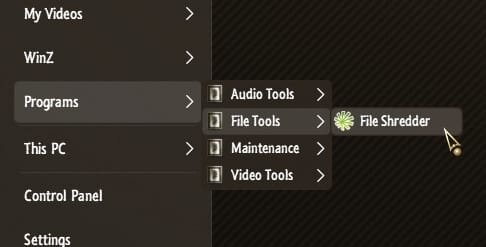
... any idea how I can do that?
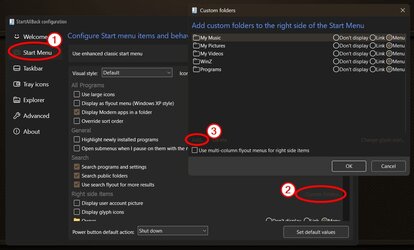
Just create a folder structure, and add shortcuts to the folders in a manner that won't overflow your screen...

0005980.jpg

... then pin the folder via Custom folders...

0005981.jpg
 

My Computers My Computers

  • At a glance

    Windows 11 Pro
    OS
    Windows 11 Pro
    Computer type
    PC/Desktop
    Manufacturer/Model
    ASUS ROG Strix
  • At a glance

    Windows 11 Pro
    Operating System
    Windows 11 Pro
    Computer type
    Laptop
    Manufacturer/Model
    ASUS VivoBook
  • ASUS VivoBook 'Lite' ~ Windows 11 Home
Apparently, version 3.7.2.4854 has been released... but, I have no idea if there are any changes and/or improvements.
 

My Computer My Computer

At a glance

Windows 11 25H2 Pro (RP Build 26200.8968)
OS
Windows 11 25H2 Pro (RP Build 26200.8968)
Computer type
PC/Desktop
Manufacturer/Model
Alienware
" version 3.7.2.4854 has been released. "..............yes, installed over the previous , did not encounter any changes .............. :unsure:
 

My Computers My Computers

  • At a glance

    Windows11 Pro 25H2i732GBnVidia
    OS
    Windows11 Pro 25H2
    Computer type
    PC/Desktop
    Manufacturer/Model
    Asus
    CPU
    i7
    Motherboard
    z97k
    Memory
    32GB
    Graphics Card(s)
    nVidia
    Sound Card
    Realtek
    Hard Drives
    3
    Cooling
    air
    Browser
    Edge
    Antivirus
    ESET
  • At a glance

    Windows11 ProIntel i516GBIntel
    Operating System
    Windows11 Pro
    Computer type
    PC/Desktop
    Manufacturer/Model
    ASUS
    CPU
    Intel i5
    Motherboard
    ASUS Basic
    Memory
    16GB
    Graphics card(s)
    Intel
    Sound Card
    Realtek
    Monitor(s) Displays
    Samsung
    Hard Drives
    one intern , 0ne extern, OS on SSD
    Cooling
    air
    Keyboard
    wireless Logitech
    Mouse
    wireless Logitech
    Internet Speed

    1GB
    Browser
    Edge
    Antivirus
    ESET
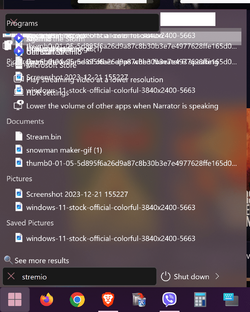
Hi guys, have problems with search in start menu, here is the pic, search is kind a scrambled, can't see what it's listing when typing something to search.1.png

 

My Computer My Computer

At a glance

win 11i5 13600k16 gbintel uhd 770
OS
win 11
Computer type
PC/Desktop
CPU
i5 13600k
Motherboard
Gigaybte B660m ds3h
Memory
16 gb
Graphics Card(s)
intel uhd 770
Hi guys, just wondering if there is any fix for windows 7 style Taskbar color in Tray icon area, looks a bit darker than the rest of the Taskbar,

it looks like this :
Screenshot 2023-12-24 155414h.png

default style looks consistent like this :
Screenshot 2023-12-24 161042.png
 
Last edited:

My Computers My Computers

  • At a glance

    Windows 11 22H2 Build 22621.4112 KB5041587Ryzen 7 4800H16GB DDR4 3200MHzRTX 3050 Ti Mobile
    OS
    Windows 11 22H2 Build 22621.4112 KB5041587
    Computer type
    Laptop
    Manufacturer/Model
    ASUS TUF GAMING A15
    CPU
    Ryzen 7 4800H
    Motherboard
    FA506IEB
    Memory
    16GB DDR4 3200MHz
    Graphics Card(s)
    RTX 3050 Ti Mobile
    Sound Card
    Realtek HD Audio 192000Hz
    Monitor(s) Displays
    Laptop Display 144Hz
    Screen Resolution
    1080p
    Hard Drives
    Samsung 970 Evo 512GB M.2 NVME
    Kioxia OEM 512GB M.2 NVME
  • At a glance

    Windows 11 23H2 Build 22631.4112 KB5041587Ryzen 5 3400GCrucial 16GB DDR4 3200MHzRTX 2060
    Operating System
    Windows 11 23H2 Build 22631.4112 KB5041587
    Computer type
    PC/Desktop
    Manufacturer/Model
    ASRock
    CPU
    Ryzen 5 3400G
    Motherboard
    ASRock A320M HDV R3
    Memory
    Crucial 16GB DDR4 3200MHz
    Graphics card(s)
    RTX 2060
    Monitor(s) Displays
    Samsung 24" S33GC 120Hz
    Screen Resolution
    1080P
    Hard Drives
    Samsung Evo 870 500GB Sata SSD
    WD Blue 3.5" HDD 1TB

My Computer My Computer

At a glance

Windows 11, Pro for Workstations, 22631.2861 ...Amd Ryzen 5 5500 ("Zen 3") (3.6GHz,45-65W,L3:...DDR4 OLOy Owl Black, 8GB, 3200MHZ, (x2)Colorful GeForce GTX 1650 Super
OS
Windows 11, Pro for Workstations, 22631.2861 (23H2)
Computer type
PC/Desktop
Manufacturer/Model
Custom
CPU
Amd Ryzen 5 5500 ("Zen 3") (3.6GHz,45-65W,L3:16M,6/12)
Motherboard
Asus Prime B450M Gaming/BR Chipset B450 AMD AM4 mATX DDR4 - BIOS 4002
Memory
DDR4 OLOy Owl Black, 8GB, 3200MHZ, (x2)
Graphics Card(s)
Colorful GeForce GTX 1650 Super
Sound Card
-
Monitor(s) Displays
Philips TV 43PFG5102/78
Screen Resolution
1920x1080
Hard Drives
SSD: 120GB, Sata III, Leitura 560MBs e Gravação 540MBs
HD: Seagate Barracuda 1TB, Sata III, 7200RPM, 64MB
PSU
Corsair ATX CV550 550W, 80 Plus Bronze, PFC Ativo
Case
Wheel Jack, Mid Tower, Vidro Temperado, Black
Cooling
default
Keyboard
common
Mouse
commom
Internet Speed
600mb
Browser
Opera
Antivirus
Windows Defender

My Computers My Computers

  • At a glance

    Windows 11 Pro
    OS
    Windows 11 Pro
    Computer type
    PC/Desktop
    Manufacturer/Model
    ASUS ROG Strix
  • At a glance

    Windows 11 Pro
    Operating System
    Windows 11 Pro
    Computer type
    Laptop
    Manufacturer/Model
    ASUS VivoBook
  • ASUS VivoBook 'Lite' ~ Windows 11 Home
Its Actually StartAllBack 3.7.3.4856 Now
 

My Computer My Computer

At a glance

Windows 11 ProIntel Core i9 12900KFCorsair 64GB DDR5 Vengeance C40 5200MhzASUS GeForce RTX 3090 ROG Strix OC 24GB
OS
Windows 11 Pro
Computer type
PC/Desktop
Manufacturer/Model
Custom Build
CPU
Intel Core i9 12900KF
Motherboard
ASUS ROG Maximus Z690 Hero
Memory
Corsair 64GB DDR5 Vengeance C40 5200Mhz
Graphics Card(s)
ASUS GeForce RTX 3090 ROG Strix OC 24GB
Sound Card
OnBoard
Monitor(s) Displays
Acer Predator XB323UGP 32" QHD G-SYNC-C 144Hz 1MS IPS LED
Screen Resolution
2560 x 1440
Hard Drives
1x Samsung 980 Pro Series Gen4 250GB M.2 NVMe
1x Samsung 980 Pro Series Gen4 500GB M.2 NVMe
2x Samsung 980 Pro Series Gen4 2TB M.2 NVMe
PSU
Corsair AX1200i 1200W 80PLUS Titanium Modular
Case
Corsair 4000D Black Case w/ Tempered Glass Side Panel
Cooling
Noctua NH-U12A Chromax Black CPU Cooler, 4x Noctua 120mm Fans
Keyboard
Logitech MK545
Mouse
Logitech MX Master 3
Internet Speed
Fixed Wireless 150mbps/75mbps
Browser
Firefox
Antivirus
Kaspersky
Other Info
Thrustmaster TS-PC RACER
Fanatec CSL Elite Pedals with the Load Cell Kit
Yamaha Amp with Bose Speakers

My Computers My Computers

  • At a glance

    Windows 11 Pro
    OS
    Windows 11 Pro
    Computer type
    PC/Desktop
    Manufacturer/Model
    ASUS ROG Strix
  • At a glance

    Windows 11 Pro
    Operating System
    Windows 11 Pro
    Computer type
    Laptop
    Manufacturer/Model
    ASUS VivoBook
  • ASUS VivoBook 'Lite' ~ Windows 11 Home
search still scrambled,.. look pic above..
 

My Computer My Computer

At a glance

win 11i5 13600k16 gbintel uhd 770
OS
win 11
Computer type
PC/Desktop
CPU
i5 13600k
Motherboard
Gigaybte B660m ds3h
Memory
16 gb
Graphics Card(s)
intel uhd 770

My Computers My Computers

  • At a glance

    Windows 11 Pro
    OS
    Windows 11 Pro
    Computer type
    PC/Desktop
    Manufacturer/Model
    ASUS ROG Strix
  • At a glance

    Windows 11 Pro
    Operating System
    Windows 11 Pro
    Computer type
    Laptop
    Manufacturer/Model
    ASUS VivoBook
  • ASUS VivoBook 'Lite' ~ Windows 11 Home
What Menu are you using?
Proper 11, but what is weird, i changed to remastered 7, tried windows 10 and click again on proper 11 and search is looking good now.
 

My Computer My Computer

At a glance

win 11i5 13600k16 gbintel uhd 770
OS
win 11
Computer type
PC/Desktop
CPU
i5 13600k
Motherboard
Gigaybte B660m ds3h
Memory
16 gb
Graphics Card(s)
intel uhd 770
Proper 11, but what is weird, i changed to remastered 7, tried windows 10 and click again on proper 11 and search is looking good now.
Yeah..., occasionally software needs a kick in the a**!
Keep an eye on it! (y)
 

My Computers My Computers

  • At a glance

    Windows 11 Pro
    OS
    Windows 11 Pro
    Computer type
    PC/Desktop
    Manufacturer/Model
    ASUS ROG Strix
  • At a glance

    Windows 11 Pro
    Operating System
    Windows 11 Pro
    Computer type
    Laptop
    Manufacturer/Model
    ASUS VivoBook
  • ASUS VivoBook 'Lite' ~ Windows 11 Home
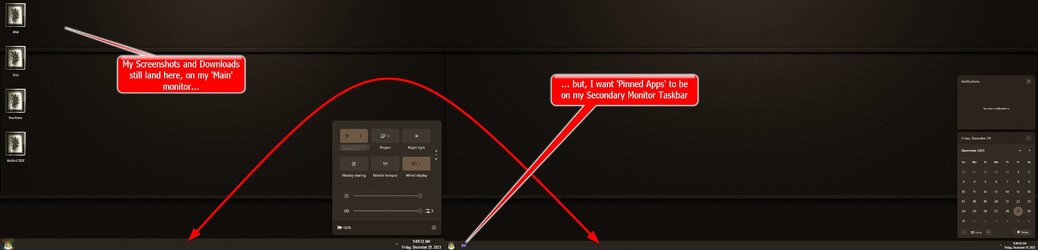
With SAB, the Unlock/Flip N Swap Taskbars thing still works in 26016.1012,
the only thing is, when invoking Control Center from the auxiliary monitor, it opens on the main monitor... 🤷‍♂️

0006049.jpg
 

My Computers My Computers

  • At a glance

    Windows 11 Pro
    OS
    Windows 11 Pro
    Computer type
    PC/Desktop
    Manufacturer/Model
    ASUS ROG Strix
  • At a glance

    Windows 11 Pro
    Operating System
    Windows 11 Pro
    Computer type
    Laptop
    Manufacturer/Model
    ASUS VivoBook
  • ASUS VivoBook 'Lite' ~ Windows 11 Home
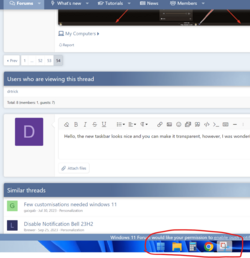
Hello, the new taskbar looks nice and you can make it transparent, however, I was wondering if we could get the taskbar to stay as an overlay on top of all apps, browsers, and so on.
Thank you
 

Attachments

  • Screenshot 2024-01-07 204607.png
    Screenshot 2024-01-07 204607.png
    85.8 KB · Views: 3

My Computer My Computer

At a glance

Windows 11
OS
Windows 11
That should be the stardard mode, so no transparency...
You should be able to switch off "Dynamic transparency" in the taskbar settings of StartAllBack:

001624.gif

Or do you have a different problem?
In that case please specify exactly what problem and post a screenprint of your taskbar settings of StartAllBack.

Is StartAllBack the only taskbar tweaking program you use or something else too?
 

My Computer My Computer

At a glance

Windows 11 Pro 25H2AMD Ryzen 7 5700GKingston FURY Beast 2x16GB DIMM DDR4 2666 CL16MSI GeForce GT 730 2GB LP V1
OS
Windows 11 Pro 25H2
Computer type
PC/Desktop
Manufacturer/Model
Build by vendor to my specs
CPU
AMD Ryzen 7 5700G
Motherboard
MSI PRO B550M-P Gen3
Memory
Kingston FURY Beast 2x16GB DIMM DDR4 2666 CL16
Graphics Card(s)
MSI GeForce GT 730 2GB LP V1
Sound Card
Creative Sound Blaster Audigy FX
Monitor(s) Displays
Samsung S24E450F 24"
Screen Resolution
1920 x 1080
Hard Drives
1. SSD Crucial P5 Plus 500GB PCIe M.2
2. SSD-SATA Crucial MX500-2TB
PSU
Corsair CV650W
Case
Cooler Master Silencio S400
Cooling
Cooler Master Hyper H412R with Be Quiet Pure Wings 2 PWM BL038 fan
Keyboard
Cherry Stream (wired, scissor keys)
Mouse
Asus WT465 (wireless)
Internet Speed
70 Mbps down / 80 Mbps up
Browser
Firefox 130.0
Antivirus
F-Secure (Internetprovider version)
Other Info
Router: FRITZBox 7490
Oracle VirtualBox 7 for testing software on Win 10 or 11
Do you have GeForce drivers?
 

My Computer My Computer

At a glance

Windows 11 Pro
OS
Windows 11 Pro
Anyone having this problem? -> Weather widget not showing on taskbar.

The generic widgets icon is showing but not the weather widget specifically. No problem if I uninstall SAB. :think:
 
Last edited:

My Computer My Computer

At a glance

Windows 11 Pro 25H2 26200.7840Intel Core i3-8145U16GB
OS
Windows 11 Pro 25H2 26200.7840
Computer type
Laptop
Manufacturer/Model
Lenovo IdeaPad L340
CPU
Intel Core i3-8145U
Memory
16GB
Hard Drives
500 GB M2 1 TB HDD
Internet Speed
400 MB
Browser
Chrome | Edge
Antivirus
Microsoft Defender | Block unknown executables | Various ASR rules enabled | Smart App Control
That should be the stardard mode, so no transparency...
You should be able to switch off "Dynamic transparency" in the taskbar settings of StartAllBack:

View attachment 83417

Or do you have a different problem?
In that case please specify exactly what problem and post a screenprint of your taskbar settings of StartAllBack.

Is StartAllBack the only taskbar tweaking program you use or something else too?
Let me explain. I like the clear taskbar feature a lot. When I use a browser or any software Photoshop, etc. I want the window of the browser or application to go all the way to the bottom beyond the taskbar icons, leaving taskbar icons floating on top. How can I do that?
 

Attachments

  • Not floating on top.png
    Not floating on top.png
    69.8 KB · Views: 3
  • Floating on top always.jpg
    Floating on top always.jpg
    153.4 KB · Views: 3

My Computer My Computer

At a glance

Windows 11
OS
Windows 11
I want the window of the browser or application to go all the way to the bottom beyond the taskbar icons, leaving taskbar icons floating on top. How can I do that?
Set the effect to Clear, Saturation to 0%...,
then, you'll have to manually size every application window, however, not all apps will re-open to the custom size...
... and, it will only apply to the Main monitor.

0006149.jpg
 

My Computers My Computers

  • At a glance

    Windows 11 Pro
    OS
    Windows 11 Pro
    Computer type
    PC/Desktop
    Manufacturer/Model
    ASUS ROG Strix
  • At a glance

    Windows 11 Pro
    Operating System
    Windows 11 Pro
    Computer type
    Laptop
    Manufacturer/Model
    ASUS VivoBook
  • ASUS VivoBook 'Lite' ~ Windows 11 Home
Back
Top Bottom