StartAllBack


StartAllBack: Windows 11 from better timeline​

Get the latest version here Download

Embrace, enhance, unsweep classic UI from under the rug​

Restore and improve taskbar​

  • Show labels on task icons
  • Adjust icon size and margins
  • Move taskbar to top, left or right edges
  • Drag and drop stuff onto taskbar
  • Center task icons but keep Start button on the left
  • Split into segments, use dynamic translucency
  • Separate corner icons with Windows 7/10 UI
  • Auto-hide when covered by maximized window

Restore and improve File Explorer and Control Panel​

  • Ribbon and Command Bar revamped with translucent effects
  • Details pane on bottom
  • Old search box (the one which works)
  • Dark mode support for more dialogs

Restore and improve context menus​

  • All new look with rounded acrylic menus
  • Fast and responsive taskbar menus
  • New fonts, better touch support

Restore and improve start menu​

  • Launch apps and go to system places in one click
  • Navigate dropdown menus like a boss
  • Enjoy fast and reliable search

Finally, lightweight styling and UI consistency​

  • Enjoy Windows 7, Windows 8 and third-party taskbar and start menu styles
  • Fix UI inconsistencies in Win32 apps
  • Don't be blue: recolor UI in all windows apps
  • Negative resource usage: fewer RAM used, fewer processes started, faster startup



StartAllBack For Windows 11 has been released.
It's an RC release. I haven't tested it yet as I have Start11 installed.

Edit: I have now tested it. It's working quite well.
Apart from a great start menu, you can also have the Enhanced Classic Taskbar back.
This means (for example) that you can have an uncombined and unlocked Taskbar.
You will now also be able to enhance the Taskbar clock using T-Clock Redux or similar.

T-Clock Redux Tray Clock_.png

You can also change Windows Explorer to Ribbon UI or Simple UI.

You can get it Download


01 - Welcome.png
02 - Start Menu.png
04 - Taskbar.png
05 - Explorer.png
06 - Advanced.png
Get
 
9957.webp
 

My Computers My Computers

  • At a glance

    Windows 11 Pro
    OS
    Windows 11 Pro
    Computer type
    PC/Desktop
    Manufacturer/Model
    ASUS ROG Strix
  • At a glance

    Windows 11 Pro
    Operating System
    Windows 11 Pro
    Computer type
    Laptop
    Manufacturer/Model
    ASUS VivoBook
  • ASUS VivoBook 'Lite' ~ Windows 11 Home
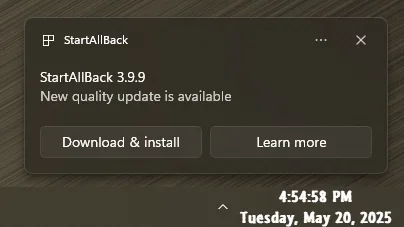
Don't go to the site to fetch it, you'll get 3.9.8!

9960.webp
 

My Computers My Computers

  • At a glance

    Windows 11 Pro
    OS
    Windows 11 Pro
    Computer type
    PC/Desktop
    Manufacturer/Model
    ASUS ROG Strix
  • At a glance

    Windows 11 Pro
    Operating System
    Windows 11 Pro
    Computer type
    Laptop
    Manufacturer/Model
    ASUS VivoBook
  • ASUS VivoBook 'Lite' ~ Windows 11 Home
StartAllBack 3.9.9.5271 (Stable)
Compatibility Fix for Dev/Beta/Release Preview


My Computer My Computer

At a glance

Windows 11 ProIntel Core i9 12900KFCorsair 64GB DDR5 Vengeance C40 5200MhzASUS GeForce RTX 3090 ROG Strix OC 24GB
OS
Windows 11 Pro
Computer type
PC/Desktop
Manufacturer/Model
Custom Build
CPU
Intel Core i9 12900KF
Motherboard
ASUS ROG Maximus Z690 Hero
Memory
Corsair 64GB DDR5 Vengeance C40 5200Mhz
Graphics Card(s)
ASUS GeForce RTX 3090 ROG Strix OC 24GB
Sound Card
OnBoard
Monitor(s) Displays
Acer Predator XB323UGP 32" QHD G-SYNC-C 144Hz 1MS IPS LED
Screen Resolution
2560 x 1440
Hard Drives
1x Samsung 980 Pro Series Gen4 250GB M.2 NVMe
1x Samsung 980 Pro Series Gen4 500GB M.2 NVMe
2x Samsung 980 Pro Series Gen4 2TB M.2 NVMe
PSU
Corsair AX1200i 1200W 80PLUS Titanium Modular
Case
Corsair 4000D Black Case w/ Tempered Glass Side Panel
Cooling
Noctua NH-U12A Chromax Black CPU Cooler, 4x Noctua 120mm Fans
Keyboard
Logitech MK545
Mouse
Logitech MX Master 3
Internet Speed
Fixed Wireless 150mbps/75mbps
Browser
Firefox
Antivirus
Kaspersky
Other Info
Thrustmaster TS-PC RACER
Fanatec CSL Elite Pedals with the Load Cell Kit
Yamaha Amp with Bose Speakers
Win 10 Ribbon Problem with Paste Icon

Windows 11 Pro
Version 24H2
2025-05 Cumulative Update for Windows 11 Version 24H2 for x64-based Systems (KB5058411)
StartAllBack 3.9.9

I am using the Win10 Ribbon UI
There is a problem using the Paste icon on the ribbon. I click copy on the ribbon or even use a cntl-c and the Paste icon is greyed out.
I haven't seen this problem posted before.
 

My Computer My Computer

At a glance

Windows 11 ProIntel(R) Core(TM) i7-9700K CPU @ 3.60GHz 3.60...32GBNVIDIA GeForce RTX 2070 SUPER
OS
Windows 11 Pro
Computer type
PC/Desktop
Manufacturer/Model
Custom build
CPU
Intel(R) Core(TM) i7-9700K CPU @ 3.60GHz 3.60 GHz
Motherboard
Z230 AORUS Pro
Memory
32GB
Graphics Card(s)
NVIDIA GeForce RTX 2070 SUPER
Sound Card
System
Monitor(s) Displays
ASUS VS247H-P 23.6
Screen Resolution
1920X1080
Hard Drives
2 TB SSD, 7 TB HD
PSU
750 watt
Case
Phanteks Eclipse P400
Cooling
Water
Keyboard
Logitech wireless
Mouse
Logitech wireless
Internet Speed
500 Mbps
Browser
Firefox
Antivirus
Windows Defender
Vorrei sapere se questo programma può essere usato solo per aggiungere il tema scuro alle finestre incongruenti di sistema, come Gestione dispositivi ecc., o anche copia file ecc. Il resto come menu start o explorer vorrei lasciarli inalterati perché li ho già modificati con Windhawk e DWMBlurGlass.
 

My Computer My Computer

At a glance

Windows 11 Pro
OS
Windows 11 Pro
Computer type
PC/Desktop
Manufacturer/Model
Acer
What do I do when I restart my computer and startallback isn't running? The only way I can find is to install it again! There's no command to start the program!
 

My Computer My Computer

At a glance

Windows 11 Professional (not the cut down rub...Ryzen 9 3900XT (on this one anyway, I have 8)72G and 72GB and 64GB and 32GB and 32GB and 8...Fury and 12 Tahitis
OS
Windows 11 Professional (not the cut down rubbish)
Computer type
PC/Desktop
Manufacturer/Model
Home built, of course
CPU
Ryzen 9 3900XT (on this one anyway, I have 8)
Motherboard
MSI X470 Gaming Plus Max
Memory
72G and 72GB and 64GB and 32GB and 32GB and 8GB and 8GB and 8GB
Graphics Card(s)
Fury and 12 Tahitis
Sound Card
People still use cards for those?
Monitor(s) Displays
7 of them.
Screen Resolution
All sorts.
Hard Drives
1TB NVME, 4TB rust spinner
PSU
Several kW
Case
Unimportant
Cooling
Big Zalman 6 inch thing
Keyboard
Really?
Mouse
Yes
Internet Speed
32Mbit/7Mbit
Browser
Opera
Antivirus
AVG
Other Info
[Crosses legs] Exactly what info are you looking for?
What do I do when I restart my computer and startallback isn't running? The only way I can find is to install it again! There's no command to start the program!
Try Control Panel. Should be there!
 

My Computer My Computer

At a glance

Windows 11 Pro Insider Preview Version 29595....AMD Ryzen 5 3550H with Radeon Vega Mobile Gfx16GBAMD Radeon(TM) Vega 8 Graphics
OS
Windows 11 Pro Insider Preview Version 29595.1000
Computer type
PC/Desktop
Manufacturer/Model
Minisforum
CPU
AMD Ryzen 5 3550H with Radeon Vega Mobile Gfx
Motherboard
Manufacturer: BESSTAR TECH LIMITED
Memory
16GB
Graphics Card(s)
AMD Radeon(TM) Vega 8 Graphics
Sound Card
Sound Card AMD High Definition Audio Device
Monitor(s) Displays
My TV
Screen Resolution
Resolution: 1920 * 1080 pixels
Keyboard
Microsoft Wireless
Browser
Vivaldi
Antivirus
Symantec
That only takes me to the settings, which are displayed ok. But it doesn't restart the program which is needed when it's not working. The taskbar and start menu revert to the windows one, and I need to restart startallback to get it working again. I can find no way to do this.
 

My Computer My Computer

At a glance

Windows 11 Professional (not the cut down rub...Ryzen 9 3900XT (on this one anyway, I have 8)72G and 72GB and 64GB and 32GB and 32GB and 8...Fury and 12 Tahitis
OS
Windows 11 Professional (not the cut down rubbish)
Computer type
PC/Desktop
Manufacturer/Model
Home built, of course
CPU
Ryzen 9 3900XT (on this one anyway, I have 8)
Motherboard
MSI X470 Gaming Plus Max
Memory
72G and 72GB and 64GB and 32GB and 32GB and 8GB and 8GB and 8GB
Graphics Card(s)
Fury and 12 Tahitis
Sound Card
People still use cards for those?
Monitor(s) Displays
7 of them.
Screen Resolution
All sorts.
Hard Drives
1TB NVME, 4TB rust spinner
PSU
Several kW
Case
Unimportant
Cooling
Big Zalman 6 inch thing
Keyboard
Really?
Mouse
Yes
Internet Speed
32Mbit/7Mbit
Browser
Opera
Antivirus
AVG
Other Info
[Crosses legs] Exactly what info are you looking for?
That only takes me to the settings, which are displayed ok. But it doesn't restart the program which is needed when it's not working. The taskbar and start menu revert to the windows one, and I need to restart startallback to get it working again. I can find no way to do this.
Sorry mate, I thought you couldn't find it at all!
 

My Computer My Computer

At a glance

Windows 11 Pro Insider Preview Version 29595....AMD Ryzen 5 3550H with Radeon Vega Mobile Gfx16GBAMD Radeon(TM) Vega 8 Graphics
OS
Windows 11 Pro Insider Preview Version 29595.1000
Computer type
PC/Desktop
Manufacturer/Model
Minisforum
CPU
AMD Ryzen 5 3550H with Radeon Vega Mobile Gfx
Motherboard
Manufacturer: BESSTAR TECH LIMITED
Memory
16GB
Graphics Card(s)
AMD Radeon(TM) Vega 8 Graphics
Sound Card
Sound Card AMD High Definition Audio Device
Monitor(s) Displays
My TV
Screen Resolution
Resolution: 1920 * 1080 pixels
Keyboard
Microsoft Wireless
Browser
Vivaldi
Antivirus
Symantec
I've updated form 3.9.4 to 3.9.9 (and the update as usual restarted it, so it's ok now. Perhaps this will work better as reinstalling 3.9.4 didn't work this time. I suspect MS have been fcuking about again and startallback have to get round it.
 

My Computer My Computer

At a glance

Windows 11 Professional (not the cut down rub...Ryzen 9 3900XT (on this one anyway, I have 8)72G and 72GB and 64GB and 32GB and 32GB and 8...Fury and 12 Tahitis
OS
Windows 11 Professional (not the cut down rubbish)
Computer type
PC/Desktop
Manufacturer/Model
Home built, of course
CPU
Ryzen 9 3900XT (on this one anyway, I have 8)
Motherboard
MSI X470 Gaming Plus Max
Memory
72G and 72GB and 64GB and 32GB and 32GB and 8GB and 8GB and 8GB
Graphics Card(s)
Fury and 12 Tahitis
Sound Card
People still use cards for those?
Monitor(s) Displays
7 of them.
Screen Resolution
All sorts.
Hard Drives
1TB NVME, 4TB rust spinner
PSU
Several kW
Case
Unimportant
Cooling
Big Zalman 6 inch thing
Keyboard
Really?
Mouse
Yes
Internet Speed
32Mbit/7Mbit
Browser
Opera
Antivirus
AVG
Other Info
[Crosses legs] Exactly what info are you looking for?
I've updated form 3.9.4 to 3.9.9 (and the update as usual restarted it, so it's ok now. Perhaps this will work better as reinstalling 3.9.4 didn't work this time. I suspect MS have been fcuking about again and startallback have to get round it.
Yup, after every update/upgrade my SAB is usually F'ed! All the best, glad it's working. 👍
 

My Computer My Computer

At a glance

Windows 11 Pro Insider Preview Version 29595....AMD Ryzen 5 3550H with Radeon Vega Mobile Gfx16GBAMD Radeon(TM) Vega 8 Graphics
OS
Windows 11 Pro Insider Preview Version 29595.1000
Computer type
PC/Desktop
Manufacturer/Model
Minisforum
CPU
AMD Ryzen 5 3550H with Radeon Vega Mobile Gfx
Motherboard
Manufacturer: BESSTAR TECH LIMITED
Memory
16GB
Graphics Card(s)
AMD Radeon(TM) Vega 8 Graphics
Sound Card
Sound Card AMD High Definition Audio Device
Monitor(s) Displays
My TV
Screen Resolution
Resolution: 1920 * 1080 pixels
Keyboard
Microsoft Wireless
Browser
Vivaldi
Antivirus
Symantec
I made a suggestion through MS feedback to include all the startallback features in their own screwed up start menu, just like they were included in previous versions of windows. Their effort to simplify windows down to the level of Mac users is all very well, but there's no harm in giving us normal people options which the mac users don't have to touch. Which is I guess why we have the old control panel as well as the fluffy new useless settings.
 

My Computer My Computer

At a glance

Windows 11 Professional (not the cut down rub...Ryzen 9 3900XT (on this one anyway, I have 8)72G and 72GB and 64GB and 32GB and 32GB and 8...Fury and 12 Tahitis
OS
Windows 11 Professional (not the cut down rubbish)
Computer type
PC/Desktop
Manufacturer/Model
Home built, of course
CPU
Ryzen 9 3900XT (on this one anyway, I have 8)
Motherboard
MSI X470 Gaming Plus Max
Memory
72G and 72GB and 64GB and 32GB and 32GB and 8GB and 8GB and 8GB
Graphics Card(s)
Fury and 12 Tahitis
Sound Card
People still use cards for those?
Monitor(s) Displays
7 of them.
Screen Resolution
All sorts.
Hard Drives
1TB NVME, 4TB rust spinner
PSU
Several kW
Case
Unimportant
Cooling
Big Zalman 6 inch thing
Keyboard
Really?
Mouse
Yes
Internet Speed
32Mbit/7Mbit
Browser
Opera
Antivirus
AVG
Other Info
[Crosses legs] Exactly what info are you looking for?
I made a suggestion through MS feedback to include all the startallback features in their own screwed up start menu, just like they were included in previous versions of windows. Their effort to simplify windows down to the level of Mac users is all very well, but there's no harm in giving us normal people options which the mac users don't have to touch. Which is I guess why we have the old control panel as well as the fluffy new useless settings.
They'll never listen! I just learned to accept it, and after some tinkering it's mostly alright again.
 

My Computer My Computer

At a glance

Windows 11 Pro Insider Preview Version 29595....AMD Ryzen 5 3550H with Radeon Vega Mobile Gfx16GBAMD Radeon(TM) Vega 8 Graphics
OS
Windows 11 Pro Insider Preview Version 29595.1000
Computer type
PC/Desktop
Manufacturer/Model
Minisforum
CPU
AMD Ryzen 5 3550H with Radeon Vega Mobile Gfx
Motherboard
Manufacturer: BESSTAR TECH LIMITED
Memory
16GB
Graphics Card(s)
AMD Radeon(TM) Vega 8 Graphics
Sound Card
Sound Card AMD High Definition Audio Device
Monitor(s) Displays
My TV
Screen Resolution
Resolution: 1920 * 1080 pixels
Keyboard
Microsoft Wireless
Browser
Vivaldi
Antivirus
Symantec
They do read feedbacks. If enough people mention something it gets done.

In the meantime I guess we just keep updating startallback and hope they keep up with MS's thwarts.

As for it crashing, startallback should make it possible to load or reload the program. There is no executable file I can find to start it, looks like a dll?! Put something in the start menu to call it to restart? It's the only app I've ever known which has no way to start it!
 

My Computer My Computer

At a glance

Windows 11 Professional (not the cut down rub...Ryzen 9 3900XT (on this one anyway, I have 8)72G and 72GB and 64GB and 32GB and 32GB and 8...Fury and 12 Tahitis
OS
Windows 11 Professional (not the cut down rubbish)
Computer type
PC/Desktop
Manufacturer/Model
Home built, of course
CPU
Ryzen 9 3900XT (on this one anyway, I have 8)
Motherboard
MSI X470 Gaming Plus Max
Memory
72G and 72GB and 64GB and 32GB and 32GB and 8GB and 8GB and 8GB
Graphics Card(s)
Fury and 12 Tahitis
Sound Card
People still use cards for those?
Monitor(s) Displays
7 of them.
Screen Resolution
All sorts.
Hard Drives
1TB NVME, 4TB rust spinner
PSU
Several kW
Case
Unimportant
Cooling
Big Zalman 6 inch thing
Keyboard
Really?
Mouse
Yes
Internet Speed
32Mbit/7Mbit
Browser
Opera
Antivirus
AVG
Other Info
[Crosses legs] Exactly what info are you looking for?
That only takes me to the settings, which are displayed ok. But it doesn't restart the program which is needed when it's not working. The taskbar and start menu revert to the windows one, and I need to restart startallback to get it working again. I can find no way to do this.
thats how you enable/disable it... once you check or uncheck that box you have to log off and back on for it to apply

1748530851415.webp
 

My Computer My Computer

At a glance

Windows 11 Pro
OS
Windows 11 Pro
That's of no use. It's already enabled, just crashed or removed by windows. So I still have to log off. You see, any normal app, you just open it!!! In fact to fix it I would have to log off twice! I have programs running!

I do find it amusing startallback is allowed in the MS store. Although I can't get that stupid pointless store to work, I always download from the company's website, the proper way.
 

My Computer My Computer

At a glance

Windows 11 Professional (not the cut down rub...Ryzen 9 3900XT (on this one anyway, I have 8)72G and 72GB and 64GB and 32GB and 32GB and 8...Fury and 12 Tahitis
OS
Windows 11 Professional (not the cut down rubbish)
Computer type
PC/Desktop
Manufacturer/Model
Home built, of course
CPU
Ryzen 9 3900XT (on this one anyway, I have 8)
Motherboard
MSI X470 Gaming Plus Max
Memory
72G and 72GB and 64GB and 32GB and 32GB and 8GB and 8GB and 8GB
Graphics Card(s)
Fury and 12 Tahitis
Sound Card
People still use cards for those?
Monitor(s) Displays
7 of them.
Screen Resolution
All sorts.
Hard Drives
1TB NVME, 4TB rust spinner
PSU
Several kW
Case
Unimportant
Cooling
Big Zalman 6 inch thing
Keyboard
Really?
Mouse
Yes
Internet Speed
32Mbit/7Mbit
Browser
Opera
Antivirus
AVG
Other Info
[Crosses legs] Exactly what info are you looking for?
StartAllBlack on the MS webstore is not the same as the version downloaded from the developer's website. This is also true for most apps on the Store.
 

My Computers My Computers

  • At a glance

    Windows 11 Pro 25H2 26200.8973AMD Ryzen 7 5825U with Radeon Graphics16GB
    OS
    Windows 11 Pro 25H2 26200.8973
    Computer type
    Laptop
    Manufacturer/Model
    Acemagic LX15PRO
    CPU
    AMD Ryzen 7 5825U with Radeon Graphics
    Motherboard
    BIOS CT_BI_AMI_LX15PRO_AB8139_A-004
    Memory
    16GB
    Screen Resolution
    1920 x 1080
    Hard Drives
    SSD 2TB
    Internet Speed
    30 Mbps
    Browser
    Brave
    Antivirus
    Webroot SecureAnywhere Complete beta
  • At a glance

    Windows 11 Pro 23H2 22631.2506Atom N450 1.66GHz2GB
    Operating System
    Windows 11 Pro 23H2 22631.2506
    Computer type
    Laptop
    Manufacturer/Model
    HP Mini 210-1090NR PC (bought in late 2009!)
    CPU
    Atom N450 1.66GHz
    Memory
    2GB
    Browser
    Brave
    Antivirus
    Webroot
  • Acer Swift SF114-34 laptop
    OS Windows 11 Pro 26200.8894
    CPU Pentium Silver N6000
    RAM 4GB
    BIOS v1.17
    SSD Samsung 970 EVO Plus SSD 2TB (an upgrade)
What's different about it? And why would there be a difference? Don't you think this would annoy customers, not getting what they think they're getting?
 

My Computer My Computer

At a glance

Windows 11 Professional (not the cut down rub...Ryzen 9 3900XT (on this one anyway, I have 8)72G and 72GB and 64GB and 32GB and 32GB and 8...Fury and 12 Tahitis
OS
Windows 11 Professional (not the cut down rubbish)
Computer type
PC/Desktop
Manufacturer/Model
Home built, of course
CPU
Ryzen 9 3900XT (on this one anyway, I have 8)
Motherboard
MSI X470 Gaming Plus Max
Memory
72G and 72GB and 64GB and 32GB and 32GB and 8GB and 8GB and 8GB
Graphics Card(s)
Fury and 12 Tahitis
Sound Card
People still use cards for those?
Monitor(s) Displays
7 of them.
Screen Resolution
All sorts.
Hard Drives
1TB NVME, 4TB rust spinner
PSU
Several kW
Case
Unimportant
Cooling
Big Zalman 6 inch thing
Keyboard
Really?
Mouse
Yes
Internet Speed
32Mbit/7Mbit
Browser
Opera
Antivirus
AVG
Other Info
[Crosses legs] Exactly what info are you looking for?
I do have the paid version of this app for 2 PCs (both licenses in use). I just got a new laptop for my daughter and I am wondering if the free version is fully usable? What is the big difference between paid and free versions?
 

My Computers My Computers

  • At a glance

    Windows 11 ProAMD Ryzen 7 9800X3D32GB DDR5 CL30 Kingston FuryASUS Prime Radeon RX 9060 XT OC Edition 16GB
    OS
    Windows 11 Pro
    Computer type
    PC/Desktop
    CPU
    AMD Ryzen 7 9800X3D
    Motherboard
    MSI PRO B850-P Wifi
    Memory
    32GB DDR5 CL30 Kingston Fury
    Graphics Card(s)
    ASUS Prime Radeon RX 9060 XT OC Edition 16GB
    Monitor(s) Displays
    LG Ultrawide 34" 1440p+ MSI 27" 4K UHD
    Screen Resolution
    3440x1440
    Hard Drives
    Main Boot Drive : 512GB Adata XPG RGB Gen3x4 NVMe M.2 SSD
    PSU
    EVGA 750 Watts 80+ Gold
    Case
    Deepcool Genome II
    Cooling
    Thermalright Burst Assassin 120
    Internet Speed
    FTTH 3Gbps
    Browser
    Chrome
    Antivirus
    "Moderna"
  • At a glance

    Windows 11 Proi7-4790K16GB Corsair Vengeance ProMSI R9 290
    Operating System
    Windows 11 Pro
    Computer type
    PC/Desktop
    CPU
    i7-4790K
    Motherboard
    ASRock Xtreme6 Z97
    Memory
    16GB Corsair Vengeance Pro
    Graphics card(s)
    MSI R9 290
    Monitor(s) Displays
    LG Ultrawide 34"
    Screen Resolution
    3440x1440
    Hard Drives
    500GB Adata SSD (OS Only)
    PSU
    Thermaltake 475 Watts 80 Bronze
    Case
    Thermaltake Commander I Snow Edition
    Cooling
    Deep Cool Archer Air Cooler
    Keyboard
    Armageddon MKA-5R RGB-Hornet
    Mouse
    Logitech G402
    Internet Speed
    1Gbps
    Browser
    Chrome
    Antivirus
    Moderna :)
What's different about it? And why would there be a difference? Don't you think this would annoy customers, not getting what they think they're getting?
You could always look it up.

Microsoft Store apps use the MSIX or AppX format — sandboxed, auto-updating, and easier to uninstall cleanly.

Developer-site apps are usually traditional Win32 (.exe or .msi) installers, which can access the system more freely, leave registry entries, and may need manual updates.

Store versions may have reduced features due to sandboxing restrictions (limited file system or registry access).

Direct-download versions often have full functionality, especially if the app relies on low-level system access.
 

My Computers My Computers

  • At a glance

    Windows 11 Pro 25H2 26200.8973AMD Ryzen 7 5825U with Radeon Graphics16GB
    OS
    Windows 11 Pro 25H2 26200.8973
    Computer type
    Laptop
    Manufacturer/Model
    Acemagic LX15PRO
    CPU
    AMD Ryzen 7 5825U with Radeon Graphics
    Motherboard
    BIOS CT_BI_AMI_LX15PRO_AB8139_A-004
    Memory
    16GB
    Screen Resolution
    1920 x 1080
    Hard Drives
    SSD 2TB
    Internet Speed
    30 Mbps
    Browser
    Brave
    Antivirus
    Webroot SecureAnywhere Complete beta
  • At a glance

    Windows 11 Pro 23H2 22631.2506Atom N450 1.66GHz2GB
    Operating System
    Windows 11 Pro 23H2 22631.2506
    Computer type
    Laptop
    Manufacturer/Model
    HP Mini 210-1090NR PC (bought in late 2009!)
    CPU
    Atom N450 1.66GHz
    Memory
    2GB
    Browser
    Brave
    Antivirus
    Webroot
  • Acer Swift SF114-34 laptop
    OS Windows 11 Pro 26200.8894
    CPU Pentium Silver N6000
    RAM 4GB
    BIOS v1.17
    SSD Samsung 970 EVO Plus SSD 2TB (an upgrade)
Back
Top Bottom