StartAllBack


StartAllBack: Windows 11 from better timeline​

Get the latest version here Download

Embrace, enhance, unsweep classic UI from under the rug​

Restore and improve taskbar​

  • Show labels on task icons
  • Adjust icon size and margins
  • Move taskbar to top, left or right edges
  • Drag and drop stuff onto taskbar
  • Center task icons but keep Start button on the left
  • Split into segments, use dynamic translucency
  • Separate corner icons with Windows 7/10 UI
  • Auto-hide when covered by maximized window

Restore and improve File Explorer and Control Panel​

  • Ribbon and Command Bar revamped with translucent effects
  • Details pane on bottom
  • Old search box (the one which works)
  • Dark mode support for more dialogs

Restore and improve context menus​

  • All new look with rounded acrylic menus
  • Fast and responsive taskbar menus
  • New fonts, better touch support

Restore and improve start menu​

  • Launch apps and go to system places in one click
  • Navigate dropdown menus like a boss
  • Enjoy fast and reliable search

Finally, lightweight styling and UI consistency​

  • Enjoy Windows 7, Windows 8 and third-party taskbar and start menu styles
  • Fix UI inconsistencies in Win32 apps
  • Don't be blue: recolor UI in all windows apps
  • Negative resource usage: fewer RAM used, fewer processes started, faster startup



StartAllBack For Windows 11 has been released.
It's an RC release. I haven't tested it yet as I have Start11 installed.

Edit: I have now tested it. It's working quite well.
Apart from a great start menu, you can also have the Enhanced Classic Taskbar back.
This means (for example) that you can have an uncombined and unlocked Taskbar.
You will now also be able to enhance the Taskbar clock using T-Clock Redux or similar.

T-Clock Redux Tray Clock_.png

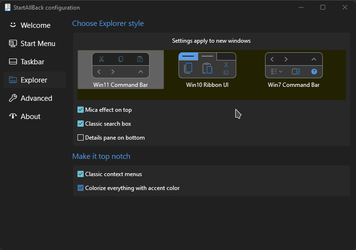
You can also change Windows Explorer to Ribbon UI or Simple UI.

You can get it Download


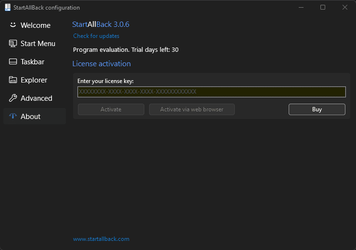
01 - Welcome.png
02 - Start Menu.png
04 - Taskbar.png
05 - Explorer.png
06 - Advanced.png
Get
 

My Computer My Computer

At a glance

Windows 11 22H211th Gen Intel(R) Core(TM) i5-1135G7 @ 2.40GHz16GBIntel(R) Iris(R) Xe Graphics
OS
Windows 11 22H2
Computer type
Laptop
Manufacturer/Model
Lenovo ThinkPad E15 Gen 2
CPU
11th Gen Intel(R) Core(TM) i5-1135G7 @ 2.40GHz
Memory
16GB
Graphics Card(s)
Intel(R) Iris(R) Xe Graphics
Hard Drives
SAMSUNG MZALQ512HALU-000L1 512GB
I'm still on my trial and would like to buy the full version but there is one thing that is really annoying.
When moving the mouse to the lower right corner, the start button is not clickable.

Oh and is there any documentation which format custom start icons must be?
I tried png 256x256, 128x128 and 64x64
 

Attachments

  • AtartAllBackStart Buttond corner.gif
    AtartAllBackStart Buttond corner.gif
    19.9 KB · Views: 6

My Computer My Computer

At a glance

Windows 11
OS
Windows 11

My Computers My Computers

  • At a glance

    Windows 11 Pro
    OS
    Windows 11 Pro
    Computer type
    PC/Desktop
    Manufacturer/Model
    ASUS ROG Strix
  • At a glance

    Windows 11 Pro
    Operating System
    Windows 11 Pro
    Computer type
    Laptop
    Manufacturer/Model
    ASUS VivoBook
  • ASUS VivoBook 'Lite' ~ Windows 11 Home

My Computer My Computer

At a glance

Windows 11 22H211th Gen Intel(R) Core(TM) i5-1135G7 @ 2.40GHz16GBIntel(R) Iris(R) Xe Graphics
OS
Windows 11 22H2
Computer type
Laptop
Manufacturer/Model
Lenovo ThinkPad E15 Gen 2
CPU
11th Gen Intel(R) Core(TM) i5-1135G7 @ 2.40GHz
Memory
16GB
Graphics Card(s)
Intel(R) Iris(R) Xe Graphics
Hard Drives
SAMSUNG MZALQ512HALU-000L1 512GB

My Computer My Computer

At a glance

Windows 11Ryzen 5 360032gb DDR4 - 3200MhzEVGA 2060 Super KO 6GB PCIE 3.0
OS
Windows 11
Computer type
PC/Desktop
Manufacturer/Model
Self Built
CPU
Ryzen 5 3600
Motherboard
ASUS Prime X570-P
Memory
32gb DDR4 - 3200Mhz
Graphics Card(s)
EVGA 2060 Super KO 6GB PCIE 3.0
Sound Card
Realtek S1200A
Monitor(s) Displays
1. LG 34UM68-P 34-Inch 21:9 UltraWide IPS 2. ONN 24-Inch LCD
Screen Resolution
1. 2560 x 1080 2. 1920 x 1080 (side by side 4480 x 1080)
Hard Drives
Samsung 860 EVO 1TB SATA III SSD (OS)
WD BLUE 2TB SATA III (DATA)
WD BLUE 1TB SATA III (DATA)
PSU
Thermaltake Toughpower PF1 750W
Case
Coolermaster HAF XB EVO
Cooling
Corsair 240mm AIO + 4x 120mm case fans
Keyboard
Standard Logitech
Mouse
Logitech M535
Internet Speed
Gigabit (Cable)
Browser
Firefox, Chrome, Edge
Antivirus
Defender

My Computer My Computer

At a glance

Windows 11 22H211th Gen Intel(R) Core(TM) i5-1135G7 @ 2.40GHz16GBIntel(R) Iris(R) Xe Graphics
OS
Windows 11 22H2
Computer type
Laptop
Manufacturer/Model
Lenovo ThinkPad E15 Gen 2
CPU
11th Gen Intel(R) Core(TM) i5-1135G7 @ 2.40GHz
Memory
16GB
Graphics Card(s)
Intel(R) Iris(R) Xe Graphics
Hard Drives
SAMSUNG MZALQ512HALU-000L1 512GB
Hey, love this, made Windows 11 usable.

Small bug: When Dynamic Transparancy is enabled and a app is full screen on another monitor, the main monitors task bar also goes opaque. As I have 3 with my main in the middle, only seems to happen when something is full screen on my left monitor, on my right if an app is fullscreen it works as exptected.

Edit: Another related quirk/bug - if a app on the left monitor touches the top of the display then the main (center) monitors task bar will also turn opaque.
 
Last edited:

My Computer My Computer

At a glance

Windows 11Ryzen 2600X16GB 3200Mhz CL15RTX 2060
OS
Windows 11
Computer type
PC/Desktop
CPU
Ryzen 2600X
Memory
16GB 3200Mhz CL15
Graphics Card(s)
RTX 2060
Hey, love this, made Windows 11 usable.

Small bug: When Dynamic Transparancy is enabled and a app is full screen on another monitor, the main monitors task bar also goes opaque.
Yeah, I noticed that! The whole bar where the thumbnail preview's hover goes opaque!
 

My Computers My Computers

  • At a glance

    Windows 11 Pro
    OS
    Windows 11 Pro
    Computer type
    PC/Desktop
    Manufacturer/Model
    ASUS ROG Strix
  • At a glance

    Windows 11 Pro
    Operating System
    Windows 11 Pro
    Computer type
    Laptop
    Manufacturer/Model
    ASUS VivoBook
  • ASUS VivoBook 'Lite' ~ Windows 11 Home
Version 3.1 ~ November 22, 2021
  • Center start menu with classic taskbar
  • Central segment only (Dock-like) taskbar perk
  • IME mode context menu works with classic taskbar
  • Support for Dev build ~22500
 

My Computers My Computers

  • At a glance

    Windows 11 Pro
    OS
    Windows 11 Pro
    Computer type
    PC/Desktop
    Manufacturer/Model
    ASUS ROG Strix
  • At a glance

    Windows 11 Pro
    Operating System
    Windows 11 Pro
    Computer type
    Laptop
    Manufacturer/Model
    ASUS VivoBook
  • ASUS VivoBook 'Lite' ~ Windows 11 Home
Yep, they seem to have gotten it right.
One click!

View attachment 7663
Hi there
@Edwin

Looks a bit like the XP menu !!!!! -- are you sure you aren't fooling us by running XP !!!!! - Mind you I LIKED the XP menu --IMO the new ones still aren't a patch on the old classic XP menu !!!.

Cheers
jimbo
 

My Computer My Computer

At a glance

Windows XP,11 Linux Fedora Rawhide pre-releas...2 X Intel i7
OS
Windows XP,11 Linux Fedora Rawhide pre-release 45
Computer type
PC/Desktop
CPU
2 X Intel i7
Screen Resolution
4KUHD X 2

My Computers My Computers

  • At a glance

    Windows 11 Pro
    OS
    Windows 11 Pro
    Computer type
    PC/Desktop
    Manufacturer/Model
    ASUS ROG Strix
  • At a glance

    Windows 11 Pro
    Operating System
    Windows 11 Pro
    Computer type
    Laptop
    Manufacturer/Model
    ASUS VivoBook
  • ASUS VivoBook 'Lite' ~ Windows 11 Home

Seems the bug is getting worse after updating, here's a video showing it off:


If any window is open on my left monitor the dynamic transparancy goes full opaque on the main monitor now. The window on the left monitor doesn't have to be in focus for it to happen, just not minimized.
 

My Computer My Computer

At a glance

Windows 11Ryzen 2600X16GB 3200Mhz CL15RTX 2060
OS
Windows 11
Computer type
PC/Desktop
CPU
Ryzen 2600X
Memory
16GB 3200Mhz CL15
Graphics Card(s)
RTX 2060
Version 3.1.2 ~ November 24, 2021

• Minor fixes and tweaks
 

My Computers My Computers

  • At a glance

    Windows 11 Pro
    OS
    Windows 11 Pro
    Computer type
    PC/Desktop
    Manufacturer/Model
    ASUS ROG Strix
  • At a glance

    Windows 11 Pro
    Operating System
    Windows 11 Pro
    Computer type
    Laptop
    Manufacturer/Model
    ASUS VivoBook
  • ASUS VivoBook 'Lite' ~ Windows 11 Home
Seems the bug is getting worse after updating, here's a video showing it off:
If any window is open on my left monitor the dynamic transparancy goes full opaque on the main monitor now. The window on the left monitor doesn't have to be in focus for it to happen, just not minimized.
I can't replicate what you've got going on there! 🤷‍♂️
 

My Computers My Computers

  • At a glance

    Windows 11 Pro
    OS
    Windows 11 Pro
    Computer type
    PC/Desktop
    Manufacturer/Model
    ASUS ROG Strix
  • At a glance

    Windows 11 Pro
    Operating System
    Windows 11 Pro
    Computer type
    Laptop
    Manufacturer/Model
    ASUS VivoBook
  • ASUS VivoBook 'Lite' ~ Windows 11 Home
I can't replicate what you've got going on there! 🤷‍♂️

Happens when 3 monitors are plugged in, showing there is my middle and left one.

Unplugging the right monitor it all works as intended, plugging the right monitor back in the left monitor screws with the middle/main monitor.

Seems to be 50/50 on boot if just having a window open on the left will cause the taskbar to go opaque or stay transparent.
But the other times is when a window is full screen or touching the top of the monitor on the left it goes opaque. So maybe the way you're checking full screen to go opaque is going into the left monitor as its X-Pos is lower than the top left of the middle screen
 

My Computer My Computer

At a glance

Windows 11Ryzen 2600X16GB 3200Mhz CL15RTX 2060
OS
Windows 11
Computer type
PC/Desktop
CPU
Ryzen 2600X
Memory
16GB 3200Mhz CL15
Graphics Card(s)
RTX 2060
Happens when 3 monitors are plugged in, showing there is my middle and left one.

Unplugging the right monitor it all works as intended, plugging the right monitor back in the left monitor screws with the middle/main monitor.

Seems to be 50/50 on boot if just having a window open on the left will cause the taskbar to go opaque or stay transparent.
But the other times is when a window is full screen or touching the top of the monitor on the left it goes opaque. So maybe the way you're checking full screen to go opaque is going into the left monitor as its X-Pos is lower than the top left of the middle screen
Hmmm..., beats me! Maybe check all settings...
 

My Computers My Computers

  • At a glance

    Windows 11 Pro
    OS
    Windows 11 Pro
    Computer type
    PC/Desktop
    Manufacturer/Model
    ASUS ROG Strix
  • At a glance

    Windows 11 Pro
    Operating System
    Windows 11 Pro
    Computer type
    Laptop
    Manufacturer/Model
    ASUS VivoBook
  • ASUS VivoBook 'Lite' ~ Windows 11 Home
Hmmm..., beats me! Maybe check all settings...

Not sure what else I can check, been messing with them trying to sort it for a while as I love the clear segmented look when windowd and the fullscreen look when fullscreen.
 

My Computer My Computer

At a glance

Windows 11Ryzen 2600X16GB 3200Mhz CL15RTX 2060
OS
Windows 11
Computer type
PC/Desktop
CPU
Ryzen 2600X
Memory
16GB 3200Mhz CL15
Graphics Card(s)
RTX 2060
Not sure what else I can check, been messing with them trying to sort it for a while as I love the clear segmented look when windowd and the fullscreen look when fullscreen.
What style are you using?
I've had weird sh stuff happen with Win11 style!

000186.png
 

My Computers My Computers

  • At a glance

    Windows 11 Pro
    OS
    Windows 11 Pro
    Computer type
    PC/Desktop
    Manufacturer/Model
    ASUS ROG Strix
  • At a glance

    Windows 11 Pro
    Operating System
    Windows 11 Pro
    Computer type
    Laptop
    Manufacturer/Model
    ASUS VivoBook
  • ASUS VivoBook 'Lite' ~ Windows 11 Home
I just bought it. this software let me unlock taskbar 2 row, I am happy with it.


Screenshot 2021-11-24 183744.png
 

My Computer My Computer

At a glance

Windows 11Intel 13th96GBRTX 4050 6GB
OS
Windows 11
Computer type
Laptop
Manufacturer/Model
Acer Nitro V15
CPU
Intel 13th
Memory
96GB
Graphics Card(s)
RTX 4050 6GB
Monitor(s) Displays
amazon fire tv 50"
Screen Resolution
3840x2160
What style are you using?
I've had weird sh stuff happen with Win11 style!

From that panel:
[
Windows 10 Style
Mica effect
Classic Search Box
Classic Context
Colorize everything
]

Changing to Win7 or 11 and rebooting to be sure doesn't effect the taskbar issue

EDIT: Just to say as well, no custom colors being used and tried lock and unlocked taskbar and also closing wallpaper engine/t-clock and anything else effecting the UX
 

My Computer My Computer

At a glance

Windows 11Ryzen 2600X16GB 3200Mhz CL15RTX 2060
OS
Windows 11
Computer type
PC/Desktop
CPU
Ryzen 2600X
Memory
16GB 3200Mhz CL15
Graphics Card(s)
RTX 2060
Back
Top Bottom