StartAllBack


StartAllBack: Windows 11 from better timeline​

Get the latest version here Download

Embrace, enhance, unsweep classic UI from under the rug​

Restore and improve taskbar​

  • Show labels on task icons
  • Adjust icon size and margins
  • Move taskbar to top, left or right edges
  • Drag and drop stuff onto taskbar
  • Center task icons but keep Start button on the left
  • Split into segments, use dynamic translucency
  • Separate corner icons with Windows 7/10 UI
  • Auto-hide when covered by maximized window

Restore and improve File Explorer and Control Panel​

  • Ribbon and Command Bar revamped with translucent effects
  • Details pane on bottom
  • Old search box (the one which works)
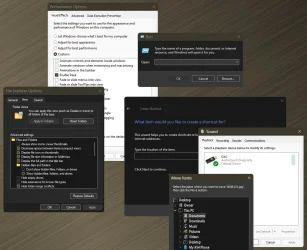
  • Dark mode support for more dialogs

Restore and improve context menus​

  • All new look with rounded acrylic menus
  • Fast and responsive taskbar menus
  • New fonts, better touch support

Restore and improve start menu​

  • Launch apps and go to system places in one click
  • Navigate dropdown menus like a boss
  • Enjoy fast and reliable search

Finally, lightweight styling and UI consistency​

  • Enjoy Windows 7, Windows 8 and third-party taskbar and start menu styles
  • Fix UI inconsistencies in Win32 apps
  • Don't be blue: recolor UI in all windows apps
  • Negative resource usage: fewer RAM used, fewer processes started, faster startup



StartAllBack For Windows 11 has been released.
It's an RC release. I haven't tested it yet as I have Start11 installed.

Edit: I have now tested it. It's working quite well.
Apart from a great start menu, you can also have the Enhanced Classic Taskbar back.
This means (for example) that you can have an uncombined and unlocked Taskbar.
You will now also be able to enhance the Taskbar clock using T-Clock Redux or similar.

T-Clock Redux Tray Clock_.png

You can also change Windows Explorer to Ribbon UI or Simple UI.

You can get it Download


01 - Welcome.png
02 - Start Menu.png
04 - Taskbar.png
05 - Explorer.png
06 - Advanced.png
Get
 
The functionality provided by this $4.99USD program is nothing short of amazing.

Although I use Start11 for the Start menu I can't live without the dark classic control panel, the Windows 10 taskbar or the Tray Icons functions that StartAllBack provide. Also the customize format of the Clock is a nice function.
 

My Computers My Computers

  • At a glance

    Windows 11 Pro x 2 + Insider DevIntel Core i9 12900K @ 5.2 GHz2 x Corsair Dominator Platinum RGB (4x16GB To...EVGA GeForce RTX 3080 XC3 ULTRA GAMING 10GB G...
    OS
    Windows 11 Pro x 2 + Insider Dev
    Computer type
    PC/Desktop
    Manufacturer/Model
    My first abomination, I call it the Money Pit One
    CPU
    Intel Core i9 12900K @ 5.2 GHz
    Motherboard
    ASUS ROG MAXIMUS Z690 HERO
    Memory
    2 x Corsair Dominator Platinum RGB (4x16GB Total) DDR5-6200 CL36 Dual Channel Kit
    Graphics Card(s)
    EVGA GeForce RTX 3080 XC3 ULTRA GAMING 10GB GDDR6X
    Sound Card
    ROG SupremeFX ALC4082 with ESS® ES9018Q2C DAC for pinpoint positioning and dynamics
    Monitor(s) Displays
    2 x Samsung 43" HDR Neo QLED Mini-LED Tizen Smart TV (QN43QN90DAFXZC) 2024
    Screen Resolution
    1920 x 1080 @ 150 DPI & 120Hz
    Hard Drives
    2 x Samsung 980 Series - 250GB PCIe Gen3. X4 NVMe 1.4 - M.2 Internal SSD (Windows 11 Pro Dual boot)
    PSU
    Corsair HX1000i 80+ Platinum Modular Power Supply 1000W
    Case
    Phanteks Enthoo Luxe Tempered Glass Full Tower Case - Black
    Cooling
    CORSAIR iCUE H150i RGB Elite 360mm Liquid CPU Cooler
    Keyboard
    Perixx PERIBOARD-732B Wireless Mini Backlit USB Keyboard with Low Profile Keys - US Layout
    Mouse
    Logitech MX Anywhere 2S Wireless Mouse
    Internet Speed
    1000 Mbps
    Browser
    Latest Version Of Firefox & Microsoft Edge Chromium Stable
    Antivirus
    ESET Internet Security
    Other Info
    LG Electronics 14x Sata Blu-ray Disk Rewriter - WH14NS4O
    2 x OREI 4K 4x2 HDMI Matrix Switch With ARC Audio Extraction, HDR & Downscaling (UHD-402D) so I can send the output of my Cable Box, Roku, or any of my 4 computers to either of my TV's separately or simultaneously.
  • At a glance

    Windows 11 Pro x 2Intel Core i9 12900K @ 5.2 GHz2 x Vengeance RGB 32GB DDR5 6400MHz CL32 Dual...ASUS TUF Gaming GeForce RTX 3070 Ti OC Editio...
    Operating System
    Windows 11 Pro x 2
    Computer type
    PC/Desktop
    Manufacturer/Model
    My second abomination, I call it the Money Pit Two
    CPU
    Intel Core i9 12900K @ 5.2 GHz
    Motherboard
    ASUS ROG STRIX Z690-F GAMING WIFI
    Memory
    2 x Vengeance RGB 32GB DDR5 6400MHz CL32 Dual Channel Kit (4x16GB Total) Black
    Graphics card(s)
    ASUS TUF Gaming GeForce RTX 3070 Ti OC Edition 8 GB GDDR6X
    Sound Card
    ROG SupremeFX ALC4082 with ESS® ES9018Q2C DAC for pinpoint positioning and dynamics
    Monitor(s) Displays
    2 x Samsung 43" HDR Neo QLED Mini-LED Tizen Smart TV (QN43QN90DAFXZC) 2024
    Screen Resolution
    1920 x 1080 @ 150 DPI & 120Hz
    Hard Drives
    2 x Samsung 980 Series - 250GB PCIe Gen3. X4 NVMe 1.4 - M.2 Internal SSD (Windows 11 Pro Dual boot)
    PSU
    Corsair AX860 - 860W Modular Power Supply
    Case
    Phanteks Enthoo Pro Tempered Glass Full Tower Case - Black
    Cooling
    CORSAIR iCUE H150i RGB Elite 360mm Liquid CPU Cooler
    Keyboard
    Perixx PERIBOARD-326 Wireless Mini Backlit USB Keyboard with Low Profile Keys - US Layout
    Mouse
    Logitech MX Anywhere 2S Wireless Mouse
    Internet Speed
    1000 Mbps
    Browser
    Latest Version Of Firefox & EDGE Chromium Stable
    Antivirus
    ESET Internet Security
    Other Info
    LG Electronics 14x Sata Blu-ray Disk Rewriter - WH14NS4O
    2 x OREI 4K 4x2 HDMI Matrix Switch With ARC Audio Extraction, HDR & Downscaling (UHD-402D) so I can send the output of my Cable Box, Roku, or any of my 4 computers to either of my TV's separately or simultaneously.
  • 2021 ASUS TUF Gaming A17 - FA706QM Gaming Laptop with a AMD Ryzen™ 7 5800H Mobile Processor, NVIDIA GeForce RTX 3060 Laptop GPU and AMD Graphics (512 MB), 17.3-inch, FHD (1920 x 1080) 16:9, Value IPS-level, Anti-glare display, 2 x 8GB DDR4 3200 SDRAM, Samsung 980 Series - 250GB PCIe Gen3. X4 NVMe 1.4 - M.2 Internal SSD running Windows 11 Pro , Backlit Chiclet Keyboard 1-Zone RGB, Touchpad, 720P HD camera, Wi-Fi 6(802.11ax) (Dual band) 2*2 + Bluetooth® 5.3 Wireless Card

    External Keyboard: Perixx PERIBOARD-326 Wireless Mini Backlit USB Keyboard with Low Profile Keys - US Layout

    External Mouse: Logitech MX Anywhere 2S Wireless Mouse

    External Monitor: Samsung 43" HDR Neo QLED Mini-LED Tizen Smart TV (QN43QN90DAFXZC) 2024
I wish all dialogs were dark!

10955.webp

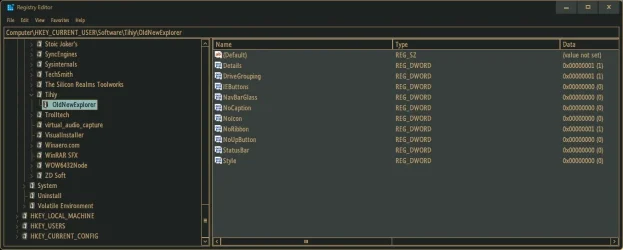
Dark Mode Registry Editor would be fantastic!!! :cool:
 

My Computers My Computers

  • At a glance

    Windows 11 Pro
    OS
    Windows 11 Pro
    Computer type
    PC/Desktop
    Manufacturer/Model
    ASUS ROG Strix
  • At a glance

    Windows 11 Pro
    Operating System
    Windows 11 Pro
    Computer type
    Laptop
    Manufacturer/Model
    ASUS VivoBook
  • ASUS VivoBook 'Lite' ~ Windows 11 Home

My Computer My Computer

At a glance

Windows 11
OS
Windows 11

My Computers My Computers

  • At a glance

    Windows 11 Pro
    OS
    Windows 11 Pro
    Computer type
    PC/Desktop
    Manufacturer/Model
    ASUS ROG Strix
  • At a glance

    Windows 11 Pro
    Operating System
    Windows 11 Pro
    Computer type
    Laptop
    Manufacturer/Model
    ASUS VivoBook
  • ASUS VivoBook 'Lite' ~ Windows 11 Home
Sure, by global theme, but I don't think it can be done by whatever method is used by SAB to make all other things dark mode. Like I said, always an option to ask Tihiti, sometimes he responds, sometimes he gets aggravated :)
 

My Computer My Computer

At a glance

Windows 11
OS
Windows 11
StartAllBack_3.9.17.5334 (9 November 2025) (Stable)
  • Support for taskbar search Paste button
  • Added Duplicate tab to SAB explorer tabs context menu
  • Fix secondary taskbar not auto-hiding on some systems
  • Fix config/install app crashing on certain monitor configurations
  • Fixes for new buggy dark copy dialog
  • Fixes for taskbar transparency missing after display driver update
 

My Computer My Computer

At a glance

Windows 11 ProIntel Core i9 12900KFCorsair 64GB DDR5 Vengeance C40 5200MhzASUS GeForce RTX 3090 ROG Strix OC 24GB
OS
Windows 11 Pro
Computer type
PC/Desktop
Manufacturer/Model
Custom Build
CPU
Intel Core i9 12900KF
Motherboard
ASUS ROG Maximus Z690 Hero
Memory
Corsair 64GB DDR5 Vengeance C40 5200Mhz
Graphics Card(s)
ASUS GeForce RTX 3090 ROG Strix OC 24GB
Sound Card
OnBoard
Monitor(s) Displays
Acer Predator XB323UGP 32" QHD G-SYNC-C 144Hz 1MS IPS LED
Screen Resolution
2560 x 1440
Hard Drives
1x Samsung 980 Pro Series Gen4 250GB M.2 NVMe
1x Samsung 980 Pro Series Gen4 500GB M.2 NVMe
2x Samsung 980 Pro Series Gen4 2TB M.2 NVMe
PSU
Corsair AX1200i 1200W 80PLUS Titanium Modular
Case
Corsair 4000D Black Case w/ Tempered Glass Side Panel
Cooling
Noctua NH-U12A Chromax Black CPU Cooler, 4x Noctua 120mm Fans
Keyboard
Logitech MK545
Mouse
Logitech MX Master 3
Internet Speed
Fixed Wireless 150mbps/75mbps
Browser
Firefox
Antivirus
Kaspersky
Other Info
Thrustmaster TS-PC RACER
Fanatec CSL Elite Pedals with the Load Cell Kit
Yamaha Amp with Bose Speakers
anyone knows why it doesn't work for my main os 25h2 but works on my other desktop 24h2? is there an issue? after install it just doesn't do anything
 

My Computer My Computer

At a glance

Windows 117800x3DKINGSTONE DDR5ZOTAC 4090 AMP EXTREME
OS
Windows 11
Computer type
PC/Desktop
Manufacturer/Model
Intel
CPU
7800x3D
Motherboard
MSI X690E TOMHAWK
Memory
KINGSTONE DDR5
Graphics Card(s)
ZOTAC 4090 AMP EXTREME
Sound Card
Creative SXFI AMP
Monitor(s) Displays
Samsung S90C
Screen Resolution
3840x2160
Hard Drives
Nmve WD850N 1TB
SanDisk SDSSDXPS480G
Samsung SSD 840 PRO Series 256Gb
WDC Enterprise Gold 16TB 512MB
WDC Enterprise Gold 6TB 256MB
PSU
ThermalTake ToughPower 1650
Case
Obsidian Series™ 750D Airflow Edition Full Tower ATX Case
Cooling
Arctic Liquid Freezer II 360
Keyboard
SteelSeries APEX PRO
Mouse
SwitPoint Z2
Internet Speed
5000/500
Browser
CHROME
Antivirus
ESET Internet Security
anyone knows why it doesn't work for my main os 25h2 but works on my other desktop 24h2? is there an issue? after install it just doesn't do anything
You must be using an older version; install this latest version.
 

My Computer My Computer

At a glance

Windows 11 Iot Enterprise 21h2 22000.3260xeon E5-2697v232gb 8x4gb ddr3 1333 mhzgtx 570 poit of view
OS
Windows 11 Iot Enterprise 21h2 22000.3260
Computer type
PC/Desktop
Manufacturer/Model
Asus
CPU
xeon E5-2697v2
Motherboard
rampage iv extreme
Memory
32gb 8x4gb ddr3 1333 mhz
Graphics Card(s)
gtx 570 poit of view
Sound Card
realtek HD (ALC898)
Monitor(s) Displays
samsung b2030
Screen Resolution
1600x900
Hard Drives
2tb hd 5400 rpm
3tb hd 5400 rpm
1tb nvme pcie 3.0
PSU
hx850w
Keyboard
mtek
Internet Speed
500/250 gpon
Browser
r3dfox 146.0
Antivirus
none
You must be using an older version; install this latest version.
i am using 3.19.17

I see there is 5334

still doesn't work, it's same version


ha nvm,, it just doesn't open the setting menu, but it still works.. it just didn't show me anything on the menu or taskbar.

I think the CFG files were corrupted, I deleted the Preftech with startallbackconfig and now it is shown
1762776004047.webp
 
Last edited:

My Computer My Computer

At a glance

Windows 117800x3DKINGSTONE DDR5ZOTAC 4090 AMP EXTREME
OS
Windows 11
Computer type
PC/Desktop
Manufacturer/Model
Intel
CPU
7800x3D
Motherboard
MSI X690E TOMHAWK
Memory
KINGSTONE DDR5
Graphics Card(s)
ZOTAC 4090 AMP EXTREME
Sound Card
Creative SXFI AMP
Monitor(s) Displays
Samsung S90C
Screen Resolution
3840x2160
Hard Drives
Nmve WD850N 1TB
SanDisk SDSSDXPS480G
Samsung SSD 840 PRO Series 256Gb
WDC Enterprise Gold 16TB 512MB
WDC Enterprise Gold 6TB 256MB
PSU
ThermalTake ToughPower 1650
Case
Obsidian Series™ 750D Airflow Edition Full Tower ATX Case
Cooling
Arctic Liquid Freezer II 360
Keyboard
SteelSeries APEX PRO
Mouse
SwitPoint Z2
Internet Speed
5000/500
Browser
CHROME
Antivirus
ESET Internet Security
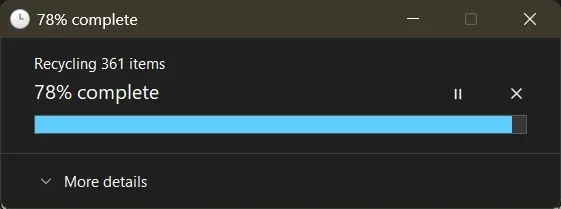
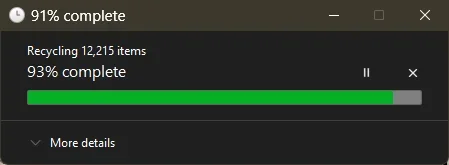
It would be great if SAB could have the Windows accent color for the Progress Bar (taskbar) like Microsoft has done since 24H2.
And no longer have this green color
Some of my progress bars on Canary are blue, some not...

0008145.webp

Otherwise they're green...

10965.webp
 

My Computers My Computers

  • At a glance

    Windows 11 Pro
    OS
    Windows 11 Pro
    Computer type
    PC/Desktop
    Manufacturer/Model
    ASUS ROG Strix
  • At a glance

    Windows 11 Pro
    Operating System
    Windows 11 Pro
    Computer type
    Laptop
    Manufacturer/Model
    ASUS VivoBook
  • ASUS VivoBook 'Lite' ~ Windows 11 Home
" For that you can use a custom .msstyles like the one from rectify 11 ".......................explain , please ! :wink:
 

My Computers My Computers

  • At a glance

    Windows11 Pro 25H2i732GBnVidia
    OS
    Windows11 Pro 25H2
    Computer type
    PC/Desktop
    Manufacturer/Model
    Asus
    CPU
    i7
    Motherboard
    z97k
    Memory
    32GB
    Graphics Card(s)
    nVidia
    Sound Card
    Realtek
    Hard Drives
    3
    Cooling
    air
    Browser
    Edge
    Antivirus
    ESET
  • At a glance

    Windows11 ProIntel i516GBIntel
    Operating System
    Windows11 Pro
    Computer type
    PC/Desktop
    Manufacturer/Model
    ASUS
    CPU
    Intel i5
    Motherboard
    ASUS Basic
    Memory
    16GB
    Graphics card(s)
    Intel
    Sound Card
    Realtek
    Monitor(s) Displays
    Samsung
    Hard Drives
    one intern , 0ne extern, OS on SSD
    Cooling
    air
    Keyboard
    wireless Logitech
    Mouse
    wireless Logitech
    Internet Speed
    1GB
    Browser
    Edge
    Antivirus
    ESET
" For that you can use a custom .msstyles like the one from rectify 11 ".......................explain , please ! :wink:
You can download Rectify11 from here, but I don't recommend it. It overwrites a ton of files, adds weird explorer animations and its light them is buggy on latest Windows version. Use this instead.
 

My Computers My Computers

  • At a glance

    Windows 11 Pro 25H2 (WinMac v1.4.0)Intel Core i5-12400F16 GB (DDR4, 3200 MHz)NVIDIA GeForce RTX 2070 Super
    OS
    Windows 11 Pro 25H2 (WinMac v1.4.0)
    Computer type
    PC/Desktop
    CPU
    Intel Core i5-12400F
    Motherboard
    B760 GAMING X DDR4
    Memory
    16 GB (DDR4, 3200 MHz)
    Graphics Card(s)
    NVIDIA GeForce RTX 2070 Super
    Screen Resolution
    2560x1440 @ 240Hz
    Other Info
    I loved modding and customizing operating systems since very young age, gaining experience from all important systems, including Windows, Ubuntu, MacOS and Android, which led to creation of Windows 11 mod called WinMac. Seamlessly blending the elegance of macOS with the versatility of Windows, my customized interface elevates user experience through meticulously crafted modifications and UI enhancements.

    With WinMac, every interaction with Windows 11 environment is imbued with a touch of sophistication, where the boundaries between the Windows and Mac universes blur, offering a sublime computing experience that transcends conventional limitations of Windows 11.
  • At a glance

    macOS SonomaApple M3 Pro18 GB
    Operating System
    macOS Sonoma
    Computer type
    Laptop
    Manufacturer/Model
    Apple MacBook Pro
    CPU
    Apple M3 Pro
    Memory
    18 GB
You can download Rectify11 from here, but I don't recommend it. It overwrites a ton of files, adds weird explorer animations and its light them is buggy on latest Windows version. Use this instead.
Thanks ! Will try......... :wink:
 

My Computers My Computers

  • At a glance

    Windows11 Pro 25H2i732GBnVidia
    OS
    Windows11 Pro 25H2
    Computer type
    PC/Desktop
    Manufacturer/Model
    Asus
    CPU
    i7
    Motherboard
    z97k
    Memory
    32GB
    Graphics Card(s)
    nVidia
    Sound Card
    Realtek
    Hard Drives
    3
    Cooling
    air
    Browser
    Edge
    Antivirus
    ESET
  • At a glance

    Windows11 ProIntel i516GBIntel
    Operating System
    Windows11 Pro
    Computer type
    PC/Desktop
    Manufacturer/Model
    ASUS
    CPU
    Intel i5
    Motherboard
    ASUS Basic
    Memory
    16GB
    Graphics card(s)
    Intel
    Sound Card
    Realtek
    Monitor(s) Displays
    Samsung
    Hard Drives
    one intern , 0ne extern, OS on SSD
    Cooling
    air
    Keyboard
    wireless Logitech
    Mouse
    wireless Logitech
    Internet Speed
    1GB
    Browser
    Edge
    Antivirus
    ESET
" For that you can use a custom .msstyles like the one from rectify 11 ".......................explain , please ! :wink:
Ok. Wi
" For that you can use a custom .msstyles like the one from rectify 11 ".......................explain , please ! :wink:
I also wouldnt install all of rectify 11. as above i agree the full install can mess things up. , but here Installer/Resources/Themes/themes at legacy-installer · Rectify11/Installer you can just get the custom dark .msstyles files and imho the rectify ones are very good with an up to date windows 11.
or you can get one by the master dark theme maker niivu here https://www.deviantart.com/niivu/gallery

then you just use the free custom dark theme you have chosen with GitHub - namazso/SecureUxTheme: 🎨 A secure boot compatible in-memory UxTheme patcher to apply it.


it is a bit of a learning curve but totally reversible these days if you just go for the .msstyles method not a full rectify 11 install which also changes icons etc.
Always best to make a copy of your system image with something like macrium reflect first if you are new at this so you can
be sure to roll back if something does not go right.
 

My Computer My Computer

At a glance

11
OS
11
The functionality provided by this $4.99USD program is nothing short of amazing.
Yes, I agree, and I like it better than OpenShell, which I was disappointed to discover does not allow taskbar placement any longer. BTW, I was happy to see that the following site had the latest version on release: Download StartAllBack 3.9.17 the 3.9.17 final release, apparently. (Major Geeks)
 

My Computer My Computer

At a glance

Win11 Experimental Channel for 26H2 buildsAMD R7 7800X3DGSkill 2x16GB @ 6400MT/sXFX 9070 XT SWIFT tri-fan (PCIe5.0)
OS
Win11 Experimental Channel for 26H2 builds
Computer type
PC/Desktop
Manufacturer/Model
a cherry-picked assembly
CPU
AMD R7 7800X3D
Motherboard
MSI x870 Tomahawk Wi-Fi, 8-layer, 2 oz copper, server PCB
Memory
GSkill 2x16GB @ 6400MT/s
Graphics Card(s)
XFX 9070 XT SWIFT tri-fan (PCIe5.0)
Sound Card
Creative Labs G8 USB External Sound device, Gaming DAC, Sound Card & Earphone AMP.. HIGHLY RECOMMENDED, btw. Totally changed my opinion of external USB sound. I like!...;)
Monitor(s) Displays
Philips 42" OLED @ 4k
Screen Resolution
3840x2160
Hard Drives
*Boot: Samsung 980 Pro 2 TB NVMe (PCIe4x4)
*Samsung 980 EVO NVMe 500GB (PCIe 4x4)
*Kingston SNV3S2000G 2TB NVMe (PCIe4x4)
*Samsung 960 EVO 250GB NVMe(PCIe3x2)
*8TB Toshiba x300 HDD
*ST4000DM004 S3 4TB HDD
PSU
Gigabyte 850W Gold, Rev 2
Case
Lian Li Lancool 217, white, with wood trim, very nice looking--tired of black, 5-fans standard
Cooling
Air coutesy Lian Li
Keyboard
Cherry MX 2.0S RGB
Mouse
Razer Basilisk V3 24k DPI
Internet Speed
~950Mbps down and up!
Browser
Firefox x64 DE
Antivirus
Defender
Other Info
Great New system. Exceeds my expectations by quite a bit, btw. I love the USB G8 SoundBlaster, it's quite an improvement over the G6!
Ok. Wi

I also wouldnt install all of rectify 11. as above i agree the full install can mess things up. , but here Installer/Resources/Themes/themes at legacy-installer · Rectify11/Installer you can just get the custom dark .msstyles files and imho the rectify ones are very good with an up to date windows 11.
or you can get one by the master dark theme maker niivu here https://www.deviantart.com/niivu/gallery

then you just use the free custom dark theme you have chosen with GitHub - namazso/SecureUxTheme: 🎨 A secure boot compatible in-memory UxTheme patcher to apply it.


it is a bit of a learning curve but totally reversible these days if you just go for the .msstyles method not a full rectify 11 install which also changes icons etc.
Always best to make a copy of your system image with something like macrium reflect first if you are new at this so you can
be sure to roll back if something does not go right.

@pietcorus2 @chip222 Just copying the msstyles won't be enough, you need to copy few dll files to system32 folder, which are not part of repositoty. You can use these dll files from the link I've included.
 

My Computers My Computers

  • At a glance

    Windows 11 Pro 25H2 (WinMac v1.4.0)Intel Core i5-12400F16 GB (DDR4, 3200 MHz)NVIDIA GeForce RTX 2070 Super
    OS
    Windows 11 Pro 25H2 (WinMac v1.4.0)
    Computer type
    PC/Desktop
    CPU
    Intel Core i5-12400F
    Motherboard
    B760 GAMING X DDR4
    Memory
    16 GB (DDR4, 3200 MHz)
    Graphics Card(s)
    NVIDIA GeForce RTX 2070 Super
    Screen Resolution
    2560x1440 @ 240Hz
    Other Info
    I loved modding and customizing operating systems since very young age, gaining experience from all important systems, including Windows, Ubuntu, MacOS and Android, which led to creation of Windows 11 mod called WinMac. Seamlessly blending the elegance of macOS with the versatility of Windows, my customized interface elevates user experience through meticulously crafted modifications and UI enhancements.

    With WinMac, every interaction with Windows 11 environment is imbued with a touch of sophistication, where the boundaries between the Windows and Mac universes blur, offering a sublime computing experience that transcends conventional limitations of Windows 11.
  • At a glance

    macOS SonomaApple M3 Pro18 GB
    Operating System
    macOS Sonoma
    Computer type
    Laptop
    Manufacturer/Model
    Apple MacBook Pro
    CPU
    Apple M3 Pro
    Memory
    18 GB
@pietcorus2 @chip222 Just copying the msstyles won't be enough, you need to copy few dll files to system32 folder, which are not part of repositoty. You can use these dll files from the link I've included.
Yes, there are a few different ways to apply the .msstyles files , i like the secureuxtheme method but i also use windhawk for other things as well.

But , I would say from experience that anybody applying .msstyles dark themes should always make sure they have a way to roll back to a recent system image, i use macrium reflect and take an image before each ms update as windows updates (especially on insider builds) are making changes to dark theme and you want to be able to rollback if something stops working.
But having an almost system wide dark theme is very nice once you have it working.

I totally agree , not to go the whole rectify 11 complete install route :)
 

My Computer My Computer

At a glance

11
OS
11
I'm on v3.9.17 and the 25H2 update has broken the dynamic transparency of the taskbar, despite the changelog mentions v3.9.15 should have fixed this. I'm experiencing the following issues:

1) When any window (both if in the background or foreground) is snapped to an edge or maximized the taskbar isn't transparent anymore. It reverts back to transparent when the window is un-snapped.
2) The taskbar clock and calendar font is always black, making it unreadable on dark wallpapers.
 

My Computer My Computer

At a glance

Windows 11Intel i7-7700HQ32GB DDR4 2400NVIDIA GeForce GTX 1060 GDDR5 6GB
OS
Windows 11
Computer type
Laptop
Manufacturer/Model
Gigabyte AERO 14-W7
CPU
Intel i7-7700HQ
Memory
32GB DDR4 2400
Graphics Card(s)
NVIDIA GeForce GTX 1060 GDDR5 6GB
is there any way to have folders or groups in the left side of the start menu. kinda like how you can organize your shortcuts in your start menu in windows 11 in folders
 

My Computer My Computer

At a glance

windows1111th gen core 17-11700k32 gbevga 3080ti
OS
windows11
Computer type
PC/Desktop
Manufacturer/Model
n/a
CPU
11th gen core 17-11700k
Memory
32 gb
Graphics Card(s)
evga 3080ti
Monitor(s) Displays
2
Screen Resolution
1080x1920
Case
lianli lancool

Latest Support Threads

Back
Top Bottom