Solved System crash while playing GTA V


Didn't you say you also replaced the CPU and motherboard? If so then the only thing left is the power supply.

I see that you have an Intel i9 14900K. Some people have been having problems with the 13th and 14th generation Intel CPUs. Some these CPUs after a period of time start crashing. Do you have the latest BIOS update? Some of these CPU instability problems are lessened with the latest BIOS update.
I do have a 14900k also RMA’d for a new unit and I’m running the latest bios ASUS released. The issues were worse before updating the BIOS though.
 

My Computer

System One

  • OS
    Windows 11 Pro
    Computer type
    PC/Desktop
    Manufacturer/Model
    Custom Build
    CPU
    Intel i9 14900K
    Motherboard
    Gigabyte Z790 Master X (Wifi-7) Revision 1.0
    Memory
    Kingston Fury Beast 64GB (2x32GB) KF564C32BBEK2-64
    Graphics Card(s)
    Gigabyte Gaming OC RTX 5070 Ti
    Sound Card
    Onboard audio
    Monitor(s) Displays
    Asus XG27ACDNG
    Screen Resolution
    1440p
    Hard Drives
    Samsung - 990 PRO 4TB

    WD - BLACK SN850X 4TB

    Seagate FireCuda ST8000DX001 8TB x2
    PSU
    Lian Li Edge Series-1300W Full Modular Power Supply-80 Plus Platinum
    Case
    Lian-Li 011D Evo RGB
    Cooling
    CORSAIR iCUE Link H170i RGB plus 7 additional Corsair QX 120s
    Keyboard
    Corsair K70 RGB Pro
    Mouse
    Corsair Nightsword RGB
    Internet Speed
    1-2GB
    Browser
    Chrome/Edge
    Antivirus
    Windows Defender
SCEP Certificate enrollment initialization for WORKGROUP\CHRISSYPC-2025$ via https://intc-keyid-ea950d987bcff0df...ca2.microsoftaik.azure.net/templates/Aik/scep failed:

GetCACaps

Method: GET(47ms)
Stage: GetCACaps
The server name or address could not be resolved 0x80072ee7 (WinHttp: 12007 ERROR_WINHTTP_NAME_NOT_RESOLVED)

Hey there, just as a test (You can re-enable it later) IF you’re not using Bitlocker or specifically BitLocker with TPM auto-unlock

Disable Device Health Attestation (DHA) Service​
  • Open Services (press Win + R, type services.msc)
  • Find Device Health Attestation Service
  • Double-click it > Set Startup type to Disabled
  • Click Stop if it's running > then OK
While you’re at it look for and disable this in Task Scheduler (if present):​
Microsoft > Windows > Device Health Attestation > HealthAttestationTask​
Reboot, both should still be disabled for now.​
Play GTA​
 

My Computers

System One System Two

  • OS
    Windows 11 Pro 25H2 Build 26200.8524
    Computer type
    PC/Desktop
    Manufacturer/Model
    Sin-built 2013
    CPU
    Intel(R) Core(TM) i7-4770K CPU @ 3.50GHz
    Motherboard
    ASUS ROG Maximus VI Formula
    Memory
    32.0 GB of I forget and the box is in storage.
    Graphics Card(s)
    Gigabyte nVidia GeForce GTX 1660 Super OC 6GB
    Sound Card
    Onboard thingy
    Monitor(s) Displays
    5 x LG 25MS500-B - 1 x 24MK430H-B - 1 x Wacom Pro 22" Touch Screen Tablet
    Screen Resolution
    All over the place
    Hard Drives
    Too many to list.
    OS on Samsung 1TB 870 QVO SATA
    PSU
    Silverstone 1500
    Case
    NZXT Phantom 820 Full-Tower Case
    Cooling
    Noctua NH-D15 Elite Class Dual Tower CPU Cooler / 6 x EziDIY 120mm / 2 x Corsair 140mm somethings / 1 x 140mm Thermaltake something / 2 x 200mm Corsair.
    Keyboard
    Corsair K95 / Logitech diNovo Edge Wireless
    Mouse
    Logitech: G402 / G502 / Mx Masters / Mx Air Cordless
    Internet Speed
    2000/500Mbps
    Browser
    All sorts
    Antivirus
    Kaspersky Premium
    Other Info
    ㅤㅤㅤㅤㅤㅤㅤㅤㅤㅤㅤㅤㅤㅤㅤㅤㅤㅤㅤㅤㅤㅤㅤㅤㅤㅤㅤㅤㅤㅤㅤㅤㅤㅤㅤㅤㅤㅤㅤㅤ⠀⠀⠀⠀⠀⠀⠀⠀⠀⠀
    TP-Link BE9300 WiFi 7 Bluetooth 5.4 (Archer TBE550E)
    TP-Link TX201 V1 2.5GB Lan

    Grandstream HT812 - VoIP
    ASUS DSL-AX82U - Mesh
    ASUS RT-AC68U - Mesh
    ASUS RT-BE88U Router

    Brother MFC-L2880DW Printer

    I’m on a horse.
  • Operating System
    Windows 11 Pro 25H2 Build 26200.8524
    Computer type
    Laptop
    Manufacturer/Model
    LENOVO Yoga 7 14IRL8 - 7i EVO OLED 14" Touchscreen i5 12 Core 16GB/512GB
    CPU
    Intel Core 12th Gen i5-1240P Processor (1.7 - 4.4GHz)
    Memory
    16GB LPDDR5 RAM
    Graphics card(s)
    Intel Iris Xe Graphics Processor
    Sound Card
    Optimized with Dolby Atmos®
    Screen Resolution
    QHD 2880 x 1800 OLED
    Hard Drives
    M.2 512GB
    Antivirus
    Defender / Malwarebytes
    Other Info
    …still on a horse.
Hey there, just as a test (You can re-enable it later) IF you’re not using Bitlocker or specifically BitLocker with TPM auto-unlock

Disable Device Health Attestation (DHA) Service​
  • Open Services (press Win + R, type services.msc)
  • Find Device Health Attestation Service
  • Double-click it > Set Startup type to Disabled
  • Click Stop if it's running > then OK
While you’re at it look for and disable this in Task Scheduler (if present):​
Microsoft > Windows > Device Health Attestation > HealthAttestationTask​
Reboot, both should still be disabled for now.​
Play GTA​
Thanks, I'll try after work tomorrow (7/24/25). I'm headed to bed...I've been working on this machine all evening,
 

My Computer

System One

  • OS
    Windows 11 Pro
    Computer type
    PC/Desktop
    Manufacturer/Model
    Custom Build
    CPU
    Intel i9 14900K
    Motherboard
    Gigabyte Z790 Master X (Wifi-7) Revision 1.0
    Memory
    Kingston Fury Beast 64GB (2x32GB) KF564C32BBEK2-64
    Graphics Card(s)
    Gigabyte Gaming OC RTX 5070 Ti
    Sound Card
    Onboard audio
    Monitor(s) Displays
    Asus XG27ACDNG
    Screen Resolution
    1440p
    Hard Drives
    Samsung - 990 PRO 4TB

    WD - BLACK SN850X 4TB

    Seagate FireCuda ST8000DX001 8TB x2
    PSU
    Lian Li Edge Series-1300W Full Modular Power Supply-80 Plus Platinum
    Case
    Lian-Li 011D Evo RGB
    Cooling
    CORSAIR iCUE Link H170i RGB plus 7 additional Corsair QX 120s
    Keyboard
    Corsair K70 RGB Pro
    Mouse
    Corsair Nightsword RGB
    Internet Speed
    1-2GB
    Browser
    Chrome/Edge
    Antivirus
    Windows Defender
You’re not the first person that I have seen (this week) to report that error


My Computers

System One System Two

  • OS
    Windows 11 Pro 25H2 Build 26200.8524
    Computer type
    PC/Desktop
    Manufacturer/Model
    Sin-built 2013
    CPU
    Intel(R) Core(TM) i7-4770K CPU @ 3.50GHz
    Motherboard
    ASUS ROG Maximus VI Formula
    Memory
    32.0 GB of I forget and the box is in storage.
    Graphics Card(s)
    Gigabyte nVidia GeForce GTX 1660 Super OC 6GB
    Sound Card
    Onboard thingy
    Monitor(s) Displays
    5 x LG 25MS500-B - 1 x 24MK430H-B - 1 x Wacom Pro 22" Touch Screen Tablet
    Screen Resolution
    All over the place
    Hard Drives
    Too many to list.
    OS on Samsung 1TB 870 QVO SATA
    PSU
    Silverstone 1500
    Case
    NZXT Phantom 820 Full-Tower Case
    Cooling
    Noctua NH-D15 Elite Class Dual Tower CPU Cooler / 6 x EziDIY 120mm / 2 x Corsair 140mm somethings / 1 x 140mm Thermaltake something / 2 x 200mm Corsair.
    Keyboard
    Corsair K95 / Logitech diNovo Edge Wireless
    Mouse
    Logitech: G402 / G502 / Mx Masters / Mx Air Cordless
    Internet Speed
    2000/500Mbps
    Browser
    All sorts
    Antivirus
    Kaspersky Premium
    Other Info
    ㅤㅤㅤㅤㅤㅤㅤㅤㅤㅤㅤㅤㅤㅤㅤㅤㅤㅤㅤㅤㅤㅤㅤㅤㅤㅤㅤㅤㅤㅤㅤㅤㅤㅤㅤㅤㅤㅤㅤㅤ⠀⠀⠀⠀⠀⠀⠀⠀⠀⠀
    TP-Link BE9300 WiFi 7 Bluetooth 5.4 (Archer TBE550E)
    TP-Link TX201 V1 2.5GB Lan

    Grandstream HT812 - VoIP
    ASUS DSL-AX82U - Mesh
    ASUS RT-AC68U - Mesh
    ASUS RT-BE88U Router

    Brother MFC-L2880DW Printer

    I’m on a horse.
  • Operating System
    Windows 11 Pro 25H2 Build 26200.8524
    Computer type
    Laptop
    Manufacturer/Model
    LENOVO Yoga 7 14IRL8 - 7i EVO OLED 14" Touchscreen i5 12 Core 16GB/512GB
    CPU
    Intel Core 12th Gen i5-1240P Processor (1.7 - 4.4GHz)
    Memory
    16GB LPDDR5 RAM
    Graphics card(s)
    Intel Iris Xe Graphics Processor
    Sound Card
    Optimized with Dolby Atmos®
    Screen Resolution
    QHD 2880 x 1800 OLED
    Hard Drives
    M.2 512GB
    Antivirus
    Defender / Malwarebytes
    Other Info
    …still on a horse.
In fact, copy this into a Google search bar, hit enter

microsoftaik.azure.net/templates/Aik/scep failed site:elevenforum.com
 

My Computers

System One System Two

  • OS
    Windows 11 Pro 25H2 Build 26200.8524
    Computer type
    PC/Desktop
    Manufacturer/Model
    Sin-built 2013
    CPU
    Intel(R) Core(TM) i7-4770K CPU @ 3.50GHz
    Motherboard
    ASUS ROG Maximus VI Formula
    Memory
    32.0 GB of I forget and the box is in storage.
    Graphics Card(s)
    Gigabyte nVidia GeForce GTX 1660 Super OC 6GB
    Sound Card
    Onboard thingy
    Monitor(s) Displays
    5 x LG 25MS500-B - 1 x 24MK430H-B - 1 x Wacom Pro 22" Touch Screen Tablet
    Screen Resolution
    All over the place
    Hard Drives
    Too many to list.
    OS on Samsung 1TB 870 QVO SATA
    PSU
    Silverstone 1500
    Case
    NZXT Phantom 820 Full-Tower Case
    Cooling
    Noctua NH-D15 Elite Class Dual Tower CPU Cooler / 6 x EziDIY 120mm / 2 x Corsair 140mm somethings / 1 x 140mm Thermaltake something / 2 x 200mm Corsair.
    Keyboard
    Corsair K95 / Logitech diNovo Edge Wireless
    Mouse
    Logitech: G402 / G502 / Mx Masters / Mx Air Cordless
    Internet Speed
    2000/500Mbps
    Browser
    All sorts
    Antivirus
    Kaspersky Premium
    Other Info
    ㅤㅤㅤㅤㅤㅤㅤㅤㅤㅤㅤㅤㅤㅤㅤㅤㅤㅤㅤㅤㅤㅤㅤㅤㅤㅤㅤㅤㅤㅤㅤㅤㅤㅤㅤㅤㅤㅤㅤㅤ⠀⠀⠀⠀⠀⠀⠀⠀⠀⠀
    TP-Link BE9300 WiFi 7 Bluetooth 5.4 (Archer TBE550E)
    TP-Link TX201 V1 2.5GB Lan

    Grandstream HT812 - VoIP
    ASUS DSL-AX82U - Mesh
    ASUS RT-AC68U - Mesh
    ASUS RT-BE88U Router

    Brother MFC-L2880DW Printer

    I’m on a horse.
  • Operating System
    Windows 11 Pro 25H2 Build 26200.8524
    Computer type
    Laptop
    Manufacturer/Model
    LENOVO Yoga 7 14IRL8 - 7i EVO OLED 14" Touchscreen i5 12 Core 16GB/512GB
    CPU
    Intel Core 12th Gen i5-1240P Processor (1.7 - 4.4GHz)
    Memory
    16GB LPDDR5 RAM
    Graphics card(s)
    Intel Iris Xe Graphics Processor
    Sound Card
    Optimized with Dolby Atmos®
    Screen Resolution
    QHD 2880 x 1800 OLED
    Hard Drives
    M.2 512GB
    Antivirus
    Defender / Malwarebytes
    Other Info
    …still on a horse.
Hey there, just as a test (You can re-enable it later) IF you’re not using Bitlocker or specifically BitLocker with TPM auto-unlock

Disable Device Health Attestation (DHA) Service​
  • Open Services (press Win + R, type services.msc)
  • Find Device Health Attestation Service
  • Double-click it > Set Startup type to Disabled
  • Click Stop if it's running > then OK
While you’re at it look for and disable this in Task Scheduler (if present):​
Microsoft > Windows > Device Health Attestation > HealthAttestationTask​
Reboot, both should still be disabled for now.​
Play GTA​
I checked my services list, I don't see an entry for DHA Service.
 

My Computer

System One

  • OS
    Windows 11 Pro
    Computer type
    PC/Desktop
    Manufacturer/Model
    Custom Build
    CPU
    Intel i9 14900K
    Motherboard
    Gigabyte Z790 Master X (Wifi-7) Revision 1.0
    Memory
    Kingston Fury Beast 64GB (2x32GB) KF564C32BBEK2-64
    Graphics Card(s)
    Gigabyte Gaming OC RTX 5070 Ti
    Sound Card
    Onboard audio
    Monitor(s) Displays
    Asus XG27ACDNG
    Screen Resolution
    1440p
    Hard Drives
    Samsung - 990 PRO 4TB

    WD - BLACK SN850X 4TB

    Seagate FireCuda ST8000DX001 8TB x2
    PSU
    Lian Li Edge Series-1300W Full Modular Power Supply-80 Plus Platinum
    Case
    Lian-Li 011D Evo RGB
    Cooling
    CORSAIR iCUE Link H170i RGB plus 7 additional Corsair QX 120s
    Keyboard
    Corsair K70 RGB Pro
    Mouse
    Corsair Nightsword RGB
    Internet Speed
    1-2GB
    Browser
    Chrome/Edge
    Antivirus
    Windows Defender
I would suggest running whatever this thread needs (Top of first page) and tagging zbook to see if they will help when you have completed it.

Zbook is quite the professional when it comes to diagnosing systems
 

My Computers

System One System Two

  • OS
    Windows 11 Pro 25H2 Build 26200.8524
    Computer type
    PC/Desktop
    Manufacturer/Model
    Sin-built 2013
    CPU
    Intel(R) Core(TM) i7-4770K CPU @ 3.50GHz
    Motherboard
    ASUS ROG Maximus VI Formula
    Memory
    32.0 GB of I forget and the box is in storage.
    Graphics Card(s)
    Gigabyte nVidia GeForce GTX 1660 Super OC 6GB
    Sound Card
    Onboard thingy
    Monitor(s) Displays
    5 x LG 25MS500-B - 1 x 24MK430H-B - 1 x Wacom Pro 22" Touch Screen Tablet
    Screen Resolution
    All over the place
    Hard Drives
    Too many to list.
    OS on Samsung 1TB 870 QVO SATA
    PSU
    Silverstone 1500
    Case
    NZXT Phantom 820 Full-Tower Case
    Cooling
    Noctua NH-D15 Elite Class Dual Tower CPU Cooler / 6 x EziDIY 120mm / 2 x Corsair 140mm somethings / 1 x 140mm Thermaltake something / 2 x 200mm Corsair.
    Keyboard
    Corsair K95 / Logitech diNovo Edge Wireless
    Mouse
    Logitech: G402 / G502 / Mx Masters / Mx Air Cordless
    Internet Speed
    2000/500Mbps
    Browser
    All sorts
    Antivirus
    Kaspersky Premium
    Other Info
    ㅤㅤㅤㅤㅤㅤㅤㅤㅤㅤㅤㅤㅤㅤㅤㅤㅤㅤㅤㅤㅤㅤㅤㅤㅤㅤㅤㅤㅤㅤㅤㅤㅤㅤㅤㅤㅤㅤㅤㅤ⠀⠀⠀⠀⠀⠀⠀⠀⠀⠀
    TP-Link BE9300 WiFi 7 Bluetooth 5.4 (Archer TBE550E)
    TP-Link TX201 V1 2.5GB Lan

    Grandstream HT812 - VoIP
    ASUS DSL-AX82U - Mesh
    ASUS RT-AC68U - Mesh
    ASUS RT-BE88U Router

    Brother MFC-L2880DW Printer

    I’m on a horse.
  • Operating System
    Windows 11 Pro 25H2 Build 26200.8524
    Computer type
    Laptop
    Manufacturer/Model
    LENOVO Yoga 7 14IRL8 - 7i EVO OLED 14" Touchscreen i5 12 Core 16GB/512GB
    CPU
    Intel Core 12th Gen i5-1240P Processor (1.7 - 4.4GHz)
    Memory
    16GB LPDDR5 RAM
    Graphics card(s)
    Intel Iris Xe Graphics Processor
    Sound Card
    Optimized with Dolby Atmos®
    Screen Resolution
    QHD 2880 x 1800 OLED
    Hard Drives
    M.2 512GB
    Antivirus
    Defender / Malwarebytes
    Other Info
    …still on a horse.
The findings are typical of malfunctioning or incompatible hardware.


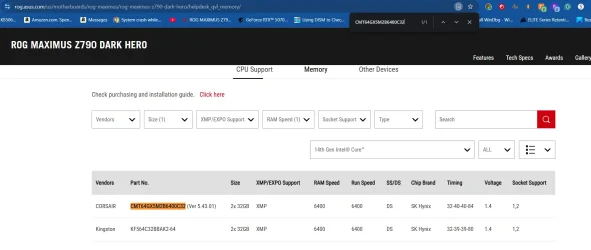
1) The installed RAM CMT64GX5M2B6400C32 were not seen on the QVL.

Please swap test RAM displayed on the Asus QVL:


2) Test the Sabrent drive: L:


A
1AA
1E
20001
3B
7A
7E
7F


Code:
Event[7159]
  Log Name: System
  Source: Microsoft-Windows-WHEA-Logger
  Date: 2025-07-14T06:31:41.3440000Z
  Event ID: 3
  Task: N/A
  Level: Information
  Opcode: Info 
  Keyword: WHEA Error Event Logs,
  User: S-1-5-19
  User Name: NT AUTHORITY\LOCAL SERVICE
  Computer: CHRISSYPC-2025
  Description:
A hardware event has occurred. An informational record describing the condition is contained in the data section of this event.

Event[7160]
  Log Name: System
  Source: Microsoft-Windows-WHEA-Logger
  Date: 2025-07-14T06:31:41.3440000Z
  Event ID: 1
  Task: N/A
  Level: Error
  Opcode: Info 
  Keyword: WHEA Error Event Logs,
  User: S-1-5-19
  User Name: NT AUTHORITY\LOCAL SERVICE
  Computer: CHRISSYPC-2025
  Description:
A fatal hardware error has occurred. A record describing the condition is contained in the data section of this event.


Code:
Event[11428]
  Log Name: System
  Source: Microsoft-Windows-StartupRepair
  Date: 2025-07-20T12:49:17.4620000Z
  Event ID: 1002
  Task: N/A
  Level: Information
  Opcode: Info 
  Keyword: N/A
  User: S-1-5-18
  User Name: NT AUTHORITY\SYSTEM
  Computer: CHRISSYPC-2025
  Description:
Startup Repair failed.

Event[11429]
  Log Name: System
  Source: Microsoft-Windows-StartupRepair
  Date: 2025-07-20T12:49:17.4620000Z
  Event ID: 1121
  Task: N/A
  Level: Information
  Opcode: Info 
  Keyword: N/A
  User: S-1-5-18
  User Name: NT AUTHORITY\SYSTEM
  Computer: CHRISSYPC-2025
  Description:
The following file necessary for Windows startup was corrupt: c:\windows\system32\ntoskrnl.exe
 
Last edited:

My Computer

System One

  • OS
    Windows 10
    Computer type
    Laptop
    Manufacturer/Model
    HP
    CPU
    Intel(R) Core(TM) i7-4800MQ CPU @ 2.70GHz
    Motherboard
    Product : 190A Version : KBC Version 94.56
    Memory
    16 GB Total: Manufacturer : Samsung MemoryType : DDR3 FormFactor : SODIMM Capacity : 8GB Speed : 1600
    Graphics Card(s)
    NVIDIA Quadro K3100M; Intel(R) HD Graphics 4600
    Sound Card
    IDT High Definition Audio CODEC; PNP Device ID HDAUDIO\FUNC_01&VEN_111D&DEV_76E0
    Hard Drives
    Model Hitachi HTS727575A9E364
    Antivirus
    Microsoft Defender
    Other Info
    Mobile Workstation
The findings are typical of malfunctioning or incompatible hardware.


The installed RAM CMT64GX5M2B6400C32 were not seen on the QVL.

Please swap test RAM displayed on the Asus QVL:


A
1AA
1E
20001
3B
7A
7E
7F
Thanks! I'm running the Wi-Fi 7 version of the board and a 14th-gen CPU; the kit is showing up under those parameters on the QVL. Is it possible that this kit isn't well-suited even under those circumstances?

I keep the Sabrent powered off unless I'm copying data from some external drives; it's not a problem for me to completely disconnect it from my system.
 

Attachments

  • Screenshot 2025-07-24 200315.webp
    Screenshot 2025-07-24 200315.webp
    75.3 KB · Views: 1

My Computer

System One

  • OS
    Windows 11 Pro
    Computer type
    PC/Desktop
    Manufacturer/Model
    Custom Build
    CPU
    Intel i9 14900K
    Motherboard
    Gigabyte Z790 Master X (Wifi-7) Revision 1.0
    Memory
    Kingston Fury Beast 64GB (2x32GB) KF564C32BBEK2-64
    Graphics Card(s)
    Gigabyte Gaming OC RTX 5070 Ti
    Sound Card
    Onboard audio
    Monitor(s) Displays
    Asus XG27ACDNG
    Screen Resolution
    1440p
    Hard Drives
    Samsung - 990 PRO 4TB

    WD - BLACK SN850X 4TB

    Seagate FireCuda ST8000DX001 8TB x2
    PSU
    Lian Li Edge Series-1300W Full Modular Power Supply-80 Plus Platinum
    Case
    Lian-Li 011D Evo RGB
    Cooling
    CORSAIR iCUE Link H170i RGB plus 7 additional Corsair QX 120s
    Keyboard
    Corsair K70 RGB Pro
    Mouse
    Corsair Nightsword RGB
    Internet Speed
    1-2GB
    Browser
    Chrome/Edge
    Antivirus
    Windows Defender
The collected minidump files were dated: 07/13, 14, 17, 23

The first BSOD was on the date of the installation.


See if running the various OCCT one hour tests finds any malfunctioning hardware:


Consider clean installing Windows 10 as a "vanilla installation" (default windows drivers and no applications) > monitor for BSOD
 

My Computer

System One

  • OS
    Windows 10
    Computer type
    Laptop
    Manufacturer/Model
    HP
    CPU
    Intel(R) Core(TM) i7-4800MQ CPU @ 2.70GHz
    Motherboard
    Product : 190A Version : KBC Version 94.56
    Memory
    16 GB Total: Manufacturer : Samsung MemoryType : DDR3 FormFactor : SODIMM Capacity : 8GB Speed : 1600
    Graphics Card(s)
    NVIDIA Quadro K3100M; Intel(R) HD Graphics 4600
    Sound Card
    IDT High Definition Audio CODEC; PNP Device ID HDAUDIO\FUNC_01&VEN_111D&DEV_76E0
    Hard Drives
    Model Hitachi HTS727575A9E364
    Antivirus
    Microsoft Defender
    Other Info
    Mobile Workstation
The collected minidump files were dated: 07/13, 14, 17, 23

The first BSOD was on the date of the installation.


See if running the various OCCT one hour tests finds any malfunctioning hardware:


Consider clean installing Windows 10 as a "vanilla installation" (default windows drivers and no applications) > monitor for BSOD
Thanks, I'll get to work!
 

My Computer

System One

  • OS
    Windows 11 Pro
    Computer type
    PC/Desktop
    Manufacturer/Model
    Custom Build
    CPU
    Intel i9 14900K
    Motherboard
    Gigabyte Z790 Master X (Wifi-7) Revision 1.0
    Memory
    Kingston Fury Beast 64GB (2x32GB) KF564C32BBEK2-64
    Graphics Card(s)
    Gigabyte Gaming OC RTX 5070 Ti
    Sound Card
    Onboard audio
    Monitor(s) Displays
    Asus XG27ACDNG
    Screen Resolution
    1440p
    Hard Drives
    Samsung - 990 PRO 4TB

    WD - BLACK SN850X 4TB

    Seagate FireCuda ST8000DX001 8TB x2
    PSU
    Lian Li Edge Series-1300W Full Modular Power Supply-80 Plus Platinum
    Case
    Lian-Li 011D Evo RGB
    Cooling
    CORSAIR iCUE Link H170i RGB plus 7 additional Corsair QX 120s
    Keyboard
    Corsair K70 RGB Pro
    Mouse
    Corsair Nightsword RGB
    Internet Speed
    1-2GB
    Browser
    Chrome/Edge
    Antivirus
    Windows Defender
The collected minidump files were dated: 07/13, 14, 17, 23

The first BSOD was on the date of the installation.


See if running the various OCCT one hour tests finds any malfunctioning hardware:


Consider clean installing Windows 10 as a "vanilla installation" (default windows drivers and no applications) > monitor for BSOD
I started the OCCT CPU/RAM test, and the system crashed within the first 10 minutes or so. Here's the updated V2 Log: CHRISSYPC-2025-(2025-07-24_21-41-38).zip
 

My Computer

System One

  • OS
    Windows 11 Pro
    Computer type
    PC/Desktop
    Manufacturer/Model
    Custom Build
    CPU
    Intel i9 14900K
    Motherboard
    Gigabyte Z790 Master X (Wifi-7) Revision 1.0
    Memory
    Kingston Fury Beast 64GB (2x32GB) KF564C32BBEK2-64
    Graphics Card(s)
    Gigabyte Gaming OC RTX 5070 Ti
    Sound Card
    Onboard audio
    Monitor(s) Displays
    Asus XG27ACDNG
    Screen Resolution
    1440p
    Hard Drives
    Samsung - 990 PRO 4TB

    WD - BLACK SN850X 4TB

    Seagate FireCuda ST8000DX001 8TB x2
    PSU
    Lian Li Edge Series-1300W Full Modular Power Supply-80 Plus Platinum
    Case
    Lian-Li 011D Evo RGB
    Cooling
    CORSAIR iCUE Link H170i RGB plus 7 additional Corsair QX 120s
    Keyboard
    Corsair K70 RGB Pro
    Mouse
    Corsair Nightsword RGB
    Internet Speed
    1-2GB
    Browser
    Chrome/Edge
    Antivirus
    Windows Defender
What steps had been made with each the Nvidia and Intel GPU drivers since the 13th?

uninstall
uninstall and reinstall
uninstall and reinstall with a different version
Turn off dGPU
etc.
 

My Computer

System One

  • OS
    Windows 10
    Computer type
    Laptop
    Manufacturer/Model
    HP
    CPU
    Intel(R) Core(TM) i7-4800MQ CPU @ 2.70GHz
    Motherboard
    Product : 190A Version : KBC Version 94.56
    Memory
    16 GB Total: Manufacturer : Samsung MemoryType : DDR3 FormFactor : SODIMM Capacity : 8GB Speed : 1600
    Graphics Card(s)
    NVIDIA Quadro K3100M; Intel(R) HD Graphics 4600
    Sound Card
    IDT High Definition Audio CODEC; PNP Device ID HDAUDIO\FUNC_01&VEN_111D&DEV_76E0
    Hard Drives
    Model Hitachi HTS727575A9E364
    Antivirus
    Microsoft Defender
    Other Info
    Mobile Workstation
What steps had been made with each the Nvidia and Intel GPU drivers since the 13th?
I ran DDU a couple of times to remove all GPU and monitor drivers (I previously had an Intel B580 and an older Dell Monitor). I uninstalled the Intel Driver Assistant because I noticed a couple of Event logs referencing that program. I reinstalled the drivers for the monitor and the Nvidia GPU.
 

My Computer

System One

  • OS
    Windows 11 Pro
    Computer type
    PC/Desktop
    Manufacturer/Model
    Custom Build
    CPU
    Intel i9 14900K
    Motherboard
    Gigabyte Z790 Master X (Wifi-7) Revision 1.0
    Memory
    Kingston Fury Beast 64GB (2x32GB) KF564C32BBEK2-64
    Graphics Card(s)
    Gigabyte Gaming OC RTX 5070 Ti
    Sound Card
    Onboard audio
    Monitor(s) Displays
    Asus XG27ACDNG
    Screen Resolution
    1440p
    Hard Drives
    Samsung - 990 PRO 4TB

    WD - BLACK SN850X 4TB

    Seagate FireCuda ST8000DX001 8TB x2
    PSU
    Lian Li Edge Series-1300W Full Modular Power Supply-80 Plus Platinum
    Case
    Lian-Li 011D Evo RGB
    Cooling
    CORSAIR iCUE Link H170i RGB plus 7 additional Corsair QX 120s
    Keyboard
    Corsair K70 RGB Pro
    Mouse
    Corsair Nightsword RGB
    Internet Speed
    1-2GB
    Browser
    Chrome/Edge
    Antivirus
    Windows Defender
Had one GPU been used without the other for testing?
 

My Computer

System One

  • OS
    Windows 10
    Computer type
    Laptop
    Manufacturer/Model
    HP
    CPU
    Intel(R) Core(TM) i7-4800MQ CPU @ 2.70GHz
    Motherboard
    Product : 190A Version : KBC Version 94.56
    Memory
    16 GB Total: Manufacturer : Samsung MemoryType : DDR3 FormFactor : SODIMM Capacity : 8GB Speed : 1600
    Graphics Card(s)
    NVIDIA Quadro K3100M; Intel(R) HD Graphics 4600
    Sound Card
    IDT High Definition Audio CODEC; PNP Device ID HDAUDIO\FUNC_01&VEN_111D&DEV_76E0
    Hard Drives
    Model Hitachi HTS727575A9E364
    Antivirus
    Microsoft Defender
    Other Info
    Mobile Workstation
Had one GPU been used without the other for testing?
Yes, I had the Intel B580 for a while when the GPU prices were high. When that GPU was installed, the system crashed more frequently (just browsing the web or sitting on the desktop, gaming wasn't even possible). When I ran DDU and replaced the Intel card with the 5070ti, the stability increased quite a bit.
 

My Computer

System One

  • OS
    Windows 11 Pro
    Computer type
    PC/Desktop
    Manufacturer/Model
    Custom Build
    CPU
    Intel i9 14900K
    Motherboard
    Gigabyte Z790 Master X (Wifi-7) Revision 1.0
    Memory
    Kingston Fury Beast 64GB (2x32GB) KF564C32BBEK2-64
    Graphics Card(s)
    Gigabyte Gaming OC RTX 5070 Ti
    Sound Card
    Onboard audio
    Monitor(s) Displays
    Asus XG27ACDNG
    Screen Resolution
    1440p
    Hard Drives
    Samsung - 990 PRO 4TB

    WD - BLACK SN850X 4TB

    Seagate FireCuda ST8000DX001 8TB x2
    PSU
    Lian Li Edge Series-1300W Full Modular Power Supply-80 Plus Platinum
    Case
    Lian-Li 011D Evo RGB
    Cooling
    CORSAIR iCUE Link H170i RGB plus 7 additional Corsair QX 120s
    Keyboard
    Corsair K70 RGB Pro
    Mouse
    Corsair Nightsword RGB
    Internet Speed
    1-2GB
    Browser
    Chrome/Edge
    Antivirus
    Windows Defender
Can you remove the Nvidia GPU with its driver (DDU) > use only Intel GPU > run the same OCCT test
 

My Computer

System One

  • OS
    Windows 10
    Computer type
    Laptop
    Manufacturer/Model
    HP
    CPU
    Intel(R) Core(TM) i7-4800MQ CPU @ 2.70GHz
    Motherboard
    Product : 190A Version : KBC Version 94.56
    Memory
    16 GB Total: Manufacturer : Samsung MemoryType : DDR3 FormFactor : SODIMM Capacity : 8GB Speed : 1600
    Graphics Card(s)
    NVIDIA Quadro K3100M; Intel(R) HD Graphics 4600
    Sound Card
    IDT High Definition Audio CODEC; PNP Device ID HDAUDIO\FUNC_01&VEN_111D&DEV_76E0
    Hard Drives
    Model Hitachi HTS727575A9E364
    Antivirus
    Microsoft Defender
    Other Info
    Mobile Workstation
Can you remove the Nvidia GPU with its driver (DDU) > use only Intel GPU > run the same OCCT test
I would, except towards the end of having the Intel card I’m pretty sure it died. I started getting lots of screen freezes paired with large green pixels.

Would running the test with the iGPU be ok?
 

My Computer

System One

  • OS
    Windows 11 Pro
    Computer type
    PC/Desktop
    Manufacturer/Model
    Custom Build
    CPU
    Intel i9 14900K
    Motherboard
    Gigabyte Z790 Master X (Wifi-7) Revision 1.0
    Memory
    Kingston Fury Beast 64GB (2x32GB) KF564C32BBEK2-64
    Graphics Card(s)
    Gigabyte Gaming OC RTX 5070 Ti
    Sound Card
    Onboard audio
    Monitor(s) Displays
    Asus XG27ACDNG
    Screen Resolution
    1440p
    Hard Drives
    Samsung - 990 PRO 4TB

    WD - BLACK SN850X 4TB

    Seagate FireCuda ST8000DX001 8TB x2
    PSU
    Lian Li Edge Series-1300W Full Modular Power Supply-80 Plus Platinum
    Case
    Lian-Li 011D Evo RGB
    Cooling
    CORSAIR iCUE Link H170i RGB plus 7 additional Corsair QX 120s
    Keyboard
    Corsair K70 RGB Pro
    Mouse
    Corsair Nightsword RGB
    Internet Speed
    1-2GB
    Browser
    Chrome/Edge
    Antivirus
    Windows Defender
Yes.
Please turn off the Nvidia GPU (or remove the card) and uninstall nvlddmkm.sys using DDU.
 

My Computer

System One

  • OS
    Windows 10
    Computer type
    Laptop
    Manufacturer/Model
    HP
    CPU
    Intel(R) Core(TM) i7-4800MQ CPU @ 2.70GHz
    Motherboard
    Product : 190A Version : KBC Version 94.56
    Memory
    16 GB Total: Manufacturer : Samsung MemoryType : DDR3 FormFactor : SODIMM Capacity : 8GB Speed : 1600
    Graphics Card(s)
    NVIDIA Quadro K3100M; Intel(R) HD Graphics 4600
    Sound Card
    IDT High Definition Audio CODEC; PNP Device ID HDAUDIO\FUNC_01&VEN_111D&DEV_76E0
    Hard Drives
    Model Hitachi HTS727575A9E364
    Antivirus
    Microsoft Defender
    Other Info
    Mobile Workstation
Yes.
Please turn off the Nvidia GPU (or remove the card) and uninstall nvlddmkm.sys using DDU.
So, I ended up reflashing the BIOS and reinstalling Windows because the system lost sight of the OS drive when I disabled the 5070TI in the BIOS. I ran OCCT on the CPU/RAM (right after Windows reinstall, no drivers added), and the system crashed. Here's the new V2 log CHRISSYPC-2025-(2025-07-25_21-47-34).zip
 

My Computer

System One

  • OS
    Windows 11 Pro
    Computer type
    PC/Desktop
    Manufacturer/Model
    Custom Build
    CPU
    Intel i9 14900K
    Motherboard
    Gigabyte Z790 Master X (Wifi-7) Revision 1.0
    Memory
    Kingston Fury Beast 64GB (2x32GB) KF564C32BBEK2-64
    Graphics Card(s)
    Gigabyte Gaming OC RTX 5070 Ti
    Sound Card
    Onboard audio
    Monitor(s) Displays
    Asus XG27ACDNG
    Screen Resolution
    1440p
    Hard Drives
    Samsung - 990 PRO 4TB

    WD - BLACK SN850X 4TB

    Seagate FireCuda ST8000DX001 8TB x2
    PSU
    Lian Li Edge Series-1300W Full Modular Power Supply-80 Plus Platinum
    Case
    Lian-Li 011D Evo RGB
    Cooling
    CORSAIR iCUE Link H170i RGB plus 7 additional Corsair QX 120s
    Keyboard
    Corsair K70 RGB Pro
    Mouse
    Corsair Nightsword RGB
    Internet Speed
    1-2GB
    Browser
    Chrome/Edge
    Antivirus
    Windows Defender
Back
Top Bottom