Thinking of upgrading from W10 to W11


Engima_2

Member
Local time
4:18 AM
Posts
4
OS
Windows 10
BACKGROUND: I'm still running some old programs. Some will probably fail under Windows 11, but my primarily concern is LOTUS 123, Vs. 9.8. I have developed hundreds of engineering spreadsheets since the 1990's and still use 123 daily. (I also use Excel on a dally basis). Under W10, I've activated all features including the HELP files and HELP topics. (Runs exactly like it did under Windows Xp).

I'm considering upgrading to Windows 11. My concerns revolve around losing functionally of the HELP files.

Q. Has anyone successfully upgraded from Windows 10 to Windows 11, which had LOTUS 123 on their system and retained all functions or will I have to specifically reactivate the HELP function after the upgrade?
 

My Computer My Computer

At a glance

Windows 10Intel Core i5-8250U @1.60GHz, 1.80GHz16Gb
OS
Windows 10
Computer type
Laptop
Manufacturer/Model
Acer, Aspire E5-576G
CPU
Intel Core i5-8250U @1.60GHz, 1.80GHz
Motherboard
16Gb
Memory
16Gb
Create an image backup of w10 installation using tool like Macrium Reflect or Aomei Backupper, then upgrade and test it.

If any issues restore backup and revert to W10.
 

My Computer My Computer

At a glance

Windows 11 Pro + Win11 Canary VM.I9 13th gen i9-13900H 2.60 GHZ16 GB solderedIntegrated Intel Iris XE
OS
Windows 11 Pro + Win11 Canary VM.
Computer type
Laptop
Manufacturer/Model
ASUS Zenbook 14
CPU
I9 13th gen i9-13900H 2.60 GHZ
Motherboard
Yep, Laptop has one.
Memory
16 GB soldered
Graphics Card(s)
Integrated Intel Iris XE
Sound Card
Realtek built in
Monitor(s) Displays
laptop OLED screen
Screen Resolution
2880x1800 touchscreen
Hard Drives
1 TB NVME SSD (only weakness is only one slot)
PSU
Internal + 65W thunderbolt USB4 charger
Case
Yep, got one
Cooling
Stella Artois (UK pint cans - 568 ml) - extra cost.
Keyboard
Built in UK keybd
Mouse
Bluetooth , wireless dongled, wired
Internet Speed
900 mbs (ethernet), wifi 6 typical 350-450 mb/s both up and down
Browser
Edge
Antivirus
Defender
Other Info
TPM 2.0, 2xUSB4 thunderbolt, 1xUsb3 (usb a), 1xUsb-c, hdmi out, 3.5 mm audio out/in combo, ASUS backlit trackpad (inc. switchable number pad)

Macrium Reflect Home V8
Office 365 Family (6 users each 1TB onedrive space)
Hyper-V (a vm runs almost as fast as my older laptop)
I'm considering upgrading to Windows 11. My concerns revolve around losing functionally of the HELP files.

Q. Has anyone successfully upgraded from Windows 10 to Windows 11, which had LOTUS 123 on their system and retained all functions or will I have to specifically reactivate the HELP function after the upgrade?
Replaced winhelp32.exe in C:\Windows with an older one (from XP, perhaps) did you? Yes, you will almost certainly have to repeat that after upgrading to Windows 11, so make sure you keep a copy of your working winhelp32.exe before you upgrade. The upgrade will replace yours with the stub version that opens your browser at the page telling why .HLP files cannot be opened.

But once replaced with your old one you'll be able to read your *.HLP files as before. I found a Lotus 9.8 CD and tested that for you....

1684450861175.png
 

My Computers My Computers

  • At a glance

    Windows 11 HomeAMD Athlon Silver 3050U8GBRadeon Graphics
    OS
    Windows 11 Home
    Computer type
    Laptop
    Manufacturer/Model
    Acer Aspire 3 A315-23-R9VY
    CPU
    AMD Athlon Silver 3050U
    Memory
    8GB
    Graphics Card(s)
    Radeon Graphics
    Monitor(s) Displays
    laptop screen
    Screen Resolution
    1366x768 native resolution, up to 2560x1440 with Radeon Virtual Super Resolution
    Hard Drives
    1TB Samsung EVO 870 SSD (from April 2026: 250GB EVO 850)
    Internet Speed
    150 Mbps
    Browser
    Edge, Firefox
    Antivirus
    Defender
    Other Info
    fully 'Windows 11 ready' laptop. Windows 10 C: partition migrated from my old unsupported 'main machine' then upgraded to 11. A test migration ran Insider builds for 2 months. When 11 was released on 5th October 2021 it was re-imaged back to 10 and was offered the upgrade in Windows Update on 20th October. Windows Update offered the 22H2 Feature Update on 20th September 2022. It got the 23H2 Feature Update on 4th November 2023 through Windows Update, 24H2 on 3rd October 2024 through Windows Update by setting the Target Release Version for 24H2, and 25H2 on 30th September 2025 through Windows Update by setting the Target Release Version for 25H2.

    UPDATE - 11 April 2026: due to mechanical deterioration this PC has been retired from active duty. The OS with all software and files has been migrated to my System Seven in 'Other systems' to carry on as my general purpose 'main machine'.
  • At a glance

    Windows 11 ProIntel® Core™ i5-520M8GB(integrated graphics) Intel HD Graphics
    Operating System
    Windows 11 Pro
    Computer type
    Laptop
    Manufacturer/Model
    Dell Latitude E4310
    CPU
    Intel® Core™ i5-520M
    Motherboard
    0T6M8G
    Memory
    8GB
    Graphics card(s)
    (integrated graphics) Intel HD Graphics
    Screen Resolution
    1366x768
    Hard Drives
    500GB Crucial MX500 SSD
    Browser
    Firefox, Edge
    Antivirus
    Defender
    Other Info
    unsupported machine: Legacy bios, MBR, TPM 1.2, upgraded from W10 to W11 using W10/W11 hybrid install media workaround.

    In-place upgrade to 22H2 using ISO and a workaround.
    Feature Update to 23H2 by manually installing the Enablement Package.
    In-place upgrade to 24H2 using hybrid 23H2/24H2 install media.
    Upgraded to 25H2 by Enablement Package.

    Also running Insider Dev, and Canary builds and Windows 10 as native boot .vhdx.
  • My SYSTEM THREE is a Dell Latitude 5410, i7-10610U, 32GB RAM, 512GB NVMe ssd, supported device running Windows 11 Pro.

    My SYSTEM FOUR is a 2-in-1 convertible Lenovo Yoga 11e 20DA, Celeron N2930, 8GB RAM, 256GB ssd. Unsupported device: currently running Win10 Pro, plus Win11 Pro RTM and Insider Dev, Beta, and RP 24H2 as native boot vhdx.

    My SYSTEM FIVE is a Dell Latitude 3190 2-in-1, Pentium Silver N5030, 8GB RAM, 1TB NVMe ssd, supported device running Windows 11 Pro, plus Insider Beta, Dev, and Canary builds (and a few others) as a native boot .vhdx.

    My SYSTEM SIX is a Dell Latitude 5550, Core Ultra 7 165H, 64GB RAM, 1TB NVMe SSD, supported device, Windows 11 Pro 24H2, Hyper-V host machine. Updated to 25H2 on 30th September 2025.

    My SYSTEM SEVEN is a Lenovo Thinkpad T580, Intel Core i7-8650U, 16GB RAM, 512GB NVMe SSD + 2nd 512GB NVMe SSD, a supported device for Windows 11. This is my current general purpose 'main machine'. The installed Windows 11 Home from my System One has been migrated to this machine.
Can't comment on Lotus 123, but I'm running Office 2000 Premium without any issues. I installed it from the original CD on this new W11 system after I did a system image with MR. I haven't done the SP1 & SP3 updates yet, but Excel runs just fine. I think making a system image prior to installing Lotus is a great idea.
 
Last edited:

My Computer My Computer

At a glance

W11 Home v. 25H2 bld. 26200.6899Intel i7 12700, @ 2.1-4.9 ghz, 12 core16GB, DDR4, 3200 mhzIntel UHD Graphics 770
OS
W11 Home v. 25H2 bld. 26200.6899
Computer type
PC/Desktop
Manufacturer/Model
HP ENVY/TE01-3254
CPU
Intel i7 12700, @ 2.1-4.9 ghz, 12 core
Motherboard
The Mother Of All Boards
Memory
16GB, DDR4, 3200 mhz
Graphics Card(s)
Intel UHD Graphics 770
Sound Card
internal, 5.1 Surround Sound
Monitor(s) Displays
AOC 22", mdl: 2269W
Screen Resolution
1280x1080
Hard Drives
1 internal- 1 TB SSD, 1 internal-1 TB SATA HDD, 1 USB external- 256GB SATA HDD, 2 USB external- 1 TB SATA HDD
PSU
310 watts
Case
HP ENVY
Cooling
Air, three internal fans
Keyboard
HP wireless
Mouse
HP wireless
Internet Speed
200+ Mb/sec Local Cable Gateway, Netgear R6400 bridged router, PC ethernet connection to Modem/Route
Browser
FireFox v.143.0, Chrome v.140.0.7339.128
Antivirus
Norton360 w/LifeLock
Other Info
4 USB 2.0 Type A Ports, 2 USB 3.0 Type A Ports, 2 USB 3.1 Type A Ports, 1 USB 3.0 Type C Port, 2 M.2 Slots
Macrium Reflect v.8.0.7279
I keep one Excel spreadsheet, for all my car expenses. It was originally set up on MS Excel many years ago, but for the past ten, I've been using either Open Office or Libre Office, and both handle those older spreadsheets just fine.
Why not try one of those, just to see if they would work for you? Both are FREE, so it won't cost you anything to try them.
Then you won't have to worry about what OS you're running. Neither is OS dependent.

I've used both of the above mentioned Office Replacement programs on Windows 8.1, 10, & 11, with no problems whatsoever.

Cheer Mate!
TM :cool:
 
Last edited:
Windows 11 is a service pack to Windows 10 with some new security installation requirements.
 

My Computers My Computers

  • At a glance

    Windows 11 Education For 25H2Intel® Core i7 5500u8 GBIntel HD Family Graphics 5500 AMD Firepro 4150M
    OS
    Windows 11 Education For 25H2
    Computer type
    Laptop
    Manufacturer/Model
    HP ZBook G2
    CPU
    Intel® Core i7 5500u
    Motherboard
    HP
    Memory
    8 GB
    Graphics Card(s)
    Intel HD Family Graphics 5500 AMD Firepro 4150M
    Sound Card
    Realtek High Audio
    Hard Drives
    1 TB SSD
    Mouse
    HP USB Mouse
    Antivirus
    Windows Defender
  • At a glance

    Windows 11 Pro For Workstations 25H2Xeon 1535m v632 GBAMD Quadro Pro 4100
    Operating System
    Windows 11 Pro For Workstations 25H2
    Computer type
    Laptop
    Manufacturer/Model
    HP Zbook G4
    CPU
    Xeon 1535m v6
    Motherboard
    HP
    Memory
    32 GB
    Graphics card(s)
    AMD Quadro Pro 4100
    Sound Card
    Bang and Olufson Audio
    Hard Drives
    1TB SSD
    Mouse
    HP USB Mouse
    Antivirus
    Windows Defender
I also run OpenOffice in lieu of more current MS office products. Color me cheap, but happy.
 

My Computer My Computer

At a glance

W11 Home v. 25H2 bld. 26200.6899Intel i7 12700, @ 2.1-4.9 ghz, 12 core16GB, DDR4, 3200 mhzIntel UHD Graphics 770
OS
W11 Home v. 25H2 bld. 26200.6899
Computer type
PC/Desktop
Manufacturer/Model
HP ENVY/TE01-3254
CPU
Intel i7 12700, @ 2.1-4.9 ghz, 12 core
Motherboard
The Mother Of All Boards
Memory
16GB, DDR4, 3200 mhz
Graphics Card(s)
Intel UHD Graphics 770
Sound Card
internal, 5.1 Surround Sound
Monitor(s) Displays
AOC 22", mdl: 2269W
Screen Resolution
1280x1080
Hard Drives
1 internal- 1 TB SSD, 1 internal-1 TB SATA HDD, 1 USB external- 256GB SATA HDD, 2 USB external- 1 TB SATA HDD
PSU
310 watts
Case
HP ENVY
Cooling
Air, three internal fans
Keyboard
HP wireless
Mouse
HP wireless
Internet Speed
200+ Mb/sec Local Cable Gateway, Netgear R6400 bridged router, PC ethernet connection to Modem/Route
Browser
FireFox v.143.0, Chrome v.140.0.7339.128
Antivirus
Norton360 w/LifeLock
Other Info
4 USB 2.0 Type A Ports, 2 USB 3.0 Type A Ports, 2 USB 3.1 Type A Ports, 1 USB 3.0 Type C Port, 2 M.2 Slots
Macrium Reflect v.8.0.7279

My Computers My Computers

  • At a glance

    Windows 11 Pro x64 24H2 v26200.5074AMD Ryzen 9 3600X 12-Core @ 3.80GHzCorsair 32GB DDR4EVGA GeForce gtx 1660 Super
    OS
    Windows 11 Pro x64 24H2 v26200.5074
    Computer type
    PC/Desktop
    Manufacturer/Model
    Built Myself in 2025
    CPU
    AMD Ryzen 9 3600X 12-Core @ 3.80GHz
    Motherboard
    MSI X570 Gaming Plus
    Memory
    Corsair 32GB DDR4
    Graphics Card(s)
    EVGA GeForce gtx 1660 Super
    Sound Card
    On Board
    Monitor(s) Displays
    2 X AOC 27" , Dell 27"
    Screen Resolution
    1920 X 1080
    Hard Drives
    ~~~~~~~~~~~~~~~~~~~~~~~~~~
    ~ P34A60 512GB NVMe PCIe Gen3x4 M.2
    ~ 6TB Toshiba HDD
    ~ 6TB HDD (Backup)
    ~ SanDisk 250GB SSD
    ~ 2 X 1TB HDD
    ~~~~~~~~~~
    PSU
    eVGA 750w G+
    Case
    GAMDIAS White ATX Mid Tower Gaming Computer PC Case w/Tempered Glass
    Cooling
    AMD Wraith Prism
    Keyboard
    Nulea RT05 Wireless Ergonomic
    Mouse
    Nulea MD280 Wireless Vertical Mouse
    Internet Speed
    761Mbps (Download) / 692Mbps (Upload)
    Browser
    Firefox
    Antivirus
    Malwarebytes
    Other Info
    *This is my Main Computer That I use*
  • At a glance

    Windows 11 Pro x64 24H2 v26100.2894AMD Ryzen 7 1800X @ 3.60Ghz16GBAMD RX580
    Operating System
    Windows 11 Pro x64 24H2 v26100.2894
    Computer type
    PC/Desktop
    CPU
    AMD Ryzen 7 1800X @ 3.60Ghz
    Motherboard
    Asus Crosshair VI Hero
    Memory
    16GB
    Graphics card(s)
    AMD RX580
    Sound Card
    onBoard
    Monitor(s) Displays
    LG 27UK650-W 27", eMachine 22"
    Screen Resolution
    1920 X 1080
    Hard Drives
    250GB SSD
    PSU
    CORSAIR RM850
    Case
    GAMDIAS Black ATX Mid Tower Gaming Computer PC Case w/Tempered Glass
    Cooling
    Liquid
    Keyboard
    Nulea RT05 Wireless Ergonomic
    Mouse
    Nulea MD280 Wireless Vertical Mouse
    Internet Speed
    752Mbps (Download) / 537Mbps (Upload)
    Browser
    Firefox
    Antivirus
    Malwarebytes
    Other Info
    I use this computer for photo/video editing and to track severe weather
At times I install W11 on my system to see how the changes/improvements have gone....

...eventually I end up going back to W10.

At least for now, while there are some improvements, the overall system seems to run better for me on W10 than it does for W11 and I don't get as lost in the Settings app (among other things).

Personally, I would try out W11 via Hyper-V, OracleBox, or another VMM and see if you can use it. If not or you don't like the setup, it's as simple as deleting the VM and you're not forced to reinstall.

If you do like it, you can always then format your main system over.
 

My Computer My Computer

At a glance

Windows 11 Pro 25H2 (26200.8457)AMD Ryzen 7 7800X3D32gb Team Group (T-Force) DDR5-6000Zotac nVidia GeForce RTX 4070 SUPER - 12gb
OS
Windows 11 Pro 25H2 (26200.8457)
Computer type
PC/Desktop
Manufacturer/Model
Pre-built
CPU
AMD Ryzen 7 7800X3D
Motherboard
MSI Pro B650-VC WiFi
Memory
32gb Team Group (T-Force) DDR5-6000
Graphics Card(s)
Zotac nVidia GeForce RTX 4070 SUPER - 12gb
Sound Card
Sound BlasterX G6
Monitor(s) Displays
Koorui G2421V and ViewSonic VX2453
Screen Resolution
P:2560x1440 S:1920x1080
Hard Drives
WD Blue SN5000 - 500gb NVME
WD Blue SN580 - 2TB NVME
Seagate 4TB HDD - ST4000VN008-2DR166
Keyboard
Mountain Everest
Mouse
Logitech G502 Hero
Internet Speed
T-Mobile Home Internet
Browser
Firefox
Other Info
QNAP TS-469 Pro NAS
TP-Link W7200 (2 unit mesh network)
Elgato Streamdeck
Create an image backup of w10 installation using tool like Macrium Reflect or Aomei Backupper, then upgrade and test it.

If any issues restore backup and revert to W10.
My sentiments exactly.
keep one Excel spreadsheet, for all my car expenses. It was originally set up on MS Excel many years ago, but for the past ten

Does it have the extension ‘xls’ or ‘xlsx’?
 

My Computer My Computer

At a glance

Win 7,8.1,10,11, Mint, Kde Plasma, DebianIntel(R) Core(TM) i7-6500U CPU @ 2.50GHz16 GBIntel(R) HD Graphics 520/Nvidia GeForce 930M
OS
Win 7,8.1,10,11, Mint, Kde Plasma, Debian
Computer type
Laptop
Manufacturer/Model
Dell
CPU
Intel(R) Core(TM) i7-6500U CPU @ 2.50GHz
Memory
16 GB
Graphics Card(s)
Intel(R) HD Graphics 520/Nvidia GeForce 930M
Sound Card
Intel(R) Display Audio/RealtekAudio
Monitor(s) Displays
Generic Pnp Monitor
Screen Resolution
1366 X 768
Hard Drives
ST2000LM024-1EJ164
Keyboard
Eng (US)
Mouse
Sanwa Supply
Browser
Firefox
Antivirus
Avast One
Other Info
Too many laptops with different system specifications.
Does it have the extension ‘xls’ or ‘xlsx’?
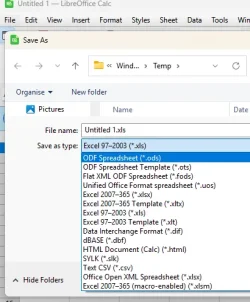
Doesn't really matter. LibreOffice Calc can open an save as either, and lots more besides.

1760352211553.webp

1760352440859.webp
 

My Computers My Computers

  • At a glance

    Windows 11 HomeAMD Athlon Silver 3050U8GBRadeon Graphics
    OS
    Windows 11 Home
    Computer type
    Laptop
    Manufacturer/Model
    Acer Aspire 3 A315-23-R9VY
    CPU
    AMD Athlon Silver 3050U
    Memory
    8GB
    Graphics Card(s)
    Radeon Graphics
    Monitor(s) Displays
    laptop screen
    Screen Resolution
    1366x768 native resolution, up to 2560x1440 with Radeon Virtual Super Resolution
    Hard Drives
    1TB Samsung EVO 870 SSD (from April 2026: 250GB EVO 850)
    Internet Speed
    150 Mbps
    Browser
    Edge, Firefox
    Antivirus
    Defender
    Other Info
    fully 'Windows 11 ready' laptop. Windows 10 C: partition migrated from my old unsupported 'main machine' then upgraded to 11. A test migration ran Insider builds for 2 months. When 11 was released on 5th October 2021 it was re-imaged back to 10 and was offered the upgrade in Windows Update on 20th October. Windows Update offered the 22H2 Feature Update on 20th September 2022. It got the 23H2 Feature Update on 4th November 2023 through Windows Update, 24H2 on 3rd October 2024 through Windows Update by setting the Target Release Version for 24H2, and 25H2 on 30th September 2025 through Windows Update by setting the Target Release Version for 25H2.

    UPDATE - 11 April 2026: due to mechanical deterioration this PC has been retired from active duty. The OS with all software and files has been migrated to my System Seven in 'Other systems' to carry on as my general purpose 'main machine'.
  • At a glance

    Windows 11 ProIntel® Core™ i5-520M8GB(integrated graphics) Intel HD Graphics
    Operating System
    Windows 11 Pro
    Computer type
    Laptop
    Manufacturer/Model
    Dell Latitude E4310
    CPU
    Intel® Core™ i5-520M
    Motherboard
    0T6M8G
    Memory
    8GB
    Graphics card(s)
    (integrated graphics) Intel HD Graphics
    Screen Resolution
    1366x768
    Hard Drives
    500GB Crucial MX500 SSD
    Browser
    Firefox, Edge
    Antivirus
    Defender
    Other Info
    unsupported machine: Legacy bios, MBR, TPM 1.2, upgraded from W10 to W11 using W10/W11 hybrid install media workaround.

    In-place upgrade to 22H2 using ISO and a workaround.
    Feature Update to 23H2 by manually installing the Enablement Package.
    In-place upgrade to 24H2 using hybrid 23H2/24H2 install media.
    Upgraded to 25H2 by Enablement Package.

    Also running Insider Dev, and Canary builds and Windows 10 as native boot .vhdx.
  • My SYSTEM THREE is a Dell Latitude 5410, i7-10610U, 32GB RAM, 512GB NVMe ssd, supported device running Windows 11 Pro.

    My SYSTEM FOUR is a 2-in-1 convertible Lenovo Yoga 11e 20DA, Celeron N2930, 8GB RAM, 256GB ssd. Unsupported device: currently running Win10 Pro, plus Win11 Pro RTM and Insider Dev, Beta, and RP 24H2 as native boot vhdx.

    My SYSTEM FIVE is a Dell Latitude 3190 2-in-1, Pentium Silver N5030, 8GB RAM, 1TB NVMe ssd, supported device running Windows 11 Pro, plus Insider Beta, Dev, and Canary builds (and a few others) as a native boot .vhdx.

    My SYSTEM SIX is a Dell Latitude 5550, Core Ultra 7 165H, 64GB RAM, 1TB NVMe SSD, supported device, Windows 11 Pro 24H2, Hyper-V host machine. Updated to 25H2 on 30th September 2025.

    My SYSTEM SEVEN is a Lenovo Thinkpad T580, Intel Core i7-8650U, 16GB RAM, 512GB NVMe SSD + 2nd 512GB NVMe SSD, a supported device for Windows 11. This is my current general purpose 'main machine'. The installed Windows 11 Home from my System One has been migrated to this machine.
Back
Top Bottom