Windows 11 Pro - Windows 7 HP 64 - Lubuntui5 6600K - 800MHz to 4400MHz4+4G GSkill DDR4 3000IG - Intel 530
OS
Windows 11 Pro - Windows 7 HP 64 - Lubuntu
Computer type
PC/Desktop
Manufacturer/Model
custom build
CPU
i5 6600K - 800MHz to 4400MHz
Motherboard
GA-Z170-HD3P
Memory
4+4G GSkill DDR4 3000
Graphics Card(s)
IG - Intel 530
Monitor(s) Displays
Samsung 226BW
Screen Resolution
1680x1050
Hard Drives
(1) -1 SM951 – 128GB M.2 AHCI PCIe SSD drive for Win 11
(2) -1 WD SATA 3 - 1T for Data
(3) -1 WD SATA 3 - 1T for backup
(4) -1 BX500 SSD - 256G for Windows 7 and Lubuntu
PSU
Thermaltake 450W TR2 gold
Keyboard
Old and good Chicony mechanical keyboard
Mouse
Logitech mX performance - 9 buttons (had to disable some)
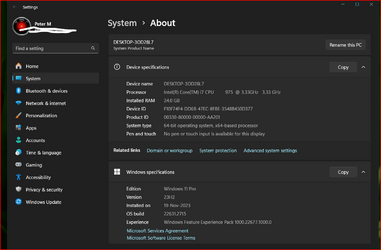
My Computer has always had a weird problem with rebooting as I have multi-boot using EasyBCD, in that when a restart is done by a major update or a system installation often the display would never turn back on from standby. So after those failed attempts to do an in-place upgrade it sudden;ly occurred to me that this maybe very simple. This time I waited until the display turned off then I quickly switched its power off and back on, and like magic I watched the upgrade complete.
Yes, after using 7-Zip to extract the ISO to a new folder and then deleting both appraiserres.dll & appraiser.sdb and replacinfg them with blank items (using Notepad) then clicking setup in that folder, everything went fine. I even installed the latest Cumulative Update for 23H2.
Thanks everyone for all the amazing help.
My Computer
At a glance
Windows 11 Pro 24H2Intel Ultra 7 165u @ 4.9ghz turbo, 12 core16gb DDR6 RAMIntel® Arc™ Graphics
OS
Windows 11 Pro 24H2
Computer type
Tablet
Manufacturer/Model
Microsoft Surface Pro 10 For Business
CPU
Intel Ultra 7 165u @ 4.9ghz turbo, 12 core
Motherboard
-
Memory
16gb DDR6 RAM
Graphics Card(s)
Intel® Arc™ Graphics
Sound Card
Intel Omni Enhanced Sound
Monitor(s) Displays
13” Led
Screen Resolution
2880 x 1920
Hard Drives
1tb M2 SSD
PSU
39W
Case
Aluminium/Gorilla Glass
Cooling
Passive
Keyboard
Onboard Touch or MS Case illuminated Keyboard/Cover
Mouse
Touch screen or MS Case illuminated Keyboard/Cover with glass trackpad
You again -- Negative comments as per usual --nothing positive or helpful --Why aren't I surprised. -- suggest a solution if you can --or even DARE.
If there were a vote for the most unhelpful person on this Forum you'd win that with HONORS !!
At least I'd start by telling the OP how to re-install the windows Bootloader via BCD.exe which usually fixes most of this stuff even if it's a bit complex or how to easily use bcdedit.exe -- so I'd suggest you just GET LOST until you can speak to fellow humans in a civilised and respectful language.
Cheers
jimbo
My Computer
At a glance
Windows XP,11 Linux Fedora Rawhide pre-releas...2 X Intel i7
Let's all remember that sometimes, new people don't realize that this is a kinder and gentler forum.
It's hard to come from most other forums to this one and change overnight into a kinder, gentler poster.
Most other forums are dog eat dog, come in with guns blazing or die... forums.
Let's all give new people some time to adjust.
Then if they don't catch on... it's out to the wood shed with them.
Noted, but as I am a Moderator at NeoSmart Forums I have to use its software.
Besides, it has worked perfectly for ages except for one intermittent problem where the Samsung monitor fails to start up correctly & that only happens as previously posted. I would imagine that's a system issue somewhere. I also require Windows NOT to always auto-restart as I prefer it to wait for my decision & the software easily handles that too.
Last edited:
My Computer
At a glance
Windows 11 Pro 24H2Intel Ultra 7 165u @ 4.9ghz turbo, 12 core16gb DDR6 RAMIntel® Arc™ Graphics
OS
Windows 11 Pro 24H2
Computer type
Tablet
Manufacturer/Model
Microsoft Surface Pro 10 For Business
CPU
Intel Ultra 7 165u @ 4.9ghz turbo, 12 core
Motherboard
-
Memory
16gb DDR6 RAM
Graphics Card(s)
Intel® Arc™ Graphics
Sound Card
Intel Omni Enhanced Sound
Monitor(s) Displays
13” Led
Screen Resolution
2880 x 1920
Hard Drives
1tb M2 SSD
PSU
39W
Case
Aluminium/Gorilla Glass
Cooling
Passive
Keyboard
Onboard Touch or MS Case illuminated Keyboard/Cover
Mouse
Touch screen or MS Case illuminated Keyboard/Cover with glass trackpad
Yes it does when you enable the TPM/SB/RAM bypass in the Windows User Experience.
If you're not sure, remember that you can find very detailed information about what Rufus is doing from its log (click on the blue notebook icon or press Ctrl-L), where you will see something like:
Code:
...
Applying Windows customization:
Created 'I:\sources\appraiserres.dll' placeholder
...
For what is worth, I have tested on 2 different machines (one running Windows 11 22H2 and another running Windows 10 22H2) that you could successfully upgrade to Windows 11 23H2 on unsupported hardware by running setup.exe from a drive that was created by Rufus (again, provided that you did select the bypass option when prompted).
I actually used my old version of registry entries with the 23H2 ISO image for x64 PCs mounted (no Rufus USB), then followed with the ring-change registry change from Release Preview to Beta on my unsupported laptop. (The laptop was running Windows 10 before, and is running Windows 11 Home 22xxx Beta now (trying to apply latest Cumulative Update). I will use a version of this with my Dell minitower which needs a nV GPU - looking at a GT 1030).