

TV is a Philips 43PUS8555/12 with latest and last firmware installed October 2022 (TPM191E_R.101.002.186.000 u3).
Router is a Plusnet Hub Two with latest firmware (v0.10.00.04201-PN) installed June 2023.
The two are connected via WiFi since running an ethernet cable is too difficult.
The TV is 5.8 metres in line-of-sight from hub with no interference in-between.
Both devices are dual band and the connection is able to switch WiFi bands dynamically.
After a stuttering/freezing on-demand issue WiFi at the TV I tried the following to fix it: -
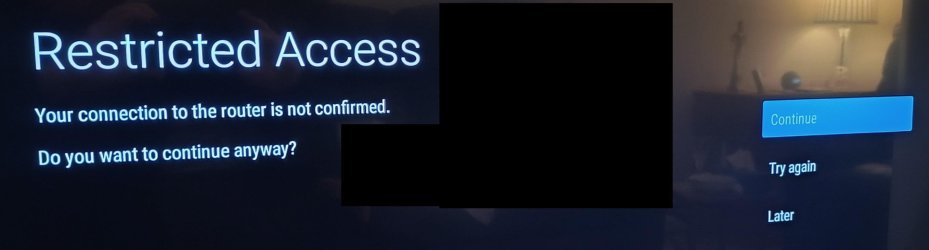
Question - I should state that this issue has not happened before but does anyone know what might have caused this message to display?

Router is a Plusnet Hub Two with latest firmware (v0.10.00.04201-PN) installed June 2023.
The two are connected via WiFi since running an ethernet cable is too difficult.
The TV is 5.8 metres in line-of-sight from hub with no interference in-between.
Both devices are dual band and the connection is able to switch WiFi bands dynamically.
After a stuttering/freezing on-demand issue WiFi at the TV I tried the following to fix it: -
- I switched the TV off at the wall socket and, after a few minutes I switched it back on again. This did not fix it.
- I switched the hub off and then back on again. This worked for about 30-minutes but then the stuttering/freezing video returned.
- I decided to go through the procedure to reconnect TV to the hub WiFi and I saw screen message “Restricted access. Your connection to the router is not confirmed. Do you want to continue anyway” so I selected ‘Continue’.
- Then the screen showed “Connected. The wireless network is connected. SSID name”.
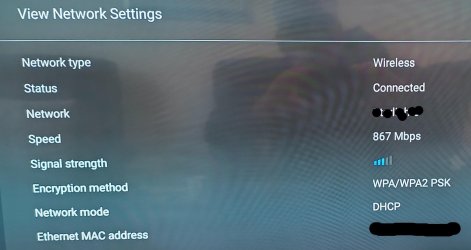
- When I check the TV ‘Network settings’ I see “Wireless”, “Connected”, “867 Mbps” and 3/5 bar signal strength.
Question - I should state that this issue has not happened before but does anyone know what might have caused this message to display?
My Computers
-
At a glance
Windows 11 ProAMD Ryzen 9 8945HS32GB DDR5 SO-DIMMIntegrated AMD Radeon 780M (4.00 GHz)- OS
- Windows 11 Pro
- Computer type
- PC/Desktop
- Manufacturer/Model
- GMKtec K11
- CPU
- AMD Ryzen 9 8945HS
- Memory
- 32GB DDR5 SO-DIMM
- Graphics Card(s)
- Integrated AMD Radeon 780M (4.00 GHz)
- Monitor(s) Displays
- Benq 2250HM
- Screen Resolution
- 1920 x 1080
- Hard Drives
- 1 TB PCIe 4.0 NVMe M.2 SSD
- Antivirus
- Bit Defender Total Security
-
At a glance
Windows 11 HomeIntel® Core™ Ultra 7 - 255H processor16 GB LPDDR5 SDRAMIntel Arc 140T onboard graphics- Operating System
- Windows 11 Home
- Computer type
- Laptop
- Manufacturer/Model
- ASUS Zenbook 14 OLED 14" Laptop - UX3405CA-QL192W
- CPU
- Intel® Core™ Ultra 7 - 255H processor
- Memory
- 16 GB LPDDR5 SDRAM
- Graphics card(s)
- Intel Arc 140T onboard graphics
- Screen Resolution
- 1920 x 1200 (16:10 WUXGA resolution) OLED Touchscreen
- Hard Drives
- 1TB SSD
- Antivirus
- Bit Defender Total Security






