
Solved TV Wi-Fi router connection not confirmed message


wiganken

Well-known member
Power User
VIP
Local time
2:40 AM
Posts
1,287
Location
UK
OS
Windows 11 Pro
TV is a Philips 43PUS8555/12 with latest and last firmware installed October 2022 (TPM191E_R.101.002.186.000 u3).

Router is a Plusnet Hub Two with latest firmware (v0.10.00.04201-PN) installed June 2023.

The two are connected via WiFi since running an ethernet cable is too difficult.
The TV is 5.8 metres in line-of-sight from hub with no interference in-between.
Both devices are dual band and the connection is able to switch WiFi bands dynamically.

After a stuttering/freezing on-demand issue WiFi at the TV I tried the following to fix it: -
  1. I switched the TV off at the wall socket and, after a few minutes I switched it back on again. This did not fix it.
  2. I switched the hub off and then back on again. This worked for about 30-minutes but then the stuttering/freezing video returned.
  3. I decided to go through the procedure to reconnect TV to the hub WiFi and I saw screen message “Restricted access. Your connection to the router is not confirmed. Do you want to continue anyway” so I selected ‘Continue’.
  4. Then the screen showed “Connected. The wireless network is connected. SSID name”.
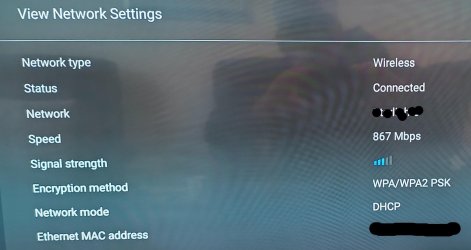
  5. When I check the TV ‘Network settings’ I see “Wireless”, “Connected”, “867 Mbps” and 3/5 bar signal strength.
The stuttering/freezing on-demand issue seems okay now but the message “Restricted access. Your connection to the router is not confirmed. Do you want to continue anyway” has me confused since selecting “Continue” connects fine.

Question - I should state that this issue has not happened before but does anyone know what might have caused this message to display?
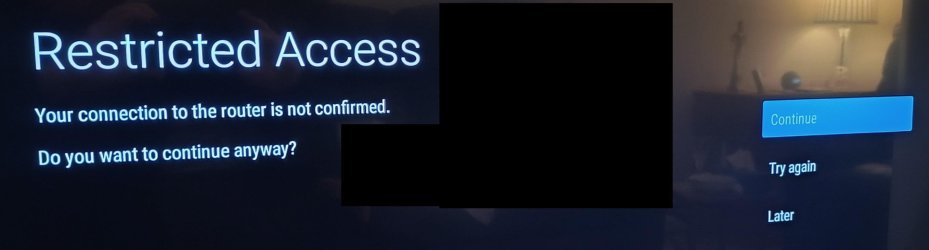

Router connection not confirmed.jpg

Connected  1.jpg

Connected 2.jpg
 

My Computers My Computers

  • At a glance

    Windows 11 ProAMD Ryzen 9 8945HS32GB DDR5 SO-DIMMIntegrated AMD Radeon 780M (4.00 GHz)
    OS
    Windows 11 Pro
    Computer type
    PC/Desktop
    Manufacturer/Model
    GMKtec K11
    CPU
    AMD Ryzen 9 8945HS
    Memory
    32GB DDR5 SO-DIMM
    Graphics Card(s)
    Integrated AMD Radeon 780M (4.00 GHz)
    Monitor(s) Displays
    Benq 2250HM
    Screen Resolution
    1920 x 1080
    Hard Drives
    1 TB PCIe 4.0 NVMe M.2 SSD
  • At a glance

    Windows 11 HomeIntel® Core™ Ultra 7 - 255H processor16 GB LPDDR5 SDRAMIntel Arc 140T onboard graphics
    Operating System
    Windows 11 Home
    Computer type
    Laptop
    Manufacturer/Model
    ASUS Zenbook 14 OLED 14" Laptop - UX3405CA-QL192W
    CPU
    Intel® Core™ Ultra 7 - 255H processor
    Memory
    16 GB LPDDR5 SDRAM
    Graphics card(s)
    Intel Arc 140T onboard graphics
    Screen Resolution
    1920 x 1200 (16:10 WUXGA resolution) OLED Touchscreen
    Hard Drives
    1TB SSD
TV is a Philips 43PUS8555/12 with latest and last firmware installed October 2022 (TPM191E_R.101.002.186.000 u3).

Router is a Plusnet Hub Two with latest firmware (v0.10.00.04201-PN) installed June 2023.

The two are connected via WiFi since running an ethernet cable is too difficult.
The TV is 5.8 metres in line-of-sight from hub with no interference in-between.
Both devices are dual band and the connection is able to switch WiFi bands dynamically.

After a stuttering/freezing on-demand issue WiFi at the TV I tried the following to fix it: -
  1. I switched the TV off at the wall socket and, after a few minutes I switched it back on again. This did not fix it.
  2. I switched the hub off and then back on again. This worked for about 30-minutes but then the stuttering/freezing video returned.
  3. I decided to go through the procedure to reconnect TV to the hub WiFi and I saw screen message “Restricted access. Your connection to the router is not confirmed. Do you want to continue anyway” so I selected ‘Continue’.
  4. Then the screen showed “Connected. The wireless network is connected. SSID name”.
  5. When I check the TV ‘Network settings’ I see “Wireless”, “Connected”, “867 Mbps” and 3/5 bar signal strength.
The stuttering/freezing on-demand issue seems okay now but the message “Restricted access. Your connection to the router is not confirmed. Do you want to continue anyway” has me confused since selecting “Continue” connects fine.

Question - I should state that this issue has not happened before but does anyone know what might have caused this message to display?
View attachment 86170

View attachment 86171

View attachment 86172

Shouldn't you be going for a static IP rather than DHCP on the TV?
It is within your network.
 

My Computers My Computers

  • At a glance

    All Branches but ReleaseAMD Ryzen 7 7735HS 3200-4500 Mhz 8 cores x 232 GB DDR5Radeon Graphic / NVIDIA GeForce RTX 4060 8 GB...
    OS
    All Branches but Release
    Computer type
    Laptop
    Manufacturer/Model
    Acer Nitro ANV15-51
    CPU
    AMD Ryzen 7 7735HS 3200-4500 Mhz 8 cores x 2
    Motherboard
    Sportage_RBH
    Memory
    32 GB DDR5
    Graphics Card(s)
    Radeon Graphic / NVIDIA GeForce RTX 4060 8 GB GDDR6
    Sound Card
    AMD/Realtek(R) Audio
    Monitor(s) Displays
    Integrated Monitor (15.3"vis)
    Screen Resolution
    FHD 1920X1080 16:9 144Hz
    Hard Drives
    KINGSTON OM8SEP4512Q-AA 1TB
    Western Digital 256GB
    PSU
    19V DC 6.32 A 120 W
    Cooling
    Dual Fans
    Mouse
    MS Bluetooth
    Internet Speed
    Fiber 1GB Cox -us & 1GB Orange-fr
    Browser
    Edge Canary- Firefox Nightly-Chrome Dev-Chrome Dev
    Antivirus
    Windows Defender
  • At a glance

    Windows 11 BetaAMD A9-94208 GB of DDR4AMD Radeon R5
    Operating System
    Windows 11 Beta
    Computer type
    Laptop
    Manufacturer/Model
    Asus X751BP
    CPU
    AMD A9-9420
    Memory
    8 GB of DDR4
    Graphics card(s)
    AMD Radeon R5
    Screen Resolution
    1600x900
    Hard Drives
    Seagate 1 TB
@OAT - Thanks for the pointer. I'll look into that in more detail.

................................................................

Okay I looked into that and I find that Static IP addresses are assigned by one's ISP and then each device needs manual configuration since it is not automatically setup for each device. This is too technical for me so, bearing in mind that I have had no trouble (until now) I will stick with DHCP and hope it it is a rare event. Thanks anyway.
 
Last edited:

My Computers My Computers

  • At a glance

    Windows 11 ProAMD Ryzen 9 8945HS32GB DDR5 SO-DIMMIntegrated AMD Radeon 780M (4.00 GHz)
    OS
    Windows 11 Pro
    Computer type
    PC/Desktop
    Manufacturer/Model
    GMKtec K11
    CPU
    AMD Ryzen 9 8945HS
    Memory
    32GB DDR5 SO-DIMM
    Graphics Card(s)
    Integrated AMD Radeon 780M (4.00 GHz)
    Monitor(s) Displays
    Benq 2250HM
    Screen Resolution
    1920 x 1080
    Hard Drives
    1 TB PCIe 4.0 NVMe M.2 SSD
  • At a glance

    Windows 11 HomeIntel® Core™ Ultra 7 - 255H processor16 GB LPDDR5 SDRAMIntel Arc 140T onboard graphics
    Operating System
    Windows 11 Home
    Computer type
    Laptop
    Manufacturer/Model
    ASUS Zenbook 14 OLED 14" Laptop - UX3405CA-QL192W
    CPU
    Intel® Core™ Ultra 7 - 255H processor
    Memory
    16 GB LPDDR5 SDRAM
    Graphics card(s)
    Intel Arc 140T onboard graphics
    Screen Resolution
    1920 x 1200 (16:10 WUXGA resolution) OLED Touchscreen
    Hard Drives
    1TB SSD
The only thing I can think of is the passphrase for the router. Did the TV ask for the passphrase or did it use the passphrase that was stored from the lastime you connected the TV to the router?
 

My Computers My Computers

  • At a glance

    Windows 11 Pro 25H2Intel Core i7-10700K16GB (8GB PC4-19200 DDR4 SDRAM x2)NVIDIA GeForce GTX 1050 TI
    OS
    Windows 11 Pro 25H2
    Computer type
    PC/Desktop
    Manufacturer/Model
    PowerSpec B746
    CPU
    Intel Core i7-10700K
    Motherboard
    ASRock Z490 Phantom Gaming 4/ax
    Memory
    16GB (8GB PC4-19200 DDR4 SDRAM x2)
    Graphics Card(s)
    NVIDIA GeForce GTX 1050 TI
    Sound Card
    Realtek Audio
    Monitor(s) Displays
    #1. LG ULTRAWIDE 34" #2. AOC Q32G2WG3 32"
    Screen Resolution
    #1. 3440 X 1440 #2. 1920 x 1080
    Hard Drives
    NVMe WDC WDS100T2B0C-00PXH0 1TB
    Samsung SSD 860 EVO 1TB
    PSU
    750 Watts (62.5A)
    Case
    PowerSpec/Lian Li ATX 205
    Keyboard
    Logitech K270
    Mouse
    Logitech M185
    Browser
    Microsoft Edge and Firefox
    Antivirus
    Webroot SecureAnywhere CE 26.1
  • At a glance

    Windows 11 Canary ChannelIntel Core i5-8400 CPU @ 2.80GHz16 MB DDR 4-2666
    Operating System
    Windows 11 Canary Channel
    Computer type
    PC/Desktop
    Manufacturer/Model
    PowerSpec G156
    CPU
    Intel Core i5-8400 CPU @ 2.80GHz
    Motherboard
    AsusTeK Prime B360M-A
    Memory
    16 MB DDR 4-2666
    Monitor(s) Displays
    23" Speptre HDMI 75Hz
    Screen Resolution
    1920x1080
    Hard Drives
    Samsung 970 EVO 500GB NVMe
    Keyboard
    Logitek K270
    Mouse
    Logitek M185
    Browser
    Firefox, Edge and Edge Canary
    Antivirus
    Windows Defender
@Winuser - When I went through the process of reconnecting the TV to the WiFi I saw that the PW field was already filled with asterisks, which I took to be the PW and carried on and was shown the messages in post #1. What I did not say in post #1 (and I should have) is that I tried a second time but on this occasion I used backspace to delete all the PW characters and re-entered them from scratch with the same result.

The PW must be correct or else it would not let me connect at all.

What bugs me is why does the message "Restricted access. Your connection to the router is not confirmed. Do you want to continue anyway?" display in the first place if it then allows the TV to connect anyway? I would expect to see "Incorrect password" or "You are now connected" and not some meaningless phrase before connection is made.
 
Last edited:

My Computers My Computers

  • At a glance

    Windows 11 ProAMD Ryzen 9 8945HS32GB DDR5 SO-DIMMIntegrated AMD Radeon 780M (4.00 GHz)
    OS
    Windows 11 Pro
    Computer type
    PC/Desktop
    Manufacturer/Model
    GMKtec K11
    CPU
    AMD Ryzen 9 8945HS
    Memory
    32GB DDR5 SO-DIMM
    Graphics Card(s)
    Integrated AMD Radeon 780M (4.00 GHz)
    Monitor(s) Displays
    Benq 2250HM
    Screen Resolution
    1920 x 1080
    Hard Drives
    1 TB PCIe 4.0 NVMe M.2 SSD
  • At a glance

    Windows 11 HomeIntel® Core™ Ultra 7 - 255H processor16 GB LPDDR5 SDRAMIntel Arc 140T onboard graphics
    Operating System
    Windows 11 Home
    Computer type
    Laptop
    Manufacturer/Model
    ASUS Zenbook 14 OLED 14" Laptop - UX3405CA-QL192W
    CPU
    Intel® Core™ Ultra 7 - 255H processor
    Memory
    16 GB LPDDR5 SDRAM
    Graphics card(s)
    Intel Arc 140T onboard graphics
    Screen Resolution
    1920 x 1200 (16:10 WUXGA resolution) OLED Touchscreen
    Hard Drives
    1TB SSD
I have one LG TV that sometimes (every few months) has WiFi connection problems, saying it is connected but not actually connecting and unplugging the TV for 5 mins, then re-creating the WiFi connection cures it - until the next time, but it isn't a regular occurrence.
 

My Computer My Computer

At a glance

Win11 26100.332312th Gen Intel(R) Core(TM) i7-1270P 2.20 GHz16Gb
OS
Win11 26100.3323
Computer type
Laptop
Manufacturer/Model
Dell Latitude 7430
CPU
12th Gen Intel(R) Core(TM) i7-1270P 2.20 GHz
Motherboard
Dell
Memory
16Gb
I am beginning to think it is a bug in the Android TV software that is mis-reporting an issue that doesn't exist. I say this because it connects to the WiFi in spite of the "connection to the router is not confirmed" message. There are no more OS updates for the TV so I'll just have to forget this oddity and move on. As long as it works then I'll have to be happy with that.

I'll call it 'Solved'.
 

My Computers My Computers

  • At a glance

    Windows 11 ProAMD Ryzen 9 8945HS32GB DDR5 SO-DIMMIntegrated AMD Radeon 780M (4.00 GHz)
    OS
    Windows 11 Pro
    Computer type
    PC/Desktop
    Manufacturer/Model
    GMKtec K11
    CPU
    AMD Ryzen 9 8945HS
    Memory
    32GB DDR5 SO-DIMM
    Graphics Card(s)
    Integrated AMD Radeon 780M (4.00 GHz)
    Monitor(s) Displays
    Benq 2250HM
    Screen Resolution
    1920 x 1080
    Hard Drives
    1 TB PCIe 4.0 NVMe M.2 SSD
  • At a glance

    Windows 11 HomeIntel® Core™ Ultra 7 - 255H processor16 GB LPDDR5 SDRAMIntel Arc 140T onboard graphics
    Operating System
    Windows 11 Home
    Computer type
    Laptop
    Manufacturer/Model
    ASUS Zenbook 14 OLED 14" Laptop - UX3405CA-QL192W
    CPU
    Intel® Core™ Ultra 7 - 255H processor
    Memory
    16 GB LPDDR5 SDRAM
    Graphics card(s)
    Intel Arc 140T onboard graphics
    Screen Resolution
    1920 x 1200 (16:10 WUXGA resolution) OLED Touchscreen
    Hard Drives
    1TB SSD
@Winuser - When I went through the process of reconnecting the TV to the WiFi I saw that the PW field was already filled with asterisks, which I took to be the PW and carried on and was shown the messages in post #1. What I did not say in post #1 (and I should have) is that I tried a second time but on this occasion I used backspace to delete all the PW characters and re-entered them from scratch with the same result.

The PW must be correct or else it would not let me connect at all.

What bugs me is why does the message "Restricted access. Your connection to the router is not confirmed. Do you want to continue anyway?" display in the first place if it then allows the TV to connect anyway? I would expect to see "Incorrect password" or "You are now connected" and not some meaningless phrase before connection is made.
Seeing how it connected it's probably a bug in the TV's software. I was going to say the it probably was because you were using a old passphrase. I reread your post and see you did re-enter the passphrase so this leads me to think it just a software bug on the TV.
 

My Computers My Computers

  • At a glance

    Windows 11 Pro 25H2Intel Core i7-10700K16GB (8GB PC4-19200 DDR4 SDRAM x2)NVIDIA GeForce GTX 1050 TI
    OS
    Windows 11 Pro 25H2
    Computer type
    PC/Desktop
    Manufacturer/Model
    PowerSpec B746
    CPU
    Intel Core i7-10700K
    Motherboard
    ASRock Z490 Phantom Gaming 4/ax
    Memory
    16GB (8GB PC4-19200 DDR4 SDRAM x2)
    Graphics Card(s)
    NVIDIA GeForce GTX 1050 TI
    Sound Card
    Realtek Audio
    Monitor(s) Displays
    #1. LG ULTRAWIDE 34" #2. AOC Q32G2WG3 32"
    Screen Resolution
    #1. 3440 X 1440 #2. 1920 x 1080
    Hard Drives
    NVMe WDC WDS100T2B0C-00PXH0 1TB
    Samsung SSD 860 EVO 1TB
    PSU
    750 Watts (62.5A)
    Case
    PowerSpec/Lian Li ATX 205
    Keyboard
    Logitech K270
    Mouse
    Logitech M185
    Browser
    Microsoft Edge and Firefox
    Antivirus
    Webroot SecureAnywhere CE 26.1
  • At a glance

    Windows 11 Canary ChannelIntel Core i5-8400 CPU @ 2.80GHz16 MB DDR 4-2666
    Operating System
    Windows 11 Canary Channel
    Computer type
    PC/Desktop
    Manufacturer/Model
    PowerSpec G156
    CPU
    Intel Core i5-8400 CPU @ 2.80GHz
    Motherboard
    AsusTeK Prime B360M-A
    Memory
    16 MB DDR 4-2666
    Monitor(s) Displays
    23" Speptre HDMI 75Hz
    Screen Resolution
    1920x1080
    Hard Drives
    Samsung 970 EVO 500GB NVMe
    Keyboard
    Logitek K270
    Mouse
    Logitek M185
    Browser
    Firefox, Edge and Edge Canary
    Antivirus
    Windows Defender
Same problem here..restricted access..with similar philips model and i had an update recently..since then cant see the tv in the google home app! Found anything? Thanks!
 

My Computer My Computer

At a glance

Android
OS
Android
Computer type
Tablet
Found anything?
No, I didn't. I have just accepted it as a bug. I think it has only happened three times in total so it is a random thing that I have to live with. As long as it connects that's all that matters.
 

My Computers My Computers

  • At a glance

    Windows 11 ProAMD Ryzen 9 8945HS32GB DDR5 SO-DIMMIntegrated AMD Radeon 780M (4.00 GHz)
    OS
    Windows 11 Pro
    Computer type
    PC/Desktop
    Manufacturer/Model
    GMKtec K11
    CPU
    AMD Ryzen 9 8945HS
    Memory
    32GB DDR5 SO-DIMM
    Graphics Card(s)
    Integrated AMD Radeon 780M (4.00 GHz)
    Monitor(s) Displays
    Benq 2250HM
    Screen Resolution
    1920 x 1080
    Hard Drives
    1 TB PCIe 4.0 NVMe M.2 SSD
  • At a glance

    Windows 11 HomeIntel® Core™ Ultra 7 - 255H processor16 GB LPDDR5 SDRAMIntel Arc 140T onboard graphics
    Operating System
    Windows 11 Home
    Computer type
    Laptop
    Manufacturer/Model
    ASUS Zenbook 14 OLED 14" Laptop - UX3405CA-QL192W
    CPU
    Intel® Core™ Ultra 7 - 255H processor
    Memory
    16 GB LPDDR5 SDRAM
    Graphics card(s)
    Intel Arc 140T onboard graphics
    Screen Resolution
    1920 x 1200 (16:10 WUXGA resolution) OLED Touchscreen
    Hard Drives
    1TB SSD

Latest Support Threads

Back
Top Bottom




