Two "personal" Folders


Meebers

Well-known member
Member
VIP
Local time
1:28 PM
Posts
124
Location
Florida
OS
W11 25H2 26200.8457
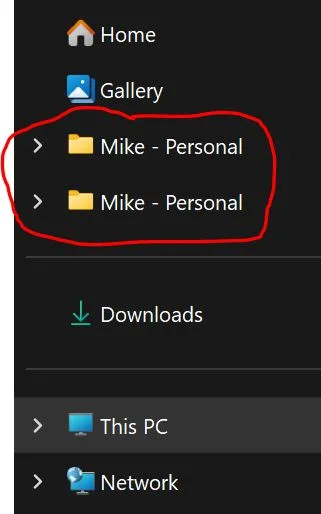
When using file explorer, it shows 2 Personal folders. They are identical in content. I do no have OneDrive installed/running, W11 puts it back in the installed apps folder after I have uninstalled it. Selecting either one indicates the path as "Start OneDrive > Mike - Personal". :O( Win 11 25H2 26200.9711
personal.webp
 

My Computers My Computers

  • At a glance

    W11 25H2 26200.8457AMD RYZEN 5-56002x8 GBMSI NVIDIA GeForce 710
    OS
    W11 25H2 26200.8457
    Computer type
    PC/Desktop
    Manufacturer/Model
    Self
    CPU
    AMD RYZEN 5-5600
    Motherboard
    ASUS B 550-F
    Memory
    2x8 GB
    Graphics Card(s)
    MSI NVIDIA GeForce 710
    Sound Card
    On Board
    Monitor(s) Displays
    TCL 4k 43" TV
    Screen Resolution
    3840x2160
    Hard Drives
    Samsung 990 Pro 2TB and WD 2TB
    PSU
    800 W
    Case
    Fractal Design Focus Mid-Tower Case (RED)
    Cooling
    3 120 mm Fan
    Keyboard
    Logitech MK320
    Mouse
    Logitech
    Internet Speed
    2 Mbps/2 Mbps
    Browser
    FF
    Antivirus
    MS Defender, MWB
  • At a glance

    W11 22621.1194 / Linux Mint/Chrome OSAMD a8-5545m2x4GBGTX 550 Ti
    Operating System
    W11 22621.1194 / Linux Mint/Chrome OS
    Computer type
    PC/Desktop
    Manufacturer/Model
    SELF
    CPU
    AMD a8-5545m
    Motherboard
    Biostar A68N-5545
    Memory
    2x4GB
    Graphics card(s)
    GTX 550 Ti
    Sound Card
    Internal
    Monitor(s) Displays
    2 ASUS 27"
    Screen Resolution
    1920x1080
    Hard Drives
    ADATA SU655
    PSU
    800W
    Case
    Cooler Master
    Cooling
    2 120mm Fan
    Keyboard
    LOGITEC
    Mouse
    lOGITEC
    Internet Speed
    940/940
    Browser
    FF
    Antivirus
    MS -MWB
@Brink has you covered.
Put the content below into a .reg file and merge it.


Code:
Windows Registry Editor Version 5.00

; Created by: Shawn Brink
; Created on: November 27, 2021
; Updated on: March 23, 2026
; Tutorial: https://www.elevenforum.com/t/add-or-remove-duplicate-drives-in-navigation-pane-of-file-explorer-in-windows-11.3043/

[-HKEY_LOCAL_MACHINE\SOFTWARE\Microsoft\Windows\CurrentVersion\Explorer\Desktop\NameSpace\DelegateFolders\{F5FB2C77-0E2F-4A16-A381-3E560C68BC83}]

[-HKEY_LOCAL_MACHINE\SOFTWARE\WOW6432Node\Microsoft\Windows\CurrentVersion\Explorer\Desktop\NameSpace\DelegateFolders\{F5FB2C77-0E2F-4A16-A381-3E560C68BC83}]
 

My Computers My Computers

  • At a glance

    All Branches but StableAMD Ryzen 7 7735HS 3200-4500 Mhz 8 cores x 232 GB DDR5Radeon Graphic / NVIDIA GeForce RTX 4060 8 GB...
    OS
    All Branches but Stable
    Computer type
    Laptop
    Manufacturer/Model
    Acer Nitro ANV15-51
    CPU
    AMD Ryzen 7 7735HS 3200-4500 Mhz 8 cores x 2
    Motherboard
    Sportage_RBH
    Memory
    32 GB DDR5
    Graphics Card(s)
    Radeon Graphic / NVIDIA GeForce RTX 4060 8 GB GDDR6
    Sound Card
    AMD/Realtek(R) Audio
    Monitor(s) Displays
    Integrated Monitor (15.3"vis)
    Screen Resolution
    FHD 1920X1080 16:9 144Hz
    Hard Drives
    KINGSTON OM8SEP4512Q-AA 1TB
    Western Digital 256GB
    PSU
    19V DC 6.32 A 120 W
    Cooling
    Dual Fans
    Mouse
    MS Bluetooth
    Internet Speed
    Fiber 1GB Cox -us & 1GB Orange-fr
    Browser
    Edge Canary- Firefox Nightly-Chrome Dev-Chrome Dev
    Antivirus
    Windows Defender
  • At a glance

    Windows 11 BetaAMD A9-94208 GB of DDR4AMD Radeon R5
    Operating System
    Windows 11 Beta
    Computer type
    Laptop
    Manufacturer/Model
    Asus X751BP
    CPU
    AMD A9-9420
    Memory
    8 GB of DDR4
    Graphics card(s)
    AMD Radeon R5
    Screen Resolution
    1600x900
    Hard Drives
    Seagate 1 TB

My Computers My Computers

  • At a glance

    Windows 11 Pro 26H2 26300.9457i9-10900 10 core 20 threads32 gbnone-Intel UHD Graphics 630
    OS
    Windows 11 Pro 26H2 26300.9457
    Computer type
    PC/Desktop
    Manufacturer/Model
    Dell Optiplex 7080
    CPU
    i9-10900 10 core 20 threads
    Motherboard
    DELL 0J37VM
    Memory
    32 gb
    Graphics Card(s)
    none-Intel UHD Graphics 630
    Sound Card
    Integrated Realtek
    Monitor(s) Displays
    Benq 27
    Screen Resolution
    2560x1440
    Hard Drives
    2x1tb Solidigm m.2 nvme /External drives 512gb Samsung m.2 sata+2tb Kingston m2.nvme
    PSU
    500w
    Case
    MT
    Cooling
    Dell Premium
    Keyboard
    Logitech wired
    Mouse
    Logitech wireless
    Internet Speed
    so slow I'm too embarrassed to tell
    Browser
    #1 Edge #2 Firefox
    Antivirus
    Defender+MWB Premium
  • At a glance

    Windows 11 Pro 24H2 26200.9457AMD Ryzen 7 6800U32 gbintegrated
    Operating System
    Windows 11 Pro 24H2 26200.9457
    Computer type
    PC/Desktop
    Manufacturer/Model
    Beelink Mini PC SER5
    CPU
    AMD Ryzen 7 6800U
    Memory
    32 gb
    Graphics card(s)
    integrated
    Sound Card
    integrated
    Monitor(s) Displays
    Benq 27
    Screen Resolution
    2560x1440
    Hard Drives
    1TB Crucial nvme
    Keyboard
    Logitech wired
    Mouse
    Logitech wireless
    Internet Speed
    still too embarrassed to tell
    Browser
    Firefox
    Antivirus
    Defender
  • System 3 is non compliant Dell 9020 i7-4770/24gb ram Win11 PRO 26200.9457
it shows 2 Personal folders
No, it does not.
It shows two shortcuts despite the icons used.
Everything in that section is a shortcut. Only ThisPC is a real location.

I suggest that your first check needs to be the list of user folder paths in the Registry at
HKEY_CURRENT_USER\SOFTWARE\Microsoft\Windows\CurrentVersion\Explorer\Shell Folders
- The entry Personal refers to your Documents folder.
I suggest that you make a record of the entries by taking a screenshot:-
- Drag the column dividers on the right-hand side so you can read all the text in the Name & Data columns.
Armed with that info, you'll know exactly where all your user folders are and you can avoid confusion when troubleshooting my always browsing to them by drilling down through ThisPC.


Denis
 

My Computer My Computer

At a glance

Windows 11 Home x64 Version 26H2 Build 26300....
OS
Windows 11 Home x64 Version 26H2 Build 26300.9457

Latest Support Threads

Back
Top Bottom