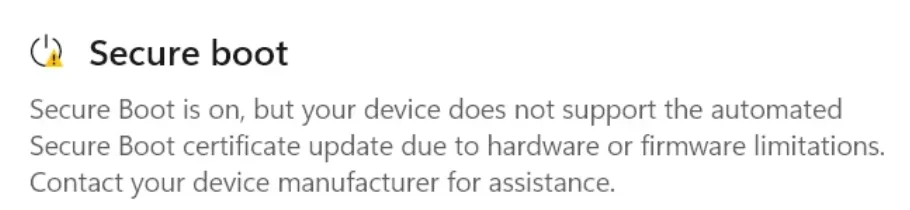
UEFI KEK Certs not updated.


Cameraman1955

Active member
Member
Local time
4:03 PM
Posts
88
OS
Windows 11 Pro 25H2 26200.7019
I have a Huawei D14 matebook from 2021 and updated the microsoft certificates, when I check this I get the following output, I see that the KEK cert is not updated is that stored in the bios ? Am I safe this way? Please help.
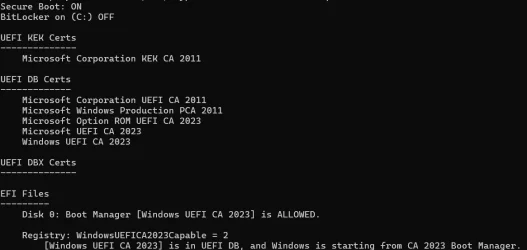
Schermafbeelding 2026-06-10 095938.webp
I also have this warning.
Schermafbeelding 2026-06-10 100347.webp
 

My Computer

System One

  • OS
    Windows 11 Pro 25H2 26200.7019
    Computer type
    PC/Desktop
    Manufacturer/Model
    Self built midi tower
    CPU
    Intel Core i7-8700K
    Motherboard
    Gigabyte Z390GX
    Memory
    Corsair 32GB 4x DDR4-2998 / PC4-23900 DDR4 SDRAM UDIMM
    Graphics Card(s)
    AMD RX570
    Sound Card
    Sound Blaster Z
    Monitor(s) Displays
    2x IIyama Prolite X2380HS
    Screen Resolution
    1920x1080
    Hard Drives
    Samsung SSD 970 EVO Plus NVMe 1TB
    Samsung SSD 970 EVO Plus NVMe 500GB
    PSU
    Seasonic 550W
    Cooling
    Noctua fans
    Keyboard
    Logitech G213
    Mouse
    Logitech Marble Mouse
    Browser
    Chrome
    Antivirus
    Norton
    Other Info
    Video/Audio editting machine
Maybe just wait a bit and keep restarting now and then and check the security settings again. When I did them on a few laptops, it took a few hours to "filter through" before the security settings changed (gradually) to you have everything needed or whatever. Leave the computer on for a few hours then restart maybe.

How did you update the security certificates? Via Windows update? Also keep running Windows update.

Just my two pennorth, but others, more expert than me, may know more.
 

My Computers

System One System Two

  • OS
    Windows 11 Home 25H2
    Computer type
    Laptop
    Manufacturer/Model
    HP Pavilion 14-ce3606sa
    CPU
    Core i5-1035G1
    Memory
    32gb
    Hard Drives
    Samsung 870 evo sata ssd
    Cooling
    Could be better
    Internet Speed
    50 mbps Starlink
    Browser
    Firefox
    Other Info
    Originally came installed with a 500gb H10 Optane ssd
  • Operating System
    Windows 11 Home
    Computer type
    Laptop
    Manufacturer/Model
    HP Pavilion ce3606sa
    CPU
    Intel Core i5-1035G1
    Memory
    16gb
    Hard Drives
    Hynix Gold P31 2TB
    Internet Speed
    200mbps Starlink
    Browser
    Firefox
    Antivirus
    Defender

My Computers

System One System Two

  • OS
    Windows 11 Pro build 26200.8524
    Computer type
    PC/Desktop
    Manufacturer/Model
    Home Built
    CPU
    Intel i7-4790
    Motherboard
    Asus H97 Pro Gamer with add-on TPM1.2 module
    Memory
    Teams DDR3-1600 4x4 GB
    Graphics Card(s)
    MSI Nvidia GeForce GTX 1050Ti
    Sound Card
    Realtek ALC1150
    Monitor(s) Displays
    Dell P2425D
    Screen Resolution
    2560 by 1440 pixels
    Hard Drives
    Corsair NVMe M.2 Core XT 1000 GB (Windows 11 v.25H2); Samsung SATA Evo 870 500 GB (Windows 11 v.25H2);
    PSU
    Corsair HX850
    Case
    Gigabyte Solo 210
    Cooling
    Zalman CNPS7X Tower
    Keyboard
    Microsoft AIO Wireless (includes touchpad)
    Mouse
    HP S1000 Plus Wireless
    Internet Speed
    500 Mb fiber optic
    Browser
    Chrome; MS Edge
    Antivirus
    Windows Defender
  • Operating System
    MacOS 12 Monterey
    Computer type
    Laptop
    Manufacturer/Model
    Apple Macbook Air
    CPU
    Intel Core i5
    Memory
    8 GB
    Graphics card(s)
    Intel integrated
    Screen Resolution
    1440 by 900 pixels
    Hard Drives
    128 GB
    Keyboard
    Built-in
    Mouse
    Microsoft Wireless
    Internet Speed
    802.11 ac
    Browser
    Chrome; Safari
    Antivirus
    N/A
this may explain better how the KEK database is updated
they will normally update after the 2023 certs have been installed by Windows update
or by a BIOS update from the manufacturer

also here is a MS KEK key update which has links to the KEK keys for downlaod
the download for the KEK keys downlaod is about halfway down the page.

so first use the KEK keys from MS then check Windows update then check the manufacturers website.
best of luck Steve ..
edit spelling, again.
 
Last edited:

My Computers

System One System Two

  • OS
    Debian 13 KDE .. Windows 11 Home
    Computer type
    PC/Desktop
    Manufacturer/Model
    HP 24" AiO
    CPU
    Ryzen 7 5825u
    Motherboard
    HP
    Memory
    64GB DDR4 3200
    Graphics Card(s)
    Ryzen 7 5825u
    Sound Card
    RealTek
    Monitor(s) Displays
    24" HP AiO
    Screen Resolution
    1920 x 1080 @60 Hz
    Hard Drives
    1TB WD Blue SN580 M2 SSD Partitioned.
    2x 1TB USB HDD External Backup/Storage.
    PSU
    90W external power brick
    Case
    24" All in One
    Cooling
    Default Air Cooling
    Keyboard
    HP WiFi UK extended
    Mouse
    HP WiFi 3 Button
    Internet Speed
    1GB full fibre
    Browser
    Edge & Firefox
    Antivirus
    AVG Internet Security/Windows Defender
    Other Info
    Mainly Open Source Software
  • Operating System
    Ubuntu 22.04.5 LTS
    Computer type
    Laptop
    Manufacturer/Model
    Dell 13" Latitude 2017
    CPU
    i5 7200u
    Motherboard
    Dell
    Memory
    16GB DDR4
    Graphics card(s)
    Intel
    Sound Card
    Intel
    Monitor(s) Displays
    13" Dell Laptop
    Hard Drives
    250GB Crucial 2.5" SSD
    Mouse
    Generic WiFi 3 button
    Internet Speed
    WiFi only
    Browser
    Firefox
    Antivirus
    ClamAV TK
    Other Info
    Mainly Open Source Software
All you need to do is let MS do it's analysis and it will be done automatically.
So you need it connected up for sometime, maybe days. Checking Windows updates now and again.
That should be all you need to do for a 2021 machine.
You could check the Manufacturers updates for your specific product but I doubt you will get anything after so many years.

If you read too much about the subject it gets overcomplicated, error prone, and wastes your time.
 

My Computer

System One

  • OS
    Windows 11
If your last BIOS update was around 2021, it's unlikely Huawei provided a signed KEK CA 2023 to MS.

Please check if your BIOS's Secure Boot menus for three options:
1. Switching from Standard to Custom (or User) mode
2. KEK key management where you can add a new key
3. Delete all keys

Depending on the age of your current BIOS, the KEK CA 2023 can either be installed using KEK key management, or deleting all keys and installing a replacement set of certs from MS.
 

My Computer

System One

  • OS
    Windows 7
I dont think this works for my laptop its having an InsydeH2O bios so I can't get to the advanced setting and the last update was in 2021, so no possebility to install KEK CA 2023 on this bios I think a lot of users of older laptops have this. It can run Windows 11 so thats something. I leave it this way.
 

My Computer

System One

  • OS
    Windows 11 Pro 25H2 26200.7019
    Computer type
    PC/Desktop
    Manufacturer/Model
    Self built midi tower
    CPU
    Intel Core i7-8700K
    Motherboard
    Gigabyte Z390GX
    Memory
    Corsair 32GB 4x DDR4-2998 / PC4-23900 DDR4 SDRAM UDIMM
    Graphics Card(s)
    AMD RX570
    Sound Card
    Sound Blaster Z
    Monitor(s) Displays
    2x IIyama Prolite X2380HS
    Screen Resolution
    1920x1080
    Hard Drives
    Samsung SSD 970 EVO Plus NVMe 1TB
    Samsung SSD 970 EVO Plus NVMe 500GB
    PSU
    Seasonic 550W
    Cooling
    Noctua fans
    Keyboard
    Logitech G213
    Mouse
    Logitech Marble Mouse
    Browser
    Chrome
    Antivirus
    Norton
    Other Info
    Video/Audio editting machine
Most BIOS'es from around 2020 (or later) can be manually updated, but navigating the BIOS screens is the most frustrating part of this exercise. It's still an option if you want to revisit it later.
 

My Computer

System One

  • OS
    Windows 7
Most BIOS'es from around 2020 (or later) can be manually updated, but navigating the BIOS screens is the most frustrating part of this exercise. It's still an option if you want to revisit it later.
I had no issues with a 2014 AMI BIOS in the HP-ENVY desktop. It seemed the mechanism for Secure Boot as far as the BIOS was concerned was still compatible with the 2023 certs. If not, I would have thought I'd have come to grief updating this computer.

Is this true or was I just lucky it worked? :unsure:
 

My Computers

System One System Two

  • OS
    Win 11 Pro 25H2, Build 26200.8655
    Computer type
    PC/Desktop
    Manufacturer/Model
    Home Brew
    CPU
    Intel Core i5 14500
    Motherboard
    Gigabyte B760M G P WIFI
    Memory
    64GB DDR4
    Graphics Card(s)
    GeForce RTX 4060
    Sound Card
    Chipset Realtek
    Monitor(s) Displays
    LG 45" Ultragear, Acer 24" 1080p
    Screen Resolution
    5120x1440, 1920x1080
    Hard Drives
    Crucial P310 2TB 2280 PCIe Gen4 3D NAND NVMe M.2 SSD (O/S)
    Silicon Power 2TB US75 NVMe PCIe Gen4 M.2 2280 SSD (backup)
    Crucial BX500 2TB 3D NAND (2nd backup)
    Seagate 4TB Ironwolf, rotating HDD archive files
    External off-line backup Drives: 2 NVMe 4TB drives in external enclosures
    PSU
    Thermaltake Toughpower GF3 750W
    Case
    LIAN LI LANCOOL 216 E-ATX PC Case
    Cooling
    Lots of fans!
    Keyboard
    Microsoft Comfort Curve 2000
    Mouse
    Logitech G305
    Internet Speed
    Verizon FiOS 1GB
    Browser
    Firefox
    Antivirus
    Malware Bytes & Windows Defender Security
  • Operating System
    Win 11 Pro 25H2, Build 26200.8524
    Computer type
    PC/Desktop
    Manufacturer/Model
    Home Brew
    CPU
    Intel Core i5 14400
    Motherboard
    Gigabyte B760M DS3H AX
    Memory
    32GB DDR5
    Graphics card(s)
    Intel 700 Embedded GPU
    Sound Card
    Realtek Embedded
    Monitor(s) Displays
    27" HP 1080p
    Screen Resolution
    1920x1080
    Hard Drives
    Crucial P310 2TB 2280 PCIe Gen4 eD NAND PCIe SSD
    Samsung EVO 990 2TB NVMe Gen4 SSD
    Samsung 2TB SATA SSD
    PSU
    Thermaltake Smart BM3 650W
    Case
    Okinos Micro ATX Case
    Cooling
    Fans
    Keyboard
    Microsoft Comfort Curve 2000
    Mouse
    Logitech G305
    Internet Speed
    Verizon FiOS 1GB
    Browser
    Firefox
    Antivirus
    Malware Bytes & Windows Defender Security
According to google there are bios later than 2021 available. Do you have the PC Manager installed (which enables bios updates apparently). The first link is the download to PC Manager.


Also this (although you might know this already about power state)

 
Last edited:

My Computers

System One System Two

  • OS
    Windows 11 Home 25H2
    Computer type
    Laptop
    Manufacturer/Model
    HP Pavilion 14-ce3606sa
    CPU
    Core i5-1035G1
    Memory
    32gb
    Hard Drives
    Samsung 870 evo sata ssd
    Cooling
    Could be better
    Internet Speed
    50 mbps Starlink
    Browser
    Firefox
    Other Info
    Originally came installed with a 500gb H10 Optane ssd
  • Operating System
    Windows 11 Home
    Computer type
    Laptop
    Manufacturer/Model
    HP Pavilion ce3606sa
    CPU
    Intel Core i5-1035G1
    Memory
    16gb
    Hard Drives
    Hynix Gold P31 2TB
    Internet Speed
    200mbps Starlink
    Browser
    Firefox
    Antivirus
    Defender
2024 bios -download link below. But presumably PC Manager would install it.

Bios.webp


My Computers

System One System Two

  • OS
    Windows 11 Home 25H2
    Computer type
    Laptop
    Manufacturer/Model
    HP Pavilion 14-ce3606sa
    CPU
    Core i5-1035G1
    Memory
    32gb
    Hard Drives
    Samsung 870 evo sata ssd
    Cooling
    Could be better
    Internet Speed
    50 mbps Starlink
    Browser
    Firefox
    Other Info
    Originally came installed with a 500gb H10 Optane ssd
  • Operating System
    Windows 11 Home
    Computer type
    Laptop
    Manufacturer/Model
    HP Pavilion ce3606sa
    CPU
    Intel Core i5-1035G1
    Memory
    16gb
    Hard Drives
    Hynix Gold P31 2TB
    Internet Speed
    200mbps Starlink
    Browser
    Firefox
    Antivirus
    Defender
2024 bios -download link below. But presumably PC Manager would install it.

View attachment 174063

Thanks for the info but I have the Matebook D14 AMD version I updated the bios now to version 1.19 thats the latest from 2023, so I think I don't get the new KEK certificates, I send the question also to Huawei.
 
Last edited:

My Computer

System One

  • OS
    Windows 11 Pro 25H2 26200.7019
    Computer type
    PC/Desktop
    Manufacturer/Model
    Self built midi tower
    CPU
    Intel Core i7-8700K
    Motherboard
    Gigabyte Z390GX
    Memory
    Corsair 32GB 4x DDR4-2998 / PC4-23900 DDR4 SDRAM UDIMM
    Graphics Card(s)
    AMD RX570
    Sound Card
    Sound Blaster Z
    Monitor(s) Displays
    2x IIyama Prolite X2380HS
    Screen Resolution
    1920x1080
    Hard Drives
    Samsung SSD 970 EVO Plus NVMe 1TB
    Samsung SSD 970 EVO Plus NVMe 500GB
    PSU
    Seasonic 550W
    Cooling
    Noctua fans
    Keyboard
    Logitech G213
    Mouse
    Logitech Marble Mouse
    Browser
    Chrome
    Antivirus
    Norton
    Other Info
    Video/Audio editting machine
Thanks for the info but I have the Matebook D14 AMD version I updated the bios now to version 1.19 thats the latest from 2023, so I think I don't get the new KEK certificates, I send the question also to Huawei.
Ok - so have you just updated the bios or did that a while back? If you just updated them then maybe run windows update a time or two and leave the machine turned on and check security settings again - open settings, type device security in search box, open and scroll down to secure boot and see what the message says. Check again a day later. Hopefully Huawei will tell you if there is a later bios version.

On my machine, Windows update delivered the kek 2023 update directly. Hence keep checking device security info as it can go on in the background. And leave the machine turned on.
 
Last edited:

My Computers

System One System Two

  • OS
    Windows 11 Home 25H2
    Computer type
    Laptop
    Manufacturer/Model
    HP Pavilion 14-ce3606sa
    CPU
    Core i5-1035G1
    Memory
    32gb
    Hard Drives
    Samsung 870 evo sata ssd
    Cooling
    Could be better
    Internet Speed
    50 mbps Starlink
    Browser
    Firefox
    Other Info
    Originally came installed with a 500gb H10 Optane ssd
  • Operating System
    Windows 11 Home
    Computer type
    Laptop
    Manufacturer/Model
    HP Pavilion ce3606sa
    CPU
    Intel Core i5-1035G1
    Memory
    16gb
    Hard Drives
    Hynix Gold P31 2TB
    Internet Speed
    200mbps Starlink
    Browser
    Firefox
    Antivirus
    Defender
Ok - so have you just updated the bios or did that a while back? If you just updated them then maybe run windows update a time or two and leave the machine turned on. Hopefully they will tell you if there is a later bios version.
Yes I found this but it's an old update from 2023 but maybe it works.
 

My Computer

System One

  • OS
    Windows 11 Pro 25H2 26200.7019
    Computer type
    PC/Desktop
    Manufacturer/Model
    Self built midi tower
    CPU
    Intel Core i7-8700K
    Motherboard
    Gigabyte Z390GX
    Memory
    Corsair 32GB 4x DDR4-2998 / PC4-23900 DDR4 SDRAM UDIMM
    Graphics Card(s)
    AMD RX570
    Sound Card
    Sound Blaster Z
    Monitor(s) Displays
    2x IIyama Prolite X2380HS
    Screen Resolution
    1920x1080
    Hard Drives
    Samsung SSD 970 EVO Plus NVMe 1TB
    Samsung SSD 970 EVO Plus NVMe 500GB
    PSU
    Seasonic 550W
    Cooling
    Noctua fans
    Keyboard
    Logitech G213
    Mouse
    Logitech Marble Mouse
    Browser
    Chrome
    Antivirus
    Norton
    Other Info
    Video/Audio editting machine
Yes I found this but it's an old update from 2023 but maybe it works.
It should get installed by their pc manager app if it's the right one. Also see above - just edited last message about windows update delivering the kek 2023 update directly.
 

My Computers

System One System Two

  • OS
    Windows 11 Home 25H2
    Computer type
    Laptop
    Manufacturer/Model
    HP Pavilion 14-ce3606sa
    CPU
    Core i5-1035G1
    Memory
    32gb
    Hard Drives
    Samsung 870 evo sata ssd
    Cooling
    Could be better
    Internet Speed
    50 mbps Starlink
    Browser
    Firefox
    Other Info
    Originally came installed with a 500gb H10 Optane ssd
  • Operating System
    Windows 11 Home
    Computer type
    Laptop
    Manufacturer/Model
    HP Pavilion ce3606sa
    CPU
    Intel Core i5-1035G1
    Memory
    16gb
    Hard Drives
    Hynix Gold P31 2TB
    Internet Speed
    200mbps Starlink
    Browser
    Firefox
    Antivirus
    Defender
While you're waiting for a response, check the BIOS menus for Secure Boot. Is there an option for manual KEK Key Enrollment?
Your BIOS is probably updated, and will need some manual help.
 

My Computer

System One

  • OS
    Windows 7
While you're waiting for a response, check the BIOS menus for Secure Boot. Is there an option for manual KEK Key Enrollment?
Your BIOS is probably updated, and will need some manual help.
I guess I don't understand how a BIOS so recent can't be updated. If AMI was putting the Secure Boot handling in their 2014 BIOS, surely any reputable BIOS creator has it by 2022!
 

My Computers

System One System Two

  • OS
    Win 11 Pro 25H2, Build 26200.8655
    Computer type
    PC/Desktop
    Manufacturer/Model
    Home Brew
    CPU
    Intel Core i5 14500
    Motherboard
    Gigabyte B760M G P WIFI
    Memory
    64GB DDR4
    Graphics Card(s)
    GeForce RTX 4060
    Sound Card
    Chipset Realtek
    Monitor(s) Displays
    LG 45" Ultragear, Acer 24" 1080p
    Screen Resolution
    5120x1440, 1920x1080
    Hard Drives
    Crucial P310 2TB 2280 PCIe Gen4 3D NAND NVMe M.2 SSD (O/S)
    Silicon Power 2TB US75 NVMe PCIe Gen4 M.2 2280 SSD (backup)
    Crucial BX500 2TB 3D NAND (2nd backup)
    Seagate 4TB Ironwolf, rotating HDD archive files
    External off-line backup Drives: 2 NVMe 4TB drives in external enclosures
    PSU
    Thermaltake Toughpower GF3 750W
    Case
    LIAN LI LANCOOL 216 E-ATX PC Case
    Cooling
    Lots of fans!
    Keyboard
    Microsoft Comfort Curve 2000
    Mouse
    Logitech G305
    Internet Speed
    Verizon FiOS 1GB
    Browser
    Firefox
    Antivirus
    Malware Bytes & Windows Defender Security
  • Operating System
    Win 11 Pro 25H2, Build 26200.8524
    Computer type
    PC/Desktop
    Manufacturer/Model
    Home Brew
    CPU
    Intel Core i5 14400
    Motherboard
    Gigabyte B760M DS3H AX
    Memory
    32GB DDR5
    Graphics card(s)
    Intel 700 Embedded GPU
    Sound Card
    Realtek Embedded
    Monitor(s) Displays
    27" HP 1080p
    Screen Resolution
    1920x1080
    Hard Drives
    Crucial P310 2TB 2280 PCIe Gen4 eD NAND PCIe SSD
    Samsung EVO 990 2TB NVMe Gen4 SSD
    Samsung 2TB SATA SSD
    PSU
    Thermaltake Smart BM3 650W
    Case
    Okinos Micro ATX Case
    Cooling
    Fans
    Keyboard
    Microsoft Comfort Curve 2000
    Mouse
    Logitech G305
    Internet Speed
    Verizon FiOS 1GB
    Browser
    Firefox
    Antivirus
    Malware Bytes & Windows Defender Security
Before Black Lotus was discovered, Secure Boot was largely ignored by the consumer market. Large enterprises wouldn't buy any PC that didn't take Secure Boot seriously and therefore had modern BIOS'es that were easier to manage, and received frequent firmware updates.

OEM's for low-end PC's will barely support Secure Boot because it's not a selling point. Managing Secure Boot incurs some engineering cost. Some OEM's used better BIOS'es, others used bare-bones or outdated BIOS'es.

Unfortunately your results will vary, especially for smaller PC brands.
 

My Computer

System One

  • OS
    Windows 7
I'll just add, most of what I suggested above was learned from @garlin when I did my secure boot on my computers :-) Eg checking device security app. Some was just finding out incidentally when it finally updated. Credit where credit is due!
 

My Computers

System One System Two

  • OS
    Windows 11 Home 25H2
    Computer type
    Laptop
    Manufacturer/Model
    HP Pavilion 14-ce3606sa
    CPU
    Core i5-1035G1
    Memory
    32gb
    Hard Drives
    Samsung 870 evo sata ssd
    Cooling
    Could be better
    Internet Speed
    50 mbps Starlink
    Browser
    Firefox
    Other Info
    Originally came installed with a 500gb H10 Optane ssd
  • Operating System
    Windows 11 Home
    Computer type
    Laptop
    Manufacturer/Model
    HP Pavilion ce3606sa
    CPU
    Intel Core i5-1035G1
    Memory
    16gb
    Hard Drives
    Hynix Gold P31 2TB
    Internet Speed
    200mbps Starlink
    Browser
    Firefox
    Antivirus
    Defender
Back
Top Bottom