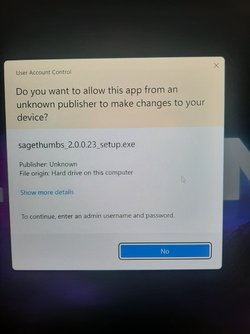
Unable to install unknown software


Dustin

New member
Local time
7:59 PM
Posts
3
OS
Windows 11
I am attempting to install sagethumbs. SageThumbs

This error shows, yet gives me no options to input admin info. Tried running install as admin. Same result.

plz help :(
 

Attachments

  • 20211114_212145.jpg
    20211114_212145.jpg
    628.6 KB · Views: 3

My Computer My Computer

At a glance

Windows 11
OS
Windows 11
Installs fine for me. Try re-downloading. Might be corrupt
 

My Computer My Computer

At a glance

Windows 11 Pro 25H2 Multi-BootAMD Ryzen 9 9950X3D 16 CoreTrident Z5 Neo Series DDR5 RAM XMP+EXPO 64GB ...Gigabyte GeForce RTX-5060Ti 16GB, AMD Radeon ...
OS
Windows 11 Pro 25H2 Multi-Boot
Computer type
PC/Desktop
Manufacturer/Model
Self Made
CPU
AMD Ryzen 9 9950X3D 16 Core
Motherboard
ASUS ROG Crosshair X870E Hero
Memory
Trident Z5 Neo Series DDR5 RAM XMP+EXPO 64GB (2x32GB) 6000MT/s CL36-36-36-96
Graphics Card(s)
Gigabyte GeForce RTX-5060Ti 16GB, AMD Radeon Integrated CPU
Sound Card
Denon x4200 Atmos AVR 12 speakers
Monitor(s) Displays
65" Hisense 4K and 4-27inchers
Screen Resolution
4K TV. 4 @ 1920x1080
Hard Drives
Samsung SSD 9100 PRO 2TB PCIE 5.0, Samsung 990 PRO 4TB PCIE 4.0
PSU
Lian Li Edge Series-850W Full Modular Power Supply-80 Plus Platinum-ATX 3.0, 3.1-PCIE 5.1-L-Shape Design for Dual Chamber Case-120mm FDB Fan-Supports up to 4X USB Devices-Black (EG0850BE.US)
Case
MUSETEX ATX PC Case,6 PWM ARGB Fans ,360MM RAD Support,Type-C Gaming PC Case,270° Full View Tempered Glass Mid Tower,Black ATX Computer Case,Y6 ontrolled 120mm ARGB Fans, Tempered Glass Panels G05MN6-HB)
Cooling
Thermalright FW360 SE ARGB V2 360mm CPU AIO Liquid Cooler, 2" LCD Screen, TL-M12Q 2000 RPM Daisy-Chain Fans, for AM4/AM5 & Intel LGA 1700/1851, Black
Keyboard
Corsair K57 Wireless RGB
Mouse
Logitech Couch Mouse
Internet Speed
Comcast Gigabit 2.5Gbps FIBER OPTIC Symetric 5+Gbps Soon! Cable Laid 7-13-2026
Browser
FIrefox Portable, Slimjet, or Cent Browser
Antivirus
Windows Defender
Other Info
This PC was built in November 2025.
Denon Dolby Atmosphere sound system with 7.3.2 (3subs and 9 speakers).
Storage on portable hard drive attached to USB 3.0 router port. (Movies, Music, and files)
Few other PC's, laptops, tablets, Raspberry PI's. So many other tech devices.
Everything is on a Oupes 2400 2250 watt hour power station. Champion 11,000 watt inverter Tri-Fuel generator using circuit breaker panel interlock.
My broadcastify live feed from a Beelink Mini PC.
https://www.broadcastify.com/listen/feed/34853
I am attempting to install sagethumbs. SageThumbs

This error shows, yet gives me no options to input admin info. Tried running install as admin. Same result.

plz help :(
Hi,
Go to all apps/ programs features and look up top and make sure you're set to Anywhere.

Before you run the exe file right click it and go to properties
If there's a Unblock button use it apply and save.
Then try.
 

My Computer My Computer

At a glance

Win-7-10-11Pro's10900k & 9940x & 5930kTrident-Z Royal 4000c16 2x16gb & Trident-Z 36...Titan Xp & 1080ti FTW3 & evga 980ti gaming
OS
Win-7-10-11Pro's
Computer type
PC/Desktop
Manufacturer/Model
Acer 17" Nitro 7840sn/ 2x16gb 5600c40/ 4060/ stock 1tb-os/ 4tb sn850x
CPU
10900k & 9940x & 5930k
Motherboard
z490-Apex & x299-Apex & x99-Sabertooth
Memory
Trident-Z Royal 4000c16 2x16gb & Trident-Z 3600c16 4x8gb & 3200c14 4x8gb
Graphics Card(s)
Titan Xp & 1080ti FTW3 & evga 980ti gaming
Sound Card
Onboard Realtek x3
Monitor(s) Displays
1-AOC G2460PG 24"G-Sync 144Hz/ 2nd 1-ASUS VG248QE 24"/ 3rd LG 43" series
Screen Resolution
1920-1080 not sure what the t.v is besides 43" class scales from 1920-1080 perfectly
Hard Drives
2-WD-sn850x 4tb/ 970evo+500gb/ 980 pro 2tb.
PSU
1000p2 & 1200p2 & 850p2
Case
D450 x2 & 1 Test bench in cherry Entertainment center
Cooling
Custom water loops x3 with 2x mora 360mm rads only 980ti gaming air cooled
Keyboard
G710+x3
Mouse
Redragon x3
Internet Speed
xfinity gigabyte
Browser
Firefox
Antivirus
mbam pro
Hi guys, none of these solutions have worked for me.

The problem is occurring with multiple new pieces of software I try to install.

Any guesses?
 

My Computer My Computer

At a glance

Windows 11
OS
Windows 11
Have you tried clicking on show more details? I think last time the run button was hidden I had to press that to see it.
 

My Computer My Computer

At a glance

Windows 11 Home 21H2 22000.59311th Gen Intel(R) Core(TM) i5-1135G7 @ 2.40GH...12gb Dual channel DDR4 2666 MHzIntel Iris Xe
OS
Windows 11 Home 21H2 22000.593
Computer type
Laptop
Manufacturer/Model
Dell Inspiron 3501
CPU
11th Gen Intel(R) Core(TM) i5-1135G7 @ 2.40GHz-4.20GHz
Memory
12gb Dual channel DDR4 2666 MHz
Graphics Card(s)
Intel Iris Xe
Sound Card
Cirrus Logic Superior High Definition Audio
Monitor(s) Displays
15.6 in
Screen Resolution
1366 x 768 x 60hz HD
Hard Drives
SK hynix BC711 256GB Solid State Drive NVMe
Internet Speed
43 Mbps
Browser
Chrome, Firefox
Update: This is a windows account issue.

I was able to install a piece of software by switching accounts. Apparently this local account isn't valid to the windows security system, but the microsoft account I used to set up the device works to install new software.

When using my local account (logs in much faster cuz it doesnt have to ping the microsoft server) It says I need UN and PW but I have already set those up.

How to fix this? For the time being I have to install on my online windows account and then switch back to the local account to use the softwares.
 

My Computer My Computer

At a glance

Windows 11
OS
Windows 11
Update: This is a windows account issue.

I was able to install a piece of software by switching accounts. Apparently this local account isn't valid to the windows security system, but the microsoft account I used to set up the device works to install new software....
The problem isn't that the local account isn't valid (otherwise you wouldn't be able to sign in to it). Your problem is that it is a Standard user account, not an administrator. The fact that you can perform the install when signed in with your Microsoft account means that your MS account is an administrator.

To be able to perform software installs and other operations that need administrator rights you are being challenged by User Account Control (UAC). If this local account was an administrator then your screenshot would have had a Yes button as well as a No one. If the user account is a standard account then you would be asked to provide the name and password of another local account that is an administrator. The fact that you don't see the 'Yes' option means that there are no local administrator accounts on this PC.

To fix this you need to sign in with your MS account (as it appears to be an administrator). Then you will have two options. Either change the local account to an administrator (then you'll see the Yes button too)...


UAC - YES.png

...or create another local account and make it an administrator. Then you'll see a UAC prompt like this (where 'Local User' is another local administrator account on my PC)

UAC - password.png
 

My Computers My Computers

  • At a glance

    Windows 11 HomeAMD Athlon Silver 3050U8GBRadeon Graphics
    OS
    Windows 11 Home
    Computer type
    Laptop
    Manufacturer/Model
    Acer Aspire 3 A315-23-R9VY
    CPU
    AMD Athlon Silver 3050U
    Memory
    8GB
    Graphics Card(s)
    Radeon Graphics
    Monitor(s) Displays
    laptop screen
    Screen Resolution
    1366x768 native resolution, up to 2560x1440 with Radeon Virtual Super Resolution
    Hard Drives
    1TB Samsung EVO 870 SSD (from April 2026: 250GB EVO 850)
    Internet Speed
    150 Mbps
    Browser
    Edge, Firefox
    Antivirus
    Defender
    Other Info
    UPDATE - 11 April 2026: due to lid hinges starting to break up this laptop has been retired from active duty. The OS with all software and files has been migrated to my System Seven in 'Other systems' to carry on as my general purpose 'main machine'.

    I've now clean installed 25H2 and used Garlin's scripts to update Secure Boot to CA 2023 and revoke the PCA 2011 certificates. It's new role is to test secure boot issues.

    Info for 2021-2026:
    fully 'Windows 11 ready' laptop. Windows 10 C: partition migrated from my old unsupported 'main machine' then upgraded to 11. A test migration ran Insider builds for 2 months. When 11 was released on 5th October 2021 it was re-imaged back to 10 and was offered the upgrade in Windows Update on 20th October. Windows Update offered the 22H2 Feature Update on 20th September 2022. It got the 23H2 Feature Update on 4th November 2023 through Windows Update, 24H2 on 3rd October 2024 through Windows Update by setting the Target Release Version for 24H2, and 25H2 on 30th September 2025 through Windows Update by setting the Target Release Version for 25H2.
  • At a glance

    Windows 11 ProIntel® Core™ i5-520M8GB(integrated graphics) Intel HD Graphics
    Operating System
    Windows 11 Pro
    Computer type
    Laptop
    Manufacturer/Model
    Dell Latitude E4310
    CPU
    Intel® Core™ i5-520M
    Motherboard
    0T6M8G
    Memory
    8GB
    Graphics card(s)
    (integrated graphics) Intel HD Graphics
    Screen Resolution
    1366x768
    Hard Drives
    500GB Crucial MX500 SSD
    Browser
    Firefox, Edge
    Antivirus
    Defender
    Other Info
    unsupported machine: Legacy bios, MBR, TPM 1.2, upgraded from W10 to W11 using W10/W11 hybrid install media workaround.

    In-place upgrade to 22H2 using ISO and a workaround.
    Feature Update to 23H2 by manually installing the Enablement Package.
    In-place upgrade to 24H2 using hybrid 23H2/24H2 install media.
    Upgraded to 25H2 by Enablement Package.

    Also running Insider Experimental 263xx and 29xxx builds and Windows 10 as native boot .vhdx.
  • My SYSTEM THREE is a Dell Latitude 5410, i7-10610U, 32GB RAM, 512GB NVMe ssd, supported device running Windows 11 Pro.

    My SYSTEM FOUR was a 2-in-1 convertible Lenovo Yoga 11e (1st gen) type 20DA, Celeron N2930, 8GB RAM, 256GB ssd. Unsupported device. This has now been sold. It has been replaced by my System Eight.

    My SYSTEM FIVE is a Dell Latitude 3190 2-in-1, Pentium Silver N5030, 8GB RAM, 1TB NVMe ssd, supported device running Windows 11 Pro, plus Insider Beta, Experimental 263xx and 29xxx builds (and a few others) as a native boot .vhdx.

    My SYSTEM SIX is a Dell Latitude 5550, Core Ultra 7 165H, 64GB RAM, 1TB NVMe SSD, supported device, Windows 11 Pro, Hyper-V host machine. Updated to 25H2 on 30th September 2025.

    My SYSTEM SEVEN is a Lenovo Thinkpad T580, 1920x1080 touchscreen, Intel Core i7-8650U, 16GB RAM, 512GB NVMe SSD + 2nd 512GB NVMe SSD, a supported device for Windows 11. This is my current general purpose 'main machine'. The installed Windows 11 Home from my System One has been migrated to this machine. As its new home has an existing digital licence for Pro I've been able to upgrade the migrated OS from Home to Pro.

    My SYSTEM EIGHT is a 2-in-1 convertible Lenovo Yoga 11e (5th gen) type 20LN, Celeron N4120, 8GB RAM, 512GB NVMe ssd, a supported device for Windows 11. Currently running Windows 11 Pro, plus Insider Beta, Experimental 263xx and 29xxx builds as native boot vhdx.

I am attempting to install sagethumbs. SageThumbs

This error shows, yet gives me no options to input admin info. Tried running install as admin. Same result.

plz help :(

Your user account is corrupt.
Your posted diagram proves it.
You can further demonstrate that fact by trying to run anything as an Admin, even a cmd/powershell/terminal window. You will get the same diagram with its Yes button missing / greyed out.

If you have another user account that is an Admin, log into it now and, as your very first action, create an*** additional local Admin account so you can then pause to take a breath & post back about your success.
- I think this is the case judging by your latest update but, just in case I misunderstood your updated post, I've also described what to do otherwise.

1 If you do not already have another Admin user account then you will have to work through this procedure.
Fix UAC prompt has greyed out or missing Yes button - TenForumsTutorials
It was written for Windows 10 so you'll see some differences as you go through but it should get you through alright.
OR
2 If you have a recent system image from before the problem appeared then you might prefer to restore that image instead.
- You'll first need to backup those files that have changed since the image was made [in C:\Users\Documents & other places].
- Your first action upon successful restoration should be to make at least one*** spare, local, password-protected Admin account so that you are prepared for any future account corruption.

*** As you'll see in that tutorial, I always have two spare, local, password-protected Admin accounts.

All the best of luck,
Denis
 
Last edited:

My Computer My Computer

At a glance

Windows 11 Home x64 Version 25H2 Build 26200....
OS
Windows 11 Home x64 Version 25H2 Build 26200.9168
You can further demonstrate that fact by trying to run anything as an Admin. You will get the same diagram with its Yes button missing / greyed out.
Are you sure the local account is corrupt? I would normally agree with you on this diagnosis, but in this particular case it appears that the PC was initially configured with a single Microsoft account that is an administrator, then a second standard account was created. It is this standard account that sees no other local administrator accounts to offer for use in UAC.

The question is: in Windows 11 if the only administrator account is a Microsoft account, then what local administrator account could UAC sensibly use in order to provide the Yes option? Hence the fix may simply be to make the local account an administrator or to create another local account as an administrator - either of which should be possible when signed into the Microsoft account.

I'll have to test this scenario in a VM to be sure, but it seems to me to be a more likely explanation than a corrupt account.
 

My Computers My Computers

  • At a glance

    Windows 11 HomeAMD Athlon Silver 3050U8GBRadeon Graphics
    OS
    Windows 11 Home
    Computer type
    Laptop
    Manufacturer/Model
    Acer Aspire 3 A315-23-R9VY
    CPU
    AMD Athlon Silver 3050U
    Memory
    8GB
    Graphics Card(s)
    Radeon Graphics
    Monitor(s) Displays
    laptop screen
    Screen Resolution
    1366x768 native resolution, up to 2560x1440 with Radeon Virtual Super Resolution
    Hard Drives
    1TB Samsung EVO 870 SSD (from April 2026: 250GB EVO 850)
    Internet Speed
    150 Mbps
    Browser
    Edge, Firefox
    Antivirus
    Defender
    Other Info
    UPDATE - 11 April 2026: due to lid hinges starting to break up this laptop has been retired from active duty. The OS with all software and files has been migrated to my System Seven in 'Other systems' to carry on as my general purpose 'main machine'.

    I've now clean installed 25H2 and used Garlin's scripts to update Secure Boot to CA 2023 and revoke the PCA 2011 certificates. It's new role is to test secure boot issues.

    Info for 2021-2026:
    fully 'Windows 11 ready' laptop. Windows 10 C: partition migrated from my old unsupported 'main machine' then upgraded to 11. A test migration ran Insider builds for 2 months. When 11 was released on 5th October 2021 it was re-imaged back to 10 and was offered the upgrade in Windows Update on 20th October. Windows Update offered the 22H2 Feature Update on 20th September 2022. It got the 23H2 Feature Update on 4th November 2023 through Windows Update, 24H2 on 3rd October 2024 through Windows Update by setting the Target Release Version for 24H2, and 25H2 on 30th September 2025 through Windows Update by setting the Target Release Version for 25H2.
  • At a glance

    Windows 11 ProIntel® Core™ i5-520M8GB(integrated graphics) Intel HD Graphics
    Operating System
    Windows 11 Pro
    Computer type
    Laptop
    Manufacturer/Model
    Dell Latitude E4310
    CPU
    Intel® Core™ i5-520M
    Motherboard
    0T6M8G
    Memory
    8GB
    Graphics card(s)
    (integrated graphics) Intel HD Graphics
    Screen Resolution
    1366x768
    Hard Drives
    500GB Crucial MX500 SSD
    Browser
    Firefox, Edge
    Antivirus
    Defender
    Other Info
    unsupported machine: Legacy bios, MBR, TPM 1.2, upgraded from W10 to W11 using W10/W11 hybrid install media workaround.

    In-place upgrade to 22H2 using ISO and a workaround.
    Feature Update to 23H2 by manually installing the Enablement Package.
    In-place upgrade to 24H2 using hybrid 23H2/24H2 install media.
    Upgraded to 25H2 by Enablement Package.

    Also running Insider Experimental 263xx and 29xxx builds and Windows 10 as native boot .vhdx.
  • My SYSTEM THREE is a Dell Latitude 5410, i7-10610U, 32GB RAM, 512GB NVMe ssd, supported device running Windows 11 Pro.

    My SYSTEM FOUR was a 2-in-1 convertible Lenovo Yoga 11e (1st gen) type 20DA, Celeron N2930, 8GB RAM, 256GB ssd. Unsupported device. This has now been sold. It has been replaced by my System Eight.

    My SYSTEM FIVE is a Dell Latitude 3190 2-in-1, Pentium Silver N5030, 8GB RAM, 1TB NVMe ssd, supported device running Windows 11 Pro, plus Insider Beta, Experimental 263xx and 29xxx builds (and a few others) as a native boot .vhdx.

    My SYSTEM SIX is a Dell Latitude 5550, Core Ultra 7 165H, 64GB RAM, 1TB NVMe SSD, supported device, Windows 11 Pro, Hyper-V host machine. Updated to 25H2 on 30th September 2025.

    My SYSTEM SEVEN is a Lenovo Thinkpad T580, 1920x1080 touchscreen, Intel Core i7-8650U, 16GB RAM, 512GB NVMe SSD + 2nd 512GB NVMe SSD, a supported device for Windows 11. This is my current general purpose 'main machine'. The installed Windows 11 Home from my System One has been migrated to this machine. As its new home has an existing digital licence for Pro I've been able to upgrade the migrated OS from Home to Pro.

    My SYSTEM EIGHT is a 2-in-1 convertible Lenovo Yoga 11e (5th gen) type 20LN, Celeron N4120, 8GB RAM, 512GB NVMe ssd, a supported device for Windows 11. Currently running Windows 11 Pro, plus Insider Beta, Experimental 263xx and 29xxx builds as native boot vhdx.
Are you sure the local account is corrupt?
That posted diagram has both
- no admin account name selector
- no password input box
yet
- it has no Yes button
so it is not behaving in a normal manner.

Windows has not previously had any problem accepting an MSAccount's Admin status for authorising elevation. I know it's early days but I haven't seen anybody else reporting a change in this regard.

Dustin -
You need to use that existing Admin [MS] account to create a local, password-protected Admin account & write its password down somewhere secure yet accessible.
Do it now. Before you do anything else. Before you even read the next line. If I turn out to be wrong then you & anybody else has my full agreement to post as many insults as you want. But make that local, password-protected Admin account now.
You might then only after the new Admin account has been seen to work alright, use either of your Admin accounts to try changing the original user account [the local one from your first post] to be an Admin account.
Then make it a Standard user account again.
Repeat both these actions half a dozen times or more and finally leave it as whatever you want [Admin/Std].
This illogical & repetitive behaviour has been known to force an account to fix itself.
Then log into the account again, try to do something that needs elevation and see if you can get through that Admin challenge dialog this time.


Denis
 
Last edited:

My Computer My Computer

At a glance

Windows 11 Home x64 Version 25H2 Build 26200....
OS
Windows 11 Home x64 Version 25H2 Build 26200.9168
it is not behaving in a normal manner.


Dustin -
You need to use that existing Admin [MS] account to create a local, password-protected Admin account & write its password down somewhere secure yet accessible.
Do it now. Before you do anything else. Before you even read the next line....
I agree. I have now tested a clean install of W11 with an initial MS account and just one local account that's a standard user. When using the local account UAC should be asking for the PIN of the MS account. Follow Try3's advice and make a new local administrator account NOW....

1637033889297.png
 

My Computers My Computers

  • At a glance

    Windows 11 HomeAMD Athlon Silver 3050U8GBRadeon Graphics
    OS
    Windows 11 Home
    Computer type
    Laptop
    Manufacturer/Model
    Acer Aspire 3 A315-23-R9VY
    CPU
    AMD Athlon Silver 3050U
    Memory
    8GB
    Graphics Card(s)
    Radeon Graphics
    Monitor(s) Displays
    laptop screen
    Screen Resolution
    1366x768 native resolution, up to 2560x1440 with Radeon Virtual Super Resolution
    Hard Drives
    1TB Samsung EVO 870 SSD (from April 2026: 250GB EVO 850)
    Internet Speed
    150 Mbps
    Browser
    Edge, Firefox
    Antivirus
    Defender
    Other Info
    UPDATE - 11 April 2026: due to lid hinges starting to break up this laptop has been retired from active duty. The OS with all software and files has been migrated to my System Seven in 'Other systems' to carry on as my general purpose 'main machine'.

    I've now clean installed 25H2 and used Garlin's scripts to update Secure Boot to CA 2023 and revoke the PCA 2011 certificates. It's new role is to test secure boot issues.

    Info for 2021-2026:
    fully 'Windows 11 ready' laptop. Windows 10 C: partition migrated from my old unsupported 'main machine' then upgraded to 11. A test migration ran Insider builds for 2 months. When 11 was released on 5th October 2021 it was re-imaged back to 10 and was offered the upgrade in Windows Update on 20th October. Windows Update offered the 22H2 Feature Update on 20th September 2022. It got the 23H2 Feature Update on 4th November 2023 through Windows Update, 24H2 on 3rd October 2024 through Windows Update by setting the Target Release Version for 24H2, and 25H2 on 30th September 2025 through Windows Update by setting the Target Release Version for 25H2.
  • At a glance

    Windows 11 ProIntel® Core™ i5-520M8GB(integrated graphics) Intel HD Graphics
    Operating System
    Windows 11 Pro
    Computer type
    Laptop
    Manufacturer/Model
    Dell Latitude E4310
    CPU
    Intel® Core™ i5-520M
    Motherboard
    0T6M8G
    Memory
    8GB
    Graphics card(s)
    (integrated graphics) Intel HD Graphics
    Screen Resolution
    1366x768
    Hard Drives
    500GB Crucial MX500 SSD
    Browser
    Firefox, Edge
    Antivirus
    Defender
    Other Info
    unsupported machine: Legacy bios, MBR, TPM 1.2, upgraded from W10 to W11 using W10/W11 hybrid install media workaround.

    In-place upgrade to 22H2 using ISO and a workaround.
    Feature Update to 23H2 by manually installing the Enablement Package.
    In-place upgrade to 24H2 using hybrid 23H2/24H2 install media.
    Upgraded to 25H2 by Enablement Package.

    Also running Insider Experimental 263xx and 29xxx builds and Windows 10 as native boot .vhdx.
  • My SYSTEM THREE is a Dell Latitude 5410, i7-10610U, 32GB RAM, 512GB NVMe ssd, supported device running Windows 11 Pro.

    My SYSTEM FOUR was a 2-in-1 convertible Lenovo Yoga 11e (1st gen) type 20DA, Celeron N2930, 8GB RAM, 256GB ssd. Unsupported device. This has now been sold. It has been replaced by my System Eight.

    My SYSTEM FIVE is a Dell Latitude 3190 2-in-1, Pentium Silver N5030, 8GB RAM, 1TB NVMe ssd, supported device running Windows 11 Pro, plus Insider Beta, Experimental 263xx and 29xxx builds (and a few others) as a native boot .vhdx.

    My SYSTEM SIX is a Dell Latitude 5550, Core Ultra 7 165H, 64GB RAM, 1TB NVMe SSD, supported device, Windows 11 Pro, Hyper-V host machine. Updated to 25H2 on 30th September 2025.

    My SYSTEM SEVEN is a Lenovo Thinkpad T580, 1920x1080 touchscreen, Intel Core i7-8650U, 16GB RAM, 512GB NVMe SSD + 2nd 512GB NVMe SSD, a supported device for Windows 11. This is my current general purpose 'main machine'. The installed Windows 11 Home from my System One has been migrated to this machine. As its new home has an existing digital licence for Pro I've been able to upgrade the migrated OS from Home to Pro.

    My SYSTEM EIGHT is a 2-in-1 convertible Lenovo Yoga 11e (5th gen) type 20LN, Celeron N4120, 8GB RAM, 512GB NVMe ssd, a supported device for Windows 11. Currently running Windows 11 Pro, plus Insider Beta, Experimental 263xx and 29xxx builds as native boot vhdx.
Hit the Windows Key and type netplwiz, then right click and select "open file location"... Then shift+right click the file and select "run as a different user" run as your ms account... you may be able to add yourself as an admin

(note: actually on win 11 it isnt letting me right click to open file location.. its located in C:\windows\system32\netplwiz.exe)

looks like it might be a waste of time though judging from the other replies..

If you end up having to create a new profile Fab's Auto Backup is an amazing tool that will slide everything over for you once you make the new user profile. Link: Fab's AutoBackup 7 Pro, Fab's
Odds are if you use that you will lose nothing.
 

My Computer My Computer

At a glance

PE
OS
PE
Back
Top Bottom