Solved unable to upgrade to windows 11 22h2 error code 0x80888002


ilcorsaro

Active member
Local time
11:46 AM
Posts
12
OS
Windows 11 Pro 24h2 26100.3194
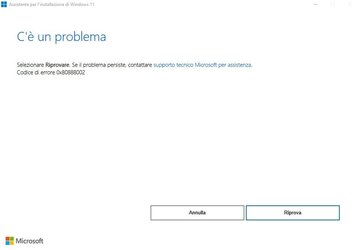
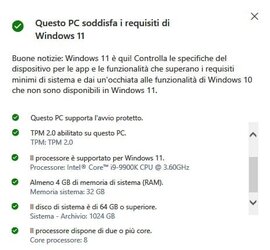
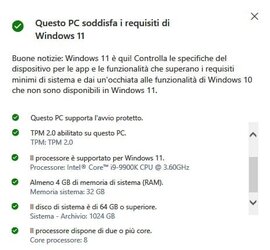
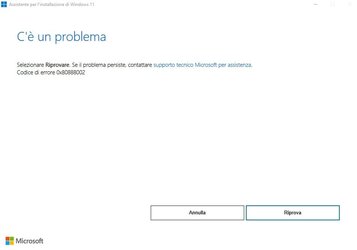
good evening yesterday I tried to update my computer with windows 11 21h1 to the latest build 22h2 through the windows 11 assistant but after checking the hardware compatibility with a positive outcome the installation stopped with the message "there is a problem select and try again. if the problem persists contact microsoft technical support for assistance error code 0x80888002 "I have already tried unsuccessfully to disable the antivirus to run sfc and DSIM to repair any corrupt system files to restart windows 11 disabling all services not microsoft via msconfig but the error message is always present and the update crashes. I thank anyone in advance who can give me a solution
this my build hw
cpu intel i9900k
mb Gigabyte Z390 Aorus Pro WiFi bios f12
ram 32gb ddr4 3000 mhz
psu corsair 750w 80+
ssd sabrent nvme 1tb
ssd kingston 240gb sata III
hd seagate 2 TB, 7200 RPM, SATA-III
hd toshiba 1 TB, 7200 RPM, SATA-III
video card Radeon RX 570 4 GB ddr5
pioneer BD-RW BDR-209D
S.O. windows 11 21H2 pro 22000.1042
security kaspersky total security 21.3.10.391
 
Windows Build/Version
Windows 11 Pro 21H2 build 22000.1042

Attachments

  • check.jpg
    check.jpg
    26 KB · Views: 6
  • errore 2022-09-21 222055.jpg
    errore 2022-09-21 222055.jpg
    16 KB · Views: 8

My Computer My Computer

At a glance

Windows 11 Pro 24h2 26100.3194i9-13900KCorsair Vengeance 32 GB (2 x 16 GB) DDR5-6000...Gigabyte Gaming Video Card OC REV 2.0 GeForce...
OS
Windows 11 Pro 24h2 26100.3194
Computer type
PC/Desktop
CPU
i9-13900K
Motherboard
gigabyte z790 aorus elite ax atx lga1700
Memory
Corsair Vengeance 32 GB (2 x 16 GB) DDR5-6000 CL30
Graphics Card(s)
Gigabyte Gaming Video Card OC REV 2.0 GeForce RTX 3060 12GB DDR6
Sound Card
realtek
Monitor(s) Displays
acer 27"
Screen Resolution
2560x1440
Hard Drives
1st Samsung 980 Pro 1 TB M.2-2280 PCle 4.0 x4 NVME Solid State Drive
2nd storage SSD Kingston Sata 240GB
3rd Storage Sabrent 1 TB M.2-2280 NVME SOLID State Drive
4th Storage HDD Seagate 2TB SATA
PSU
Corsair RM850E (2023) 850 W 80+ Gold Certified Fully Modular ATX
Case
corsair
Cooling
NCUTUA NH-D15 Chromax.Black 82.52 CFM CPU Cooler
Browser
chrome
Antivirus
norton 360 for gamers
Other Info
pioneer BD-RW BDR-209D
A little bit of info on the error you posted ! Might want to check it out if you haven't !


Chuck
 

My Computer My Computer

At a glance

Windows11 23H2 (OS Build 22631.2428)2.90 gigahertz Intel Core i7-1070016214 Megabytes Usable Installed Memor
OS
Windows11 23H2 (OS Build 22631.2428)
Computer type
PC/Desktop
Manufacturer/Model
HP HP ENVY TE01
CPU
2.90 gigahertz Intel Core i7-10700
Motherboard
Board: HP 8767 A (SMVB)
Memory
16214 Megabytes Usable Installed Memor
Hard Drives
1511.52 Gigabytes Usable Hard Drive Capacity
1418.15 Gigabytes Hard Drive Free Space
Keyboard
Logitech wireless
Mouse
M 185 wireless
Internet Speed
12 ms Jitter 8 ms Download 10.5 Mbps Upload 1.7
Browser
Edge & FF
Antivirus
Windows Defender
A little bit of info on the error you posted ! Might want to check it out if you haven't !


Chuck
thanks for the answer but my pc meets all hardware requirements (uefi secure boot tpm) and I'm using windows 11 pro "genuine" with a legal product key however about 30 minute ago I've contact the microsoft support and after a session of rapid assistance he sayed me that I must wait the official relase trought windows update :unsure:
 

Attachments

  • check.jpg
    check.jpg
    26 KB · Views: 7

My Computer My Computer

At a glance

Windows 11 Pro 24h2 26100.3194i9-13900KCorsair Vengeance 32 GB (2 x 16 GB) DDR5-6000...Gigabyte Gaming Video Card OC REV 2.0 GeForce...
OS
Windows 11 Pro 24h2 26100.3194
Computer type
PC/Desktop
CPU
i9-13900K
Motherboard
gigabyte z790 aorus elite ax atx lga1700
Memory
Corsair Vengeance 32 GB (2 x 16 GB) DDR5-6000 CL30
Graphics Card(s)
Gigabyte Gaming Video Card OC REV 2.0 GeForce RTX 3060 12GB DDR6
Sound Card
realtek
Monitor(s) Displays
acer 27"
Screen Resolution
2560x1440
Hard Drives
1st Samsung 980 Pro 1 TB M.2-2280 PCle 4.0 x4 NVME Solid State Drive
2nd storage SSD Kingston Sata 240GB
3rd Storage Sabrent 1 TB M.2-2280 NVME SOLID State Drive
4th Storage HDD Seagate 2TB SATA
PSU
Corsair RM850E (2023) 850 W 80+ Gold Certified Fully Modular ATX
Case
corsair
Cooling
NCUTUA NH-D15 Chromax.Black 82.52 CFM CPU Cooler
Browser
chrome
Antivirus
norton 360 for gamers
Other Info
pioneer BD-RW BDR-209D
I must wait the official relase trought windows update :unsure:
Sounds like a MS cop out to me or your assistor did not know what he's doing. An upgrade through WU and a repair install (aka in-place upgrade) using an iso is the same thing. If it were me I would try the following. Make sure secure boot is turned on in bios.


1. If you have Malwarebytes, end it's process in task manager. Also in TM under startup tab, disable the MWB service from auto starting and under services disable MWB service.

2. Verify you have no corruption in system files. From command prompt as admin type sfc /scannow

3. Reset Windows Update components Reset Windows Update in Windows 11 Tutorial

4. If you haven't already download 22H2 iso and use this procedure to upgrade. Repair Install Windows 11 Repair Install Windows 11 with an In-place Upgrade Tutorial

5. If 22H2 successfully installs enable your MWB at startup and in services.
 

My Computers My Computers

  • At a glance

    Windows 11 Pro 25H2 26200.9168i9-10900 10 core 20 threads32 gbnone-Intel UHD Graphics 630
    OS
    Windows 11 Pro 25H2 26200.9168
    Computer type
    PC/Desktop
    Manufacturer/Model
    Dell Optiplex 7080
    CPU
    i9-10900 10 core 20 threads
    Motherboard
    DELL 0J37VM
    Memory
    32 gb
    Graphics Card(s)
    none-Intel UHD Graphics 630
    Sound Card
    Integrated Realtek
    Monitor(s) Displays
    Benq 27
    Screen Resolution
    2560x1440
    Hard Drives
    2x1tb Solidigm m.2 nvme /External drives 512gb Samsung m.2 sata+2tb Kingston m2.nvme
    PSU
    500w
    Case
    MT
    Cooling
    Dell Premium
    Keyboard
    Logitech wired
    Mouse
    Logitech wireless
    Internet Speed
    so slow I'm too embarrassed to tell
    Browser
    #1 Edge #2 Firefox
    Antivirus
    Defender+MWB Premium
  • At a glance

    Windows 11 Pro 24H2 26200.9168AMD Ryzen 7 6800U32 gbintegrated
    Operating System
    Windows 11 Pro 24H2 26200.9168
    Computer type
    PC/Desktop
    Manufacturer/Model
    Beelink Mini PC SER5
    CPU
    AMD Ryzen 7 6800U
    Memory
    32 gb
    Graphics card(s)
    integrated
    Sound Card
    integrated
    Monitor(s) Displays
    Benq 27
    Screen Resolution
    2560x1440
    Hard Drives
    1TB Crucial nvme
    Keyboard
    Logitech wired
    Mouse
    Logitech wireless
    Internet Speed
    still too embarrassed to tell
    Browser
    Firefox
    Antivirus
    Defender
  • System 3 is non compliant Dell 9020 i7-4770/24gb ram Win11 PRO 26200.9168
I have a Gigabyte Z390 motherboard (with i9 9900K) and can't upgrade. Its not being offered in updates. I downloaded it with media creator and tried an update but it dies near the end with 0x8007000D. I've done things suggested from internet searches and tried again without success.

I had problems with a previous update failing and had to do the "repair" in place upgrade.. Since that upgrade a couple months ago, no new apps and as far as I know only Microsoft updates.
 

My Computers My Computers

  • At a glance

    Windows 11 Proi7 1360P16GBIntel CPU
    OS
    Windows 11 Pro
    Computer type
    Laptop
    Manufacturer/Model
    Dell Inspiron 16 5630
    CPU
    i7 1360P
    Motherboard
    Dell
    Memory
    16GB
    Graphics Card(s)
    Intel CPU
    Sound Card
    Realtek
    Monitor(s) Displays
    16" Touch Screen
    Screen Resolution
    1920X1080
    Hard Drives
    1TB Samsung NVME SSD
    PSU
    65 Watt Dell
    Case
    Dell
    Cooling
    Dell
    Keyboard
    Dell
    Mouse
    Trackpad
    Internet Speed
    Google Fiber
    Browser
    Edge
    Antivirus
    Defender and Malwarebytes
    Other Info
    Cakewalk by Bandlab and Presonus Studio One 4.6 Pro recording programs. MOTU recording interface
  • Computer type
    Laptop
Do you have Malwarebytes installed?
I had to disable this & turn off start when windows starts & also disable NET framework 3.5.
 

My Computers My Computers

  • At a glance

    Windows 11 Pro 64bit6th Gen Intel Core i7-6700HQ Quad Core proces...16GB HyperX IMPACT 1600MHz SODIMM DDR3 (2 x 8GB)NVIDIA® GeForce® GTX 960M - 2.0GB DDR5 Video ...
    OS
    Windows 11 Pro 64bit
    Computer type
    Laptop
    Manufacturer/Model
    PC Specialist Optimus VII V17-960 Gaming Laptop.
    CPU
    6th Gen Intel Core i7-6700HQ Quad Core processor.
    Memory
    16GB HyperX IMPACT 1600MHz SODIMM DDR3 (2 x 8GB)
    Graphics Card(s)
    NVIDIA® GeForce® GTX 960M - 2.0GB DDR5 Video RAM - DirectX® 12
    Sound Card
    Intel 2 Channel High Def. Audio + SoundBlaster™ Cinema 2 & Realtek
    Monitor(s) Displays
    Optimus Series: 17.3" Matte Full HD IPS LED Widescreen (1920x1080)
    Screen Resolution
    Full HD IPS display (1920 x 1080).
    Hard Drives
    4TB SSD (internal).
    1x 1TB & 1x 5TB external HDDs.
    Cooling
    STANDARD THERMAL PASTE FOR SUFFICIENT COOLING
    Keyboard
    Logitech K800 wireless keyboard
    Mouse
    Logitech M705 wireless mouse
    Internet Speed
    Upto 100Mbps
    Browser
    Edge.
    Antivirus
    Windows Defender & MalwareBytes pro.
  • At a glance

    IOS 14.6
    Operating System
    IOS 14.6
    Computer type
    Tablet
    Manufacturer/Model
    Apple
Sounds like a MS cop out to me or your assistor did not know what he's doing. An upgrade through WU and a repair install (aka in-place upgrade) using an iso is the same thing. If it were me I would try the following. Make sure secure boot is turned on in bios.


1. If you have Malwarebytes, end it's process in task manager. Also in TM under startup tab, disable the MWB service from auto starting and under services disable MWB service.

2. Verify you have no corruption in system files. From command prompt as admin type sfc /scannow

3. Reset Windows Update components Reset Windows Update in Windows 11 Tutorial

4. If you haven't already download 22H2 iso and use this procedure to upgrade. Repair Install Windows 11 Repair Install Windows 11 with an In-place Upgrade Tutorial

5. If 22H2 successfully installs enable your MWB at startup and in services.
thanks for reply I don't have malwarebytes but kaspersky and as I wrote in the main post not only I closed it but I also tried to update with a clean boot or keeping active only the microsoft services I have already run DSIM and SFC I have no problem with windows update that anyway I was unnecessarily reset by microsoft support....I would prefer not to upgrade from windows 22h2 iso as this pc is the one I use for work
 

My Computer My Computer

At a glance

Windows 11 Pro 24h2 26100.3194i9-13900KCorsair Vengeance 32 GB (2 x 16 GB) DDR5-6000...Gigabyte Gaming Video Card OC REV 2.0 GeForce...
OS
Windows 11 Pro 24h2 26100.3194
Computer type
PC/Desktop
CPU
i9-13900K
Motherboard
gigabyte z790 aorus elite ax atx lga1700
Memory
Corsair Vengeance 32 GB (2 x 16 GB) DDR5-6000 CL30
Graphics Card(s)
Gigabyte Gaming Video Card OC REV 2.0 GeForce RTX 3060 12GB DDR6
Sound Card
realtek
Monitor(s) Displays
acer 27"
Screen Resolution
2560x1440
Hard Drives
1st Samsung 980 Pro 1 TB M.2-2280 PCle 4.0 x4 NVME Solid State Drive
2nd storage SSD Kingston Sata 240GB
3rd Storage Sabrent 1 TB M.2-2280 NVME SOLID State Drive
4th Storage HDD Seagate 2TB SATA
PSU
Corsair RM850E (2023) 850 W 80+ Gold Certified Fully Modular ATX
Case
corsair
Cooling
NCUTUA NH-D15 Chromax.Black 82.52 CFM CPU Cooler
Browser
chrome
Antivirus
norton 360 for gamers
Other Info
pioneer BD-RW BDR-209D
I had a similar situation. What worked for me was to do an in-place update using the 20H2 ISO file downloaded directly from MS. The process is slightly different from the one documented here, but the net result is the same - I got 20H2 installed just fine, all my existing software was left untouched, and I had to make only a couple of tweaks to the new Windows to get things back to normal. See this post for more info:


My Computer My Computer

At a glance

Win11 ProAMD Ryzen 5 5500U16 GBRadeon 2100
OS
Win11 Pro
Computer type
PC/Desktop
Manufacturer/Model
BeeLink SER Mini
CPU
AMD Ryzen 5 5500U
Motherboard
BeeLink SER
Memory
16 GB
Graphics Card(s)
Radeon 2100
Sound Card
none
Monitor(s) Displays
Primary: Phillips 4K; Secondary: LG 4K
Screen Resolution
Both 3860 x 2160
Hard Drives
C: NVme 500 GB Windows only
D: 128 GB NVme User data + Windows Temp via Junction Link
PSU
External
Case
Mini
Cooling
Internal fan
Keyboard
Logitech Wireless Lighted
Mouse
Kensington ExpertMouse wireless trackball
Internet Speed
500/500
Browser
Brave
Antivirus
Windows Defender
Do you have Malwarebytes installed?
I had to disable this & turn off start when windows starts & also disable NET framework 3.5.
I disabled Malwarebytes (turned off startup) but it didn't help.

Actual error code I'm getting is 0x8007000D-0x2000C.

I found suggested "fix" for that specific error code. SFC and DISM commands. That site also noted a corrupt ISO can cause this error. I'm going to redownload and see what happens.
 

My Computers My Computers

  • At a glance

    Windows 11 Proi7 1360P16GBIntel CPU
    OS
    Windows 11 Pro
    Computer type
    Laptop
    Manufacturer/Model
    Dell Inspiron 16 5630
    CPU
    i7 1360P
    Motherboard
    Dell
    Memory
    16GB
    Graphics Card(s)
    Intel CPU
    Sound Card
    Realtek
    Monitor(s) Displays
    16" Touch Screen
    Screen Resolution
    1920X1080
    Hard Drives
    1TB Samsung NVME SSD
    PSU
    65 Watt Dell
    Case
    Dell
    Cooling
    Dell
    Keyboard
    Dell
    Mouse
    Trackpad
    Internet Speed
    Google Fiber
    Browser
    Edge
    Antivirus
    Defender and Malwarebytes
    Other Info
    Cakewalk by Bandlab and Presonus Studio One 4.6 Pro recording programs. MOTU recording interface
  • Computer type
    Laptop
4. If you haven't already download 22H2 iso and use this procedure to upgrade. Repair Install Windows 11 Repair Install Windows 11 with an In-place Upgrade Tutorial
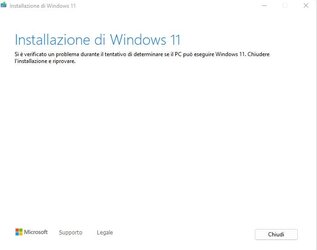
I ran an image of my operating system with applications and after downloading the iso 22h2 as you suggested by the microsoft site I then started the update from windows 11 21h1 but the result is always the same as in the attached image. problem is from search in the partition of windows 11 since from disk management I see that the "local disk c" is disk 3 and not disk 0 probably the setup tries to perform the compatibility check and the installation in disk 0 not finding nothing shows the error message
 

Attachments

  • windows11 error.jpg
    windows11 error.jpg
    13.8 KB · Views: 7
  • partizioni.jpg
    partizioni.jpg
    98.6 KB · Views: 8

My Computer My Computer

At a glance

Windows 11 Pro 24h2 26100.3194i9-13900KCorsair Vengeance 32 GB (2 x 16 GB) DDR5-6000...Gigabyte Gaming Video Card OC REV 2.0 GeForce...
OS
Windows 11 Pro 24h2 26100.3194
Computer type
PC/Desktop
CPU
i9-13900K
Motherboard
gigabyte z790 aorus elite ax atx lga1700
Memory
Corsair Vengeance 32 GB (2 x 16 GB) DDR5-6000 CL30
Graphics Card(s)
Gigabyte Gaming Video Card OC REV 2.0 GeForce RTX 3060 12GB DDR6
Sound Card
realtek
Monitor(s) Displays
acer 27"
Screen Resolution
2560x1440
Hard Drives
1st Samsung 980 Pro 1 TB M.2-2280 PCle 4.0 x4 NVME Solid State Drive
2nd storage SSD Kingston Sata 240GB
3rd Storage Sabrent 1 TB M.2-2280 NVME SOLID State Drive
4th Storage HDD Seagate 2TB SATA
PSU
Corsair RM850E (2023) 850 W 80+ Gold Certified Fully Modular ATX
Case
corsair
Cooling
NCUTUA NH-D15 Chromax.Black 82.52 CFM CPU Cooler
Browser
chrome
Antivirus
norton 360 for gamers
Other Info
pioneer BD-RW BDR-209D
I disabled Malwarebytes (turned off startup) but it didn't help.

Actual error code I'm getting is 0x8007000D-0x2000C.

I found suggested "fix" for that specific error code. SFC and DISM commands. That site also noted a corrupt ISO can cause this error. I'm going to redownload and see what happens.
I ran into the same issue -- so I ran Windows Update Troubleshooter -- which claimed to fix the problem -- and ran the update again. This time I got a different Windows Update error message. So, I did this again -- and got another error message. After three download attempts, I gave up and did the update using the ISO file I downloaded from MS. The update went without issues.
 

My Computer My Computer

At a glance

Windows 11Ryzen 5600X16GBEVGA GT 710
OS
Windows 11
Computer type
PC/Desktop
Manufacturer/Model
Custom built
CPU
Ryzen 5600X
Motherboard
ASRock Steel Legend
Memory
16GB
Graphics Card(s)
EVGA GT 710
Sound Card
None
Monitor(s) Displays
23",24", 19" - flat panels
Screen Resolution
1920x1200
Hard Drives
None - only M.2 SATA and NVMe drives
PSU
750W
Case
Antec
Cooling
stock Wraith cooler
Keyboard
Corsair gaming
Mouse
Logitech M720
Internet Speed
1Gb
I also tried to download the KB5017321 MSU update from the microsoft catalog and install it but nothing to do as shown in the attached image
 

Attachments

  • KB5017321 MSU.jpg
    KB5017321 MSU.jpg
    21.5 KB · Views: 6

My Computer My Computer

At a glance

Windows 11 Pro 24h2 26100.3194i9-13900KCorsair Vengeance 32 GB (2 x 16 GB) DDR5-6000...Gigabyte Gaming Video Card OC REV 2.0 GeForce...
OS
Windows 11 Pro 24h2 26100.3194
Computer type
PC/Desktop
CPU
i9-13900K
Motherboard
gigabyte z790 aorus elite ax atx lga1700
Memory
Corsair Vengeance 32 GB (2 x 16 GB) DDR5-6000 CL30
Graphics Card(s)
Gigabyte Gaming Video Card OC REV 2.0 GeForce RTX 3060 12GB DDR6
Sound Card
realtek
Monitor(s) Displays
acer 27"
Screen Resolution
2560x1440
Hard Drives
1st Samsung 980 Pro 1 TB M.2-2280 PCle 4.0 x4 NVME Solid State Drive
2nd storage SSD Kingston Sata 240GB
3rd Storage Sabrent 1 TB M.2-2280 NVME SOLID State Drive
4th Storage HDD Seagate 2TB SATA
PSU
Corsair RM850E (2023) 850 W 80+ Gold Certified Fully Modular ATX
Case
corsair
Cooling
NCUTUA NH-D15 Chromax.Black 82.52 CFM CPU Cooler
Browser
chrome
Antivirus
norton 360 for gamers
Other Info
pioneer BD-RW BDR-209D
Update finally installed! I cleaned system files and downloaded a new ISO copy. Did the update with Malwarebytes still enabled (forgot to disable it) but it wasn't a problem (or The problem).
 

My Computers My Computers

  • At a glance

    Windows 11 Proi7 1360P16GBIntel CPU
    OS
    Windows 11 Pro
    Computer type
    Laptop
    Manufacturer/Model
    Dell Inspiron 16 5630
    CPU
    i7 1360P
    Motherboard
    Dell
    Memory
    16GB
    Graphics Card(s)
    Intel CPU
    Sound Card
    Realtek
    Monitor(s) Displays
    16" Touch Screen
    Screen Resolution
    1920X1080
    Hard Drives
    1TB Samsung NVME SSD
    PSU
    65 Watt Dell
    Case
    Dell
    Cooling
    Dell
    Keyboard
    Dell
    Mouse
    Trackpad
    Internet Speed
    Google Fiber
    Browser
    Edge
    Antivirus
    Defender and Malwarebytes
    Other Info
    Cakewalk by Bandlab and Presonus Studio One 4.6 Pro recording programs. MOTU recording interface
  • Computer type
    Laptop
Update finally installed! I cleaned system files and downloaded a new ISO copy. Did the update with Malwarebytes still enabled (forgot to disable it) but it wasn't a problem (or The problem).
what do you mean clean system files? Could you explayn in detail step by step what did you do to install the update?
 

My Computer My Computer

At a glance

Windows 11 Pro 24h2 26100.3194i9-13900KCorsair Vengeance 32 GB (2 x 16 GB) DDR5-6000...Gigabyte Gaming Video Card OC REV 2.0 GeForce...
OS
Windows 11 Pro 24h2 26100.3194
Computer type
PC/Desktop
CPU
i9-13900K
Motherboard
gigabyte z790 aorus elite ax atx lga1700
Memory
Corsair Vengeance 32 GB (2 x 16 GB) DDR5-6000 CL30
Graphics Card(s)
Gigabyte Gaming Video Card OC REV 2.0 GeForce RTX 3060 12GB DDR6
Sound Card
realtek
Monitor(s) Displays
acer 27"
Screen Resolution
2560x1440
Hard Drives
1st Samsung 980 Pro 1 TB M.2-2280 PCle 4.0 x4 NVME Solid State Drive
2nd storage SSD Kingston Sata 240GB
3rd Storage Sabrent 1 TB M.2-2280 NVME SOLID State Drive
4th Storage HDD Seagate 2TB SATA
PSU
Corsair RM850E (2023) 850 W 80+ Gold Certified Fully Modular ATX
Case
corsair
Cooling
NCUTUA NH-D15 Chromax.Black 82.52 CFM CPU Cooler
Browser
chrome
Antivirus
norton 360 for gamers
Other Info
pioneer BD-RW BDR-209D

My Computers My Computers

  • At a glance

    Windows 11 Proi7 1360P16GBIntel CPU
    OS
    Windows 11 Pro
    Computer type
    Laptop
    Manufacturer/Model
    Dell Inspiron 16 5630
    CPU
    i7 1360P
    Motherboard
    Dell
    Memory
    16GB
    Graphics Card(s)
    Intel CPU
    Sound Card
    Realtek
    Monitor(s) Displays
    16" Touch Screen
    Screen Resolution
    1920X1080
    Hard Drives
    1TB Samsung NVME SSD
    PSU
    65 Watt Dell
    Case
    Dell
    Cooling
    Dell
    Keyboard
    Dell
    Mouse
    Trackpad
    Internet Speed
    Google Fiber
    Browser
    Edge
    Antivirus
    Defender and Malwarebytes
    Other Info
    Cakewalk by Bandlab and Presonus Studio One 4.6 Pro recording programs. MOTU recording interface
  • Computer type
    Laptop
It was actually disk cleanup.
Here is the forum tutorial

Step 1 did the disk cleanup
Step 2 downloaded a new ISO
Step 3 did the "in place upgrade" Forum Tutorial
strange I've done the same operations but the result is always the same....as if it couldn't check for hardware compatibility as if it couldn't check hardware compatibility..even if the hardware is compatible
 

Attachments

  • errore 2022-09-21 222055.jpg
    errore 2022-09-21 222055.jpg
    16 KB · Views: 4
  • check.jpg
    check.jpg
    26 KB · Views: 4

My Computer My Computer

At a glance

Windows 11 Pro 24h2 26100.3194i9-13900KCorsair Vengeance 32 GB (2 x 16 GB) DDR5-6000...Gigabyte Gaming Video Card OC REV 2.0 GeForce...
OS
Windows 11 Pro 24h2 26100.3194
Computer type
PC/Desktop
CPU
i9-13900K
Motherboard
gigabyte z790 aorus elite ax atx lga1700
Memory
Corsair Vengeance 32 GB (2 x 16 GB) DDR5-6000 CL30
Graphics Card(s)
Gigabyte Gaming Video Card OC REV 2.0 GeForce RTX 3060 12GB DDR6
Sound Card
realtek
Monitor(s) Displays
acer 27"
Screen Resolution
2560x1440
Hard Drives
1st Samsung 980 Pro 1 TB M.2-2280 PCle 4.0 x4 NVME Solid State Drive
2nd storage SSD Kingston Sata 240GB
3rd Storage Sabrent 1 TB M.2-2280 NVME SOLID State Drive
4th Storage HDD Seagate 2TB SATA
PSU
Corsair RM850E (2023) 850 W 80+ Gold Certified Fully Modular ATX
Case
corsair
Cooling
NCUTUA NH-D15 Chromax.Black 82.52 CFM CPU Cooler
Browser
chrome
Antivirus
norton 360 for gamers
Other Info
pioneer BD-RW BDR-209D

I don't recall checking for hardware compatibility.
Only differences from yours, my Gigabyte Z390 is the "Designare" and I only have 16GB of memory.
 

My Computers My Computers

  • At a glance

    Windows 11 Proi7 1360P16GBIntel CPU
    OS
    Windows 11 Pro
    Computer type
    Laptop
    Manufacturer/Model
    Dell Inspiron 16 5630
    CPU
    i7 1360P
    Motherboard
    Dell
    Memory
    16GB
    Graphics Card(s)
    Intel CPU
    Sound Card
    Realtek
    Monitor(s) Displays
    16" Touch Screen
    Screen Resolution
    1920X1080
    Hard Drives
    1TB Samsung NVME SSD
    PSU
    65 Watt Dell
    Case
    Dell
    Cooling
    Dell
    Keyboard
    Dell
    Mouse
    Trackpad
    Internet Speed
    Google Fiber
    Browser
    Edge
    Antivirus
    Defender and Malwarebytes
    Other Info
    Cakewalk by Bandlab and Presonus Studio One 4.6 Pro recording programs. MOTU recording interface
  • Computer type
    Laptop
nothing to do any attempt to update my windows 11 21h1 all build 22h2 fails regardless of whether I use the windows installation assistant or if I download the iso and try an on-place installation or if I download from the microsoft catalog only the update I don't want to format and install everything again :-( from what I understand from my attempts to update and that the wizard fails to check compatibility giving me error 0x80888002 any suggestions?
 

Attachments

  • errore 2022-09-21 222055.jpg
    errore 2022-09-21 222055.jpg
    16 KB · Views: 4

My Computer My Computer

At a glance

Windows 11 Pro 24h2 26100.3194i9-13900KCorsair Vengeance 32 GB (2 x 16 GB) DDR5-6000...Gigabyte Gaming Video Card OC REV 2.0 GeForce...
OS
Windows 11 Pro 24h2 26100.3194
Computer type
PC/Desktop
CPU
i9-13900K
Motherboard
gigabyte z790 aorus elite ax atx lga1700
Memory
Corsair Vengeance 32 GB (2 x 16 GB) DDR5-6000 CL30
Graphics Card(s)
Gigabyte Gaming Video Card OC REV 2.0 GeForce RTX 3060 12GB DDR6
Sound Card
realtek
Monitor(s) Displays
acer 27"
Screen Resolution
2560x1440
Hard Drives
1st Samsung 980 Pro 1 TB M.2-2280 PCle 4.0 x4 NVME Solid State Drive
2nd storage SSD Kingston Sata 240GB
3rd Storage Sabrent 1 TB M.2-2280 NVME SOLID State Drive
4th Storage HDD Seagate 2TB SATA
PSU
Corsair RM850E (2023) 850 W 80+ Gold Certified Fully Modular ATX
Case
corsair
Cooling
NCUTUA NH-D15 Chromax.Black 82.52 CFM CPU Cooler
Browser
chrome
Antivirus
norton 360 for gamers
Other Info
pioneer BD-RW BDR-209D

It is not unusual for MS to put holds on certain hardware configurations/ driver installs if they detect issues, this might be happening in your case. Currently there is a hold on systems using Intel Smart Sound Technology that I know of, there may well be others and your system has a component that could cause system instability, it could be hardware, BIOS, firmware, drivers or a combination.
I would just wait a few more weeks until the October ISO is available with all patches/ updates rolled in and try then.
 

My Computer My Computer

At a glance

Windows 11 Pro 22H2, build: 22621.521Intel i7-12700K 3.6GHz Base (5.0GHz Turbo)64GB DDR 3600MhzAsus Tuff RTX 3080 10GB OC
OS
Windows 11 Pro 22H2, build: 22621.521
Computer type
PC/Desktop
Manufacturer/Model
Scan 3XS Custom 1700
CPU
Intel i7-12700K 3.6GHz Base (5.0GHz Turbo)
Motherboard
Asus ProArt Creator B660 D4
Memory
64GB DDR 3600Mhz
Graphics Card(s)
Asus Tuff RTX 3080 10GB OC
Sound Card
Onboard Realtek
Monitor(s) Displays
Gigabyte G32QC 32inch 16:9 curved @2560 x 1440p 165Hz Freesync Premium Pro/ Dell SE2422H 24inch 16:9 1920 x 1080p 75Hz Freesync
Screen Resolution
2560 x 1440p & 1920 x 1080p
Hard Drives
WD SN570 1TB NVME (Boot), Samsung 870QVO 1TB (SSD), SanDisk 3D Ultra 500Gb (SSD) x2, Seagate 3Tb Expansion Desk (Ext HDD), 2x Toshiba 1Tb P300 (Ext HDD)
PSU
Corsair RM1000X Modular
Case
Corsair 4000D Airflow Desktop
Cooling
Corsair Hydro H150i RGB Pro XT 360mm Liquid Cooler, 3 x 120mm fans, 1x Exhaust
Keyboard
Microsoft Ergonomic
Mouse
Logitech G402
Internet Speed
800Mbs
Browser
Edge Chromium
Antivirus
Defender, Malwarebytes
nothing to do any attempt to update my windows 11 21h1 all build 22h2 fails regardless of whether I use the windows installation assistant or if I download the iso and try an on-place installation or if I download from the microsoft catalog only the update I don't want to format and install everything again :-( from what I understand from my attempts to update and that the wizard fails to check compatibility giving me error 0x80888002 any suggestions?

Hello

Can you run this command in an command prompt as admin please:

Code:
reg delete "HKLM\SOFTWARE\Microsoft\Windows NT\CurrentVersion\Image File Execution Options\vdsldr.exe" /f

You should then get the message: The operation completed successfully.

When not let me known.

Greetings

reference thread: Redirecting
 
Last edited:

My Computer My Computer

At a glance

Win 11
OS
Win 11

Latest Support Threads

Back
Top Bottom