Solved unplug phone from computer


(y)
Took me damn near 30 minutes to markup that stupid screenshot!!! :zany:
That should take only about 30 seconds though. 🙂
 

My Computer My Computer

At a glance

Windows 11Intel Core i7 3630QM16 GBIntel HD Graphics 4000 & Nvidia GeForce GT 635M
OS
Windows 11
Computer type
Laptop
Manufacturer/Model
HP Envy dv7
CPU
Intel Core i7 3630QM
Motherboard
HP
Memory
16 GB
Graphics Card(s)
Intel HD Graphics 4000 & Nvidia GeForce GT 635M
Sound Card
IDT High Definition
Screen Resolution
1080p
Hard Drives
1 TB Crucial MX500 on bay 1.
1 TB Seagate HDD on bay 2.
Antivirus
Windows Defender

My Computers My Computers

  • At a glance

    Windows 11 Pro
    OS
    Windows 11 Pro
    Computer type
    PC/Desktop
    Manufacturer/Model
    ASUS ROG Strix
  • At a glance

    Windows 11 Pro
    Operating System
    Windows 11 Pro
    Computer type
    Laptop
    Manufacturer/Model
    ASUS VivoBook
  • ASUS VivoBook 'Lite' ~ Windows 11 Home
I'm quite surprised. If I get a chance to use another computer, I'll test this out.
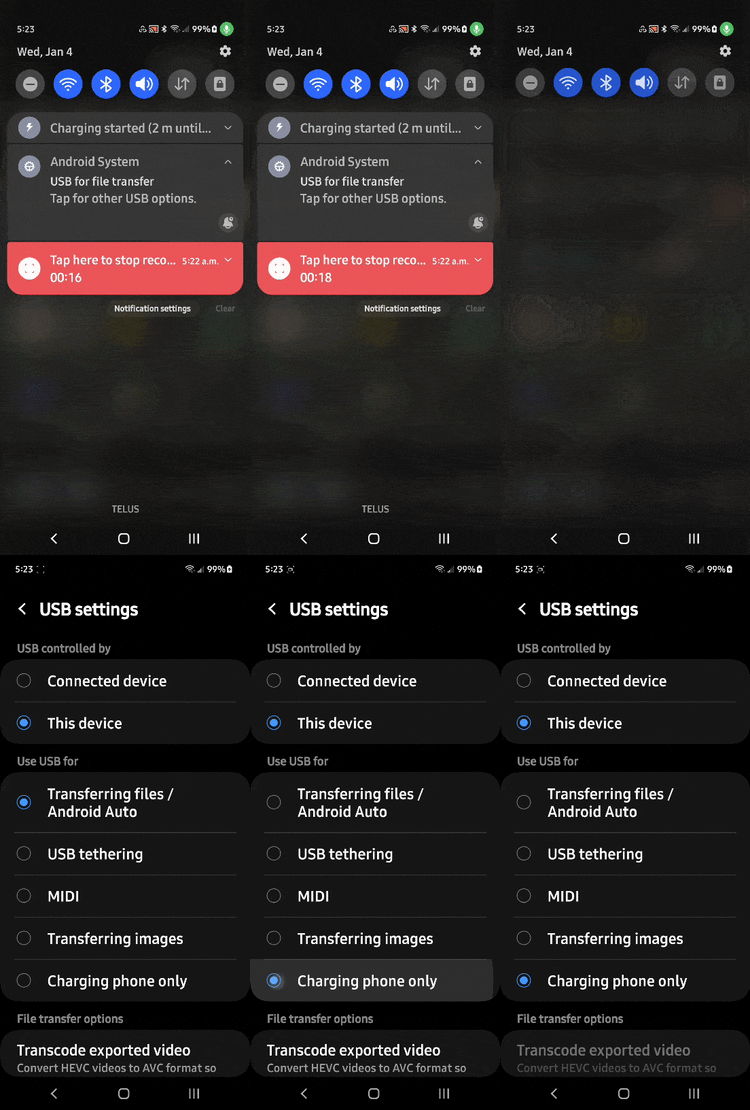
Mine defaults to File Transfer on all my PC's even if I change it!
Can't remember how I got it to function that way..., perhaps it's because my device is paired to all my PC's 🤷‍♂️

jif.gif
 

My Computers My Computers

  • At a glance

    Windows 11 Pro
    OS
    Windows 11 Pro
    Computer type
    PC/Desktop
    Manufacturer/Model
    ASUS ROG Strix
  • At a glance

    Windows 11 Pro
    Operating System
    Windows 11 Pro
    Computer type
    Laptop
    Manufacturer/Model
    ASUS VivoBook
  • ASUS VivoBook 'Lite' ~ Windows 11 Home
Mine defaults to File Transfer on all my PC's even if I change it!
Can't remember how I got it to function that way..., perhaps it's because my device is paired to all my PC's 🤷‍♂️

View attachment 49092

There has to be a way to unpair.

I notice that under USB settings on the phone, only 'USB controlled by phone' can be selected, 'USB controlled by computer' cannot be selected.

I find it strange that there is a radio button that cannot be selected, but the upshot is that the USB connection is always controlled by the phone.

This is very much like a server-client relationship where the server is the phone and the client is the computer.

And like in any server, there has to be a means to disallow/unpair individual clients. I just don't know how to do it with a phone, perhaps @TheMystic or someone else may know.
 

My Computer My Computer

At a glance

Windows 10 Pro
OS
Windows 10 Pro
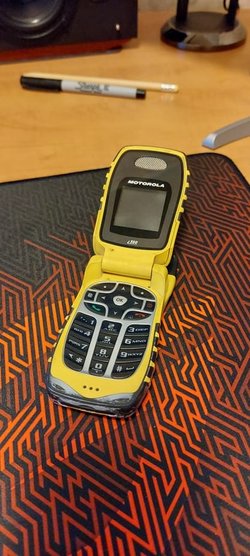
Yeah, I know, you're all laughing at my phone.
Hell no! I loved em!
Still got one! (doesn't work, but...)

20230104_074150.jpg
 

My Computers My Computers

  • At a glance

    Windows 11 Pro
    OS
    Windows 11 Pro
    Computer type
    PC/Desktop
    Manufacturer/Model
    ASUS ROG Strix
  • At a glance

    Windows 11 Pro
    Operating System
    Windows 11 Pro
    Computer type
    Laptop
    Manufacturer/Model
    ASUS VivoBook
  • ASUS VivoBook 'Lite' ~ Windows 11 Home
Hell no! I loved em!
Still got one! (doesn't work, but...)

View attachment 49094


Cricket keeps picking junkier and junkier flip phones.
Long, long ago, they offered the Nokia bar phone. That phone was indestructible.
Then came flip phones... they were pretty tough... Samsung, LG... etc.
Lately, two "forced" phone upgrades, one was a "who knows" model and this one is a TCL Classic.

I don't know if they're any good or not... but I always liked the ruggedness of the Sonim phones.
The Samsung Rugby phones seemed pretty rugged, also.
 

My Computers My Computers

  • At a glance

    Win 11 Home ♦♦♦26200.8655 ♦♦♦♦♦♦♦25H2AMD Ryzen 7 3700XG.Skill (F4-3200C14D-16GTZKW)EVGA RTX 2070 (08G-P4-2171-KR)
    OS
    Win 11 Home ♦♦♦26200.8655 ♦♦♦♦♦♦♦25H2
    Computer type
    PC/Desktop
    Manufacturer/Model
    Built by Ghot® [May 2020]
    CPU
    AMD Ryzen 7 3700X
    Motherboard
    Asus Pro WS X570-ACE (BIOS 5302)
    Memory
    G.Skill (F4-3200C14D-16GTZKW)
    Graphics Card(s)
    EVGA RTX 2070 (08G-P4-2171-KR)
    Sound Card
    Realtek ALC1220P / ALC S1220A
    Monitor(s) Displays
    Dell U3011 30"
    Screen Resolution
    2560 x 1600
    Hard Drives
    2x Samsung 860 EVO 500GB,
    WD 4TB Black FZBX - SATA III,
    WD 8TB Black FZBX - SATA III,
    DRW-24B1ST CD/DVD Burner
    PSU
    PC Power & Cooling 750W Quad EPS12V
    Case
    Cooler Master ATCS 840 Tower
    Cooling
    CM Hyper 212 EVO (push/pull)
    Keyboard
    Ducky DK9008 Shine II Blue LED
    Mouse
    Logitech Optical M-100
    Internet Speed
    300/300
    Browser
    Firefox (latest)
    Antivirus
    Bitdefender Total Security
    Other Info
    Speakers: Klipsch Pro Media 2.1
  • At a glance

    Windows XP Pro 32bit w/SP3AMD Athlon 64 X2 5000+ (OC'd @ 3.2Ghz)TWIN2X2048-6400C4DHX (2 x 1GB, DDR2 800)EVGA 256-P2-N758-TR GeForce 8600GT SSC
    Operating System
    Windows XP Pro 32bit w/SP3
    Computer type
    PC/Desktop
    Manufacturer/Model
    Built by Ghot® (not in use)
    CPU
    AMD Athlon 64 X2 5000+ (OC'd @ 3.2Ghz)
    Motherboard
    ASUS M2N32-SLI Deluxe Wireless Edition
    Memory
    TWIN2X2048-6400C4DHX (2 x 1GB, DDR2 800)
    Graphics card(s)
    EVGA 256-P2-N758-TR GeForce 8600GT SSC
    Sound Card
    Onboard
    Monitor(s) Displays
    ViewSonic G90FB Black 19" Professional (CRT)
    Screen Resolution
    up to 2048 x 1536
    Hard Drives
    WD 36GB 10,000rpm Raptor SATA
    Seagate 80GB 7200rpm SATA
    Lite-On LTR-52246S CD/RW
    Lite-On LH-18A1P CD/DVD Burner
    PSU
    PC Power & Cooling Silencer 750 Quad EPS12V
    Case
    Generic Beige case, 80mm fans
    Cooling
    ZALMAN 9500A 92mm CPU Cooler
    Keyboard
    Logitech Classic Keybooard 200
    Mouse
    Logitech Optical M-BT96a
    Internet Speed
    300/300
    Browser
    Firefox 3.x ??
    Antivirus
    Symantec (Norton)
    Other Info
    Still assembled, still runs. Haven't turned it on for 15 years?
Back to regular programming and disconnecting the phone from the computer (afer doing a file transfer)

Everyone here myself included have done the disconnect without taking any precautions, and nobody encountered any problems.

So, is setting the phone to 'charge' before disconnecting an unnecessary safety precaution? Or can there be adverse effects after doing thousands of disconnects? Is setting the phone to 'charge' before disconnecting perhaps a good habit to adopt?
 

My Computer My Computer

At a glance

Windows 10 Pro
OS
Windows 10 Pro
Back to regular programming and disconnecting the phone from the computer (afer doing a file transfer)

Everyone here myself included have done the disconnect without taking any precautions, and nobody encountered any problems.

So, is setting the phone to 'charge' before disconnecting an unnecessary safety precaution? Or can there be adverse effects after doing thousands of disconnects? Is setting the phone to 'charge' before disconnecting perhaps a good habit to adopt?


I think they try to make the phones as idiot proof as possible. So, you can probably just unhook them when you're done.
No rocket science required. :cool:
 

My Computers My Computers

  • At a glance

    Win 11 Home ♦♦♦26200.8655 ♦♦♦♦♦♦♦25H2AMD Ryzen 7 3700XG.Skill (F4-3200C14D-16GTZKW)EVGA RTX 2070 (08G-P4-2171-KR)
    OS
    Win 11 Home ♦♦♦26200.8655 ♦♦♦♦♦♦♦25H2
    Computer type
    PC/Desktop
    Manufacturer/Model
    Built by Ghot® [May 2020]
    CPU
    AMD Ryzen 7 3700X
    Motherboard
    Asus Pro WS X570-ACE (BIOS 5302)
    Memory
    G.Skill (F4-3200C14D-16GTZKW)
    Graphics Card(s)
    EVGA RTX 2070 (08G-P4-2171-KR)
    Sound Card
    Realtek ALC1220P / ALC S1220A
    Monitor(s) Displays
    Dell U3011 30"
    Screen Resolution
    2560 x 1600
    Hard Drives
    2x Samsung 860 EVO 500GB,
    WD 4TB Black FZBX - SATA III,
    WD 8TB Black FZBX - SATA III,
    DRW-24B1ST CD/DVD Burner
    PSU
    PC Power & Cooling 750W Quad EPS12V
    Case
    Cooler Master ATCS 840 Tower
    Cooling
    CM Hyper 212 EVO (push/pull)
    Keyboard
    Ducky DK9008 Shine II Blue LED
    Mouse
    Logitech Optical M-100
    Internet Speed
    300/300
    Browser
    Firefox (latest)
    Antivirus
    Bitdefender Total Security
    Other Info
    Speakers: Klipsch Pro Media 2.1
  • At a glance

    Windows XP Pro 32bit w/SP3AMD Athlon 64 X2 5000+ (OC'd @ 3.2Ghz)TWIN2X2048-6400C4DHX (2 x 1GB, DDR2 800)EVGA 256-P2-N758-TR GeForce 8600GT SSC
    Operating System
    Windows XP Pro 32bit w/SP3
    Computer type
    PC/Desktop
    Manufacturer/Model
    Built by Ghot® (not in use)
    CPU
    AMD Athlon 64 X2 5000+ (OC'd @ 3.2Ghz)
    Motherboard
    ASUS M2N32-SLI Deluxe Wireless Edition
    Memory
    TWIN2X2048-6400C4DHX (2 x 1GB, DDR2 800)
    Graphics card(s)
    EVGA 256-P2-N758-TR GeForce 8600GT SSC
    Sound Card
    Onboard
    Monitor(s) Displays
    ViewSonic G90FB Black 19" Professional (CRT)
    Screen Resolution
    up to 2048 x 1536
    Hard Drives
    WD 36GB 10,000rpm Raptor SATA
    Seagate 80GB 7200rpm SATA
    Lite-On LTR-52246S CD/RW
    Lite-On LH-18A1P CD/DVD Burner
    PSU
    PC Power & Cooling Silencer 750 Quad EPS12V
    Case
    Generic Beige case, 80mm fans
    Cooling
    ZALMAN 9500A 92mm CPU Cooler
    Keyboard
    Logitech Classic Keybooard 200
    Mouse
    Logitech Optical M-BT96a
    Internet Speed
    300/300
    Browser
    Firefox 3.x ??
    Antivirus
    Symantec (Norton)
    Other Info
    Still assembled, still runs. Haven't turned it on for 15 years?
OK, then, now on to the security issue of connecting phone to computer.

Without unlocking my password protected phone, no file transfer can take place (or so I hope)

Nonetheless, I don't like the idea either, if my unlocked phone could transfer files to ANY connected computer. That's not the case in my stable, only 1 computer is paired.

Even so, I like to know how I could unpair that 1 computer.

More generally speaking, I like to know how I could allow/disallow my phone to pair/unpair to selected computers.
 

My Computer My Computer

At a glance

Windows 10 Pro
OS
Windows 10 Pro
Mine defaults to File Transfer on all my PC's even if I change it!
Can't remember how I got it to function that way..., perhaps it's because my device is paired to all my PC's 🤷‍♂️

View attachment 49092
This is certainly not default behaviour of any stock ROM as this is a security risk. Which phone do you use and which ROM? What is the update version?

There has to be a way to unpair.

I notice that under USB settings on the phone, only 'USB controlled by phone' can be selected, 'USB controlled by computer' cannot be selected.

I find it strange that there is a radio button that cannot be selected, but the upshot is that the USB connection is always controlled by the phone.

This is very much like a server-client relationship where the server is the phone and the client is the computer.

And like in any server, there has to be a means to disallow/unpair individual clients. I just don't know how to do it with a phone, perhaps @TheMystic or someone else may know.
This pairing thing you are referring to is not how it is designed to be. Once I get hold of another computer, I'll be able to confirm this.

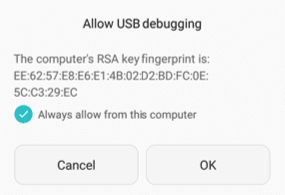
When you use ADB to pass terminal commands on your phone via USB Debugging, you get a prompt like this on your phone:

Screenshot_2016-05-31-10-14-24.png

This sets a unique pairing key between the phone and the computer. If you check 'Always allow....', you won't be prompted for the same next time, but only on that computer. You'll see a prompt like that on every computer you connect to, so you can choose which ones to allow, and if allowed, should it be permanent until revoked.

Please note USB Debugging should not be left ON when you are not using it, both as a security measure as well as to save phone battery life.

Same holds true if you are debugging your phone wirelessly.

As far as simply connecting a phone to a PC is concerned, there is no pairing key that is generated. It is a simple setting that ideally should be left to 'Charging only' and that setting would be universal. This is how it is designed. Any deviation from this behaviour is most likely a bug.
 

My Computer My Computer

At a glance

Windows 11Intel Core i7 3630QM16 GBIntel HD Graphics 4000 & Nvidia GeForce GT 635M
OS
Windows 11
Computer type
Laptop
Manufacturer/Model
HP Envy dv7
CPU
Intel Core i7 3630QM
Motherboard
HP
Memory
16 GB
Graphics Card(s)
Intel HD Graphics 4000 & Nvidia GeForce GT 635M
Sound Card
IDT High Definition
Screen Resolution
1080p
Hard Drives
1 TB Crucial MX500 on bay 1.
1 TB Seagate HDD on bay 2.
Antivirus
Windows Defender

My Computers My Computers

  • At a glance

    Windows 11 Pro
    OS
    Windows 11 Pro
    Computer type
    PC/Desktop
    Manufacturer/Model
    ASUS ROG Strix
  • At a glance

    Windows 11 Pro
    Operating System
    Windows 11 Pro
    Computer type
    Laptop
    Manufacturer/Model
    ASUS VivoBook
  • ASUS VivoBook 'Lite' ~ Windows 11 Home
Samsung Galaxy A52 - Android 13
ROM..., beats me! 🤷‍♂️
I'm assuming it is the stock ROM from Samsung. This behaviour baffles me. I haven't seen this on any of my phones (i mean the default behaviour).

Sounds scary ...

It is very useful if you want to get certain things done like debloating your phone, unlocking the bootloader, installing a custom recovery or ROM, rooting, creating a system image just like you do on Windows, etc.

But the setting should be turned OFF once your work is done. Leaving it on is a bad idea.
 

My Computer My Computer

At a glance

Windows 11Intel Core i7 3630QM16 GBIntel HD Graphics 4000 & Nvidia GeForce GT 635M
OS
Windows 11
Computer type
Laptop
Manufacturer/Model
HP Envy dv7
CPU
Intel Core i7 3630QM
Motherboard
HP
Memory
16 GB
Graphics Card(s)
Intel HD Graphics 4000 & Nvidia GeForce GT 635M
Sound Card
IDT High Definition
Screen Resolution
1080p
Hard Drives
1 TB Crucial MX500 on bay 1.
1 TB Seagate HDD on bay 2.
Antivirus
Windows Defender

My Computers My Computers

  • At a glance

    Windows 11 Pro
    OS
    Windows 11 Pro
    Computer type
    PC/Desktop
    Manufacturer/Model
    ASUS ROG Strix
  • At a glance

    Windows 11 Pro
    Operating System
    Windows 11 Pro
    Computer type
    Laptop
    Manufacturer/Model
    ASUS VivoBook
  • ASUS VivoBook 'Lite' ~ Windows 11 Home
It is very useful if you want to get certain things done like debloating your phone, unlocking the bootloader, installing a custom recovery or ROM, rooting, creating a system image just like you do on Windows, etc.

But the setting should be turned OFF once your work is done. Leaving it on is a bad idea.

Isn't most of all that (at least for an ordinary phone user like me) done by the regular Android updates?

I'd rather do the 'selective pairing' (or whatever you may call it) using the settings available to an ordinary phone user.

FWIW, long time ago, I also thought I could personalize my own PC better than the HMI (Human Machine Interface) specialists at MS could do. But nowadays, the number of personalizations I do is less than fingers on one hand. The rest I can and do work around.
 

My Computer My Computer

At a glance

Windows 10 Pro
OS
Windows 10 Pro
The whole "Remove Device from the computer" is long gone from my point of view. As long as the files are completely copied you should safely remove the USB drive from the USB port
 

My Computers My Computers

  • At a glance

    WiN11 ProXeon E5450 3.0GHZ (OC 3.6GHZ)8GB (2GBX4)NVIDIA Quadro K2200 4GB
    OS
    WiN11 Pro
    Computer type
    PC/Desktop
    Manufacturer/Model
    Custom 775 System
    CPU
    Xeon E5450 3.0GHZ (OC 3.6GHZ)
    Motherboard
    ASUS PQ5-EM
    Memory
    8GB (2GBX4)
    Graphics Card(s)
    NVIDIA Quadro K2200 4GB
    Sound Card
    Onboard
    Monitor(s) Displays
    ASUS 24"
    Screen Resolution
    1080p
    Hard Drives
    1TB|750GB USB, 3 SSDs 2 240GB 1 128GB, 750GB HDD
    PSU
    650WATT Rosewill
    Case
    Rosewill with side Window
    Cooling
    5 Fans and a big HSK for cpu
    Keyboard
    Rosewill RGB
    Mouse
    Rosewill RGB
    Internet Speed
    AT&T 150MB DL\UP
    Browser
    FireFox
    Antivirus
    None
    Other Info
    I'm lucky to even be here after 6yrs from my car accident
  • At a glance

    WiN10 LTSCi7 2670QM 2.20GHZ8GB (2X4GB) DUAL ChannelIntel HD Graphics 3000
    Operating System
    WiN10 LTSC
    Computer type
    Laptop
    Manufacturer/Model
    Hp 8460p
    CPU
    i7 2670QM 2.20GHZ
    Motherboard
    Hp 161C
    Memory
    8GB (2X4GB) DUAL Channel
    Graphics card(s)
    Intel HD Graphics 3000
    Sound Card
    Intel high Def (basically onboard)
    Screen Resolution
    1366x768
    Hard Drives
    OS 128GB l Storage (caddy) 320GB
    PSU
    AC (IDK the watts)
    Browser
    Firefox
    Antivirus
    Defender
    Other Info
    A USB 3.0 in the Express Card Slot
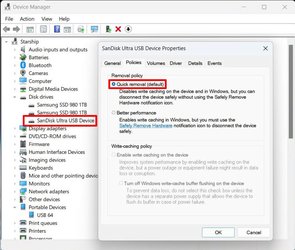
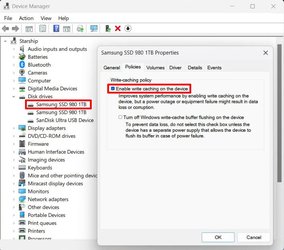
Years ago there was a reason for "Safely to Remove Device". It was write caching. Write caching was enabled on drives to speed up writing to that device. Now USB drives have gotten fast enough to make that less important. Now the norm is to turn off or disable write-caching for external drives. With write caching disabled it should be safe enough to disconnect that drive without going to the old Eject process in the system tray. This includes phones.

Here is a USB flash drive. Write caching by default is disabled. Note, there is an option to turn it on. However, doing this requires the old safeguard of Eject from the system tray to prevent data loss.

USB2.jpg

Note this is different for internal drives because they are not normally allowed to be disconnected while the computer is powered on. With write caching on these drives can write faster.

Here is an internal drive that by default has write caching enabled.

USB1.jpg
 

My Computers My Computers

  • At a glance

    Windows 11 Pro 25H2 (26200.6901)AMD Ryzen 7 6800H with Radeon 680M GPU (486MB...Crucial DDR5-4800 (2400MHz) 32GB (2 x 16GB)NVIDIA RTX 3060 Laptop (6GB RAM)
    OS
    Windows 11 Pro 25H2 (26200.6901)
    Computer type
    Laptop
    Manufacturer/Model
    ASUS TUF Gaming A15 (2022)
    CPU
    AMD Ryzen 7 6800H with Radeon 680M GPU (486MB RAM)
    Memory
    Crucial DDR5-4800 (2400MHz) 32GB (2 x 16GB)
    Graphics Card(s)
    NVIDIA RTX 3060 Laptop (6GB RAM)
    Sound Card
    n/a
    Monitor(s) Displays
    15.6-inch
    Screen Resolution
    1920x1080 300Hz
    Hard Drives
    2 x Samsung 990 Evo Plus (2TB M.2 NVME SSD)
    PSU
    n/a
    Mouse
    Wireless Mouse M510
    Internet Speed
    2100Mbps/300Mbps
    Browser
    Firefox
    Antivirus
    Malwarebytes
  • At a glance

    Windows 11 Pro 25H2 (26200.8246)AMD Ryzen 7 5700X3DG.SKILL Flare X 32GB (2x16GB) DDR4ASUS ROG-STRIX-RTX3060TI-08G-V2-GAMING (RTX 3...
    Operating System
    Windows 11 Pro 25H2 (26200.8246)
    Computer type
    PC/Desktop
    Manufacturer/Model
    Custom build
    CPU
    AMD Ryzen 7 5700X3D
    Motherboard
    ASUS ROG Strix B550-F Gaming WiFi II
    Memory
    G.SKILL Flare X 32GB (2x16GB) DDR4
    Graphics card(s)
    ASUS ROG-STRIX-RTX3060TI-08G-V2-GAMING (RTX 3060-Ti, 8GB RAM)
    Monitor(s) Displays
    Samsung G50D IPS 27"
    Screen Resolution
    1440p/180Hz
    Hard Drives
    SAMSUNG 990 EVO Plus (2TB] M.2 NVME SSD
    SAMSUNG 990 EVO Plus (4TB) M.2 NVME SSD
    PSU
    Corsair RM750x (750 watts)
    Case
    Cooler Master MasterCase 5
    Cooling
    Scythe Mugen 6
    Keyboard
    Logitech K520 (MK540 keyboard/mouse combo)
    Mouse
    Logitech M310 (MK540 keyboard/mouse combo)
    Internet Speed
    2100 Mbps down / 300 Mbps up
    Browser
    Firefox, Edge, Chrome
    Antivirus
    Malwarebytes (Premium)
    Other Info
    ASUS Blu-ray Burner BW-16D1HT (SATA) || Western Digital Easystore 20TB USB 3.0 external hard drive used with Acronis True Image 2025 backup software || HP OfficeJet Pro 6975 Printer/Scanner
Isn't most of all that (at least for an ordinary phone user like me) done by the regular Android updates?
None of that is done via Android updates. And those settings are called Developer Options for a reason. They are not meant for casual users.

I only wish Android provided a way to backup app data without root. Don't understand why they don't implement this very important feature.
But nowadays, the number of personalizations I do is less than fingers on one hand.
That's true. There are too many things happening and it is difficult to stay on top on things for someone not working in that field.

I stopped unlocking the bootloader a few years back (after wasting years tinkering with them) as it is no longer as rewarding as it used to be. Much of what was earlier possible only on rooted devices are now possible without root, making root increasingly irrelevant today.

Then there is also the issue of privacy and security with tools used from unknown sources. You never know what is baked into the codes. It is better to stick with OEM solutions than use ones from random people on XDA and elsewhere, unless you're absolutely sure about the product. There are great tools available, but there is still that element of risk always present.
 

My Computer My Computer

At a glance

Windows 11Intel Core i7 3630QM16 GBIntel HD Graphics 4000 & Nvidia GeForce GT 635M
OS
Windows 11
Computer type
Laptop
Manufacturer/Model
HP Envy dv7
CPU
Intel Core i7 3630QM
Motherboard
HP
Memory
16 GB
Graphics Card(s)
Intel HD Graphics 4000 & Nvidia GeForce GT 635M
Sound Card
IDT High Definition
Screen Resolution
1080p
Hard Drives
1 TB Crucial MX500 on bay 1.
1 TB Seagate HDD on bay 2.
Antivirus
Windows Defender

With write caching disabled it should be safe enough to disconnect that drive without going to the old Eject process in the system tray. This includes phones.
If it was indeed that safe, then Microsoft should have removed that option on the taskbar for external drives that have write caching disabled.

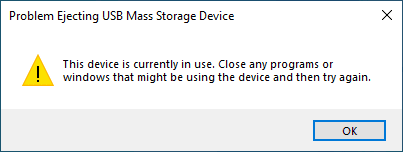
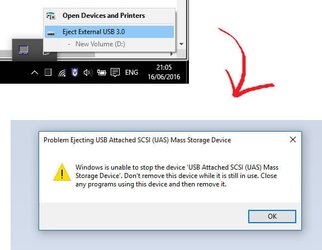
Even today, I often see the annoying inability of Windows to tell me why I can't remove the USB safely and which program is using it:

images.png

images.jpeg
 

My Computer My Computer

At a glance

Windows 11Intel Core i7 3630QM16 GBIntel HD Graphics 4000 & Nvidia GeForce GT 635M
OS
Windows 11
Computer type
Laptop
Manufacturer/Model
HP Envy dv7
CPU
Intel Core i7 3630QM
Motherboard
HP
Memory
16 GB
Graphics Card(s)
Intel HD Graphics 4000 & Nvidia GeForce GT 635M
Sound Card
IDT High Definition
Screen Resolution
1080p
Hard Drives
1 TB Crucial MX500 on bay 1.
1 TB Seagate HDD on bay 2.
Antivirus
Windows Defender

@TheMystic Well, your last paragraph (in post #58) in particular makes me feel that I should be looking at workarounds on the 'selective pairing' issue. Any suggestions?
 

My Computer My Computer

At a glance

Windows 10 Pro
OS
Windows 10 Pro

Latest Support Threads

Back
Top Bottom