Solved Upgrade_failure_info_bat not creating zip file


Continue with post #20 steps #2 and #3.
 

My Computer

System One

  • OS
    Windows 10
    Computer type
    Laptop
    Manufacturer/Model
    HP
    CPU
    Intel(R) Core(TM) i7-4800MQ CPU @ 2.70GHz
    Motherboard
    Product : 190A Version : KBC Version 94.56
    Memory
    16 GB Total: Manufacturer : Samsung MemoryType : DDR3 FormFactor : SODIMM Capacity : 8GB Speed : 1600
    Graphics Card(s)
    NVIDIA Quadro K3100M; Intel(R) HD Graphics 4600
    Sound Card
    IDT High Definition Audio CODEC; PNP Device ID HDAUDIO\FUNC_01&VEN_111D&DEV_76E0
    Hard Drives
    Model Hitachi HTS727575A9E364
    Antivirus
    Microsoft Defender
    Other Info
    Mobile Workstation
Update the progress with these steps in post #9


3) Post a website link for MSI that has BIOS and drivers: PRO B650-VC WIFI III (MS-7E18)


4) Turn off Windows fast startup
 

My Computer

System One

  • OS
    Windows 10
    Computer type
    Laptop
    Manufacturer/Model
    HP
    CPU
    Intel(R) Core(TM) i7-4800MQ CPU @ 2.70GHz
    Motherboard
    Product : 190A Version : KBC Version 94.56
    Memory
    16 GB Total: Manufacturer : Samsung MemoryType : DDR3 FormFactor : SODIMM Capacity : 8GB Speed : 1600
    Graphics Card(s)
    NVIDIA Quadro K3100M; Intel(R) HD Graphics 4600
    Sound Card
    IDT High Definition Audio CODEC; PNP Device ID HDAUDIO\FUNC_01&VEN_111D&DEV_76E0
    Hard Drives
    Model Hitachi HTS727575A9E364
    Antivirus
    Microsoft Defender
    Other Info
    Mobile Workstation
Continue with these steps:


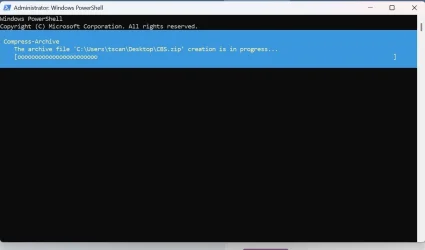
GCI -Path 'c:\windows\logs\cbs\*.*', 'c:\windows\inf\setupapi.dev.log' | Compress-Archive -destination (join-path ([environment]::GetFolderPath('Desktop')) \CBS.zip)
I enter that first cmd, it starts to compress but stream is too long

compress.webp

PS_TooLong.webp
 

My Computer

System One

  • OS
    Windows 11
    Computer type
    PC/Desktop
    Manufacturer/Model
    MSI
    CPU
    Ryzen 9 9900X
    Motherboard
    MSI Pro BG50 VC WiFi (MS-7E18)
    Memory
    32 GB
    Graphics Card(s)
    RTX 5080
    Monitor(s) Displays
    LG LSAG 700
Please continue with these steps:


1) Download to a new desktop folder:


2) Post a website link for MSI that has BIOS and drivers: PRO B650-VC WIFI III (MS-7E18)


3) Turn off Windows fast startup


My Computer

System One

  • OS
    Windows 10
    Computer type
    Laptop
    Manufacturer/Model
    HP
    CPU
    Intel(R) Core(TM) i7-4800MQ CPU @ 2.70GHz
    Motherboard
    Product : 190A Version : KBC Version 94.56
    Memory
    16 GB Total: Manufacturer : Samsung MemoryType : DDR3 FormFactor : SODIMM Capacity : 8GB Speed : 1600
    Graphics Card(s)
    NVIDIA Quadro K3100M; Intel(R) HD Graphics 4600
    Sound Card
    IDT High Definition Audio CODEC; PNP Device ID HDAUDIO\FUNC_01&VEN_111D&DEV_76E0
    Hard Drives
    Model Hitachi HTS727575A9E364
    Antivirus
    Microsoft Defender
    Other Info
    Mobile Workstation
This PC is a Costco variant. It's not listed on MSI's site. Only the VC WiFi II is listed. It's literally brand new-one week old with a clean install of Windows. The BIOS install date is August '25.
 

My Computer

System One

  • OS
    Windows 11
    Computer type
    PC/Desktop
    Manufacturer/Model
    MSI
    CPU
    Ryzen 9 9900X
    Motherboard
    MSI Pro BG50 VC WiFi (MS-7E18)
    Memory
    32 GB
    Graphics Card(s)
    RTX 5080
    Monitor(s) Displays
    LG LSAG 700
Using the newly downloaded desktop iso please perform an in place upgrade repair:


My Computer

System One

  • OS
    Windows 10
    Computer type
    Laptop
    Manufacturer/Model
    HP
    CPU
    Intel(R) Core(TM) i7-4800MQ CPU @ 2.70GHz
    Motherboard
    Product : 190A Version : KBC Version 94.56
    Memory
    16 GB Total: Manufacturer : Samsung MemoryType : DDR3 FormFactor : SODIMM Capacity : 8GB Speed : 1600
    Graphics Card(s)
    NVIDIA Quadro K3100M; Intel(R) HD Graphics 4600
    Sound Card
    IDT High Definition Audio CODEC; PNP Device ID HDAUDIO\FUNC_01&VEN_111D&DEV_76E0
    Hard Drives
    Model Hitachi HTS727575A9E364
    Antivirus
    Microsoft Defender
    Other Info
    Mobile Workstation
Using the newly downloaded desktop iso please perform an in place upgrade repair:

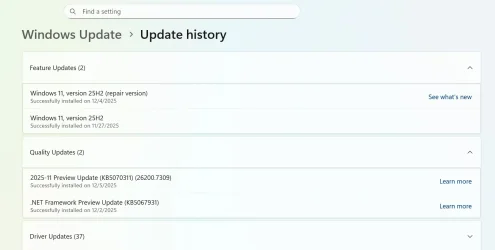
Thanks, the repair install worked.
Installed.webp
 

My Computer

System One

  • OS
    Windows 11
    Computer type
    PC/Desktop
    Manufacturer/Model
    MSI
    CPU
    Ryzen 9 9900X
    Motherboard
    MSI Pro BG50 VC WiFi (MS-7E18)
    Memory
    32 GB
    Graphics Card(s)
    RTX 5080
    Monitor(s) Displays
    LG LSAG 700
You're welcome.


There are multiple active threads on secure boot.

A new V2 can be scanned for event ID 1801 as in post #12.
 

My Computer

System One

  • OS
    Windows 10
    Computer type
    Laptop
    Manufacturer/Model
    HP
    CPU
    Intel(R) Core(TM) i7-4800MQ CPU @ 2.70GHz
    Motherboard
    Product : 190A Version : KBC Version 94.56
    Memory
    16 GB Total: Manufacturer : Samsung MemoryType : DDR3 FormFactor : SODIMM Capacity : 8GB Speed : 1600
    Graphics Card(s)
    NVIDIA Quadro K3100M; Intel(R) HD Graphics 4600
    Sound Card
    IDT High Definition Audio CODEC; PNP Device ID HDAUDIO\FUNC_01&VEN_111D&DEV_76E0
    Hard Drives
    Model Hitachi HTS727575A9E364
    Antivirus
    Microsoft Defender
    Other Info
    Mobile Workstation
What about the HD? This PC came with (low budget ) 2TB WD SSD Green. I’m considering upgrading to higher storage and better quality.
 

My Computer

System One

  • OS
    Windows 11
    Computer type
    PC/Desktop
    Manufacturer/Model
    MSI
    CPU
    Ryzen 9 9900X
    Motherboard
    MSI Pro BG50 VC WiFi (MS-7E18)
    Memory
    32 GB
    Graphics Card(s)
    RTX 5080
    Monitor(s) Displays
    LG LSAG 700
The were reports of problems with E: in the event viewer.


If you're considering a better and larger internal drive backup images can be made and restored onto the new drive.


The Crucial scanner may be able to provide drive options however there was a recent thread about Crucial changing their business.


Code:
WD Green SN3000 2TB


Code:
Name                   : WD Green SN3000 2TB
Model                  : WD Green SN3000 2TB
Manufacturer           :
PartNumber             :
SerialNumber           : E823_8FA6_BF53_0001_001B_448B_42E5_E9B3.
MediaType              : SSD
BusType                : NVMe
BootDrive              : True
PartitionStyle         : GPT
FirmwareVersion        : 123000WD
Size(GB)               : 1863.02
GUID                   : {b1accd26-ce0a-4480-b044-b6b27f6849b0}
Health Status          : Healthy
Wear                   : 0
Temperature            : 42
TemperatureMax         : 90
PowerOnHours           :
ReadErrorsUncorrected  :
ReadErrorsCorrected    :
WriteErrorsUncorrected :
WriteErrorsCorrected   :


Code:
TemperatureMax         : 90
 
Last edited:

My Computer

System One

  • OS
    Windows 10
    Computer type
    Laptop
    Manufacturer/Model
    HP
    CPU
    Intel(R) Core(TM) i7-4800MQ CPU @ 2.70GHz
    Motherboard
    Product : 190A Version : KBC Version 94.56
    Memory
    16 GB Total: Manufacturer : Samsung MemoryType : DDR3 FormFactor : SODIMM Capacity : 8GB Speed : 1600
    Graphics Card(s)
    NVIDIA Quadro K3100M; Intel(R) HD Graphics 4600
    Sound Card
    IDT High Definition Audio CODEC; PNP Device ID HDAUDIO\FUNC_01&VEN_111D&DEV_76E0
    Hard Drives
    Model Hitachi HTS727575A9E364
    Antivirus
    Microsoft Defender
    Other Info
    Mobile Workstation
The were reports of problems with E: in the event viewer.
I'm not sure what you mean by E. Is that a faulty partition on my SSD C drive? I don't have a drive E unless it's an external device. I don't know where to find this problem in the Event Viewer.

I was considering Samsung SSD. I need to contact MSI support an ask why this model is not listed on their site for Drivers & BIOS support.

And I find it disturbing that I needed to install the repair version in order to properly update Windows on a PC that's only one week old.

90 day return policy though.

Thanks again
 

My Computer

System One

  • OS
    Windows 11
    Computer type
    PC/Desktop
    Manufacturer/Model
    MSI
    CPU
    Ryzen 9 9900X
    Motherboard
    MSI Pro BG50 VC WiFi (MS-7E18)
    Memory
    32 GB
    Graphics Card(s)
    RTX 5080
    Monitor(s) Displays
    LG LSAG 700
The E:\ were an external drive and all were dated 11/26

Code:
{Delayed Write Failed} Windows was unable to save all the data for the file E:\Pics\Kylie Rocket & Xxlayna Marie - Threesome Heaven With Latina Goddesses Pics. The data has been lost. This error may be caused by a failure of your computer hardware or network connection. Please try to save this file elsewhere.


{Delayed Write Failed} Windows was unable to save all the data for the file E:\$Mft. The data has been lost. This error may be caused by a failure of your computer hardware or network connection. Please try to save this file elsewhere.


{Delayed Write Failed} Windows was unable to save all the data for the file E:\Vids\11-3-25. The data has been lost. This error may be caused by a failure of your computer hardware or network connection. Please try to save this file elsewhere.


{Delayed Write Failed} Windows was unable to save all the data for the file E:\Pics\Kylie Rocket & Xxlayna Marie - Threesome Heaven With Latina Goddesses Pics. The data has been lost. This error may be caused by a failure of your computer hardware or network connection. Please try to save this file elsewhere


{Delayed Write Failed} Windows was unable to save all the data for the file E:\$Extend\$ObjId:$O:$INDEX_ALLOCATION. The data has been lost. This error may be caused by a failure of your computer hardware or network connection. Please try to save this file elsewhere.


{Delayed Write Failed} Windows was unable to save all the data for the file E:\Pics. The data has been lost. This error may be caused by a failure of your computer hardware or network connection. Please try to save this file elsewhere.


{Delayed Write Failed} Windows was unable to save all the data for the file E:\System Volume Information\tracking.log. The data has been lost. This error may be caused by a failure of your computer hardware or network connection. Please try to save this file elsewhere.


{Delayed Write Failed} Windows was unable to save all the data for the file E:\Pics\Dakota Lyn IR Savvy Suxx BBC-Crazy Bl ..  Take Turns Riding A Massive Cock Blacked Pics. The data has been lost. This error may be caused by a failure of your computer hardware or network connection. Please try to save this file elsewhere.


{Delayed Write Failed} Windows was unable to save all the data for the file E:\$Mft. The data has been lost. This error may be caused by a failure of your computer hardware or network connection. Please try to save this file elsewhere.


When the script was written for failure to upgrade specific files were searched for and if present they were collected.

These files are created by Windows when it fails to upgrade.

For failures to update these files are not typically generated.

(upgrade vs update)

This is for the thread title.
 

My Computer

System One

  • OS
    Windows 10
    Computer type
    Laptop
    Manufacturer/Model
    HP
    CPU
    Intel(R) Core(TM) i7-4800MQ CPU @ 2.70GHz
    Motherboard
    Product : 190A Version : KBC Version 94.56
    Memory
    16 GB Total: Manufacturer : Samsung MemoryType : DDR3 FormFactor : SODIMM Capacity : 8GB Speed : 1600
    Graphics Card(s)
    NVIDIA Quadro K3100M; Intel(R) HD Graphics 4600
    Sound Card
    IDT High Definition Audio CODEC; PNP Device ID HDAUDIO\FUNC_01&VEN_111D&DEV_76E0
    Hard Drives
    Model Hitachi HTS727575A9E364
    Antivirus
    Microsoft Defender
    Other Info
    Mobile Workstation

Latest Support Threads

Back
Top Bottom