Solved Using Customizer God to change system icons


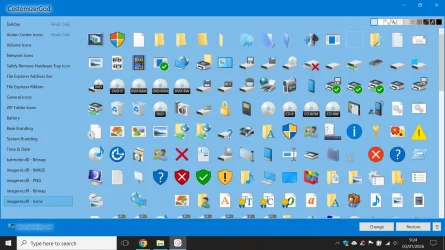
If you open File Explorer to C:\Windows\SystemResources folder you will see many files. For the battery icon is batmeter.dll.mun For all system icons is imageres.dll.mun For sound is SndVolSSO.dll.mun and for USB safe ejection icon is stobject.dll.mun

Since Customizer God expects standard .dll icons, it doesn't show them by default. You have to either change file type to *.* to see them or manually type the first letters of their filename. I don't know about new versions, but in my old version you press CTRL+O to open a file.
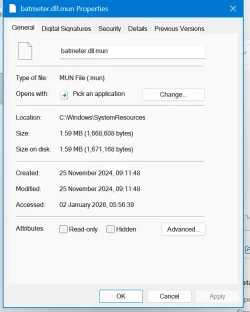
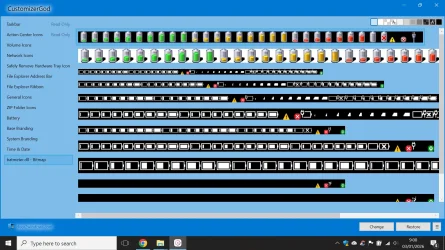
batmeter does not show the icons tab unlike pnidi.dll or sndvolsso.dll
1767387537517.webpicons tab is literaly missing
 

My Computers

System One System Two

  • OS
    Windows 1125h2
    Computer type
    Laptop
    Manufacturer/Model
    HP
    CPU
    Intel(R) Pentium(R) Silver N5030 CPU @ 1.10GHz
    Motherboard
    HP 864D PCI express
    Memory
    4GB
    Graphics Card(s)
    Intel (UHD) Graphics 605
    Screen Resolution
    1920x1080
    Hard Drives
    2, A:, C:, D: (Note that A is not a hard disk)
    Cooling
    Hot
    Keyboard
    UK Keyboard layout
    Mouse
    No Mouse, compatble laptop
    Internet Speed
    500Kbps
    Browser
    Chrome
    Antivirus
    Windows Defender, Microsoft Defender
    Other Info
    Main PC
    I have 5 computers
  • Operating System
    Windows 11 24h2
    Computer type
    Laptop
    Manufacturer/Model
    DELL
    CPU
    Intel i5 processer
    Screen Resolution
    Random Screen resolution
    Hard Drives
    1 C:, cuz others are banned
    Cooling
    Fine
    Keyboard
    UK Keyboard layout
    Mouse
    Laptop mouse
    Internet Speed
    0.5Kbps
    Browser
    Edge
    Antivirus
    Windows Defender
    Other Info
    School Teacher PC
My Computers

System One System Two

  • OS
    Windows 11 Pro 23H2 (5699), 25H2 (8457)
    Computer type
    Laptop
    Manufacturer/Model
    Acer Extensa 5630EZ
    CPU
    Mobile DualCore Intel Core 2 Duo T7250, 2000 MHz
    Motherboard
    Acer Extensa 5630
    Memory
    4GB
    Graphics Card(s)
    Mobile Intel(R) GMA 4500M (Mobile 4 series)
    Sound Card
    Realtek ALC268 @ Intel 82801IB ICH9 - High Definition Audio Controller
    Monitor(s) Displays
    1
    Screen Resolution
    1280x800
    Hard Drives
    Samsung SSD 850 EVO 250GB SATA Device (250 GB, SATA-III)
    Internet Speed
    VDSL 50 Mbps
    Browser
    MICROSOFT EDGE
    Antivirus
    WINDOWS DEFENDER
    Other Info
    Legacy MBR installation, no TPM, no Secure Boot, no WDDM 2.0 graphics drivers, no SSE4.2, cannot get more unsupported ;) This is only my test laptop. I had installed Windows 11 here before upgrading my main PC. For my main PC I use everyday see my 2nd system specs.
  • Operating System
    Windows 11 Pro v25H2 (build 26200.8457)
    Computer type
    PC/Desktop
    Manufacturer/Model
    Custom-built PC
    CPU
    Intel Core-i7 3770 3.40GHz s1155 (3rd generation)
    Motherboard
    Asus P8H61 s1155 ATX
    Memory
    2x Kingston Hyper-X Blu 8GB DDR3-1600
    Graphics card(s)
    GIGABYTE GeForce RTX 3050 WINDFORCE OC V2 6GB (GV-N3050WF2OCV2-6GD)
    Sound Card
    Realtek HD audio (ALC887)
    Monitor(s) Displays
    Sony Bravia KDL-19L4000 19" LCD TV via VGA
    Screen Resolution
    1440x900 32-bit 60Hz
    Hard Drives
    WD Blue SA510 2.5 1000GB SSD as system disk, Western Digital Caviar Purple 4TB SATA III (WD40PURZ) as second
    PSU
    Thermaltake Litepower RGB 550W Full Wired
    Case
    SUPERCASE MIDI-TOWER
    Cooling
    Deepcool Gamma Archer CPU cooler, 1x 8cm fan at the back
    Keyboard
    Mitsumi 101-key PS/2
    Mouse
    Sunnyline OptiEye PS/2
    Internet Speed
    100Mbps
    Browser
    Microsoft Edge, Mozilla Firefox
    Antivirus
    Microsoft Windows Defender
    Other Info
    Legacy BIOS (MBR) installation, no TPM, no Secure Boot, WDDM 3.0 graphics drivers, WEI score 7.4
batmeter does not show the icons tab unlike pnidi.dll or sndvolsso.dll
View attachment 158680icons tab is literaly missing
Yes, you see them in Customizer God or Resource Hacker, not in File Explorer. Also you might see them if you try to change icon in a shortcut and open one .mun file Also batmeter.dll.mun has images, not icons.
 

My Computers

System One System Two

  • OS
    Windows 11 Pro 23H2 (5699), 25H2 (8457)
    Computer type
    Laptop
    Manufacturer/Model
    Acer Extensa 5630EZ
    CPU
    Mobile DualCore Intel Core 2 Duo T7250, 2000 MHz
    Motherboard
    Acer Extensa 5630
    Memory
    4GB
    Graphics Card(s)
    Mobile Intel(R) GMA 4500M (Mobile 4 series)
    Sound Card
    Realtek ALC268 @ Intel 82801IB ICH9 - High Definition Audio Controller
    Monitor(s) Displays
    1
    Screen Resolution
    1280x800
    Hard Drives
    Samsung SSD 850 EVO 250GB SATA Device (250 GB, SATA-III)
    Internet Speed
    VDSL 50 Mbps
    Browser
    MICROSOFT EDGE
    Antivirus
    WINDOWS DEFENDER
    Other Info
    Legacy MBR installation, no TPM, no Secure Boot, no WDDM 2.0 graphics drivers, no SSE4.2, cannot get more unsupported ;) This is only my test laptop. I had installed Windows 11 here before upgrading my main PC. For my main PC I use everyday see my 2nd system specs.
  • Operating System
    Windows 11 Pro v25H2 (build 26200.8457)
    Computer type
    PC/Desktop
    Manufacturer/Model
    Custom-built PC
    CPU
    Intel Core-i7 3770 3.40GHz s1155 (3rd generation)
    Motherboard
    Asus P8H61 s1155 ATX
    Memory
    2x Kingston Hyper-X Blu 8GB DDR3-1600
    Graphics card(s)
    GIGABYTE GeForce RTX 3050 WINDFORCE OC V2 6GB (GV-N3050WF2OCV2-6GD)
    Sound Card
    Realtek HD audio (ALC887)
    Monitor(s) Displays
    Sony Bravia KDL-19L4000 19" LCD TV via VGA
    Screen Resolution
    1440x900 32-bit 60Hz
    Hard Drives
    WD Blue SA510 2.5 1000GB SSD as system disk, Western Digital Caviar Purple 4TB SATA III (WD40PURZ) as second
    PSU
    Thermaltake Litepower RGB 550W Full Wired
    Case
    SUPERCASE MIDI-TOWER
    Cooling
    Deepcool Gamma Archer CPU cooler, 1x 8cm fan at the back
    Keyboard
    Mitsumi 101-key PS/2
    Mouse
    Sunnyline OptiEye PS/2
    Internet Speed
    100Mbps
    Browser
    Microsoft Edge, Mozilla Firefox
    Antivirus
    Microsoft Windows Defender
    Other Info
    Legacy BIOS (MBR) installation, no TPM, no Secure Boot, WDDM 3.0 graphics drivers, WEI score 7.4

My Computers

System One System Two

  • OS
    Windows 1125h2
    Computer type
    Laptop
    Manufacturer/Model
    HP
    CPU
    Intel(R) Pentium(R) Silver N5030 CPU @ 1.10GHz
    Motherboard
    HP 864D PCI express
    Memory
    4GB
    Graphics Card(s)
    Intel (UHD) Graphics 605
    Screen Resolution
    1920x1080
    Hard Drives
    2, A:, C:, D: (Note that A is not a hard disk)
    Cooling
    Hot
    Keyboard
    UK Keyboard layout
    Mouse
    No Mouse, compatble laptop
    Internet Speed
    500Kbps
    Browser
    Chrome
    Antivirus
    Windows Defender, Microsoft Defender
    Other Info
    Main PC
    I have 5 computers
  • Operating System
    Windows 11 24h2
    Computer type
    Laptop
    Manufacturer/Model
    DELL
    CPU
    Intel i5 processer
    Screen Resolution
    Random Screen resolution
    Hard Drives
    1 C:, cuz others are banned
    Cooling
    Fine
    Keyboard
    UK Keyboard layout
    Mouse
    Laptop mouse
    Internet Speed
    0.5Kbps
    Browser
    Edge
    Antivirus
    Windows Defender
    Other Info
    School Teacher PC
Yes, you see them in Customizer God or Resource Hacker, not in File Explorer. Also you might see them if you try to change icon in a shortcut and open one .mun file Also batmeter.dll.mun has images, not icons.
i use iconviewer cuz my parents downloaded it and its useful
1767430818095.webp
here is the batmeter.dll, is it possible to replace the battery icons from the windows 10 icons to windows 7 (the top one)
 

My Computers

System One System Two

  • OS
    Windows 1125h2
    Computer type
    Laptop
    Manufacturer/Model
    HP
    CPU
    Intel(R) Pentium(R) Silver N5030 CPU @ 1.10GHz
    Motherboard
    HP 864D PCI express
    Memory
    4GB
    Graphics Card(s)
    Intel (UHD) Graphics 605
    Screen Resolution
    1920x1080
    Hard Drives
    2, A:, C:, D: (Note that A is not a hard disk)
    Cooling
    Hot
    Keyboard
    UK Keyboard layout
    Mouse
    No Mouse, compatble laptop
    Internet Speed
    500Kbps
    Browser
    Chrome
    Antivirus
    Windows Defender, Microsoft Defender
    Other Info
    Main PC
    I have 5 computers
  • Operating System
    Windows 11 24h2
    Computer type
    Laptop
    Manufacturer/Model
    DELL
    CPU
    Intel i5 processer
    Screen Resolution
    Random Screen resolution
    Hard Drives
    1 C:, cuz others are banned
    Cooling
    Fine
    Keyboard
    UK Keyboard layout
    Mouse
    Laptop mouse
    Internet Speed
    0.5Kbps
    Browser
    Edge
    Antivirus
    Windows Defender
    Other Info
    School Teacher PC
loaded up win10 imageres and look what it came up
1767432235885.webp1767432258674.webp
1767432280067.webp1767432296366.webp
 

My Computers

System One System Two

  • OS
    Windows 1125h2
    Computer type
    Laptop
    Manufacturer/Model
    HP
    CPU
    Intel(R) Pentium(R) Silver N5030 CPU @ 1.10GHz
    Motherboard
    HP 864D PCI express
    Memory
    4GB
    Graphics Card(s)
    Intel (UHD) Graphics 605
    Screen Resolution
    1920x1080
    Hard Drives
    2, A:, C:, D: (Note that A is not a hard disk)
    Cooling
    Hot
    Keyboard
    UK Keyboard layout
    Mouse
    No Mouse, compatble laptop
    Internet Speed
    500Kbps
    Browser
    Chrome
    Antivirus
    Windows Defender, Microsoft Defender
    Other Info
    Main PC
    I have 5 computers
  • Operating System
    Windows 11 24h2
    Computer type
    Laptop
    Manufacturer/Model
    DELL
    CPU
    Intel i5 processer
    Screen Resolution
    Random Screen resolution
    Hard Drives
    1 C:, cuz others are banned
    Cooling
    Fine
    Keyboard
    UK Keyboard layout
    Mouse
    Laptop mouse
    Internet Speed
    0.5Kbps
    Browser
    Edge
    Antivirus
    Windows Defender
    Other Info
    School Teacher PC

i use iconviewer cuz my parents downloaded it and its useful
View attachment 158716
here is the batmeter.dll, is it possible to replace the battery icons from the windows 10 icons to windows 7 (the top one)
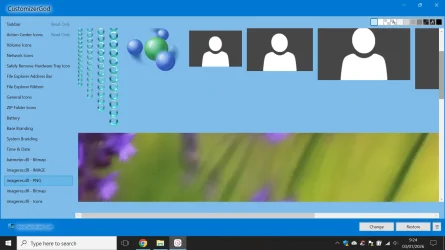
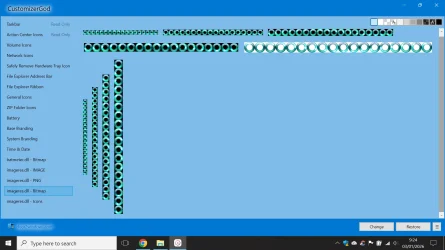
Yes, you can. In Customizer God you click on images, there are no icons in this file.
 

My Computers

System One System Two

  • OS
    Windows 11 Pro 23H2 (5699), 25H2 (8457)
    Computer type
    Laptop
    Manufacturer/Model
    Acer Extensa 5630EZ
    CPU
    Mobile DualCore Intel Core 2 Duo T7250, 2000 MHz
    Motherboard
    Acer Extensa 5630
    Memory
    4GB
    Graphics Card(s)
    Mobile Intel(R) GMA 4500M (Mobile 4 series)
    Sound Card
    Realtek ALC268 @ Intel 82801IB ICH9 - High Definition Audio Controller
    Monitor(s) Displays
    1
    Screen Resolution
    1280x800
    Hard Drives
    Samsung SSD 850 EVO 250GB SATA Device (250 GB, SATA-III)
    Internet Speed
    VDSL 50 Mbps
    Browser
    MICROSOFT EDGE
    Antivirus
    WINDOWS DEFENDER
    Other Info
    Legacy MBR installation, no TPM, no Secure Boot, no WDDM 2.0 graphics drivers, no SSE4.2, cannot get more unsupported ;) This is only my test laptop. I had installed Windows 11 here before upgrading my main PC. For my main PC I use everyday see my 2nd system specs.
  • Operating System
    Windows 11 Pro v25H2 (build 26200.8457)
    Computer type
    PC/Desktop
    Manufacturer/Model
    Custom-built PC
    CPU
    Intel Core-i7 3770 3.40GHz s1155 (3rd generation)
    Motherboard
    Asus P8H61 s1155 ATX
    Memory
    2x Kingston Hyper-X Blu 8GB DDR3-1600
    Graphics card(s)
    GIGABYTE GeForce RTX 3050 WINDFORCE OC V2 6GB (GV-N3050WF2OCV2-6GD)
    Sound Card
    Realtek HD audio (ALC887)
    Monitor(s) Displays
    Sony Bravia KDL-19L4000 19" LCD TV via VGA
    Screen Resolution
    1440x900 32-bit 60Hz
    Hard Drives
    WD Blue SA510 2.5 1000GB SSD as system disk, Western Digital Caviar Purple 4TB SATA III (WD40PURZ) as second
    PSU
    Thermaltake Litepower RGB 550W Full Wired
    Case
    SUPERCASE MIDI-TOWER
    Cooling
    Deepcool Gamma Archer CPU cooler, 1x 8cm fan at the back
    Keyboard
    Mitsumi 101-key PS/2
    Mouse
    Sunnyline OptiEye PS/2
    Internet Speed
    100Mbps
    Browser
    Microsoft Edge, Mozilla Firefox
    Antivirus
    Microsoft Windows Defender
    Other Info
    Legacy BIOS (MBR) installation, no TPM, no Secure Boot, WDDM 3.0 graphics drivers, WEI score 7.4

My Computers

System One System Two

  • OS
    Windows 11 Pro 23H2 (5699), 25H2 (8457)
    Computer type
    Laptop
    Manufacturer/Model
    Acer Extensa 5630EZ
    CPU
    Mobile DualCore Intel Core 2 Duo T7250, 2000 MHz
    Motherboard
    Acer Extensa 5630
    Memory
    4GB
    Graphics Card(s)
    Mobile Intel(R) GMA 4500M (Mobile 4 series)
    Sound Card
    Realtek ALC268 @ Intel 82801IB ICH9 - High Definition Audio Controller
    Monitor(s) Displays
    1
    Screen Resolution
    1280x800
    Hard Drives
    Samsung SSD 850 EVO 250GB SATA Device (250 GB, SATA-III)
    Internet Speed
    VDSL 50 Mbps
    Browser
    MICROSOFT EDGE
    Antivirus
    WINDOWS DEFENDER
    Other Info
    Legacy MBR installation, no TPM, no Secure Boot, no WDDM 2.0 graphics drivers, no SSE4.2, cannot get more unsupported ;) This is only my test laptop. I had installed Windows 11 here before upgrading my main PC. For my main PC I use everyday see my 2nd system specs.
  • Operating System
    Windows 11 Pro v25H2 (build 26200.8457)
    Computer type
    PC/Desktop
    Manufacturer/Model
    Custom-built PC
    CPU
    Intel Core-i7 3770 3.40GHz s1155 (3rd generation)
    Motherboard
    Asus P8H61 s1155 ATX
    Memory
    2x Kingston Hyper-X Blu 8GB DDR3-1600
    Graphics card(s)
    GIGABYTE GeForce RTX 3050 WINDFORCE OC V2 6GB (GV-N3050WF2OCV2-6GD)
    Sound Card
    Realtek HD audio (ALC887)
    Monitor(s) Displays
    Sony Bravia KDL-19L4000 19" LCD TV via VGA
    Screen Resolution
    1440x900 32-bit 60Hz
    Hard Drives
    WD Blue SA510 2.5 1000GB SSD as system disk, Western Digital Caviar Purple 4TB SATA III (WD40PURZ) as second
    PSU
    Thermaltake Litepower RGB 550W Full Wired
    Case
    SUPERCASE MIDI-TOWER
    Cooling
    Deepcool Gamma Archer CPU cooler, 1x 8cm fan at the back
    Keyboard
    Mitsumi 101-key PS/2
    Mouse
    Sunnyline OptiEye PS/2
    Internet Speed
    100Mbps
    Browser
    Microsoft Edge, Mozilla Firefox
    Antivirus
    Microsoft Windows Defender
    Other Info
    Legacy BIOS (MBR) installation, no TPM, no Secure Boot, WDDM 3.0 graphics drivers, WEI score 7.4
In this file you replace the icons. The images are common in Windows 10 and 11.
i am not modifying those, i will try on a vm if that works, and i dont have virturalbox yer soon i will
 

My Computers

System One System Two

  • OS
    Windows 1125h2
    Computer type
    Laptop
    Manufacturer/Model
    HP
    CPU
    Intel(R) Pentium(R) Silver N5030 CPU @ 1.10GHz
    Motherboard
    HP 864D PCI express
    Memory
    4GB
    Graphics Card(s)
    Intel (UHD) Graphics 605
    Screen Resolution
    1920x1080
    Hard Drives
    2, A:, C:, D: (Note that A is not a hard disk)
    Cooling
    Hot
    Keyboard
    UK Keyboard layout
    Mouse
    No Mouse, compatble laptop
    Internet Speed
    500Kbps
    Browser
    Chrome
    Antivirus
    Windows Defender, Microsoft Defender
    Other Info
    Main PC
    I have 5 computers
  • Operating System
    Windows 11 24h2
    Computer type
    Laptop
    Manufacturer/Model
    DELL
    CPU
    Intel i5 processer
    Screen Resolution
    Random Screen resolution
    Hard Drives
    1 C:, cuz others are banned
    Cooling
    Fine
    Keyboard
    UK Keyboard layout
    Mouse
    Laptop mouse
    Internet Speed
    0.5Kbps
    Browser
    Edge
    Antivirus
    Windows Defender
    Other Info
    School Teacher PC
only problem is the error one on windows 7
1767435113285.webpis this
if i change the high volume the error will change to high tooo
1767435229452.webp
themute icon is so ugly
1767435302116.webp
 

My Computers

System One System Two

  • OS
    Windows 1125h2
    Computer type
    Laptop
    Manufacturer/Model
    HP
    CPU
    Intel(R) Pentium(R) Silver N5030 CPU @ 1.10GHz
    Motherboard
    HP 864D PCI express
    Memory
    4GB
    Graphics Card(s)
    Intel (UHD) Graphics 605
    Screen Resolution
    1920x1080
    Hard Drives
    2, A:, C:, D: (Note that A is not a hard disk)
    Cooling
    Hot
    Keyboard
    UK Keyboard layout
    Mouse
    No Mouse, compatble laptop
    Internet Speed
    500Kbps
    Browser
    Chrome
    Antivirus
    Windows Defender, Microsoft Defender
    Other Info
    Main PC
    I have 5 computers
  • Operating System
    Windows 11 24h2
    Computer type
    Laptop
    Manufacturer/Model
    DELL
    CPU
    Intel i5 processer
    Screen Resolution
    Random Screen resolution
    Hard Drives
    1 C:, cuz others are banned
    Cooling
    Fine
    Keyboard
    UK Keyboard layout
    Mouse
    Laptop mouse
    Internet Speed
    0.5Kbps
    Browser
    Edge
    Antivirus
    Windows Defender
    Other Info
    School Teacher PC

My Computers

System One System Two

  • OS
    Windows 11 Pro 23H2 (5699), 25H2 (8457)
    Computer type
    Laptop
    Manufacturer/Model
    Acer Extensa 5630EZ
    CPU
    Mobile DualCore Intel Core 2 Duo T7250, 2000 MHz
    Motherboard
    Acer Extensa 5630
    Memory
    4GB
    Graphics Card(s)
    Mobile Intel(R) GMA 4500M (Mobile 4 series)
    Sound Card
    Realtek ALC268 @ Intel 82801IB ICH9 - High Definition Audio Controller
    Monitor(s) Displays
    1
    Screen Resolution
    1280x800
    Hard Drives
    Samsung SSD 850 EVO 250GB SATA Device (250 GB, SATA-III)
    Internet Speed
    VDSL 50 Mbps
    Browser
    MICROSOFT EDGE
    Antivirus
    WINDOWS DEFENDER
    Other Info
    Legacy MBR installation, no TPM, no Secure Boot, no WDDM 2.0 graphics drivers, no SSE4.2, cannot get more unsupported ;) This is only my test laptop. I had installed Windows 11 here before upgrading my main PC. For my main PC I use everyday see my 2nd system specs.
  • Operating System
    Windows 11 Pro v25H2 (build 26200.8457)
    Computer type
    PC/Desktop
    Manufacturer/Model
    Custom-built PC
    CPU
    Intel Core-i7 3770 3.40GHz s1155 (3rd generation)
    Motherboard
    Asus P8H61 s1155 ATX
    Memory
    2x Kingston Hyper-X Blu 8GB DDR3-1600
    Graphics card(s)
    GIGABYTE GeForce RTX 3050 WINDFORCE OC V2 6GB (GV-N3050WF2OCV2-6GD)
    Sound Card
    Realtek HD audio (ALC887)
    Monitor(s) Displays
    Sony Bravia KDL-19L4000 19" LCD TV via VGA
    Screen Resolution
    1440x900 32-bit 60Hz
    Hard Drives
    WD Blue SA510 2.5 1000GB SSD as system disk, Western Digital Caviar Purple 4TB SATA III (WD40PURZ) as second
    PSU
    Thermaltake Litepower RGB 550W Full Wired
    Case
    SUPERCASE MIDI-TOWER
    Cooling
    Deepcool Gamma Archer CPU cooler, 1x 8cm fan at the back
    Keyboard
    Mitsumi 101-key PS/2
    Mouse
    Sunnyline OptiEye PS/2
    Internet Speed
    100Mbps
    Browser
    Microsoft Edge, Mozilla Firefox
    Antivirus
    Microsoft Windows Defender
    Other Info
    Legacy BIOS (MBR) installation, no TPM, no Secure Boot, WDDM 3.0 graphics drivers, WEI score 7.4
That's why I use the respective Windows 7 or 8.1 icons, because I don't like the default Windows 10/11 icons either.
well because of the customizergod broken i just stayed to the windows 10 icons
1767442832096.webpalso i hate windows 11 icons way too much cuz they look so trash, no color or effort, whoever made this windows 11 isdumb, and my parents force me to use windows 11 and i hate it, thats why i make windows 11 look like windows 10 using activated windows
and changed action centre with a weird icon
 

My Computers

System One System Two

  • OS
    Windows 1125h2
    Computer type
    Laptop
    Manufacturer/Model
    HP
    CPU
    Intel(R) Pentium(R) Silver N5030 CPU @ 1.10GHz
    Motherboard
    HP 864D PCI express
    Memory
    4GB
    Graphics Card(s)
    Intel (UHD) Graphics 605
    Screen Resolution
    1920x1080
    Hard Drives
    2, A:, C:, D: (Note that A is not a hard disk)
    Cooling
    Hot
    Keyboard
    UK Keyboard layout
    Mouse
    No Mouse, compatble laptop
    Internet Speed
    500Kbps
    Browser
    Chrome
    Antivirus
    Windows Defender, Microsoft Defender
    Other Info
    Main PC
    I have 5 computers
  • Operating System
    Windows 11 24h2
    Computer type
    Laptop
    Manufacturer/Model
    DELL
    CPU
    Intel i5 processer
    Screen Resolution
    Random Screen resolution
    Hard Drives
    1 C:, cuz others are banned
    Cooling
    Fine
    Keyboard
    UK Keyboard layout
    Mouse
    Laptop mouse
    Internet Speed
    0.5Kbps
    Browser
    Edge
    Antivirus
    Windows Defender
    Other Info
    School Teacher PC

here is my weird icon
1767442979427.webp1767442987653.webp1767443009349.webp1767443047674.webp1767443100386.webp1767443100458.webp1767443124874.webp1767443138444.webp1767443194552.webp
also the windows 11 icons look a bit bumpy and cool but the windows 10 imageres.dll icons are more 3d and less colours, some of them are too flat
 

My Computers

System One System Two

  • OS
    Windows 1125h2
    Computer type
    Laptop
    Manufacturer/Model
    HP
    CPU
    Intel(R) Pentium(R) Silver N5030 CPU @ 1.10GHz
    Motherboard
    HP 864D PCI express
    Memory
    4GB
    Graphics Card(s)
    Intel (UHD) Graphics 605
    Screen Resolution
    1920x1080
    Hard Drives
    2, A:, C:, D: (Note that A is not a hard disk)
    Cooling
    Hot
    Keyboard
    UK Keyboard layout
    Mouse
    No Mouse, compatble laptop
    Internet Speed
    500Kbps
    Browser
    Chrome
    Antivirus
    Windows Defender, Microsoft Defender
    Other Info
    Main PC
    I have 5 computers
  • Operating System
    Windows 11 24h2
    Computer type
    Laptop
    Manufacturer/Model
    DELL
    CPU
    Intel i5 processer
    Screen Resolution
    Random Screen resolution
    Hard Drives
    1 C:, cuz others are banned
    Cooling
    Fine
    Keyboard
    UK Keyboard layout
    Mouse
    Laptop mouse
    Internet Speed
    0.5Kbps
    Browser
    Edge
    Antivirus
    Windows Defender
    Other Info
    School Teacher PC

If you have the time and patience you can replace every icon with custom icons. Here is one site with free icons.


You can also use some utilities to create your own icons. I remember the good old BMP2ICO which can convert any .bmp (uncompressed image) to an icon file. You can even choose a specific color or specific points to be transparent.

Cannot find a link to the version I am talking about. The one found by Google is a newer unrelated version with the same name.
 

My Computers

System One System Two

  • OS
    Windows 11 Pro 23H2 (5699), 25H2 (8457)
    Computer type
    Laptop
    Manufacturer/Model
    Acer Extensa 5630EZ
    CPU
    Mobile DualCore Intel Core 2 Duo T7250, 2000 MHz
    Motherboard
    Acer Extensa 5630
    Memory
    4GB
    Graphics Card(s)
    Mobile Intel(R) GMA 4500M (Mobile 4 series)
    Sound Card
    Realtek ALC268 @ Intel 82801IB ICH9 - High Definition Audio Controller
    Monitor(s) Displays
    1
    Screen Resolution
    1280x800
    Hard Drives
    Samsung SSD 850 EVO 250GB SATA Device (250 GB, SATA-III)
    Internet Speed
    VDSL 50 Mbps
    Browser
    MICROSOFT EDGE
    Antivirus
    WINDOWS DEFENDER
    Other Info
    Legacy MBR installation, no TPM, no Secure Boot, no WDDM 2.0 graphics drivers, no SSE4.2, cannot get more unsupported ;) This is only my test laptop. I had installed Windows 11 here before upgrading my main PC. For my main PC I use everyday see my 2nd system specs.
  • Operating System
    Windows 11 Pro v25H2 (build 26200.8457)
    Computer type
    PC/Desktop
    Manufacturer/Model
    Custom-built PC
    CPU
    Intel Core-i7 3770 3.40GHz s1155 (3rd generation)
    Motherboard
    Asus P8H61 s1155 ATX
    Memory
    2x Kingston Hyper-X Blu 8GB DDR3-1600
    Graphics card(s)
    GIGABYTE GeForce RTX 3050 WINDFORCE OC V2 6GB (GV-N3050WF2OCV2-6GD)
    Sound Card
    Realtek HD audio (ALC887)
    Monitor(s) Displays
    Sony Bravia KDL-19L4000 19" LCD TV via VGA
    Screen Resolution
    1440x900 32-bit 60Hz
    Hard Drives
    WD Blue SA510 2.5 1000GB SSD as system disk, Western Digital Caviar Purple 4TB SATA III (WD40PURZ) as second
    PSU
    Thermaltake Litepower RGB 550W Full Wired
    Case
    SUPERCASE MIDI-TOWER
    Cooling
    Deepcool Gamma Archer CPU cooler, 1x 8cm fan at the back
    Keyboard
    Mitsumi 101-key PS/2
    Mouse
    Sunnyline OptiEye PS/2
    Internet Speed
    100Mbps
    Browser
    Microsoft Edge, Mozilla Firefox
    Antivirus
    Microsoft Windows Defender
    Other Info
    Legacy BIOS (MBR) installation, no TPM, no Secure Boot, WDDM 3.0 graphics drivers, WEI score 7.4
If you have the time and patience you can replace every icon with custom icons. Here is one site with free icons.


You can also use some utilities to create your own icons. I remember the good old BMP2ICO which can convert any .bmp (uncompressed image) to an icon file. You can even choose a specific color or specific points to be transparent.

Cannot find a link to the version I am talking about. The one found by Google is a newer unrelated version with the same name.
this one is good
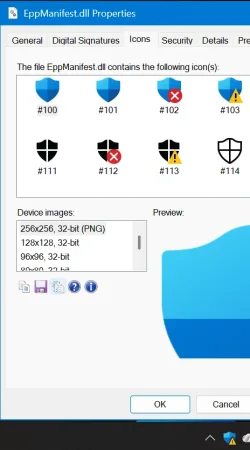
also is it safe to replace eppmanifest.dll
 

My Computers

System One System Two

  • OS
    Windows 1125h2
    Computer type
    Laptop
    Manufacturer/Model
    HP
    CPU
    Intel(R) Pentium(R) Silver N5030 CPU @ 1.10GHz
    Motherboard
    HP 864D PCI express
    Memory
    4GB
    Graphics Card(s)
    Intel (UHD) Graphics 605
    Screen Resolution
    1920x1080
    Hard Drives
    2, A:, C:, D: (Note that A is not a hard disk)
    Cooling
    Hot
    Keyboard
    UK Keyboard layout
    Mouse
    No Mouse, compatble laptop
    Internet Speed
    500Kbps
    Browser
    Chrome
    Antivirus
    Windows Defender, Microsoft Defender
    Other Info
    Main PC
    I have 5 computers
  • Operating System
    Windows 11 24h2
    Computer type
    Laptop
    Manufacturer/Model
    DELL
    CPU
    Intel i5 processer
    Screen Resolution
    Random Screen resolution
    Hard Drives
    1 C:, cuz others are banned
    Cooling
    Fine
    Keyboard
    UK Keyboard layout
    Mouse
    Laptop mouse
    Internet Speed
    0.5Kbps
    Browser
    Edge
    Antivirus
    Windows Defender
    Other Info
    School Teacher PC

What icons are there? I don't know, better try this on a virtual machine first.
 

My Computers

System One System Two

  • OS
    Windows 11 Pro 23H2 (5699), 25H2 (8457)
    Computer type
    Laptop
    Manufacturer/Model
    Acer Extensa 5630EZ
    CPU
    Mobile DualCore Intel Core 2 Duo T7250, 2000 MHz
    Motherboard
    Acer Extensa 5630
    Memory
    4GB
    Graphics Card(s)
    Mobile Intel(R) GMA 4500M (Mobile 4 series)
    Sound Card
    Realtek ALC268 @ Intel 82801IB ICH9 - High Definition Audio Controller
    Monitor(s) Displays
    1
    Screen Resolution
    1280x800
    Hard Drives
    Samsung SSD 850 EVO 250GB SATA Device (250 GB, SATA-III)
    Internet Speed
    VDSL 50 Mbps
    Browser
    MICROSOFT EDGE
    Antivirus
    WINDOWS DEFENDER
    Other Info
    Legacy MBR installation, no TPM, no Secure Boot, no WDDM 2.0 graphics drivers, no SSE4.2, cannot get more unsupported ;) This is only my test laptop. I had installed Windows 11 here before upgrading my main PC. For my main PC I use everyday see my 2nd system specs.
  • Operating System
    Windows 11 Pro v25H2 (build 26200.8457)
    Computer type
    PC/Desktop
    Manufacturer/Model
    Custom-built PC
    CPU
    Intel Core-i7 3770 3.40GHz s1155 (3rd generation)
    Motherboard
    Asus P8H61 s1155 ATX
    Memory
    2x Kingston Hyper-X Blu 8GB DDR3-1600
    Graphics card(s)
    GIGABYTE GeForce RTX 3050 WINDFORCE OC V2 6GB (GV-N3050WF2OCV2-6GD)
    Sound Card
    Realtek HD audio (ALC887)
    Monitor(s) Displays
    Sony Bravia KDL-19L4000 19" LCD TV via VGA
    Screen Resolution
    1440x900 32-bit 60Hz
    Hard Drives
    WD Blue SA510 2.5 1000GB SSD as system disk, Western Digital Caviar Purple 4TB SATA III (WD40PURZ) as second
    PSU
    Thermaltake Litepower RGB 550W Full Wired
    Case
    SUPERCASE MIDI-TOWER
    Cooling
    Deepcool Gamma Archer CPU cooler, 1x 8cm fan at the back
    Keyboard
    Mitsumi 101-key PS/2
    Mouse
    Sunnyline OptiEye PS/2
    Internet Speed
    100Mbps
    Browser
    Microsoft Edge, Mozilla Firefox
    Antivirus
    Microsoft Windows Defender
    Other Info
    Legacy BIOS (MBR) installation, no TPM, no Secure Boot, WDDM 3.0 graphics drivers, WEI score 7.4
What icons are there? I don't know, better try this on a virtual machine first.
1767451835333.webpWindows defender icons
i dont know when i will do this vm thing


i will install windows 11 iso
 

My Computers

System One System Two

  • OS
    Windows 1125h2
    Computer type
    Laptop
    Manufacturer/Model
    HP
    CPU
    Intel(R) Pentium(R) Silver N5030 CPU @ 1.10GHz
    Motherboard
    HP 864D PCI express
    Memory
    4GB
    Graphics Card(s)
    Intel (UHD) Graphics 605
    Screen Resolution
    1920x1080
    Hard Drives
    2, A:, C:, D: (Note that A is not a hard disk)
    Cooling
    Hot
    Keyboard
    UK Keyboard layout
    Mouse
    No Mouse, compatble laptop
    Internet Speed
    500Kbps
    Browser
    Chrome
    Antivirus
    Windows Defender, Microsoft Defender
    Other Info
    Main PC
    I have 5 computers
  • Operating System
    Windows 11 24h2
    Computer type
    Laptop
    Manufacturer/Model
    DELL
    CPU
    Intel i5 processer
    Screen Resolution
    Random Screen resolution
    Hard Drives
    1 C:, cuz others are banned
    Cooling
    Fine
    Keyboard
    UK Keyboard layout
    Mouse
    Laptop mouse
    Internet Speed
    0.5Kbps
    Browser
    Edge
    Antivirus
    Windows Defender
    Other Info
    School Teacher PC

Windows Defender icons are nice, unless you want to replace the blue only icons with blue-green-yellow-red to have all the original Windows logo icons.
 

My Computers

System One System Two

  • OS
    Windows 11 Pro 23H2 (5699), 25H2 (8457)
    Computer type
    Laptop
    Manufacturer/Model
    Acer Extensa 5630EZ
    CPU
    Mobile DualCore Intel Core 2 Duo T7250, 2000 MHz
    Motherboard
    Acer Extensa 5630
    Memory
    4GB
    Graphics Card(s)
    Mobile Intel(R) GMA 4500M (Mobile 4 series)
    Sound Card
    Realtek ALC268 @ Intel 82801IB ICH9 - High Definition Audio Controller
    Monitor(s) Displays
    1
    Screen Resolution
    1280x800
    Hard Drives
    Samsung SSD 850 EVO 250GB SATA Device (250 GB, SATA-III)
    Internet Speed
    VDSL 50 Mbps
    Browser
    MICROSOFT EDGE
    Antivirus
    WINDOWS DEFENDER
    Other Info
    Legacy MBR installation, no TPM, no Secure Boot, no WDDM 2.0 graphics drivers, no SSE4.2, cannot get more unsupported ;) This is only my test laptop. I had installed Windows 11 here before upgrading my main PC. For my main PC I use everyday see my 2nd system specs.
  • Operating System
    Windows 11 Pro v25H2 (build 26200.8457)
    Computer type
    PC/Desktop
    Manufacturer/Model
    Custom-built PC
    CPU
    Intel Core-i7 3770 3.40GHz s1155 (3rd generation)
    Motherboard
    Asus P8H61 s1155 ATX
    Memory
    2x Kingston Hyper-X Blu 8GB DDR3-1600
    Graphics card(s)
    GIGABYTE GeForce RTX 3050 WINDFORCE OC V2 6GB (GV-N3050WF2OCV2-6GD)
    Sound Card
    Realtek HD audio (ALC887)
    Monitor(s) Displays
    Sony Bravia KDL-19L4000 19" LCD TV via VGA
    Screen Resolution
    1440x900 32-bit 60Hz
    Hard Drives
    WD Blue SA510 2.5 1000GB SSD as system disk, Western Digital Caviar Purple 4TB SATA III (WD40PURZ) as second
    PSU
    Thermaltake Litepower RGB 550W Full Wired
    Case
    SUPERCASE MIDI-TOWER
    Cooling
    Deepcool Gamma Archer CPU cooler, 1x 8cm fan at the back
    Keyboard
    Mitsumi 101-key PS/2
    Mouse
    Sunnyline OptiEye PS/2
    Internet Speed
    100Mbps
    Browser
    Microsoft Edge, Mozilla Firefox
    Antivirus
    Microsoft Windows Defender
    Other Info
    Legacy BIOS (MBR) installation, no TPM, no Secure Boot, WDDM 3.0 graphics drivers, WEI score 7.4
Windows Defender icons are nice, unless you want to replace the blue only icons with blue-green-yellow-red to have all the original Windows logo icons.
if you show me your hidden tray icons that would be good anyways i want to change it from this
1767461714302.webpto this 1767461831057.webp
here is all my hidden tray icons
1767461846279.webp
 

My Computers

System One System Two

  • OS
    Windows 1125h2
    Computer type
    Laptop
    Manufacturer/Model
    HP
    CPU
    Intel(R) Pentium(R) Silver N5030 CPU @ 1.10GHz
    Motherboard
    HP 864D PCI express
    Memory
    4GB
    Graphics Card(s)
    Intel (UHD) Graphics 605
    Screen Resolution
    1920x1080
    Hard Drives
    2, A:, C:, D: (Note that A is not a hard disk)
    Cooling
    Hot
    Keyboard
    UK Keyboard layout
    Mouse
    No Mouse, compatble laptop
    Internet Speed
    500Kbps
    Browser
    Chrome
    Antivirus
    Windows Defender, Microsoft Defender
    Other Info
    Main PC
    I have 5 computers
  • Operating System
    Windows 11 24h2
    Computer type
    Laptop
    Manufacturer/Model
    DELL
    CPU
    Intel i5 processer
    Screen Resolution
    Random Screen resolution
    Hard Drives
    1 C:, cuz others are banned
    Cooling
    Fine
    Keyboard
    UK Keyboard layout
    Mouse
    Laptop mouse
    Internet Speed
    0.5Kbps
    Browser
    Edge
    Antivirus
    Windows Defender
    Other Info
    School Teacher PC
since its 2026 it might come out this year
 

My Computers

System One System Two

  • OS
    Windows 1125h2
    Computer type
    Laptop
    Manufacturer/Model
    HP
    CPU
    Intel(R) Pentium(R) Silver N5030 CPU @ 1.10GHz
    Motherboard
    HP 864D PCI express
    Memory
    4GB
    Graphics Card(s)
    Intel (UHD) Graphics 605
    Screen Resolution
    1920x1080
    Hard Drives
    2, A:, C:, D: (Note that A is not a hard disk)
    Cooling
    Hot
    Keyboard
    UK Keyboard layout
    Mouse
    No Mouse, compatble laptop
    Internet Speed
    500Kbps
    Browser
    Chrome
    Antivirus
    Windows Defender, Microsoft Defender
    Other Info
    Main PC
    I have 5 computers
  • Operating System
    Windows 11 24h2
    Computer type
    Laptop
    Manufacturer/Model
    DELL
    CPU
    Intel i5 processer
    Screen Resolution
    Random Screen resolution
    Hard Drives
    1 C:, cuz others are banned
    Cooling
    Fine
    Keyboard
    UK Keyboard layout
    Mouse
    Laptop mouse
    Internet Speed
    0.5Kbps
    Browser
    Edge
    Antivirus
    Windows Defender
    Other Info
    School Teacher PC
Back
Top Bottom