- Local time
- 3:41 AM
- Posts
- 8,797
- OS
- Windows 11 Pro + Win11 Canary VM.
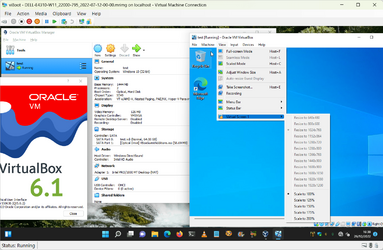
I have just set a W11 VM up in VB7, and it is unactivated - just testing.
It defaults to 1024x768 screen setting, and I cannot change it as unactivated.
When I do same in Hyper-V enhanced mode, I can set the screen resolution to 1920x1080 or 1366x768 as I wish, even though it is not activated.
So, I activated the vm, but still no ability to change setting.
In device manager, I only see

So I suspect it is a driver issue.
Does anybody know how to enable different screen settings?
It defaults to 1024x768 screen setting, and I cannot change it as unactivated.
When I do same in Hyper-V enhanced mode, I can set the screen resolution to 1920x1080 or 1366x768 as I wish, even though it is not activated.
So, I activated the vm, but still no ability to change setting.
In device manager, I only see
So I suspect it is a driver issue.
Does anybody know how to enable different screen settings?
My Computer
At a glance
Windows 11 Pro + Win11 Canary VM.I9 13th gen i9-13900H 2.60 GHZ16 GB solderedIntegrated Intel Iris XE
- OS
- Windows 11 Pro + Win11 Canary VM.
- Computer type
- Laptop
- Manufacturer/Model
- ASUS Zenbook 14
- CPU
- I9 13th gen i9-13900H 2.60 GHZ
- Motherboard
- Yep, Laptop has one.
- Memory
- 16 GB soldered
- Graphics Card(s)
- Integrated Intel Iris XE
- Sound Card
- Realtek built in
- Monitor(s) Displays
- laptop OLED screen
- Screen Resolution
- 2880x1800 touchscreen
- Hard Drives
- 1 TB NVME SSD (only weakness is only one slot)
- PSU
- Internal + 65W thunderbolt USB4 charger
- Case
- Yep, got one
- Cooling
- Stella Artois (UK pint cans - 568 ml) - extra cost.
- Keyboard
- Built in UK keybd
- Mouse
- Bluetooth , wireless dongled, wired
- Internet Speed
- 900 mbs (ethernet), wifi 6 typical 350-450 mb/s both up and down
- Browser
- Edge
- Antivirus
- Defender
- Other Info
- TPM 2.0, 2xUSB4 thunderbolt, 1xUsb3 (usb a), 1xUsb-c, hdmi out, 3.5 mm audio out/in combo, ASUS backlit trackpad (inc. switchable number pad)
Macrium Reflect Home V8
Office 365 Family (6 users each 1TB onedrive space)
Hyper-V (a vm runs almost as fast as my older laptop)


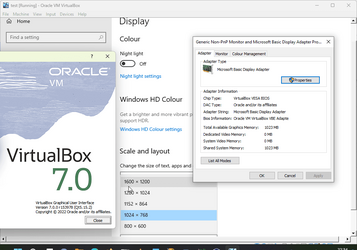
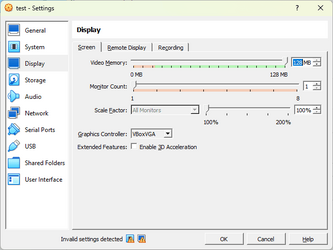
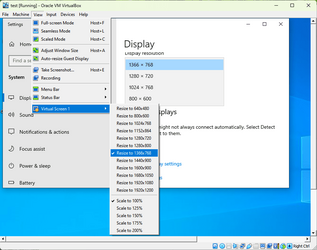
 ). The menu options are the same. I couldn't install Guest Additions though (it gave a BSOD in the VM within a VM) so it's stuck with 1024x768 and the options are all greyed out - it does show that they're there though.