Solved Win 11 file explorer drag and drop files to folder question


john1955

Jack of all trades
Power User
VIP
Local time
5:10 AM
Posts
576
Location
Southern California
OS
Windows 11 (up to date)
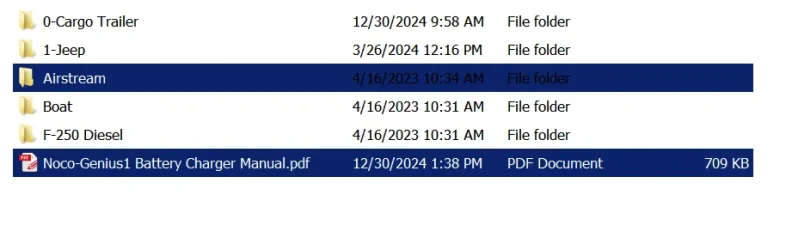
When I drag a file or files to a folder in Win-11 (set to details view) it drags a stupid icon that blocks my view of the folder I want to drop them into. Is there a way to have it NOT have that icon and act like Windows 7 that only highlights the file(s) being moved and where it's being moved to like this . . . I'm writing this from windows 7 so no screen capture from the windows 11 machine

winver 23H2
1737942266234.webp
 

My Computers

System One System Two

  • OS
    Windows 11 (up to date)
    Computer type
    PC/Desktop
    Manufacturer/Model
    Custom
    CPU
    Intel i5 12400
    Motherboard
    Gigabyte Z690 UA
    Memory
    Corsair Vengeance LPX 16GB
    Graphics Card(s)
    On Board the Z690
    Sound Card
    On Board
    Monitor(s) Displays
    43" Samsung tu7000
    Screen Resolution
    2560 x 1440
    Hard Drives
    SAMSUNG SSD 1TB NVMe M.2
    PSU
    Thermaltake smart 500w 80+
    Case
    LIAN LANCOOL_205M
    Cooling
    Bunch of fans . . . :o) (lights dont work)
    Keyboard
    Unicomp: Ultra Classic White Buckling Spring USB
    Mouse
    M510
    Internet Speed
    50mbps on Ethernet
    Browser
    Fire Fox
    Antivirus
    Windows
    Other Info
    Love this computer but I still prefer Win-7 like I love my old Lazy Boy Recliner . . . it just feels better.
  • Operating System
    WIN-7-64BIT and Win-11 pro for testing on unsupported hardware
    Computer type
    PC/Desktop
    Manufacturer/Model
    Home built
    CPU
    i5-3570K CPU @ 3.40GHz, 3801 Mhz, 4 Core(s), 4 Logical Processor(s)
    Motherboard
    GA-Z77-HD3
    Memory
    16 GB - Crucial Ballistick 4GB PC3-14900 DDR3-1333 MHz
    Graphics card(s)
    NVIDIA GeForce GTX 1050
    Sound Card
    On Board
    Monitor(s) Displays
    ASUS VP278
    Screen Resolution
    1920 x 1080
    Hard Drives
    4 - internal Samsung 2.5" SSD, 1 WD HDD 7200 and some external drives
    PSU
    EVGA 550w
    Case
    Old Gygabyte Tower
    Cooling
    Yes
    Keyboard
    Unicomp - UNIOP4A USB (like the old IBM Model H that I started with)
    Mouse
    M510
    Internet Speed
    50mbps
    Browser
    Firefox
    Antivirus
    Windows
    Other Info
    The only thing it lack is USB-3.2 on the front face but it has 3.0 on the back
it drags a stupid icon that blocks my view of the folder

What is a “stupid icon”? Are you referring to the icons of the objects you are dragging?
I highly doubt there is a way to disable that.
 

My Computers

System One System Two

  • OS
    Windows 11 Pro 25H2 Build 26200.8524
    Computer type
    PC/Desktop
    Manufacturer/Model
    Sin-built 2013
    CPU
    Intel(R) Core(TM) i7-4770K CPU @ 3.50GHz
    Motherboard
    ASUS ROG Maximus VI Formula
    Memory
    32.0 GB of I forget and the box is in storage.
    Graphics Card(s)
    Gigabyte nVidia GeForce GTX 1660 Super OC 6GB
    Sound Card
    Onboard thingy
    Monitor(s) Displays
    5 x LG 25MS500-B - 1 x 24MK430H-B - 1 x Wacom Pro 22" Touch Screen Tablet
    Screen Resolution
    All over the place
    Hard Drives
    Too many to list.
    OS on Samsung 1TB 870 QVO SATA
    PSU
    Silverstone 1500
    Case
    NZXT Phantom 820 Full-Tower Case
    Cooling
    Noctua NH-D15 Elite Class Dual Tower CPU Cooler / 6 x EziDIY 120mm / 2 x Corsair 140mm somethings / 1 x 140mm Thermaltake something / 2 x 200mm Corsair.
    Keyboard
    Corsair K95 / Logitech diNovo Edge Wireless
    Mouse
    Logitech: G402 / G502 / Mx Masters / Mx Air Cordless
    Internet Speed
    2000/500Mbps
    Browser
    All sorts
    Antivirus
    Kaspersky Premium
    Other Info
    ㅤㅤㅤㅤㅤㅤㅤㅤㅤㅤㅤㅤㅤㅤㅤㅤㅤㅤㅤㅤㅤㅤㅤㅤㅤㅤㅤㅤㅤㅤㅤㅤㅤㅤㅤㅤㅤㅤㅤㅤ⠀⠀⠀⠀⠀⠀⠀⠀⠀⠀
    TP-Link BE9300 WiFi 7 Bluetooth 5.4 (Archer TBE550E)
    TP-Link TX201 V1 2.5GB Lan

    Grandstream HT812 - VoIP
    ASUS DSL-AX82U - Mesh
    ASUS RT-AC68U - Mesh
    ASUS RT-BE88U Router

    Brother MFC-L2880DW Printer

    I’m on a horse.
  • Operating System
    Windows 11 Pro 25H2 Build 26200.8524
    Computer type
    Laptop
    Manufacturer/Model
    LENOVO Yoga 7 14IRL8 - 7i EVO OLED 14" Touchscreen i5 12 Core 16GB/512GB
    CPU
    Intel Core 12th Gen i5-1240P Processor (1.7 - 4.4GHz)
    Memory
    16GB LPDDR5 RAM
    Graphics card(s)
    Intel Iris Xe Graphics Processor
    Sound Card
    Optimized with Dolby Atmos®
    Screen Resolution
    QHD 2880 x 1800 OLED
    Hard Drives
    M.2 512GB
    Antivirus
    Defender / Malwarebytes
    Other Info
    …still on a horse.
I would guess that a possible alternative would be to add “Copy to / Move to” to your right click context menu.

Or drag the objects further to the left, or only to the very edge of the right of the destination, may enable you to see the folder you are dragging to. However the longer you hover over a folder that contains sub-folders, the more likelihood that the folder you are dragging to will expand to show the sub-folders. When this happens it is possible to drop the objects into the wrong folder if not careful.
 

My Computers

System One System Two

  • OS
    Windows 11 Pro 25H2 Build 26200.8524
    Computer type
    PC/Desktop
    Manufacturer/Model
    Sin-built 2013
    CPU
    Intel(R) Core(TM) i7-4770K CPU @ 3.50GHz
    Motherboard
    ASUS ROG Maximus VI Formula
    Memory
    32.0 GB of I forget and the box is in storage.
    Graphics Card(s)
    Gigabyte nVidia GeForce GTX 1660 Super OC 6GB
    Sound Card
    Onboard thingy
    Monitor(s) Displays
    5 x LG 25MS500-B - 1 x 24MK430H-B - 1 x Wacom Pro 22" Touch Screen Tablet
    Screen Resolution
    All over the place
    Hard Drives
    Too many to list.
    OS on Samsung 1TB 870 QVO SATA
    PSU
    Silverstone 1500
    Case
    NZXT Phantom 820 Full-Tower Case
    Cooling
    Noctua NH-D15 Elite Class Dual Tower CPU Cooler / 6 x EziDIY 120mm / 2 x Corsair 140mm somethings / 1 x 140mm Thermaltake something / 2 x 200mm Corsair.
    Keyboard
    Corsair K95 / Logitech diNovo Edge Wireless
    Mouse
    Logitech: G402 / G502 / Mx Masters / Mx Air Cordless
    Internet Speed
    2000/500Mbps
    Browser
    All sorts
    Antivirus
    Kaspersky Premium
    Other Info
    ㅤㅤㅤㅤㅤㅤㅤㅤㅤㅤㅤㅤㅤㅤㅤㅤㅤㅤㅤㅤㅤㅤㅤㅤㅤㅤㅤㅤㅤㅤㅤㅤㅤㅤㅤㅤㅤㅤㅤㅤ⠀⠀⠀⠀⠀⠀⠀⠀⠀⠀
    TP-Link BE9300 WiFi 7 Bluetooth 5.4 (Archer TBE550E)
    TP-Link TX201 V1 2.5GB Lan

    Grandstream HT812 - VoIP
    ASUS DSL-AX82U - Mesh
    ASUS RT-AC68U - Mesh
    ASUS RT-BE88U Router

    Brother MFC-L2880DW Printer

    I’m on a horse.
  • Operating System
    Windows 11 Pro 25H2 Build 26200.8524
    Computer type
    Laptop
    Manufacturer/Model
    LENOVO Yoga 7 14IRL8 - 7i EVO OLED 14" Touchscreen i5 12 Core 16GB/512GB
    CPU
    Intel Core 12th Gen i5-1240P Processor (1.7 - 4.4GHz)
    Memory
    16GB LPDDR5 RAM
    Graphics card(s)
    Intel Iris Xe Graphics Processor
    Sound Card
    Optimized with Dolby Atmos®
    Screen Resolution
    QHD 2880 x 1800 OLED
    Hard Drives
    M.2 512GB
    Antivirus
    Defender / Malwarebytes
    Other Info
    …still on a horse.
I'm confused. I have no idea what you mean by "it blocks the view of the folder" If you are talking about that pdf, that's a file, not a folder. It's not blocking any folder icon. Its icon is dependent on whatever app you have set to open pdf files. Once it's dropped inside a folder its icon is not seen until you open the folder to view the files inside it.
In Win11 the default drag & drop action is different depending on where you are dragging a file/folder from. You can set it so the drag/drop action is the same across windows no matter the location.. This explains what I mean.
 

My Computers

System One System Two

  • OS
    Windows 11 Pro 25H2
    Computer type
    PC/Desktop
    Manufacturer/Model
    Dell Optiplex 7080
    CPU
    i9-10900 10 core 20 threads
    Motherboard
    DELL 0J37VM
    Memory
    32 gb
    Graphics Card(s)
    none-Intel UHD Graphics 630
    Sound Card
    Integrated Realtek
    Monitor(s) Displays
    Benq 27
    Screen Resolution
    2560x1440
    Hard Drives
    2x1tb Solidigm m.2 nvme /External drives 512gb Samsung m.2 sata+2tb Kingston m2.nvme
    PSU
    500w
    Case
    MT
    Cooling
    Dell Premium
    Keyboard
    Logitech wired
    Mouse
    Logitech wireless
    Internet Speed
    so slow I'm too embarrassed to tell
    Browser
    #1 Edge #2 Firefox
    Antivirus
    Defender+MWB Premium
  • Operating System
    Windows 11 Pro 24H2 26200.8457
    Computer type
    PC/Desktop
    Manufacturer/Model
    Beelink Mini PC SER5
    CPU
    AMD Ryzen 7 6800U
    Memory
    32 gb
    Graphics card(s)
    integrated
    Sound Card
    integrated
    Monitor(s) Displays
    Benq 27
    Screen Resolution
    2560x1440
    Hard Drives
    1TB Crucial nvme
    Keyboard
    Logitech wired
    Mouse
    Logitech wireless
    Internet Speed
    still too embarrassed to tell
    Browser
    Firefox
    Antivirus
    Defender
    Other Info
    System 3 is non compliant Dell 9020 i7-4770/24gb ram Win11 PRO 26200.8457
When I drag a file or files to a folder in Win-11 (set to details view) it drags a stupid icon that blocks my view of the folder I want to drop them into. Is there a way to have it NOT have that icon
I know what you mean. The icon is big and opaque. In Windows 10, it's still big, but it's translucent, so it's much easier to see your target. You can't eliminate the icon, but you can make it translucent with this patch:


My Computer

System One

  • OS
    Windows 10/11
    Computer type
    Laptop
    Manufacturer/Model
    Acer
I know what you mean. The icon is big and opaque. In Windows 10, it's still big, but it's translucent, so it's much easier to see your target. You can't eliminate the icon, but you can make it translucent with this patch:


Is there any perspective to understand that change to a big icon as being a good idea?
 

My Computer

System One

  • OS
    Windows 11
    Computer type
    PC/Desktop
    Manufacturer/Model
    Intel
    CPU
    Intel(R) Core(TM) i9-14900K
    Motherboard
    GIGABYTE Z790 AORUS Elite X WIFI7
    Memory
    Corsair 128GB (4x32GB) DDR5 5600MT/S CL40 Memory Kit
    Graphics Card(s)
    Onboard
    Sound Card
    Onboard
    Monitor(s) Displays
    43 inch 4k
    Screen Resolution
    2k (2560 x 1440)
    Hard Drives
    WD_BLACK 1TB NVMe SSD with Heatsink 7300 mb/s
    PSU
    MEG Ai1300P PCIE 5 & ATX 3.0 PSU 1300 watts
    Case
    Phanteks (PH-ES614PTG_BK) Enthoo Pro ATX , Tempered Glass, Integrated RGB Lighting
    Cooling
    ENERMAX LIQMAXFLO 360mm A-RGB AIO CPU Liquid Cooler
    Keyboard
    Wireless logitech
    Mouse
    Wireless logitech
I would guess that a possible alternative would be to add “Copy to / Move to” to your right click context menu.

Or drag the objects further to the left, or only to the very edge of the right of the destination, may enable you to see the folder you are dragging to. However the longer you hover over a folder that contains sub-folders, the more likelihood that the folder you are dragging to will expand to show the sub-folders. When this happens it is possible to drop the objects into the wrong folder if not careful.
I actually use “Copy to / Move to” in Windows 7 but don't use it when I simply add a sub-folder and then drag and drop multiple files into the new folder so this is a good suggestion. Maybe I can make a habit of using it more often. I use it often moving things from my desktop to their final location so I dont have to have more than one File Explorer window open.

I thought of that other solution later last night which seems dumb that I did not think of earlier that if I select the files and then grip them with the mouse somewhere other than on the filename (someplace to the the right of it) the icon goes with the mouse pointer grip so it does not cover the folder name I'm moving them to. I just dont see the point of there even being an icon. Who thinks of these things? Windows 7 has a tiny icon under the mouse pointer that is just an outline of a rectangle but it did not show up in the screen capture using the print screen key because it does not capture the mouse pointer at all. Cut and paste also works so I guess I was just VENTING about an unwelcome feature

Marking this as solved
 

My Computers

System One System Two

  • OS
    Windows 11 (up to date)
    Computer type
    PC/Desktop
    Manufacturer/Model
    Custom
    CPU
    Intel i5 12400
    Motherboard
    Gigabyte Z690 UA
    Memory
    Corsair Vengeance LPX 16GB
    Graphics Card(s)
    On Board the Z690
    Sound Card
    On Board
    Monitor(s) Displays
    43" Samsung tu7000
    Screen Resolution
    2560 x 1440
    Hard Drives
    SAMSUNG SSD 1TB NVMe M.2
    PSU
    Thermaltake smart 500w 80+
    Case
    LIAN LANCOOL_205M
    Cooling
    Bunch of fans . . . :o) (lights dont work)
    Keyboard
    Unicomp: Ultra Classic White Buckling Spring USB
    Mouse
    M510
    Internet Speed
    50mbps on Ethernet
    Browser
    Fire Fox
    Antivirus
    Windows
    Other Info
    Love this computer but I still prefer Win-7 like I love my old Lazy Boy Recliner . . . it just feels better.
  • Operating System
    WIN-7-64BIT and Win-11 pro for testing on unsupported hardware
    Computer type
    PC/Desktop
    Manufacturer/Model
    Home built
    CPU
    i5-3570K CPU @ 3.40GHz, 3801 Mhz, 4 Core(s), 4 Logical Processor(s)
    Motherboard
    GA-Z77-HD3
    Memory
    16 GB - Crucial Ballistick 4GB PC3-14900 DDR3-1333 MHz
    Graphics card(s)
    NVIDIA GeForce GTX 1050
    Sound Card
    On Board
    Monitor(s) Displays
    ASUS VP278
    Screen Resolution
    1920 x 1080
    Hard Drives
    4 - internal Samsung 2.5" SSD, 1 WD HDD 7200 and some external drives
    PSU
    EVGA 550w
    Case
    Old Gygabyte Tower
    Cooling
    Yes
    Keyboard
    Unicomp - UNIOP4A USB (like the old IBM Model H that I started with)
    Mouse
    M510
    Internet Speed
    50mbps
    Browser
    Firefox
    Antivirus
    Windows
    Other Info
    The only thing it lack is USB-3.2 on the front face but it has 3.0 on the back
Is there any perspective to understand that change to a big icon as being a good idea?

NO! Unless it was an option without having to install a patch. If someone wanted this It should be a checkable option in the explorer Tools/Folder Options
 

My Computers

System One System Two

  • OS
    Windows 11 (up to date)
    Computer type
    PC/Desktop
    Manufacturer/Model
    Custom
    CPU
    Intel i5 12400
    Motherboard
    Gigabyte Z690 UA
    Memory
    Corsair Vengeance LPX 16GB
    Graphics Card(s)
    On Board the Z690
    Sound Card
    On Board
    Monitor(s) Displays
    43" Samsung tu7000
    Screen Resolution
    2560 x 1440
    Hard Drives
    SAMSUNG SSD 1TB NVMe M.2
    PSU
    Thermaltake smart 500w 80+
    Case
    LIAN LANCOOL_205M
    Cooling
    Bunch of fans . . . :o) (lights dont work)
    Keyboard
    Unicomp: Ultra Classic White Buckling Spring USB
    Mouse
    M510
    Internet Speed
    50mbps on Ethernet
    Browser
    Fire Fox
    Antivirus
    Windows
    Other Info
    Love this computer but I still prefer Win-7 like I love my old Lazy Boy Recliner . . . it just feels better.
  • Operating System
    WIN-7-64BIT and Win-11 pro for testing on unsupported hardware
    Computer type
    PC/Desktop
    Manufacturer/Model
    Home built
    CPU
    i5-3570K CPU @ 3.40GHz, 3801 Mhz, 4 Core(s), 4 Logical Processor(s)
    Motherboard
    GA-Z77-HD3
    Memory
    16 GB - Crucial Ballistick 4GB PC3-14900 DDR3-1333 MHz
    Graphics card(s)
    NVIDIA GeForce GTX 1050
    Sound Card
    On Board
    Monitor(s) Displays
    ASUS VP278
    Screen Resolution
    1920 x 1080
    Hard Drives
    4 - internal Samsung 2.5" SSD, 1 WD HDD 7200 and some external drives
    PSU
    EVGA 550w
    Case
    Old Gygabyte Tower
    Cooling
    Yes
    Keyboard
    Unicomp - UNIOP4A USB (like the old IBM Model H that I started with)
    Mouse
    M510
    Internet Speed
    50mbps
    Browser
    Firefox
    Antivirus
    Windows
    Other Info
    The only thing it lack is USB-3.2 on the front face but it has 3.0 on the back

Is there any perspective to understand that change to a big icon as being a good idea?

Are you asking why Microsoft made the drag icon so big?

Are you asking if applying the patch to make the icon translucent is safe?

Something else? Sorry I'm confused.
 

My Computer

System One

  • OS
    Windows 10/11
    Computer type
    Laptop
    Manufacturer/Model
    Acer
NO! Unless it was an option without having to install a patch. If someone wanted this It should be a checkable option in the explorer Tools/Folder Options

If Microsoft made cars they would have square wheels.
 

My Computer

System One

  • OS
    Windows 11
    Computer type
    PC/Desktop
    Manufacturer/Model
    Intel
    CPU
    Intel(R) Core(TM) i9-14900K
    Motherboard
    GIGABYTE Z790 AORUS Elite X WIFI7
    Memory
    Corsair 128GB (4x32GB) DDR5 5600MT/S CL40 Memory Kit
    Graphics Card(s)
    Onboard
    Sound Card
    Onboard
    Monitor(s) Displays
    43 inch 4k
    Screen Resolution
    2k (2560 x 1440)
    Hard Drives
    WD_BLACK 1TB NVMe SSD with Heatsink 7300 mb/s
    PSU
    MEG Ai1300P PCIE 5 & ATX 3.0 PSU 1300 watts
    Case
    Phanteks (PH-ES614PTG_BK) Enthoo Pro ATX , Tempered Glass, Integrated RGB Lighting
    Cooling
    ENERMAX LIQMAXFLO 360mm A-RGB AIO CPU Liquid Cooler
    Keyboard
    Wireless logitech
    Mouse
    Wireless logitech

My Computer

System One

  • OS
    Windows 11
    Computer type
    PC/Desktop
    Manufacturer/Model
    Intel
    CPU
    Intel(R) Core(TM) i9-14900K
    Motherboard
    GIGABYTE Z790 AORUS Elite X WIFI7
    Memory
    Corsair 128GB (4x32GB) DDR5 5600MT/S CL40 Memory Kit
    Graphics Card(s)
    Onboard
    Sound Card
    Onboard
    Monitor(s) Displays
    43 inch 4k
    Screen Resolution
    2k (2560 x 1440)
    Hard Drives
    WD_BLACK 1TB NVMe SSD with Heatsink 7300 mb/s
    PSU
    MEG Ai1300P PCIE 5 & ATX 3.0 PSU 1300 watts
    Case
    Phanteks (PH-ES614PTG_BK) Enthoo Pro ATX , Tempered Glass, Integrated RGB Lighting
    Cooling
    ENERMAX LIQMAXFLO 360mm A-RGB AIO CPU Liquid Cooler
    Keyboard
    Wireless logitech
    Mouse
    Wireless logitech
Yes. I wondering how that could possibly be a good idea.
Ahh, so it was a rhetorical question. 🙂

It's perplexing. It's obvious one needs to see their target when doing a drag. At least in Windows 10, you could see through the icon.
 

My Computer

System One

  • OS
    Windows 10/11
    Computer type
    Laptop
    Manufacturer/Model
    Acer
Ahh, so it was a rhetorical question. 🙂

It's perplexing. It's obvious one needs to see their target when doing a drag. At least in Windows 10, you could see through the icon.

I wonder if maybe it's for touchscreen. It might make more sense on a tablet.
 

My Computer

System One

  • OS
    Windows 11
    Computer type
    PC/Desktop
    Manufacturer/Model
    Intel
    CPU
    Intel(R) Core(TM) i9-14900K
    Motherboard
    GIGABYTE Z790 AORUS Elite X WIFI7
    Memory
    Corsair 128GB (4x32GB) DDR5 5600MT/S CL40 Memory Kit
    Graphics Card(s)
    Onboard
    Sound Card
    Onboard
    Monitor(s) Displays
    43 inch 4k
    Screen Resolution
    2k (2560 x 1440)
    Hard Drives
    WD_BLACK 1TB NVMe SSD with Heatsink 7300 mb/s
    PSU
    MEG Ai1300P PCIE 5 & ATX 3.0 PSU 1300 watts
    Case
    Phanteks (PH-ES614PTG_BK) Enthoo Pro ATX , Tempered Glass, Integrated RGB Lighting
    Cooling
    ENERMAX LIQMAXFLO 360mm A-RGB AIO CPU Liquid Cooler
    Keyboard
    Wireless logitech
    Mouse
    Wireless logitech
I thought of that other solution later last night which seems dumb that I did not think of earlier that if I select the files and then grip them with the mouse somewhere other than on the filename

That sounds like a good plan
 

My Computers

System One System Two

  • OS
    Windows 11 Pro 25H2 Build 26200.8524
    Computer type
    PC/Desktop
    Manufacturer/Model
    Sin-built 2013
    CPU
    Intel(R) Core(TM) i7-4770K CPU @ 3.50GHz
    Motherboard
    ASUS ROG Maximus VI Formula
    Memory
    32.0 GB of I forget and the box is in storage.
    Graphics Card(s)
    Gigabyte nVidia GeForce GTX 1660 Super OC 6GB
    Sound Card
    Onboard thingy
    Monitor(s) Displays
    5 x LG 25MS500-B - 1 x 24MK430H-B - 1 x Wacom Pro 22" Touch Screen Tablet
    Screen Resolution
    All over the place
    Hard Drives
    Too many to list.
    OS on Samsung 1TB 870 QVO SATA
    PSU
    Silverstone 1500
    Case
    NZXT Phantom 820 Full-Tower Case
    Cooling
    Noctua NH-D15 Elite Class Dual Tower CPU Cooler / 6 x EziDIY 120mm / 2 x Corsair 140mm somethings / 1 x 140mm Thermaltake something / 2 x 200mm Corsair.
    Keyboard
    Corsair K95 / Logitech diNovo Edge Wireless
    Mouse
    Logitech: G402 / G502 / Mx Masters / Mx Air Cordless
    Internet Speed
    2000/500Mbps
    Browser
    All sorts
    Antivirus
    Kaspersky Premium
    Other Info
    ㅤㅤㅤㅤㅤㅤㅤㅤㅤㅤㅤㅤㅤㅤㅤㅤㅤㅤㅤㅤㅤㅤㅤㅤㅤㅤㅤㅤㅤㅤㅤㅤㅤㅤㅤㅤㅤㅤㅤㅤ⠀⠀⠀⠀⠀⠀⠀⠀⠀⠀
    TP-Link BE9300 WiFi 7 Bluetooth 5.4 (Archer TBE550E)
    TP-Link TX201 V1 2.5GB Lan

    Grandstream HT812 - VoIP
    ASUS DSL-AX82U - Mesh
    ASUS RT-AC68U - Mesh
    ASUS RT-BE88U Router

    Brother MFC-L2880DW Printer

    I’m on a horse.
  • Operating System
    Windows 11 Pro 25H2 Build 26200.8524
    Computer type
    Laptop
    Manufacturer/Model
    LENOVO Yoga 7 14IRL8 - 7i EVO OLED 14" Touchscreen i5 12 Core 16GB/512GB
    CPU
    Intel Core 12th Gen i5-1240P Processor (1.7 - 4.4GHz)
    Memory
    16GB LPDDR5 RAM
    Graphics card(s)
    Intel Iris Xe Graphics Processor
    Sound Card
    Optimized with Dolby Atmos®
    Screen Resolution
    QHD 2880 x 1800 OLED
    Hard Drives
    M.2 512GB
    Antivirus
    Defender / Malwarebytes
    Other Info
    …still on a horse.
I believe it's a long gone setting, Use visual styles on windows and buttons, that used to be available in Appearance Settings, I think it went out with W7 Aero themes.
 

My Computers

System One System Two

  • OS
    Windows 11 Pro
    Computer type
    PC/Desktop
    Manufacturer/Model
    ASUS ROG Strix
  • Operating System
    Windows 11 Pro
    Computer type
    Laptop
    Manufacturer/Model
    ASUS VivoBook

Latest Support Threads

Back
Top Bottom