WIN 11 PC can't see the Lenovo WIN 11 PC.


GerryPeters

Well-known member
Member
Local time
4:55 PM
Posts
187
OS
WIN 11 PRO
My Win 10 computer can see my wife Lenovo PC and I can share files, but my WIN 11 PC can't see the Lenovo WIN 11 PC. In File Explorer Network my WIN 10 computer is there and so is my WIN 11 PC, but not Lenovo. Not sure how I created a network HD from my WIN 10 PC to the Lenovo, but it works. How can I get a Network drive letter on the Lenovo C drive on my WIN 11 PC?
 

My Computers My Computers

  • At a glance

    WIN 11 PROIntel(R) Core(TM) i5-14400 2.50 Ghz,32 Gigs
    OS
    WIN 11 PRO
    Computer type
    PC/Desktop
    Manufacturer/Model
    Custom built - WIN 11 PRO 64-bit ,
    CPU
    Intel(R) Core(TM) i5-14400 2.50 Ghz,
    Motherboard
    ACER Z790 motherboard
    Memory
    32 Gigs
    Hard Drives
    256 gig M2 SSD boot HD, 3 internal HD's, 2 USB
  • At a glance

    Win 10 PROHaswell CPU 4790k @ 4.4GHz,16 Gigs
    Operating System
    Win 10 PRO
    Computer type
    PC/Desktop
    Manufacturer/Model
    CUSTOM
    CPU
    Haswell CPU 4790k @ 4.4GHz,
    Motherboard
    AsRock Z97 motherboard,
    Memory
    16 Gigs
    Hard Drives
    OS drive 250GB SSD,

the Win 11 Lenovo PC does see the ACER WIN 11 PC and can access the files, But the ACER WIN 11 PC can't see the Lenovo WIN 11 PC
 

My Computers My Computers

  • At a glance

    WIN 11 PROIntel(R) Core(TM) i5-14400 2.50 Ghz,32 Gigs
    OS
    WIN 11 PRO
    Computer type
    PC/Desktop
    Manufacturer/Model
    Custom built - WIN 11 PRO 64-bit ,
    CPU
    Intel(R) Core(TM) i5-14400 2.50 Ghz,
    Motherboard
    ACER Z790 motherboard
    Memory
    32 Gigs
    Hard Drives
    256 gig M2 SSD boot HD, 3 internal HD's, 2 USB
  • At a glance

    Win 10 PROHaswell CPU 4790k @ 4.4GHz,16 Gigs
    Operating System
    Win 10 PRO
    Computer type
    PC/Desktop
    Manufacturer/Model
    CUSTOM
    CPU
    Haswell CPU 4790k @ 4.4GHz,
    Motherboard
    AsRock Z97 motherboard,
    Memory
    16 Gigs
    Hard Drives
    OS drive 250GB SSD,

Every computer in your home network has a unique name. If you don't know what it is you can find it in: Settings > System > About.

If you can't see a computer in the network you can always access it by using a shortcut to it. It is best if you can find and select a computer in File Explorer > Network. However, in case that doesn't work using a shortcut gives you a way that should always work.

For example, I have a computer whose name is DarkMatter. The shortcut to it is \\DarkMatter.

net2.webp
 

My Computers My Computers

  • At a glance

    Windows 11 Pro 25H2 (26200.6901)AMD Ryzen 7 6800H with Radeon 680M GPU (486MB...Crucial DDR5-4800 (2400MHz) 32GB (2 x 16GB)NVIDIA RTX 3060 Laptop (6GB RAM)
    OS
    Windows 11 Pro 25H2 (26200.6901)
    Computer type
    Laptop
    Manufacturer/Model
    ASUS TUF Gaming A15 (2022)
    CPU
    AMD Ryzen 7 6800H with Radeon 680M GPU (486MB RAM)
    Memory
    Crucial DDR5-4800 (2400MHz) 32GB (2 x 16GB)
    Graphics Card(s)
    NVIDIA RTX 3060 Laptop (6GB RAM)
    Sound Card
    n/a
    Monitor(s) Displays
    15.6-inch
    Screen Resolution
    1920x1080 300Hz
    Hard Drives
    2 x Samsung 990 Evo Plus (2TB M.2 NVME SSD)
    PSU
    n/a
    Mouse
    Wireless Mouse M510
    Internet Speed
    2100Mbps/300Mbps
    Browser
    Firefox
    Antivirus
    Malwarebytes
  • At a glance

    Windows 11 Pro 25H2 (26200.8246)AMD Ryzen 7 5700X3DG.SKILL Flare X 32GB (2x16GB) DDR4ASUS ROG-STRIX-RTX3060TI-08G-V2-GAMING (RTX 3...
    Operating System
    Windows 11 Pro 25H2 (26200.8246)
    Computer type
    PC/Desktop
    Manufacturer/Model
    Custom build
    CPU
    AMD Ryzen 7 5700X3D
    Motherboard
    ASUS ROG Strix B550-F Gaming WiFi II
    Memory
    G.SKILL Flare X 32GB (2x16GB) DDR4
    Graphics card(s)
    ASUS ROG-STRIX-RTX3060TI-08G-V2-GAMING (RTX 3060-Ti, 8GB RAM)
    Monitor(s) Displays
    Samsung G50D IPS 27"
    Screen Resolution
    1440p/180Hz
    Hard Drives
    SAMSUNG 990 EVO Plus (2TB] M.2 NVME SSD
    SAMSUNG 990 EVO Plus (4TB) M.2 NVME SSD
    PSU
    Corsair RM750x (750 watts)
    Case
    Cooler Master MasterCase 5
    Cooling
    Scythe Mugen 6
    Keyboard
    Logitech K520 (MK540 keyboard/mouse combo)
    Mouse
    Logitech M310 (MK540 keyboard/mouse combo)
    Internet Speed
    2100 Mbps down / 300 Mbps up
    Browser
    Firefox, Edge, Chrome
    Antivirus
    Malwarebytes (Premium)
    Other Info
    ASUS Blu-ray Burner BW-16D1HT (SATA) || Western Digital Easystore 20TB USB 3.0 external hard drive used with Acronis True Image 2025 backup software || HP OfficeJet Pro 6975 Printer/Scanner
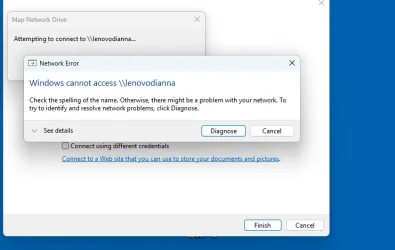
This shortcut method works fine on my WIN 10, I can create a desktop shortcut and it works. But n my Win 11 PC the same method doens't work
 

Attachments

  • lenovo.webp
    lenovo.webp
    20.9 KB · Views: 1

My Computers My Computers

  • At a glance

    WIN 11 PROIntel(R) Core(TM) i5-14400 2.50 Ghz,32 Gigs
    OS
    WIN 11 PRO
    Computer type
    PC/Desktop
    Manufacturer/Model
    Custom built - WIN 11 PRO 64-bit ,
    CPU
    Intel(R) Core(TM) i5-14400 2.50 Ghz,
    Motherboard
    ACER Z790 motherboard
    Memory
    32 Gigs
    Hard Drives
    256 gig M2 SSD boot HD, 3 internal HD's, 2 USB
  • At a glance

    Win 10 PROHaswell CPU 4790k @ 4.4GHz,16 Gigs
    Operating System
    Win 10 PRO
    Computer type
    PC/Desktop
    Manufacturer/Model
    CUSTOM
    CPU
    Haswell CPU 4790k @ 4.4GHz,
    Motherboard
    AsRock Z97 motherboard,
    Memory
    16 Gigs
    Hard Drives
    OS drive 250GB SSD,
On the Lenovo, make sure you’re on a private network and have file and printer sharing on.

Always a good idea to run through Denis’s checklist when networking a new PC.


My Computer My Computer

At a glance

Windows 11 Enterprise 25H2 [rev. 8893]
OS
Windows 11 Enterprise 25H2 [rev. 8893]
And MS should FIX networking so you don't have to use shortcuts to get to your own damn devices!
 

My Computer My Computer

At a glance

Windows 11 Pro 23H2Intel(R) Core(TM) i9-12900HK32gbIntel(R) Iris(R) Xe Graphics
OS
Windows 11 Pro 23H2
Computer type
PC/Desktop
Manufacturer/Model
MinisForum
CPU
Intel(R) Core(TM) i9-12900HK
Memory
32gb
Graphics Card(s)
Intel(R) Iris(R) Xe Graphics
Sound Card
Realtek 888
Monitor(s) Displays
Acer
Screen Resolution
1920x1080
Hard Drives
1TB SSD
Keyboard
Logitech
Mouse
Logitech MX Master 2X
Internet Speed
1GB
Browser
Firefox
Antivirus
Windows Defender
I suspect that Windows 11 has a tighter security policy than Windows 10 did. Unfortunately you have to put more effort into it to get it working. What those steps are I can't tell you because I don't have 2 systems with Windows 10 and 11. Both are Windows 11. I never made a share from the one to the other. I tried it once but to resolve this issue was hard. Instead of continue to get a connection I use a portable USB stick to transfer files. I never had any problems with my 2 NAS's. No wonder the underlying OS are Linux based. 100% secure but not that demanding as Windows 11.

It is easier to make a Windows 11 connection to a Windows 10 machine then the other way around. Windows 10 security policy is less demanding then Windows 11.
 

My Computers My Computers

  • At a glance

    Win 11 Pro 25H2 Build 26200.8894, Zorin OS ProIntel® Core™ i7-12700KF 12th Gen. (S1700)32GB DDR5 5600-36 Vengeance (2x16)PCIe4.0 Asus NVIDIA RTX3060Ti
    OS
    Win 11 Pro 25H2 Build 26200.8894, Zorin OS Pro
    Computer type
    PC/Desktop
    Manufacturer/Model
    Self built
    CPU
    Intel® Core™ i7-12700KF 12th Gen. (S1700)
    Motherboard
    ASUS Prime Z690-A, BIOS v4505 (Z690 Intel Chipset)
    Memory
    32GB DDR5 5600-36 Vengeance (2x16)
    Graphics Card(s)
    PCIe4.0 Asus NVIDIA RTX3060Ti
    Sound Card
    Onboard; Realtek
    Monitor(s) Displays
    34" LG 34UC79G-B Curved 21:9 144Hz
    Screen Resolution
    2560x1080 (No HDR)
    Hard Drives
    250Gb Samsung 870PRO NVMe (Win 11 Pro)
    1Tb Samsung 980PRO NVMe
    1Tb Samsung 970EVO NVMe
    2Tb Samsung 990PRO NVMe with heatsink.
    4Tb WDC WD40EZRZ Blue SATA (Int.)
    4Tb WDC WD40EZRZ Blue SATA (Int.)
    3Tb WDC WD30EFRZ Red SATA (Int.)
    256Gb Samsung 840PRO SSD (RHEL 9,5)
    256Gb Samsung 850PRO SSD (Zorin OS Pro 18)
    PSU
    Coolermaster 850W V2 Gold with internal 12cm exaust fan
    Case
    Be-Quiet Pure Base 600.
    Cooling
    3x Be-Quiet! 12/14cm "Silent Wings 4" casefans, 1x Arctic Freezer i35 CPU towerblock with fan.
    Keyboard
    Steelseries APEX 7 keyboard.
    Mouse
    Logitech G-502 Hero
    Internet Speed
    1Gb
    Browser
    Brave
    Antivirus
    F-Secure
    Other Info
    No Noise system.
    256Gb Kingston Travler USB 3.0 drive.
    64Gb Sandisk USB 3.2 drive. (Ventoy)
    8Gb Philips USB 3.0 drive. (Win. Inst.)
    8Gb Philips USB 3.0 drive. (Rescue disk)
    2Tb WD USB 3.0 Passport drive.
    USB Ext. 500Gb WD SATA drive.
    External USB 3.0 C.A. CD/DVD* burner.
  • At a glance

    Windows 11 Pro 25H2Intel® Core™ i7-6700K 6th Gen. (S1151)32Gb DDR4 2400 Corsair Vengeance (4x8)ASUS GeForce GTX1080
    Operating System
    Windows 11 Pro 25H2
    Computer type
    PC/Desktop
    Manufacturer/Model
    Selfbuild
    CPU
    Intel® Core™ i7-6700K 6th Gen. (S1151)
    Motherboard
    ASUS Maximus VIII Ranger (Intel Chipset Z170)
    Memory
    32Gb DDR4 2400 Corsair Vengeance (4x8)
    Graphics card(s)
    ASUS GeForce GTX1080
    Sound Card
    Onboard; Realtek
    Monitor(s) Displays
    LG IPS277L 27" WideLED, IPS
    Screen Resolution
    1920x1080
    Hard Drives
    Samsung 850 Pro SSD
    PSU
    Zalman ZM600-HP with internal exhaust fan. Heatpipes & Modular cables.
    Case
    Cooler Master Aero
    Cooling
    Scythe Mugen 4 dual fan towerblock.
    Keyboard
    Red Dragon
    Mouse
    Red Dragon
    Internet Speed
    1Gb
    Browser
    Chrome
    Antivirus
    F-Secure
ON my WIN 10 PC it's on Private network 4 and my ASUS WIN 11 PC is on network 2. Both these PC's communicate perfectly in my home network. The Lenovo network is ATT public network, which is my home WIFI connection for the whole home.

Something else is also strange, with File Explorer Network tab on my WIN 10 PC I see both the WIN 10 PC and the ASUS win 11 PC. And on my WIN 11 Asus there is only the WIN 11 Asus under the network tab, yet these 2 PC's work fine in the network

This difference in the network names may be because the WIN 10 and WIN 11 PC are on the wired network, connected to the ATT WIFI modem box, whereas the WIN 11 Lenovo is connected to the network wirelessly to the ATT box
 
Last edited:

My Computers My Computers

  • At a glance

    WIN 11 PROIntel(R) Core(TM) i5-14400 2.50 Ghz,32 Gigs
    OS
    WIN 11 PRO
    Computer type
    PC/Desktop
    Manufacturer/Model
    Custom built - WIN 11 PRO 64-bit ,
    CPU
    Intel(R) Core(TM) i5-14400 2.50 Ghz,
    Motherboard
    ACER Z790 motherboard
    Memory
    32 Gigs
    Hard Drives
    256 gig M2 SSD boot HD, 3 internal HD's, 2 USB
  • At a glance

    Win 10 PROHaswell CPU 4790k @ 4.4GHz,16 Gigs
    Operating System
    Win 10 PRO
    Computer type
    PC/Desktop
    Manufacturer/Model
    CUSTOM
    CPU
    Haswell CPU 4790k @ 4.4GHz,
    Motherboard
    AsRock Z97 motherboard,
    Memory
    16 Gigs
    Hard Drives
    OS drive 250GB SSD,
By default, file and printer sharing is off for public networks. You can turn it on, but don’t. Switch to private.
 

My Computer My Computer

At a glance

Windows 11 Enterprise 25H2 [rev. 8893]
OS
Windows 11 Enterprise 25H2 [rev. 8893]
I did find some settings not correct on the Lenovo for Network Sharing, I fixed them, rebooted. Then i was able to create a shortcut to the Lenovo C drive, it worked. Then I went to File Explorer Network and saw the Lenovo there and double clicked it and opened the C drive and then mapped the C drive. So now it's solved I can access the C drive and include it in my nightly backups. What was strange is now the Lenovo is not shown in the File Explorer Network tab, but at least it's still mapped
 

My Computers My Computers

  • At a glance

    WIN 11 PROIntel(R) Core(TM) i5-14400 2.50 Ghz,32 Gigs
    OS
    WIN 11 PRO
    Computer type
    PC/Desktop
    Manufacturer/Model
    Custom built - WIN 11 PRO 64-bit ,
    CPU
    Intel(R) Core(TM) i5-14400 2.50 Ghz,
    Motherboard
    ACER Z790 motherboard
    Memory
    32 Gigs
    Hard Drives
    256 gig M2 SSD boot HD, 3 internal HD's, 2 USB
  • At a glance

    Win 10 PROHaswell CPU 4790k @ 4.4GHz,16 Gigs
    Operating System
    Win 10 PRO
    Computer type
    PC/Desktop
    Manufacturer/Model
    CUSTOM
    CPU
    Haswell CPU 4790k @ 4.4GHz,
    Motherboard
    AsRock Z97 motherboard,
    Memory
    16 Gigs
    Hard Drives
    OS drive 250GB SSD,
I don't understand why you are mapping the C: drive. If you need to back it up then run the backup on the computer it is on. If the backup drive is on another computer then you can back it up over the network to it.

My three desktop computers have their own external backup drives. The backups are done automatically on a fixed schedule.
My main desktop has two external drives. I also use these drives to backup my main two laptops wirelessly. These backups are also done automatically on a fixed schedule. Note I do daily backups of important user data and weekly backups each drive on the computer.

I have 3 desktop computers (wired) and 3 laptop computers (wireless). I have shared folders on each one. I can access these folders simply by double-clicking on the network shortcut for the computer.

Note on the desktop of each computer I have a folder called My Network. In the folder are network shortcuts to each computer on the network. I only had to create this folder on one computer. After it was done I copied it onto the desktops of all the other computers.

The network computer shortcuts are shown below. The computers are a mix of Windows 7, 10, & 11. BTW, up until a year ago I also had shortcuts to two desktop computers with Windows XP.

2026-07-23 21_09_29-My Network - File Explorer.webp
 

My Computers My Computers

  • At a glance

    Windows 11 Pro 25H2 (26200.6901)AMD Ryzen 7 6800H with Radeon 680M GPU (486MB...Crucial DDR5-4800 (2400MHz) 32GB (2 x 16GB)NVIDIA RTX 3060 Laptop (6GB RAM)
    OS
    Windows 11 Pro 25H2 (26200.6901)
    Computer type
    Laptop
    Manufacturer/Model
    ASUS TUF Gaming A15 (2022)
    CPU
    AMD Ryzen 7 6800H with Radeon 680M GPU (486MB RAM)
    Memory
    Crucial DDR5-4800 (2400MHz) 32GB (2 x 16GB)
    Graphics Card(s)
    NVIDIA RTX 3060 Laptop (6GB RAM)
    Sound Card
    n/a
    Monitor(s) Displays
    15.6-inch
    Screen Resolution
    1920x1080 300Hz
    Hard Drives
    2 x Samsung 990 Evo Plus (2TB M.2 NVME SSD)
    PSU
    n/a
    Mouse
    Wireless Mouse M510
    Internet Speed
    2100Mbps/300Mbps
    Browser
    Firefox
    Antivirus
    Malwarebytes
  • At a glance

    Windows 11 Pro 25H2 (26200.8246)AMD Ryzen 7 5700X3DG.SKILL Flare X 32GB (2x16GB) DDR4ASUS ROG-STRIX-RTX3060TI-08G-V2-GAMING (RTX 3...
    Operating System
    Windows 11 Pro 25H2 (26200.8246)
    Computer type
    PC/Desktop
    Manufacturer/Model
    Custom build
    CPU
    AMD Ryzen 7 5700X3D
    Motherboard
    ASUS ROG Strix B550-F Gaming WiFi II
    Memory
    G.SKILL Flare X 32GB (2x16GB) DDR4
    Graphics card(s)
    ASUS ROG-STRIX-RTX3060TI-08G-V2-GAMING (RTX 3060-Ti, 8GB RAM)
    Monitor(s) Displays
    Samsung G50D IPS 27"
    Screen Resolution
    1440p/180Hz
    Hard Drives
    SAMSUNG 990 EVO Plus (2TB] M.2 NVME SSD
    SAMSUNG 990 EVO Plus (4TB) M.2 NVME SSD
    PSU
    Corsair RM750x (750 watts)
    Case
    Cooler Master MasterCase 5
    Cooling
    Scythe Mugen 6
    Keyboard
    Logitech K520 (MK540 keyboard/mouse combo)
    Mouse
    Logitech M310 (MK540 keyboard/mouse combo)
    Internet Speed
    2100 Mbps down / 300 Mbps up
    Browser
    Firefox, Edge, Chrome
    Antivirus
    Malwarebytes (Premium)
    Other Info
    ASUS Blu-ray Burner BW-16D1HT (SATA) || Western Digital Easystore 20TB USB 3.0 external hard drive used with Acronis True Image 2025 backup software || HP OfficeJet Pro 6975 Printer/Scanner
Like others said switch from Public to Private on all computers. Also make sure File and Printer sharing is enabled with the same settings in all three computers. Unlike Windows 10, Microsoft made it a little more difficult to share resources without password (to everyone, not using a specific user account to connect). You have to do some changes if you want to connect to your Windows 11 computers without password.
 

My Computers My Computers

  • At a glance

    Windows 11 Pro 23H2 (5699), 25H2 (8875)Mobile DualCore Intel Core 2 Duo T7250, 2000 MHz4GBMobile Intel(R) GMA 4500M (Mobile 4 series)
    OS
    Windows 11 Pro 23H2 (5699), 25H2 (8875)
    Computer type
    Laptop
    Manufacturer/Model
    Acer Extensa 5630EZ
    CPU
    Mobile DualCore Intel Core 2 Duo T7250, 2000 MHz
    Motherboard
    Acer Extensa 5630
    Memory
    4GB
    Graphics Card(s)
    Mobile Intel(R) GMA 4500M (Mobile 4 series)
    Sound Card
    Realtek ALC268 @ Intel 82801IB ICH9 - High Definition Audio Controller
    Monitor(s) Displays
    1
    Screen Resolution
    1280x800
    Hard Drives
    Samsung SSD 850 EVO 250GB SATA Device (250 GB, SATA-III)
    Internet Speed
    VDSL 50 Mbps
    Browser
    MICROSOFT EDGE
    Antivirus
    WINDOWS DEFENDER
    Other Info
    Legacy MBR installation, no TPM, no Secure Boot, no WDDM 2.0 graphics drivers, no SSE4.2, cannot get more unsupported ;) This is only my test laptop. I had installed Windows 11 here before upgrading my main PC. For my main PC I use everyday see my 2nd system specs.
  • At a glance

    Windows 11 Pro v25H2 (build 26200.8875)Intel Core-i7 3770 3.40GHz s1155 (3rd generat...2x Kingston Hyper-X Blu 8GB DDR3-1600GIGABYTE GeForce RTX 3050 WINDFORCE OC V2 6GB...
    Operating System
    Windows 11 Pro v25H2 (build 26200.8875)
    Computer type
    PC/Desktop
    Manufacturer/Model
    Custom-built PC
    CPU
    Intel Core-i7 3770 3.40GHz s1155 (3rd generation)
    Motherboard
    Asus P8H61 s1155 ATX
    Memory
    2x Kingston Hyper-X Blu 8GB DDR3-1600
    Graphics card(s)
    GIGABYTE GeForce RTX 3050 WINDFORCE OC V2 6GB (GV-N3050WF2OCV2-6GD)
    Sound Card
    Realtek HD audio (ALC887)
    Monitor(s) Displays
    Sony Bravia KDL-19L4000 19" LCD TV via VGA
    Screen Resolution
    1440x900 32-bit 60Hz
    Hard Drives
    WD Blue SA510 2.5 1000GB SSD as system disk, Western Digital Caviar Purple 4TB SATA III (WD40PURZ) as second
    PSU
    Thermaltake Litepower RGB 550W Full Wired
    Case
    SUPERCASE MIDI-TOWER
    Cooling
    Deepcool Gamma Archer CPU cooler, 1x 8cm fan at the back
    Keyboard
    Mitsumi 101-key PS/2
    Mouse
    Sunnyline OptiEye PS/2
    Internet Speed
    100Mbps
    Browser
    Microsoft Edge, Mozilla Firefox
    Antivirus
    Microsoft Windows Defender
    Other Info
    Legacy BIOS (MBR) installation, no TPM, no Secure Boot, WDDM 3.0 graphics drivers, WEI score 7.4
Every night I backup all 3 computers in the network from my main computer by hitting a shortcut. Then I backup my backup HD to the cloud using Backblaze. In order to do this I needed mapped HD's. I now finally have my 2nd WIN 11 Lenovo PC backed up. So problem solved.

Also I like beng able to access each PC from other PC's and using Remote Desktop
 

My Computers My Computers

  • At a glance

    WIN 11 PROIntel(R) Core(TM) i5-14400 2.50 Ghz,32 Gigs
    OS
    WIN 11 PRO
    Computer type
    PC/Desktop
    Manufacturer/Model
    Custom built - WIN 11 PRO 64-bit ,
    CPU
    Intel(R) Core(TM) i5-14400 2.50 Ghz,
    Motherboard
    ACER Z790 motherboard
    Memory
    32 Gigs
    Hard Drives
    256 gig M2 SSD boot HD, 3 internal HD's, 2 USB
  • At a glance

    Win 10 PROHaswell CPU 4790k @ 4.4GHz,16 Gigs
    Operating System
    Win 10 PRO
    Computer type
    PC/Desktop
    Manufacturer/Model
    CUSTOM
    CPU
    Haswell CPU 4790k @ 4.4GHz,
    Motherboard
    AsRock Z97 motherboard,
    Memory
    16 Gigs
    Hard Drives
    OS drive 250GB SSD,
Remote Desktop is disabled by default. You have to enable it and also configure a specific user account to use for access.
 

My Computers My Computers

  • At a glance

    Windows 11 Pro 23H2 (5699), 25H2 (8875)Mobile DualCore Intel Core 2 Duo T7250, 2000 MHz4GBMobile Intel(R) GMA 4500M (Mobile 4 series)
    OS
    Windows 11 Pro 23H2 (5699), 25H2 (8875)
    Computer type
    Laptop
    Manufacturer/Model
    Acer Extensa 5630EZ
    CPU
    Mobile DualCore Intel Core 2 Duo T7250, 2000 MHz
    Motherboard
    Acer Extensa 5630
    Memory
    4GB
    Graphics Card(s)
    Mobile Intel(R) GMA 4500M (Mobile 4 series)
    Sound Card
    Realtek ALC268 @ Intel 82801IB ICH9 - High Definition Audio Controller
    Monitor(s) Displays
    1
    Screen Resolution
    1280x800
    Hard Drives
    Samsung SSD 850 EVO 250GB SATA Device (250 GB, SATA-III)
    Internet Speed
    VDSL 50 Mbps
    Browser
    MICROSOFT EDGE
    Antivirus
    WINDOWS DEFENDER
    Other Info
    Legacy MBR installation, no TPM, no Secure Boot, no WDDM 2.0 graphics drivers, no SSE4.2, cannot get more unsupported ;) This is only my test laptop. I had installed Windows 11 here before upgrading my main PC. For my main PC I use everyday see my 2nd system specs.
  • At a glance

    Windows 11 Pro v25H2 (build 26200.8875)Intel Core-i7 3770 3.40GHz s1155 (3rd generat...2x Kingston Hyper-X Blu 8GB DDR3-1600GIGABYTE GeForce RTX 3050 WINDFORCE OC V2 6GB...
    Operating System
    Windows 11 Pro v25H2 (build 26200.8875)
    Computer type
    PC/Desktop
    Manufacturer/Model
    Custom-built PC
    CPU
    Intel Core-i7 3770 3.40GHz s1155 (3rd generation)
    Motherboard
    Asus P8H61 s1155 ATX
    Memory
    2x Kingston Hyper-X Blu 8GB DDR3-1600
    Graphics card(s)
    GIGABYTE GeForce RTX 3050 WINDFORCE OC V2 6GB (GV-N3050WF2OCV2-6GD)
    Sound Card
    Realtek HD audio (ALC887)
    Monitor(s) Displays
    Sony Bravia KDL-19L4000 19" LCD TV via VGA
    Screen Resolution
    1440x900 32-bit 60Hz
    Hard Drives
    WD Blue SA510 2.5 1000GB SSD as system disk, Western Digital Caviar Purple 4TB SATA III (WD40PURZ) as second
    PSU
    Thermaltake Litepower RGB 550W Full Wired
    Case
    SUPERCASE MIDI-TOWER
    Cooling
    Deepcool Gamma Archer CPU cooler, 1x 8cm fan at the back
    Keyboard
    Mitsumi 101-key PS/2
    Mouse
    Sunnyline OptiEye PS/2
    Internet Speed
    100Mbps
    Browser
    Microsoft Edge, Mozilla Firefox
    Antivirus
    Microsoft Windows Defender
    Other Info
    Legacy BIOS (MBR) installation, no TPM, no Secure Boot, WDDM 3.0 graphics drivers, WEI score 7.4
I'm pretty sure you have to have win 11 pro which I have for Remote Desktop. It's very handy for my needs
 

My Computers My Computers

  • At a glance

    WIN 11 PROIntel(R) Core(TM) i5-14400 2.50 Ghz,32 Gigs
    OS
    WIN 11 PRO
    Computer type
    PC/Desktop
    Manufacturer/Model
    Custom built - WIN 11 PRO 64-bit ,
    CPU
    Intel(R) Core(TM) i5-14400 2.50 Ghz,
    Motherboard
    ACER Z790 motherboard
    Memory
    32 Gigs
    Hard Drives
    256 gig M2 SSD boot HD, 3 internal HD's, 2 USB
  • At a glance

    Win 10 PROHaswell CPU 4790k @ 4.4GHz,16 Gigs
    Operating System
    Win 10 PRO
    Computer type
    PC/Desktop
    Manufacturer/Model
    CUSTOM
    CPU
    Haswell CPU 4790k @ 4.4GHz,
    Motherboard
    AsRock Z97 motherboard,
    Memory
    16 Gigs
    Hard Drives
    OS drive 250GB SSD,
I'm pretty sure you have to have win 11 pro which I have for Remote Desktop. It's very handy for my needs
Well I have Pro too. I am not sure if Remote Desktop is available in the Home version. But I am sure it is disabled by default for security reasons. You have to enable it first from Settings -> System -> Remote Desktop and then configure which users can remote access the computer. This works locally using the computer network name or IP. If you want remote access from the internet you can use AnyDesk or other similar tool.
 

My Computers My Computers

  • At a glance

    Windows 11 Pro 23H2 (5699), 25H2 (8875)Mobile DualCore Intel Core 2 Duo T7250, 2000 MHz4GBMobile Intel(R) GMA 4500M (Mobile 4 series)
    OS
    Windows 11 Pro 23H2 (5699), 25H2 (8875)
    Computer type
    Laptop
    Manufacturer/Model
    Acer Extensa 5630EZ
    CPU
    Mobile DualCore Intel Core 2 Duo T7250, 2000 MHz
    Motherboard
    Acer Extensa 5630
    Memory
    4GB
    Graphics Card(s)
    Mobile Intel(R) GMA 4500M (Mobile 4 series)
    Sound Card
    Realtek ALC268 @ Intel 82801IB ICH9 - High Definition Audio Controller
    Monitor(s) Displays
    1
    Screen Resolution
    1280x800
    Hard Drives
    Samsung SSD 850 EVO 250GB SATA Device (250 GB, SATA-III)
    Internet Speed
    VDSL 50 Mbps
    Browser
    MICROSOFT EDGE
    Antivirus
    WINDOWS DEFENDER
    Other Info
    Legacy MBR installation, no TPM, no Secure Boot, no WDDM 2.0 graphics drivers, no SSE4.2, cannot get more unsupported ;) This is only my test laptop. I had installed Windows 11 here before upgrading my main PC. For my main PC I use everyday see my 2nd system specs.
  • At a glance

    Windows 11 Pro v25H2 (build 26200.8875)Intel Core-i7 3770 3.40GHz s1155 (3rd generat...2x Kingston Hyper-X Blu 8GB DDR3-1600GIGABYTE GeForce RTX 3050 WINDFORCE OC V2 6GB...
    Operating System
    Windows 11 Pro v25H2 (build 26200.8875)
    Computer type
    PC/Desktop
    Manufacturer/Model
    Custom-built PC
    CPU
    Intel Core-i7 3770 3.40GHz s1155 (3rd generation)
    Motherboard
    Asus P8H61 s1155 ATX
    Memory
    2x Kingston Hyper-X Blu 8GB DDR3-1600
    Graphics card(s)
    GIGABYTE GeForce RTX 3050 WINDFORCE OC V2 6GB (GV-N3050WF2OCV2-6GD)
    Sound Card
    Realtek HD audio (ALC887)
    Monitor(s) Displays
    Sony Bravia KDL-19L4000 19" LCD TV via VGA
    Screen Resolution
    1440x900 32-bit 60Hz
    Hard Drives
    WD Blue SA510 2.5 1000GB SSD as system disk, Western Digital Caviar Purple 4TB SATA III (WD40PURZ) as second
    PSU
    Thermaltake Litepower RGB 550W Full Wired
    Case
    SUPERCASE MIDI-TOWER
    Cooling
    Deepcool Gamma Archer CPU cooler, 1x 8cm fan at the back
    Keyboard
    Mitsumi 101-key PS/2
    Mouse
    Sunnyline OptiEye PS/2
    Internet Speed
    100Mbps
    Browser
    Microsoft Edge, Mozilla Firefox
    Antivirus
    Microsoft Windows Defender
    Other Info
    Legacy BIOS (MBR) installation, no TPM, no Secure Boot, WDDM 3.0 graphics drivers, WEI score 7.4
I use Remote Desktop all the time, so when I got my new WIN 11 PC last year I immediately set it up. I had to buy Pro becuase the home version doesn't have Remote Desktop

I've used AnyViewer to access my WIN 11 Home laptop

I'm a Murphey's Law type guy, so I Backup every night
 

My Computers My Computers

  • At a glance

    WIN 11 PROIntel(R) Core(TM) i5-14400 2.50 Ghz,32 Gigs
    OS
    WIN 11 PRO
    Computer type
    PC/Desktop
    Manufacturer/Model
    Custom built - WIN 11 PRO 64-bit ,
    CPU
    Intel(R) Core(TM) i5-14400 2.50 Ghz,
    Motherboard
    ACER Z790 motherboard
    Memory
    32 Gigs
    Hard Drives
    256 gig M2 SSD boot HD, 3 internal HD's, 2 USB
  • At a glance

    Win 10 PROHaswell CPU 4790k @ 4.4GHz,16 Gigs
    Operating System
    Win 10 PRO
    Computer type
    PC/Desktop
    Manufacturer/Model
    CUSTOM
    CPU
    Haswell CPU 4790k @ 4.4GHz,
    Motherboard
    AsRock Z97 motherboard,
    Memory
    16 Gigs
    Hard Drives
    OS drive 250GB SSD,
Being old school I keep too many files on my Windows partition, so creating a full disk backup takes some time and it is not convenient to do it very frequently. I do it once or twice a month. More frequently I copy my important files to USB flash drives or external hard disks.
 

My Computers My Computers

  • At a glance

    Windows 11 Pro 23H2 (5699), 25H2 (8875)Mobile DualCore Intel Core 2 Duo T7250, 2000 MHz4GBMobile Intel(R) GMA 4500M (Mobile 4 series)
    OS
    Windows 11 Pro 23H2 (5699), 25H2 (8875)
    Computer type
    Laptop
    Manufacturer/Model
    Acer Extensa 5630EZ
    CPU
    Mobile DualCore Intel Core 2 Duo T7250, 2000 MHz
    Motherboard
    Acer Extensa 5630
    Memory
    4GB
    Graphics Card(s)
    Mobile Intel(R) GMA 4500M (Mobile 4 series)
    Sound Card
    Realtek ALC268 @ Intel 82801IB ICH9 - High Definition Audio Controller
    Monitor(s) Displays
    1
    Screen Resolution
    1280x800
    Hard Drives
    Samsung SSD 850 EVO 250GB SATA Device (250 GB, SATA-III)
    Internet Speed
    VDSL 50 Mbps
    Browser
    MICROSOFT EDGE
    Antivirus
    WINDOWS DEFENDER
    Other Info
    Legacy MBR installation, no TPM, no Secure Boot, no WDDM 2.0 graphics drivers, no SSE4.2, cannot get more unsupported ;) This is only my test laptop. I had installed Windows 11 here before upgrading my main PC. For my main PC I use everyday see my 2nd system specs.
  • At a glance

    Windows 11 Pro v25H2 (build 26200.8875)Intel Core-i7 3770 3.40GHz s1155 (3rd generat...2x Kingston Hyper-X Blu 8GB DDR3-1600GIGABYTE GeForce RTX 3050 WINDFORCE OC V2 6GB...
    Operating System
    Windows 11 Pro v25H2 (build 26200.8875)
    Computer type
    PC/Desktop
    Manufacturer/Model
    Custom-built PC
    CPU
    Intel Core-i7 3770 3.40GHz s1155 (3rd generation)
    Motherboard
    Asus P8H61 s1155 ATX
    Memory
    2x Kingston Hyper-X Blu 8GB DDR3-1600
    Graphics card(s)
    GIGABYTE GeForce RTX 3050 WINDFORCE OC V2 6GB (GV-N3050WF2OCV2-6GD)
    Sound Card
    Realtek HD audio (ALC887)
    Monitor(s) Displays
    Sony Bravia KDL-19L4000 19" LCD TV via VGA
    Screen Resolution
    1440x900 32-bit 60Hz
    Hard Drives
    WD Blue SA510 2.5 1000GB SSD as system disk, Western Digital Caviar Purple 4TB SATA III (WD40PURZ) as second
    PSU
    Thermaltake Litepower RGB 550W Full Wired
    Case
    SUPERCASE MIDI-TOWER
    Cooling
    Deepcool Gamma Archer CPU cooler, 1x 8cm fan at the back
    Keyboard
    Mitsumi 101-key PS/2
    Mouse
    Sunnyline OptiEye PS/2
    Internet Speed
    100Mbps
    Browser
    Microsoft Edge, Mozilla Firefox
    Antivirus
    Microsoft Windows Defender
    Other Info
    Legacy BIOS (MBR) installation, no TPM, no Secure Boot, WDDM 3.0 graphics drivers, WEI score 7.4
Back
Top Bottom