Solved Winaero Tweaker feature undo problem


larc919

Well-known member
Member
VIP
Local time
9:29 PM
Posts
579
Location
Raleigh, NC, USA
OS
Windows 11 Pro
My desktop PC running Windows 11 Insider Release Preview has a messed up taskbar. I used Winaero Tweaker 1.40 last year to enable classic taskbar. That feature no longer works correctly since 22H2 was installed. But my installed Winaero Tweaker is now 1.55, which no longer does classic taskbar registry manipulations. Unfortunately, it also no longer reverses what was done when I originally selected the feature. Now, I'm stuck with a taskbar that is eternally black no matter which color I select for it. Also, the setting to center the start button or move it to the left is no longer available in Taskbar Settings > Taskbar behaviors.

Does anybody know where I could download a copy of Winaero Tweaker 1.40 or what registry changes are necessary to back out of classic taskbar? Winaero has an archive that shows announcements for each version going back to the beginning, but links for downloading result only in getting the current version. I'm dreading the thought of having to do a fresh 11 install and hope something short of that will fix the taskbar.
 

My Computer

System One

  • OS
    Windows 11 Pro
    Computer type
    PC/Desktop
    Manufacturer/Model
    Self Build
    CPU
    Intel Core Ultra 265K
    Motherboard
    Gigabyte Z890 AOROS Elite
    Memory
    TeamGroup T-Force Vulcan DDR5 6400MHz 32GB
    Graphics Card(s)
    MSI GeForce RTX 3050
    Sound Card
    GPU NVIDIA High Definition Audio via HDMI to Denon AVR-S670BT Receiver
    Monitor(s) Displays
    LG 32UN650 32" 4k
    Screen Resolution
    3840x2160 @ 60Hz (175% scaling)
    Hard Drives
    Samsung 980 Pro NVMe 1TB x2
    PSU
    Corsair RM850x
    Case
    be quiet! Pure Base 600
    Cooling
    Thermalright Phantom Spirit 120SE & be quiet! Silent Wings Pro x3 case fans
    Keyboard
    Arteck Backlit USB Wired
    Mouse
    Logitech M510
    Internet Speed
    500Mb down/12Mb up
    Browser
    Firefox & Edge
    Antivirus
    Windows Defender & Free MBAM
    Other Info
    Main PC
Have a copy of 1.33 if that helps
 

My Computer

System One

  • OS
    Windows 11 Pro 23H2 22631.2191
    Computer type
    PC/Desktop
    Manufacturer/Model
    Intel NUC11PAHi7
    CPU
    11th Gen Intel Core i7-1165G7 @ 2.80GHz, 2803 MHz
    Motherboard
    NUC11PABi7
    Memory
    32 GB
    Graphics Card(s)
    Intel Iris Xe Graphics
    Sound Card
    Realtek High Definition Audio(SST)
    Monitor(s) Displays
    Dual Samsung 27" curved C27F390 monitors
    Screen Resolution
    2x 1920x1080
    Hard Drives
    Internal: Samsung SSD 860 EVO
    Internal: Crucial CT1000MX500SSD4 - 1TB M.2 2280 SATA III NGFF Solid State SSD
    Case
    NUC
    Keyboard
    Microsoft Bluetooth Keyboard
    Mouse
    Logitech MX Anywhere 3 Bluetooth
    Internet Speed
    AT&T Gigabit Fiber (963 down 786 up)
    Browser
    Edge 115.0.1901.203
    Antivirus
    Windows Defender
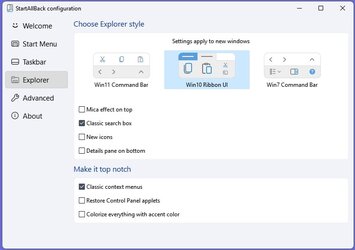
You could try installing StartAllBack and in the 'Explorer' tab you can disable 'Mica Effect on top' and I think this helps regarding colours. It has other features as well. Quite a few people on this forum have installed it, me included. There is also another third party app that people use but I don't know anything about that one. I think it is called 'ExplorerPatcher'.


SAB Explorer tab.jpg
 

My Computers

System One System Two

  • OS
    Windows 11 Pro
    Computer type
    PC/Desktop
    Manufacturer/Model
    GMKtec K11
    CPU
    AMD Ryzen 9 8945HS
    Memory
    32GB DDR5 SO-DIMM
    Graphics Card(s)
    Integrated AMD Radeon 780M (4.00 GHz)
    Monitor(s) Displays
    Benq 2250HM
    Screen Resolution
    1920 x 1080
    Hard Drives
    1 TB PCIe 4.0 NVMe M.2 SSD
  • Operating System
    Windows 11 Home
    Computer type
    Laptop
    Manufacturer/Model
    ASUS Zenbook 14 OLED 14" Laptop - UX3405CA-QL192W
    CPU
    Intel® Core™ Ultra 7 - 255H processor
    Memory
    16 GB LPDDR5 SDRAM
    Graphics card(s)
    Intel Arc 140T onboard graphics
    Screen Resolution
    1920 x 1200 (16:10 WUXGA resolution) OLED Touchscreen
    Hard Drives
    1TB SSD

My Computers

System One System Two

  • OS
    All Branches but Release
    Computer type
    Laptop
    Manufacturer/Model
    Acer Nitro ANV15-51
    CPU
    AMD Ryzen 7 7735HS 3200-4500 Mhz 8 cores x 2
    Motherboard
    Sportage_RBH
    Memory
    32 GB DDR5
    Graphics Card(s)
    Radeon Graphic / NVIDIA GeForce RTX 4060 8 GB GDDR6
    Sound Card
    AMD/Realtek(R) Audio
    Monitor(s) Displays
    Integrated Monitor (15.3"vis)
    Screen Resolution
    FHD 1920X1080 16:9 144Hz
    Hard Drives
    KINGSTON OM8SEP4512Q-AA 1TB
    Western Digital 256GB
    PSU
    19V DC 6.32 A 120 W
    Cooling
    Dual Fans
    Mouse
    MS Bluetooth
    Internet Speed
    Fiber 1GB Cox -us & 1GB Orange-fr
    Browser
    Edge Canary- Firefox Nightly-Chrome Dev-Chrome Dev
    Antivirus
    Windows Defender
  • Operating System
    Windows 11 Beta
    Computer type
    Laptop
    Manufacturer/Model
    Asus X751BP
    CPU
    AMD A9-9420
    Memory
    8 GB of DDR4
    Graphics card(s)
    AMD Radeon R5
    Screen Resolution
    1600x900
    Hard Drives
    Seagate 1 TB
OAT, thank you very much! Winaero Tweaker 1.40 worked perfectly to fix all the problems. Everything is as it should be now. Also, thanks to StanP50 and wiganken for your offer of 1.33 and utility suggestion.
 

My Computer

System One

  • OS
    Windows 11 Pro
    Computer type
    PC/Desktop
    Manufacturer/Model
    Self Build
    CPU
    Intel Core Ultra 265K
    Motherboard
    Gigabyte Z890 AOROS Elite
    Memory
    TeamGroup T-Force Vulcan DDR5 6400MHz 32GB
    Graphics Card(s)
    MSI GeForce RTX 3050
    Sound Card
    GPU NVIDIA High Definition Audio via HDMI to Denon AVR-S670BT Receiver
    Monitor(s) Displays
    LG 32UN650 32" 4k
    Screen Resolution
    3840x2160 @ 60Hz (175% scaling)
    Hard Drives
    Samsung 980 Pro NVMe 1TB x2
    PSU
    Corsair RM850x
    Case
    be quiet! Pure Base 600
    Cooling
    Thermalright Phantom Spirit 120SE & be quiet! Silent Wings Pro x3 case fans
    Keyboard
    Arteck Backlit USB Wired
    Mouse
    Logitech M510
    Internet Speed
    500Mb down/12Mb up
    Browser
    Firefox & Edge
    Antivirus
    Windows Defender & Free MBAM
    Other Info
    Main PC
  • Like
Reactions: OAT
Back
Top Bottom