Solved Winaero Tweaker feature undo problem


larc919

Well-known member
Member
VIP
Local time
6:42 AM
Posts
731
Location
Raleigh, NC, USA
OS
Windows 11 Pro
My desktop PC running Windows 11 Insider Release Preview has a messed up taskbar. I used Winaero Tweaker 1.40 last year to enable classic taskbar. That feature no longer works correctly since 22H2 was installed. But my installed Winaero Tweaker is now 1.55, which no longer does classic taskbar registry manipulations. Unfortunately, it also no longer reverses what was done when I originally selected the feature. Now, I'm stuck with a taskbar that is eternally black no matter which color I select for it. Also, the setting to center the start button or move it to the left is no longer available in Taskbar Settings > Taskbar behaviors.

Does anybody know where I could download a copy of Winaero Tweaker 1.40 or what registry changes are necessary to back out of classic taskbar? Winaero has an archive that shows announcements for each version going back to the beginning, but links for downloading result only in getting the current version. I'm dreading the thought of having to do a fresh 11 install and hope something short of that will fix the taskbar.
 

My Computer My Computer

At a glance

Windows 11 ProIntel Core Ultra 265KTeamGroup T-Force Vulcan DDR5 6400MHz 32GBMSI GeForce RTX 3050
OS
Windows 11 Pro
Computer type
PC/Desktop
Manufacturer/Model
Self Build
CPU
Intel Core Ultra 265K
Motherboard
Gigabyte Z890 AOROS Elite
Memory
TeamGroup T-Force Vulcan DDR5 6400MHz 32GB
Graphics Card(s)
MSI GeForce RTX 3050
Sound Card
GPU NVIDIA High Definition Audio via HDMI to Denon AVR-S670BT Receiver
Monitor(s) Displays
LG 32UN650 32" 4k
Screen Resolution
3840x2160 @ 60Hz (175% scaling)
Hard Drives
Samsung 980 Pro NVMe 1TB x2
PSU
Corsair RM850x
Case
be quiet! Pure Base 600
Cooling
Thermalright Phantom Spirit 120SE & be quiet! Silent Wings Pro x3 case fans
Keyboard
Arteck Backlit USB Wired
Mouse
Logitech M510
Internet Speed
500Mb down/12Mb up
Browser
Firefox & Edge
Antivirus
Windows Defender & Free MBAM
Other Info
Main PC
Have a copy of 1.33 if that helps
 

My Computer My Computer

At a glance

Windows 11 Pro 23H2 22631.219111th Gen Intel Core i7-1165G7 @ 2.80GHz, 2803...32 GBIntel Iris Xe Graphics
OS
Windows 11 Pro 23H2 22631.2191
Computer type
PC/Desktop
Manufacturer/Model
Intel NUC11PAHi7
CPU
11th Gen Intel Core i7-1165G7 @ 2.80GHz, 2803 MHz
Motherboard
NUC11PABi7
Memory
32 GB
Graphics Card(s)
Intel Iris Xe Graphics
Sound Card
Realtek High Definition Audio(SST)
Monitor(s) Displays
Dual Samsung 27" curved C27F390 monitors
Screen Resolution
2x 1920x1080
Hard Drives
Internal: Samsung SSD 860 EVO
Internal: Crucial CT1000MX500SSD4 - 1TB M.2 2280 SATA III NGFF Solid State SSD
Case
NUC
Keyboard
Microsoft Bluetooth Keyboard
Mouse
Logitech MX Anywhere 3 Bluetooth
Internet Speed
AT&T Gigabit Fiber (963 down 786 up)
Browser
Edge 115.0.1901.203
Antivirus
Windows Defender
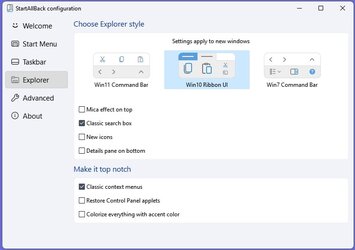
You could try installing StartAllBack and in the 'Explorer' tab you can disable 'Mica Effect on top' and I think this helps regarding colours. It has other features as well. Quite a few people on this forum have installed it, me included. There is also another third party app that people use but I don't know anything about that one. I think it is called 'ExplorerPatcher'.


SAB Explorer tab.jpg
 

My Computers My Computers

  • At a glance

    Windows 11 ProAMD Ryzen 9 8945HS32GB DDR5 SO-DIMMIntegrated AMD Radeon 780M (4.00 GHz)
    OS
    Windows 11 Pro
    Computer type
    PC/Desktop
    Manufacturer/Model
    GMKtec K11
    CPU
    AMD Ryzen 9 8945HS
    Memory
    32GB DDR5 SO-DIMM
    Graphics Card(s)
    Integrated AMD Radeon 780M (4.00 GHz)
    Monitor(s) Displays
    Benq 2250HM
    Screen Resolution
    1920 x 1080
    Hard Drives
    1 TB PCIe 4.0 NVMe M.2 SSD
  • At a glance

    Windows 11 HomeIntel® Core™ Ultra 7 - 255H processor16 GB LPDDR5 SDRAMIntel Arc 140T onboard graphics
    Operating System
    Windows 11 Home
    Computer type
    Laptop
    Manufacturer/Model
    ASUS Zenbook 14 OLED 14" Laptop - UX3405CA-QL192W
    CPU
    Intel® Core™ Ultra 7 - 255H processor
    Memory
    16 GB LPDDR5 SDRAM
    Graphics card(s)
    Intel Arc 140T onboard graphics
    Screen Resolution
    1920 x 1200 (16:10 WUXGA resolution) OLED Touchscreen
    Hard Drives
    1TB SSD

My Computers My Computers

  • At a glance

    All Branches but StableAMD Ryzen 7 7735HS 3200-4500 Mhz 8 cores x 232 GB DDR5Radeon Graphic / NVIDIA GeForce RTX 4060 8 GB...
    OS
    All Branches but Stable
    Computer type
    Laptop
    Manufacturer/Model
    Acer Nitro ANV15-51
    CPU
    AMD Ryzen 7 7735HS 3200-4500 Mhz 8 cores x 2
    Motherboard
    Sportage_RBH
    Memory
    32 GB DDR5
    Graphics Card(s)
    Radeon Graphic / NVIDIA GeForce RTX 4060 8 GB GDDR6
    Sound Card
    AMD/Realtek(R) Audio
    Monitor(s) Displays
    Integrated Monitor (15.3"vis)
    Screen Resolution
    FHD 1920X1080 16:9 144Hz
    Hard Drives
    KINGSTON OM8SEP4512Q-AA 1TB
    Western Digital 256GB
    PSU
    19V DC 6.32 A 120 W
    Cooling
    Dual Fans
    Mouse
    MS Bluetooth
    Internet Speed
    Fiber 1GB Cox -us & 1GB Orange-fr
    Browser
    Edge Canary- Firefox Nightly-Chrome Dev-Chrome Dev
    Antivirus
    Windows Defender
  • At a glance

    Windows 11 BetaAMD A9-94208 GB of DDR4AMD Radeon R5
    Operating System
    Windows 11 Beta
    Computer type
    Laptop
    Manufacturer/Model
    Asus X751BP
    CPU
    AMD A9-9420
    Memory
    8 GB of DDR4
    Graphics card(s)
    AMD Radeon R5
    Screen Resolution
    1600x900
    Hard Drives
    Seagate 1 TB
OAT, thank you very much! Winaero Tweaker 1.40 worked perfectly to fix all the problems. Everything is as it should be now. Also, thanks to StanP50 and wiganken for your offer of 1.33 and utility suggestion.
 

My Computer My Computer

At a glance

Windows 11 ProIntel Core Ultra 265KTeamGroup T-Force Vulcan DDR5 6400MHz 32GBMSI GeForce RTX 3050
OS
Windows 11 Pro
Computer type
PC/Desktop
Manufacturer/Model
Self Build
CPU
Intel Core Ultra 265K
Motherboard
Gigabyte Z890 AOROS Elite
Memory
TeamGroup T-Force Vulcan DDR5 6400MHz 32GB
Graphics Card(s)
MSI GeForce RTX 3050
Sound Card
GPU NVIDIA High Definition Audio via HDMI to Denon AVR-S670BT Receiver
Monitor(s) Displays
LG 32UN650 32" 4k
Screen Resolution
3840x2160 @ 60Hz (175% scaling)
Hard Drives
Samsung 980 Pro NVMe 1TB x2
PSU
Corsair RM850x
Case
be quiet! Pure Base 600
Cooling
Thermalright Phantom Spirit 120SE & be quiet! Silent Wings Pro x3 case fans
Keyboard
Arteck Backlit USB Wired
Mouse
Logitech M510
Internet Speed
500Mb down/12Mb up
Browser
Firefox & Edge
Antivirus
Windows Defender & Free MBAM
Other Info
Main PC
  • Like
Reactions: OAT

Latest Support Threads

Back
Top Bottom