Windows 11 not creating Desktop.ini files, not updating folder preview.


Andacar

Well-known member
Local time
4:47 PM
Posts
18
OS
Windows 11
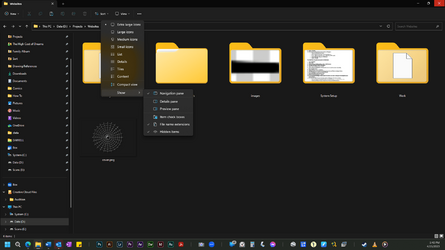
I use a lot of custom folder preview files. For important stuff I create a custom cover .png file for the subject. I used Customizer God to change the folder icon image to show a full image instead of a preview. A few problems:
  • Sometimes when I go to the folder Properties and Choose a new file for the folder picture it will not change. I have the folder optimized for pictures.
  • In some folders Windows will not create a new Desktop.ini file, which is very strange.
  • Sometimes when I try to reset icons I'll find entire subfolders set with the icon of the higher folder, as in the example.
I'd appreciate some advice please. Thanks in advance!
 
Windows Build/Version
Windows 11 Home Build 22621.1555

Attachments

  • example.png
    example.png
    129.3 KB · Views: 7

My Computer My Computer

At a glance

Windows 11Intel i9-10900KF128 GBNvidia GeForce RTX 3080
OS
Windows 11
Computer type
PC/Desktop
Manufacturer/Model
Custom
CPU
Intel i9-10900KF
Motherboard
ASUS ROG Maximus XII Hero WI-FI
Memory
128 GB
Graphics Card(s)
Nvidia GeForce RTX 3080
Sound Card
Onboard
Monitor(s) Displays
HP 24uh (2)
Screen Resolution
1920x1080
Hard Drives
C: 1TB Samsung 980 PRO SSD
2 8 TB Aux drives
PSU
APC 1500
Case
Montek AIR 900
The desktop.ini file is a hidden file used to store information about the arrangement of a Windows folder. Essentially, if the layout or settings for a folder are changed, a desktop.ini file is automatically generated to save those changes.
 

My Computer My Computer

At a glance

Windows 11AMD Ryzen 7 5700GMicron Technology DDR4-3200 16GBNVIDIA GeForce RTX 3060
OS
Windows 11
Computer type
PC/Desktop
Manufacturer/Model
HP Pavilion
CPU
AMD Ryzen 7 5700G
Motherboard
Erica6
Memory
Micron Technology DDR4-3200 16GB
Graphics Card(s)
NVIDIA GeForce RTX 3060
Sound Card
Realtek ALC671
Monitor(s) Displays
Samsung SyncMaster U28E590
Screen Resolution
3840 x 2160
Hard Drives
SAMSUNG MZVLQ1T0HALB-000H1
Thanks, I know that it's supposed to, and yet it doesn't. Here's a folder with Hidden Files shown. I moved things around, changed the folder type, changed the folder image. Still no desktop.ini. Plus in some other folders when there is a desktop.ini files the folder ignores its settings. I haven't seen Windows do this before, and I've used every version since 3.11.
 

Attachments

  • example.png
    example.png
    107.2 KB · Views: 6

My Computer My Computer

At a glance

Windows 11Intel i9-10900KF128 GBNvidia GeForce RTX 3080
OS
Windows 11
Computer type
PC/Desktop
Manufacturer/Model
Custom
CPU
Intel i9-10900KF
Motherboard
ASUS ROG Maximus XII Hero WI-FI
Memory
128 GB
Graphics Card(s)
Nvidia GeForce RTX 3080
Sound Card
Onboard
Monitor(s) Displays
HP 24uh (2)
Screen Resolution
1920x1080
Hard Drives
C: 1TB Samsung 980 PRO SSD
2 8 TB Aux drives
PSU
APC 1500
Case
Montek AIR 900

My Computer My Computer

At a glance

Windows 11AMD Ryzen 7 5700GMicron Technology DDR4-3200 16GBNVIDIA GeForce RTX 3060
OS
Windows 11
Computer type
PC/Desktop
Manufacturer/Model
HP Pavilion
CPU
AMD Ryzen 7 5700G
Motherboard
Erica6
Memory
Micron Technology DDR4-3200 16GB
Graphics Card(s)
NVIDIA GeForce RTX 3060
Sound Card
Realtek ALC671
Monitor(s) Displays
Samsung SyncMaster U28E590
Screen Resolution
3840 x 2160
Hard Drives
SAMSUNG MZVLQ1T0HALB-000H1
I moved things around
Might it be possible that in your moving the file, the original file path has become corrupted?
 

My Computer My Computer

At a glance

Windows 11 Pro (x64) Version 23H2 Used Enable...2.10 gigahertz Intel 12th Gen Core i7-1270015.78 of 16 Gigabytes Usable Installed MemoryIntel(R) UHD Graphics 770 [Display adapter]
OS
Windows 11 Pro (x64) Version 23H2 Used Enablement Package (build 22631.2861)
Computer type
PC/Desktop
Manufacturer/Model
Acer Aspire TC-1760 1.0
CPU
2.10 gigahertz Intel 12th Gen Core i7-12700
Motherboard
Acer Aspire TC-1760 1.0 Bus: 100 megahertz UEFI: American Megatrends Inc. R01-A4 02/21/2022
Memory
15.78 of 16 Gigabytes Usable Installed Memory
Graphics Card(s)
Intel(R) UHD Graphics 770 [Display adapter]
Sound Card
Realtek(R) Audio
Monitor(s) Displays
Acer KA242Y A (24.0"vis, s/n 6243003C23E00, October 2022)
Screen Resolution
1920 x 1080
Hard Drives
c: (NTFS on drive 1) * 510.74 GB SSD
d: (NTFS on drive 0) 1.00 TB 7200rpm SATA HHD
* Operating System is installed on c:
PSU
300w OEM
Case
OEM
Cooling
OEM
Keyboard
OEM
Mouse
Logitech M325 add-on
Internet Speed
Vz Fios; Png 20ms DL 110.82Mbps UL 122.49Mbps | speedtest
Browser
FireFox (64bit) Updated Regulary, now at 125.0.3 (64bit)
Antivirus
Windows Security | Came with Norton Ultra trial but has since been uninstalled
Other Info
Canon MG3200 Printer
Possible, I suppose. But the weird thing is there are other folders that haven't had a desktop.ini file for a long time. Also to FreeBooter, I looked at the instructions you posted (thanks!) and it requires making every folder a system folder, which is a weird requirement.

I've been copying and pasting a desktop.ini file into folders missing it and it helps. It doesn't explain why they're missing in the first place.
 

My Computer My Computer

At a glance

Windows 11Intel i9-10900KF128 GBNvidia GeForce RTX 3080
OS
Windows 11
Computer type
PC/Desktop
Manufacturer/Model
Custom
CPU
Intel i9-10900KF
Motherboard
ASUS ROG Maximus XII Hero WI-FI
Memory
128 GB
Graphics Card(s)
Nvidia GeForce RTX 3080
Sound Card
Onboard
Monitor(s) Displays
HP 24uh (2)
Screen Resolution
1920x1080
Hard Drives
C: 1TB Samsung 980 PRO SSD
2 8 TB Aux drives
PSU
APC 1500
Case
Montek AIR 900
First of all if you did not know Desktop.ini is hidden file.

The desktop.ini is a part of the operating system you can either choose to delete or hide it, but cannot stop it from being generated.

Even if you delete it, the file is generated automatically after the folder settings have been changed to default.
 

My Computer My Computer

At a glance

Windows 11AMD Ryzen 7 5700GMicron Technology DDR4-3200 16GBNVIDIA GeForce RTX 3060
OS
Windows 11
Computer type
PC/Desktop
Manufacturer/Model
HP Pavilion
CPU
AMD Ryzen 7 5700G
Motherboard
Erica6
Memory
Micron Technology DDR4-3200 16GB
Graphics Card(s)
NVIDIA GeForce RTX 3060
Sound Card
Realtek ALC671
Monitor(s) Displays
Samsung SyncMaster U28E590
Screen Resolution
3840 x 2160
Hard Drives
SAMSUNG MZVLQ1T0HALB-000H1
Possible, I suppose. But the weird thing is there are other folders that haven't had a desktop.ini file for a long time.
Those are what I believe are called hard linked, buried somewhere they work better than shortcuts, but when the hard-links get brkn and iirc the os then creates the .ini .
I used to be more involved back in the 3.11 days, I'm rusty as hell now, used to help in the 7F BSOD forum aka organized chaos, it was fun.

I've been copying and pasting a desktop.ini file into folders missing it and it helps. It doesn't explain why they're missing in the first place.
There should be a PS Cmd to do what you want to do, chk if the .ini is missing. If yes then add to file, if no go to next.
3.11 was where I used the Cmd line a lot.

Something like this: Add a newline only if it doesn't exist | Stackoverflow
 

My Computer My Computer

At a glance

Windows 11 Pro (x64) Version 23H2 Used Enable...2.10 gigahertz Intel 12th Gen Core i7-1270015.78 of 16 Gigabytes Usable Installed MemoryIntel(R) UHD Graphics 770 [Display adapter]
OS
Windows 11 Pro (x64) Version 23H2 Used Enablement Package (build 22631.2861)
Computer type
PC/Desktop
Manufacturer/Model
Acer Aspire TC-1760 1.0
CPU
2.10 gigahertz Intel 12th Gen Core i7-12700
Motherboard
Acer Aspire TC-1760 1.0 Bus: 100 megahertz UEFI: American Megatrends Inc. R01-A4 02/21/2022
Memory
15.78 of 16 Gigabytes Usable Installed Memory
Graphics Card(s)
Intel(R) UHD Graphics 770 [Display adapter]
Sound Card
Realtek(R) Audio
Monitor(s) Displays
Acer KA242Y A (24.0"vis, s/n 6243003C23E00, October 2022)
Screen Resolution
1920 x 1080
Hard Drives
c: (NTFS on drive 1) * 510.74 GB SSD
d: (NTFS on drive 0) 1.00 TB 7200rpm SATA HHD
* Operating System is installed on c:
PSU
300w OEM
Case
OEM
Cooling
OEM
Keyboard
OEM
Mouse
Logitech M325 add-on
Internet Speed
Vz Fios; Png 20ms DL 110.82Mbps UL 122.49Mbps | speedtest
Browser
FireFox (64bit) Updated Regulary, now at 125.0.3 (64bit)
Antivirus
Windows Security | Came with Norton Ultra trial but has since been uninstalled
Other Info
Canon MG3200 Printer
Desktop.ini is a file that has a System, Hidden attribute.

To show them, enable "Show protected operating system files" on the File Explorer Folder options.
 

My Computers My Computers

  • At a glance

    Windows 11 HomeCore i5-12450HX20GB DDR5-4800iGPU + RTX 3050 Mobile (6GB)
    OS
    Windows 11 Home
    Computer type
    Laptop
    Manufacturer/Model
    Lenovo
    CPU
    Core i5-12450HX
    Memory
    20GB DDR5-4800
    Graphics Card(s)
    iGPU + RTX 3050 Mobile (6GB)
    Sound Card
    Realtek
    Monitor(s) Displays
    the built-in laptop screen, and a generic monitor
    Screen Resolution
    1080p * 2
    Hard Drives
    GIGABYTE NVMe SSD 256GB (GP-GSM2NE3256GNTD)
    Micron NVMe SSD 512GB (MTFDKCD512QFM-1BDIAABLA)
    Browser
    Firefox
    Antivirus
    WD
  • At a glance

    Windows 10 ProCore i3-21004GB DDR3-2133iGPU
    Operating System
    Windows 10 Pro
    Computer type
    PC/Desktop
    Manufacturer/Model
    Dell
    CPU
    Core i3-2100
    Memory
    4GB DDR3-2133
    Graphics card(s)
    iGPU
    Screen Resolution
    1080p
    Antivirus
    WD
Desktop.ini is a file that has a System, Hidden attribute.

To show them, enable "Show protected operating system files" on the File Explorer Folder options.
That is no longer an option.

What happened recently?

I all of a sudden see those ini files even tho I have the "Hide protected operating system files (recommended)" option turned on (box checked, therefore the files invisible). But I do have the other option in options that allows less crucial hidden files to be visible turned on ("show hidden files, folders and drives"). in the past this wasn't enough to make desktop.ini files visible. One reallyt had to uncheck or disable the "Hide protected..." option. Otherwise even with the "show hidden files" option turned on, desktop.ini files remained hidden. That's how it was for 20+ years (I have used Microsoft Windows since it was invented. Those desktop.ini files are very old and have always been totally hidden until this year. It seems like Microsoft has now decided to "downgrade" them from potected system + hidden status to merely "hidden" status very recently. It happens this new year in February or something. So now I see those damn ini files everywhere despite me continuing to have the "protected system" files still in invisible mode.
 

My Computer My Computer

At a glance

Windows 11 Home (23H2)Ryzen 516 mb
OS
Windows 11 Home (23H2)
Computer type
Laptop
Manufacturer/Model
HP Laptop 15s
CPU
Ryzen 5
Memory
16 mb
Hard Drives
1 tb

Latest Support Threads

Back
Top Bottom