Please run administrative PS:
Code:
Get-AppxPackage -AllUsers | Foreach {
    Add-AppxPackage -DisableDevelopmentMode -Register "$($_.InstallLocation)\AppXManifest.xml"
}
Windows PowerShell
Copyright (C) Microsoft Corporation. All rights reserved.
Install the latest PowerShell for new features and improvements!
Windows PowerShell update message FAQ - PowerShell PS C:\WINDOWS\system32> Get-AppxPackage -AllUsers | Foreach { >> Add-AppxPackage -DisableDevelopmentMode -Register "$($_.InstallLocation)\AppXManifest.xml" >> } Add-AppxPackage : Cannot find path 'C:\AppXManifest.xml' because it does not exist. At line:2 char:5 + Add-AppxPackage -DisableDevelopmentMode -Register "$($_.InstallLo ... + ~~~~~~~~~~~~~~~~~~~~~~~~~~~~~~~~~~~~~~~~~~~~~~~~~~~~~~~~~~~~~~~~~ + CategoryInfo : ObjectNotFound: (C:\AppXManifest.xml:String) [Add-AppxPackage], ItemNotFoundException + FullyQualifiedErrorId : PathNotFound,Microsoft.Windows.Appx.PackageManager.Commands.AddAppxPackageCommand Add-AppxPackage : Cannot find path 'C:\AppXManifest.xml' because it does not exist. At line:2 char:5 + Add-AppxPackage -DisableDevelopmentMode -Register "$($_.InstallLo ... + ~~~~~~~~~~~~~~~~~~~~~~~~~~~~~~~~~~~~~~~~~~~~~~~~~~~~~~~~~~~~~~~~~ + CategoryInfo : ObjectNotFound: (C:\AppXManifest.xml:String) [Add-AppxPackage], ItemNotFoundException + FullyQualifiedErrorId : PathNotFound,Microsoft.Windows.Appx.PackageManager.Commands.AddAppxPackageCommand Add-AppxPackage : Cannot find path 'C:\AppXManifest.xml' because it does not exist. At line:2 char:5 + Add-AppxPackage -DisableDevelopmentMode -Register "$($_.InstallLo ... + ~~~~~~~~~~~~~~~~~~~~~~~~~~~~~~~~~~~~~~~~~~~~~~~~~~~~~~~~~~~~~~~~~ + CategoryInfo : ObjectNotFound: (C:\AppXManifest.xml:String) [Add-AppxPackage], ItemNotFoundException + FullyQualifiedErrorId : PathNotFound,Microsoft.Windows.Appx.PackageManager.Commands.AddAppxPackageCommand Add-AppxPackage : Cannot find path 'C:\AppXManifest.xml' because it does not exist. At line:2 char:5 + Add-AppxPackage -DisableDevelopmentMode -Register "$($_.InstallLo ... + ~~~~~~~~~~~~~~~~~~~~~~~~~~~~~~~~~~~~~~~~~~~~~~~~~~~~~~~~~~~~~~~~~ + CategoryInfo : ObjectNotFound: (C:\AppXManifest.xml:String) [Add-AppxPackage], ItemNotFoundException + FullyQualifiedErrorId : PathNotFound,Microsoft.Windows.Appx.PackageManager.Commands.AddAppxPackageCommand Add-AppxPackage : Cannot find path 'C:\AppXManifest.xml' because it does not exist. At line:2 char:5 + Add-AppxPackage -DisableDevelopmentMode -Register "$($_.InstallLo ... + ~~~~~~~~~~~~~~~~~~~~~~~~~~~~~~~~~~~~~~~~~~~~~~~~~~~~~~~~~~~~~~~~~ + CategoryInfo : ObjectNotFound: (C:\AppXManifest.xml:String) [Add-AppxPackage], ItemNotFoundException + FullyQualifiedErrorId : PathNotFound,Microsoft.Windows.Appx.PackageManager.Commands.AddAppxPackageCommand Add-AppxPackage : Cannot find path 'C:\AppXManifest.xml' because it does not exist. At line:2 char:5 + Add-AppxPackage -DisableDevelopmentMode -Register "$($_.InstallLo ... + ~~~~~~~~~~~~~~~~~~~~~~~~~~~~~~~~~~~~~~~~~~~~~~~~~~~~~~~~~~~~~~~~~ + CategoryInfo : ObjectNotFound: (C:\AppXManifest.xml:String) [Add-AppxPackage], ItemNotFoundException + FullyQualifiedErrorId : PathNotFound,Microsoft.Windows.Appx.PackageManager.Commands.AddAppxPackageCommand Add-AppxPackage : Cannot find path 'C:\AppXManifest.xml' because it does not exist. At line:2 char:5 + Add-AppxPackage -DisableDevelopmentMode -Register "$($_.InstallLo ... + ~~~~~~~~~~~~~~~~~~~~~~~~~~~~~~~~~~~~~~~~~~~~~~~~~~~~~~~~~~~~~~~~~ + CategoryInfo : ObjectNotFound: (C:\AppXManifest.xml:String) [Add-AppxPackage], ItemNotFoundException + FullyQualifiedErrorId : PathNotFound,Microsoft.Windows.Appx.PackageManager.Commands.AddAppxPackageCommand Add-AppxPackage : Deployment failed with HRESULT: 0x80073D06, The package could not be installed because a higher version of this package is already installed. Windows cannot install package Microsoft.Advertising.Xaml_10.1808.3.0_x64__8wekyb3d8bbwe because it has version 10.1808.3.0. A higher version 10.1811.1.0 of this package is already installed. NOTE: For additional information, look for [ActivityId] db3360f9-e53b-0009-ef06-34db3be5dc01 in the Event Log or use the command line Get-AppPackageLog -ActivityID db3360f9-e53b-0009-ef06-34db3be5dc01 At line:2 char:5 + Add-AppxPackage -DisableDevelopmentMode -Register "$($_.InstallLo ... + ~~~~~~~~~~~~~~~~~~~~~~~~~~~~~~~~~~~~~~~~~~~~~~~~~~~~~~~~~~~~~~~~~ + CategoryInfo : NotSpecified: (C:\Program File...ppXManifest.xml:String) [Add-AppxPackage], Exception + FullyQualifiedErrorId : DeploymentError,Microsoft.Windows.Appx.PackageManager.Commands.AddAppxPackageCommand Add-AppxPackage : Cannot find path 'C:\AppXManifest.xml' because it does not exist. At line:2 char:5 + Add-AppxPackage -DisableDevelopmentMode -Register "$($_.InstallLo ... + ~~~~~~~~~~~~~~~~~~~~~~~~~~~~~~~~~~~~~~~~~~~~~~~~~~~~~~~~~~~~~~~~~ + CategoryInfo : ObjectNotFound: (C:\AppXManifest.xml:String) [Add-AppxPackage], ItemNotFoundException + FullyQualifiedErrorId : PathNotFound,Microsoft.Windows.Appx.PackageManager.Commands.AddAppxPackageCommand Add-AppxPackage : Cannot find path 'C:\AppXManifest.xml' because it does not exist. At line:2 char:5 + Add-AppxPackage -DisableDevelopmentMode -Register "$($_.InstallLo ... + ~~~~~~~~~~~~~~~~~~~~~~~~~~~~~~~~~~~~~~~~~~~~~~~~~~~~~~~~~~~~~~~~~ + CategoryInfo : ObjectNotFound: (C:\AppXManifest.xml:String) [Add-AppxPackage], ItemNotFoundException + FullyQualifiedErrorId : PathNotFound,Microsoft.Windows.Appx.PackageManager.Commands.AddAppxPackageCommand Add-AppxPackage : Cannot find path 'C:\AppXManifest.xml' because it does not exist. At line:2 char:5 + Add-AppxPackage -DisableDevelopmentMode -Register "$($_.InstallLo ... + ~~~~~~~~~~~~~~~~~~~~~~~~~~~~~~~~~~~~~~~~~~~~~~~~~~~~~~~~~~~~~~~~~ + CategoryInfo : ObjectNotFound: (C:\AppXManifest.xml:String) [Add-AppxPackage], ItemNotFoundException + FullyQualifiedErrorId : PathNotFound,Microsoft.Windows.Appx.PackageManager.Commands.AddAppxPackageCommand Add-AppxPackage : Cannot find path 'C:\AppXManifest.xml' because it does not exist. At line:2 char:5 + Add-AppxPackage -DisableDevelopmentMode -Register "$($_.InstallLo ... + ~~~~~~~~~~~~~~~~~~~~~~~~~~~~~~~~~~~~~~~~~~~~~~~~~~~~~~~~~~~~~~~~~ + CategoryInfo : ObjectNotFound: (C:\AppXManifest.xml:String) [Add-AppxPackage], ItemNotFoundException + FullyQualifiedErrorId : PathNotFound,Microsoft.Windows.Appx.PackageManager.Commands.AddAppxPackageCommand Add-AppxPackage : Cannot find path 'C:\AppXManifest.xml' because it does not exist. At line:2 char:5 + Add-AppxPackage -DisableDevelopmentMode -Register "$($_.InstallLo ... + ~~~~~~~~~~~~~~~~~~~~~~~~~~~~~~~~~~~~~~~~~~~~~~~~~~~~~~~~~~~~~~~~~ + CategoryInfo : ObjectNotFound: (C:\AppXManifest.xml:String) [Add-AppxPackage], ItemNotFoundException + FullyQualifiedErrorId : PathNotFound,Microsoft.Windows.Appx.PackageManager.Commands.AddAppxPackageCommand Add-AppxPackage : Cannot find path 'C:\AppXManifest.xml' because it does not exist. At line:2 char:5 + Add-AppxPackage -DisableDevelopmentMode -Register "$($_.InstallLo ... + ~~~~~~~~~~~~~~~~~~~~~~~~~~~~~~~~~~~~~~~~~~~~~~~~~~~~~~~~~~~~~~~~~ + CategoryInfo : ObjectNotFound: (C:\AppXManifest.xml:String) [Add-AppxPackage], ItemNotFoundException + FullyQualifiedErrorId : PathNotFound,Microsoft.Windows.Appx.PackageManager.Commands.AddAppxPackageCommand Add-AppxPackage : Cannot find path 'C:\AppXManifest.xml' because it does not exist. At line:2 char:5 + Add-AppxPackage -DisableDevelopmentMode -Register "$($_.InstallLo ... + ~~~~~~~~~~~~~~~~~~~~~~~~~~~~~~~~~~~~~~~~~~~~~~~~~~~~~~~~~~~~~~~~~ + CategoryInfo : ObjectNotFound: (C:\AppXManifest.xml:String) [Add-AppxPackage], ItemNotFoundException + FullyQualifiedErrorId : PathNotFound,Microsoft.Windows.Appx.PackageManager.Commands.AddAppxPackageCommand Add-AppxPackage : Cannot find path 'C:\AppXManifest.xml' because it does not exist. At line:2 char:5 + Add-AppxPackage -DisableDevelopmentMode -Register "$($_.InstallLo ... + ~~~~~~~~~~~~~~~~~~~~~~~~~~~~~~~~~~~~~~~~~~~~~~~~~~~~~~~~~~~~~~~~~ + CategoryInfo : ObjectNotFound: (C:\AppXManifest.xml:String) [Add-AppxPackage], ItemNotFoundException + FullyQualifiedErrorId : PathNotFound,Microsoft.Windows.Appx.PackageManager.Commands.AddAppxPackageCommand Add-AppxPackage : Cannot find path 'C:\AppXManifest.xml' because it does not exist. At line:2 char:5 + Add-AppxPackage -DisableDevelopmentMode -Register "$($_.InstallLo ... + ~~~~~~~~~~~~~~~~~~~~~~~~~~~~~~~~~~~~~~~~~~~~~~~~~~~~~~~~~~~~~~~~~ + CategoryInfo : ObjectNotFound: (C:\AppXManifest.xml:String) [Add-AppxPackage], ItemNotFoundException + FullyQualifiedErrorId : PathNotFound,Microsoft.Windows.Appx.PackageManager.Commands.AddAppxPackageCommand Add-AppxPackage : Cannot find path 'C:\AppXManifest.xml' because it does not exist. At line:2 char:5 + Add-AppxPackage -DisableDevelopmentMode -Register "$($_.InstallLo ... + ~~~~~~~~~~~~~~~~~~~~~~~~~~~~~~~~~~~~~~~~~~~~~~~~~~~~~~~~~~~~~~~~~ + CategoryInfo : ObjectNotFound: (C:\AppXManifest.xml:String) [Add-AppxPackage], ItemNotFoundException + FullyQualifiedErrorId : PathNotFound,Microsoft.Windows.Appx.PackageManager.Commands.AddAppxPackageCommand Add-AppxPackage : Cannot find path 'C:\AppXManifest.xml' because it does not exist. At line:2 char:5 + Add-AppxPackage -DisableDevelopmentMode -Register "$($_.InstallLo ... + ~~~~~~~~~~~~~~~~~~~~~~~~~~~~~~~~~~~~~~~~~~~~~~~~~~~~~~~~~~~~~~~~~ + CategoryInfo : ObjectNotFound: (C:\AppXManifest.xml:String) [Add-AppxPackage], ItemNotFoundException + FullyQualifiedErrorId : PathNotFound,Microsoft.Windows.Appx.PackageManager.Commands.AddAppxPackageCommand Add-AppxPackage : Deployment failed with HRESULT: 0x80073D06, The package could not be installed because a higher version of this package is already installed. Windows cannot install package Microsoft.NET.Native.Framework.1.7_1.7.25531.0_x64__8wekyb3d8bbwe because it has version 1.7.25531.0. A higher version 1.7.27413.0 of this package is already installed. NOTE: For additional information, look for [ActivityId] db3360f9-e53b-0009-ea0a-34db3be5dc01 in the Event Log or use the command line Get-AppPackageLog -ActivityID db3360f9-e53b-0009-ea0a-34db3be5dc01 At line:2 char:5 + Add-AppxPackage -DisableDevelopmentMode -Register "$($_.InstallLo ... + ~~~~~~~~~~~~~~~~~~~~~~~~~~~~~~~~~~~~~~~~~~~~~~~~~~~~~~~~~~~~~~~~~ + CategoryInfo : NotSpecified: (C:\Program File...ppXManifest.xml:String) [Add-AppxPackage], Exception + FullyQualifiedErrorId : DeploymentError,Microsoft.Windows.Appx.PackageManager.Commands.AddAppxPackageCommand Add-AppxPackage : Cannot find path 'C:\AppXManifest.xml' because it does not exist. At line:2 char:5 + Add-AppxPackage -DisableDevelopmentMode -Register "$($_.InstallLo ... + ~~~~~~~~~~~~~~~~~~~~~~~~~~~~~~~~~~~~~~~~~~~~~~~~~~~~~~~~~~~~~~~~~ + CategoryInfo : ObjectNotFound: (C:\AppXManifest.xml:String) [Add-AppxPackage], ItemNotFoundException + FullyQualifiedErrorId : PathNotFound,Microsoft.Windows.Appx.PackageManager.Commands.AddAppxPackageCommand Add-AppxPackage : Cannot find path 'C:\AppXManifest.xml' because it does not exist. At line:2 char:5 + Add-AppxPackage -DisableDevelopmentMode -Register "$($_.InstallLo ... + ~~~~~~~~~~~~~~~~~~~~~~~~~~~~~~~~~~~~~~~~~~~~~~~~~~~~~~~~~~~~~~~~~ + CategoryInfo : ObjectNotFound: (C:\AppXManifest.xml:String) [Add-AppxPackage], ItemNotFoundException + FullyQualifiedErrorId : PathNotFound,Microsoft.Windows.Appx.PackageManager.Commands.AddAppxPackageCommand Add-AppxPackage : Cannot find path 'C:\AppXManifest.xml' because it does not exist. At line:2 char:5 + Add-AppxPackage -DisableDevelopmentMode -Register "$($_.InstallLo ... + ~~~~~~~~~~~~~~~~~~~~~~~~~~~~~~~~~~~~~~~~~~~~~~~~~~~~~~~~~~~~~~~~~ + CategoryInfo : ObjectNotFound: (C:\AppXManifest.xml:String) [Add-AppxPackage], ItemNotFoundException + FullyQualifiedErrorId : PathNotFound,Microsoft.Windows.Appx.PackageManager.Commands.AddAppxPackageCommand Add-AppxPackage : Cannot find path 'C:\AppXManifest.xml' because it does not exist. At line:2 char:5 + Add-AppxPackage -DisableDevelopmentMode -Register "$($_.InstallLo ... + ~~~~~~~~~~~~~~~~~~~~~~~~~~~~~~~~~~~~~~~~~~~~~~~~~~~~~~~~~~~~~~~~~ + CategoryInfo : ObjectNotFound: (C:\AppXManifest.xml:String) [Add-AppxPackage], ItemNotFoundException + FullyQualifiedErrorId : PathNotFound,Microsoft.Windows.Appx.PackageManager.Commands.AddAppxPackageCommand Add-AppxPackage : Deployment failed with HRESULT: 0x80073CFD, A Prerequisite for an install could not be satisfied. Package Microsoft.Wallet_2.4.18324.0_x64__8wekyb3d8bbwe is end of life and can no longer be installed. NOTE: For additional information, look for [ActivityId] db3360f9-e53b-0009-2b0b-34db3be5dc01 in the Event Log or use the command line Get-AppPackageLog -ActivityID db3360f9-e53b-0009-2b0b-34db3be5dc01 At line:2 char:5 + Add-AppxPackage -DisableDevelopmentMode -Register "$($_.InstallLo ... + ~~~~~~~~~~~~~~~~~~~~~~~~~~~~~~~~~~~~~~~~~~~~~~~~~~~~~~~~~~~~~~~~~ + CategoryInfo : NotSpecified: (C:\Program File...ppXManifest.xml:String) [Add-AppxPackage], Exception + FullyQualifiedErrorId : DeploymentError,Microsoft.Windows.Appx.PackageManager.Commands.AddAppxPackageCommand Add-AppxPackage : Cannot find path 'C:\AppXManifest.xml' because it does not exist. At line:2 char:5 + Add-AppxPackage -DisableDevelopmentMode -Register "$($_.InstallLo ... + ~~~~~~~~~~~~~~~~~~~~~~~~~~~~~~~~~~~~~~~~~~~~~~~~~~~~~~~~~~~~~~~~~ + CategoryInfo : ObjectNotFound: (C:\AppXManifest.xml:String) [Add-AppxPackage], ItemNotFoundException + FullyQualifiedErrorId : PathNotFound,Microsoft.Windows.Appx.PackageManager.Commands.AddAppxPackageCommand Add-AppxPackage : Cannot find path 'C:\AppXManifest.xml' because it does not exist. At line:2 char:5 + Add-AppxPackage -DisableDevelopmentMode -Register "$($_.InstallLo ... + ~~~~~~~~~~~~~~~~~~~~~~~~~~~~~~~~~~~~~~~~~~~~~~~~~~~~~~~~~~~~~~~~~ + CategoryInfo : ObjectNotFound: (C:\AppXManifest.xml:String) [Add-AppxPackage], ItemNotFoundException + FullyQualifiedErrorId : PathNotFound,Microsoft.Windows.Appx.PackageManager.Commands.AddAppxPackageCommand Add-AppxPackage : Deployment failed with HRESULT: 0x80073CFD, A Prerequisite for an install could not be satisfied. Package Microsoft.Getstarted_8.2.22942.0_neutral_split.scale-200_8wekyb3d8bbwe is end of life and can no longer be installed. NOTE: For additional information, look for [ActivityId] db3360f9-e53b-0009-5b0d-34db3be5dc01 in the Event Log or use the command line Get-AppPackageLog -ActivityID db3360f9-e53b-0009-5b0d-34db3be5dc01 At line:2 char:5 + Add-AppxPackage -DisableDevelopmentMode -Register "$($_.InstallLo ... + ~~~~~~~~~~~~~~~~~~~~~~~~~~~~~~~~~~~~~~~~~~~~~~~~~~~~~~~~~~~~~~~~~ + CategoryInfo : NotSpecified: (C:\Program File...ppXManifest.xml:String) [Add-AppxPackage], Exception + FullyQualifiedErrorId : DeploymentError,Microsoft.Windows.Appx.PackageManager.Commands.AddAppxPackageCommand Add-AppxPackage : Deployment failed with HRESULT: 0x80073CF9, Install failed. Please contact your software vendor. (Exception from HRESULT: 0x80073CF9) The system cannot find the path specified. NOTE: For additional information, look for [ActivityId] db3360f9-e53b-0009-7f0d-34db3be5dc01 in the Event Log or use the command line Get-AppPackageLog -ActivityID db3360f9-e53b-0009-7f0d-34db3be5dc01 At line:2 char:5 + Add-AppxPackage -DisableDevelopmentMode -Register "$($_.InstallLo ... + ~~~~~~~~~~~~~~~~~~~~~~~~~~~~~~~~~~~~~~~~~~~~~~~~~~~~~~~~~~~~~~~~~ + CategoryInfo : WriteError: (C:\Program File...ppXManifest.xml:String) [Add-AppxPackage], IOException + FullyQualifiedErrorId : DeploymentError,Microsoft.Windows.Appx.PackageManager.Commands.AddAppxPackageCommand Add-AppxPackage : Deployment failed with HRESULT: 0x80073D06, The package could not be installed because a higher version of this package is already installed. Windows cannot install package Microsoft.NET.Native.Runtime.1.7_1.7.25531.0_x64__8wekyb3d8bbwe because it has version 1.7.25531.0. A higher version 1.7.27422.0 of this package is already installed. NOTE: For additional information, look for [ActivityId] db3360f9-e53b-0009-a70d-34db3be5dc01 in the Event Log or use the command line Get-AppPackageLog -ActivityID db3360f9-e53b-0009-a70d-34db3be5dc01 At line:2 char:5 + Add-AppxPackage -DisableDevelopmentMode -Register "$($_.InstallLo ... + ~~~~~~~~~~~~~~~~~~~~~~~~~~~~~~~~~~~~~~~~~~~~~~~~~~~~~~~~~~~~~~~~~ + CategoryInfo : NotSpecified: (C:\Program File...ppXManifest.xml:String) [Add-AppxPackage], Exception + FullyQualifiedErrorId : DeploymentError,Microsoft.Windows.Appx.PackageManager.Commands.AddAppxPackageCommand Add-AppxPackage : Deployment failed with HRESULT: 0x80073D06, The package could not be installed because a higher version of this package is already installed. Windows cannot install package Microsoft.NET.Native.Runtime.2.2_2.2.27328.0_x64__8wekyb3d8bbwe because it has version 2.2.27328.0. A higher version 2.2.28604.0 of this package is already installed. NOTE: For additional information, look for [ActivityId] db3360f9-e53b-0009-c10d-34db3be5dc01 in the Event Log or use the command line Get-AppPackageLog -ActivityID db3360f9-e53b-0009-c10d-34db3be5dc01 At line:2 char:5 + Add-AppxPackage -DisableDevelopmentMode -Register "$($_.InstallLo ... + ~~~~~~~~~~~~~~~~~~~~~~~~~~~~~~~~~~~~~~~~~~~~~~~~~~~~~~~~~~~~~~~~~ + CategoryInfo : NotSpecified: (C:\Program File...ppXManifest.xml:String) [Add-AppxPackage], Exception + FullyQualifiedErrorId : DeploymentError,Microsoft.Windows.Appx.PackageManager.Commands.AddAppxPackageCommand Add-AppxPackage : Deployment failed with HRESULT: 0x80073CF9, Install failed. Please contact your software vendor. (Exception from HRESULT: 0x80073CF9) The system cannot find the path specified. NOTE: For additional information, look for [ActivityId] db3360f9-e53b-0009-ed0d-34db3be5dc01 in the Event Log or use the command line Get-AppPackageLog -ActivityID db3360f9-e53b-0009-ed0d-34db3be5dc01 At line:2 char:5 + Add-AppxPackage -DisableDevelopmentMode -Register "$($_.InstallLo ... + ~~~~~~~~~~~~~~~~~~~~~~~~~~~~~~~~~~~~~~~~~~~~~~~~~~~~~~~~~~~~~~~~~ + CategoryInfo : WriteError: (C:\Program File...ppXManifest.xml:String) [Add-AppxPackage], IOException + FullyQualifiedErrorId : DeploymentError,Microsoft.Windows.Appx.PackageManager.Commands.AddAppxPackageCommand Add-AppxPackage : Cannot find path 'C:\AppXManifest.xml' because it does not exist. At line:2 char:5 + Add-AppxPackage -DisableDevelopmentMode -Register "$($_.InstallLo ... + ~~~~~~~~~~~~~~~~~~~~~~~~~~~~~~~~~~~~~~~~~~~~~~~~~~~~~~~~~~~~~~~~~ + CategoryInfo : ObjectNotFound: (C:\AppXManifest.xml:String) [Add-AppxPackage], ItemNotFoundException + FullyQualifiedErrorId : PathNotFound,Microsoft.Windows.Appx.PackageManager.Commands.AddAppxPackageCommand Add-AppxPackage : Deployment failed with HRESULT: 0x80073D06, The package could not be installed because a higher version of this package is already installed. Windows cannot install package Microsoft.VCLibs.140.00_14.0.29231.0_x64__8wekyb3d8bbwe because it has version 14.0.29231.0. A higher version 14.0.33519.0 of this package is already installed. NOTE: For additional information, look for [ActivityId] db3360f9-e53b-000a-c4fb-37db3be5dc01 in the Event Log or use the command line Get-AppPackageLog -ActivityID db3360f9-e53b-000a-c4fb-37db3be5dc01 At line:2 char:5 + Add-AppxPackage -DisableDevelopmentMode -Register "$($_.InstallLo ... + ~~~~~~~~~~~~~~~~~~~~~~~~~~~~~~~~~~~~~~~~~~~~~~~~~~~~~~~~~~~~~~~~~ + CategoryInfo : NotSpecified: (C:\Program File...ppXManifest.xml:String) [Add-AppxPackage], Exception + FullyQualifiedErrorId : DeploymentError,Microsoft.Windows.Appx.PackageManager.Commands.AddAppxPackageCommand Add-AppxPackage : Deployment failed with HRESULT: 0x80073D06, The package could not be installed because a higher version of this package is already installed. Windows cannot install package Microsoft.NET.Native.Framework.2.2_2.2.27405.0_x64__8wekyb3d8bbwe because it has version 2.2.27405.0. A higher version 2.2.29512.0 of this package is already installed. NOTE: For additional information, look for [ActivityId] db3360f9-e53b-000a-97fc-37db3be5dc01 in the Event Log or use the command line Get-AppPackageLog -ActivityID db3360f9-e53b-000a-97fc-37db3be5dc01 At line:2 char:5 + Add-AppxPackage -DisableDevelopmentMode -Register "$($_.InstallLo ... + ~~~~~~~~~~~~~~~~~~~~~~~~~~~~~~~~~~~~~~~~~~~~~~~~~~~~~~~~~~~~~~~~~ + CategoryInfo : NotSpecified: (C:\Program File...ppXManifest.xml:String) [Add-AppxPackage], Exception + FullyQualifiedErrorId : DeploymentError,Microsoft.Windows.Appx.PackageManager.Commands.AddAppxPackageCommand Add-AppxPackage : Deployment failed with HRESULT: 0x80073D06, The package could not be installed because a higher version of this package is already installed. Windows cannot install package Microsoft.VCLibs.140.00.UWPDesktop_14.0.30035.0_x64__8wekyb3d8bbwe because it has version 14.0.30035.0. A higher version 14.0.33728.0 of this package is already installed. NOTE: For additional information, look for [ActivityId] db3360f9-e53b-0009-e30f-34db3be5dc01 in the Event Log or use the command line Get-AppPackageLog -ActivityID db3360f9-e53b-0009-e30f-34db3be5dc01 At line:2 char:5 + Add-AppxPackage -DisableDevelopmentMode -Register "$($_.InstallLo ... + ~~~~~~~~~~~~~~~~~~~~~~~~~~~~~~~~~~~~~~~~~~~~~~~~~~~~~~~~~~~~~~~~~ + CategoryInfo : NotSpecified: (C:\Program File...ppXManifest.xml:String) [Add-AppxPackage], Exception + FullyQualifiedErrorId : DeploymentError,Microsoft.Windows.Appx.PackageManager.Commands.AddAppxPackageCommand Add-AppxPackage : Deployment failed with HRESULT: 0x80073D06, The package could not be installed because a higher version of this package is already installed. Windows cannot install package Microsoft.VCLibs.140.00_14.0.30035.0_x64__8wekyb3d8bbwe because it has version 14.0.30035.0. A higher version 14.0.33519.0 of this package is already installed. NOTE: For additional information, look for [ActivityId] db3360f9-e53b-0009-0c10-34db3be5dc01 in the Event Log or use the command line Get-AppPackageLog -ActivityID db3360f9-e53b-0009-0c10-34db3be5dc01 At line:2 char:5 + Add-AppxPackage -DisableDevelopmentMode -Register "$($_.InstallLo ... + ~~~~~~~~~~~~~~~~~~~~~~~~~~~~~~~~~~~~~~~~~~~~~~~~~~~~~~~~~~~~~~~~~ + CategoryInfo : NotSpecified: (C:\Program File...ppXManifest.xml:String) [Add-AppxPackage], Exception + FullyQualifiedErrorId : DeploymentError,Microsoft.Windows.Appx.PackageManager.Commands.AddAppxPackageCommand Add-AppxPackage : Deployment failed with HRESULT: 0x80073CFD, A Prerequisite for an install could not be satisfied. Package Microsoft.Getstarted_10.2.41172.0_x64__8wekyb3d8bbwe is end of life and can no longer be installed. NOTE: For additional information, look for [ActivityId] db3360f9-e53b-0009-8e13-34db3be5dc01 in the Event Log or use the command line Get-AppPackageLog -ActivityID db3360f9-e53b-0009-8e13-34db3be5dc01 At line:2 char:5 + Add-AppxPackage -DisableDevelopmentMode -Register "$($_.InstallLo ... + ~~~~~~~~~~~~~~~~~~~~~~~~~~~~~~~~~~~~~~~~~~~~~~~~~~~~~~~~~~~~~~~~~ + CategoryInfo : NotSpecified: (C:\Program File...ppXManifest.xml:String) [Add-AppxPackage], Exception + FullyQualifiedErrorId : DeploymentError,Microsoft.Windows.Appx.PackageManager.Commands.AddAppxPackageCommand Add-AppxPackage : Deployment failed with HRESULT: 0x80073CF9, Install failed. Please contact your software vendor. (Exception from HRESULT: 0x80073CF9) The system cannot find the path specified. NOTE: For additional information, look for [ActivityId] db3360f9-e53b-0009-bf13-34db3be5dc01 in the Event Log or use the command line Get-AppPackageLog -ActivityID db3360f9-e53b-0009-bf13-34db3be5dc01 At line:2 char:5 + Add-AppxPackage -DisableDevelopmentMode -Register "$($_.InstallLo ... + ~~~~~~~~~~~~~~~~~~~~~~~~~~~~~~~~~~~~~~~~~~~~~~~~~~~~~~~~~~~~~~~~~ + CategoryInfo : WriteError: (C:\Program File...ppXManifest.xml:String) [Add-AppxPackage], IOException + FullyQualifiedErrorId : DeploymentError,Microsoft.Windows.Appx.PackageManager.Commands.AddAppxPackageCommand Add-AppxPackage : Deployment failed with HRESULT: 0x80073CF9, Install failed. Please contact your software vendor. (Exception from HRESULT: 0x80073CF9) The system cannot find the path specified. NOTE: For additional information, look for [ActivityId] db3360f9-e53b-0009-f116-34db3be5dc01 in the Event Log or use the command line Get-AppPackageLog -ActivityID db3360f9-e53b-0009-f116-34db3be5dc01 At line:2 char:5 + Add-AppxPackage -DisableDevelopmentMode -Register "$($_.InstallLo ... + ~~~~~~~~~~~~~~~~~~~~~~~~~~~~~~~~~~~~~~~~~~~~~~~~~~~~~~~~~~~~~~~~~ + CategoryInfo : WriteError: (C:\Program File...ppXManifest.xml:String) [Add-AppxPackage], IOException + FullyQualifiedErrorId : DeploymentError,Microsoft.Windows.Appx.PackageManager.Commands.AddAppxPackageCommand Add-AppxPackage : Deployment failed with HRESULT: 0x80073D06, The package could not be installed because a higher version of this package is already installed. Windows cannot install package Microsoft.VCLibs.140.00.UWPDesktop_14.0.30704.0_x64__8wekyb3d8bbwe because it has version 14.0.30704.0. A higher version 14.0.33728.0 of this package is already installed. NOTE: For additional information, look for [ActivityId] db3360f9-e53b-0006-8a0d-35db3be5dc01 in the Event Log or use the command line Get-AppPackageLog -ActivityID db3360f9-e53b-0006-8a0d-35db3be5dc01 At line:2 char:5 + Add-AppxPackage -DisableDevelopmentMode -Register "$($_.InstallLo ... + ~~~~~~~~~~~~~~~~~~~~~~~~~~~~~~~~~~~~~~~~~~~~~~~~~~~~~~~~~~~~~~~~~ + CategoryInfo : NotSpecified: (C:\Program File...ppXManifest.xml:String) [Add-AppxPackage], Exception + FullyQualifiedErrorId : DeploymentError,Microsoft.Windows.Appx.PackageManager.Commands.AddAppxPackageCommand Add-AppxPackage : Deployment failed with HRESULT: 0x80073D06, The package could not be installed because a higher version of this package is already installed. Windows cannot install package Microsoft.VCLibs.140.00_14.0.30704.0_x64__8wekyb3d8bbwe because it has version 14.0.30704.0. A higher version 14.0.33519.0 of this package is already installed. NOTE: For additional information, look for [ActivityId] db3360f9-e53b-0009-7017-34db3be5dc01 in the Event Log or use the command line Get-AppPackageLog -ActivityID db3360f9-e53b-0009-7017-34db3be5dc01 At line:2 char:5 + Add-AppxPackage -DisableDevelopmentMode -Register "$($_.InstallLo ... + ~~~~~~~~~~~~~~~~~~~~~~~~~~~~~~~~~~~~~~~~~~~~~~~~~~~~~~~~~~~~~~~~~ + CategoryInfo : NotSpecified: (C:\Program File...ppXManifest.xml:String) [Add-AppxPackage], Exception + FullyQualifiedErrorId : DeploymentError,Microsoft.Windows.Appx.PackageManager.Commands.AddAppxPackageCommand Add-AppxPackage : Cannot find path 'C:\AppXManifest.xml' because it does not exist. At line:2 char:5 + Add-AppxPackage -DisableDevelopmentMode -Register "$($_.InstallLo ... + ~~~~~~~~~~~~~~~~~~~~~~~~~~~~~~~~~~~~~~~~~~~~~~~~~~~~~~~~~~~~~~~~~ + CategoryInfo : ObjectNotFound: (C:\AppXManifest.xml:String) [Add-AppxPackage], ItemNotFoundException + FullyQualifiedErrorId : PathNotFound,Microsoft.Windows.Appx.PackageManager.Commands.AddAppxPackageCommand Add-AppxPackage : Deployment failed with HRESULT: 0x80073CFD, A Prerequisite for an install could not be satisfied. Package Microsoft.Getstarted_10.2204.1.0_x64__8wekyb3d8bbwe is end of life and can no longer be installed. NOTE: For additional information, look for [ActivityId] db3360f9-e53b-0009-6018-34db3be5dc01 in the Event Log or use the command line Get-AppPackageLog -ActivityID db3360f9-e53b-0009-6018-34db3be5dc01 At line:2 char:5 + Add-AppxPackage -DisableDevelopmentMode -Register "$($_.InstallLo ... + ~~~~~~~~~~~~~~~~~~~~~~~~~~~~~~~~~~~~~~~~~~~~~~~~~~~~~~~~~~~~~~~~~ + CategoryInfo : NotSpecified: (C:\Program File...ppXManifest.xml:String) [Add-AppxPackage], Exception + FullyQualifiedErrorId : DeploymentError,Microsoft.Windows.Appx.PackageManager.Commands.AddAppxPackageCommand Add-AppxPackage : Deployment failed with HRESULT: 0x80073CF9, Install failed. Please contact your software vendor. (Exception from HRESULT: 0x80073CF9) The system cannot find the path specified. NOTE: For additional information, look for [ActivityId] db3360f9-e53b-0009-b718-34db3be5dc01 in the Event Log or use the command line Get-AppPackageLog -ActivityID db3360f9-e53b-0009-b718-34db3be5dc01 At line:2 char:5 + Add-AppxPackage -DisableDevelopmentMode -Register "$($_.InstallLo ... + ~~~~~~~~~~~~~~~~~~~~~~~~~~~~~~~~~~~~~~~~~~~~~~~~~~~~~~~~~~~~~~~~~ + CategoryInfo : WriteError: (C:\Program File...ppXManifest.xml:String) [Add-AppxPackage], IOException + FullyQualifiedErrorId : DeploymentError,Microsoft.Windows.Appx.PackageManager.Commands.AddAppxPackageCommand Add-AppxPackage : Deployment failed with HRESULT: 0x80073CF9, Install failed. Please contact your software vendor. (Exception from HRESULT: 0x80073CF9) The system cannot find the path specified. NOTE: For additional information, look for [ActivityId] db3360f9-e53b-0009-0a19-34db3be5dc01 in the Event Log or use the command line Get-AppPackageLog -ActivityID db3360f9-e53b-0009-0a19-34db3be5dc01 At line:2 char:5 + Add-AppxPackage -DisableDevelopmentMode -Register "$($_.InstallLo ... + ~~~~~~~~~~~~~~~~~~~~~~~~~~~~~~~~~~~~~~~~~~~~~~~~~~~~~~~~~~~~~~~~~ + CategoryInfo : WriteError: (C:\Program File...ppXManifest.xml:String) [Add-AppxPackage], IOException + FullyQualifiedErrorId : DeploymentError,Microsoft.Windows.Appx.PackageManager.Commands.AddAppxPackageCommand Add-AppxPackage : Deployment failed with HRESULT: 0x80073D06, The package could not be installed because a higher version of this package is already installed. Windows cannot install package Microsoft.VCLibs.140.00_14.0.32530.0_x64__8wekyb3d8bbwe because it has version 14.0.32530.0. A higher version 14.0.33519.0 of this package is already installed. NOTE: For additional information, look for [ActivityId] db3360f9-e53b-0001-1ed7-33db3be5dc01 in the Event Log or use the command line Get-AppPackageLog -ActivityID db3360f9-e53b-0001-1ed7-33db3be5dc01 At line:2 char:5 + Add-AppxPackage -DisableDevelopmentMode -Register "$($_.InstallLo ... + ~~~~~~~~~~~~~~~~~~~~~~~~~~~~~~~~~~~~~~~~~~~~~~~~~~~~~~~~~~~~~~~~~ + CategoryInfo : NotSpecified: (C:\Program File...ppXManifest.xml:String) [Add-AppxPackage], Exception + FullyQualifiedErrorId : DeploymentError,Microsoft.Windows.Appx.PackageManager.Commands.AddAppxPackageCommand Add-AppxPackage : Deployment failed with HRESULT: 0x80073D06, The package could not be installed because a higher version of this package is already installed. Windows cannot install package Microsoft.VCLibs.140.00.UWPDesktop_14.0.32530.0_x64__8wekyb3d8bbwe because it has version 14.0.32530.0. A higher version 14.0.33728.0 of this package is already installed. NOTE: For additional information, look for [ActivityId] db3360f9-e53b-0009-611b-34db3be5dc01 in the Event Log or use the command line Get-AppPackageLog -ActivityID db3360f9-e53b-0009-611b-34db3be5dc01 At line:2 char:5 + Add-AppxPackage -DisableDevelopmentMode -Register "$($_.InstallLo ... + ~~~~~~~~~~~~~~~~~~~~~~~~~~~~~~~~~~~~~~~~~~~~~~~~~~~~~~~~~~~~~~~~~ + CategoryInfo : NotSpecified: (C:\Program File...ppXManifest.xml:String) [Add-AppxPackage], Exception + FullyQualifiedErrorId : DeploymentError,Microsoft.Windows.Appx.PackageManager.Commands.AddAppxPackageCommand Add-AppxPackage : Deployment failed with HRESULT: 0x80073D06, The package could not be installed because a higher version of this package is already installed. Windows cannot install package Microsoft.VCLibs.140.00.UWPDesktop_14.0.33321.0_x64__8wekyb3d8bbwe because it has version 14.0.33321.0. A higher version 14.0.33728.0 of this package is already installed. NOTE: For additional information, look for [ActivityId] db3360f9-e53b-0009-261c-34db3be5dc01 in the Event Log or use the command line Get-AppPackageLog -ActivityID db3360f9-e53b-0009-261c-34db3be5dc01 At line:2 char:5 + Add-AppxPackage -DisableDevelopmentMode -Register "$($_.InstallLo ... + ~~~~~~~~~~~~~~~~~~~~~~~~~~~~~~~~~~~~~~~~~~~~~~~~~~~~~~~~~~~~~~~~~ + CategoryInfo : NotSpecified: (C:\Program File...ppXManifest.xml:String) [Add-AppxPackage], Exception + FullyQualifiedErrorId : DeploymentError,Microsoft.Windows.Appx.PackageManager.Commands.AddAppxPackageCommand Add-AppxPackage : Deployment failed with HRESULT: 0x80073D06, The package could not be installed because a higher version of this package is already installed. Windows cannot install package Microsoft.VCLibs.140.00_14.0.33321.0_x64__8wekyb3d8bbwe because it has version 14.0.33321.0. A higher version 14.0.33519.0 of this package is already installed. NOTE: For additional information, look for [ActivityId] db3360f9-e53b-0009-791c-34db3be5dc01 in the Event Log or use the command line Get-AppPackageLog -ActivityID db3360f9-e53b-0009-791c-34db3be5dc01 At line:2 char:5 + Add-AppxPackage -DisableDevelopmentMode -Register "$($_.InstallLo ... + ~~~~~~~~~~~~~~~~~~~~~~~~~~~~~~~~~~~~~~~~~~~~~~~~~~~~~~~~~~~~~~~~~ + CategoryInfo : NotSpecified: (C:\Program File...ppXManifest.xml:String) [Add-AppxPackage], Exception + FullyQualifiedErrorId : DeploymentError,Microsoft.Windows.Appx.PackageManager.Commands.AddAppxPackageCommand Add-AppxPackage : Deployment failed with HRESULT: 0x80073D06, The package could not be installed because a higher version of this package is already installed. Windows cannot install package Microsoft.VCLibs.140.00.UWPDesktop_14.0.33519.0_x64__8wekyb3d8bbwe because it has version 14.0.33519.0. A higher version 14.0.33728.0 of this package is already installed. NOTE: For additional information, look for [ActivityId] db3360f9-e53b-0009-a51c-34db3be5dc01 in the Event Log or use the command line Get-AppPackageLog -ActivityID db3360f9-e53b-0009-a51c-34db3be5dc01 At line:2 char:5 + Add-AppxPackage -DisableDevelopmentMode -Register "$($_.InstallLo ... + ~~~~~~~~~~~~~~~~~~~~~~~~~~~~~~~~~~~~~~~~~~~~~~~~~~~~~~~~~~~~~~~~~ + CategoryInfo : NotSpecified: (C:\Program File...ppXManifest.xml:String) [Add-AppxPackage], Exception + FullyQualifiedErrorId : DeploymentError,Microsoft.Windows.Appx.PackageManager.Commands.AddAppxPackageCommand Add-AppxPackage : Deployment failed with HRESULT: 0x80073D02, The package could not be installed because resources it modifies are currently in use. error 0x80073D02: Unable to install because the following apps need to be closed Microsoft.WindowsStore_22602.1401.6.0_x64__8wekyb3d8bbwe. NOTE: For additional information, look for [ActivityId] db3360f9-e53b-0009-151d-34db3be5dc01 in the Event Log or use the command line Get-AppPackageLog -ActivityID db3360f9-e53b-0009-151d-34db3be5dc01 At line:2 char:5 + Add-AppxPackage -DisableDevelopmentMode -Register "$($_.InstallLo ... + ~~~~~~~~~~~~~~~~~~~~~~~~~~~~~~~~~~~~~~~~~~~~~~~~~~~~~~~~~~~~~~~~~ + CategoryInfo : NotSpecified: (C:\Program File...ppXManifest.xml:String) [Add-AppxPackage], Exception + FullyQualifiedErrorId : DeploymentError,Microsoft.Windows.Appx.PackageManager.Commands.AddAppxPackageCommand Add-AppxPackage : Cannot find path 'C:\AppXManifest.xml' because it does not exist. At line:2 char:5 + Add-AppxPackage -DisableDevelopmentMode -Register "$($_.InstallLo ... + ~~~~~~~~~~~~~~~~~~~~~~~~~~~~~~~~~~~~~~~~~~~~~~~~~~~~~~~~~~~~~~~~~ + CategoryInfo : ObjectNotFound: (C:\AppXManifest.xml:String) [Add-AppxPackage], ItemNotFoundException + FullyQualifiedErrorId : PathNotFound,Microsoft.Windows.Appx.PackageManager.Commands.AddAppxPackageCommand Add-AppxPackage : Cannot find path 'C:\AppXManifest.xml' because it does not exist. At line:2 char:5 + Add-AppxPackage -DisableDevelopmentMode -Register "$($_.InstallLo ... + ~~~~~~~~~~~~~~~~~~~~~~~~~~~~~~~~~~~~~~~~~~~~~~~~~~~~~~~~~~~~~~~~~ + CategoryInfo : ObjectNotFound: (C:\AppXManifest.xml:String) [Add-AppxPackage], ItemNotFoundException + FullyQualifiedErrorId : PathNotFound,Microsoft.Windows.Appx.PackageManager.Commands.AddAppxPackageCommand Add-AppxPackage : Cannot find path 'C:\AppXManifest.xml' because it does not exist. At line:2 char:5 + Add-AppxPackage -DisableDevelopmentMode -Register "$($_.InstallLo ... + ~~~~~~~~~~~~~~~~~~~~~~~~~~~~~~~~~~~~~~~~~~~~~~~~~~~~~~~~~~~~~~~~~ + CategoryInfo : ObjectNotFound: (C:\AppXManifest.xml:String) [Add-AppxPackage], ItemNotFoundException + FullyQualifiedErrorId : PathNotFound,Microsoft.Windows.Appx.PackageManager.Commands.AddAppxPackageCommand Add-AppxPackage : Cannot find path 'C:\AppXManifest.xml' because it does not exist. At line:2 char:5 + Add-AppxPackage -DisableDevelopmentMode -Register "$($_.InstallLo ... + ~~~~~~~~~~~~~~~~~~~~~~~~~~~~~~~~~~~~~~~~~~~~~~~~~~~~~~~~~~~~~~~~~ + CategoryInfo : ObjectNotFound: (C:\AppXManifest.xml:String) [Add-AppxPackage], ItemNotFoundException + FullyQualifiedErrorId : PathNotFound,Microsoft.Windows.Appx.PackageManager.Commands.AddAppxPackageCommand Add-AppxPackage : Deployment failed with HRESULT: 0x80073CF9, Install failed. Please contact your software vendor. (Exception from HRESULT: 0x80073CF9) The system cannot find the path specified. NOTE: For additional information, look for [ActivityId] db3360f9-e53b-0002-f0ec-34db3be5dc01 in the Event Log or use the command line Get-AppPackageLog -ActivityID db3360f9-e53b-0002-f0ec-34db3be5dc01 At line:2 char:5 + Add-AppxPackage -DisableDevelopmentMode -Register "$($_.InstallLo ... + ~~~~~~~~~~~~~~~~~~~~~~~~~~~~~~~~~~~~~~~~~~~~~~~~~~~~~~~~~~~~~~~~~ + CategoryInfo : WriteError: (C:\Program File...ppXManifest.xml:String) [Add-AppxPackage], IOException + FullyQualifiedErrorId : DeploymentError,Microsoft.Windows.Appx.PackageManager.Commands.AddAppxPackageCommand Add-AppxPackage : Deployment failed with HRESULT: 0x80073CF9, Install failed. Please contact your software vendor. (Exception from HRESULT: 0x80073CF9) The system cannot find the path specified. NOTE: For additional information, look for [ActivityId] db3360f9-e53b-0009-4a2a-34db3be5dc01 in the Event Log or use the command line Get-AppPackageLog -ActivityID db3360f9-e53b-0009-4a2a-34db3be5dc01 At line:2 char:5 + Add-AppxPackage -DisableDevelopmentMode -Register "$($_.InstallLo ... + ~~~~~~~~~~~~~~~~~~~~~~~~~~~~~~~~~~~~~~~~~~~~~~~~~~~~~~~~~~~~~~~~~ + CategoryInfo : WriteError: (C:\Program File...ppXManifest.xml:String) [Add-AppxPackage], IOException + FullyQualifiedErrorId : DeploymentError,Microsoft.Windows.Appx.PackageManager.Commands.AddAppxPackageCommand Add-AppxPackage : Deployment failed with HRESULT: 0x80073CF9, Install failed. Please contact your software vendor. (Exception from HRESULT: 0x80073CF9) The system cannot find the path specified. NOTE: For additional information, look for [ActivityId] db3360f9-e53b-0009-852a-34db3be5dc01 in the Event Log or use the command line Get-AppPackageLog -ActivityID db3360f9-e53b-0009-852a-34db3be5dc01 At line:2 char:5 + Add-AppxPackage -DisableDevelopmentMode -Register "$($_.InstallLo ... + ~~~~~~~~~~~~~~~~~~~~~~~~~~~~~~~~~~~~~~~~~~~~~~~~~~~~~~~~~~~~~~~~~ + CategoryInfo : WriteError: (C:\Program File...ppXManifest.xml:String) [Add-AppxPackage], IOException + FullyQualifiedErrorId : DeploymentError,Microsoft.Windows.Appx.PackageManager.Commands.AddAppxPackageCommand Add-AppxPackage : Deployment failed with HRESULT: 0x80073CF3, Package failed updates, dependency or conflict validation. Deployment Register operation with target volume C: on Package Microsoft.WindowsSoundRecorder_1.0.76.0_x64__8wekyb3d8bbwe from: (AppXManifest.xml) failed with error 0x80073CF3. See
Troubleshooting packaging, deployment, and query of Windows apps - Win32 apps for help diagnosing app deployment issues. NOTE: For additional information, look for [ActivityId] db3360f9-e53b-0009-c92a-34db3be5dc01 in the Event Log or use the command line Get-AppPackageLog -ActivityID db3360f9-e53b-0009-c92a-34db3be5dc01 At line:2 char:5 + Add-AppxPackage -DisableDevelopmentMode -Register "$($_.InstallLo ... + ~~~~~~~~~~~~~~~~~~~~~~~~~~~~~~~~~~~~~~~~~~~~~~~~~~~~~~~~~~~~~~~~~ + CategoryInfo : WriteError: (C:\Program File...ppXManifest.xml:String) [Add-AppxPackage], IOException + FullyQualifiedErrorId : DeploymentError,Microsoft.Windows.Appx.PackageManager.Commands.AddAppxPackageCommand Add-AppxPackage : Deployment failed with HRESULT: 0x80073CF9, Install failed. Please contact your software vendor. (Exception from HRESULT: 0x80073CF9) The system cannot find the path specified. NOTE: For additional information, look for [ActivityId] db3360f9-e53b-0009-f82a-34db3be5dc01 in the Event Log or use the command line Get-AppPackageLog -ActivityID db3360f9-e53b-0009-f82a-34db3be5dc01 At line:2 char:5 + Add-AppxPackage -DisableDevelopmentMode -Register "$($_.InstallLo ... + ~~~~~~~~~~~~~~~~~~~~~~~~~~~~~~~~~~~~~~~~~~~~~~~~~~~~~~~~~~~~~~~~~ + CategoryInfo : WriteError: (C:\Program File...ppXManifest.xml:String) [Add-AppxPackage], IOException + FullyQualifiedErrorId : DeploymentError,Microsoft.Windows.Appx.PackageManager.Commands.AddAppxPackageCommand Add-AppxPackage : Cannot find path 'C:\AppXManifest.xml' because it does not exist. At line:2 char:5 + Add-AppxPackage -DisableDevelopmentMode -Register "$($_.InstallLo ... + ~~~~~~~~~~~~~~~~~~~~~~~~~~~~~~~~~~~~~~~~~~~~~~~~~~~~~~~~~~~~~~~~~ + CategoryInfo : ObjectNotFound: (C:\AppXManifest.xml:String) [Add-AppxPackage], ItemNotFoundException + FullyQualifiedErrorId : PathNotFound,Microsoft.Windows.Appx.PackageManager.Commands.AddAppxPackageCommand Add-AppxPackage : Deployment failed with HRESULT: 0x80073D06, The package could not be installed because a higher version of this package is already installed. Windows cannot install package Microsoft.UI.Xaml.2.7_7.2208.15002.0_x64__8wekyb3d8bbwe because it has version 7.2208.15002.0. A higher version 7.2409.9001.0 of this package is already installed. NOTE: For additional information, look for [ActivityId] db3360f9-e53b-0009-442b-34db3be5dc01 in the Event Log or use the command line Get-AppPackageLog -ActivityID db3360f9-e53b-0009-442b-34db3be5dc01 At line:2 char:5 + Add-AppxPackage -DisableDevelopmentMode -Register "$($_.InstallLo ... + ~~~~~~~~~~~~~~~~~~~~~~~~~~~~~~~~~~~~~~~~~~~~~~~~~~~~~~~~~~~~~~~~~ + CategoryInfo : NotSpecified: (C:\Program File...ppXManifest.xml:String) [Add-AppxPackage], Exception + FullyQualifiedErrorId : DeploymentError,Microsoft.Windows.Appx.PackageManager.Commands.AddAppxPackageCommand Add-AppxPackage : Cannot find path 'C:\Windows\SystemApps\MicrosoftWindows.Client.AIX_cw5n1h2txyewy\AppXManifest.xml' because it does not exist. At line:2 char:5 + Add-AppxPackage -DisableDevelopmentMode -Register "$($_.InstallLo ... + ~~~~~~~~~~~~~~~~~~~~~~~~~~~~~~~~~~~~~~~~~~~~~~~~~~~~~~~~~~~~~~~~~ + CategoryInfo : ObjectNotFound: (C:\Windows\Syst...ppXManifest.xml:String) [Add-AppxPackage], ItemNotFou ndException + FullyQualifiedErrorId : PathNotFound,Microsoft.Windows.Appx.PackageManager.Commands.AddAppxPackageCommand Add-AppxPackage : Cannot find path 'C:\Windows\SystemApps\LKG\MicrosoftWindows.LKG.AccountsService_cw5n1h2txyewy\AppXManifest.xml' because it does not exist. At line:2 char:5 + Add-AppxPackage -DisableDevelopmentMode -Register "$($_.InstallLo ... + ~~~~~~~~~~~~~~~~~~~~~~~~~~~~~~~~~~~~~~~~~~~~~~~~~~~~~~~~~~~~~~~~~ + CategoryInfo : ObjectNotFound: (C:\Windows\Syst...ppXManifest.xml:String) [Add-AppxPackage], ItemNotFou ndException + FullyQualifiedErrorId : PathNotFound,Microsoft.Windows.Appx.PackageManager.Commands.AddAppxPackageCommand Add-AppxPackage : Cannot find path 'C:\Windows\SystemApps\LKG\MicrosoftWindows.LKG.DesktopSpotlight_cw5n1h2txyewy\AppXManifest.xml' because it does not exist. At line:2 char:5 + Add-AppxPackage -DisableDevelopmentMode -Register "$($_.InstallLo ... + ~~~~~~~~~~~~~~~~~~~~~~~~~~~~~~~~~~~~~~~~~~~~~~~~~~~~~~~~~~~~~~~~~ + CategoryInfo : ObjectNotFound: (C:\Windows\Syst...ppXManifest.xml:String) [Add-AppxPackage], ItemNotFou ndException + FullyQualifiedErrorId : PathNotFound,Microsoft.Windows.Appx.PackageManager.Commands.AddAppxPackageCommand Add-AppxPackage : Cannot find path 'C:\Windows\SystemApps\LKG\MicrosoftWindows.LKG.IrisService_cw5n1h2txyewy\AppXManifest.xml' because it does not exist. At line:2 char:5 + Add-AppxPackage -DisableDevelopmentMode -Register "$($_.InstallLo ... + ~~~~~~~~~~~~~~~~~~~~~~~~~~~~~~~~~~~~~~~~~~~~~~~~~~~~~~~~~~~~~~~~~ + CategoryInfo : ObjectNotFound: (C:\Windows\Syst...ppXManifest.xml:String) [Add-AppxPackage], ItemNotFou ndException + FullyQualifiedErrorId : PathNotFound,Microsoft.Windows.Appx.PackageManager.Commands.AddAppxPackageCommand Add-AppxPackage : Cannot find path 'C:\Windows\SystemApps\LKG\MicrosoftWindows.LKG.RulesEngine_cw5n1h2txyewy\AppXManifest.xml' because it does not exist. At line:2 char:5 + Add-AppxPackage -DisableDevelopmentMode -Register "$($_.InstallLo ... + ~~~~~~~~~~~~~~~~~~~~~~~~~~~~~~~~~~~~~~~~~~~~~~~~~~~~~~~~~~~~~~~~~ + CategoryInfo : ObjectNotFound: (C:\Windows\Syst...ppXManifest.xml:String) [Add-AppxPackage], ItemNotFou ndException + FullyQualifiedErrorId : PathNotFound,Microsoft.Windows.Appx.PackageManager.Commands.AddAppxPackageCommand Add-AppxPackage : Cannot find path 'C:\Windows\SystemApps\LKG\MicrosoftWindows.LKG.SpeechRuntime_cw5n1h2txyewy\AppXManifest.xml' because it does not exist. At line:2 char:5 + Add-AppxPackage -DisableDevelopmentMode -Register "$($_.InstallLo ... + ~~~~~~~~~~~~~~~~~~~~~~~~~~~~~~~~~~~~~~~~~~~~~~~~~~~~~~~~~~~~~~~~~ + CategoryInfo : ObjectNotFound: (C:\Windows\Syst...ppXManifest.xml:String) [Add-AppxPackage], ItemNotFou ndException + FullyQualifiedErrorId : PathNotFound,Microsoft.Windows.Appx.PackageManager.Commands.AddAppxPackageCommand Add-AppxPackage : Cannot find path 'C:\Windows\SystemApps\SxS\MicrosoftWindows.55182690.Taskbar_cw5n1h2txyewy\AppXManifest.xml' because it does not exist. At line:2 char:5 + Add-AppxPackage -DisableDevelopmentMode -Register "$($_.InstallLo ... + ~~~~~~~~~~~~~~~~~~~~~~~~~~~~~~~~~~~~~~~~~~~~~~~~~~~~~~~~~~~~~~~~~ + CategoryInfo : ObjectNotFound: (C:\Windows\Syst...ppXManifest.xml:String) [Add-AppxPackage], ItemNotFou ndException + FullyQualifiedErrorId : PathNotFound,Microsoft.Windows.Appx.PackageManager.Commands.AddAppxPackageCommand Add-AppxPackage : Cannot find path 'C:\Windows\SystemApps\LKG\MicrosoftWindows.LKG.TwinSxS_cw5n1h2txyewy\AppXManifest.xml' because it does not exist. At line:2 char:5 + Add-AppxPackage -DisableDevelopmentMode -Register "$($_.InstallLo ... + ~~~~~~~~~~~~~~~~~~~~~~~~~~~~~~~~~~~~~~~~~~~~~~~~~~~~~~~~~~~~~~~~~ + CategoryInfo : ObjectNotFound: (C:\Windows\Syst...ppXManifest.xml:String) [Add-AppxPackage], ItemNotFou ndException + FullyQualifiedErrorId : PathNotFound,Microsoft.Windows.Appx.PackageManager.Commands.AddAppxPackageCommand Add-AppxPackage : Cannot find path 'C:\Windows\SystemApps\SxS\MicrosoftWindows.56978801.Voiess_cw5n1h2txyewy\AppXManifest.xml' because it does not exist. At line:2 char:5 + Add-AppxPackage -DisableDevelopmentMode -Register "$($_.InstallLo ... + ~~~~~~~~~~~~~~~~~~~~~~~~~~~~~~~~~~~~~~~~~~~~~~~~~~~~~~~~~~~~~~~~~ + CategoryInfo : ObjectNotFound: (C:\Windows\Syst...ppXManifest.xml:String) [Add-AppxPackage], ItemNotFou ndException + FullyQualifiedErrorId : PathNotFound,Microsoft.Windows.Appx.PackageManager.Commands.AddAppxPackageCommand Add-AppxPackage : Cannot find path 'C:\Windows\SystemApps\SxS\MicrosoftWindows.57058570.Speion_cw5n1h2txyewy\AppXManifest.xml' because it does not exist. At line:2 char:5 + Add-AppxPackage -DisableDevelopmentMode -Register "$($_.InstallLo ... + ~~~~~~~~~~~~~~~~~~~~~~~~~~~~~~~~~~~~~~~~~~~~~~~~~~~~~~~~~~~~~~~~~ + CategoryInfo : ObjectNotFound: (C:\Windows\Syst...ppXManifest.xml:String) [Add-AppxPackage], ItemNotFou ndException + FullyQualifiedErrorId : PathNotFound,Microsoft.Windows.Appx.PackageManager.Commands.AddAppxPackageCommand Add-AppxPackage : Cannot find path 'C:\Windows\SystemApps\SxS\MicrosoftWindows.57074904.InpApp_cw5n1h2txyewy\AppXManifest.xml' because it does not exist. At line:2 char:5 + Add-AppxPackage -DisableDevelopmentMode -Register "$($_.InstallLo ... + ~~~~~~~~~~~~~~~~~~~~~~~~~~~~~~~~~~~~~~~~~~~~~~~~~~~~~~~~~~~~~~~~~ + CategoryInfo : ObjectNotFound: (C:\Windows\Syst...ppXManifest.xml:String) [Add-AppxPackage], ItemNotFou ndException + FullyQualifiedErrorId : PathNotFound,Microsoft.Windows.Appx.PackageManager.Commands.AddAppxPackageCommand Add-AppxPackage : Cannot find path 'C:\Windows\SystemApps\SxS\MicrosoftWindows.57074914.Livtop_cw5n1h2txyewy\AppXManifest.xml' because it does not exist. At line:2 char:5 + Add-AppxPackage -DisableDevelopmentMode -Register "$($_.InstallLo ... + ~~~~~~~~~~~~~~~~~~~~~~~~~~~~~~~~~~~~~~~~~~~~~~~~~~~~~~~~~~~~~~~~~ + CategoryInfo : ObjectNotFound: (C:\Windows\Syst...ppXManifest.xml:String) [Add-AppxPackage], ItemNotFou ndException + FullyQualifiedErrorId : PathNotFound,Microsoft.Windows.Appx.PackageManager.Commands.AddAppxPackageCommand Add-AppxPackage : Cannot find path 'C:\Windows\SystemApps\SxS\MicrosoftWindows.54792954.Filons_cw5n1h2txyewy\AppXManifest.xml' because it does not exist. At line:2 char:5 + Add-AppxPackage -DisableDevelopmentMode -Register "$($_.InstallLo ... + ~~~~~~~~~~~~~~~~~~~~~~~~~~~~~~~~~~~~~~~~~~~~~~~~~~~~~~~~~~~~~~~~~ + CategoryInfo : ObjectNotFound: (C:\Windows\Syst...ppXManifest.xml:String) [Add-AppxPackage], ItemNotFou ndException + FullyQualifiedErrorId : PathNotFound,Microsoft.Windows.Appx.PackageManager.Commands.AddAppxPackageCommand Add-AppxPackage : Cannot find path 'C:\Windows\SystemApps\SxS\MicrosoftWindows.58680125.Speion_cw5n1h2txyewy\AppXManifest.xml' because it does not exist. At line:2 char:5 + Add-AppxPackage -DisableDevelopmentMode -Register "$($_.InstallLo ... + ~~~~~~~~~~~~~~~~~~~~~~~~~~~~~~~~~~~~~~~~~~~~~~~~~~~~~~~~~~~~~~~~~ + CategoryInfo : ObjectNotFound: (C:\Windows\Syst...ppXManifest.xml:String) [Add-AppxPackage], ItemNotFou ndException + FullyQualifiedErrorId : PathNotFound,Microsoft.Windows.Appx.PackageManager.Commands.AddAppxPackageCommand Add-AppxPackage : Cannot find path 'C:\Windows\SystemApps\SxS\MicrosoftWindows.58681517.Voiess_cw5n1h2txyewy\AppXManifest.xml' because it does not exist. At line:2 char:5 + Add-AppxPackage -DisableDevelopmentMode -Register "$($_.InstallLo ... + ~~~~~~~~~~~~~~~~~~~~~~~~~~~~~~~~~~~~~~~~~~~~~~~~~~~~~~~~~~~~~~~~~ + CategoryInfo : ObjectNotFound: (C:\Windows\Syst...ppXManifest.xml:String) [Add-AppxPackage], ItemNotFou ndException + FullyQualifiedErrorId : PathNotFound,Microsoft.Windows.Appx.PackageManager.Commands.AddAppxPackageCommand Add-AppxPackage : Cannot find path 'C:\Windows\SystemApps\SxS\MicrosoftWindows.58681560.Livtop_cw5n1h2txyewy\AppXManifest.xml' because it does not exist. At line:2 char:5 + Add-AppxPackage -DisableDevelopmentMode -Register "$($_.InstallLo ... + ~~~~~~~~~~~~~~~~~~~~~~~~~~~~~~~~~~~~~~~~~~~~~~~~~~~~~~~~~~~~~~~~~ + CategoryInfo : ObjectNotFound: (C:\Windows\Syst...ppXManifest.xml:String) [Add-AppxPackage], ItemNotFou ndException + FullyQualifiedErrorId : PathNotFound,Microsoft.Windows.Appx.PackageManager.Commands.AddAppxPackageCommand Add-AppxPackage : Cannot find path 'C:\Windows\SystemApps\SxS\MicrosoftWindows.58683691.InpApp_cw5n1h2txyewy\AppXManifest.xml' because it does not exist. At line:2 char:5 + Add-AppxPackage -DisableDevelopmentMode -Register "$($_.InstallLo ... + ~~~~~~~~~~~~~~~~~~~~~~~~~~~~~~~~~~~~~~~~~~~~~~~~~~~~~~~~~~~~~~~~~ + CategoryInfo : ObjectNotFound: (C:\Windows\Syst...ppXManifest.xml:String) [Add-AppxPackage], ItemNotFou ndException + FullyQualifiedErrorId : PathNotFound,Microsoft.Windows.Appx.PackageManager.Commands.AddAppxPackageCommand Add-AppxPackage : Cannot find path 'C:\Windows\SystemApps\SxS\MicrosoftWindows.59336768.Speion_cw5n1h2txyewy\AppXManifest.xml' because it does not exist. At line:2 char:5 + Add-AppxPackage -DisableDevelopmentMode -Register "$($_.InstallLo ... + ~~~~~~~~~~~~~~~~~~~~~~~~~~~~~~~~~~~~~~~~~~~~~~~~~~~~~~~~~~~~~~~~~ + CategoryInfo : ObjectNotFound: (C:\Windows\Syst...ppXManifest.xml:String) [Add-AppxPackage], ItemNotFou ndException + FullyQualifiedErrorId : PathNotFound,Microsoft.Windows.Appx.PackageManager.Commands.AddAppxPackageCommand Add-AppxPackage : Cannot find path 'C:\Windows\SystemApps\SxS\MicrosoftWindows.59337133.Voiess_cw5n1h2txyewy\AppXManifest.xml' because it does not exist. At line:2 char:5 + Add-AppxPackage -DisableDevelopmentMode -Register "$($_.InstallLo ... + ~~~~~~~~~~~~~~~~~~~~~~~~~~~~~~~~~~~~~~~~~~~~~~~~~~~~~~~~~~~~~~~~~ + CategoryInfo : ObjectNotFound: (C:\Windows\Syst...ppXManifest.xml:String) [Add-AppxPackage], ItemNotFou ndException + FullyQualifiedErrorId : PathNotFound,Microsoft.Windows.Appx.PackageManager.Commands.AddAppxPackageCommand Add-AppxPackage : Cannot find path 'C:\Windows\SystemApps\SxS\MicrosoftWindows.59337145.Livtop_cw5n1h2txyewy\AppXManifest.xml' because it does not exist. At line:2 char:5 + Add-AppxPackage -DisableDevelopmentMode -Register "$($_.InstallLo ... + ~~~~~~~~~~~~~~~~~~~~~~~~~~~~~~~~~~~~~~~~~~~~~~~~~~~~~~~~~~~~~~~~~ + CategoryInfo : ObjectNotFound: (C:\Windows\Syst...ppXManifest.xml:String) [Add-AppxPackage], ItemNotFou ndException + FullyQualifiedErrorId : PathNotFound,Microsoft.Windows.Appx.PackageManager.Commands.AddAppxPackageCommand Add-AppxPackage : Cannot find path 'C:\Windows\SystemApps\SxS\MicrosoftWindows.59379618.InpApp_cw5n1h2txyewy\AppXManifest.xml' because it does not exist. At line:2 char:5 + Add-AppxPackage -DisableDevelopmentMode -Register "$($_.InstallLo ... + ~~~~~~~~~~~~~~~~~~~~~~~~~~~~~~~~~~~~~~~~~~~~~~~~~~~~~~~~~~~~~~~~~ + CategoryInfo : ObjectNotFound: (C:\Windows\Syst...ppXManifest.xml:String) [Add-AppxPackage], ItemNotFou ndException + FullyQualifiedErrorId : PathNotFound,Microsoft.Windows.Appx.PackageManager.Commands.AddAppxPackageCommand Add-AppxPackage : Deployment failed with HRESULT: 0x80073D06, The package could not be installed because a higher version of this package is already installed. Windows cannot install package Microsoft.WindowsAppRuntime.1.8_8000.770.947.0_x64__8wekyb3d8bbwe because it has version 8000.770.947.0. A higher version 8000.806.2252.0 of this package is already installed. NOTE: For additional information, look for [ActivityId] db3360f9-e53b-0009-d53f-34db3be5dc01 in the Event Log or use the command line Get-AppPackageLog -ActivityID db3360f9-e53b-0009-d53f-34db3be5dc01 At line:2 char:5 + Add-AppxPackage -DisableDevelopmentMode -Register "$($_.InstallLo ... + ~~~~~~~~~~~~~~~~~~~~~~~~~~~~~~~~~~~~~~~~~~~~~~~~~~~~~~~~~~~~~~~~~ + CategoryInfo : NotSpecified: (C:\Program File...ppXManifest.xml:String) [Add-AppxPackage], Exception + FullyQualifiedErrorId : DeploymentError,Microsoft.Windows.Appx.PackageManager.Commands.AddAppxPackageCommand Add-AppxPackage : Deployment failed with HRESULT: 0x80073D06, The package could not be installed because a higher version of this package is already installed. Windows cannot install package MicrosoftWindows.CrossDevice_1.26012.79.0_x64__cw5n1h2txyewy because it has version 1.26012.79.0. A higher version 1.26022.46.0 of this package is already installed. NOTE: For additional information, look for [ActivityId] db3360f9-e53b-0009-4341-34db3be5dc01 in the Event Log or use the command line Get-AppPackageLog -ActivityID db3360f9-e53b-0009-4341-34db3be5dc01 At line:2 char:5 + Add-AppxPackage -DisableDevelopmentMode -Register "$($_.InstallLo ... + ~~~~~~~~~~~~~~~~~~~~~~~~~~~~~~~~~~~~~~~~~~~~~~~~~~~~~~~~~~~~~~~~~ + CategoryInfo : NotSpecified: (C:\Program File...ppXManifest.xml:String) [Add-AppxPackage], Exception + FullyQualifiedErrorId : DeploymentError,Microsoft.Windows.Appx.PackageManager.Commands.AddAppxPackageCommand Add-AppxPackage : Cannot find path 'C:\Windows\SystemApps\SxS\MicrosoftWindows.57242383.Tasbar_cw5n1h2txyewy\AppXManifest.xml' because it does not exist. At line:2 char:5 + Add-AppxPackage -DisableDevelopmentMode -Register "$($_.InstallLo ... + ~~~~~~~~~~~~~~~~~~~~~~~~~~~~~~~~~~~~~~~~~~~~~~~~~~~~~~~~~~~~~~~~~ + CategoryInfo : ObjectNotFound: (C:\Windows\Syst...ppXManifest.xml:String) [Add-AppxPackage], ItemNotFou ndException + FullyQualifiedErrorId : PathNotFound,Microsoft.Windows.Appx.PackageManager.Commands.AddAppxPackageCommand Add-AppxPackage : Deployment failed with HRESULT: 0x80073CF9, Install failed. Please contact your software vendor. (Exception from HRESULT: 0x80073CF9) The system cannot find the path specified. NOTE: For additional information, look for [ActivityId] db3360f9-e53b-0009-f743-34db3be5dc01 in the Event Log or use the command line Get-AppPackageLog -ActivityID db3360f9-e53b-0009-f743-34db3be5dc01 At line:2 char:5 + Add-AppxPackage -DisableDevelopmentMode -Register "$($_.InstallLo ... + ~~~~~~~~~~~~~~~~~~~~~~~~~~~~~~~~~~~~~~~~~~~~~~~~~~~~~~~~~~~~~~~~~ + CategoryInfo : WriteError: (C:\Program File...ppXManifest.xml:String) [Add-AppxPackage], IOException + FullyQualifiedErrorId : DeploymentError,Microsoft.Windows.Appx.PackageManager.Commands.AddAppxPackageCommand Add-AppxPackage : Deployment failed with HRESULT: 0x80073D02, The package could not be installed because resources it modifies are currently in use. error 0x80073D02: Unable to install because the following apps need to be closed Microsoft.WindowsStore_22602.1401.6.0_x64__8wekyb3d8bbwe. NOTE: For additional information, look for [ActivityId] db3360f9-e53b-000a-c265-38db3be5dc01 in the Event Log or use the command line Get-AppPackageLog -ActivityID db3360f9-e53b-000a-c265-38db3be5dc01 At line:2 char:5 + Add-AppxPackage -DisableDevelopmentMode -Register "$($_.InstallLo ... + ~~~~~~~~~~~~~~~~~~~~~~~~~~~~~~~~~~~~~~~~~~~~~~~~~~~~~~~~~~~~~~~~~ + CategoryInfo : NotSpecified: (C:\Program File...ppXManifest.xml:String) [Add-AppxPackage], Exception + FullyQualifiedErrorId : DeploymentError,Microsoft.Windows.Appx.PackageManager.Commands.AddAppxPackageCommand Add-AppxPackage : Deployment failed with HRESULT: 0x80073D02, The package could not be installed because resources it modifies are currently in use. error 0x80073D02: Unable to install because the following apps need to be closed Microsoft.WindowsAlarms_11.2510.4.0_x64__8wekyb3d8bbwe Microsoft.WindowsStore_22602.1401.6.0_x64__8wekyb3d8bbwe. NOTE: For additional information, look for [ActivityId] db3360f9-e53b-0009-b14e-34db3be5dc01 in the Event Log or use the command line Get-AppPackageLog -ActivityID db3360f9-e53b-0009-b14e-34db3be5dc01 At line:2 char:5 + Add-AppxPackage -DisableDevelopmentMode -Register "$($_.InstallLo ... + ~~~~~~~~~~~~~~~~~~~~~~~~~~~~~~~~~~~~~~~~~~~~~~~~~~~~~~~~~~~~~~~~~ + CategoryInfo : NotSpecified: (C:\Program File...ppXManifest.xml:String) [Add-AppxPackage], Exception + FullyQualifiedErrorId : DeploymentError,Microsoft.Windows.Appx.PackageManager.Commands.AddAppxPackageCommand
Add-AppxPackage : Deployment failed with HRESULT: 0x80073D02, The package could not be installed because resources it
modifies are currently in use.
error 0x80073D02: Unable to install because the following apps need to be closed
MicrosoftWindows.CrossDevice_1.26022.46.0_x64__cw5n1h2txyewy.
NOTE: For additional information, look for [ActivityId] db3360f9-e53b-0009-5f4f-34db3be5dc01 in the Event Log or use
the command line Get-AppPackageLog -ActivityID db3360f9-e53b-0009-5f4f-34db3be5dc01
At line:2 char:5
+ Add-AppxPackage -DisableDevelopmentMode -Register "$($_.InstallLo ...
+ ~~~~~~~~~~~~~~~~~~~~~~~~~~~~~~~~~~~~~~~~~~~~~~~~~~~~~~~~~~~~~~~~~
+ CategoryInfo : NotSpecified: (C:\Program File...ppXManifest.xml:String) [Add-AppxPackage], Exception
+ FullyQualifiedErrorId : DeploymentError,Microsoft.Windows.Appx.PackageManager.Commands.AddAppxPackageCommand
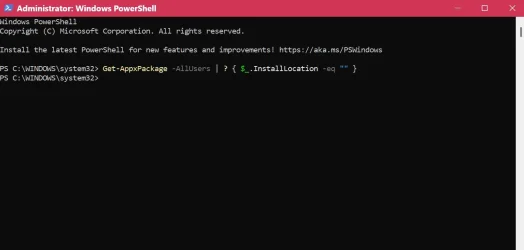
Code:
Get-AppxPackage -AllUsers | ? { $_.InstallLocation -eq "" }
This one does nothing, see attachment.










 That sounds like it would be SUPER inconvenient!